belt INFINITI Q60 2014 Repair Manual
[x] Cancel search | Manufacturer: INFINITI, Model Year: 2014, Model line: Q60, Model: INFINITI Q60 2014Pages: 466, PDF Size: 3.2 MB
Page 132 of 466
WARNING
.Always have the doors locked while
driving. Along with the use of seat belts,
this provides greater safety in the event
of an accident by helping to prevent
persons from being thrown from the
vehicle. This also helps keep children
and others from unintentionally opening
the doors, and will help keep out
intruders.
. Before opening any door, always look for
and avoid oncoming traffic.
. Do not leave children unattended inside
the vehicle. They could unknowingly
activate switches or controls. Unat-
tended children could become involved
in serious accidents.
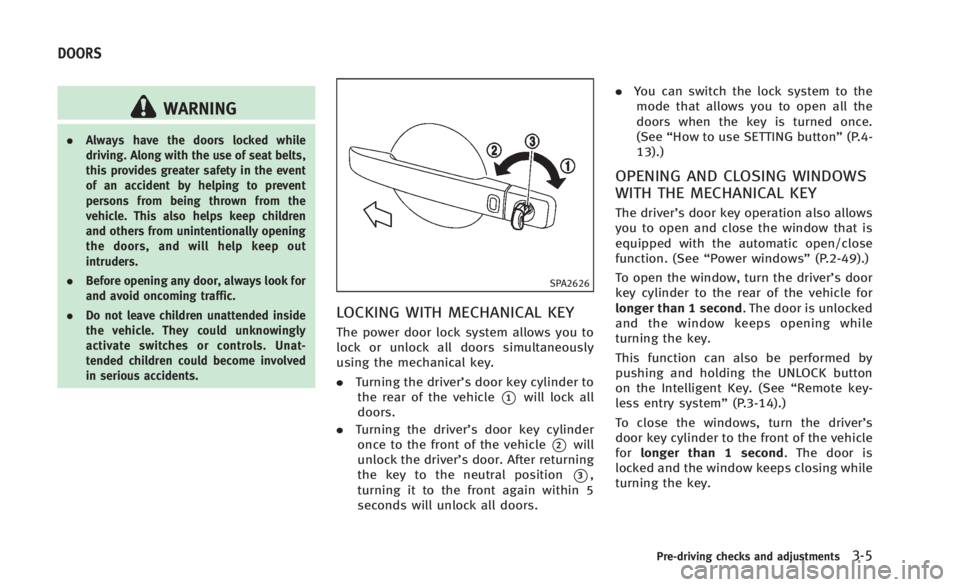
SPA2626
LOCKING WITH MECHANICAL KEY
The power door lock system allows you to
lock or unlock all doors simultaneously
using the mechanical key.
.Turning the driver’s door key cylinder to
the rear of the vehicle
*1will lock all
doors.
. Turning the driver’s door key cylinder
once to the front of the vehicle
*2will
unlock the driver’s door. After returning
the key to the neutral position
*3,
turning it to the front again within 5
seconds will unlock all doors. .
You can switch the lock system to the
mode that allows you to open all the
doors when the key is turned once.
(See “How to use SETTING button” (P.4-
13).)
OPENING AND CLOSING WINDOWS
WITH THE MECHANICAL KEY
The driver’s door key operation also allows
you to open and close the window that is
equipped with the automatic open/close
function. (See “Power windows” (P.2-49).)
To open the window, turn the driver’s door
key cylinder to the rear of the vehicle for
longer than 1 second. The door is unlocked
and the window keeps opening while
turning the key.
This function can also be performed by
pushing and holding the UNLOCK button
on the Intelligent Key. (See “Remote key-
less entry system” (P.3-14).)
To close the windows, turn the driver’s
door key cylinder to the front of the vehicle
for longer than 1 second. The door is
locked and the window keeps closing while
turning the key.
Pre-driving checks and adjustments3-5
DOORS
Page 146 of 466

over the retractable hard top (for exam-
ple, in a garage or a covered area). More
than approximately 6.6 ft (2 m) from the
ground and more than approximately 3.3
ft (1 m) from the rear is required to open
or close the retractable hard top safely.
Otherwise, the top may damage any
objects above it while moving. The
retractable hard top operating system
could also be damaged.
. Do not operate the retractable hard top
in a strong wind. It could be blown by
the wind, striking someone or damaging
the retractable hard top.
. When the retractable hard top is re-
tracted, do not allow anyone to stand up
or extend any portion of their body out
of the opening while the vehicle is in
motion or while the retractable hard top
is being operated.
. In an accident you could be thrown from
the vehicle with an open retractable hard
top if you do not use seat belts. Always
use seat belts and proper child re-
straints.
. Do not place any objects on or near the
retractable hard top operating switch.
Unintentional operation of the retract- able hard top may cause injuries or an
accident if the objects press the switch.
. Do not put your fingers or hands in the
gap between the rear seats and the rear
parcel shelf or the side flaps. Doing so
may cause injury if the retractable hard
top is operated.
CAUTION
.Do not operate the retractable hard top
when the temperature is below 328F
(08C). This may result in damage to the
retractable hard top material or operat-
ing system.
. Remove water drops, snow, ice or sand
from the retractable hard top, and dry
the surface of the retractable hard top
completely before opening it.
. Do not open the retractable hard top
when it is wet or damp. If the retractable
hardtop and rear window are wet, water
might get inside of the vehicle. To avoid
this, wipe off any water drops before
opening the retractable hard top.
. Do not place any objects between the
hard rail and the structure. Doing so could interfere with retractable hard top
operation and cause damage to the
retractable hard top operating system
or the objects.
. Do not place any objects on the upper
area of the windshield glass or the hard
rail when the retractable hard top is fully
opened. Doing so could interfere with
retractable hard top operation and cause
damage.
. Do not place any object between the
retractable hard top when the retract-
able hard top is stored in the storage
space. Doing so may interfere with
retractable hard top operation and cause
damage.
. Do not place anything on the retractable
hard top, rear parcel shelf, side flaps and
trunk lid. Even small items may interfere
with the retractable hard top operation
and could cause damage to the retract-
able hard top or the vehicle body.
. Do not place anything in the retractable
hard top storage area. The retractable
hard top will not fit there properly, and
this could damage the retractable hard
top and/or the vehicle body.
Pre-driving checks and adjustments3-19
Page 161 of 466

3-34Pre-driving checks and adjustments
WARNING
.Do not adjust the steering wheel while
driving. You could lose control of your
vehicle and cause an accident.
. Do not adjust the steering wheel any
closer to you than is necessary for
proper steering operation and comfort.
The driver’s air bag inflates with great
force. If you are unrestrained, leaning
forward, sitting sideways or out of
position in any way, you are at greater
risk of injury or death in a crash. You
may also receive serious or fatal injuries
from the air bag if you are up against it
when it inflates. Always sit back against
the seatback and as far away as practical
from the steering wheel. Always use the
seat belts.
SPA2328
MANUAL OPERATION (if so
equipped)
Tilt or telescopic operation
Pull the lock lever*1down and adjust the
steering wheel up, down, forward or rear-
ward to the desired position.
Push the lock lever up securely to lock the
steering wheel in place.
SPA2312
ELECTRIC OPERATION (if so
equipped)
Tilt or telescopic operation
Move the lever to adjust the steering wheel
up or down, forward or rearward to the
desired position.
For more information, see “Automatic drive
positioner” (P.3-38).
TILT/TELESCOPIC STEERING
Page 306 of 466

AVOIDING COLLISION AND ROLL-
OVER
WARNING
Failure to operate this vehicle in a safe and
prudent manner may result in loss of control
or an accident.
Be alert and drive defensively at all times.
Obey all traffic regulations. Avoid exces-
sive speed, high speed cornering, or
sudden steering maneuvers, because
these driving practices could cause you to
lose control of your vehicle.As with any
vehicle, a loss of control could result in a
collision with other vehicles or objects, or
cause the vehicle to rollover, particularly if
the loss of control causes the vehicle to
slide sideways. Be attentive at all times,
and avoid driving when tired. Never drive
when under the influence of alcohol or
drugs (including prescription or over-the-
counter drugs which may cause drowsi-
ness). Always wear your seat belt as
outlined in the “Seat belts”(P.1-11) of this
manual, and also instruct your passengers
to do so. Seat belts help reduce the risk of injury in
collisions and rollovers.
In a rollover crash,
an unbelted or improperly belted person is
significantly more likely to be injured or
killed than a person properly wearing a
seat belt.
OFF-ROAD RECOVERY
While driving, the right side or left side
wheels may unintentionally leave the road
surface. If this occurs, maintain control of
the vehicle by following the procedure
below. Please note that this procedure is
only a general guide. The vehicle must be
driven as appropriate based on the condi-
tions of the vehicle, road and traffic.
1. Remain calm and do not overreact.
2. Do not apply the brakes.
3. Maintain a firm grip on the steering wheel with both hands and try to hold a
straight course.
4. When appropriate, slowly release the accelerator pedal to gradually slow the
vehicle.
5. If there is nothing in the way, steer the vehicle to follow the road while the
vehicle speed is reduced. Do not
attempt to drive the vehicle back onto the road surface until vehicle speed is
reduced.
6. When it is safe to do so, gradually turn the steering wheel until both tires
return to the road surface. When all
tires are on the road surface, steer the
vehicle to stay in the appropriate
driving lane..If you decide that it is not safe toreturn the vehicle to the road surface
based on vehicle, road or traffic
conditions, gradually slow the vehi-
cle to a stop in a safe place off the
road.
RAPID AIR PRESSURE LOSS
Rapid air pressure loss or a “blow-out”can
occur if the tire is punctured or is damaged
due to hitting a curb or pothole. Rapid air
pressure loss can also be caused by
driving on under-inflated tires.
Rapid air pressure loss can affect the
handling and stability of the vehicle,
especially at highway speeds.
Help prevent rapid air pressure loss by
maintaining the correct air pressure and
visually inspect the tires for wear and
damage. See “Wheels and tires” (P.8-30) of
this manual.
Starting and driving5-7
Page 311 of 466

5-12Starting and driving
.Make sure the area around the vehicle
is clear.
. Check fluid levels such as engine oil,
coolant, brake fluid and window
washer fluid as frequently as possible,
or at least whenever you refuel.
. Check that all windows and lights are
clean.
. Visually inspect tires for their appear-
ance and condition. Also check tires for
proper inflation.
. Lock all doors.
. Position seat and adjust head re-
straints.
. Adjust inside and outside mirrors.
. Fasten seat belts and ask all passen-
gers to do likewise.
. Check the operation of warning lights
when the ignition switch is pushed to
the ON position. (See “Warning/indica-
tor lights and audible reminders” (P.2-
10).) 1. Apply the parking brake.
2.
Automatic Transmission (AT) model:
Move the shift lever to the P (Park) or N
(Neutral) position. (P is recommended.)
The starter is designed not to operate
unless the shift lever is in either of the
above positions.
Manual Transmission (MT) model:
Move the shift lever to the N (Neutral)
position. Depress the clutch pedal fully
to the floor.
The starter is designed not to operate
unless the clutch pedal is fully de-
pressed.
The Intelligent Key must be carried
when operating the ignition switch.
3. Push the ignition switch to the ON position. Depress the brake pedal (AT
model) or the clutch pedal (MT model)
and push the ignition switch to start
the engine.
To start the engine immediately, push
and release the ignition switch while
depressing the brake pedal or the
clutch pedal (MT model) with the
ignition switch in any position.
.If the engine is very hard to start inextremely cold weather or when restarting, depress the accelerator
pedal a little (approximately 1/3 to
the floor) and while holding, crank
the engine. Release the accelerator
pedal when the engine starts.
.If the engine is very hard to start
because it is flooded, depress the
accelerator pedal all the way to the
floor and hold it. Push the ignition
switch to the ON position to start
cranking the engine. After 5 or 6
seconds, stop cranking by pushing
the ignition switch to OFF. After
cranking the engine, release the
accelerator pedal. Crank the engine
with your foot off the accelerator
pedal by depressing the brake pedal
and the clutch pedal (MT model) and
pushing the push-button ignition
switch to start the engine. If the
engine starts, but fails to run, repeat
the above procedure.
CAUTION
Do not operate the starter for more than 15
seconds at a time. If the engine does not
start, push the ignition switch to OFF and
wait 10 seconds before cranking again,
BEFORE STARTING THE ENGINE STARTING THE ENGINE
Page 350 of 466
to the object with its color and rate of
blinking.
When an object is detected, the indicator
(green) appears and blinks (the tone
sounds intermittently). When the vehicle
moves closer to the object, the color of the
indicator turns yellow and the rate of
blinking increases (the rate of the tone
increases). When the bumper is very close
to the object, less than 11.8 in (30 cm)
away, the indicator stops blinking and
turns red (the tone sounds continuously).
When the rear view monitor is displayed,
the colors of the sonar indicator and the
distance guide lines in the rear view
indicate different distances to the object.
The sonar indicator can be turned off in the
SONAR setting display. (See“How to use
SETTING button” (P.4-13) for the“Sonar”
settings.) When the sonar indicator is off,
only a tone sounds when the sonar detects
obstacles.
SSD0929
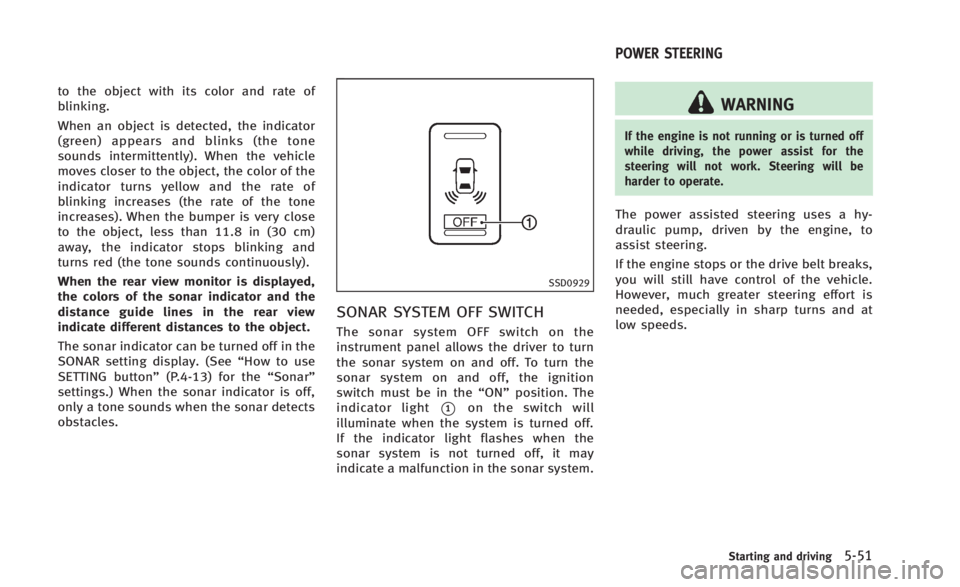
SONAR SYSTEM OFF SWITCH
The sonar system OFF switch on the
instrument panel allows the driver to turn
the sonar system on and off. To turn the
sonar system on and off, the ignition
switch must be in the “ON”position. The
indicator light
*1on the switch will
illuminate when the system is turned off.
If the indicator light flashes when the
sonar system is not turned off, it may
indicate a malfunction in the sonar system.
WARNING
If the engine is not running or is turned off
while driving, the power assist for the
steering will not work. Steering will be
harder to operate.
The power assisted steering uses a hy-
draulic pump, driven by the engine, to
assist steering.
If the engine stops or the drive belt breaks,
you will still have control of the vehicle.
However, much greater steering effort is
needed, especially in sharp turns and at
low speeds.
Starting and driving5-51
POWER STEERING
Page 376 of 466

Do not stop the engine.
3. Turn off the air conditioner. Open all the windows, move the heater or air condi-
tioner temperature control to maximum
hot and fan control to high speed.
4. If engine overheating is caused by climbing a long hill on a hot day, run
the engine at a fast idle (approximately
1,500 rpm) until the temperature gauge
indication returns to normal.
5. Get out of the vehicle. Look and listen for steam or coolant escaping from the
radiator before opening the hood. (If
steam or coolant is escaping, turn off
the engine.) Do not open the hood
further until no steam or coolant can be
seen.
6. Open the engine hood.
WARNING
If steam or water is coming from the engine,
stand clear to prevent getting burned.
7. Visually check the drive belt for damage or looseness. Also check if the cooling
fan is running. The radiator hoses and
radiator should not leak water. If cool- ant is leaking or the cooling fan does
not run, stop the engine.
WARNING
Be careful not to allow your hands, hair,
jewelry or clothing to come into contact
with, or get caught in, engine belts or the
engine cooling fan. The engine cooling fan
can start at any time.
8. After the engine cools down, check the
coolant level in the reservoir with the
engine running. Add coolant to the
reservoir if necessary. Have your vehi-
cle repaired at the nearest INFINITI
retailer. When towing your vehicle, all State (Pro-
vincial in Canada) and local regulations for
towing must be followed. Incorrect towing
equipment could damage your vehicle.
Towing instructions are available from an
INFINITI retailer. Local service operators are
familiar with the applicable laws and
procedures for towing. To assure proper
towing and to prevent accidental damage
to your vehicle, INFINITI recommends that
you have a service operator tow your
vehicle. It is advisable to have the service
operator carefully read the following pre-
cautions.
WARNING
.
Never ride in a vehicle that is being
towed.
. Never get under your vehicle after it has
been lifted by a tow truck.
CAUTION
.When towing, make sure that the trans-
mission, axles, steering system and
drivetrain are in working condition. If
any unit is damaged, dollies must be
In case of emergency6-17
TOWING YOUR VEHICLE
Page 382 of 466
7 Appearance and care
Cleaning exterior................................................. 7-2
Washing .......................................................... 7-2
Waxing ............................................................ 7-3
Removing spots............................................... 7-3
Underbody ...................................................... 7-3
Glass............................................................... 7-3
Aluminum alloy wheels ................................... 7-3
Chrome parts .................................................. 7-4
Tire dressing ................................................... 7-4 Cleaning interior ................................................. 7-4
Air fresheners ................................................ 7-5
Floor mats ..................................................... 7-5
Seat belts ...................................................... 7-6
Corrosion protection............................................ 7-7 Most common factors contributing to
vehicle corrosion ........................................... 7-7
Environmental factors influence the rate
of corrosion ................................................... 7-7
To protect your vehicle from corrosion ........... 7-7
Page 387 of 466
7-6Appearance and care
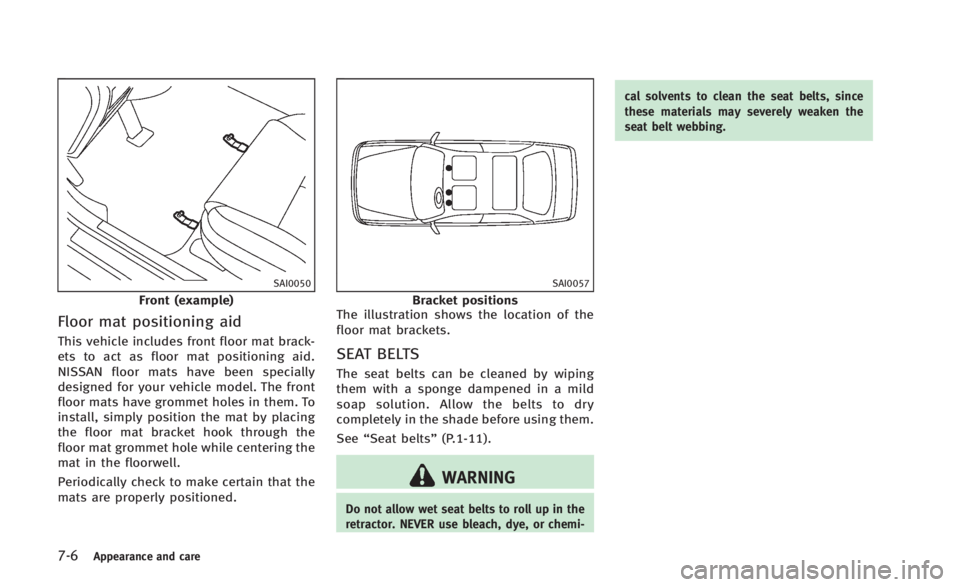
SAI0050
Front (example)
Floor mat positioning aid
This vehicle includes front floor mat brack-
ets to act as floor mat positioning aid.
NISSAN floor mats have been specially
designed for your vehicle model. The front
floor mats have grommet holes in them. To
install, simply position the mat by placing
the floor mat bracket hook through the
floor mat grommet hole while centering the
mat in the floorwell.
Periodically check to make certain that the
mats are properly positioned.
SAI0057
Bracket positions
The illustration shows the location of the
floor mat brackets.
SEAT BELTS
The seat belts can be cleaned by wiping
them with a sponge dampened in a mild
soap solution. Allow the belts to dry
completely in the shade before using them.
See “Seat belts” (P.1-11).
WARNING
Do not allow wet seat belts to roll up in the
retractor. NEVER use bleach, dye, or chemi- cal solvents to clean the seat belts, since
these materials may severely weaken the
seat belt webbing.
Page 390 of 466
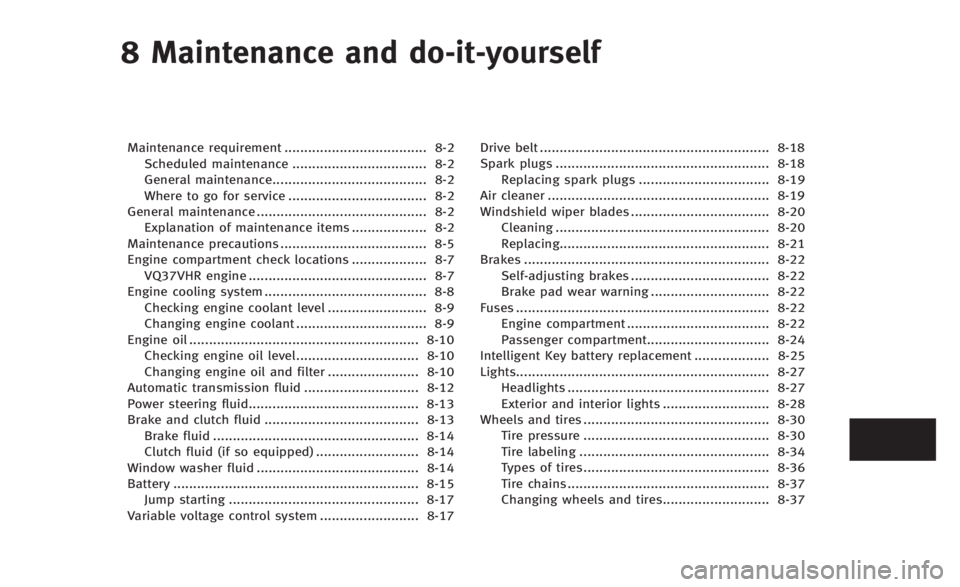
8 Maintenance and do-it-yourself
Maintenance requirement.................................... 8-2
Scheduled maintenance .................................. 8-2
General maintenance....................................... 8-2
Where to go for service ................................... 8-2
General maintenance ........................................... 8-2 Explanation of maintenance items ................... 8-2
Maintenance precautions ..................................... 8-5
Engine compartment check locations ................... 8-7 VQ37VHR engine ............................................. 8-7
Engine cooling system ......................................... 8-8
Checking engine coolant level ......................... 8-9
Changing engine coolant ................................. 8-9
Engine oil .......................................................... 8-10
Checking engine oil level............................... 8-10
Changing engine oil and filter ....................... 8-10
Automatic transmission fluid ............................. 8-12
Power steering fluid........................................... 8-13
Brake and clutch fluid ....................................... 8-13 Brake fluid .................................................... 8-14
Clutch fluid (if so equipped) .......................... 8-14
Window washer fluid ......................................... 8-14
Battery .............................................................. 8-15 Jump starting ................................................ 8-17
Variable voltage control system ......................... 8-17 Drive belt .......................................................... 8-18
Spark plugs ...................................................... 8-18
Replacing spark plugs ................................. 8-19
Air cleaner ........................................................ 8-19
Windshield wiper blades ................................... 8-20 Cleaning ...................................................... 8-20
Replacing..................................................... 8-21
Brakes .............................................................. 8-22 Self-adjusting brakes ................................... 8-22
Brake pad wear warning .............................. 8-22
Fuses ................................................................ 8-22 Engine compartment .................................... 8-22
Passenger compartment............................... 8-24
Intelligent Key battery replacement ................... 8-25
Lights................................................................ 8-27 Headlights ................................................... 8-27
Exterior and interior lights ........................... 8-28
Wheels and tires ............................................... 8-30 Tire pressure ............................................... 8-30
Tire labeling ................................................ 8-34
Types of tires............................................... 8-36
Tire chains ................................................... 8-37
Changing wheels and tires........................... 8-37