wheel INFINITI Q60 2018 Service Manual
[x] Cancel search | Manufacturer: INFINITI, Model Year: 2018, Model line: Q60, Model: INFINITI Q60 2018Pages: 466, PDF Size: 2.47 MB
Page 217 of 466
![INFINITI Q60 2018 Service Manual 5-38Starting and driving
JVS0246X
HOW TO ENABLE/DISABLE THE
LDP SYSTEM
Perform the following steps to enable or
disable the LDP system.
1. Push the MENU button
and touch
[Driver Assistance] on the low](/img/42/41095/w960_41095-216.png "INFINITI Q60 2018 Service Manual 5-38Starting and driving
JVS0246X
HOW TO ENABLE/DISABLE THE
LDP SYSTEM
Perform the following steps to enable or
disable the LDP system.
1. Push the MENU button
and touch
[Driver Assistance] on the low")
5-38Starting and driving
JVS0246X
HOW TO ENABLE/DISABLE THE
LDP SYSTEM
Perform the following steps to enable or
disable the LDP system.
1. Push the MENU button
and touch
[Driver Assistance] on the lower display.
2. Touch [Lane Assist].
3. Touch [Lane Departure Prevention] to
enable or disable the system.
LDW/LDP SYSTEM LIMITATIONS
WARNING
Listed below are the system limitations
for the LDW and LDP systems. Failure to
operate the vehicle in accordance with
these system limitations could result in
serious injury or death.
.The system will not operate at speeds
below 45 MPH (70 km/h) or if it
cannot detect lane markers.
.The LDP system is primarily intended
for use on well-developed freeways
or highways. It may not detect the
lane markers in certain roads, weath-
er or driving conditions.
.Do not use the LDP system under the
following conditions as it may not
function properly:
— During bad weather (rain, fog,
snow, etc.).
— When driving on slippery roads,
such as on ice or snow, etc.
— When driving on winding or un-
even roads.
— When there is a lane closure due
to road repairs.— When driving in a makeshift or
temporary lane.
— When driving on roads where the
lane width is too narrow.
— When driving without normal tire
conditions (for example, tire wear,
low tire pressure, installation of
spare tire, tire chains, non-stan-
dard wheels).
— When the vehicle is equipped with
non-original steering parts, brake
parts or suspension parts.
.The camera may not detect lane
markers in the following situations
and the LDW and LDP systems may
not operate properly.
— On roads where there are multi-
ple parallel lane markers; lane
markers that are faded or not
painted clearly; yellow painted
lane markers; non-standard lane
markers; or lane markers covered
with water, dirt, snow, etc.
— On roads where discontinued lane
markers are still detectable.
— On roads where there are sharp
curves.
— On roads where there are sharply
contrasting objects, such as sha-
Page 218 of 466
dows, snow, water, wheel ruts,
seams or lines remaining after
road repairs. (The LDW and LDP
systems could detect these items
as lane markers.)
— On roads where the traveling lane
merges or separates.
— When the vehicle’s traveling di-
rection does not align with the
lane marker.
— When traveling close to the ve-
hicle in front of you, which ob-
structs the lane camera unit
detection range.
— When rain, snow or dirt adheres
to the windshield in front of the
lane camera unit.
— When the headlights are not
bright due to dirt on the lens or
if the aiming is not adjusted
properly.
— When strong light enters the lane
camera unit. (For example, the
light directly shines on the front
of the vehicle at sunrise or sun-
set.)
— When a sudden change in bright-
ness occurs. (For example, when
the vehicle enters or exits a tunnelor under a bridge.)
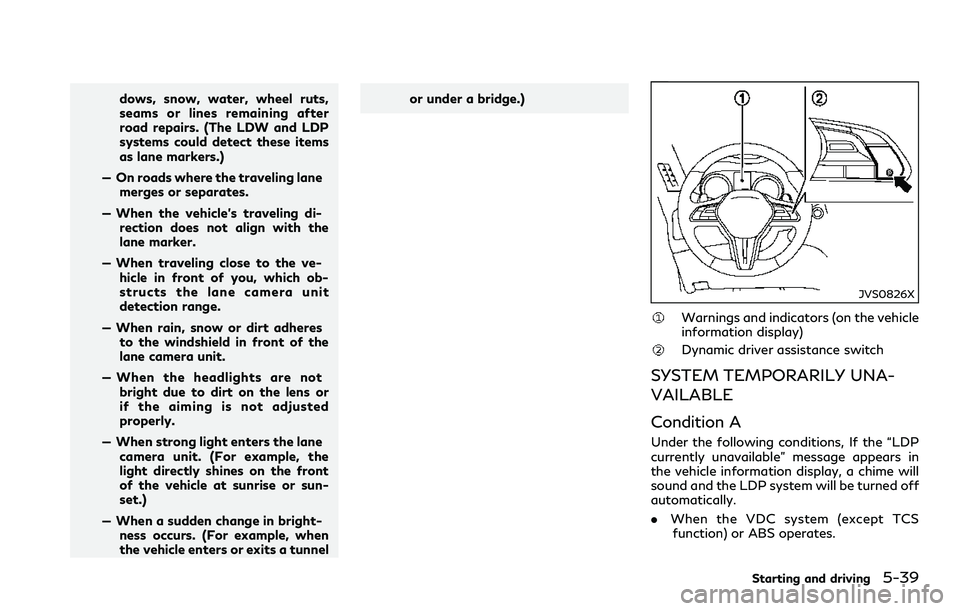
JVS0826X
Warnings and indicators (on the vehicle
information display)
Dynamic driver assistance switch
SYSTEM TEMPORARILY UNA-
VAILABLE
Condition A
Under the following conditions, If the “LDP
currently unavailable” message appears in
the vehicle information display, a chime will
sound and the LDP system will be turned off
automatically.
.When the VDC system (except TCS
function) or ABS operates.
Starting and driving5-39
Page 231 of 466
5-52Starting and driving
TURNING THE BSI SYSTEM ON/
OFF
To turn on the BSI system, push the dynamic
driver assistance switchon the steering
wheel after starting the engine. The driver
assist system blind spot indicator (green)
in the vehicle information display will illumi-
nate.
Push the dynamic driver assistance switch
again to turn off the BSI system. The driver
assist system blind spot indicatorwill turn
off.
The dynamic driver assistance switch
is
used for Active Lane Control (if so
equipped), Blind Spot Intervention (BSI),
Lane Departure Prevention (LDP) and Dis-
tance Control Assist (DCA) systems. When
the dynamic driver assistance switch
is
pushed, Active Lane Control, LDP and DCA
systems will also turn on or off simulta-
neously. The BSI system can be individually
set to on or off on the lower display
.
If the system is set to off, the system will not
turn on even if the dynamic driver assistance
switch
is pushed to on. To set the system
to on or off on the lower display, see “How
to enable/disable the BSI system” (P.5-52).
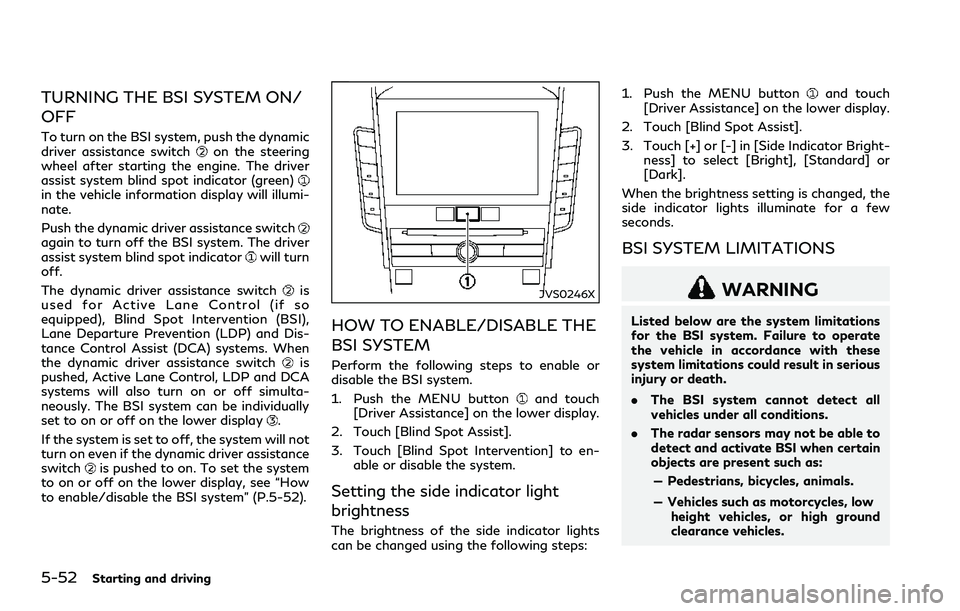
JVS0246X
HOW TO ENABLE/DISABLE THE
BSI SYSTEM
Perform the following steps to enable or
disable the BSI system.
1. Push the MENU button
and touch
[Driver Assistance] on the lower display.
2. Touch [Blind Spot Assist].
3. Touch [Blind Spot Intervention] to en-
able or disable the system.
Setting the side indicator light
brightness
The brightness of the side indicator lights
can be changed using the following steps:1. Push the MENU button
and touch
[Driver Assistance] on the lower display.
2. Touch [Blind Spot Assist].
3. Touch [+] or [-] in [Side Indicator Bright-
ness] to select [Bright], [Standard] or
[Dark].
When the brightness setting is changed, the
side indicator lights illuminate for a few
seconds.
BSI SYSTEM LIMITATIONS
WARNING
Listed below are the system limitations
for the BSI system. Failure to operate
the vehicle in accordance with these
system limitations could result in serious
injury or death.
.The BSI system cannot detect all
vehicles under all conditions.
.The radar sensors may not be able to
detect and activate BSI when certain
objects are present such as:
— Pedestrians, bicycles, animals.
— Vehicles such as motorcycles, low
height vehicles, or high ground
clearance vehicles.
Page 232 of 466
— Vehicles remaining in the detec-
tion zone when you accelerate
from a stop.
— Oncoming vehicles.
— A vehicle merging into an adja-
cent lane at a speed approxi-
mately the same as your vehicle.
— A vehicle approaching rapidly
from behind.
— A vehicle which your vehicle over-
takes rapidly.
— A vehicle that passes through the
detection zone quickly.
.The radar sensor’s detection zone is
designed based on a standard lane
width. When driving in a wider lane,
the radar sensors may not detect
vehicles in an adjacent lane. When
driving in a narrow lane, the radar
sensors may detect vehicles driving
two lanes away.
.The radar sensors are designed to
ignore most stationary objects, how-
ever objects such as guardrails, walls,
foliage and parked vehicles may oc-
casionally be detected. This is a
normal operation condition.
.The camera may not detect lane
markers in the following situationsand the BSI system may not operate
properly.
— On roads where there are multi-
ple parallel lane markers; lane
markers that are faded or not
painted clearly; yellow painted
lane markers; nonstandard lane
markers; lane markers covered
with water, dirt, snow, etc.
— On roads where discontinued lane
markers are still detectable.
— On roads where there are sharp
curves.
— On roads where there are sharply
contrasting objects, such as sha-
dows, snow, water, wheel ruts,
seams or lines remaining after
road repairs.
— On roads where the traveling lane
merges or separates.
— When the vehicle’s traveling di-
rection does not align with the
lane markers.
— When traveling close to the ve-
hicle in front of you, which ob-
structs the lane camera unit
detection range.
— When rain, snow or dirt adheres
to the windshield in front of a lanecamera unit.
— When the headlights are not
bright due to dirt on the lens or
if aiming is not adjusted properly.
— When strong light enters a lane
camera unit. (For example: light
directly shines on the front of the
vehicle at sunrise or sunset.)
— When a sudden change in bright-
ness occurs. (For example: when
the vehicle enters or exits a tunnel
or under a bridge.)
.Do not use the BSI system under the
following conditions because the sys-
tem may not function properly.
— During bad weather. (For exam-
ple: rain, fog, snow, etc.)
— When driving on slippery roads,
such as on ice or snow, etc.
— When driving on winding or un-
even roads.
— When there is a lane closure due
to road repairs.
— When driving in a makeshift or
temporary lane.
— When driving on roads where the
lane width is too narrow.
Starting and driving5-53
Page 233 of 466
5-54Starting and driving
— When driving with a tire that is
not within normal tire conditions
(for example, tire wear, low tire
pressure, installation of spare tire,
tire chains, non-standard wheels).
— When the vehicle is equipped with
non-original steering parts or sus-
pension parts.
.Excessive noise (for example, audio
system volume, open vehicle window)
will interfere with the chime sound,
and it may not be heard.BSI DRIVING SITUATIONS
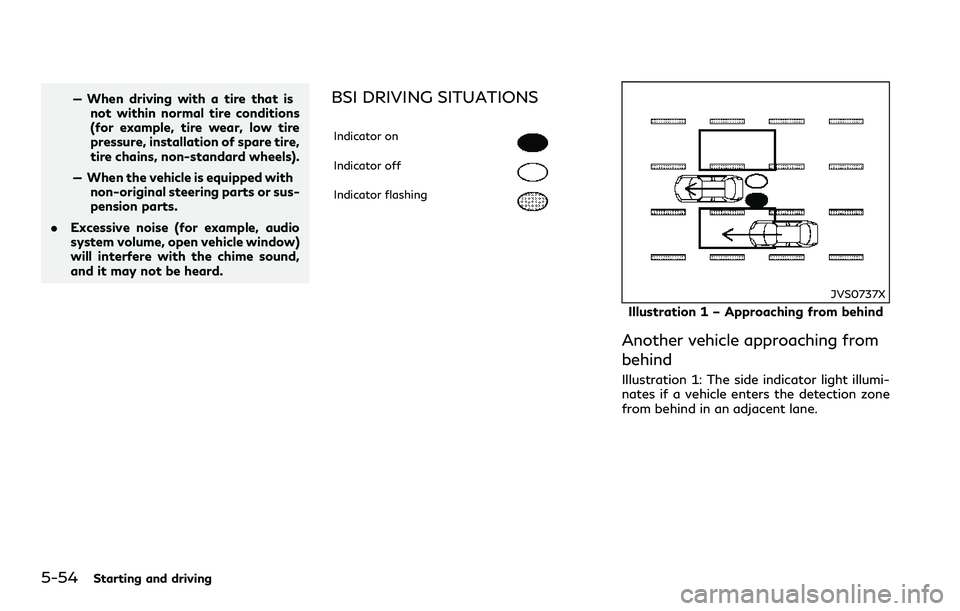
Indicator on
Indicator off
Indicator flashing
JVS0737X
Illustration 1 – Approaching from behind
Another vehicle approaching from
behind
Illustration 1: The side indicator light illumi-
nates if a vehicle enters the detection zone
from behind in an adjacent lane.
Page 248 of 466
— Severe weather
— Road spray
— Ice/frost/dirt build up on the
vehicle
.Do not attach stickers (including
transparent material), install acces-
sories or apply additional paint near
the radar sensors. These conditions
may reduce the ability of the radar
sensors to detect other vehicles.
.The sonar sensors detect stationary
objects behind the vehicle. The sonar
sensor may not detect:
— Small or moving objects
— Wedge-shaped objects
— Object close to the bumper (less
than approximately 1 ft (30 cm))
— Thin objects such as rope, wire
and chain, etc.
.The brake engagement by the BCI
system is not as effective on a slope
as it is on flat ground. When on a
steep slope the system may not
function properly.
.Do not use the BCI system under the
following conditions because the sys-
tem may not function properly.— When driving with a tire that is
not within normal tire conditions
(for example, tire wear, low tire
pressure, installation of spare tire,
tire chains, non-standard wheels).
— When the vehicle is equipped with
non-original brake parts or sus-
pension parts.
.Excessive noise (for example, audio
system volume, open vehicle window)
will interfere with the chime sound,
and it may not be heard.
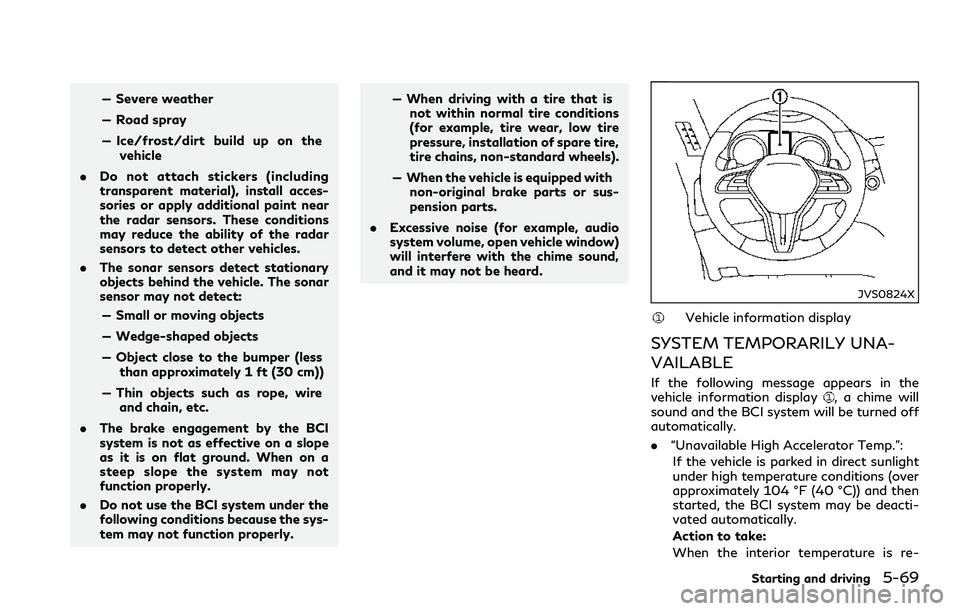
JVS0824X
Vehicle information display
SYSTEM TEMPORARILY UNA-
VAILABLE
If the following message appears in the
vehicle information display, a chime will
sound and the BCI system will be turned off
automatically.
.“Unavailable High Accelerator Temp.”:
If the vehicle is parked in direct sunlight
under high temperature conditions (over
approximately 104 °F (40 °C)) and then
started, the BCI system may be deacti-
vated automatically.
Action to take:
When the interior temperature is re-
Starting and driving5-69
Page 256 of 466
SSD0254
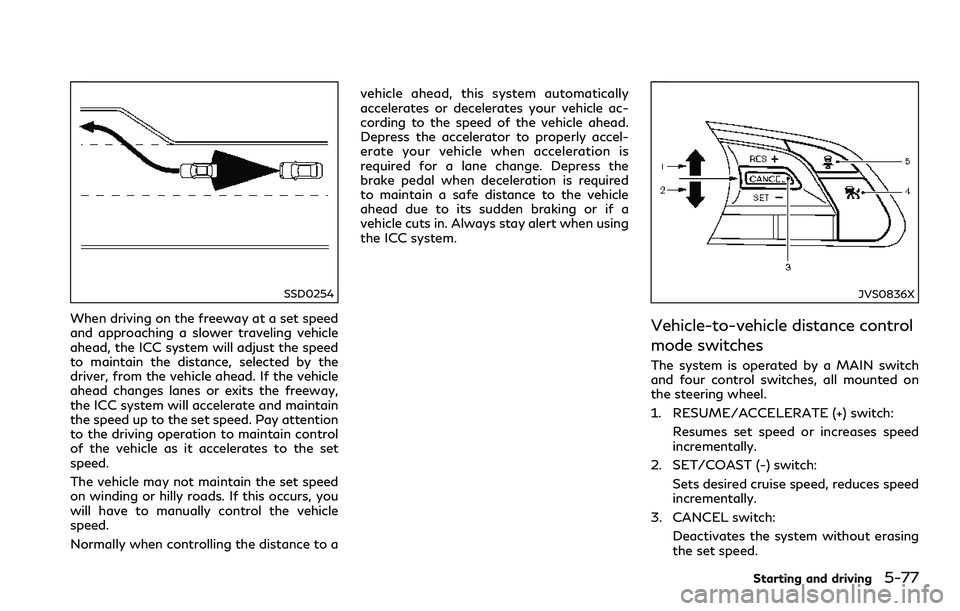
When driving on the freeway at a set speed
and approaching a slower traveling vehicle
ahead, the ICC system will adjust the speed
to maintain the distance, selected by the
driver, from the vehicle ahead. If the vehicle
ahead changes lanes or exits the freeway,
the ICC system will accelerate and maintain
the speed up to the set speed. Pay attention
to the driving operation to maintain control
of the vehicle as it accelerates to the set
speed.
The vehicle may not maintain the set speed
on winding or hilly roads. If this occurs, you
will have to manually control the vehicle
speed.
Normally when controlling the distance to avehicle ahead, this system automatically
accelerates or decelerates your vehicle ac-
cording to the speed of the vehicle ahead.
Depress the accelerator to properly accel-
erate your vehicle when acceleration is
required for a lane change. Depress the
brake pedal when deceleration is required
to maintain a safe distance to the vehicle
ahead due to its sudden braking or if a
vehicle cuts in. Always stay alert when using
the ICC system.
JVS0836X
Vehicle-to-vehicle distance control
mode switches
The system is operated by a MAIN switch
and four control switches, all mounted on
the steering wheel.
1. RESUME/ACCELERATE (+) switch:
Resumes set speed or increases speed
incrementally.
2. SET/COAST (-) switch:
Sets desired cruise speed, reduces speed
incrementally.
3. CANCEL switch:
Deactivates the system without erasing
the set speed.
Starting and driving5-77
Page 259 of 466
5-80Starting and driving
A warning chime will sound and the “cur-
rently unavailable” warning message ap-
pears in the vehicle information display.
.When the INFINITI Drive Mode Selector
is turned to the SNOW mode (To use the
ICC system, turn the INFINITI Drive
Mode Selector to a mode other than
the SNOW mode, push the MAIN switch
to turn off the ICC and reset the ICC
switch by pressing the MAIN switch
again.)
For details about the INFINITI Drive
Mode Selector, see “INFINITI Drive
Mode Selector” (P.5-22).
.When the VDC system is off (To use the
ICC system, turn on the VDC system.
Push the MAIN switch to turn off the
ICC system and reset the ICC switch by
pushing the MAIN switch again.)
For details about the VDC system, see
“Vehicle Dynamic Control (VDC) system”
(P.5-134).
.When ABS or VDC (including the traction
control system) is operating
.When a wheel is slipping (To use the ICC
system, make sure the wheels are no
longer slipping.)
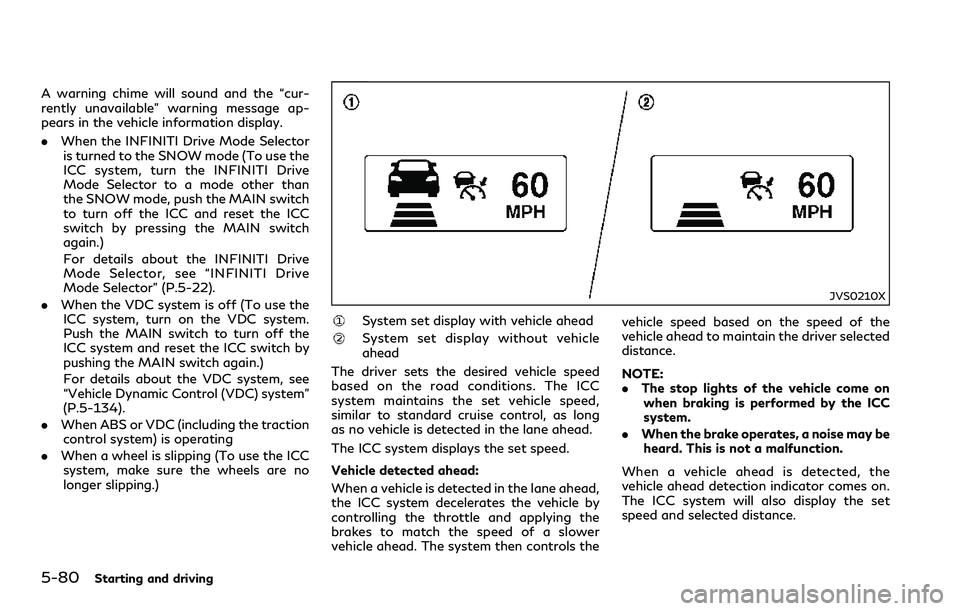
JVS0210X
System set display with vehicle ahead
System set display without vehicle
ahead
The driver sets the desired vehicle speed
based on the road conditions. The ICC
system maintains the set vehicle speed,
similar to standard cruise control, as long
as no vehicle is detected in the lane ahead.
The ICC system displays the set speed.
Vehicle detected ahead:
When a vehicle is detected in the lane ahead,
the ICC system decelerates the vehicle by
controlling the throttle and applying the
brakes to match the speed of a slower
vehicle ahead. The system then controls thevehicle speed based on the speed of the
vehicle ahead to maintain the driver selected
distance.
NOTE:
.The stop lights of the vehicle come on
when braking is performed by the ICC
system.
.When the brake operates, a noise may be
heard. This is not a malfunction.
When a vehicle ahead is detected, the
vehicle ahead detection indicator comes on.
The ICC system will also display the set
speed and selected distance.
Page 263 of 466
5-84Starting and driving
control the proper distance ahead of your
vehicle.
Also, the sensor sensitivity can be affected
by vehicle operation (steering maneuver or
driving position in the lane) or traffic or
vehicle condition (for example, if a vehicle is
being driven with some damage).
Automatic cancellation
A chime sounds under the following condi-
tions and the control is automatically can-
celed.
.When the vehicle ahead is not detected
and your vehicle is traveling below the
speed of 15 MPH (24 km/h)
.When the system judges the vehicle is at
standstill
.When the shift lever is not in the D
position or Manual mode
.When the parking brake is applied
.When the INFINITI Drive Mode Selector
is turned to the SNOW mode
.When the VDC system is turned off
.When ABS or VDC (including the traction
control system) operates
.When distance measurement becomes
impaired due to adhesion of dirt or
obstruction to the sensor
.When a wheel slips.When the radar signal is temporarily
interrupted
Vehicle-to-vehicle distance control
mode limitations
WARNING
Listed below are the system limitations
for the ICC system. Failure to operate
the vehicle in accordance with these
system limitations could result in serious
injury or death.
.The system is primarily intended for
use on straight, dry, open roads with
light traffic. It is not advisable to use
the system in city traffic or con-
gested areas.
.This system will not adapt automati-
cally to road conditions. This system
should be used in evenly flowing
traffic. Do not use the system on
roads with sharp curves, or on icy
roads, in heavy rain or in fog.
.As there is a performance limit to the
distance control function, never rely
solely on the ICC system. This system
does not correct careless, inattentive
or absent-minded driving, or over-
come poor visibility in rain, fog, orother bad weather. Decelerate the
vehicle speed by depressing the brake
pedal, depending on the distance to
the vehicle ahead and the surround-
ing circumstances in order to main-
tain a safe distance between vehicles.
.If the vehicle ahead comes to a stop,
the vehicle decelerates to a standstill
within the limitations of the system.
The system will cancel once it judges
that the vehicle has come to a
standstill and sound a warning chime.
To prevent the vehicle from moving,
the driver must depress the brake
pedal.
.Always pay attention to the opera-
tion of the vehicle and be ready to
manually control the proper follow-
ing distance. The vehicle-to-vehicle
distance control mode of the ICC
system may not be able to maintain
the selected distance between vehi-
cles (following distance) or selected
vehicle speed under some circum-
stances.
.The system may not detect the
vehicle in front of you in certain road
or weather conditions. To avoid ac-
cidents, never use the ICC system
under the following conditions:
Page 272 of 466
3. Push, then quickly release the SET/
COAST (-) switch. Each time you do this,
the set speed will decrease by about 1
MPH (1.6 km/h).
To resume the preset speed,push and
release the RESUME/ACCELERATE (+)
switch. The vehicle will resume the last set
cruising speed when the vehicle speed is over
25 MPH (40 km/h).
System temporarily unavailable
A chime sounds under the following condi-
tions and the control is automatically can-
celed.
.When the vehicle slows down more than
8 MPH (13 km/h) below the set speed
.When the shift lever is not in the D (Drive)
or manual shift mode
.When the parking brake is applied.
.When the VDC operates (including the
traction control system)
.When a wheel slips
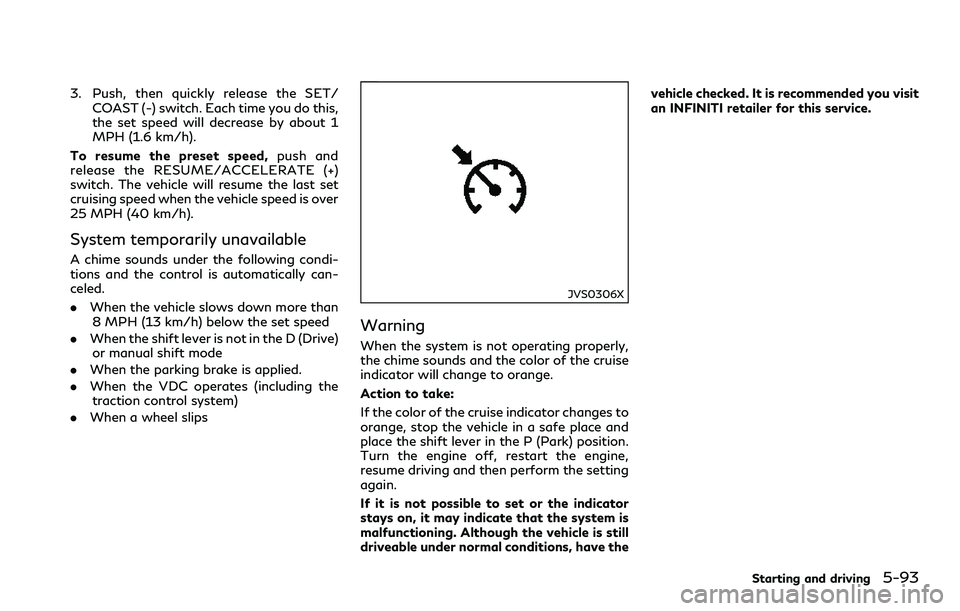
JVS0306X
Warning
When the system is not operating properly,
the chime sounds and the color of the cruise
indicator will change to orange.
Action to take:
If the color of the cruise indicator changes to
orange, stop the vehicle in a safe place and
place the shift lever in the P (Park) position.
Turn the engine off, restart the engine,
resume driving and then perform the setting
again.
If it is not possible to set or the indicator
stays on, it may indicate that the system is
malfunctioning. Although the vehicle is still
driveable under normal conditions, have thevehicle checked. It is recommended you visit
an INFINITI retailer for this service.
Starting and driving5-93