light INFINITI Q60 2018 Workshop Manual
[x] Cancel search | Manufacturer: INFINITI, Model Year: 2018, Model line: Q60, Model: INFINITI Q60 2018Pages: 466, PDF Size: 2.47 MB
Page 120 of 466
JVI0644X
JVI0937X
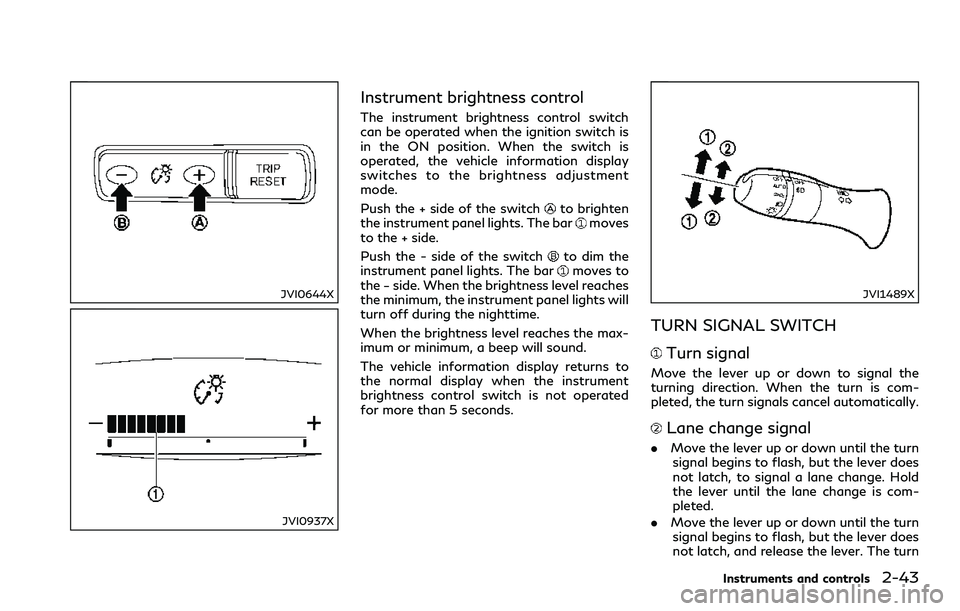
Instrument brightness control
The instrument brightness control switch
can be operated when the ignition switch is
in the ON position. When the switch is
operated, the vehicle information display
switches to the brightness adjustment
mode.
Push the + side of the switch
to brighten
the instrument panel lights. The barmoves
to the + side.
Push the - side of the switch
to dim the
instrument panel lights. The barmoves to
the − side. When the brightness level reaches
the minimum, the instrument panel lights will
turn off during the nighttime.
When the brightness level reaches the max-
imum or minimum, a beep will sound.
The vehicle information display returns to
the normal display when the instrument
brightness control switch is not operated
for more than 5 seconds.
JVI1489X
TURN SIGNAL SWITCH
Turn signal
Move the lever up or down to signal the
turning direction. When the turn is com-
pleted, the turn signals cancel automatically.
Lane change signal
.Move the lever up or down until the turn
signal begins to flash, but the lever does
not latch, to signal a lane change. Hold
the lever until the lane change is com-
pleted.
.Move the lever up or down until the turn
signal begins to flash, but the lever does
not latch, and release the lever. The turn
Instruments and controls2-43
Page 121 of 466
2-44Instruments and controls
signal will automatically flash three
times.
Choose the appropriate method to signal a
lane change based on road and traffic
conditions.
JVI1490X
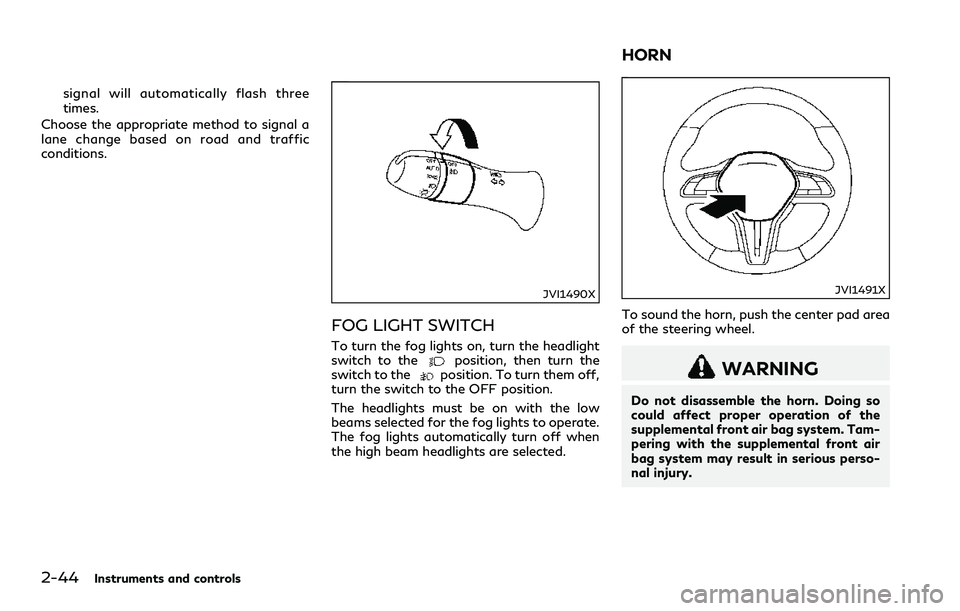
FOG LIGHT SWITCH
To turn the fog lights on, turn the headlight
switch to theposition, then turn the
switch to theposition. To turn them off,
turn the switch to the OFF position.
The headlights must be on with the low
beams selected for the fog lights to operate.
The fog lights automatically turn off when
the high beam headlights are selected.
JVI1491X
To sound the horn, push the center pad area
of the steering wheel.
WARNING
Do not disassemble the horn. Doing so
could affect proper operation of the
supplemental front air bag system. Tam-
pering with the supplemental front air
bag system may result in serious perso-
nal injury.
HORN
Page 122 of 466

SIC4336
The vehicle should be driven with the Vehicle
Dynamic Control (VDC) system on for most
driving conditions.
If the vehicle is stuck in mud or snow, the
VDC system reduces the engine output to
reduce wheel spin. The engine speed will be
reduced even if the accelerator is depressed
to the floor. If maximum engine power is
needed to free a stuck vehicle, turn the VDC
system off.
To turn off the VDC system, push the VDC
OFF switch. The
indicator light will
illuminate.
Push the VDC OFF switch again or restart
the engine to turn on the system. (See
“Vehicle Dynamic Control (VDC) system”(P.5-134).)
WARNING
Do not use or allow occupants to use the
seat heater if you or the occupants
cannot monitor elevated seat tempera-
tures or have an inability to feel pain in
those body parts in contact with the
seat. Use of the seat heater by such
people could result in serious injury.
CAUTION
.The battery could run down if the
seat heater is operated while the
engine is not running.
.Do not use the seat heater for
extended periods or when no one is
using the seat.
.Do not put anything on the seat
which insulates heat, such as a blan-
ket, cushion, seat cover, etc. Other-
wise, the seat may become
overheated.
.Do not place anything hard or heavy
on the seat or pierce it with a pin or
similar object. This may result in
damage to the heater.
Instruments and controls2-45
VEHICLE DYNAMIC CONTROL
(VDC) OFF SWITCHHEATED SEATS (if so equipped)
Page 123 of 466

2-46Instruments and controls
.Any liquid spilled on the heated seat
should be removed immediately with
a dry cloth.
.When cleaning the seat, never use
gasoline, thinner, or any similar ma-
terials.
.If any malfunctions are found or the
heated seat does not operate, turn
the switch off and have the system
checked. It is recommended you visit
an INFINITI retailer for this service.
JVR0505X
The front seats can be warmed by built-in
heaters. The heating system of driver’s seat
and front passenger seat can be operated
independently.
OPERATION WITH SWITCH
1. Start the engine.
2. Push the switch on the instrument panel.
.Each time the switch is pushed, the
seat heating mode will change in the
following order.
AUTO?High?Mid?Low?OFF
.The indicator lighton the switch will
illuminate when the heater is on.
When the vehicle’s interior is warmed, or
before you leave the vehicle, be sure to turnoff the seat heater.
OPERATION WITH TOUCH
SCREEN
Push the CLIMATE button and touch []
or [] on the lower display. Select an item
from [AUTO], [High], [Mid], [Low] or [OFF].
AUTO MODE SETTING
When in the AUTO mode, the heater will
turn on or off automatically according to the
conditions such as the temperature inside
the vehicle compartment. Depending on the
conditions, the heater will not turn on even if
AUTO is selected. The settings for the AUTO
mode can be changed. For details, see the
Infiniti InTouch Owner’s Manual.
Page 125 of 466

2-48Instruments and controls
The power outlets are located in the storage
box and in the console box.
CAUTION
.The outlet and plug may be hot
during or immediately after use.
.Do not use with accessories that
exceed a 12 volt, 120W (10A) power
draw. Do not use double adapters or
more than one electrical accessory.
.Use power outlet with the engine
running to avoid discharging the
vehicle battery.
.Avoid using power outlet when the
air conditioner, headlights or rear
window defroster is on.
.This power outlet is not designed for
use with a cigarette lighter unit.
.Push the plug in as far as it will go. If
good contact is not made, the plug
may overheat or the internal tem-
perature fuse may blow.
.Before inserting or disconnecting a
plug, be sure the electrical accessory
being used is turned OFF.
.When not in use, be sure to close the
cap. Do not allow water or any liquid
to contact the outlet.
CUP HOLDERS
CAUTION
.Avoid abrupt starting and braking
when the cup holder is being used to
prevent spilling the drink. If the liquid
is hot, it can scald you or your
passenger.
.Use only soft cups in the cup holder.
Hard objects can injure you in an
accident.
JVI0649X
Front
JVI1492X
Rear
STORAGE
Page 126 of 466
JVI1500X
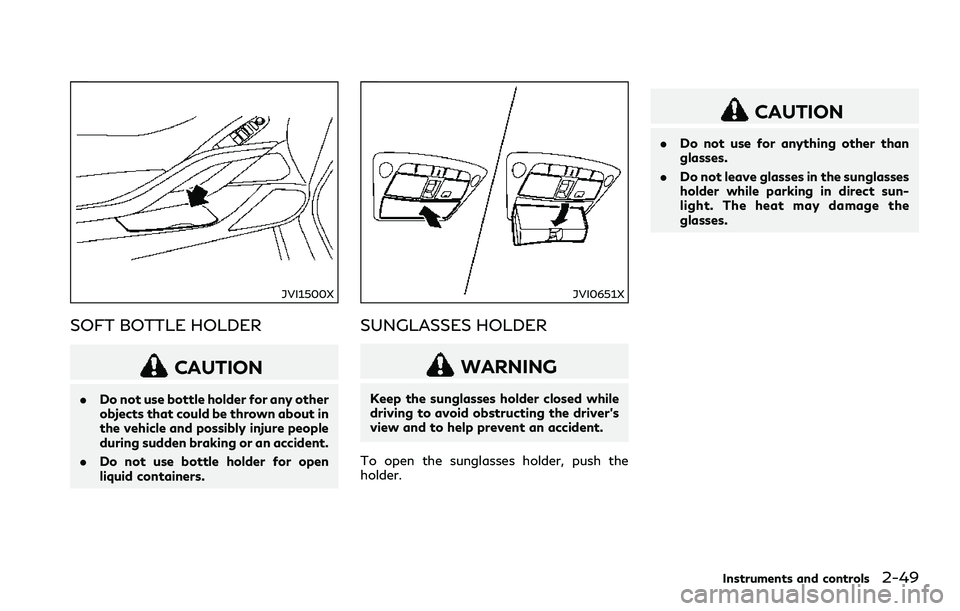
SOFT BOTTLE HOLDER
CAUTION
.Do not use bottle holder for any other
objects that could be thrown about in
the vehicle and possibly injure people
during sudden braking or an accident.
.Do not use bottle holder for open
liquid containers.
JVI0651X
SUNGLASSES HOLDER
WARNING
Keep the sunglasses holder closed while
driving to avoid obstructing the driver’s
view and to help prevent an accident.
To open the sunglasses holder, push the
holder.
CAUTION
.Do not use for anything other than
glasses.
.Do not leave glasses in the sunglasses
holder while parking in direct sun-
light. The heat may damage the
glasses.
Instruments and controls2-49
Page 127 of 466
2-50Instruments and controls
JVI0763X
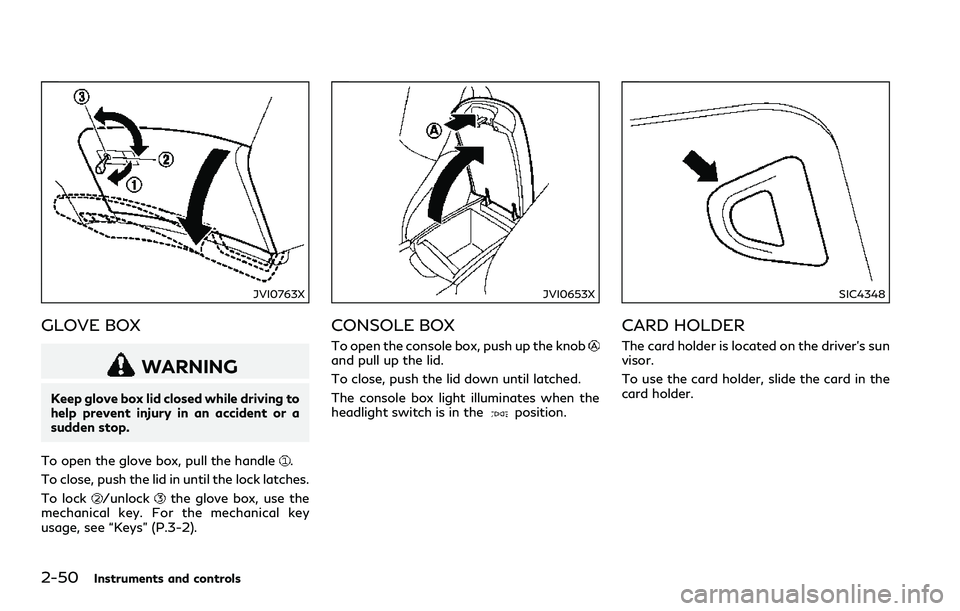
GLOVE BOX
WARNING
Keep glove box lid closed while driving to
help prevent injury in an accident or a
sudden stop.
To open the glove box, pull the handle
.
To close, push the lid in until the lock latches.
To lock
/unlockthe glove box, use the
mechanical key. For the mechanical key
usage, see “Keys” (P.3-2).
JVI0653X
CONSOLE BOX
To open the console box, push up the knoband pull up the lid.
To close, push the lid down until latched.
The console box light illuminates when the
headlight switch is in the
position.
SIC4348
CARD HOLDER
The card holder is located on the driver’s sun
visor.
To use the card holder, slide the card in the
card holder.
Page 130 of 466
SIC4353
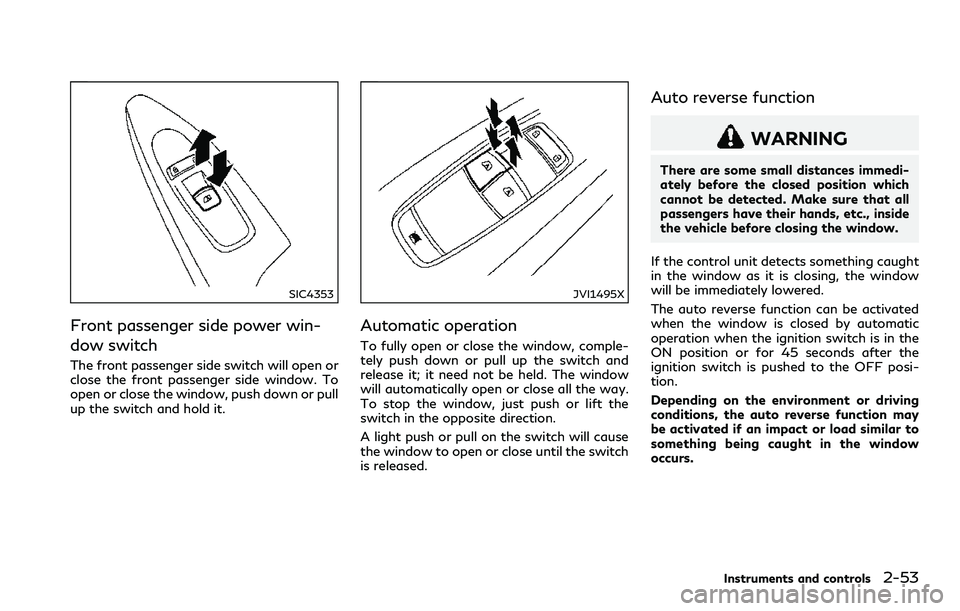
Front passenger side power win-
dow switch
The front passenger side switch will open or
close the front passenger side window. To
open or close the window, push down or pull
up the switch and hold it.
JVI1495X
Automatic operation
To fully open or close the window, comple-
tely push down or pull up the switch and
release it; it need not be held. The window
will automatically open or close all the way.
To stop the window, just push or lift the
switch in the opposite direction.
A light push or pull on the switch will cause
the window to open or close until the switch
is released.
Auto reverse function
WARNING
There are some small distances immedi-
ately before the closed position which
cannot be detected. Make sure that all
passengers have their hands, etc., inside
the vehicle before closing the window.
If the control unit detects something caught
in the window as it is closing, the window
will be immediately lowered.
The auto reverse function can be activated
when the window is closed by automatic
operation when the ignition switch is in the
ON position or for 45 seconds after the
ignition switch is pushed to the OFF posi-
tion.
Depending on the environment or driving
conditions, the auto reverse function may
be activated if an impact or load similar to
something being caught in the window
occurs.
Instruments and controls2-53
Page 131 of 466

2-54Instruments and controls
Automatic adjusting function
CAUTION
When the battery cable is removed from
the battery terminal, do not close either
of the front doors. The automatic win-
dow adjusting function will not work and
the side roof panel may be damaged.
The power window has an automatic ad-
justing function. When the door is being
opened, the window is automatically low-
ered slightly to avoid contact between the
window and the side roof panel. When the
door is closed, the window is automatically
raised slightly.
While the automatic adjusting function does
not work, the window will be controlled as
follows:
.When the door is opened, the window
lowers for approximately 2 seconds.
.While the door is open, the window
cannot be raised.
If the windows do not close auto-
matically
If the power window automatic function
(closing only) does not operate properly,
perform the following procedure to initializethe power window system.
1. Push the ignition switch to start the
engine.
2. Close the door.
3. After starting the engine, open the
window completely by operating the
power window switch.
4. Pull the power window switch and hold it
to close the window, and then hold the
switch more than 3 seconds after the
window is closed completely.
5. Release the power window switch. Op-
erate the window by the automatic
function to confirm the initialization is
complete.
6. Perform steps 2 through 5 above for
other windows.
If the power window automatic function
does not operate properly after performing
the procedure above, it is recommended you
have your vehicle checked by an INFINITI
retailer.
WARNING
.In an accident you could be thrown
from the vehicle through an open
moonroof. Always use seat belts
and child restraints.
.Do not allow anyone to stand up or
extend any portion of their body out
of the moonroof opening while the
vehicle is in motion or while the
moonroof is closing.
CAUTION
.Remove water drops, snow, ice or
sand from the moonroof before
opening.
.Do not place any heavy object on the
moonroof or surrounding area.
MOONROOF (if so equipped)
Page 133 of 466
2-56Instruments and controls
If the control unit detects something caught
in the moonroof when it is closing, the
moonroof will be immediately opened.
The auto reverse function can be activated
when the moonroof is closed by automatic
operation when the ignition switch is in the
ON position or for about 45 seconds after
the ignition switch is pushed to the OFF
position.
If the moonroof cannot be closed automa-
tically when the auto reverse function
activates due to a malfunction, push and
hold the moonroof switch to the close
position
.
Depending on the environment or driving
conditions, the auto reverse function may
be activated if an impact or load similar to
something being caught in the moonroof
occurs.
If the moonroof does not operate
If the moonroof does not operate properly,
perform the following procedure to initialize
the moonroof operation system.
1. If the moonroof is open, close it fully by
repeatedly pushing the moonroof switch
to the close position
to tilt the moon-
roof up.
2. Push and hold the switch to the close
position
.3. Release the moonroof switch after the
moonroof moves slightly up and down.
4. Push and hold the switch to the open
position
to fully tilt the moonroof
down.
5. Check if the moonroof switch operates
normally.
If the moonroof does not operate properly
after performing the procedure above, have
your moonroof checked and repaired. It is
recommended you visit an INFINITI retailer
for this service.
JVI0656X
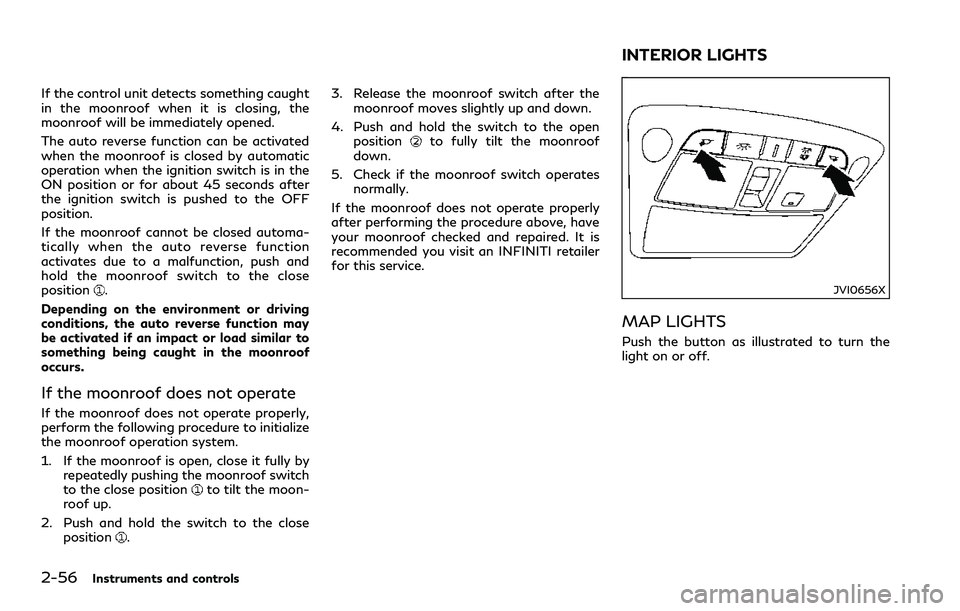
MAP LIGHTS
Push the button as illustrated to turn the
light on or off.
INTERIOR LIGHTS