trunk INFINITI Q60 2018 Owners Manual
[x] Cancel search | Manufacturer: INFINITI, Model Year: 2018, Model line: Q60, Model: INFINITI Q60 2018Pages: 466, PDF Size: 2.47 MB
Page 11 of 466
0-4Illustrated table of contents
JVC0940X
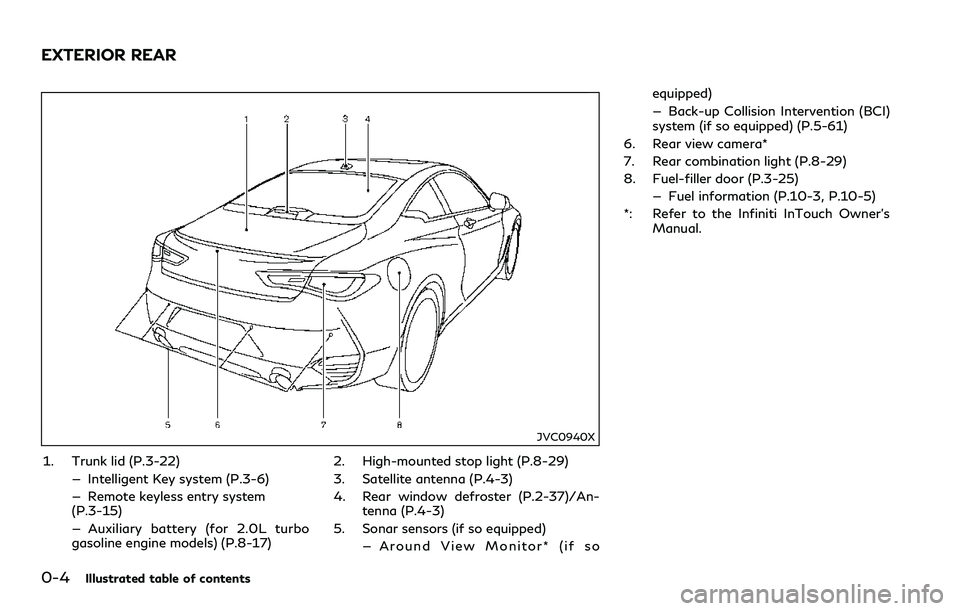
1. Trunk lid (P.3-22)
— Intelligent Key system (P.3-6)
— Remote keyless entry system
(P.3-15)
— Auxiliary battery (for 2.0L turbo
gasoline engine models) (P.8-17)2. High-mounted stop light (P.8-29)
3. Satellite antenna (P.4-3)
4. Rear window defroster (P.2-37)/An-
tenna (P.4-3)
5. Sonar sensors (if so equipped)
— Around View Monitor* (if soequipped)
— Back-up Collision Intervention (BCI)
system (if so equipped) (P.5-61)
6. Rear view camera*
7. Rear combination light (P.8-29)
8. Fuel-filler door (P.3-25)
— Fuel information (P.10-3, P.10-5)
*: Refer to the Infiniti InTouch Owner’s
Manual.
EXTERIOR REAR
Page 13 of 466
0-6Illustrated table of contents
JVC0942X
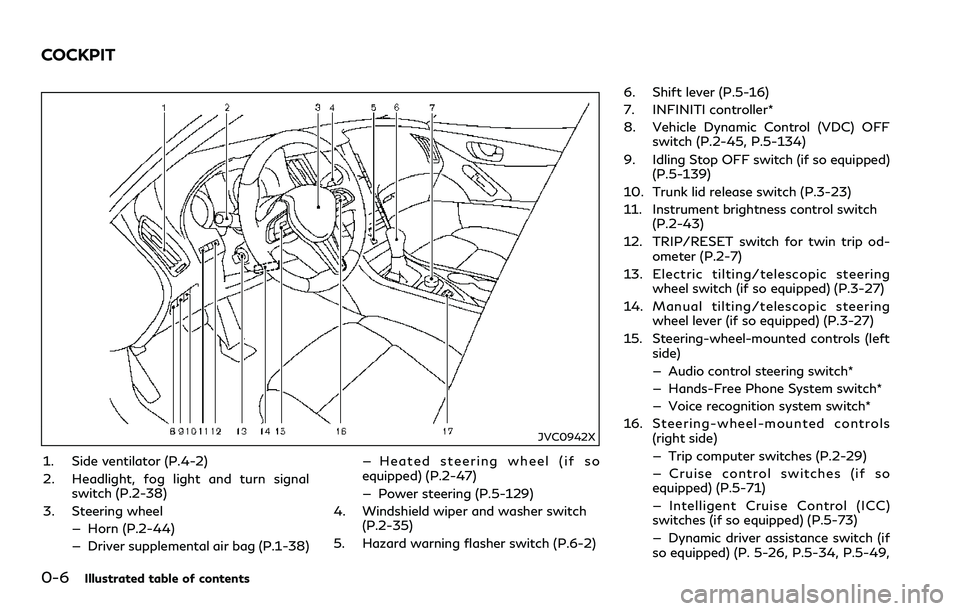
1. Side ventilator (P.4-2)
2. Headlight, fog light and turn signal
switch (P.2-38)
3. Steering wheel
— Horn (P.2-44)
— Driver supplemental air bag (P.1-38)— Heated steering wheel (if so
equipped) (P.2-47)
— Power steering (P.5-129)
4. Windshield wiper and washer switch
(P.2-35)
5. Hazard warning flasher switch (P.6-2)6. Shift lever (P.5-16)
7. INFINITI controller*
8. Vehicle Dynamic Control (VDC) OFF
switch (P.2-45, P.5-134)
9. Idling Stop OFF switch (if so equipped)
(P.5-139)
10. Trunk lid release switch (P.3-23)
11. Instrument brightness control switch
(P.2-43)
12. TRIP/RESET switch for twin trip od-
ometer (P.2-7)
13. Electric tilting/telescopic steering
wheel switch (if so equipped) (P.3-27)
14. Manual tilting/telescopic steering
wheel lever (if so equipped) (P.3-27)
15. Steering-wheel-mounted controls (left
side)
— Audio control steering switch*
— Hands-Free Phone System switch*
— Voice recognition system switch*
16. Steering-wheel-mounted controls
(right side)
— Trip computer switches (P.2-29)
— Cruise control switches (if so
equipped) (P.5-71)
— Intelligent Cruise Control (ICC)
switches (if so equipped) (P.5-73)
— Dynamic driver assistance switch (if
so equipped) (P. 5-26, P.5-34, P.5-49,
COCKPIT
Page 15 of 466
0-8Illustrated table of contents
JVC0969X
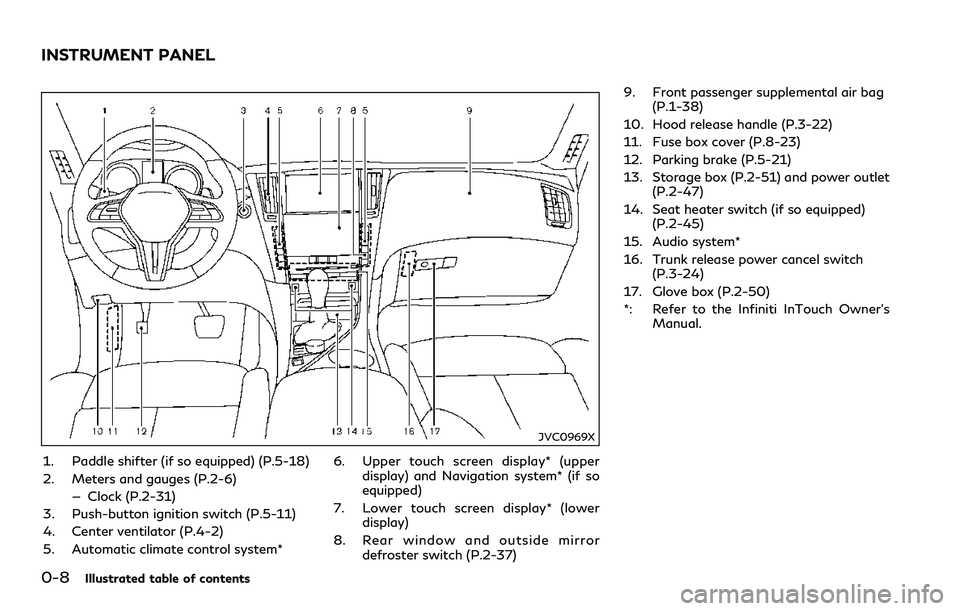
1. Paddle shifter (if so equipped) (P.5-18)
2. Meters and gauges (P.2-6)
— Clock (P.2-31)
3. Push-button ignition switch (P.5-11)
4. Center ventilator (P.4-2)
5. Automatic climate control system*6. Upper touch screen display* (upper
display) and Navigation system* (if so
equipped)
7. Lower touch screen display* (lower
display)
8. Rear window and outside mirror
defroster switch (P.2-37)9. Front passenger supplemental air bag
(P.1-38)
10. Hood release handle (P.3-22)
11. Fuse box cover (P.8-23)
12. Parking brake (P.5-21)
13. Storage box (P.2-51) and power outlet
(P.2-47)
14. Seat heater switch (if so equipped)
(P.2-45)
15. Audio system*
16. Trunk release power cancel switch
(P.3-24)
17. Glove box (P.2-50)
*: Refer to the Infiniti InTouch Owner’s
Manual.
INSTRUMENT PANEL
Page 18 of 466
JVC0646X
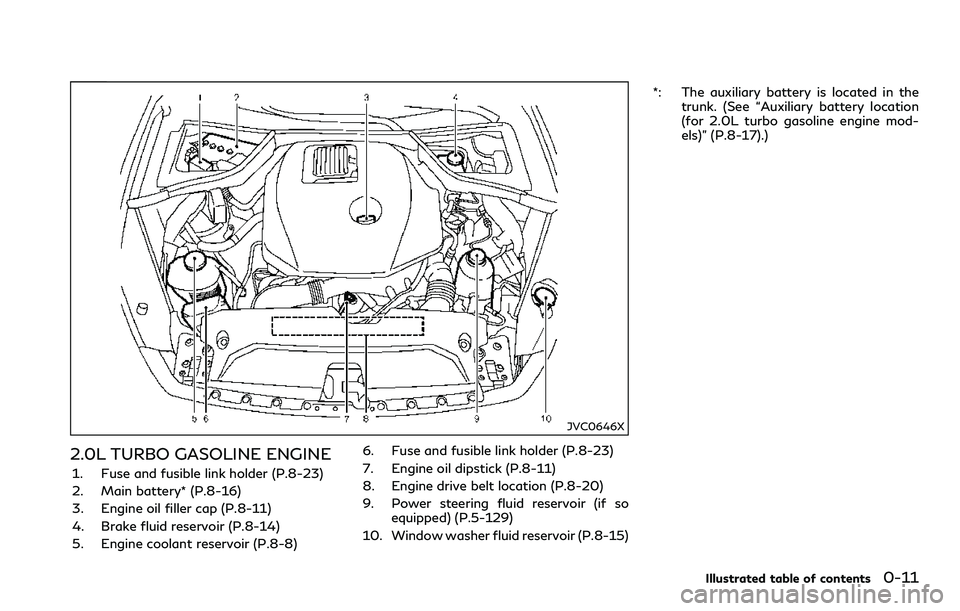
2.0L TURBO GASOLINE ENGINE
1. Fuse and fusible link holder (P.8-23)
2. Main battery* (P.8-16)
3. Engine oil filler cap (P.8-11)
4. Brake fluid reservoir (P.8-14)
5. Engine coolant reservoir (P.8-8)6. Fuse and fusible link holder (P.8-23)
7. Engine oil dipstick (P.8-11)
8. Engine drive belt location (P.8-20)
9. Power steering fluid reservoir (if so
equipped) (P.5-129)
10. Window washer fluid reservoir (P.8-15)*: The auxiliary battery is located in the
trunk. (See “Auxiliary battery location
(for 2.0L turbo gasoline engine mod-
els)” (P.8-17).)
Illustrated table of contents0-11
Page 25 of 466
1-6Safety — Seats, seat belts and supplemental restraint system
WARNING
When returning the seat to its original
position, confirm the seat and seatback
are locked properly.
CAUTION
.Be careful not to pinch your hand or
foot or bump your head when oper-
ating the walk-in seat.
.While operating the walk-in seat, do
not operate the seatback reclining
switch. The reclining motor may be
damaged.
.Do not place any objects near the
seatback of the front seats. They may
be pinched and damaged.
The automatic forwarding and reversing will
not work or stop under the following condi-
tions:
.When the vehicle speed is moving (dri-
ver’s seat only).
.When the seat belt is fastened.
.When the shift lever is not in the P (Park)
position (driver’s seat only)..When the door is closed (automatic
forwarding only).
.While the automatic drive positioner (if
so equipped) operates.
.When the automatic drive positioner
switches (if so equipped) are pushed.
.When the seatback switch is pushed.
.When the seat position is adjusted.
Note that the seat must be moved to the
front-most position by operating the walk-
in function after the battery is disconnected.
Otherwise, the seat will not move backward
during the walk-in function.
REAR SEATS
Folding
WARNING
.Never allow anyone to ride in the
trunk or on the rear seat when it is in
the fold-down position. Use of these
areas by passengers without proper
restraints could result in serious in-
jury in an accident or sudden stop.
.Properly secure all cargo with ropes
or straps to help prevent it from
sliding or shifting. Do not place cargo
higher than the seatback. In a sudden
stop or collision, unsecured cargocould cause personal injury.
.When returning the seatback to the
upright position, be certain they are
completely secured in the latched
position. If they are not completely
secured, passengers may be injured in
an accident or sudden stop.
.Closely supervise children when they
are around cars to prevent them from
playing and becoming locked in the
trunk where they could be seriously
injured. Keep the car locked, with the
rear seatback and trunk lid securely
latched when not in use, and prevent
children’s access to car keys.
Page 26 of 466
JVR0498X
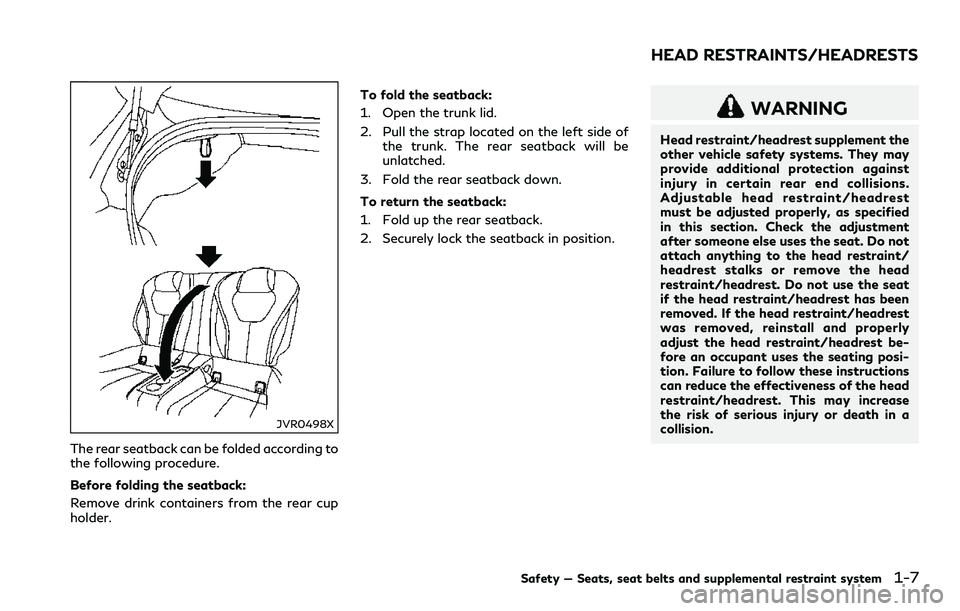
The rear seatback can be folded according to
the following procedure.
Before folding the seatback:
Remove drink containers from the rear cup
holder.To fold the seatback:
1. Open the trunk lid.
2. Pull the strap located on the left side of
the trunk. The rear seatback will be
unlatched.
3. Fold the rear seatback down.
To return the seatback:
1. Fold up the rear seatback.
2. Securely lock the seatback in position.
WARNING
Head restraint/headrest supplement the
other vehicle safety systems. They may
provide additional protection against
injury in certain rear end collisions.
Adjustable head restraint/headrest
must be adjusted properly, as specified
in this section. Check the adjustment
after someone else uses the seat. Do not
attach anything to the head restraint/
headrest stalks or remove the head
restraint/headrest. Do not use the seat
if the head restraint/headrest has been
removed. If the head restraint/headrest
was removed, reinstall and properly
adjust the head restraint/headrest be-
fore an occupant uses the seating posi-
tion. Failure to follow these instructions
can reduce the effectiveness of the head
restraint/headrest. This may increase
the risk of serious injury or death in a
collision.
Safety — Seats, seat belts and supplemental restraint system1-7
HEAD RESTRAINTS/HEADRESTS
Page 79 of 466
Card holder.................................................................. 2-50
Storage box.................................................................. 2-51
Coat hooks ................................................................... 2-51
Trunk hooks.................................................................. 2-51
Windows............................................................................. 2-52
Power windows.......................................................... 2-52
Moonroof (if so equipped)............................................. 2-54
Power moonroof ........................................................ 2-55
Interior lights..................................................................... 2-56
Map lights..................................................................... 2-56
Console light (if so equipped).................................. 2-57
Interior light control switch..................................... 2-57
Vanity mirror lights.......................................................... 2-58Trunk light ......................................................................... 2-58
Courtesy light................................................................... 2-59
HomeLink
®Universal Transceiver (if
so equipped)...................................................................... 2-59
Programming HomeLink
®..................................... 2-60
Programming HomeLink®for Canadian
customers and gate openers................................. 2-61
Operating the HomeLink
®
Universal Transceiver .............................................. 2-61
Programming troubleshooting.............................. 2-62
Clearing the programmed information............... 2-62
Reprogramming a single HomeLink
®button..... 2-62
If your vehicle is stolen ........................................... 2-62
Page 80 of 466
JVC0942X
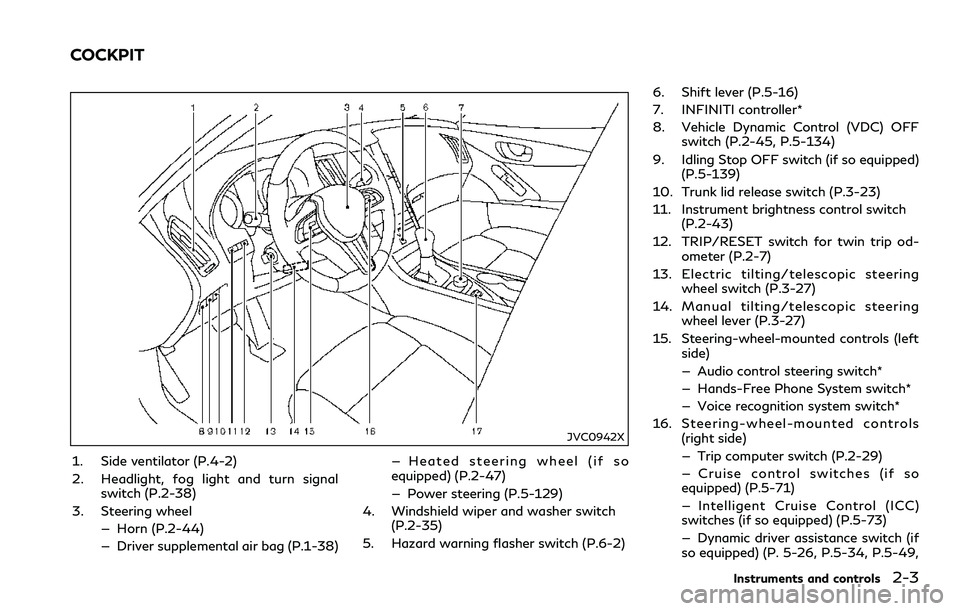
1. Side ventilator (P.4-2)
2. Headlight, fog light and turn signal
switch (P.2-38)
3. Steering wheel
— Horn (P.2-44)
— Driver supplemental air bag (P.1-38)— Heated steering wheel (if so
equipped) (P.2-47)
— Power steering (P.5-129)
4. Windshield wiper and washer switch
(P.2-35)
5. Hazard warning flasher switch (P.6-2)6. Shift lever (P.5-16)
7. INFINITI controller*
8. Vehicle Dynamic Control (VDC) OFF
switch (P.2-45, P.5-134)
9. Idling Stop OFF switch (if so equipped)
(P.5-139)
10. Trunk lid release switch (P.3-23)
11. Instrument brightness control switch
(P.2-43)
12. TRIP/RESET switch for twin trip od-
ometer (P.2-7)
13. Electric tilting/telescopic steering
wheel switch (P.3-27)
14. Manual tilting/telescopic steering
wheel lever (P.3-27)
15. Steering-wheel-mounted controls (left
side)
— Audio control steering switch*
— Hands-Free Phone System switch*
— Voice recognition system switch*
16. Steering-wheel-mounted controls
(right side)
— Trip computer switch (P.2-29)
— Cruise control switches (if so
equipped) (P.5-71)
— Intelligent Cruise Control (ICC)
switches (if so equipped) (P.5-73)
— Dynamic driver assistance switch (if
so equipped) (P. 5-26, P.5-34, P.5-49,
Instruments and controls2-3
COCKPIT
Page 82 of 466
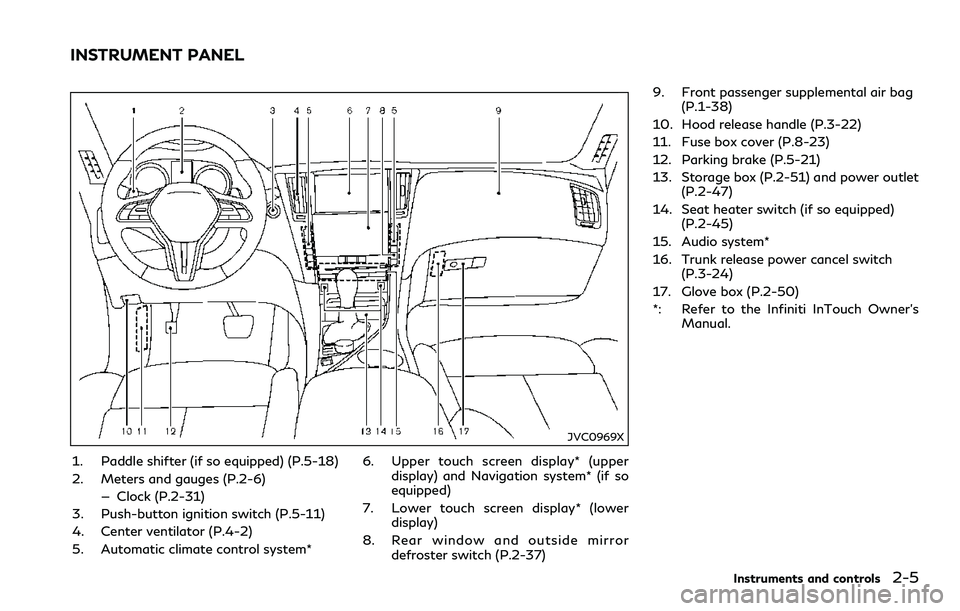
JVC0969X
1. Paddle shifter (if so equipped) (P.5-18)
2. Meters and gauges (P.2-6)
— Clock (P.2-31)
3. Push-button ignition switch (P.5-11)
4. Center ventilator (P.4-2)
5. Automatic climate control system*6. Upper touch screen display* (upper
display) and Navigation system* (if so
equipped)
7. Lower touch screen display* (lower
display)
8. Rear window and outside mirror
defroster switch (P.2-37)9. Front passenger supplemental air bag
(P.1-38)
10. Hood release handle (P.3-22)
11. Fuse box cover (P.8-23)
12. Parking brake (P.5-21)
13. Storage box (P.2-51) and power outlet
(P.2-47)
14. Seat heater switch (if so equipped)
(P.2-45)
15. Audio system*
16. Trunk release power cancel switch
(P.3-24)
17. Glove box (P.2-50)
*: Refer to the Infiniti InTouch Owner’s
Manual.
Instruments and controls2-5
INSTRUMENT PANEL
Page 93 of 466
2-16Instruments and controls
TPMS may not operate correctly.
.Be sure to install the specified size of
tires to the four wheels correctly.
Master warning light
When the ignition switch is in the ON
position, the master warning light illumi-
nates if any of the following warnings
appear in the vehicle information display:
.No key warning
.PUSH warning
.Key ID Incorrect warning
.Low washer fluid warning
.Door/trunk open warning
.Loose fuel cap warning
.Tire Pressure Low - Add Air warning
.Flat Tire - Visit dealer warning (if so
equipped)
.All-Wheel Drive (AWD) warning (if so
equipped)
.Adaptive Front lighting System (AFS)
warning (if so equipped)
.Intelligent Key system warning
.Chassis control warning
.Parking brake release warning
.SHIFT “P” warning
.Low oil pressure warningSee “Vehicle information display” (P.2-21).
If the driver assist system warnings appear
in the vehicle information display, the master
warning light also illuminates. See “Lane
Departure Warning (LDW) system/Lane
Departure Prevention (LDP)” (P.5-34),
“Blind Spot Warning (BSW)” (P.5-41), “Blind
Spot Intervention®(BSI)” (P.5-49), “Back-up
Collision Intervention (BCI)” (P.5-61), “Dis-
tance Control Assist (DCA)” (P.5-94), “For-
ward Emergency Braking (FEB) with
pedestrian detection system” (P.5-105) and
“Predictive Forward Collision Warning
(PFCW)” (P.5-115).
Power steering warning light
Models with Direct Adaptive Steering :
When the ignition switch is in the ON
position, the power steering warning light
illuminates. After starting the engine, the
power steering warning light stays on for a
few seconds and turns off. This indicates
that Direct Adaptive Steering is operational.
Drive the vehicle after the power steering
warning light turns off.
If the power steering warning light illumi-
nates while driving, pull off the road to a
safe location and stop the vehicle. If the
power steering warning light turns off, you
can drive again. If the power steering
warning light continues to illuminate, it isrecommended you have Direct Adaptive
Steering checked by an INFINITI retailer.
(See “Direct Adaptive Steering type” (P.5-
130).)
Models with hydraulic pump electric power
steering :
When the ignition switch is in the ON
position, the power steering warning light
illuminates. After starting the engine, the
power steering warning light turns off. This
indicates that or hydraulic pump electric
power steering is operational.
If the power steering warning light illumi-
nates while the engine is running, it may
indicate hydraulic pump electric power
steering is not functioning properly and
may need servicing. It is recommended you
have the hydraulic pump electric power
steering checked by an INFINITI retailer.
(See “Hydraulic pump electric power steering
type” (P.5-129).)
Models with electric power steering :
When the ignition switch is in the ON
position, the power steering warning light
illuminates. After starting the engine, the
power steering warning light turns off. This
indicates the electric power steering is
operational.
If the power steering warning light illumi-
nates while the engine is running, it may