maintenance INFINITI Q60 2019 User Guide
[x] Cancel search | Manufacturer: INFINITI, Model Year: 2019, Model line: Q60, Model: INFINITI Q60 2019Pages: 468, PDF Size: 2.18 MB
Page 183 of 468
5 Starting and driving
Precautions when starting and driving ...................... 5-4Exhaust gas (carbon monoxide) .............................. 5-4
Three-way catalyst ..................................................... 5-5
Tire Pressure Monitoring System (TPMS) ........... 5-5
Avoiding collision and rollover ................................. 5-9
Off-road recovery ....................................................... 5-9
Rapid air pressure loss ............................................. 5-10
Drinking alcohol/drugs and driving ..................... 5-10
Intelligent All-Wheel Drive (AWD) driving
safety precautions (AWD models) ....................... 5-11
Push-button ignition switch ........................................ 5-11 Operating range for engine start function ........ 5-12
Push-button ignition switch operation ............... 5-12
Push-button ignition switch positions ................ 5-13
Emergency engine shut off .................................... 5-13
Intelligent Key battery discharge .......................... 5-14
Before starting the engine ........................................... 5-14
Starting the engine ......................................................... 5-15 Remote engine start (if so equipped) .................. 5-15
Driving the vehicle .......................................................... 5-16
Automatic Transmission (AT) ................................ 5-16
Parking brake ................................................................... 5-21
INFINITI Drive Mode Selector .................................... 5-22
STANDARD mode .................................................... 5-22
SPORT+ mode (if so equipped) ............................. 5-23 SPORT mode ............................................................ 5-23
SNOW mode ............................................................ 5-23
ECO mode (if so equipped) .................................. 5-23
PERSONAL mode ................................................... 5-25
Active Lane Control (if so equipped) ........................ 5-26 Active Lane Control operation ............................ 5-28
Turning Active Lane Control ON/OFF ............ 5-29
How to enable/disable Active
Lane Control ............................................................ 5-30
Active Lane Control limitations .......................... 5-31
System temporarily unavailable .......................... 5-32
System malfunction ................................................ 5-32
System maintenance .............................................. 5-33
Lane Departure Warning (LDW) system/Lane
Departure Prevention (LDP) (if so equipped) ........ 5-34 LDW system operation ......................................... 5-35
How to enable/disable the LDW system ........ 5-36
LDP system operation ........................................... 5-36
Turning the LDP system ON/OFF .................... 5-37
How to enable/disable the LDP system .......... 5-38
LDW/LDP system limitations ............................. 5-38
System temporarily unavailable .......................... 5-39
System malfunction ............................................... 5-40
System maintenance ............................................. 5-40
Page 184 of 468
Blind Spot Warning (BSW) (if so equipped) ............ 5-41BSW system operation ............................................ 5-43
How to enable/disable the BSW system ........... 5-43
BSW system limitations .......................................... 5-43
BSW driving situations ........................................... 5-44
System temporarily unavailable ............................ 5-47
System malfunction .................................................. 5-47
System maintenance ............................................... 5-48
Blind Spot Intervention
®(BSI) (if so equipped) ...... 5-49
BSI system operation .............................................. 5-50
Turning the BSI system ON/OFF ........................ 5-52
How to enable/disable the BSI system .............. 5-53
BSI system limitations ............................................. 5-53
BSI driving situations ............................................... 5-55
System temporarily unavailable ............................ 5-59
System malfunction ................................................. 5-60
System maintenance ............................................... 5-60
Back-up Collision Intervention (BCI) (if
so equipped) ..................................................................... 5-61 BCI system operation .............................................. 5-63
Turning the BCI system ON/OFF ........................ 5-67
How to enable/disable the BCI system ............. 5-67
BCI system limitations ............................................. 5-68
System temporarily unavailable ............................ 5-69
System malfunction .................................................. 5-70
System maintenance ................................................ 5-70
Cruise control (if so equipped) .................................... 5-71
Precautions on cruise control ................................ 5-71 Cruise control operations ..................................... 5-72
Intelligent Cruise Control (ICC) (if so equipped) .... 5-73 How to select the cruise control mode ............. 5-75
Vehicle-to-vehicle distance control mode ....... 5-75
Conventional (fixed speed) cruise
control mode ........................................................... 5-90
Distance Control Assist (DCA) (if so equipped) ..... 5-94 DCA system operation .......................................... 5-96
Turning the DCA system ON/OFF .................... 5-99
How to enable/disable the DCA system ...... 5-100
DCA system display and indicators ................ 5-100
DCA system limitations ...................................... 5-101
System temporarily unavailable ....................... 5-103
System malfunction ............................................. 5-104
System maintenance ........................................... 5-104
Forward Emergency Braking (FEB) with
pedestrian detection system (if so equipped) ..... 5-105 FEB with pedestrian detection
system operation .................................................. 5-106
Turning the FEB with pedestrian detection
system ON/OFF .................................................. 5-108
FEB with pedestrian detection
system limitations ................................................ 5-109
System temporarily unavailable ........................ 5-112
System malfunction .............................................. 5-113
System maintenance ............................................ 5-114
Predictive Forward Collision Warning (PFCW)
(if so equipped) ............................................................. 5-115 PFCW system operation ..................................... 5-117
Page 185 of 468

Turning the PFCW system ON/OFF ................ 5-118
PFCW system limitations .................................... 5-120
System temporarily unavailable .......................... 5-122
System malfunction ................................................ 5-123
System maintenance .............................................. 5-123
Break-in schedule ........................................................ 5-124
Fuel Efficient Driving Tips ......................................... 5-124
Increasing fuel economy ............................................. 5-125
Intelligent All-Wheel Drive (AWD) (if
so equipped) ................................................................... 5-126
Parking/parking on hills ............................................. 5-128
Power steering .............................................................. 5-129 Electric power steering type ................................ 5-129
Hydraulic pump electric power
steering type ............................................................. 5-129
Direct Adaptive Steering type ............................ 5-130
Brake system .................................................................. 5-132 Braking precautions ................................................ 5-132
Parking brake break-in .......................................... 5-132
Brake assist .................................................................... 5-133 Brake assist ............................................................... 5-133
Anti-lock Braking System (ABS) ......................... 5-133 Vehicle Dynamic Control (VDC) system ............... 5-134
Brake force distribution ...................................... 5-135
Active trace control .................................................... 5-136
Hill Start Assist system ............................................. 5-138
Chassis control ............................................................. 5-138
Idling Stop System (if so equipped) ....................... 5-139 Retrograde movement control function ........ 5-140
Idling Stop System display ................................ 5-140
Idling Stop OFF switch ...................................... 5-142
Cold weather driving .................................................. 5-143 Freeing a frozen door lock ................................ 5-143
Antifreeze ............................................................... 5-143
Battery .................................................................... 5-143
Draining of coolant water ................................. 5-143
Tire equipment ...................................................... 5-143
Special winter equipment .................................. 5-144
Driving on snow or ice ........................................ 5-144
Engine block heater (if so equipped) .............. 5-144
Active noise cancellation/Active
sound enhancement ................................................... 5-145 Active noise cancellation .................................... 5-146
Active sound enhancement ............................... 5-146
Page 188 of 468
5-6Starting and driving
Please note that the TPMS is not a sub-
stitute for proper tire maintenance, and it is
the driver’s responsibility to maintain correct
tire pressure, even if under-inflation has not
reached the level to trigger illumination of
the TPMS low tire pressure telltale.
Your vehicle has also been equipped with a
TPMS malfunction indicator to indicate
when the system is not operating properly.
The TPMS malfunction indicator is com-
bined with the low tire pressure telltale.
When the system detects a malfunction, the
telltale will flash for approximately one
minute and then remain continuously illumi-
nated. This sequence will continue upon
subsequent vehicle start-ups as long as the
malfunction exists. When the malfunction
indicator is illuminated, the system may not
be able to detect or signal low tire pressure
as intended. TPMS malfunctions may occur
for a variety of reasons, including the
installation of replacement or alternate tires
or wheels on the vehicle that prevent the
TPMS from functioning properly. Always
check the TPMS malfunction telltale after
replacing one or more tires or wheels on your
vehicle to ensure that the replacement or
alternate tires and wheels allow the TPMS
to continue to function properly.Additional information
.Since the spare tire (if so equipped) is not
equipped with the TPMS, the TPMS
does not monitor the tire pressure of
the spare tire.
. The TPMS will activate only when the
vehicle is driven at speeds above 16
MPH (25 km/h). Also, this system may
not detect a sudden drop in tire pressure
(for example a flat tire while driving).
. The low tire pressure warning light does
not automatically turn off when the tire
pressure is adjusted. After the tire is
inflated to the recommended pressure,
the vehicle must be driven at speeds
above 16 MPH (25 km/h) to activate the
TPMS and turn off the low tire pressure
warning light. Use a tire pressure gauge
to check the tire pressure.
. The “Tire Pressure Low - Add Air”
warning appears in the vehicle informa-
tion display when the low tire pressure
warning light is illuminated and low tire
pressure is detected. The “Tire Pressure
Low - Add Air” warning turns off when
the low tire pressure warning light turns
off.
The “Tire Pressure Low - Add Air”
warning does not appear if the low tire
pressure warning light illuminates to
indicate a TPMS malfunction. .
The “Flat Tire - Visit dealer” warning (if
so equipped) appears in the vehicle
information display when the low tire
pressure warning light is illuminated and
one or more flat tires are detected.
. Tire pressure rises and falls depending on
the heat caused by the vehicle’s opera-
tion and the outside temperature. Do not
reduce the tire pressure after driving
because the tire pressure rises after
driving. Low outside temperature can
lower the temperature of the air inside
the tire which can cause a lower tire
inflation pressure. This may cause the
low tire pressure warning light to illumi-
nate. If the warning light illuminates in
low ambient temperature, check the tire
pressure for all four tires.
. You can also check the pressure of all
tires (except the spare tire) in the vehicle
information display. (See “Vehicle infor-
mation display” (P.2-20).)
. After the ignition switch is placed in the
ON position, it may take a period of time
for the tire pressure to be displayed while
the vehicle is driven. Depending on the
radio wave circumstance, tire pressure
may not correctly be displayed.
For additional information, see “Low tire
pressure warning light” (P.2-14) and “Tire
Pressure Monitoring System (TPMS)” (P.6-
3).
Page 215 of 468
Action to take:
If the chassis control warning appears, pull
off the road to a safe location and stop the
vehicle. Turn the engine off and restart the
engine. If the chassis control warning con-
tinues to appear, have Active Lane Control
checked. It is recommended you visit an
INFINITI retailer for this service.
JVS0823X
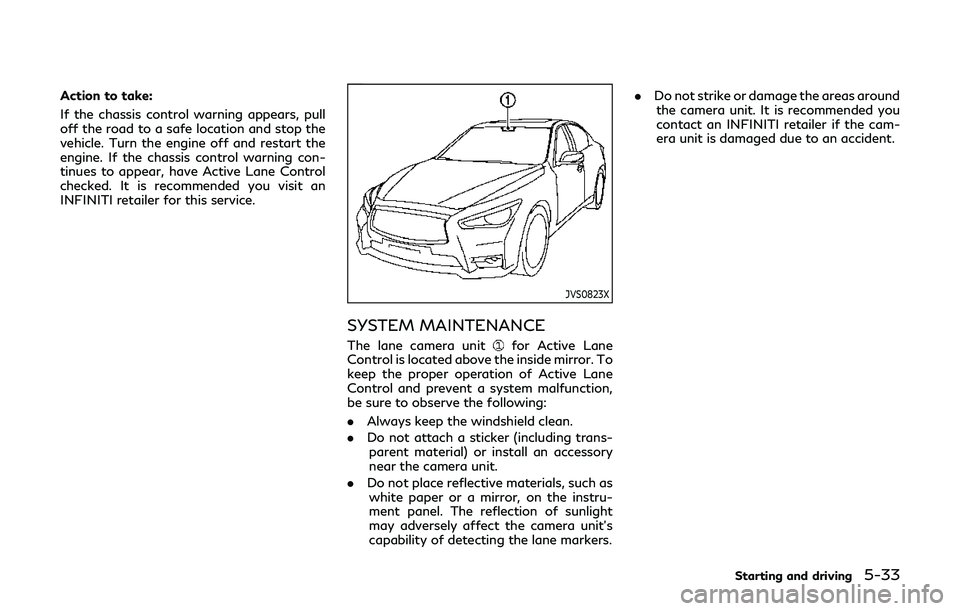
SYSTEM MAINTENANCE
The lane camera unitfor Active Lane
Control is located above the inside mirror. To
keep the proper operation of Active Lane
Control and prevent a system malfunction,
be sure to observe the following:
. Always keep the windshield clean.
. Do not attach a sticker (including trans-
parent material) or install an accessory
near the camera unit.
. Do not place reflective materials, such as
white paper or a mirror, on the instru-
ment panel. The reflection of sunlight
may adversely affect the camera unit’s
capability of detecting the lane markers. .
Do not strike or damage the areas around
the camera unit. It is recommended you
contact an INFINITI retailer if the cam-
era unit is damaged due to an accident.
Starting and driving5-33
Page 222 of 468
5-40Starting and driving
.When the VDC system is turned off.
. When the INFINITI Drive Mode Selector
is turned to the SNOW mode.
Action to take:
When the above conditions no longer exist,
push the dynamic driver assistance switch
again to turn the LDP system back on.
Condition B
LDW system: If the vehicle is parked in direct
sunlight under high temperature conditions
(over approximately 104°F (40°C)) and then
started, the LDW system may be deacti-
vated automatically. The “high cabin tem-
perature” warning message will appear in
the vehicle information display.
LDP system: If the vehicle is parked in direct
sunlight under high temperature conditions
(over approximately 104°F (40°C)) and then
the LDP system is turned on, the LDP
system may be deactivated automatically.
The “high cabin temperature” message will
appear in the vehicle information display.
The LDW and LDP systems are not available
until the conditions no longer exist.
Action to take:
When the above conditions no longer exist,
the LDW system will resume automatically.
For the LDP system, push the dynamic driver
assistance switch
again to turn the LDP system back on.
SYSTEM MALFUNCTION
LDW system:
If the LDW system malfunc-
tions, it will cancel automatically, and the
LDW “malfunction” message will appear in
the vehicle information display.
LDP system: If the LDP system malfunc-
tions, it will cancel automatically. The LDP
“malfunction” message will appear in the
vehicle information display.
Action to take:
Stop the vehicle in a safe location, place the
vehicle in the P (Park) position, turn the
engine off and restart the engine. If the
“malfunction” message continues to appear,
have the system checked. It is recommended
you visit an INFINITI retailer for this service.
JVS0823X
SYSTEM MAINTENANCE
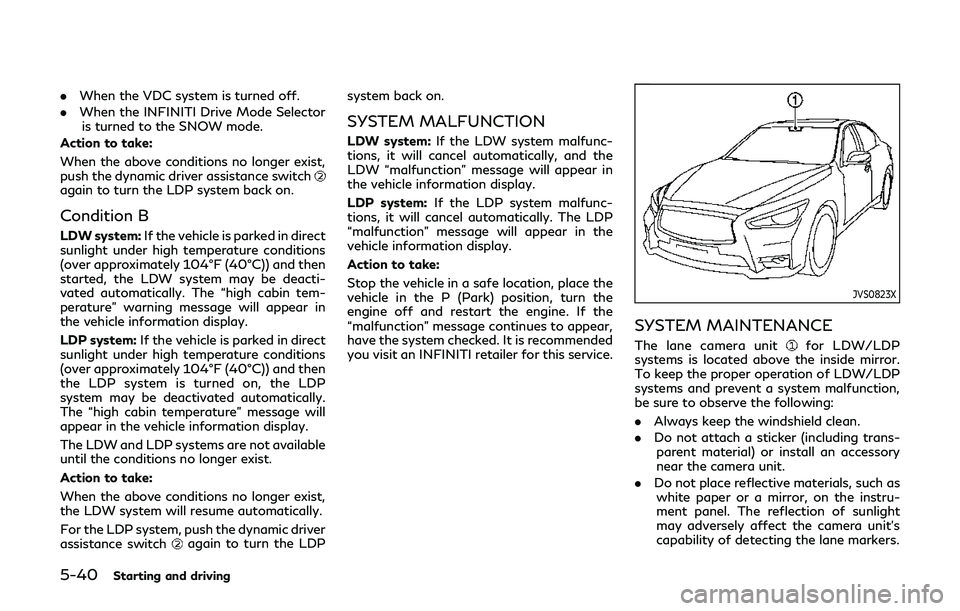
The lane camera unitfor LDW/LDP
systems is located above the inside mirror.
To keep the proper operation of LDW/LDP
systems and prevent a system malfunction,
be sure to observe the following:
. Always keep the windshield clean.
. Do not attach a sticker (including trans-
parent material) or install an accessory
near the camera unit.
. Do not place reflective materials, such as
white paper or a mirror, on the instru-
ment panel. The reflection of sunlight
may adversely affect the camera unit’s
capability of detecting the lane markers.
Page 230 of 468

5-48Starting and driving
JVS0863X
SYSTEM MAINTENANCE
The two radar sensorsfor the BSW
system are located near the rear bumper.
Always keep the area near the radar sensors
clean.
The radar sensors may be blocked by
temporary ambient conditions such as
splashing water, mist or fog.
The blocked condition may also be caused by
objects such as ice, frost or dirt obstructing
the radar sensors.
Check for and remove objects obstructing
the area around the radar sensors.
Do not attach stickers (including transparent
material), install accessories or apply addi- tional paint near the radar sensors.
Do not strike or damage the area around the
radar sensors.
It is recommended you visit an INFINITI
retailer if the area around the radar sensors
is damaged due to a collision.
Radio frequency statement
For USA
This device complies with part 15 of the
FCC Rules.
Operation is subject to the following two
conditions: (1) This device may not cause
harmful interference, and (2) this device
must accept any interference received, in-
cluding interference that may cause unde-
sired operation.
NOTE:
The manufacturer is not responsible for any
radio or TV interference caused by un-
authorized modifications to this equipment.
Such modifications could void the user’s
authority to operate the equipment.
For Canada
This device complies with Industry Canada
Standard RSS-310.
Operation is subject to the following two
conditions: (1) This device may not cause
harmful interference, and (2) this device
must accept any interference received, in-
cluding interference that may cause unde-
sired operation.
Frequency of operation: 24.05GHz —
24.25GHz
Field Strength: Not greater than 2.5V/m
peak (0.25V/m average) at a distance of 3
m
Page 242 of 468

5-60Starting and driving
.When the INFINITI Drive Mode Selector
is turned to the SNOW mode.
Action to take:
When the above conditions no longer exist,
push the dynamic driver assistance switch
again to turn the BSI system back on.
When radar blockage is detected, the BSI
system will be turned off automatically, a
chime will sound and the “side radar ob-
struction” warning message will appear in
the vehicle information display
.
The BSI system is not available until the
conditions no longer exist. For additional
information, see “System maintenance”
(P.5-60).
Action to take:
When the above conditions no longer exist,
turn the BSI system on again. If the “side
radar obstruction” warning message ap-
pears even after the BSI system is turned
on again, stop the vehicle in a safe location,
place the shift lever in the P (Park) position
and turn the engine off. Check for and
remove objects obscuring the radar sensors
on the rear bumper, and restart the engine.
If the vehicle is parked in direct sunlight
under high temperature conditions (over
approximately 104°F (40°C)) and then the
BSI system is turned on, the BSI system may
be deactivated automatically. The “high
cabin temperature” warning message will appear in the vehicle information display
.
Action to take:
When the interior temperature is reduced,
push the dynamic driver assistance switch
again to turn the BSI system back on.
SYSTEM MALFUNCTION
When the BSI system malfunctions, it will be
turned off automatically, a chime will sound,
and the system “malfunction” warning mes-
sage with the driver assist system blind spot
indicator (orange) will appear in the vehicle
information display.
Action to take:
Stop the vehicle in a safe location and place
the shift lever in the P (Park) position. Turn
the engine off and restart the engine. If the
system “malfunction” warning message with
the driver assist system blind spot indicator
(orange) continues to be displayed, have the
BSI system checked. It is recommended you
visit an INFINITI retailer for this service.
JVS0864X
SYSTEM MAINTENANCE
The two radar sensorsfor the BSI system
are located near the rear bumper. Always
keep the area near the radar sensors clean.
The radar sensors may be blocked by
temporary ambient conditions such as
splashing water, mist or fog.
The blocked condition may also be caused by
objects such as ice, frost or dirt obstructing
the radar sensors.
Check for and remove objects obstructing
the area around the radar sensors.
Do not attach stickers (including transparent
material), install accessories or apply addi-
tional paint near the radar sensors.
Page 252 of 468

5-70Starting and driving
Action to take:
When the interior temperature is re-
duced, turn off the BCI system and turn
it on again.
. “Unavailable Side Radar Obstruction”:
When side radar blockage is detected.
Action to take:
When the blockage is removed, turn off
the BCI system and turn it on again.
SYSTEM MALFUNCTION
If the BCI system malfunctions, it will turn
off automatically, a chime will sound and BCI
system “malfunction” warning message will
appear in the vehicle information display
.
Action to take:
Stop the vehicle in a safe location and place
the shift lever in the P (Park) position. Turn
the engine off and restart the engine. If the
warning message continues to appear, have
the system checked. It is recommended you
visit an INFINITI retailer for this service.JVS0863X
SYSTEM MAINTENANCE
The two radar sensorsfor the BCI system
is located near the rear bumper. Always keep
the area near the radar sensors clean.
The radar sensors may be blocked by
temporary ambient conditions such as
splashing water, mist or fog.
The blocked condition may also be caused by
objects such as ice, frost or dirt obstructing
the radar sensors.
Check for and remove objects obstructing
the area around the radar sensors.
Do not attach stickers (including transparent
material), install accessories or apply addi-
tional paint near the radar sensors. Do not strike or damage the area around the
radar sensors.
It is recommended you visit an INFINITI
retailer if the area around the radar sensors
is damaged due to a collision.
Radio frequency statement
For USA
This device complies with part 15 of the
FCC Rules.
Operation is subject to the following two
conditions: (1) This device may not cause
harmful interference, and (2) this device
must accept any interference received, in-
cluding interference that may cause unde-
sired operation.
NOTE:
The manufacturer is not responsible for any
radio or TV interference caused by un-
authorized modifications to this equipment.
Such modifications could void the user’s
authority to operate the equipment.
For Canada
This device complies with Industry Canada
Standard RSS-310.
Operation is subject to the following two
conditions: (1) This device may not cause
harmful interference, and (2) this device
must accept any interference received, in-
cluding interference that may cause unde-
Page 271 of 468

If it is not possible to set the system or the
warning stays on, it may indicate that the
ICC system is malfunctioning. Although the
vehicle is still driveable under normal con-
ditions, have the vehicle checked. It is
recommended you visit an INFINITI retailer
for this service.
JVS0869X
System maintenance
The sensor for the ICC systemis located
behind the grille of the front bumper.
To keep the ICC system operating properly,
be sure to observe the following:
. Always keep the sensor area of the front
grille clean.
. Do not strike or damage the areas around
the sensor.
. Do not cover or attach stickers or similar
objects on the front bumper near the
sensor area. This could cause failure or
malfunction.
. Do not attach metallic objects near the
sensor area (brush guard, etc.). This could cause failure or malfunction.
. Do not alter, remove or paint the front
bumper. It is recommended you contact
an INFINITI retailer before customizing
or restoring the front bumper.
FCC Notice:
For USA:
This device complies with Part 15 of the
FCC Rules. Operation is subject to the
following two conditions:
1. This device may not cause harmful
interference, and
2. This device must accept any interfer-
ence received, including interference
that may cause undesired operation.
FCC Warning
Changes or modification not expressly ap-
proved by the party responsible for com-
pliance could void the user’s authority to
operate the equipment.
For Canada:
This device complies with Industry Canada
licence-exempt RSS standard(s). Operation
is subject to the following two conditions:
1. This device may not cause interference,
and
2. This device must accept any interfer-
ence, including interference that may
cause undesired operation of the device.
Starting and driving5-89