mirror INFINITI Q60 2019 User Guide
[x] Cancel search | Manufacturer: INFINITI, Model Year: 2019, Model line: Q60, Model: INFINITI Q60 2019Pages: 468, PDF Size: 2.18 MB
Page 136 of 468
2-58Instruments and controls
— remain on for about 15 seconds.
. doors are unlocked by pushing the UN-
LOCK button on the Intelligent Key or
one touch unlock sensor with the ignition
switch in the LOCK position
— remain on for about 15 seconds.
. any door is opened and then closed with
the ignition switch in the LOCK position
— remain on for about 15 seconds.
. any door is opened
— remain on while the door is opened. When the door is closed, the lights go
off.
When the DOOR OFF switch
is pushed in,
the map lights will not illuminate under the
above condition. The map lights can be
turned on only with the ON switch
.
The lights will also turn off after a period of
time when the lights remain illuminated
after the ignition switch has been pushed
to the OFF or LOCK position to prevent the
battery from becoming discharged.
When [Lamp ON When Door Unlocks] is set
to the OFF position (see the INFINITI
InTouch
TMOwner’s Manual), the lights will
illuminate under the following condition:
. any door is opened with the ignition
switch in any position
— remain on while the door is opened. When the door is closed, the lights go off.
CAUTION
Do not use for extended periods of time
with the engine stopped. This could
result in a discharged battery.
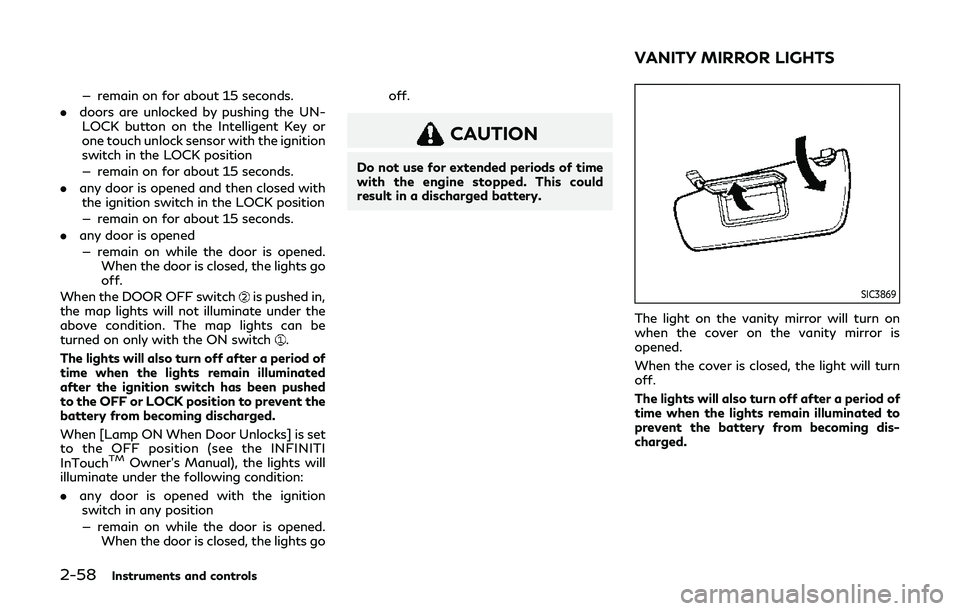
SIC3869
The light on the vanity mirror will turn on
when the cover on the vanity mirror is
opened.
When the cover is closed, the light will turn
off.
The lights will also turn off after a period of
time when the lights remain illuminated to
prevent the battery from becoming dis-
charged.
VANITY MIRROR LIGHTS
Page 143 of 468

3 Pre-driving checks and adjustments
Keys ........................................................................\
.............. 3-2Intelligent Key .............................................................. 3-2
Valet hand-off ............................................................. 3-4
Doors ........................................................................\
............ 3-4 Locking with mechanical key ................................... 3-4
Opening and closing windows with mechanical
key (if so equipped) ..................................................... 3-5
Locking with inside lock knob ................................. 3-5
Locking with power door lock switch ................... 3-5
Automatic door locks ................................................. 3-6
Intelligent Key system ..................................................... 3-6 Intelligent Key operating range ............................... 3-8
Door locks/unlocks precaution .............................. 3-9
Intelligent Key operation ........................................... 3-9
Battery saver system ............................................... 3-13
Warning signals ......................................................... 3-13
Troubleshooting guide ............................................. 3-14
Log-in function .......................................................... 3-15
Remote keyless entry system ...................................... 3-15 How to use remote keyless entry system .......... 3-16
Remote engine start (if so equipped) ....................... 3-20 Remote engine start operating range ................ 3-20
Remote starting the engine .................................. 3-20
Extending engine run time ...................................... 3-21 Canceling a remote engine start ......................... 3-21
Conditions the remote engine start will
not work .................................................................... 3-22
Hood ........................................................................\
.......... 3-23
Trunk lid ........................................................................\
.... 3-23 Trunk lid release switch ......................................... 3-24
Trunk open request switch ................................... 3-24
TRUNK button ......................................................... 3-24
Trunk release power cancel switch .................... 3-25
Interior trunk lid release ........................................ 3-25
Fuel-filler door ................................................................ 3-26 Opening the fuel-filler door ................................. 3-26
Fuel-filler cap ........................................................... 3-26
Tilt/telescopic steering ................................................. 3-28 Manual operation (if so equipped) ..................... 3-29
Electric operation (if so equipped) ..................... 3-29
Sun visors ........................................................................\
. 3-29
Mirrors ........................................................................\
..... 3-30 Inside mirror ............................................................. 3-30
Outside mirrors ........................................................ 3-31
Vanity mirror ............................................................ 3-33
Automatic drive positioner (if so equipped) ........... 3-33 Memory storage ...................................................... 3-34
System operation .................................................... 3-34
Page 163 of 468
lights illuminate. If the vehicle is not
within view, push and hold the remote
engine start
button for at least 2
seconds.
The following events will occur when the
engine starts:
. The front parking lights will turn on and
remain on as long as the engine is
running.
. The doors will be locked and the air
conditioner system may turn on.
. The engine will continue to run for about
10 minutes. Repeat the steps to extend
the time for an additional 10 minutes.
See “Extending engine run time” (P.3-
21).
. The rear window glass and outside mirror
defroster may turn on automatically
when the outside air temperature, the
interior temperature and the engine
coolant temperature are low.
Depress and hold the brake pedal, then place
the ignition switch in the ON position before
driving. For further instructions, see “Driving
the vehicle” (P.5-16).
EXTENDING ENGINE RUN TIME
The remote engine start function can be
extended one time by performing the steps
listed in “Remote starting the engine” (P.3-
20). Run time will be calculated as follows:
. The first 10 minute run time will start
when the remote engine start function is
performed.
. The second 10 minutes will start imme-
diately when the remote engine start
function is performed. For example, if
the engine has been running for 5
minutes, and 10 minutes are added, the
engine will run for a total of 15 minutes.
. Extending engine run time will count
towards the two remote engine start
limit.
A maximum of two remote engine starts, or
a single start with an extension, are allowed
between ignition cycles.
The ignition switch must be cycled to the ON
position and then back to the OFF position
before the remote engine start procedure
can be used again.
CANCELING A REMOTE ENGINE
START
To cancel a remote engine start, perform one
of the following:
. Aim the Intelligent Key at the vehicle and
push and hold the remote engine start
button until the parking lights turn
off.
. Turn on the hazard warning flashers.
. Cycle the ignition switch ON and then
OFF.
. The extended engine run time has ex-
pired.
. The first 10 minute timer has expired.
. The engine hood has been opened.
. The shift lever is moved out of P (Park).
. The alarm sounds due to illegal entry into
the vehicle.
. The ignition switch is pushed without an
Intelligent Key in the vehicle.
. The ignition switch is pushed with an
Intelligent Key in the vehicle but the
brake pedal is not depressed.
Pre-driving checks and adjustments3-21
Page 172 of 468
3-30Pre-driving checks and adjustments
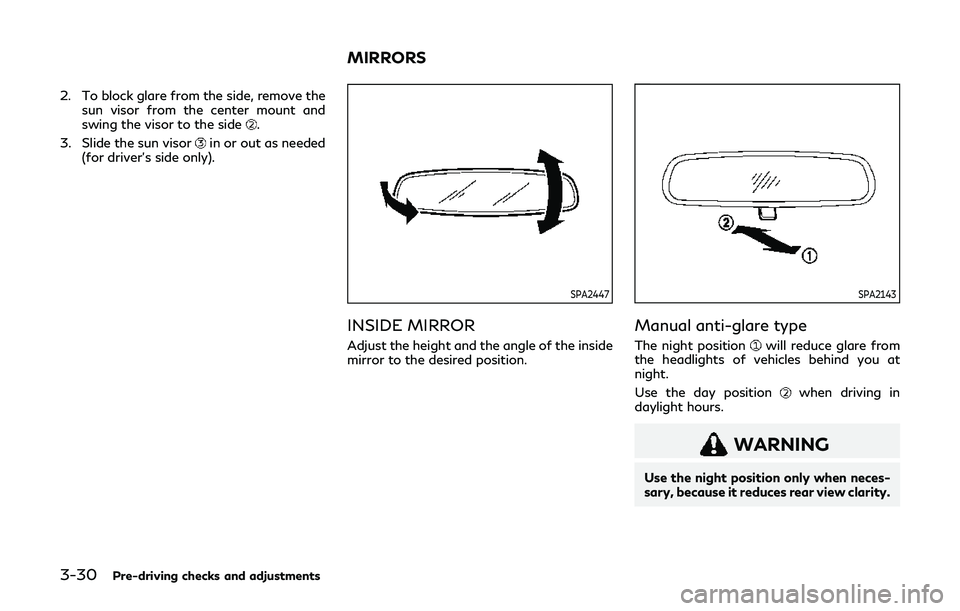
2. To block glare from the side, remove thesun visor from the center mount and
swing the visor to the side
.
3. Slide the sun visor
in or out as needed
(for driver’s side only).
SPA2447
INSIDE MIRROR
Adjust the height and the angle of the inside
mirror to the desired position.
SPA2143
Manual anti-glare type
The night positionwill reduce glare from
the headlights of vehicles behind you at
night.
Use the day position
when driving in
daylight hours.
WARNING
Use the night position only when neces-
sary, because it reduces rear view clarity.
MIRRORS
Page 173 of 468

SPA2422A
Type A (if so equipped)
SPA2450
Type B (if so equipped)
Automatic anti-glare type
The inside mirror is designed so that it
automatically changes reflection according
to the intensity of the headlights of the
following vehicle.
The anti-glare system will be automatically
turned on when the ignition switch is placed
in the ON position.
The anti-glare system also operates for the
outside mirrors (if so equipped).
When the anti-glare system is turned on, the
indicator light
will illuminate and excessive
glare from the headlights of the vehicle
behind you will be reduced.
Type A (if so equipped): Push the
switchto make the inside mirror operate normally
and the indicator light will turn off. Push the
switchagain to turn the system on.
Type B (if so equipped): Push the “*” switch
to make the inside mirror operate nor-
mally. The indicator light will turn off. Push
the “I” switch
to turn the system on.
Do not allow any object to cover the sensors
or apply glass cleaner on them. Doing so
will reduce the sensitivity of the sensor,
resulting in improper operation.
For the compass (if so equipped) operation,
see “Compass” (P.2-9).
For the HomeLink
®Universal Transceiver (if so equipped) operation, see “HomeLink
®
Universal Transceiver” (P.2-59).
OUTSIDE MIRRORS
WARNING
Objects viewed in the outside mirror on
the passenger side are closer than they
appear. Be careful when moving to the
right. Using only this mirror could cause
an accident. Use the inside mirror or
glance over your shoulder to properly
judge distances to other objects.
Pre-driving checks and adjustments3-31
Page 174 of 468
3-32Pre-driving checks and adjustments
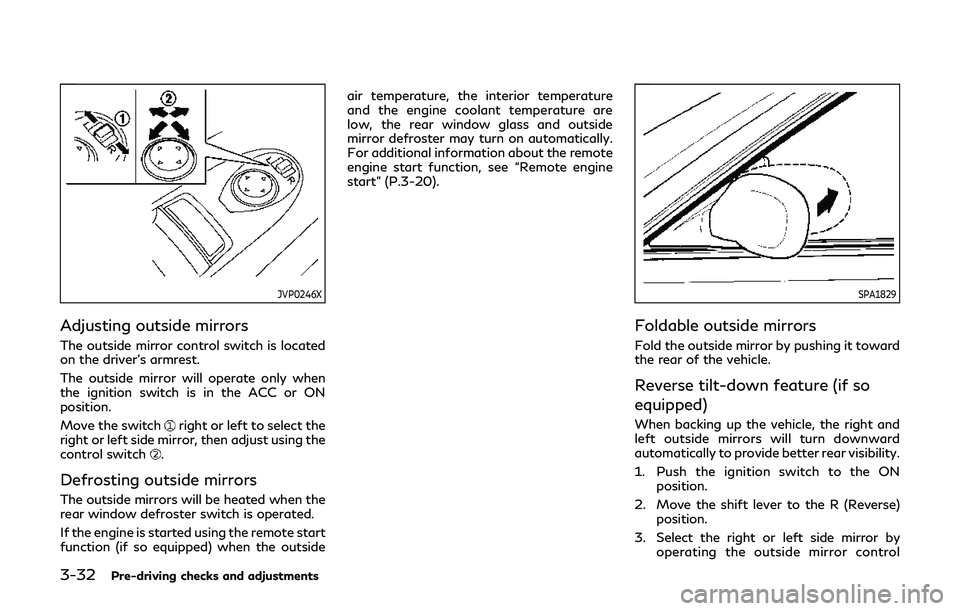
JVP0246X
Adjusting outside mirrors
The outside mirror control switch is located
on the driver’s armrest.
The outside mirror will operate only when
the ignition switch is in the ACC or ON
position.
Move the switch
right or left to select the
right or left side mirror, then adjust using the
control switch
.
Defrosting outside mirrors
The outside mirrors will be heated when the
rear window defroster switch is operated.
If the engine is started using the remote start
function (if so equipped) when the outside air temperature, the interior temperature
and the engine coolant temperature are
low, the rear window glass and outside
mirror defroster may turn on automatically.
For additional information about the remote
engine start function, see “Remote engine
start” (P.3-20).
SPA1829
Foldable outside mirrors
Fold the outside mirror by pushing it toward
the rear of the vehicle.
Reverse tilt-down feature (if so
equipped)
When backing up the vehicle, the right and
left outside mirrors will turn downward
automatically to provide better rear visibility.
1. Push the ignition switch to the ON
position.
2. Move the shift lever to the R (Reverse) position.
3. Select the right or left side mirror by operating the outside mirror control
Page 175 of 468
switch.
4. The outside mirror surface moves down- ward.
When one of the following conditions has
occurred, the outside mirror surface will
return to its original position.
. The shift lever is moved to any position
other than R (Reverse).
. The outside mirror control switch is set to
the center position.
. The ignition switch is pushed to the OFF
position.
Automatic anti-glare (if so
equipped)
The outside mirrors are designed so that
they automatically change reflection ac-
cording to the intensity of the headlights of
the vehicle following you.
The anti-glare system will be automatically
turned on when the ignition switch is placed
in the ON position.
SIC3869
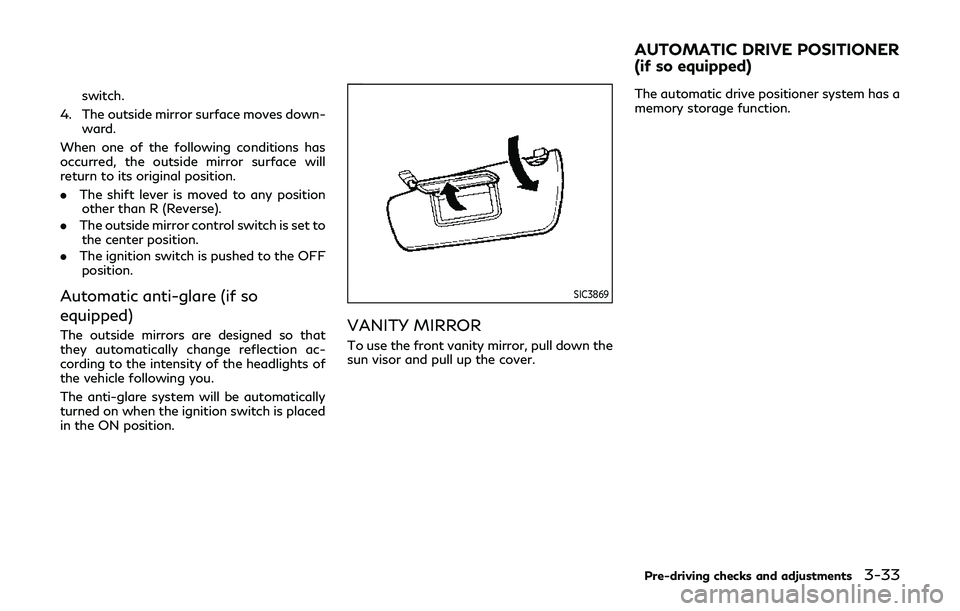
VANITY MIRROR
To use the front vanity mirror, pull down the
sun visor and pull up the cover. The automatic drive positioner system has a
memory storage function.
Pre-driving checks and adjustments3-33
AUTOMATIC DRIVE POSITIONER
(if so equipped)
Page 176 of 468
3-34Pre-driving checks and adjustments
JVP0462X
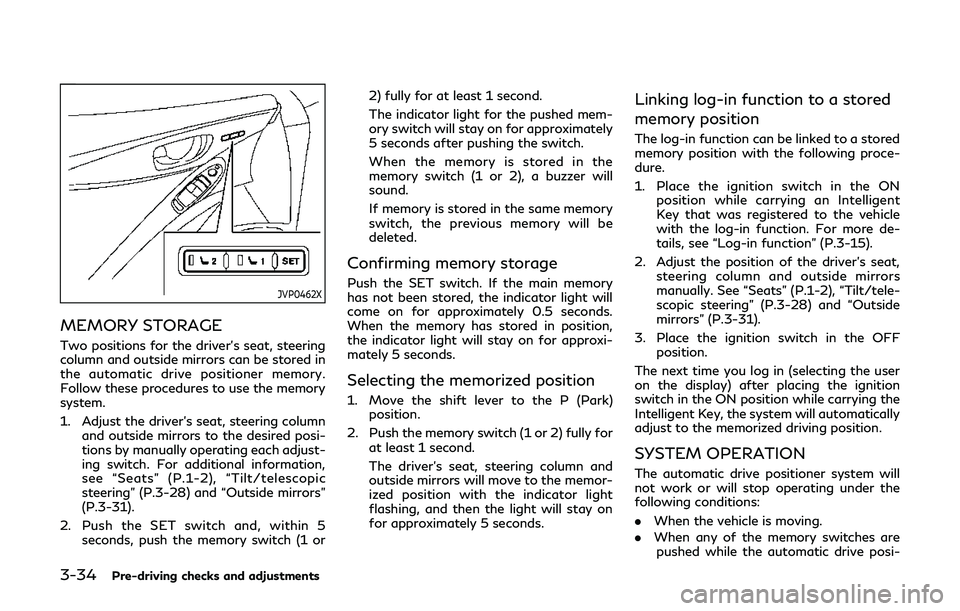
MEMORY STORAGE
Two positions for the driver’s seat, steering
column and outside mirrors can be stored in
the automatic drive positioner memory.
Follow these procedures to use the memory
system.
1. Adjust the driver’s seat, steering columnand outside mirrors to the desired posi-
tions by manually operating each adjust-
ing switch. For additional information,
see “Seats” (P.1-2), “Tilt/telescopic
steering” (P.3-28) and “Outside mirrors”
(P.3-31).
2. Push the SET switch and, within 5 seconds, push the memory switch (1 or 2) fully for at least 1 second.
The indicator light for the pushed mem-
ory switch will stay on for approximately
5 seconds after pushing the switch.
When the memory is stored in the
memory switch (1 or 2), a buzzer will
sound.
If memory is stored in the same memory
switch, the previous memory will be
deleted.
Confirming memory storage
Push the SET switch. If the main memory
has not been stored, the indicator light will
come on for approximately 0.5 seconds.
When the memory has stored in position,
the indicator light will stay on for approxi-
mately 5 seconds.
Selecting the memorized position
1. Move the shift lever to the P (Park)
position.
2. Push the memory switch (1 or 2) fully for at least 1 second.
The driver’s seat, steering column and
outside mirrors will move to the memor-
ized position with the indicator light
flashing, and then the light will stay on
for approximately 5 seconds.
Linking log-in function to a stored
memory position
The log-in function can be linked to a stored
memory position with the following proce-
dure.
1. Place the ignition switch in the ONposition while carrying an Intelligent
Key that was registered to the vehicle
with the log-in function. For more de-
tails, see “Log-in function” (P.3-15).
2. Adjust the position of the driver’s seat, steering column and outside mirrors
manually. See “Seats” (P.1-2), “Tilt/tele-
scopic steering” (P.3-28) and “Outside
mirrors” (P.3-31).
3. Place the ignition switch in the OFF position.
The next time you log in (selecting the user
on the display) after placing the ignition
switch in the ON position while carrying the
Intelligent Key, the system will automatically
adjust to the memorized driving position.
SYSTEM OPERATION
The automatic drive positioner system will
not work or will stop operating under the
following conditions:
. When the vehicle is moving.
. When any of the memory switches are
pushed while the automatic drive posi-
Page 196 of 468
5-14Starting and driving
JVS0404X
INTELLIGENT KEY BATTERY DIS-
CHARGE
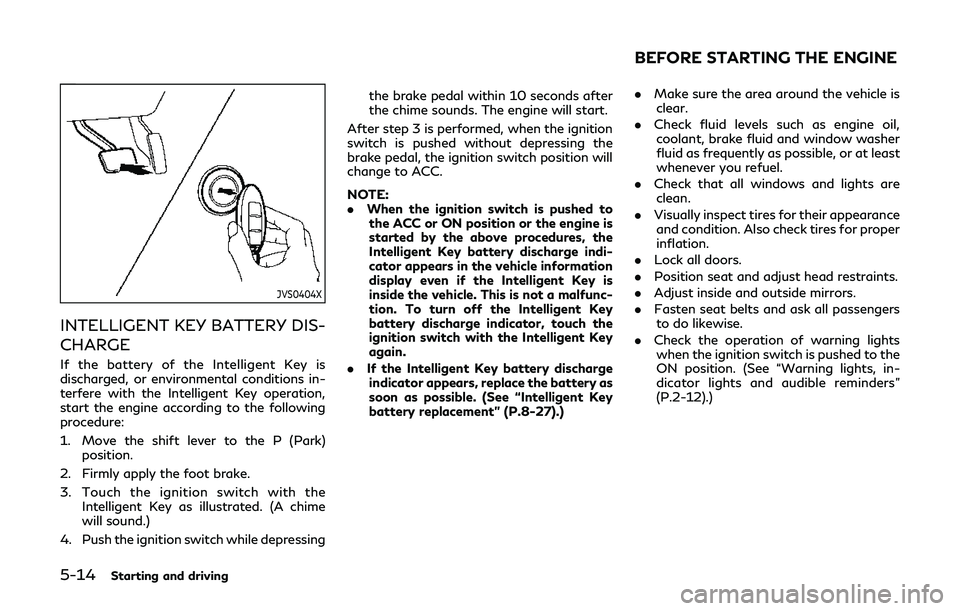
If the battery of the Intelligent Key is
discharged, or environmental conditions in-
terfere with the Intelligent Key operation,
start the engine according to the following
procedure:
1. Move the shift lever to the P (Park)position.
2. Firmly apply the foot brake.
3. Touch the ignition switch with the Intelligent Key as illustrated. (A chime
will sound.)
4. Push the ignition switch while depressing the brake pedal within 10 seconds after
the chime sounds. The engine will start.
After step 3 is performed, when the ignition
switch is pushed without depressing the
brake pedal, the ignition switch position will
change to ACC.
NOTE:
. When the ignition switch is pushed to
the ACC or ON position or the engine is
started by the above procedures, the
Intelligent Key battery discharge indi-
cator appears in the vehicle information
display even if the Intelligent Key is
inside the vehicle. This is not a malfunc-
tion. To turn off the Intelligent Key
battery discharge indicator, touch the
ignition switch with the Intelligent Key
again.
. If the Intelligent Key battery discharge
indicator appears, replace the battery as
soon as possible. (See “Intelligent Key
battery replacement” (P.8-27).)
. Make sure the area around the vehicle is
clear.
. Check fluid levels such as engine oil,
coolant, brake fluid and window washer
fluid as frequently as possible, or at least
whenever you refuel.
. Check that all windows and lights are
clean.
. Visually inspect tires for their appearance
and condition. Also check tires for proper
inflation.
. Lock all doors.
. Position seat and adjust head restraints.
. Adjust inside and outside mirrors.
. Fasten seat belts and ask all passengers
to do likewise.
. Check the operation of warning lights
when the ignition switch is pushed to the
ON position. (See “Warning lights, in-
dicator lights and audible reminders”
(P.2-12).)
BEFORE STARTING THE ENGINE
Page 210 of 468
5-28Starting and driving
JVS0251X
ACTIVE LANE CONTROL OP-
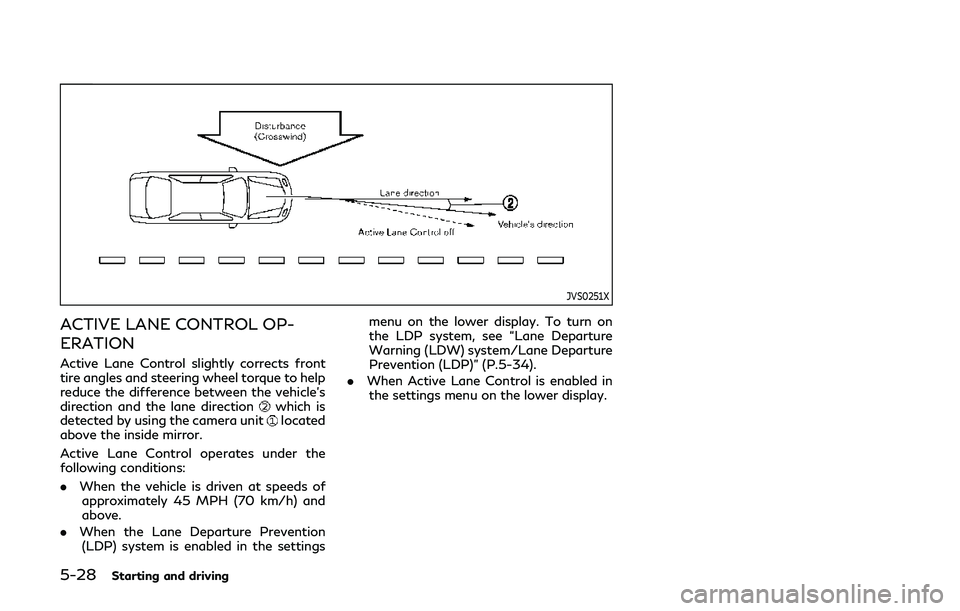
ERATION
Active Lane Control slightly corrects front
tire angles and steering wheel torque to help
reduce the difference between the vehicle’s
direction and the lane direction
which is
detected by using the camera unitlocated
above the inside mirror.
Active Lane Control operates under the
following conditions:
. When the vehicle is driven at speeds of
approximately 45 MPH (70 km/h) and
above.
. When the Lane Departure Prevention
(LDP) system is enabled in the settings menu on the lower display. To turn on
the LDP system, see “Lane Departure
Warning (LDW) system/Lane Departure
Prevention (LDP)” (P.5-34).
. When Active Lane Control is enabled in
the settings menu on the lower display.