mirror INFINITI Q60 2019 Owner's Manual
[x] Cancel search | Manufacturer: INFINITI, Model Year: 2019, Model line: Q60, Model: INFINITI Q60 2019Pages: 468, PDF Size: 2.18 MB
Page 215 of 468
Action to take:
If the chassis control warning appears, pull
off the road to a safe location and stop the
vehicle. Turn the engine off and restart the
engine. If the chassis control warning con-
tinues to appear, have Active Lane Control
checked. It is recommended you visit an
INFINITI retailer for this service.
JVS0823X
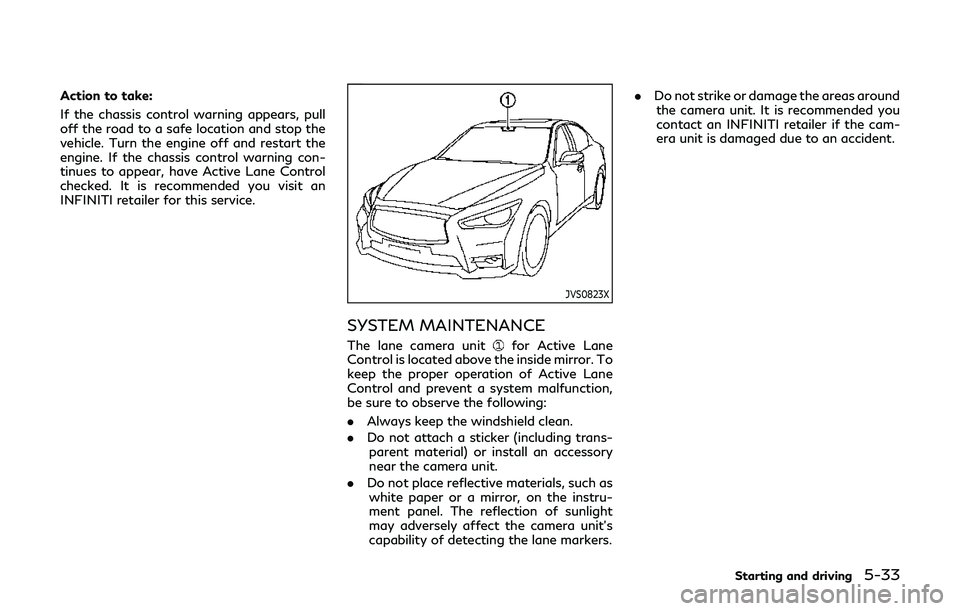
SYSTEM MAINTENANCE
The lane camera unitfor Active Lane
Control is located above the inside mirror. To
keep the proper operation of Active Lane
Control and prevent a system malfunction,
be sure to observe the following:
. Always keep the windshield clean.
. Do not attach a sticker (including trans-
parent material) or install an accessory
near the camera unit.
. Do not place reflective materials, such as
white paper or a mirror, on the instru-
ment panel. The reflection of sunlight
may adversely affect the camera unit’s
capability of detecting the lane markers. .
Do not strike or damage the areas around
the camera unit. It is recommended you
contact an INFINITI retailer if the cam-
era unit is damaged due to an accident.
Starting and driving5-33
Page 222 of 468
5-40Starting and driving
.When the VDC system is turned off.
. When the INFINITI Drive Mode Selector
is turned to the SNOW mode.
Action to take:
When the above conditions no longer exist,
push the dynamic driver assistance switch
again to turn the LDP system back on.
Condition B
LDW system: If the vehicle is parked in direct
sunlight under high temperature conditions
(over approximately 104°F (40°C)) and then
started, the LDW system may be deacti-
vated automatically. The “high cabin tem-
perature” warning message will appear in
the vehicle information display.
LDP system: If the vehicle is parked in direct
sunlight under high temperature conditions
(over approximately 104°F (40°C)) and then
the LDP system is turned on, the LDP
system may be deactivated automatically.
The “high cabin temperature” message will
appear in the vehicle information display.
The LDW and LDP systems are not available
until the conditions no longer exist.
Action to take:
When the above conditions no longer exist,
the LDW system will resume automatically.
For the LDP system, push the dynamic driver
assistance switch
again to turn the LDP system back on.
SYSTEM MALFUNCTION
LDW system:
If the LDW system malfunc-
tions, it will cancel automatically, and the
LDW “malfunction” message will appear in
the vehicle information display.
LDP system: If the LDP system malfunc-
tions, it will cancel automatically. The LDP
“malfunction” message will appear in the
vehicle information display.
Action to take:
Stop the vehicle in a safe location, place the
vehicle in the P (Park) position, turn the
engine off and restart the engine. If the
“malfunction” message continues to appear,
have the system checked. It is recommended
you visit an INFINITI retailer for this service.
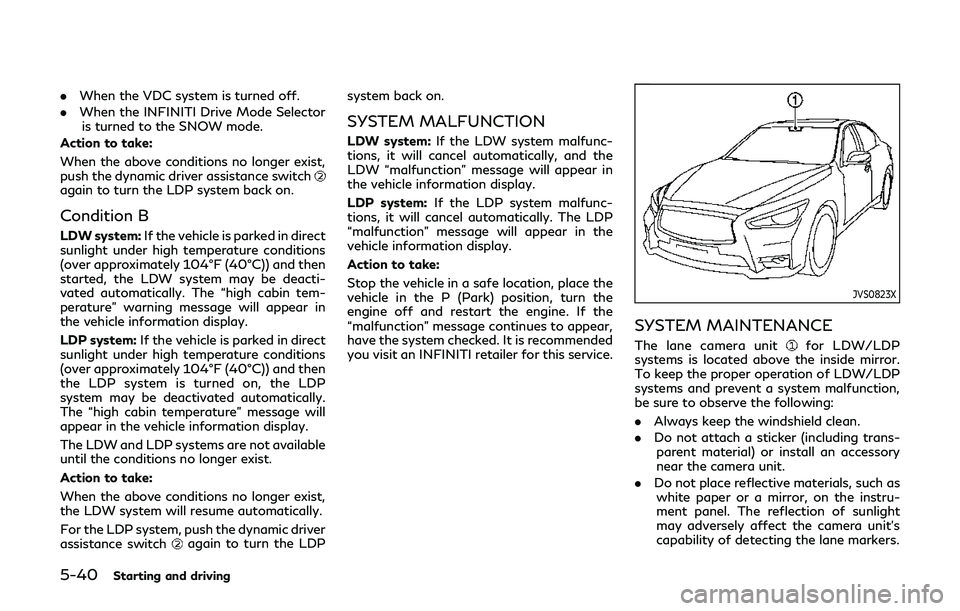
JVS0823X
SYSTEM MAINTENANCE
The lane camera unitfor LDW/LDP
systems is located above the inside mirror.
To keep the proper operation of LDW/LDP
systems and prevent a system malfunction,
be sure to observe the following:
. Always keep the windshield clean.
. Do not attach a sticker (including trans-
parent material) or install an accessory
near the camera unit.
. Do not place reflective materials, such as
white paper or a mirror, on the instru-
ment panel. The reflection of sunlight
may adversely affect the camera unit’s
capability of detecting the lane markers.
Page 223 of 468

.Do not strike or damage the areas around
the camera unit. It is recommended you
contact an INFINITI retailer if the cam-
era unit is damaged due to an accident.WARNING
Failure to follow the warnings and
instructions for proper use of the BSW
system could result in serious injury or
death.
. The BSW system is not a replacement
for proper driving procedure and is
not designed to prevent contact with
vehicles or objects. When changing
lanes, always use the side and rear
mirrors and turn and look in the
direction your vehicle will move to
ensure it is safe to change lanes.
Never rely solely on the BSW system.
. There is a limitation to the detection
capability of the radar. Not every
moving object or vehicle will be
detected. Using the BSW system
under some road, ground, lane mar-
ker, traffic or weather conditions
could lead to improper system opera-
tion. Always rely on your own opera-
tion to avoid accidents.
The BSW system helps alert the driver of
other vehicles in adjacent lanes when chan-
ging lanes.
JVS0863X
The BSW system uses radar sensorsinstalled near the rear bumper to detect
other vehicles in an adjacent lane.
Starting and driving5-41
BLIND SPOT WARNING (BSW) (if
so equipped)
Page 224 of 468

5-42Starting and driving
SSD1030
Detection zone
The radar sensors can detect vehicles on
either side of your vehicle within the detec-
tion zone shown as illustrated. This detec-
tion zone starts from the outside mirror of
your vehicle and extends approximately 10
ft (3.0 m) behind the rear bumper, and
approximately 10 ft (3.0 m) sideways.
JVS0827X
Side indicator light
Driver assist system blind spot indica-
tor (on the vehicle information display)
Lower display
Page 231 of 468

WARNING
Failure to follow the warnings and
instructions for proper use of the BSI
system could result in serious injury or
death.
.The BSI system is not a replacement
for proper driving procedures and is
not designed to prevent contact with
vehicles or objects. When changing
lanes, always use the side and rear
mirrors and turn and look in the
direction your vehicle will move to
ensure it is safe to change lanes.
Never rely solely on the BSI system.
. There is a limitation to the detection
capability of the radar. Not every
moving object or vehicle will be
detected. Using the BSI system under
some road, ground, lane marker,
traffic or weather conditions could
lead to improper system operation.
Always rely on your own operation to
avoid accidents.
The BSI system helps alert the driver of other
vehicles in adjacent lanes when changing
lanes, and helps assist the driver to return
the vehicle to the center of the traveling
lane.
JVS0864X
The BSI system uses radar sensorsinstalled near the rear bumper to detect
other vehicles in an adjacent lane. In addition
to the radar sensors, the BSI system uses a
camera
installed behind the windshield to
monitor the lane markers of your traveling
lane.
SSD1030
Detection zone
The radar sensors can detect vehicles on
either side of your vehicle within the detec-
tion zone shown as illustrated.
This detection zone starts from the outside
mirror of your vehicle and extends approxi-
mately 10 ft (3.0 m) behind the rear bumper,
and approximately 10 ft (3.0 m) sideways.
Starting and driving5-49
BLIND SPOT INTERVENTION®
(BSI) (if so equipped)
Page 243 of 468

Do not strike or damage the area around the
radar sensors.
It is recommended you visit an INFINITI
retailer if the area around the radar sensors
is damaged due to a collision.
The lane camera unit
for BSI system is
located above the inside mirror. To keep the
proper operation of BSI and prevent a
system malfunction, be sure to observe the
following:
. Always keep the windshield clean.
. Do not attach a sticker (including trans-
parent material) or install an accessory
near the camera unit.
. Do not place reflective materials, such as
white paper or a mirror, on the instru-
ment panel. The reflection of sunlight
may adversely affect the camera unit’s
capability of detecting the lane markers.
. Do not strike or damage the areas around
the camera unit. It is recommended you
contact an INFINITI retailer if the cam-
era unit is damaged due to an accident.
Radio frequency statement
For USA
This device complies with part 15 of the
FCC Rules.
Operation is subject to the following two
conditions: (1) This device may not cause harmful interference, and (2) this device
must accept any interference received, in-
cluding interference that may cause unde-
sired operation.
NOTE:
The manufacturer is not responsible for any
radio or TV interference caused by un-
authorized modifications to this equipment.
Such modifications could void the user’s
authority to operate the equipment.
For Canada
This device complies with Industry Canada
Standard RSS-310.
Operation is subject to the following two
conditions: (1) This device may not cause
harmful interference, and (2) this device
must accept any interference received, in-
cluding interference that may cause unde-
sired operation.
Frequency of operation: 24.05GHz —
24.25GHz
Field Strength: Not greater than 2.5V/m
peak (0.25V/m average) at a distance of 3
m
WARNING
Failure to follow the warnings and
instructions for proper use of the BCI
system could result in serious injury or
death.
.
The BCI system is not a replacement
for proper driving procedure, is not
designed to prevent contact with
vehicles or objects and does not
provide full brake power. When back-
ing out of parking spaces, always use
the inside and rear mirrors and turn
and look in the direction you will
move. Never rely solely on the BCI
system.
. There is a limitation to the detection
capability of the radar or the sonar.
Using the BCI system under some
road, ground, traffic or weather con-
ditions could lead to improper system
operation. Always rely on your own
operation to avoid accidents.
The BCI system can help alert the driver of
an approaching vehicle or objects behind the
vehicle when the driver is backing out of a
parking space.
Starting and driving5-61
BACK-UP COLLISION
INTERVENTION (BCI) (if so equipped)
Page 296 of 468

5-114Starting and driving
JVS0865X
SYSTEM MAINTENANCE
The radar sensoris located behind the
grille of the front bumper. The camerais
located on the upper side of the windshield.
To keep the FEB with pedestrian detection
system operating properly, be sure to ob-
serve the following:
. Always keep the sensor area of the front
grille and windshield clean.
. Do not strike or damage the areas around
the sensors (ex. grille, windshield).
. Do not cover or attach stickers, or install
any accessory near the sensors. This
could block sensor signals, and/or cause
failure or malfunction. .
Do not attach metallic objects near the
radar sensor area (brush guard, etc.).
This could cause failure or malfunction.
. Do not place reflective materials, such as
white paper or a mirror, on the instru-
ment panel. The reflection of sunlight
may adversely affect the camera unit’s
detection capability.
. Do not alter, remove or paint the front
bumper. It is recommended you contact
an INFINITI retailer before customizing
or restoring the front grille.
FCC Notice:
For USA:
This device complies with Part 15 of the
FCC Rules. Operation is subject to the
following two conditions:
1. This device may not cause harmful
interference, and
2. This device must accept any interfer-
ence received, including interference
that may cause undesired operation.
FCC Warning
Changes or modification not expressly ap-
proved by the party responsible for com-
pliance could void the user’s authority to
operate the equipment. For Canada:
This device complies with Industry Canada
licence-exempt RSS standard(s). Operation
is subject to the following two conditions:
1.
This device may not cause interference,
and
2. This device must accept any interfer-
ence, including interference that may
cause undesired operation of the device.
Page 392 of 468
8-30Do-it-yourself
HEADLIGHTS
If replacement is required, it is recommended
you visit an INFINITI retailer for this service.
Fog may temporarily form inside the lens of
the exterior lights in the rain or in a car wash.
A temperature difference between the inside
and the outside of the lens causes the fog.
This is not a malfunction. If large drops of
water collect inside the lens, it is recom-
mended you visit an INFINITI retailer for this
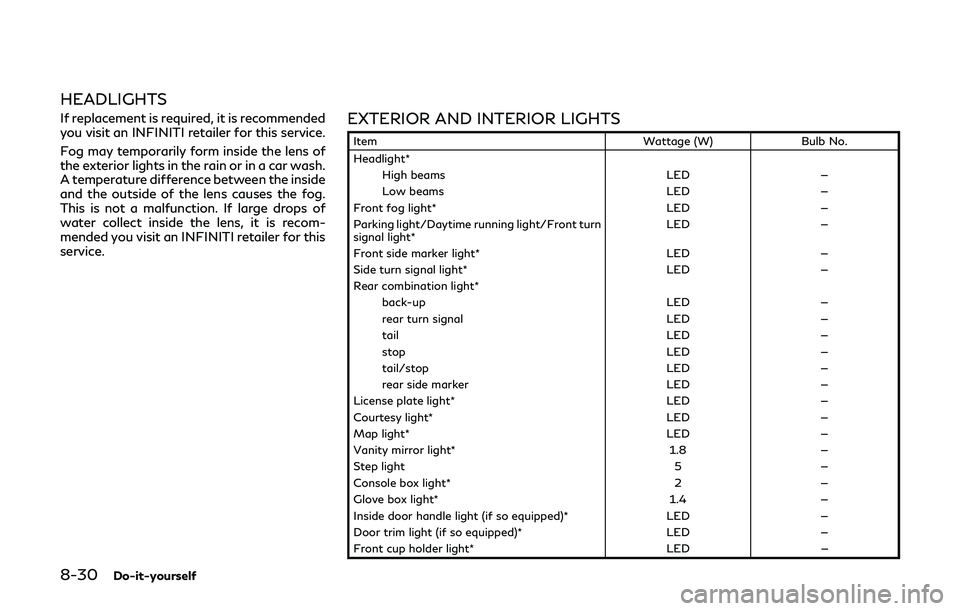
service.EXTERIOR AND INTERIOR LIGHTS
ItemWattage (W)Bulb No.
Headlight* High beams LED—
Low beams LED—
Front fog light* LED—
Parking light/Daytime running light/Front turn
signal light* LED
—
Front side marker light* LED—
Side turn signal light* LED—
Rear combination light* back-up LED—
rear turn signal LED—
tail LED—
stop LED—
tail/stop LED—
rear side marker LED—
License plate light* LED—
Courtesy light* LED—
Map light* LED—
Vanity mirror light* 1.8—
Step light 5—
Console box light* 2—
Glove box light* 1.4—
Inside door handle light (if so equipped)* LED—
Door trim light (if so equipped)* LED—
Front cup holder light* LED—
Page 458 of 468
11-2
Circuit breakerFusible link ....................................................... 8-25
Cleaning exterior and interior .................... 7-2, 7-5
Clock ...................................................................... 2-31
Coat hooks ............................................................ 2-51
Cockpit ...................................................................... 2-3
Cold weather driving ........................................ 5-143
Compact spare tire ............................................ 8-44
Compass .................................................................... 2-9
Console box ........................................................... 2-50
Coolant Capacities and
recommended fluids/lubricants ................. 10-2
Changing engine coolant ...................... 8-7, 8-9
Checking engine coolant level ............. 8-7, 8-8
Corrosion protection ............................................. 7-8
Courtesy light ....................................................... 2-59
Cruise control ........................................................ 5-71 Fixed speed cruise control (on
ICC system) .................................................... 5-90
Intelligent Cruise Control (ICC) ................. 5-73
Cruise indicator .................................................... 2-25
Cup holders ........................................................... 2-48
Current fuel consumption ................................. 2-30
D
Daytime running light system .......................... 2-42
Defroster switch
Rear window and outside mirror
defroster switch ............................................. 2-37
Dimensions .......................................................... 10-13 Direct Adaptive Steering ................................ 5-130
Distance Control Assist (DCA) ........................ 5-94
Distance to empty ............................................... 2-29
Drive belts .............................................................. 8-20
Drive positioner .................................................... 3-33
Driver assist system indicator .......................... 2-26
Driving
Cold weather driving ................................. 5-143
Driving with Automatic
Transmission (AT) .......................................... 5-16
Precautions when starting and driving ..... 5-4
E
ECO drive indicator light ................................... 2-18
ECO mode ............................................................. 5-23
ECO pedal system ............................................... 5-23
Economy Fuel .................................................................. 5-125
Elapsed time ......................................................... 2-29
Elapsed time and trip odometer ..................... 2-29
Emergency tire puncture repair kit .................... 6-9
Emission control information label ............... 10-16
Emission control system maintenance ............ 9-8
Emission control system warranty .............. 10-23
Engine Before starting the engine .......................... 5-14
Break-in schedule ....................................... 5-124
Capacities and
recommended fluids/lubricants ................. 10-2
Changing engine coolant ...................... 8-7, 8-9
Changing engine oil and filter .................... 8-11 Checking engine coolant level ............. 8-7, 8-8
Checking engine oil level ............................. 8-11
Coolant temperature gauge ......................... 2-8
Emergency engine shut off ......................... 5-13
Engine block heater ................................... 5-144
Engine compartment check locations ........ 8-4
Engine cooling system (2.0L turbo
gasoline engine models) ................................. 8-8
Engine cooling system (VR30DDTT
engine models) ................................................. 8-6
Engine oil ........................................................ 8-10
Engine oil and filter
replacement indicator ................................... 2-27
Engine oil and oil
filter recommendation ................................. 10-8
Engine serial number ................................. 10-15
Engine specifications .................................. 10-11
Engine start operation indicator ............... 2-23
If your vehicle overheats ............................. 6-21
Intercooler cooling system ............................ 8-9
Remote engine start .................................... 3-20
Remote engine start
operation indicator ........................................ 2-23
Starting the engine ....................................... 5-15
Engine coolant temperature gauge .................. 2-8
Event Data Recorders (EDR) ........................ 10-25
Exhaust gas (carbon monoxide) ........................ 5-4
Explanation of scheduled
maintenance items ................................................. 9-5
Page 460 of 468
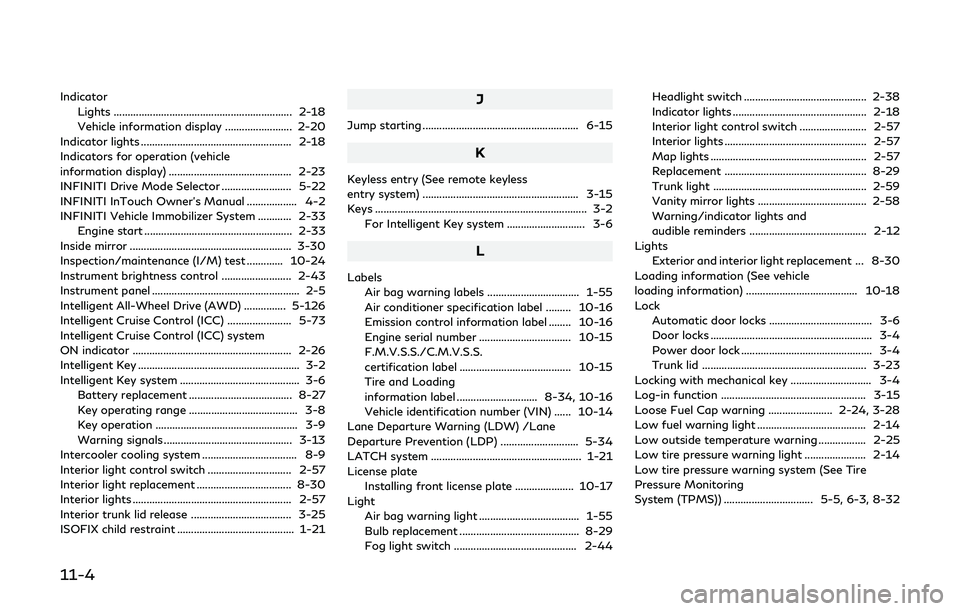
11-4
IndicatorLights ................................................................ 2-18
Vehicle information display ........................ 2-20
Indicator lights ...................................................... 2-18
Indicators for operation (vehicle
information display) ............................................ 2-23
INFINITI Drive Mode Selector ......................... 5-22
INFINITI InTouch Owner’s Manual .................. 4-2
INFINITI Vehicle Immobilizer System ............ 2-33 Engine start ..................................................... 2-33
Inside mirror .......................................................... 3-30
Inspection/maintenance (I/M) test ............. 10-24
Instrument brightness control ......................... 2-43
Instrument panel ..................................................... 2-5
Intelligent All-Wheel Drive (AWD) ............... 5-126
Intelligent Cruise Control (ICC) ....................... 5-73
Intelligent Cruise Control (ICC) system
ON indicator ......................................................... 2-26
Intelligent Key .......................................................... 3-2
Intelligent Key system ........................................... 3-6 Battery replacement ..................................... 8-27
Key operating range ....................................... 3-8
Key operation ................................................... 3-9
Warning signals .............................................. 3-13
Intercooler cooling system .................................. 8-9
Interior light control switch .............................. 2-57
Interior light replacement .................................. 8-30
Interior lights ......................................................... 2-57
Interior trunk lid release .................................... 3-25
ISOFIX child restraint .......................................... 1-21J
Jump starting ........................................................ 6-15
K
Keyless entry (See remote keyless
entry system) ........................................................ 3-15
Keys ........................................................................\
.... 3-2
For Intelligent Key system ............................ 3-6
L
LabelsAir bag warning labels ................................. 1-55
Air conditioner specification label ......... 10-16
Emission control information label ........ 10-16
Engine serial number ................................. 10-15
F.M.V.S.S./C.M.V.S.S.
certification label ........................................ 10-15
Tire and Loading
information label ............................. 8-34, 10-16
Vehicle identification number (VIN) ...... 10-14
Lane Departure Warning (LDW) /Lane
Departure Prevention (LDP) ............................ 5-34
LATCH system ...................................................... 1-21
License plate
Installing front license plate ..................... 10-17
Light
Air bag warning light .................................... 1-55
Bulb replacement ........................................... 8-29
Fog light switch ............................................ 2-44 Headlight switch ............................................ 2-38
Indicator lights ................................................ 2-18
Interior light control switch ........................ 2-57
Interior lights ................................................... 2-57
Map lights ........................................................ 2-57
Replacement ................................................... 8-29
Trunk light ....................................................... 2-59
Vanity mirror lights ....................................... 2-58
Warning/indicator lights and
audible reminders .......................................... 2-12
Lights Exterior and interior light replacement ... 8-30
Loading information (See vehicle
loading information) ........................................ 10-18
Lock Automatic door locks ..................................... 3-6
Door locks .......................................................... 3-4
Power door lock ............................................... 3-4
Trunk lid ........................................................... 3-23
Locking with mechanical key ............................. 3-4
Log-in function .................................................... 3-15
Loose Fuel Cap warning ....................... 2-24, 3-28
Low fuel warning light ....................................... 2-14
Low outside temperature warning ................. 2-25
Low tire pressure warning light ...................... 2-14
Low tire pressure warning system (See Tire
Pressure Monitoring
System (TPMS)) ................................ 5-5, 6-3, 8-32