warning lights INFINITI Q60 2019 User Guide
[x] Cancel search | Manufacturer: INFINITI, Model Year: 2019, Model line: Q60, Model: INFINITI Q60 2019Pages: 468, PDF Size: 2.18 MB
Page 162 of 468
3-20Pre-driving checks and adjustments
WARNING
To avoid risk of injury or death, do not
use the remote engine start function
when the vehicle is in an enclosed area
such as a garage.
JVP0437X
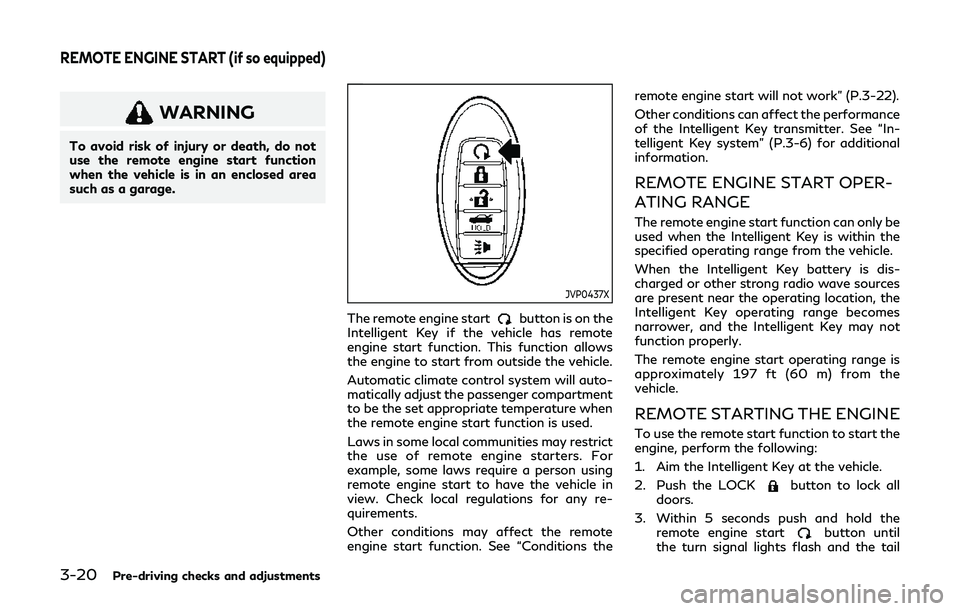
The remote engine startbutton is on the
Intelligent Key if the vehicle has remote
engine start function. This function allows
the engine to start from outside the vehicle.
Automatic climate control system will auto-
matically adjust the passenger compartment
to be the set appropriate temperature when
the remote engine start function is used.
Laws in some local communities may restrict
the use of remote engine starters. For
example, some laws require a person using
remote engine start to have the vehicle in
view. Check local regulations for any re-
quirements.
Other conditions may affect the remote
engine start function. See “Conditions the remote engine start will not work” (P.3-22).
Other conditions can affect the performance
of the Intelligent Key transmitter. See “In-
telligent Key system” (P.3-6) for additional
information.
REMOTE ENGINE START OPER-
ATING RANGE
The remote engine start function can only be
used when the Intelligent Key is within the
specified operating range from the vehicle.
When the Intelligent Key battery is dis-
charged or other strong radio wave sources
are present near the operating location, the
Intelligent Key operating range becomes
narrower, and the Intelligent Key may not
function properly.
The remote engine start operating range is
approximately 197 ft (60 m) from the
vehicle.
REMOTE STARTING THE ENGINE
To use the remote start function to start the
engine, perform the following:
1. Aim the Intelligent Key at the vehicle.
2. Push the LOCK
button to lock all
doors.
3. Within 5 seconds push and hold the remote engine start
button until
the turn signal lights flash and the tail
REMOTE ENGINE START (if so equipped)
Page 163 of 468
lights illuminate. If the vehicle is not
within view, push and hold the remote
engine start
button for at least 2
seconds.
The following events will occur when the
engine starts:
. The front parking lights will turn on and
remain on as long as the engine is
running.
. The doors will be locked and the air
conditioner system may turn on.
. The engine will continue to run for about
10 minutes. Repeat the steps to extend
the time for an additional 10 minutes.
See “Extending engine run time” (P.3-
21).
. The rear window glass and outside mirror
defroster may turn on automatically
when the outside air temperature, the
interior temperature and the engine
coolant temperature are low.
Depress and hold the brake pedal, then place
the ignition switch in the ON position before
driving. For further instructions, see “Driving
the vehicle” (P.5-16).
EXTENDING ENGINE RUN TIME
The remote engine start function can be
extended one time by performing the steps
listed in “Remote starting the engine” (P.3-
20). Run time will be calculated as follows:
. The first 10 minute run time will start
when the remote engine start function is
performed.
. The second 10 minutes will start imme-
diately when the remote engine start
function is performed. For example, if
the engine has been running for 5
minutes, and 10 minutes are added, the
engine will run for a total of 15 minutes.
. Extending engine run time will count
towards the two remote engine start
limit.
A maximum of two remote engine starts, or
a single start with an extension, are allowed
between ignition cycles.
The ignition switch must be cycled to the ON
position and then back to the OFF position
before the remote engine start procedure
can be used again.
CANCELING A REMOTE ENGINE
START
To cancel a remote engine start, perform one
of the following:
. Aim the Intelligent Key at the vehicle and
push and hold the remote engine start
button until the parking lights turn
off.
. Turn on the hazard warning flashers.
. Cycle the ignition switch ON and then
OFF.
. The extended engine run time has ex-
pired.
. The first 10 minute timer has expired.
. The engine hood has been opened.
. The shift lever is moved out of P (Park).
. The alarm sounds due to illegal entry into
the vehicle.
. The ignition switch is pushed without an
Intelligent Key in the vehicle.
. The ignition switch is pushed with an
Intelligent Key in the vehicle but the
brake pedal is not depressed.
Pre-driving checks and adjustments3-21
Page 164 of 468
3-22Pre-driving checks and adjustments
CONDITIONS THE REMOTE EN-
GINE START WILL NOT WORK
The remote engine start will not operate if
any of the following conditions are present:
.The ignition switch is placed in the ON
position.
. The hood is not securely closed.
. The hazard warning lights are on.
. The engine is still running. The engine
must be completely stopped. Wait at
least 6 seconds if the engine goes from
running to off. This is not applicable
when extending engine run time.
. The remote engine start
button is
not pushed and held for at least 2
seconds.
. The remote engine start
button is
not pushed and held within 5 seconds of
pushing LOCK
button.
. The brake pedal is depressed.
. The doors are not closed and locked.
. The trunk is open.
. The Intelligent Key warning message is
displayed in the vehicle information dis-
play.
. The alarm sounds due to illegal entry into
the vehicle.
. Two remote engine starts, or a single
remote engine start with an extension,
have already been used. .
The vehicle is not in P (Park).
. The remote engine start function has
been switched to OFF in the settings
menu on the lower display. For additional
information, see the INFINITI InTouch
TM
Owner’s Manual.
The remote engine start may display a
warning or indicator in the vehicle informa-
tion display. For an explanation of the
warning or indicator, see “Indicators for
operation” (P.2-23).
Page 172 of 468
3-30Pre-driving checks and adjustments
2. To block glare from the side, remove thesun visor from the center mount and
swing the visor to the side
.
3. Slide the sun visor
in or out as needed
(for driver’s side only).
SPA2447
INSIDE MIRROR
Adjust the height and the angle of the inside
mirror to the desired position.
SPA2143
Manual anti-glare type
The night positionwill reduce glare from
the headlights of vehicles behind you at
night.
Use the day position
when driving in
daylight hours.
WARNING
Use the night position only when neces-
sary, because it reduces rear view clarity.
MIRRORS
Page 173 of 468

SPA2422A
Type A (if so equipped)
SPA2450
Type B (if so equipped)
Automatic anti-glare type
The inside mirror is designed so that it
automatically changes reflection according
to the intensity of the headlights of the
following vehicle.
The anti-glare system will be automatically
turned on when the ignition switch is placed
in the ON position.
The anti-glare system also operates for the
outside mirrors (if so equipped).
When the anti-glare system is turned on, the
indicator light
will illuminate and excessive
glare from the headlights of the vehicle
behind you will be reduced.
Type A (if so equipped): Push the
switchto make the inside mirror operate normally
and the indicator light will turn off. Push the
switchagain to turn the system on.
Type B (if so equipped): Push the “*” switch
to make the inside mirror operate nor-
mally. The indicator light will turn off. Push
the “I” switch
to turn the system on.
Do not allow any object to cover the sensors
or apply glass cleaner on them. Doing so
will reduce the sensitivity of the sensor,
resulting in improper operation.
For the compass (if so equipped) operation,
see “Compass” (P.2-9).
For the HomeLink
®Universal Transceiver (if so equipped) operation, see “HomeLink
®
Universal Transceiver” (P.2-59).
OUTSIDE MIRRORS
WARNING
Objects viewed in the outside mirror on
the passenger side are closer than they
appear. Be careful when moving to the
right. Using only this mirror could cause
an accident. Use the inside mirror or
glance over your shoulder to properly
judge distances to other objects.
Pre-driving checks and adjustments3-31
Page 196 of 468
5-14Starting and driving
JVS0404X
INTELLIGENT KEY BATTERY DIS-
CHARGE
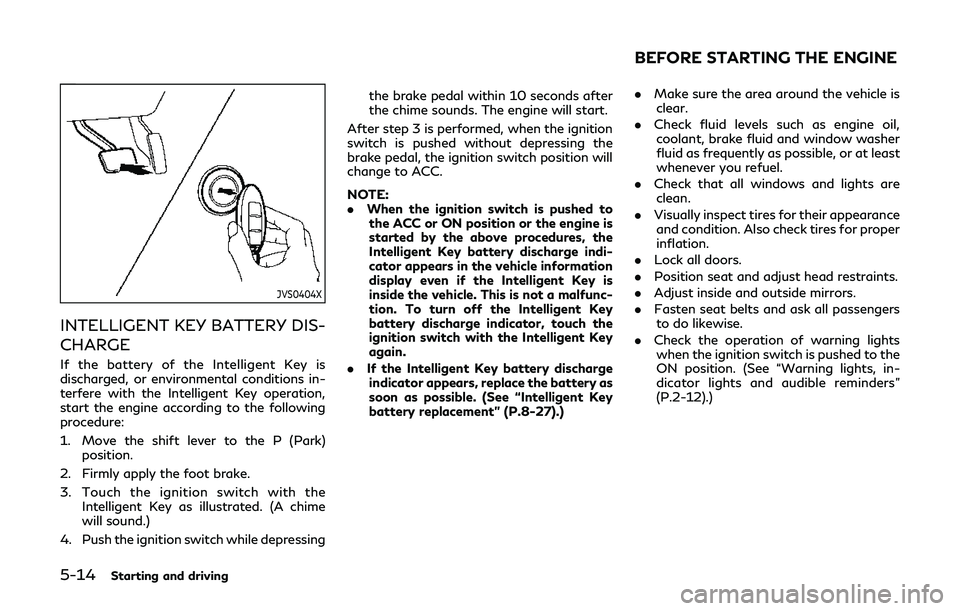
If the battery of the Intelligent Key is
discharged, or environmental conditions in-
terfere with the Intelligent Key operation,
start the engine according to the following
procedure:
1. Move the shift lever to the P (Park)position.
2. Firmly apply the foot brake.
3. Touch the ignition switch with the Intelligent Key as illustrated. (A chime
will sound.)
4. Push the ignition switch while depressing the brake pedal within 10 seconds after
the chime sounds. The engine will start.
After step 3 is performed, when the ignition
switch is pushed without depressing the
brake pedal, the ignition switch position will
change to ACC.
NOTE:
. When the ignition switch is pushed to
the ACC or ON position or the engine is
started by the above procedures, the
Intelligent Key battery discharge indi-
cator appears in the vehicle information
display even if the Intelligent Key is
inside the vehicle. This is not a malfunc-
tion. To turn off the Intelligent Key
battery discharge indicator, touch the
ignition switch with the Intelligent Key
again.
. If the Intelligent Key battery discharge
indicator appears, replace the battery as
soon as possible. (See “Intelligent Key
battery replacement” (P.8-27).)
. Make sure the area around the vehicle is
clear.
. Check fluid levels such as engine oil,
coolant, brake fluid and window washer
fluid as frequently as possible, or at least
whenever you refuel.
. Check that all windows and lights are
clean.
. Visually inspect tires for their appearance
and condition. Also check tires for proper
inflation.
. Lock all doors.
. Position seat and adjust head restraints.
. Adjust inside and outside mirrors.
. Fasten seat belts and ask all passengers
to do likewise.
. Check the operation of warning lights
when the ignition switch is pushed to the
ON position. (See “Warning lights, in-
dicator lights and audible reminders”
(P.2-12).)
BEFORE STARTING THE ENGINE
Page 214 of 468
5-32Starting and driving
— When the vehicle’s traveling di-rection does not align with the
lane marker.
— When traveling close to the ve- hicle in front of you, which ob-
structs the lane camera unit
detection range.
— When rain, snow, dirt or object adheres to the windshield in front
of the lane camera unit.
— When the headlights are not bright due to dirt on the lens or
if the aiming is not adjusted
properly.
— When strong light enters the lane camera unit. (For example, the
light directly shines on the front
of the vehicle at sunrise or sun-
set.)
— When a sudden change in bright- ness occurs. (For example, when
the vehicle enters or exits a tunnel
or under a bridge.)
— When entering or exiting toll- gates.
— When driving on roads with a widening or narrowing lane width.
JVS0824X
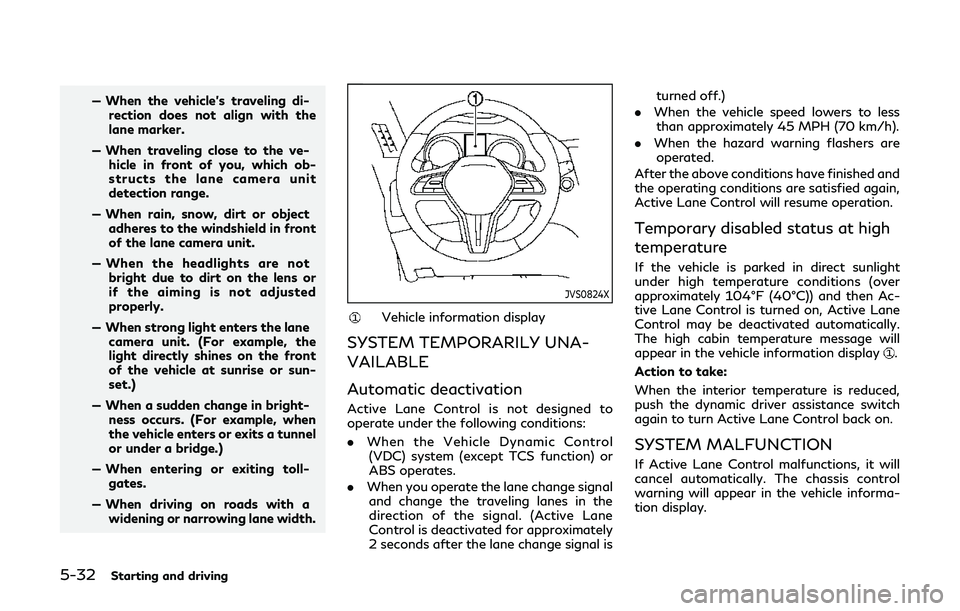
Vehicle information display
SYSTEM TEMPORARILY UNA-
VAILABLE
Automatic deactivation
Active Lane Control is not designed to
operate under the following conditions:
. When the Vehicle Dynamic Control
(VDC) system (except TCS function) or
ABS operates.
. When you operate the lane change signal
and change the traveling lanes in the
direction of the signal. (Active Lane
Control is deactivated for approximately
2 seconds after the lane change signal is turned off.)
. When the vehicle speed lowers to less
than approximately 45 MPH (70 km/h).
. When the hazard warning flashers are
operated.
After the above conditions have finished and
the operating conditions are satisfied again,
Active Lane Control will resume operation.
Temporary disabled status at high
temperature
If the vehicle is parked in direct sunlight
under high temperature conditions (over
approximately 104°F (40°C)) and then Ac-
tive Lane Control is turned on, Active Lane
Control may be deactivated automatically.
The high cabin temperature message will
appear in the vehicle information display
.
Action to take:
When the interior temperature is reduced,
push the dynamic driver assistance switch
again to turn Active Lane Control back on.
SYSTEM MALFUNCTION
If Active Lane Control malfunctions, it will
cancel automatically. The chassis control
warning will appear in the vehicle informa-
tion display.
Page 221 of 468
dows, snow, water, wheel ruts,
seams or lines remaining after
road repairs. (The LDW and LDP
systems could detect these items
as lane markers.)
— On roads where the traveling lane merges or separates.
— When the vehicle’s traveling di- rection does not align with the
lane marker.
— When traveling close to the ve- hicle in front of you, which ob-
structs the lane camera unit
detection range.
— When rain, snow or dirt adheres to the windshield in front of the
lane camera unit.
— When the headlights are not bright due to dirt on the lens or
if the aiming is not adjusted
properly.
— When strong light enters the lane camera unit. (For example, the
light directly shines on the front
of the vehicle at sunrise or sun-
set.)
— When a sudden change in bright- ness occurs. (For example, when
the vehicle enters or exits a tunnel or under a bridge.)
JVS0826X
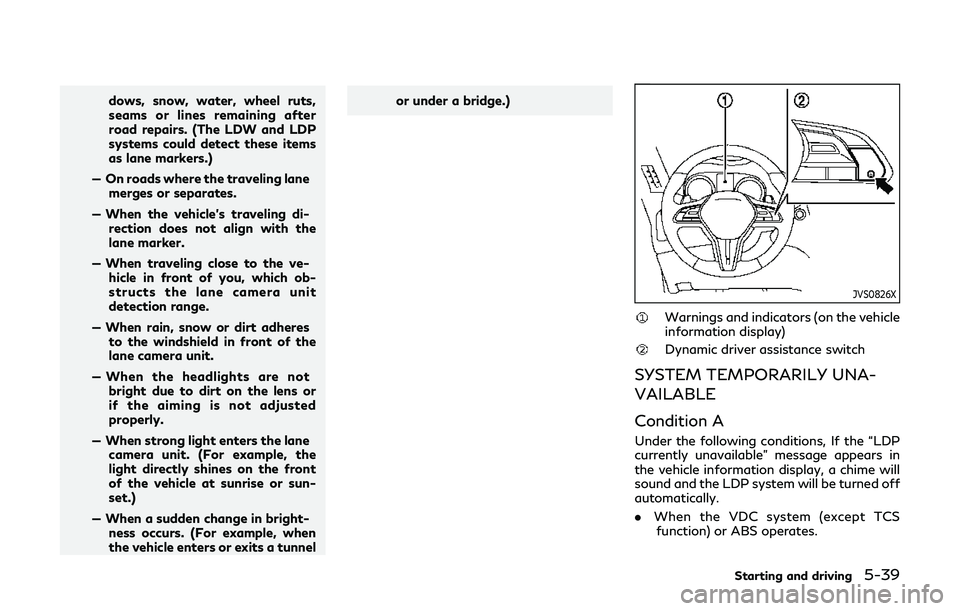
Warnings and indicators (on the vehicle
information display)
Dynamic driver assistance switch
SYSTEM TEMPORARILY UNA-
VAILABLE
Condition A
Under the following conditions, If the “LDP
currently unavailable” message appears in
the vehicle information display, a chime will
sound and the LDP system will be turned off
automatically.
.
When the VDC system (except TCS
function) or ABS operates.
Starting and driving5-39
Page 225 of 468

BSW SYSTEM OPERATION
The BSW system operates above approxi-
mately 20 MPH (32 km/h).
If the radar sensors detect a vehicle in the
detection zone, the side indicator light
illuminates.
If the turn signal is then activated, the
system chimes (twice) and the side indicator
light flashes. The side indicator light con-
tinues to flash until the detected vehicle
leaves the detection zone.
NOTE:
.The side indicator lights illuminate for a
few seconds when the ignition switch is
placed in the ON position.
. The brightness of the side indicator
lights is adjusted automatically depend-
ing on the brightness of the ambient
light.
. If a vehicle comes into the detection zone
after the driver activates the turn
signal, then only the side indicator light
flashes and no chime sounds. (See “BSW
driving situations” (P.5-44).)
JVS0246X
HOW TO ENABLE/DISABLE THE
BSW SYSTEM
Perform the following steps to enable or
disable the BSW system.
1. Push the MENU button
and touch
[Driver Assistance] on the lower display.
2. Touch [Blind Spot Assist].
3. Touch [Blind Spot Warning] to enable or disable the system.
Setting the side indicator light
brightness
The brightness of the side indicator lights
can be changed using the following steps: 1. Push the MENU button
and touch
[Driver Assistance] on the lower display.
2. Touch [Blind Spot Assist].
3. Touch [+] or [-] in [Side Indicator Bright- ness] to select [Bright], [Standard] or
[Dark].
When the brightness setting is changed, the
side indicator lights illuminate for a few
seconds.
BSW SYSTEM LIMITATIONS
WARNING
Listed below are the system limitations
for the BSW system. Failure to operate
the vehicle in accordance with these
system limitations could result in serious
injury or death.
. The BSW system cannot detect all
vehicles under all conditions.
. The radar sensors may not be able to
detect and activate BSW when cer-
tain objects are present such as:
— Pedestrians, bicycles, animals.
— Vehicles such as motorcycles, low height vehicles, or high ground
clearance vehicles.
Starting and driving5-43
Page 235 of 468
![INFINITI Q60 2019 User Guide JVS0246X
HOW TO ENABLE/DISABLE THE
BSI SYSTEM
Perform the following steps to enable or
disable the BSI system.
1. Push the MENU button
and touch
[Driver Assistance] on the lower display.
2. Touch [Bli](/img/42/41096/w960_41096-234.png "INFINITI Q60 2019 User Guide JVS0246X
HOW TO ENABLE/DISABLE THE
BSI SYSTEM
Perform the following steps to enable or
disable the BSI system.
1. Push the MENU button
and touch
[Driver Assistance] on the lower display.
2. Touch [Bli")
JVS0246X
HOW TO ENABLE/DISABLE THE
BSI SYSTEM
Perform the following steps to enable or
disable the BSI system.
1. Push the MENU button
and touch
[Driver Assistance] on the lower display.
2. Touch [Blind Spot Assist].
3. Touch [Blind Spot Intervention] to en- able or disable the system.
Setting the side indicator light
brightness
The brightness of the side indicator lights
can be changed using the following steps:
1. Push the MENU button
and touch
[Driver Assistance] on the lower display.
2. Touch [Blind Spot Assist].
3. Touch [+] or [-] in [Side Indicator Bright- ness] to select [Bright], [Standard] or
[Dark].
When the brightness setting is changed, the
side indicator lights illuminate for a few
seconds.
BSI SYSTEM LIMITATIONS
WARNING
Listed below are the system limitations
for the BSI system. Failure to operate
the vehicle in accordance with these
system limitations could result in serious
injury or death.
. The BSI system cannot detect all
vehicles under all conditions.
. The radar sensors may not be able to
detect and activate BSI when certain
objects are present such as: — Pedestrians, bicycles, animals.
— Vehicles such as motorcycles, low
height vehicles, or high ground
clearance vehicles.
— Vehicles remaining in the detec- tion zone when you accelerate
from a stop.
— Oncoming vehicles.
— A vehicle merging into an adja- cent lane at a speed approxi-
mately the same as your vehicle.
— A vehicle approaching rapidly from behind.
— A vehicle which your vehicle over- takes rapidly.
— A vehicle that passes through the detection zone quickly.
. The radar sensor’s detection zone is
designed based on a standard lane
width. When driving in a wider lane,
the radar sensors may not detect
vehicles in an adjacent lane. When
driving in a narrow lane, the radar
sensors may detect vehicles driving
two lanes away.
. The radar sensors are designed to
ignore most stationary objects, how-
ever objects such as guardrails, walls,
Starting and driving5-53