service INFINITI Q60 2019 Owner's Manual
[x] Cancel search | Manufacturer: INFINITI, Model Year: 2019, Model line: Q60, Model: INFINITI Q60 2019Pages: 468, PDF Size: 2.18 MB
Page 102 of 468
2-24Instruments and controls
reaches the empty (0) position.
There is a small reserve of fuel remaining in
the tank when the fuel gauge reaches the
empty (0) position.
11. Low washer fluid warning
This warning appears when the washer tank
fluid is at a low level. Add washer fluid as
necessary. (See “Window washer fluid” (P.8-
15).)
12. Door/trunk open warning
This warning appears if any of the doors
and/or the trunk lid are open or not closed
securely. The vehicle icon indicates which
door or the trunk lid is open on the display.
13. Intelligent Key system warning
This warning appears if there is a malfunc-
tion in the Intelligent Key system.
If this warning appears while the engine is
stopped, the engine cannot be started. If this
warning appears while the engine is running,
the vehicle can be driven. However, in these
cases, have the system checked as soon as
possible. It is recommended you visit an
INFINITI retailer for this service.
14. Loose Fuel Cap warning
This warning appears when the fuel-filler
cap is not tightened correctly after thevehicle has been refueled. (See “Fuel-filler
cap” (P.3-26).)
15. Tire Pressure Low - Add Air
warning
This warning appears when the low tire
pressure warning light in the meter illumi-
nates and low tire pressure is detected. The
warning appears each time the ignition
switch is placed in the ON position as long
as the low tire pressure warning light
remains illuminated. If this warning appears,
stop the vehicle and adjust the pressure to
the recommended COLD tire pressure
shown on the Tire and Loading Information
label. (See “Low tire pressure warning light”
(P.2-14) and “Tire Pressure Monitoring
System (TPMS)” (P.5-5).)
16. Flat Tire - Visit dealer warning
(if so equipped)
This warning appears when the low tire
pressure warning light in the meter illumi-
nates and one or more flat tires are detected
while driving. A chime also sounds for
approximately 10 seconds. (See “Low tire
pressure warning light” (P.2-14) and “Tire
Pressure Monitoring System (TPMS)” (P.5-
5).)
17. Low oil pressure warning (for
VR30DDTT engine models)
This warning appears if low engine oil
pressure is detected. If the warning appears
during normal driving, pull off the road in a
safe area, stop the engine immediately and
call an INFINITI retailer or other authorized
repair shop.
The low oil pressure warning is not designed
to indicate a low oil level. Use the dipstick to
check the oil level. (See “Engine oil” (P.8-
10).)
18. Low oil level warning (for 2.0L
turbo gasoline engine models)
This warning appears if low engine oil level is
detected. If this warning appears, check the
oil level using the dipstick. (See “Engine oil”
(P.8-10).)
CAUTION
The oil level should be checked regularly
using the engine oil dipstick. Operating
with an insufficient amount of oil can
damage the engine and such damage is
not covered by the warranty.
Page 112 of 468

2-34Instruments and controls
FCC Notice:
For USA:
This device complies with Part 15 of the
FCC Rules. Operation is subject to the
following two conditions: (1) This device
may not cause harmful interference, and (2)
this device must accept any interference
received, including interference that may
cause undesired operation.
NOTE:
Changes or modifications not expressly
approved by the party responsible for
compliance could void the user’s authority
to operate the equipment.
For Canada:
This device complies with Industry Canada
licence-exempt RSS standard(s). Operation
is subject to the following two conditions:
(1) this device may not cause interference,
and (2) this device must accept any inter-
ference, including interference that may
cause undesired operation of the device.
SIC2045
Security indicator light
The security indicator light is located on the
meter panel. It indicates the status of the
INFINITI Vehicle Immobilizer System.
The light blinks after the ignition switch was
in the LOCK, ACC or OFF position. This
function indicates the security systems
equipped on the vehicle are operational.
If the INFINITI Vehicle Immobilizer System is
malfunctioning, this light will remain on
while the ignition switch is in the ON
position.
If the light still remains on and/or the
engine will not start, seek service for the
INFINITI Vehicle Immobilizer System assoon as possible. Please bring all registered
keys that you have. It is recommended you
visit an INFINITI retailer for this service.
Page 114 of 468

2-36Instruments and controls
The windshield wiper and washer operates
when the ignition switch is in the ON
position.
Push the lever down to operate the wiper at
the following speed:
INT (Type A) (if so equipped) — inter-
mittent operation can be adjusted by
turning the knob toward
(Slower) or(Faster). When the speed sensing
wiper interval function is turned on, the
intermittent operation speed varies in
accordance with the vehicle speed. (For
example, when the vehicle speed is
high, the intermittent operation speed
will be faster.) To turn this function on
and off, see the INFINITI InTouch
TM
Owner’s Manual.
AUTO (Type B) (if so equipped) — For
models with the rain-sensing auto
wiper system, see “Rain-sensing auto
wiper system” (P.2-36).
LO — continuous low speed operation
HI — continuous high speed operation
MIST — one sweep operation of the
wiper
Pull the lever toward you
to operate the
washer. Then the wiper will also operate
several times.
Pulling up the wiper arm:
The wiper arm should be in the up position when replacing the windshield wiper blade.
To replace the windshield wiper blades,
follow the procedure below:
1. When the ignition switch is ON or within
60 seconds after placing the ignition
switch from the ON to OFF position,
place the windshield wiper and washer
lever into the OFF position.
2. Rapidly lift the lever
upwards twice
within 0.5 seconds. This action will cause
the wipers to automatically take the
service position.
To return the wiper arm, place the wiper arm
in the down position and operate the wiper
switch once.
CAUTION
Do not operate the windshield wiper
while the wiper arm is pulled up. The
wiper arm may be damaged.
Wiper drip wipe system:
The wiper will also operate once about 3
seconds after the washer and wiper are
operated. This operation is to wipe washer
fluid that has dripped on the windshield.
JVI0739X
RAIN-SENSING AUTO WIPER
SYSTEM (if so equipped)
The rain-sensing auto wiper system can
automatically turn on the wipers and adjust
the wiper speed depending on the rainfall
and the vehicle speed by using the rain
sensor located on the upper part of the
windshield.
To set the rain-sensing auto wiper system,
push the lever down to the AUTO position
. The wiper will sweep once while the
ignition switch is in the ON position.
The rain sensor sensitivity level can be
adjusted by turning the knob toward
(High) or toward(Low).
Page 121 of 468

for this service. When the engine is started,
the headlights will vibrate to check the
system condition. This is not a malfunction.
JVI0644X
JVI0937X
Instrument brightness control
The instrument brightness control switch
can be operated when the ignition switch is
in the ON position. When the switch is
operated, the vehicle information display
switches to the brightness adjustment
mode.
Push the + side of the switch
to brighten
the instrument panel lights. The barmoves
to the + side.
Push the - side of the switch
to dim the
instrument panel lights. The barmoves to
the − side. When the brightness level reaches
the minimum, the instrument panel lights will
turn off during the nighttime.
When the brightness level reaches the max-
imum or minimum, a beep will sound.
The vehicle information display returns to
the normal display when the instrument
brightness control switch is not operated
for more than 5 seconds.
Instruments and controls2-43
Page 124 of 468

2-46Instruments and controls
WARNING
Do not use or allow occupants to use the
seat heater if you or the occupants
cannot monitor elevated seat tempera-
tures or have an inability to feel pain in
those body parts in contact with the
seat. Use of the seat heater by such
people could result in serious injury.
CAUTION
.The battery could run down if the
seat heater is operated while the
engine is not running.
. Do not use the seat heater for
extended periods or when no one is
using the seat.
. Do not put anything on the seat
which insulates heat, such as a blan-
ket, cushion, seat cover, etc. Other-
wise, the seat may become
overheated.
. Do not place anything hard or heavy
on the seat or pierce it with a pin or
similar object. This may result in
damage to the heater. .
Any liquid spilled on the heated seat
should be removed immediately with
a dry cloth.
. When cleaning the seat, never use
gasoline, thinner, or any similar ma-
terials.
. If any malfunctions are found or the
heated seat does not operate, turn
the switch off and have the system
checked. It is recommended you visit
an INFINITI retailer for this service.
JVR0505X
The front seats can be warmed by built-in
heaters. The heating system of driver’s seat
and front passenger seat can be operated
independently.
OPERATION WITH SWITCH
1. Start the engine.
2. Push the switch on the instrument panel.
.Each time the switch is pushed, the
seat heating mode will change in the
following order.
AUTO ?High ?Mid ?Low ?OFF
.The indicator lighton the switch will
illuminate when the heater is on.
When the vehicle’s interior is warmed, or
before you leave the vehicle, be sure to turn
HEATED SEATS (if so equipped)
Page 125 of 468
![INFINITI Q60 2019 Owners Manual off the seat heater.
OPERATION WITH TOUCH
SCREEN
Push the CLIMATE button and touch []
or [] on the lower display. Select an item
from [AUTO], [High], [Mid], [Low] or [OFF].
AUTO MODE SETTING
When in t](/img/42/41096/w960_41096-124.png "INFINITI Q60 2019 Owners Manual off the seat heater.
OPERATION WITH TOUCH
SCREEN
Push the CLIMATE button and touch []
or [] on the lower display. Select an item
from [AUTO], [High], [Mid], [Low] or [OFF].
AUTO MODE SETTING
When in t")
off the seat heater.
OPERATION WITH TOUCH
SCREEN
Push the CLIMATE button and touch []
or [] on the lower display. Select an item
from [AUTO], [High], [Mid], [Low] or [OFF].
AUTO MODE SETTING
When in the AUTO mode, the heater will
turn on or off automatically according to the
conditions such as the temperature inside
the vehicle compartment. Depending on the
conditions, the heater will not turn on even if
AUTO is selected. The settings for the AUTO
mode can be changed. For details, see the
INFINITI InTouch
TMOwner’s Manual.
WARNING
Do not use or allow occupants to come
into contact with the heated steering
wheel if you or the occupants cannot
monitor elevated steering wheel tem-
peratures or have an inability to feel pain
in those body parts in contact. Use of the
heated steering wheel by such people
could result in serious injuries.
CAUTION
. The battery could run down if the
steering wheel heater is operated
while the engine is not running.
. Do not use the steering wheel heater
for extended periods of time as it may
cause burns and overheating.
. Any liquid spilled on the steering
wheel should be removed immedi-
ately with a dry cloth.
. When cleaning the steering wheel,
never use gasoline, thinner, or any
similar materials.
. If any malfunctions are found or the
steering wheel heater does not oper-
ate, turn the heater off and have the system checked. It is recommended
that you visit an INFINITI retailer for
this service.
Push the CLIMATE button and touch
[Steering Heater] on the lower display to
turn on or off the steering wheel heating
manually. The steering wheel heating will
turn off automatically 30 minutes after it
has been turned on. When the steering
wheel heating is turned on, the indicator
above [Steering Heater] will turn on.
If the surface temperature of the steering
wheel is above the temperature within which
the system is designed to operate, the
system will not heat the steering wheel. This
is not a malfunction.
Automatic steering wheel heating can be
turned on or off from the climate control
settings screen. For details, see the INFINITI
InTouch
TMOwner’s Manual.
Instruments and controls2-47
HEATED STEERING WHEEL (if so
equipped)
Page 134 of 468
2-56Instruments and controls
will automatically open or close all the way.
To stop the roof, push the switch once more
while it is opening or closing.
Operating moonroof with Intelli-
gent Key (if so equipped)
The moonroof can be opened by pushing the
UNLOCK button on the Intelligent Key. This
function will not operate while the moonroof
timer is activated or when the moonroof
need to be initialized. For details about the
Intelligent Key button usage, see “How to
use remote keyless entry system” (P.3-16).
Opening:
To open the sunroof, push the UNLOCK
button on the Intelligent Key for about 3
seconds after the door is unlocked.
To stop opening, release the
button.
Auto reverse function
WARNING
There are some small distances immedi-
ately before the closed position which
cannot be detected. Make sure that all
passengers have their hands, etc., inside
the vehicle before closing the moonroof.If the control unit detects something caught
in the moonroof when it is closing, the
moonroof will be immediately opened.
The auto reverse function can be activated
when the moonroof is closed by automatic
operation when the ignition switch is in the
ON position or for about 45 seconds after
the ignition switch is pushed to the OFF
position.
If the moonroof cannot be closed automa-
tically when the auto reverse function
activates due to a malfunction, push and
hold the moonroof switch to the close
position
.
Depending on the environment or driving
conditions, the auto reverse function may
be activated if an impact or load similar to
something being caught in the moonroof
occurs.
If the moonroof does not operate
If the moonroof does not operate properly,
perform the following procedure to initialize
the moonroof operation system.
1. If the moonroof is open, close it fully by repeatedly pushing the moonroof switch
to the close position
to tilt the moon-
roof up.
2. Push and hold the switch to the close position
. 3. Release the moonroof switch after the
moonroof moves slightly up and down.
4. Push and hold the switch to the open position
to fully tilt the moonroof
down.
5. Check if the moonroof switch operates normally.
If the moonroof does not operate properly
after performing the procedure above, have
your moonroof checked and repaired. It is
recommended you visit an INFINITI retailer
for this service.
Page 169 of 468

malfunction and possible injury. It
could also cause the Malfunction
Indicator Light (MIL) to come on.
. Never pour fuel into the throttle body
to attempt to start your vehicle.
. Do not fill a portable fuel container in
the vehicle or trailer. Static electricity
can cause an explosion of flammable
liquid, vapor or gas in any vehicle or
trailer. To reduce the risk of serious
injury or death when filling portable
fuel containers:
— Always place the container on the ground when filling.
— Do not use electronic devices when filling.
— Keep the pump nozzle in contact with the container while you are
filling it.
— Use only approved portable fuel containers for flammable liquid.
CAUTION
. If fuel is spilled on the vehicle body,
flush it away with water to avoid
paint damage. .
Insert the cap straight into the fuel-
filler tube, then tighten the fuel-filler
cap until a single click is heard. Failure
to tighten the fuel-filler cap properly
may cause the
Malfunction In-
dicator Light (MIL) to illuminate. If
the
light illuminates because the
fuel-filler cap is loose or missing,
tighten or install the cap and con-
tinue to drive the vehicle. The
light should turn off after a few
driving trips. If thelight does
not turn off after a few driving trips,
have the vehicle inspected. It is
recommended you visit an INFINITI
retailer for this service.
. The Loose Fuel Cap warning will
appear if the fuel-filler cap is not
properly tightened. It may take a few
driving trips for the warning to be
displayed. Failure to tighten the fuel-
filler cap properly after the Loose
Fuel Cap warning appears may cause
the
Malfunction Indicator Light
(MIL) to illuminate.
. For additional information, see “Mal-
function Indicator Light (MIL)” (P.2-
19).
JVP0454X
To remove the fuel-filler cap:
1. Turn the fuel-filler cap counterclockwise
to remove.
2. Put the fuel-filler cap on the cap holder
while refueling.
To install the fuel-filler cap:
1. Insert the fuel-filler cap straight into the fuel-filler tube.
2. Turn the fuel-filler cap clockwise until a single click is heard.
Pre-driving checks and adjustments3-27
Page 180 of 468
4-2Monitor, climate, audio, phone and voice recognition systems
Refer to the INFINITI InTouchTMOwner’s
Manual that includes the following informa-
tion.
. Navigation system (if so equipped)
. Audio system
. Bluetooth
®Hands-Free Phone system
. Heater and air conditioner
. INFINITI InTouch
TMApps
. INFINITI InTouchTMServices (if so
equipped)
. SiriusXM Traffic
TM(if so equipped)
. SiriusXM®Travel Link (if so equipped)
. SiriusXM®Satellite Radio
. Viewing information
. Other settings
. Voice recognition (if so equipped)
. Monitor system
. Meter settings
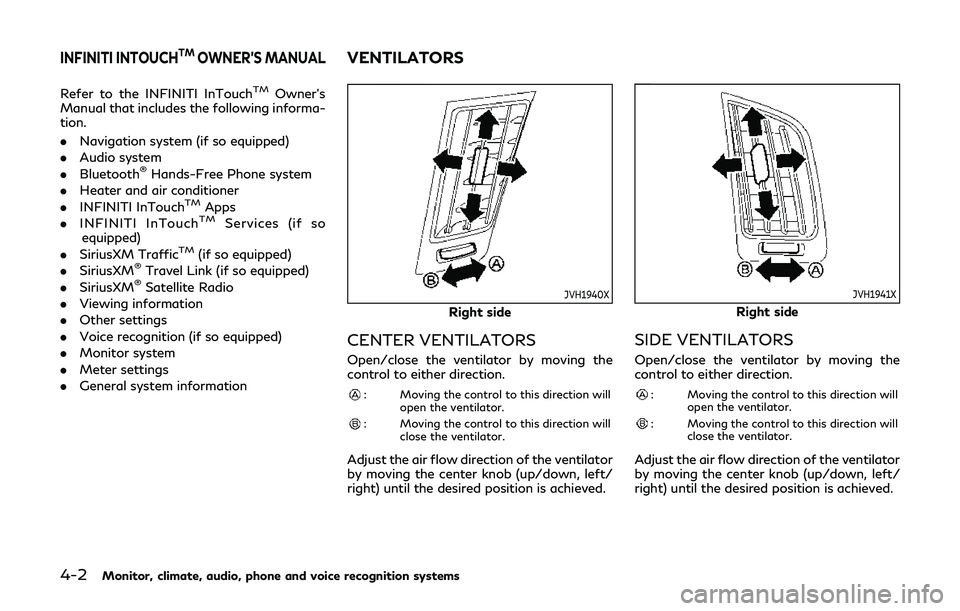
. General system informationJVH1940X
Right side
CENTER VENTILATORS
Open/close the ventilator by moving the
control to either direction.
: Moving the control to this direction will
open the ventilator.
: Moving the control to this direction willclose the ventilator.
Adjust the air flow direction of the ventilator
by moving the center knob (up/down, left/
right) until the desired position is achieved.
JVH1941X
Right side
SIDE VENTILATORS
Open/close the ventilator by moving the
control to either direction.
: Moving the control to this direction willopen the ventilator.
: Moving the control to this direction willclose the ventilator.
Adjust the air flow direction of the ventilator
by moving the center knob (up/down, left/
right) until the desired position is achieved.
INFINITI INTOUCHTMOWNER’S MANUALVENTILATORS
Page 186 of 468
5-4Starting and driving
WARNING
.Do not leave children or adults who
would normally require the support
of others alone in your vehicle. Pets
should not be left alone either. They
could accidentally injure themselves
or others through inadvertent opera-
tion of the vehicle. Also, on hot,
sunny days, temperatures in a closed
vehicle could quickly become high
enough to cause severe or possibly
fatal injuries to people or animals.
. Closely supervise children when they
are around cars to prevent them from
playing and becoming locked in the
trunk where they could be seriously
injured. Keep the car locked, with the
rear seatback and trunk lid securely
latched when not in use, and prevent
children’s access to car keys.
EXHAUST GAS (carbon monoxide)
WARNING
.Do not breathe exhaust gases; they
contain colorless and odorless carbon
monoxide. Carbon monoxide is dan-
gerous. It can cause unconsciousness
or death.
. If you suspect that exhaust fumes are
entering the vehicle, drive with all
windows fully open, and have the
vehicle inspected immediately.
. Do not run the engine in closed spaces
such as a garage.
. Do not park the vehicle with the
engine running for any extended
length of time.
. Keep the trunk lid closed while driv-
ing, otherwise exhaust gases could be
drawn into the passenger compart-
ment. If you must drive with the
trunk lid open, follow these precau-
tions:
1) Open all the windows.
2) Set the air recirculation to off and the fan control to high to circulate
the air. .
If electrical wiring or other cable
connections must pass to a trailer
through the seal on the trunk lid or
the body, follow the manufacturer’s
recommendation to prevent carbon
monoxide entry into the vehicle.
. The exhaust system and body should
be inspected by a qualified mechanic
whenever:
— The vehicle is raised for service.
— You suspect that exhaust fumes are entering into the passenger
compartment.
— You notice a change in the sound of the exhaust system.
— You have had an accident invol- ving damage to the exhaust sys-
tem, underbody, or rear of the
vehicle.
PRECAUTIONS WHEN STARTING
AND DRIVING