horn INFINITI Q60 2019 Owners Manual
[x] Cancel search | Manufacturer: INFINITI, Model Year: 2019, Model line: Q60, Model: INFINITI Q60 2019Pages: 468, PDF Size: 2.18 MB
Page 14 of 468
0-6Illustrated table of contents
JVC0942X
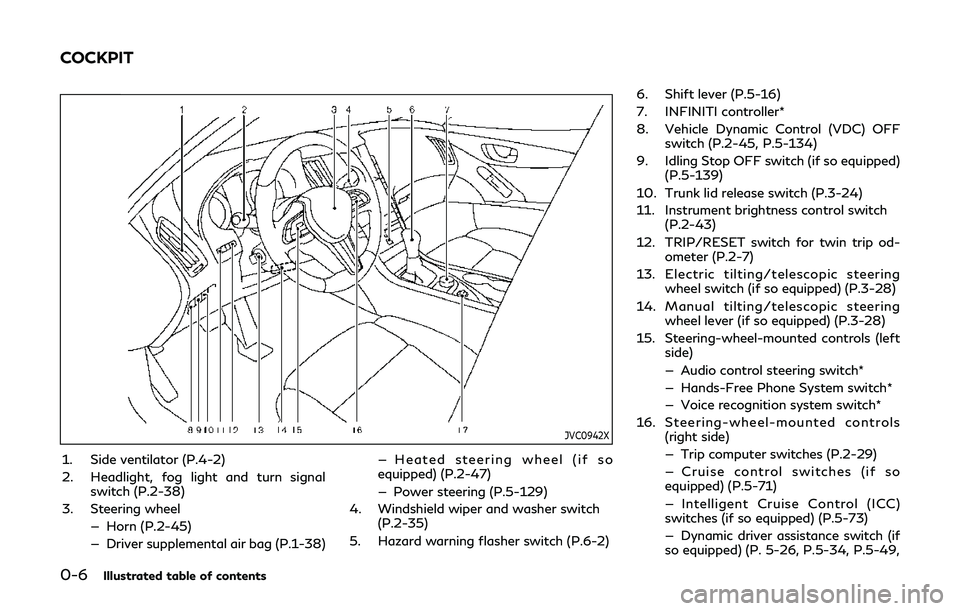
1. Side ventilator (P.4-2)
2. Headlight, fog light and turn signalswitch (P.2-38)
3. Steering wheel — Horn (P.2-45)
— Driver supplemental air bag (P.1-38) — Heated steering wheel (if so
equipped) (P.2-47)
— Power steering (P.5-129)
4. Windshield wiper and washer switch (P.2-35)
5. Hazard warning flasher switch (P.6-2) 6. Shift lever (P.5-16)
7. INFINITI controller*
8. Vehicle Dynamic Control (VDC) OFF
switch (P.2-45, P.5-134)
9. Idling Stop OFF switch (if so equipped) (P.5-139)
10. Trunk lid release switch (P.3-24)
11. Instrument brightness control switch (P.2-43)
12. TRIP/RESET switch for twin trip od- ometer (P.2-7)
13. Electric tilting/telescopic steering wheel switch (if so equipped) (P.3-28)
14. Manual tilting/telescopic steering wheel lever (if so equipped) (P.3-28)
15. Steering-wheel-mounted controls (left side)
— Audio control steering switch*
— Hands-Free Phone System switch*
— Voice recognition system switch*
16. Steering-wheel-mounted controls (right side)
— Trip computer switches (P.2-29)
— Cruise control switches (if so
equipped) (P.5-71)
— Intelligent Cruise Control (ICC)
switches (if so equipped) (P.5-73)
— Dynamic driver assistance switch (if
so equipped) (P. 5-26, P.5-34, P.5-49,
COCKPIT
Page 79 of 468

2 Instruments and controls
Cockpit ........................................................................\
......... 2-3
Instrument panel ............................................................... 2-5
Meters and gauges .......................................................... 2-6Speedometer and odometer ..................................... 2-7
Tachometer ................................................................... 2-8
Engine coolant temperature gauge ....................... 2-8
Fuel gauge ..................................................................... 2-9
Compass (if so equipped) ............................................... 2-9 Zone variation change procedure ......................... 2-11
Warning lights, indicator lights and
audible reminders ............................................................ 2-12 Checking lights ........................................................... 2-12
Warning lights ............................................................ 2-12
Indicator lights ........................................................... 2-18
Audible reminders ..................................................... 2-20
Vehicle information display .......................................... 2-20
Indicators for operation .......................................... 2-23
Indicators for maintenance .................................... 2-27
Trip computer ............................................................. 2-29
Clock and outside air temperature ....................... 2-31
Security systems ............................................................. 2-32 Vehicle Security System .......................................... 2-32
INFINITI Vehicle Immobilizer System .................. 2-33 Wiper and washer switch ............................................ 2-35
Rain-sensing auto wiper system (if
so equipped) ............................................................. 2-36
Rear window and outside mirror
defroster switch ............................................................. 2-37
Headlight and turn signal switch ............................... 2-38 Headlight switch ..................................................... 2-38
Turn signal switch .................................................. 2-44
Fog light switch ...................................................... 2-44
Horn ........................................................................\
........... 2-45
Vehicle Dynamic Control (VDC) OFF switch ......... 2-45
Heated seats (if so equipped) ..................................... 2-46 Operation with switch ........................................... 2-46
Operation with touch screen ............................... 2-47
AUTO mode setting ............................................... 2-47
Heated steering wheel (if so equipped) ................... 2-47
Power outlets ................................................................. 2-48
Storage ........................................................................\
.... 2-48 Cup holders .............................................................. 2-48
Soft bottle holder .................................................... 2-49
Sunglasses holder .................................................... 2-49
Glove box .................................................................. 2-50
Console box ............................................................. 2-50
Page 81 of 468

JVC0942X
1. Side ventilator (P.4-2)
2. Headlight, fog light and turn signalswitch (P.2-38)
3. Steering wheel — Horn (P.2-45)
— Driver supplemental air bag (P.1-38) — Heated steering wheel (if so
equipped) (P.2-47)
— Power steering (P.5-129)
4. Windshield wiper and washer switch (P.2-35)
5. Hazard warning flasher switch (P.6-2) 6. Shift lever (P.5-16)
7. INFINITI controller*
8. Vehicle Dynamic Control (VDC) OFF
switch (P.2-45, P.5-134)
9. Idling Stop OFF switch (if so equipped) (P.5-139)
10. Trunk lid release switch (P.3-24)
11. Instrument brightness control switch (P.2-43)
12. TRIP/RESET switch for twin trip od- ometer (P.2-7)
13. Electric tilting/telescopic steering wheel switch (P.3-28)
14. Manual tilting/telescopic steering wheel lever (P.3-28)
15. Steering-wheel-mounted controls (left side)
— Audio control steering switch*
— Hands-Free Phone System switch*
— Voice recognition system switch*
16. Steering-wheel-mounted controls (right side)
— Trip computer switch (P.2-29)
— Cruise control switches (if so
equipped) (P.5-71)
— Intelligent Cruise Control (ICC)
switches (if so equipped) (P.5-73)
— Dynamic driver assistance switch (if
so equipped) (P. 5-26, P.5-34, P.5-49,
Instruments and controls2-3
COCKPIT
Page 111 of 468
SIC2045
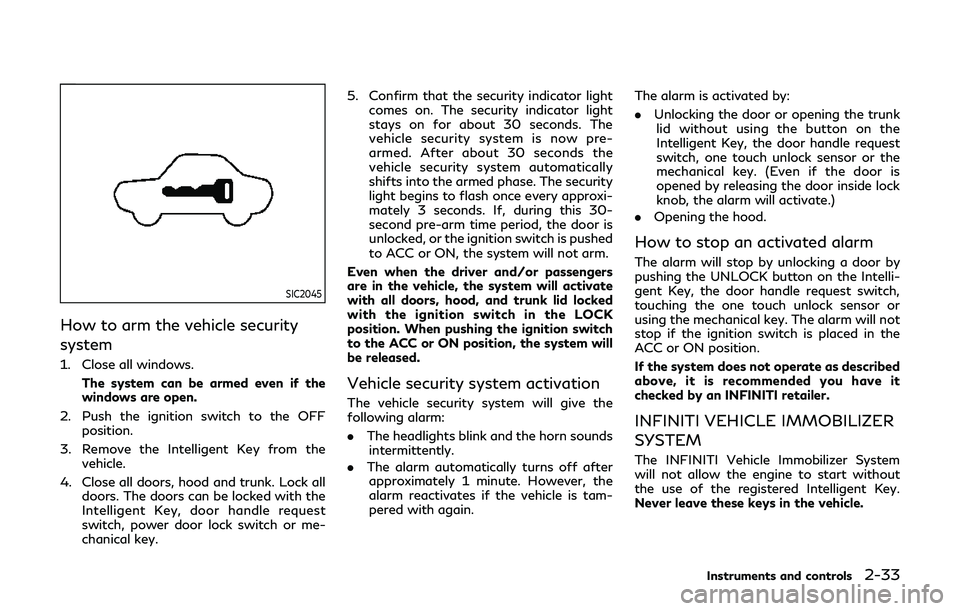
How to arm the vehicle security
system
1. Close all windows.The system can be armed even if the
windows are open.
2. Push the ignition switch to the OFF position.
3. Remove the Intelligent Key from the vehicle.
4. Close all doors, hood and trunk. Lock all doors. The doors can be locked with the
Intelligent Key, door handle request
switch, power door lock switch or me-
chanical key. 5. Confirm that the security indicator light
comes on. The security indicator light
stays on for about 30 seconds. The
vehicle security system is now pre-
armed. After about 30 seconds the
vehicle security system automatically
shifts into the armed phase. The security
light begins to flash once every approxi-
mately 3 seconds. If, during this 30-
second pre-arm time period, the door is
unlocked, or the ignition switch is pushed
to ACC or ON, the system will not arm.
Even when the driver and/or passengers
are in the vehicle, the system will activate
with all doors, hood, and trunk lid locked
with the ignition switch in the LOCK
position. When pushing the ignition switch
to the ACC or ON position, the system will
be released.
Vehicle security system activation
The vehicle security system will give the
following alarm:
. The headlights blink and the horn sounds
intermittently.
. The alarm automatically turns off after
approximately 1 minute. However, the
alarm reactivates if the vehicle is tam-
pered with again. The alarm is activated by:
.
Unlocking the door or opening the trunk
lid without using the button on the
Intelligent Key, the door handle request
switch, one touch unlock sensor or the
mechanical key. (Even if the door is
opened by releasing the door inside lock
knob, the alarm will activate.)
. Opening the hood.
How to stop an activated alarm
The alarm will stop by unlocking a door by
pushing the UNLOCK button on the Intelli-
gent Key, the door handle request switch,
touching the one touch unlock sensor or
using the mechanical key. The alarm will not
stop if the ignition switch is placed in the
ACC or ON position.
If the system does not operate as described
above, it is recommended you have it
checked by an INFINITI retailer.
INFINITI VEHICLE IMMOBILIZER
SYSTEM
The INFINITI Vehicle Immobilizer System
will not allow the engine to start without
the use of the registered Intelligent Key.
Never leave these keys in the vehicle.
Instruments and controls2-33
Page 123 of 468
JVI1491X
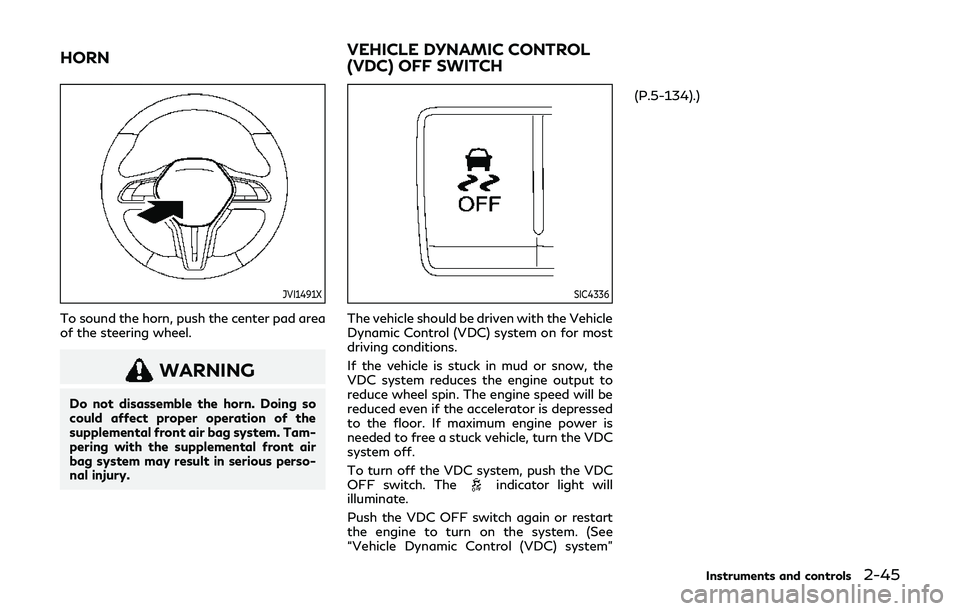
To sound the horn, push the center pad area
of the steering wheel.
WARNING
Do not disassemble the horn. Doing so
could affect proper operation of the
supplemental front air bag system. Tam-
pering with the supplemental front air
bag system may result in serious perso-
nal injury.
SIC4336
The vehicle should be driven with the Vehicle
Dynamic Control (VDC) system on for most
driving conditions.
If the vehicle is stuck in mud or snow, the
VDC system reduces the engine output to
reduce wheel spin. The engine speed will be
reduced even if the accelerator is depressed
to the floor. If maximum engine power is
needed to free a stuck vehicle, turn the VDC
system off.
To turn off the VDC system, push the VDC
OFF switch. The
indicator light will
illuminate.
Push the VDC OFF switch again or restart
the engine to turn on the system. (See
“Vehicle Dynamic Control (VDC) system” (P.5-134).)
Instruments and controls2-45
HORN
VEHICLE DYNAMIC CONTROL
(VDC) OFF SWITCH
Page 152 of 468

3-10Pre-driving checks and adjustments
JVP0448X
When you carry the Intelligent Key with you,
you can lock all doors by pushing the door
handle request switch
(driver’s or front
passenger’s) within the range of operation.
JVP0449X
You can also unlock the corresponding door
by touching the one touch unlock sensor
(driver’s or front passenger’s) within the
range of operation, and can unlock the other
doors using the door handle request switch
.
When you lock or unlock the doors or the
trunk lid, the hazard indicator will flash and
the horn (or the outside chime) will sound as
a confirmation. For details, see “Setting
hazard indicator and horn mode” (P.3-18).
CAUTION
. After locking the doors using the
request switch, make sure that the
doors have been securely locked by
operating the door handles.
. When locking the doors using the
request switch, make sure to have the
Intelligent Key in your possession
before operating the request switch
to prevent the Intelligent Key from
being left in the vehicle.
. The request switch and one touch
unlock sensor are operational only
when the Intelligent Key has been
detected by the Intelligent Key sys-
tem.
Welcome light and farewell light
function
When you lock or unlock the doors and fuel-
filler door, front and rear side marker lights,
parking lights, tail lights and the license plate
light will illuminate for a period of time. The
welcome light and farewell light function can
be disabled. For information about disabling
the welcome light and farewell light func-
tion, see the INFINITI InTouch
TMOwner’s
Manual.
Page 158 of 468

3-16Pre-driving checks and adjustments
operate when:
.the distance between the Intelligent Key
and the vehicle is over 33 ft (10 m).
. the Intelligent Key battery is discharged.
After locking with the remote keyless entry
function, pull the door handle to make sure
the doors are securely locked.
The LOCK/UNLOCK operating range varies
depending on the environment. To securely
operate the lock and unlock buttons, ap-
proach the vehicle to about 3 ft (1 m) from
the door.
SPA2100
Type A (if so equipped)
JVP0409X
Type B (if so equipped) 1. LOCK button
2. UNLOCK button
3. TRUNK button
4. PANIC button
5. Remote engine start button
HOW TO USE REMOTE KEYLESS
ENTRY SYSTEM
When you lock or unlock the doors or the
trunk lid, the hazard indicator will flash and
the horn (or the outside chime) will sound as
a confirmation. For details, see “Setting
hazard indicator and horn mode” (P.3-18).
Locking doors, trunk lid and fuel-
filler door
1. Push the ignition switch to the OFF
position and make sure you carry the
Intelligent Key with you.*1
2. Close all the doors.
3. Push the LOCK
buttonon the
Intelligent Key.
4. All the doors, trunk lid and fuel-filler door will lock.
5. The hazard indicator flashes twice and the horn chirps once.
*1: Doors will lock with the Intelligent Key while the ignition switch is in the ACC
or ON position.
Page 160 of 468
3-18Pre-driving checks and adjustments
Setting hazard indicator and horn
mode
This vehicle is set in hazard indicator and
horn mode when you first receive the vehicle.
In hazard indicator and horn mode, when the
LOCK
buttonis pushed, the hazard
indicator flashes twice and the horn chirps
once. When the UNLOCK
buttonis
pushed, the hazard indicator flashes once.
If horns are not necessary, the system can be
switched to the hazard indicator mode.
In hazard indicator mode, when the LOCK
buttonis pushed, the hazard indicator
flashes twice. When the UNLOCK
buttonis pushed, neither the hazard
indicator nor the horn operates.
Page 161 of 468
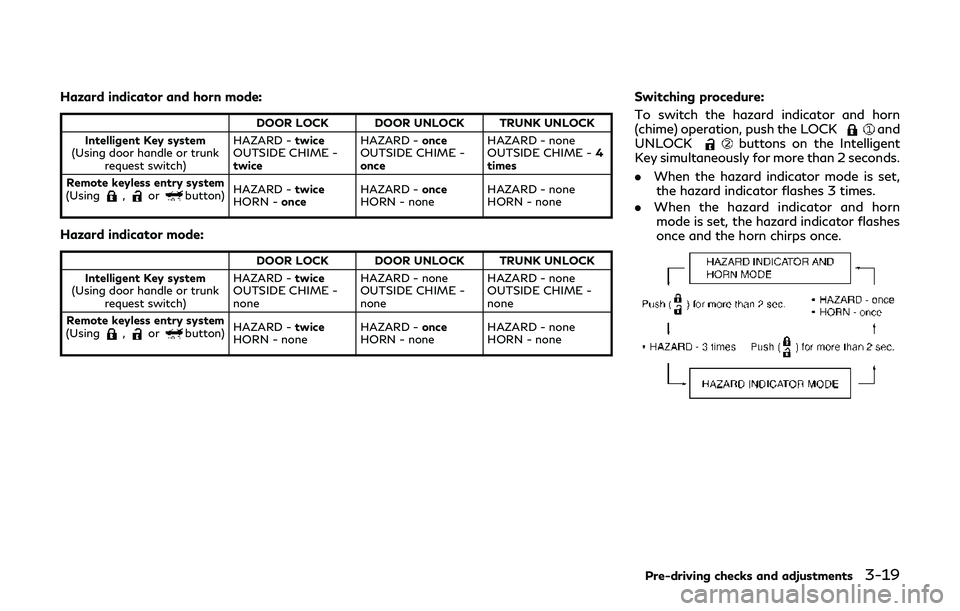
Hazard indicator and horn mode:
DOOR LOCK DOOR UNLOCK TRUNK UNLOCK
Intelligent Key system
(Using door handle or trunk request switch) HAZARD -
twice
OUTSIDE CHIME -
twice HAZARD -
once
OUTSIDE CHIME -
once HAZARD - none
OUTSIDE CHIME -
4
times
Remote keyless entry system
(Using
,orbutton) HAZARD -
twice
HORN - once HAZARD -
once
HORN - none HAZARD - none
HORN - none
Hazard indicator mode:
DOOR LOCK DOOR UNLOCK TRUNK UNLOCK
Intelligent Key system
(Using door handle or trunk request switch) HAZARD -
twice
OUTSIDE CHIME -
none HAZARD - none
OUTSIDE CHIME -
noneHAZARD - none
OUTSIDE CHIME -
none
Remote keyless entry system
(Using
,orbutton) HAZARD -
twice
HORN - none HAZARD -
once
HORN - none HAZARD - none
HORN - none
Switching procedure:
To switch the hazard indicator and horn
(chime) operation, push the LOCK
and
UNLOCKbuttons on the Intelligent
Key simultaneously for more than 2 seconds.
. When the hazard indicator mode is set,
the hazard indicator flashes 3 times.
. When the hazard indicator and horn
mode is set, the hazard indicator flashes
once and the horn chirps once.
Pre-driving checks and adjustments3-19
Page 190 of 468
5-8Starting and driving
CAUTION
.The TPMS may not function properly
when the wheels are equipped with
tire chains or the wheels are buried in
snow.
. Do not place metalized film or any
metal parts (antenna, etc.) on the
windows. This may cause poor recep-
tion of the signals from the tire
pressure sensors, and the TPMS will
not function properly.
Some devices and transmitters may tem-
porarily interfere with the operation of the
TPMS and cause the low tire pressure
warning light to illuminate. Some examples
are:
. Facilities or electric devices using similar
radio frequencies are near the vehicle.
. If a transmitter set to similar frequencies
is being used in or near the vehicle.
. If a computer (or similar equipment) or a
DC/AC converter is being used in or near
the vehicle.
Low tire pressure warning light may illumi-
nate in the following cases.
. If the vehicle is equipped with a wheel
and tire without TPMS. .
If the TPMS has been replaced and the ID
has not been registered.
. If the wheel is not originally specified by
INFINITI.
FCC Notice:
For USA:
This device complies with Part 15 of the
FCC Rules. Operation is subject to the
following two conditions: (1) This device
may not cause harmful interference, and (2)
this device must accept any interference
received, including interference that may
cause undesired operation.
NOTE:
Changes or modifications not expressly
approved by the party responsible for
compliance could void the user’s authority
to operate the equipment.
For Canada:
This device complies with Industry Canada
licence-exempt RSS standard(s). Operation
is subject to the following two conditions:
1. This device may not cause interference,
and
2. This device must accept any interfer-
ence, include interference that may
cause undesired operation of the device.
TPMS with Tire Inflation Indicator
When adding air to an under-inflated tire,
the TPMS with Tire Inflation Indicator
provides visual and audible signals outside
the vehicle to help you inflate the tires to the
recommended COLD tire pressure.
Vehicle set-up:
1. Park the vehicle in a safe and level place.
2. Apply the parking brake and place the
shift lever in the P (Park) position.
3. Place the ignition switch in the ON position. Do not start the engine.
Operation:
1. Add air to the tire.
2. After a few seconds, the hazard indica- tors will start flashing.
3. When the designated pressure is reached, the horn beeps once and the
hazard indicators stop flashing.
4. Perform the above steps for each tire.
. If the tire is over-inflated more than
approximately 4 psi (30 kPa), the horn
beeps and the hazard indicators flash 3
times. To correct the pressure, push the
core of the valve stem on the tire briefly
to release pressure. When the pressure
reaches the designated pressure, the
horn beeps once.