ECU INFINITI Q60 2020 Owner's Manual
[x] Cancel search | Manufacturer: INFINITI, Model Year: 2020, Model line: Q60, Model: INFINITI Q60 2020Pages: 476, PDF Size: 2.05 MB
Page 53 of 476

SSS0652
Forward-facing — step 5
5. Allow the seat belt to retract. Pull up on the shoulder belt to remove any slack in
the belt.
SSS0653
Forward-facing — step 6
6. Remove any additional slack from the seat belt; press downward and rearward
firmly in the center of the child restraint
with your knee to compress the vehicle
seat cushion and seatback while pulling
up on the seat belt.
7. Tighten the tether strap according to the manufacturer’s instructions to remove
any slack.
SSS0641
Forward-facing — step 8
8. After attaching the child restraint, test it before you place the child in it. Push it
from side to side while holding the child
restraint near the seat belt path. The
child restraint should not move more
than 1 inch (25 mm), from side to side.
Try to tug it forward and check to see if
the belt holds the restraint in place. If the
restraint is not secure, tighten the seat
belt as necessary, or put the restraint in
another seat and test it again. You may
need to try a different child restraint. Not
all child restraints fit in all types of
vehicles.
9. Check to make sure the child restraint is properly secured prior to each use. If the
Safety — Seats, seat belts and supplemental restraint system1-33
Page 55 of 476
The child restraint top tether strap must be
used when installing the child restraint with
the seat belts.
First, secure the child restraint with the seat
belt.
1. Flip up the anchor cover from the anchorpoint which is located directly behind the
child restraint.
2. Position the top tether strap over the top of the seatback.
3. Secure the tether strap to the tether anchor point on the rear parcel shelf.
4. Refer to the appropriate child restraint installation procedure steps in this sec-
tion before tightening the tether strap.
If you have any questions when installing a
top tether strap, it is recommended you
visit an INFINITI retailer for this service.BOOSTER SEATS
Precautions on booster seats
WARNING
If a booster seat and seat belt are not
used properly, the risk of a child being
injured or killed in a sudden stop or
collision greatly increases:
. Make sure the shoulder portion of
the belt is away from the child’s face
and neck and the lap portion of the
belt does not cross the stomach.
. Make sure the shoulder belt is not
behind the child or under the child’s
arm.
. A booster seat must only be installed
in a seating position that has a lap/
shoulder belt.
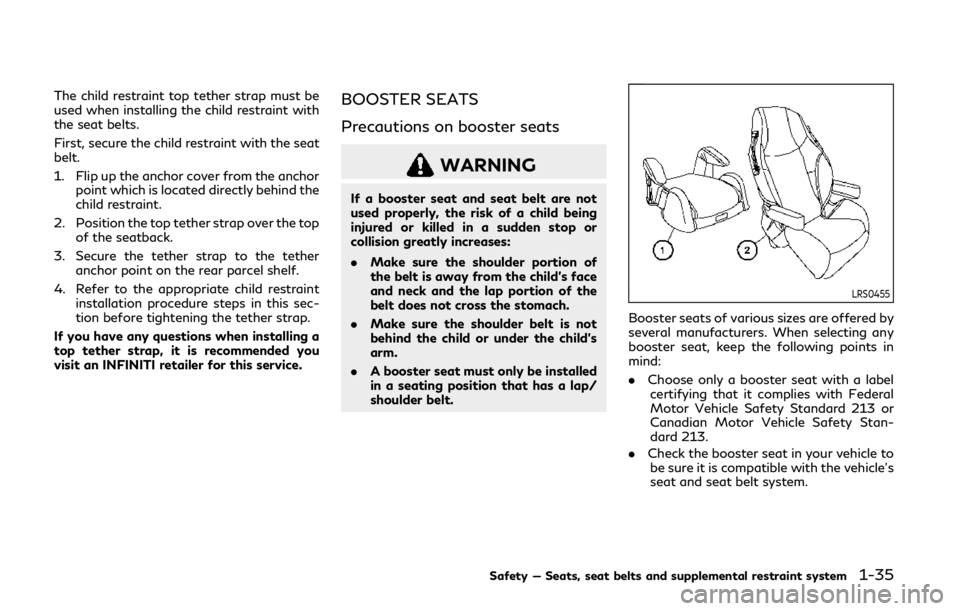
LRS0455
Booster seats of various sizes are offered by
several manufacturers. When selecting any
booster seat, keep the following points in
mind:
.Choose only a booster seat with a label
certifying that it complies with Federal
Motor Vehicle Safety Standard 213 or
Canadian Motor Vehicle Safety Stan-
dard 213.
. Check the booster seat in your vehicle to
be sure it is compatible with the vehicle’s
seat and seat belt system.
Safety — Seats, seat belts and supplemental restraint system1-35
Page 57 of 476

SSS0640
1.If you must install a booster seat in the
front seat, move the seat to the rear-
most position.
2. Position the booster seat on the seat. Only place it in a forward-facing direc-
tion. Always follow the booster seat
manufacturer’s instructions.
LRS0454
Front passenger position
3. The booster seat should be positioned on the vehicle seat so that it is stable.
If necessary, adjust or remove the head
restraint or headrest to obtain the
correct booster seat fit. If the head
restraint or headrest is removed, store
it in a secure place. Be sure to reinstall
the head restraint or headrest when the
booster seat is removed. See “Head
restraints/headrests” (P.1-7) for head
restraint or headrest adjustment, re-
moval and installation information.
If the seating position does not have an
adjustable head restraint or headrest
and it is interfering with the proper booster seat fit, try another seating
position or a different booster seat.
4. Position the lap portion of the seat belt low and snug on the child’s hips. Be sure
to follow the booster seat manufac-
turer’s instructions for adjusting the seat
belt routing.
5. Pull the shoulder belt portion of the seat belt toward the retractor to take up
extra slack. Be sure the shoulder belt is
positioned across the top, middle portion
of the child’s shoulder. Be sure to follow
the booster seat manufacturer’s instruc-
tions for adjusting the seat belt routing.
6. Follow the warnings, cautions and in- structions for properly fastening a seat
belt shown in “Seat belts” (P.1-11).
Safety — Seats, seat belts and supplemental restraint system1-37
Page 68 of 476

1-48Safety — Seats, seat belts and supplemental restraint system
In addition to the above, certain objects
placed on the front passenger seat may also
cause the light to operate as described
above depending on their weight.
For additional information related to the
normal operation and troubleshooting of
this occupant classification sensor system,
please refer to “Normal operation” (P.1-49)
and “Troubleshooting” (P.1-50).
Front passenger air bag:
The front passenger air bag is designed to
automatically turn OFF when the vehicle is
operated under some conditions as de-
scribed below in accordance with U.S.
regulations. If the front passenger air bag
is OFF, it will not inflate in a crash. The driver
air bag and other air bags in your vehicle are
not part of this system.
The purpose of the regulation is to help
reduce the risk of injury or death from an
inflating air bag to certain front passenger
seat occupants, such as children, by requiring
the air bag to be automatically turned OFF.
Certain sensors are used to meet the
requirements.
The occupant classification sensor in this
vehicle is a weight sensor. It is designed to
detect an occupant and objects on the seat
by weight. For example, if a child is in the
front passenger seat, the Advanced Air Bag
System is designed to turn the passenger airbag OFF in accordance with the regulations.
Also, if a child restraint of the type specified
in the regulations is on the seat, its weight
and the child’s weight can be detected and
cause the air bag to turn OFF.
Front passenger seat adult occupants who
are properly seated and using the seat belt
as outlined in this manual should not cause
the passenger air bag to be automatically
turned OFF. For small adults it may be
turned OFF, however, if the occupant takes
his/her weight off the seat cushion (for
example, by not sitting upright, by sitting on
an edge of the seat, or by otherwise being
out of position), this could cause the sensor
to turn the air bag OFF. Always be sure to be
seated and wearing the seat belt properly
for the most effective protection by the seat
belt and supplemental air bag.
INFINITI recommends that pre-teens and
children be properly restrained in a rear seat.
INFINITI also recommends that appropriate
child restraints and booster seats be prop-
erly installed in a rear seat. If this is not
possible, the occupant classification sensor
is designed to operate as described above to
turn the front passenger air bag OFF for
specified child restraints as required by the
regulations. Failing to properly secure child
restraints and to use the ALR mode may
allow the restraint to tip or move in a
collision or sudden stop. This can also result
in the passenger air bag inflating in a crash
instead of being OFF. For additional infor-
mation, refer to “Child restraints” (P.1-19)
for proper use and installation.
If the front passenger seat is not occupied,
the passenger air bag is designed not to
inflate in a crash. However, heavy objects
placed on the seat could result in air bag
inflation, because of the object’s weight
detected by the occupant classification
sensor. Other conditions could also result in
air bag inflation, such as if a child is standing
on the seat, or if two children are on the
seat, contrary to the instructions in this
manual. Always be sure that you and all
vehicle occupants are seated and restrained
properly.
Using the front passenger air bag status
light, you can monitor when the front
passenger air bag is automatically turned
OFF.
If an adult occupant is in the seat but the
front passenger air bag status light is
illuminated (indicating that the air bag is
OFF), it could be that the person is a small
adult, or is not sitting on the seat properly or
not using the seat belt properly.
If a child restraint must be used in the front
seat, the front passenger air bag status light
may or may not be illuminated, depending on
the size of the child and the type of child
Page 79 of 476

2 Instruments and controls
Cockpit ........................................................................\
......... 2-3
Instrument panel ............................................................... 2-5
Meters and gauges .......................................................... 2-6Speedometer and odometer ..................................... 2-7
Tachometer ................................................................... 2-8
Engine coolant temperature gauge ....................... 2-8
Fuel gauge ..................................................................... 2-9
Compass (if so equipped) ............................................... 2-9 Zone variation change procedure ......................... 2-11
Warning lights, indicator lights and audible
reminders ........................................................................\
... 2-12 Checking lights ........................................................... 2-12
Warning lights ............................................................ 2-12
Indicator lights ........................................................... 2-18
Audible reminders ..................................................... 2-19
Vehicle information display .......................................... 2-20
Indicators for operation .......................................... 2-23
Indicators for maintenance .................................... 2-26
Trip computer ............................................................. 2-29
Clock and outside air temperature ....................... 2-31
Security systems ............................................................. 2-32 Vehicle Security System .......................................... 2-32
INFINITI Vehicle Immobilizer System .................. 2-33 Wiper and washer switch ............................................ 2-34
Rain-sensing auto wiper system
(if so equipped) ........................................................ 2-36
Rear window and outside mirror defroster
switch ........................................................................\
........ 2-37
Headlight and turn signal switch ............................... 2-38 Headlight switch ..................................................... 2-38
Turn signal switch ................................................... 2-43
Fog light switch ...................................................... 2-44
Horn ........................................................................\
.......... 2-44
Vehicle Dynamic Control (VDC) OFF switch ......... 2-45
Heated seats (if so equipped) ..................................... 2-45 Operation with switch ........................................... 2-46
Operation with touch screen ............................... 2-46
AUTO mode setting ............................................... 2-46
Heated steering wheel (if so equipped) ................... 2-47
Power outlets .................................................................. 2-47
Storage ........................................................................\
.... 2-48 Cup holders .............................................................. 2-48
Soft bottle holder .................................................... 2-49
Sunglasses holder .................................................... 2-49
Glove box .................................................................. 2-50
Console box ............................................................. 2-50
Page 90 of 476

2-12Instruments and controls
Anti-lock Braking System (ABS) warning
lightPower steering warning lightHigh beam assist indicator light (if so
equipped)
Brake warning lightSeat belt warning light and chimeHigh beam indicator light
Supplemental air bag warning lightMalfunction Indicator Light (MIL)
Charge warning lightVehicle Dynamic Control (VDC) warning
lightSecurity indicator light
Forward Emergency Braking (FEB) sys-
tem warning light (if so equipped)ECO drive indicator lightTurn signal/hazard indicator lights
Low fuel warning lightExterior light indicatorVehicle Dynamic Control (VDC) off in-
dicator light
Low tire pressure warning lightFront fog light indicator light
Master warning lightFront passenger air bag status light
CHECKING LIGHTS
With all doors closed, apply the parking
brake, fasten the seat belts and place the
ignition switch in the ON position without
starting the engine. The following lights (if
so equipped) will come on:
,or,,,
The following lights (if so equipped) will
come on briefly and then go off:
,or,,,,
If any light does not come on or operates in a
way other than described, it may indicate a
burned-out bulb and/or a system malfunc-tion. It is recommended you have the system
checked by an INFINITI retailer.
Some indicators and warnings are also
displayed in the vehicle information display
between the speedometer and tachometer.
(See “Vehicle information display” (P.2-20).)
WARNING LIGHTS
orAnti-lock Braking
System (ABS) warning light
When the ignition switch is in the ON
position, the Anti-lock Braking System
(ABS) warning light illuminates and then
turns off. This indicates the ABS is opera-
tional.
If the ABS warning light illuminates while the
engine is running, or while driving, it may
indicate the ABS is not functioning properly.
Have the system checked. It is recommended
WARNING LIGHTS, INDICATOR
LIGHTS AND AUDIBLE REMINDERS
Page 95 of 476

Seat belt warning light and
chime
The light and chime remind you to fasten
seat belts. The light illuminates whenever
the ignition switch is pushed to the ON
position, and will remain illuminated until the
driver’s seat belt is fastened. At the same
time, the chime will sound for about 6
seconds unless the driver’s seat belt is
securely fastened.
The seat belt warning light for the front
passenger will illuminate if the seat belt is
not fastened when the front passenger’s
seat is occupied.
See “Seat belts” (P.1-11) for precautions on
seat belt usage.
Supplemental air bag warning
light
After pushing the ignition switch to the ON
position, the supplemental air bag warning
light will illuminate. The supplemental air bag
warning light will turn off after about 7
seconds if the supplemental front air bag
and supplemental side air bag, curtain side-
impact air bag systems and/or pretensioner
seat belt are operational.
If any of the following conditions occur, the
supplemental front air bag, supplemental side air bag, supplemental curtain side-
impact air bag and pretensioner seat belt
needs servicing.
.
The supplemental air bag warning light
remains on after approximately 7 sec-
onds.
. The supplemental air bag warning light
flashes intermittently.
. The supplemental air bag warning light
does not come on at all.
It is recommended you visit an INFINITI
retailer for these services.
Unless checked and repaired, the Supple-
mental Restraint Systems and/or the pre-
tensioner seat belt may not function
properly.
For additional information, see “Supplemen-
tal restraint system” (P.1-38).
WARNING
If the supplemental air bag warning light
is on, it could mean that the supple-
mental front air bag, supplemental side
air bag, curtain side-impact air bag
systems and/or pretensioner seat belt
will not operate in an accident. To help
avoid injury to yourself or others, have
your vehicle checked. It is recommended
you visit an INFINITI retailer for this service.
Vehicle Dynamic Control
(VDC) warning light
When the ignition switch is in the ON
position, the Vehicle Dynamic Control
(VDC) warning light illuminates and then
turns off.
The light will blink when the VDC system or
the traction control system is operating, thus
alerting the driver that the vehicle is nearing
its traction limits. The road surface may be
slippery.
When the VDC warning light illuminates
when the VDC system is turned on, this light
alerts the driver to the fact that the VDC
system’s fail-safe mode is operating, for
example the VDC, active trace control func-
tion, Brake Force Distribution or hill start
assist system may not be functioning prop-
erly. Have the system checked. It is recom-
mended you visit an INFINITI retailer for this
service. If a malfunction occurs in the
system, the VDC system function will be
canceled but the vehicle is still driveable. For
additional information, see “Vehicle Dynamic
Control (VDC) system” (P.5-129).
Instruments and controls2-17
Page 97 of 476

cap if the Loose Fuel Cap warning
appears in the vehicle information dis-
play. If the fuel-filler cap is loose or
missing, tighten or install the cap and
continue to drive the vehicle. The
light should turn off after a few driving
trips. If thelight does not turn off
after a few driving trips, have the vehicle
inspected. It is recommended you visit an
INFINITI retailer for this service. You do
not need to have your vehicle towed to
the retailer.
. Malfunction indicator light blinking — An
engine misfire has been detected which
may damage the emission control sys-
tem.
To reduce or avoid emission control
system damage:
1) Do not drive at speeds above 45 MPH (72 km/h).
2) Avoid hard acceleration or decelera- tion.
3) Avoid steep uphill grades.
4) If possible, reduce the amount of cargo being hauled or towed.
The malfunction indicator light may stop
blinking and remain on.
Have the vehicle inspected. It is recom-
mended you visit an INFINITI retailer for
this service. You do not need to have
your vehicle towed to the retailer.
CAUTION
Continued vehicle operation without
having the emission control system
checked and repaired as necessary could
lead to poor driveability, reduced fuel
economy, and possible damage to the
emission control system.
Security indicator light
The light blinks when the ignition switch is in
the ACC, OFF or LOCK position. This
function indicates the security system
equipped on the vehicle is operational.
If the security system is malfunctioning, this
light will remain on while the ignition switch
is in the ON position. For additional informa-
tion, see “Security systems” (P.2-32).
Turn signal/hazard indicator
lights
The light flashes when the turn signal switch
lever or hazard switch is turned on.
Vehicle Dynamic Control
(VDC) off indicator light
When the ignition switch is placed in the ON
position, the light will come on and then turn
off.
The light comes on when the VDC off switch
is pushed to OFF. This indicates that the
VDC system and traction control system are
not operating.
AUDIBLE REMINDERS
Key reminder chime
A chime will sound if the driver side door is
opened while the ignition switch is pushed to
the ACC position. Make sure the ignition
switch is pushed to the OFF position, and
take the Intelligent Key with you when
leaving the vehicle.
Light reminder chime
A chime will sound when the driver side door
is opened with the light switch in theorposition and the ignition switch in the
ACC, OFF or LOCK position.
Turn the light switch off when you leave the
vehicle.
Instruments and controls2-19
Page 102 of 476

2-24Instruments and controls
reaches the empty (0) position.
There is a small reserve of fuel remaining in
the tank when the fuel gauge reaches the
empty (0) position.
11. Low washer fluid warning
This warning appears when the washer tank
fluid is at a low level. Add washer fluid as
necessary. (See “Window washer fluid” (P.8-
10).)
12. Door/trunk open warning
This warning appears if any of the doors
and/or the trunk lid are open or not closed
securely. The vehicle icon indicates which
door or the trunk lid is open on the display.
13. Intelligent Key system warning
This warning appears if there is a malfunc-
tion in the Intelligent Key system.
If this warning appears while the engine is
stopped, the engine cannot be started. If this
warning appears while the engine is running,
the vehicle can be driven. However, in these
cases, have the system checked as soon as
possible. It is recommended you visit an
INFINITI retailer for this service.
14. Loose Fuel Cap warning
This warning appears when the fuel-filler
cap is not tightened correctly after thevehicle has been refueled. (See “Fuel-filler
cap” (P.3-25).)
15. Tire Pressure Low - Add Air
warning
This warning appears when the low tire
pressure warning light in the meter illumi-
nates and low tire pressure is detected. The
warning appears each time the ignition
switch is placed in the ON position as long
as the low tire pressure warning light
remains illuminated. If this warning appears,
stop the vehicle and adjust the pressure to
the recommended COLD tire pressure
shown on the Tire and Loading Information
label. (See “Low tire pressure warning light”
(P.2-14) and “Tire Pressure Monitoring
System (TPMS)” (P.5-5).)
16. Flat Tire - Visit dealer warning
(if so equipped)
This warning appears when the low tire
pressure warning light in the meter illumi-
nates and one or more flat tires are detected
while driving. A chime also sounds for
approximately 10 seconds. (See “Low tire
pressure warning light” (P.2-14) and “Tire
Pressure Monitoring System (TPMS)” (P.5-
5).)
17. Low oil pressure warning
This warning appears if low engine oil
pressure is detected. If the warning appears
during normal driving, pull off the road in a
safe area, stop the engine immediately and
call an INFINITI retailer or other authorized
repair shop.
The low oil pressure warning is not designed
to indicate a low oil level. Use the dipstick to
check the oil level. (See “Engine oil” (P.8-6).)
18. All-Wheel Drive (AWD) warning
(if so equipped)
This warning appears when the Intelligent
All-Wheel Drive (AWD) system is not func-
tioning properly while the engine is running.
The displayed message will vary depending
on the condition of the AWD system mal-
function. (See “Intelligent All-Wheel Drive
(AWD)” (P.5-121).)
19. Extended storage fuse warning
(if so equipped)
This warning may appear if the extended
storage fuse switch is not pushed in
(switched on). When this warning appears,
push in (switch on) the extended storage
fuse switch to turn off the warning. For
more information, see “Extended storage
fuse switch” (P.8-19).
Page 110 of 476

2-32Instruments and controls
SIC2132
Your vehicle has two types of security
systems, as follows:
.Vehicle security system
. INFINITI Vehicle Immobilizer System
The security condition will be shown by the
security indicator light.
VEHICLE SECURITY SYSTEM
The vehicle security system provides visual
and audio alarm signals if someone opens
the doors, hood, or trunk lid when the
system is armed. It is not, however, a motion
detection type system that activates when a
vehicle is moved or when a vibration occurs.
The system helps deter vehicle theft but
cannot prevent it, nor can it prevent the
theft of interior or exterior vehicle compo-
nents in all situations. Always secure your
vehicle even if parking for a brief period.
Never leave your Intelligent Key(s) in the
vehicle, and always lock it when unattended.
Be aware of your surroundings, and park in
secure, well-lit areas whenever possible.
Many devices offering additional protection,
such as component locks, identification
markers, and tracking systems, are available
at auto supply stores and specialty shops.
Your INFINITI retailer may also offer such
equipment. Check with your insurance com-
pany to see if you may be eligible for
discounts for various theft protection fea-
tures.
SIC2045
How to arm the vehicle security
system
1. Close all windows.
The system can be armed even if the
windows are open.
2. Push the ignition switch to the OFF position.
3. Remove the Intelligent Key from the vehicle.
4. Close all doors, hood and trunk. Lock all doors. The doors can be locked with the
Intelligent Key, door handle request
switch or power door lock switch.
SECURITY SYSTEMS