engine INFINITI Q60 COUPE 2014 Repair Manual
[x] Cancel search | Manufacturer: INFINITI, Model Year: 2014, Model line: Q60 COUPE, Model: INFINITI Q60 COUPE 2014Pages: 458, PDF Size: 4.27 MB
Page 314 of 458
Suggested maximum speed in each
gear
Downshift to a lower gear if the engine is
not running smoothly, or if you need to
accelerate.
Do not exceed the maximum suggested
speed (shown below) in any gear. For level
road driving, use the highest gear sug-
gested for that speed. Always observe
posted speed limits, and drive according
to the road conditions, which will ensure
safe operation. Do not over-rev the engine
when shifting to a lower gear as it may
cause engine damage or loss of vehicle
control.
GearMPH (km/h)
1st 39 (63)
2nd 65 (104)
3rd 93 (149)
4th —
5th —
6th —
WARNING
.
Be sure the parking brake is fully
released before driving. Failure to do so
can cause brake failure and lead to an
accident.
. Do not release the parking brake from
outside the vehicle.
. Do not use the gear shift in place of the
parking brake. When parking, be sure
the parking brake is fully engaged.
. Do not leave children unattended in a
vehicle. They could release the parking
brake and cause an accident.
SPA2331
AUTOMATIC TRANSMISSION MOD-
ELS
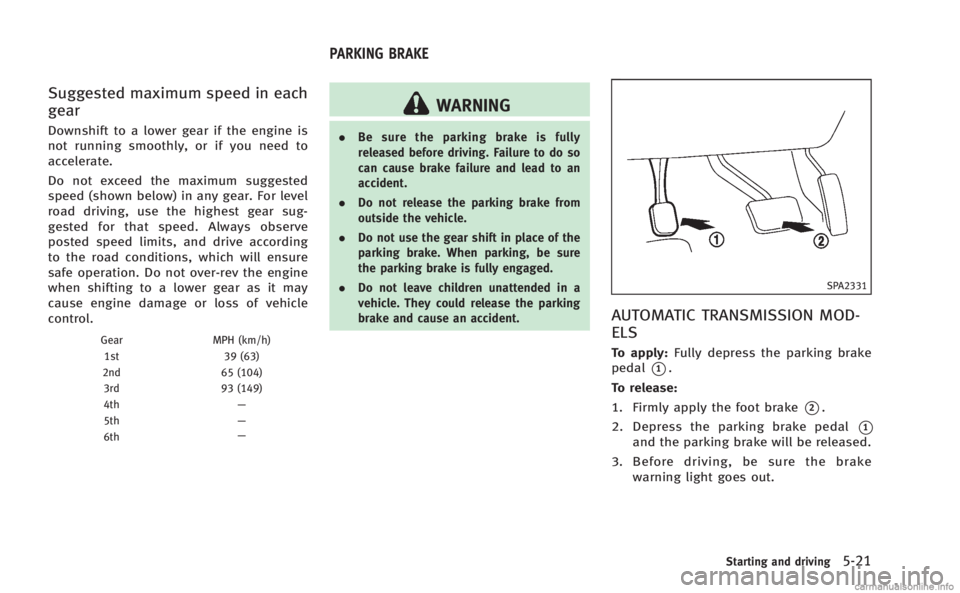
To apply: Fully depress the parking brake
pedal
*1.
To release:
1. Firmly apply the foot brake
*2.
2. Depress the parking brake pedal
*1
and the parking brake will be released.
3. Before driving, be sure the brake warning light goes out.
Starting and driving5-21
PARKING BRAKE
Page 315 of 458

5-22Starting and driving
SPA2110
MANUAL TRANSMISSION MODELS
To apply:Pull the parking brake lever up
*1.
To release:
1. Firmly apply the foot brake.
2. While pulling up on the parking brake lever slightly, push the button
*2and
lower the lever completely
*3.
3. Before driving, be sure the brake warning light goes out.
PRECAUTIONS ON CRUISE CONTROL
.If the cruise control system malfunc-
tions, it will cancel automatically. The
SET indicator on the dot matrix crystal
display will then blink to warn the
driver.
. If the engine coolant temperature be-
comes excessively high, the cruise
control system will be canceled auto-
matically.
. If the SET indicator blinks, turn the
cruise control main switch off and have
the system checked by your INFINITI
retailer.
. The SET indicator may sometimes blink
when the cruise control main switch is
turned ON while pushing the ACCELER-
ATE/RESUME, COAST/SET or CANCEL
switch. To properly set the cruise
control system, perform the steps
below in the order indicated.
WARNING
Do not use the cruise control when driving
under the following conditions:
. when it is not possible to keep the
vehicle at a set speed .
in heavy traffic or in traffic that varies in
speed
. on winding or hilly roads
. on slippery roads (rain, snow, ice, etc.)
. in very windy areas
Doing so could cause a loss of vehicle
control and result in an accident.
CAUTION
On manual transmission models, do not
shift into N (Neutral) without depressing the
clutch pedal when the cruise control is set.
Should this occur, depress the clutch pedal
and turn the main switch off immediately.
Failure to do so may cause engine damage.
CRUISE CONTROL
Page 326 of 458

4. Indicates your vehicle
5. Set vehicle speed indicator:Indicates the set vehicle speed.
For Canadian models, the speed is
displayed in km/h.
6. Intelligent Cruise Control system warn- ing light (orange):
The light comes on if there is a
malfunction in the ICC system.
SSD0607
When the ignition switch is pushed to the
ON position, the indicators come on as
illustrated to check for a burned-out bulb,
and it turns off when the engine is started.
SSD0608
Operating vehicle-to-vehicle dis-
tance control mode
To turn on the cruise control, quickly push
and release the MAIN switch
*Aon. The
cruise indicator light, set distance indicator
and set vehicle speed indicator come on
and in a standby state for setting.
Starting and driving5-33
Page 331 of 458
5-38Starting and driving
SSD0613D
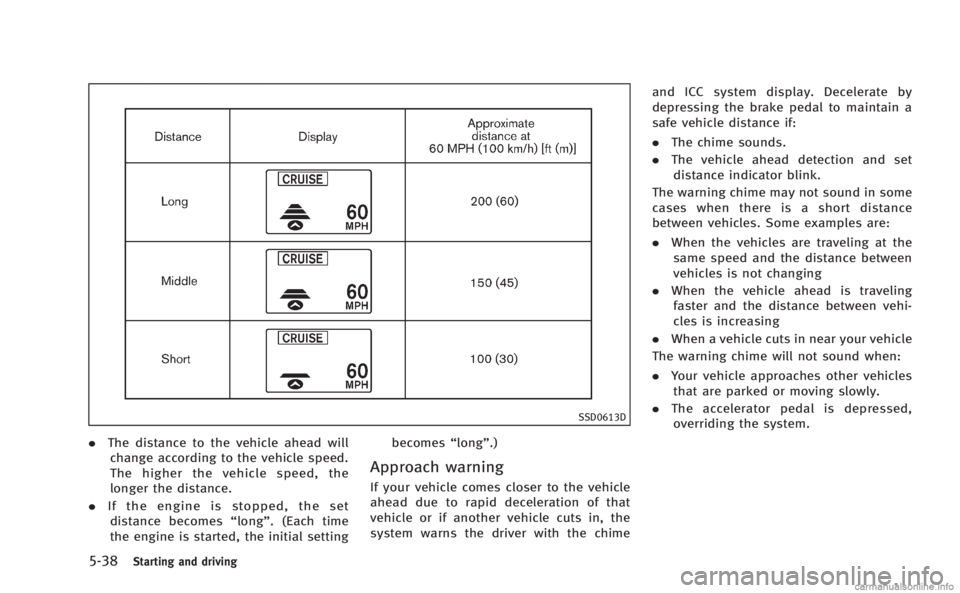
.The distance to the vehicle ahead will
change according to the vehicle speed.
The higher the vehicle speed, the
longer the distance.
. If the engine is stopped, the set
distance becomes “long”. (Each time
the engine is started, the initial setting becomes
“long”.)
Approach warning
If your vehicle comes closer to the vehicle
ahead due to rapid deceleration of that
vehicle or if another vehicle cuts in, the
system warns the driver with the chime and ICC system display. Decelerate by
depressing the brake pedal to maintain a
safe vehicle distance if:
.
The chime sounds.
. The vehicle ahead detection and set
distance indicator blink.
The warning chime may not sound in some
cases when there is a short distance
between vehicles. Some examples are:
. When the vehicles are traveling at the
same speed and the distance between
vehicles is not changing
. When the vehicle ahead is traveling
faster and the distance between vehi-
cles is increasing
. When a vehicle cuts in near your vehicle
The warning chime will not sound when:
. Your vehicle approaches other vehicles
that are parked or moving slowly.
. The accelerator pedal is depressed,
overriding the system.
Page 333 of 458

5-40Starting and driving
.When strong light (sunlight, etc.) is
directly shining on the front of the
vehicle
Action to take:
When the conditions listed above are no
longer present, turn the system off using
the Intelligent Cruise Control MAIN Switch.
Turn the ICC system back on to use the
system.
SSD0615
Condition B:
When the sensor window is dirty, making it
impossible to detect a vehicle ahead, the
ICC system is automatically canceled.
The chime sounds and the ICC system
warning light (orange) will come on and the
“CLEAN SENSOR” indicator will appear.
Action to take:
If the warning light comes on, park the
vehicle in a safe place, turn the engine off.
Clean the sensor window with a soft cloth
and then perform the settings again.
SSD0616
Condition C:
When the ICC system is not operating
properly, the chime sounds and the ICC
system warning light (orange) will come
on.
Action to take:
If the warning light comes on, park the
vehicle in a safe place. Turn the engine off,
restart the engine, resume driving and set
the ICC system again.
If it is not possible to set the system or the
indicator stays on, it may indicate that the
ICC system is malfunctioning. Although
the vehicle is still driveable under normal
Page 338 of 458

2. Push and hold the COAST/SET switch.Release the switch when the vehicle
slows down to the desired speed.
3. Push, then quickly release the COAST/ SET switch. Each time you do this, the
set speed will decrease by about 1 MPH
(1.6 km/h).
To resume the preset speed, push and
release the ACCELERATE/RESUME switch.
The vehicle will resume the last set
cruising speed when the vehicle speed is
over 25 MPH (40 km/h).
Automatic cancellation
A chime sounds under the following con-
ditions and the control is automatically
canceled.
. When the vehicle slows down more
than 8 MPH (13 km/h) below the set
speed
. When the vehicle speed falls below
approximately 20 MPH (32 km/h)
. When the shift lever is not in the D
(Drive), DS (Drive Sport) or manual shift
mode (Automatic Transmission models)
. When the VDC operates (including the
traction control system)
. When a tire slips
SSD0621
Warning light
When the system is not operating properly,
the chime sounds and the system warning
light (orange) will come on.
Action to take:
If the warning light comes on, park the
vehicle in a safe place. Turn the engine off,
restart the engine, resume driving and then
perform the setting again.
If it is not possible to set or the indicator
stays on, it may indicate that the system is
malfunctioning. Although the vehicle is
still driveable under normal conditions,
have the vehicle checked at an INFINITI retailer.
PREVIEW FUNCTION (for Intelligent
Cruise Control system equipped
models)
The ICC system with the preview function
identifies the need to apply emergency
braking by sensing the vehicle ahead in
the same lane and the distance to the
vehicle ahead and relative speed from it, it
applies the brake pre-pressure before the
driver depresses the brake pedal and helps
improve brake response by reducing pedal
free play.
For more details, see
“Brake assist”(P.5-
54).
Starting and driving5-45
Page 339 of 458
5-46Starting and driving
CAUTION
During the first 1,200 miles (2,000 km),
follow these recommendations to obtain
maximum engine performance and ensure
the future reliability and economy of your
new vehicle.
Failure to follow these recommendations
may result in shortened engine life and
reduced engine performance.
.Avoid driving for long periods at con-
stant speed, either fast or slow. Do not
run the engine over 4,000 rpm.
. Do not accelerate at full throttle in any
gear.
. Avoid quick starts.
. Avoid hard braking as much as possi-
ble. Follow these easy-to-use Fuel Efficient
Driving Tips to help you achieve the most
fuel economy from your vehicle.
1. Use smooth accelerator and brake
pedal application.
.Avoid rapid starts and stops..Use smooth, gentle accelerator andbrake application whenever possi-
ble.
.Maintain constant speed while com-muting and coast whenever possi-
ble.
2. Maintain constant speed.
.Look ahead to try and anticipate and minimize stops.
.Synchronizing your speed with traf-fic lights allows you to reduce your
number of stops.
.Maintaining a steady speed can
minimize red light stops and im-
prove fuel efficiency.
3. Use air conditioning (A/C) at higher vehicle speeds.
.Below 40 MPH (64 km/h), it is moreefficient to open windows to cool the
vehicle due to reduced engine load.
.Above 40 MPH (64 km/h), it is moreefficient to use A/C to cool the
vehicle due to increased aerody- namic drag.
.Recirculating the cool air in the cabin
when the A/C is on reduces cooling
load.
4. Drive at economical speeds and dis- tances.
.Observing the speed limit and not
exceeding 60 MPH (97 km/h) (where
legally allowed) can improve fuel
efficiency due to reduced aerody-
namic drag.
.Maintaining a safe following dis-tance behind other vehicles reduces
unnecessary braking.
.Safely monitoring traffic to antici- pate changes in speed permits
reduced braking and smooth accel-
eration changes.
.Select a gear range suitable to road
conditions.
5. Use cruise control.
.Using cruise control during highway driving helps maintain a steady
speed.
.Cruise control is particularly effec-tive in providing fuel savings when
driving on flat terrains.
BREAK-IN SCHEDULE FUEL EFFICIENT DRIVING TIPS
Page 340 of 458
6. Plan for the shortest route..Utilize a map or navigation system todetermine the best route to save
time.
7. Avoid idling.
.Shutting off your engine when safe for stops exceeding 30-60 seconds
saves fuel and reduces emissions.
8. Buy an automated pass for toll roads.
.Automated passes permit drivers to use special lanes to maintain cruis-
ing speed through the toll and avoid
stopping and starting.
9. Winter warm up.
.Limit idling time to minimize impact to fuel economy.
.Vehicles typically need no more than30 seconds of idling at start-up to
effectively circulate the engine oil
before driving.
.Your vehicle will reach its ideal
operating temperature more quickly
while driving versus idling.
10. Keeping your vehicle cool.
.Park your vehicle in a covered
parking area or in the shade when-
ever possible.
.When entering a hot vehicle, open- ing the windows will help to reduce
the inside temperature faster, result-
ing in reduced demand on your A/C
system. .
Keep your engine tuned up.
. Follow the recommended scheduled
maintenance.
. Keep the tires inflated to the correct
pressure. Low tire pressure increases
tire wear and lowers fuel economy.
. Keep the wheels in correct alignment.
Improper alignment increases tire wear
and lowers fuel economy.
. Use the recommended viscosity engine
oil. (See “Engine oil and oil filter
recommendation” (P.9-6).)
Starting and driving5-47
INCREASING FUEL ECONOMY
Page 341 of 458
5-48Starting and driving
SSD0336
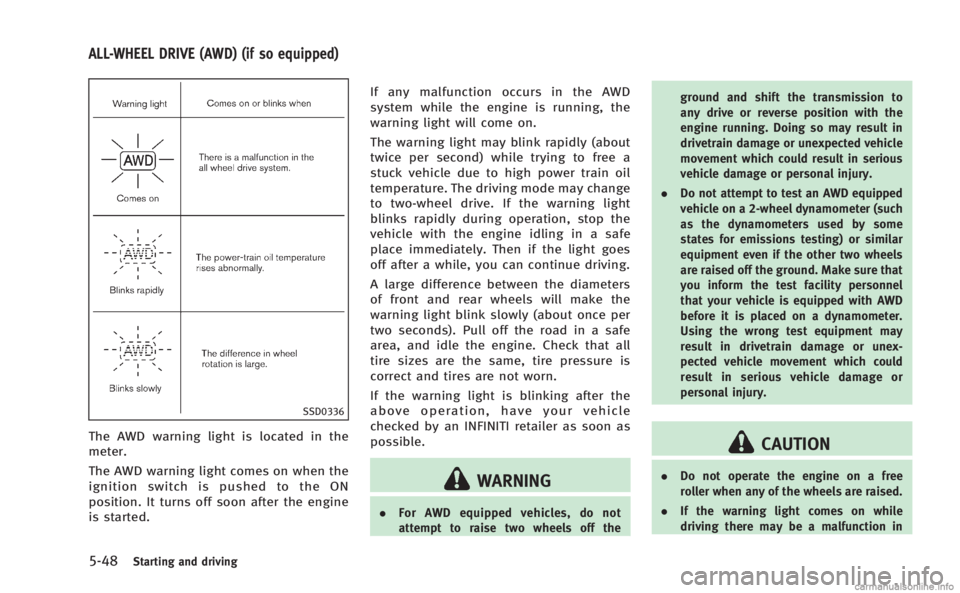
The AWD warning light is located in the
meter.
The AWD warning light comes on when the
ignition switch is pushed to the ON
position. It turns off soon after the engine
is started.If any malfunction occurs in the AWD
system while the engine is running, the
warning light will come on.
The warning light may blink rapidly (about
twice per second) while trying to free a
stuck vehicle due to high power train oil
temperature. The driving mode may change
to two-wheel drive. If the warning light
blinks rapidly during operation, stop the
vehicle with the engine idling in a safe
place immediately. Then if the light goes
off after a while, you can continue driving.
A large difference between the diameters
of front and rear wheels will make the
warning light blink slowly (about once per
two seconds). Pull off the road in a safe
area, and idle the engine. Check that all
tire sizes are the same, tire pressure is
correct and tires are not worn.
If the warning light is blinking after the
above operation, have your vehicle
checked by an INFINITI retailer as soon as
possible.
WARNING
.
For AWD equipped vehicles, do not
attempt to raise two wheels off the ground and shift the transmission to
any drive or reverse position with the
engine running. Doing so may result in
drivetrain damage or unexpected vehicle
movement which could result in serious
vehicle damage or personal injury.
. Do not attempt to test an AWD equipped
vehicle on a 2-wheel dynamometer (such
as the dynamometers used by some
states for emissions testing) or similar
equipment even if the other two wheels
are raised off the ground. Make sure that
you inform the test facility personnel
that your vehicle is equipped with AWD
before it is placed on a dynamometer.
Using the wrong test equipment may
result in drivetrain damage or unex-
pected vehicle movement which could
result in serious vehicle damage or
personal injury.
CAUTION
.Do not operate the engine on a free
roller when any of the wheels are raised.
. If the warning light comes on while
driving there may be a malfunction in
ALL-WHEEL DRIVE (AWD) (if so equipped)
Page 342 of 458
the AWD system. Reduce the vehicle
speed and have your vehicle checked by
an INFINITI retailer as soon as possible.
. If the warning light remains on after the
above operation, have your vehicle
checked by an INFINITI retailer as soon
as possible.
. The power train may be damaged if you
continue driving with the warning light
blinking.
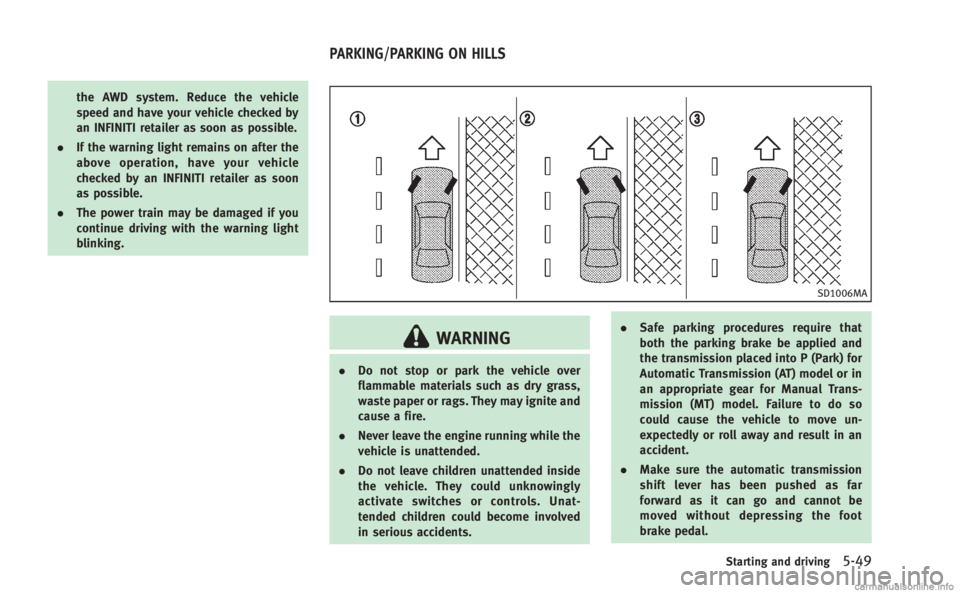
SD1006MA
WARNING
.Do not stop or park the vehicle over
flammable materials such as dry grass,
waste paper or rags. They may ignite and
cause a fire.
. Never leave the engine running while the
vehicle is unattended.
. Do not leave children unattended inside
the vehicle. They could unknowingly
activate switches or controls. Unat-
tended children could become involved
in serious accidents. .
Safe parking procedures require that
both the parking brake be applied and
the transmission placed into P (Park) for
Automatic Transmission (AT) model or in
an appropriate gear for Manual Trans-
mission (MT) model. Failure to do so
could cause the vehicle to move un-
expectedly or roll away and result in an
accident.
. Make sure the automatic transmission
shift lever has been pushed as far
forward as it can go and cannot be
moved without depressing the foot
brake pedal.
Starting and driving5-49
PARKING/PARKING ON HILLS