park assist INFINITI Q60 COUPE 2018 Infiniti Intouch
[x] Cancel search | Manufacturer: INFINITI, Model Year: 2018, Model line: Q60 COUPE, Model: INFINITI Q60 COUPE 2018Pages: 292, PDF Size: 1.45 MB
Page 89 of 292
Models without navigation system:
Push
>on the
steering-wheel to display the phone screen again.
HANDS-FREE TEXT MESSAGING
ASSISTANT
WARNING
Use the text messaging feature after
parking your vehicle in a safe location. If
you have to use the feature while driving,
exercise extreme caution at all times so
full attention may be given to vehicle
operation.
CAUTION
This feature is disabled if the connected
device does not support the Message
Access Profile (MAP). See the phone’s
Owner’s Manual for details and instruc-
tions.
Laws in some jurisdictions may restrict the
use of “Text-to-Speech.” Check local regula-
tions before using this feature.
The system allows for the sending and
receiving of text messages through the vehicle interface.
Depending on the device that is connected
to the vehicle, some of the items may not be
displayed.
Receiving a message
When the cellular phone connected to the
vehicle receives a text message, a notifica-
tion is displayed on the upper display with a
tone.
To check the message, touch [Check Now].
Touch [Later] to save the message to be
checked later.
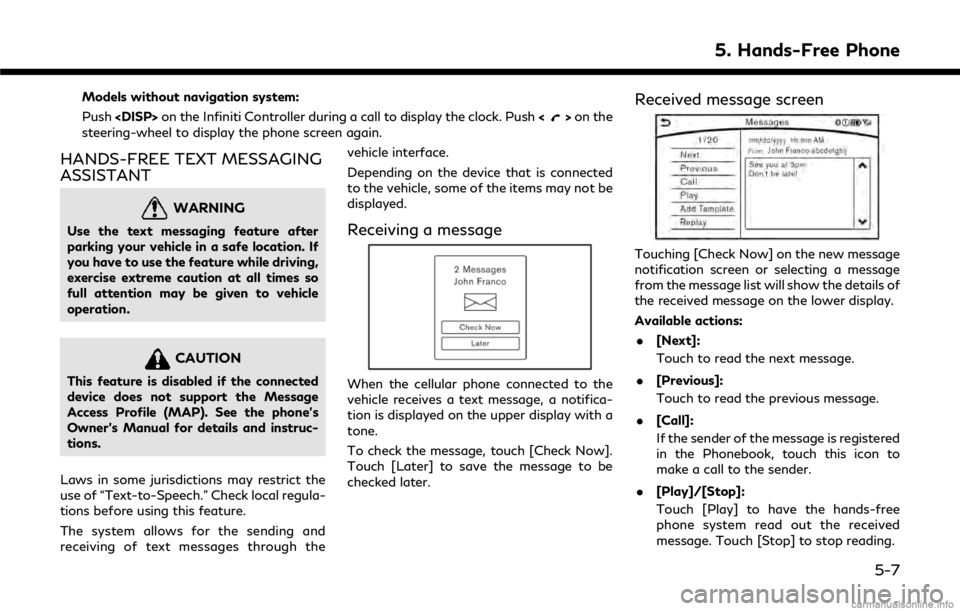
Received message screen
Touching [Check Now] on the new message
notification screen or selecting a message
from the message list will show the details of
the received message on the lower display.
Available actions:
. [Next]:
Touch to read the next message.
. [Previous]:
Touch to read the previous message.
. [Call]:
If the sender of the message is registered
in the Phonebook, touch this icon to
make a call to the sender.
. [Play]/[Stop]:
Touch [Play] to have the hands-free
phone system read out the received
message. Touch [Stop] to stop reading.
5. Hands-Free Phone
5-7
Page 149 of 292

.Destination AssistanceSet a destination using a Interactive
Voice Response (IVR) system.
.Roadside AssistanceConnect to the Roadside Response
Specialist.
.Valet AlertTurns on the Valet Alert function and
monitors the vehicle movement within
a certain range.
.Personal AssistanceConnects to the Infiniti InTouchTM
Services Response Specialist.
INFO:
. You can also connect to an Infiniti
InTouch
TMServices Interactive Voice
Menu by touching the IVR soft button
on the map. .
After selecting [Connect to Voice Menu],
it may take some time until the system
initiates connection, depending on the
technical environment and whether the
TCU (Telematics Control Unit) is being
used by other services.
. To avoid disconnecting the line, do not
turn off the engine or hybrid system.
USING MY SCHEDULE
Allows you to provide in-vehicle access to
your personal Google CalendarTM.
1. Push