ECO mode INFINITI Q60 COUPE 2018 User Guide
[x] Cancel search | Manufacturer: INFINITI, Model Year: 2018, Model line: Q60 COUPE, Model: INFINITI Q60 COUPE 2018Pages: 466, PDF Size: 2.48 MB
Page 101 of 466

2-24Instruments and controls
reaches the empty (0) position.
There is a small reserve of fuel remaining in
the tank when the fuel gauge reaches the
empty (0) position.
11. Low washer fluid warning
This warning appears when the washer tank
fluid is at a low level. Add washer fluid as
necessary. (See “Window washer fluid” (P.8-
15).)
12. Door/trunk open warning
This warning appears if any of the doors
and/or the trunk lid are open or not closed
securely. The vehicle icon indicates which
door or the trunk lid is open on the display.
13. Intelligent Key system warning
This warning appears if there is a malfunc-
tion in the Intelligent Key system.
If this warning appears while the engine is
stopped, the engine cannot be started. If this
warning appears while the engine is running,
the vehicle can be driven. However, in these
cases, have the system checked as soon as
possible. It is recommended you visit an
INFINITI retailer for this service.
14. Loose Fuel Cap warning
This warning appears when the fuel-filler
cap is not tightened correctly after thevehicle has been refueled. (See “Fuel-filler
cap” (P.3-25).)
15. Tire Pressure Low - Add Air
warning
This warning appears when the low tire
pressure warning light in the meter illumi-
nates and low tire pressure is detected. The
warning appears each time the ignition
switch is placed in the ON position as long
as the low tire pressure warning light
remains illuminated. If this warning appears,
stop the vehicle and adjust the pressure to
the recommended COLD tire pressure
shown on the Tire and Loading Information
label. (See “Low tire pressure warning light”
(P.2-14) and “Tire Pressure Monitoring
System (TPMS)” (P.5-5).)
16. Flat Tire - Visit dealer warning
(if so equipped)
This warning appears when the low tire
pressure warning light in the meter illumi-
nates and one or more flat tires are detected
while driving. A chime also sounds for
approximately 10 seconds. (See “Low tire
pressure warning light” (P.2-14) and “Tire
Pressure Monitoring System (TPMS)” (P.5-
5).)
17. Low oil pressure warning (for
VR30DDTT engine models)
This warning appears if low engine oil
pressure is detected. If the warning appears
during normal driving, pull off the road in a
safe area, stop the engine immediately and
call an INFINITI retailer or other authorized
repair shop.
The low oil pressure warning is not designed
to indicate a low oil level. Use the dipstick to
check the oil level. (See “Engine oil” (P.8-
10).)
18. Low oil level warning (for 2.0L
turbo gasoline engine models)
This warning appears if low engine oil level is
detected. If this warning appears, check the
oil level using the dipstick. (See “Engine oil”
(P.8-10).)
CAUTION
The oil level should be checked regularly
using the engine oil dipstick. Operating
with an insufficient amount of oil can
damage the engine and such damage is
not covered by the warranty.
Page 102 of 466

19. All-Wheel Drive (AWD) warning
(if so equipped)
This warning appears when the Intelligent
All-Wheel Drive (AWD) system is not func-
tioning properly while the engine is running.
The displayed message will vary depending
on the condition of the AWD system mal-
function. (See “Intelligent All-Wheel Drive
(AWD)” (P.5-126).)
20. Extended storage fuse warning
This warning may appear if the extended
storage fuse switch is not pushed in
(switched on). When this warning appears,
push in (switch on) the extended storage
fuse switch to turn off the warning. For
more information, see “Extended storage
fuse switch” (P.8-26).
21. Adaptive Front lighting System
(AFS) warning (if so equipped)
This warning appears when the Adaptive
Front lighting System (AFS) is not function-
ing properly. It is recommended you have the
system checked by an INFINITI retailer.
(See “Adaptive Front lighting System (AFS)”
(P.2-42).)
22. Power will turn off to save the
battery warning
This warning appears after a period of time
if the shift lever has not moved from the “P”
(Park) position with the ignition switch in the
ACC or ON position.
23. Power turned off to save the
battery warning
This warning appears after the ignition
switch is automatically turned OFF to save
the battery.
24. Light reminder warning
This warning appears when the driver side
door is opened with the headlight switch is
left ON and the ignition switch is placed in
the ACC, OFF or LOCK position. Place the
headlight switch to “OFF” or “AUTO” posi-
tion. For additional information, see “Head-
light and turn signal switch” (P.2-38).
25. “TIMER” indicator
This indicator appears when the set “TIMER”
indicator activates. You can set the time for
up to 6 hours. (See the Infiniti InTouch
Owner’s Manual.)
26. Low outside temperature
warning
This warning appears if the outside tem-
perature is below 37°F (3°C). The warning
can be set not to be displayed. (See the
Infiniti InTouch Owner’s Manual.)
27. Chassis control warning
This warning appears if Active Lane Control
(if so equipped), the active trace control
system and/or chassis control are not
functioning properly. It is recommended
you have the system checked by an INFINITI
retailer. (See “Active Lane Control” (P.5-26),
“Active trace control” (P.5-136) and “Chassis
control” (P.5-138).)
28. Cruise indicator
Models without Intelligent Cruise Control
(ICC) system:
This indicator shows the cruise control
system status. The status is shown by the
color.
See “Cruise control” (P.5-71) for details.
Models with Intelligent Cruise Control (ICC)
system:
This indicator shows the conventional (fixed
speed) cruise control mode status. The
status is shown by the color.
Instruments and controls2-25
Page 103 of 466

2-26Instruments and controls
See “Conventional (fixed speed) cruise con-
trol mode” (P.5-90) for details.
29. Intelligent Cruise Control (ICC)
system ON indicator (if so
equipped)
This indicator shows the Intelligent Cruise
Control (ICC) system status. The status is
shown by the color. (See “Intelligent Cruise
Control (ICC)” (P.5-73).)
30. Driver assist system indicator (if
so equipped)
This indicator shows the status of the
following systems.
.Lane Departure Warning (LDW)
.Lane Departure Prevention (LDP)
.Blind Spot Warning (BSW)
.Blind Spot Intervention
®(BSI)
.Distance Control Assist (DCA)
.Forward Emergency Braking (FEB) with
pedestrian detection system
.Predictive Forward Collision Warning
(PFCW)
For more details, see “Lane Departure
Warning (LDW) system/Lane Departure
Prevention (LDP)” (P.5-34), “Blind Spot
Warning (BSW)” (P.5-41), “Blind Spot Inter-
vention
®(BSI)” (P.5-49), “Distance Control
Assist (DCA)” (P.5-94), “Forward Emer-gency Braking (FEB) with pedestrian detec-
tion system” (P.5-105) and “Predictive
Forward Collision Warning (PFCW)” (P.5-
115).
The figure and color of this indicator will
change depending on the conditions of the
above systems. (In each section, the name of
this indicator is referred to as, “driver assist
system lane indicator”, “driver assist system
blind spot indicator” or “driver assist system
forward indicator” depending on the sys-
tems.)
31. INFINITI Drive Mode Selector
indicator
When a driving mode is selected using the
INFINITI Drive Mode Selector, the selected
mode indicator is displayed.
.PERSONAL
.SPORT
.SPORT+ (if so equipped)
.STANDARD
.ECO (if so equipped)
.SNOW
(See “INFINITI Drive Mode Selector” (P.5-
22).)
32. Idling Stop System indicator (if
so equipped)
This indicator shows the Idling Stop System
status. See “Idling Stop System” (P.5-139).
33. Automatic Transmission (AT)
position indicator
This indicator shows the automatic shift
position.
In the manual shift mode, when the trans-
mission does not shift to the selected gear
due to a transmission protection mode, the
AT position indicator will blink and a chime
will sound.
See “Automatic Transmission (AT)” (P.5-16)
for further details.
Page 106 of 466

JVI1484X
TRIP COMPUTER
Switches for the trip computer are located
on the right side of the steering wheel. To
operate the trip computer, push the
switches.
Each time the
orswitch is pushed,
the display will change.
The display items for trip computer are
changed on the lower display. For details,
see the Infiniti InTouch Owner’s Manual.
1. Distance to empty (dte — mile or
km)
The distance to empty (dte) mode provides
you with an estimation of the distance thatcan be driven before refueling. The dte is
constantly being calculated, based on the
amount of fuel in the fuel tank and the actual
fuel consumption.
The display is updated every 30 seconds.
The dte mode includes a low range warning
feature. If the fuel level is low, the warning is
displayed on the screen.
When the fuel level drops even lower, the
dte display will change to “——”.
.If the amount of fuel added is small, the
display just before the ignition switch is
placed in the OFF position may continue
to be displayed.
.When driving uphill or rounding curves,
the fuel in the tank shifts, which may
momentarily change the display.
2. Average speed (MPH or km/h)
The average speed mode shows the average
vehicle speed since the last reset. Resetting
is done by pushing the
orswitch for
longer than 1 second.
The display is updated every 30 seconds.
The first 30 seconds after a reset, the
display shows “——”.
3. Elapsed time and trip odometer
(mile or km)
Elapsed time:
The elapsed time mode shows the time since
the last reset. Resetting is done by pushing
the
orswitch for longer than 1
second. (The trip odometer is also reset at
the same time.)
Trip odometer:
The trip odometer mode shows the total
distance the vehicle has been driven since
the last reset. Resetting is done by pushing
the
orswitch for longer than 1
second. (The elapsed time is also reset at the
same time.)
4. Trip fuel saved and engine stop
time (if so equipped)
The trip fuel saved and engine stop time
(Idling Stop System) mode shows amount of
fuel saved and the engine stop time since the
time the ignition switch was placed in the
ON position.
.The estimated quantity of saved fuel
.The time that the engine has been
stopped for by the Idling Stop System
The fuel saved and engine stop time can be
reset by pushing the
orswitch for
longer than 1 second.
Instruments and controls2-29
Page 107 of 466

2-30Instruments and controls
See “Idling Stop System” (P.5-139) for more
details.
5. Total fuel saved and engine stop
time (if so equipped)
The total fuel saved and engine stop time
(Idling Stop System) mode shows amount of
fuel saved and the engine stop time since the
last reset.
.The estimated quantity of saved fuel
.The time that the engine has been
stopped for by the Idling Stop System
The fuel saved and engine stop time can be
reset by pushing the
orswitch for
longer than 1 second.
See “Idling Stop System” (P.5-139) for more
details.
6. Current fuel consumption and
average fuel consumption (MPG, l
(liter)/100 km or km/l)
Current fuel consumption:
The current fuel consumption mode shows
the current fuel consumption.
Average fuel consumption:
The average fuel consumption mode shows
the average fuel consumption since the last
reset. Resetting is done by pushing the
orswitch for longer than 1 second.The average fuel consumption is also reset
on the lower display. See the Infiniti InTouch
Owner’s Manual.
The display is updated every 30 seconds. At
about the first 1/3 mile (500 m) after a
reset, the display shows “——”.
7. Navigation (if so equipped)
When the route guidance is set in the
navigation system, this item shows the
navigation route information.
For more details, see the Infiniti InTouch
Owner’s Manual.
8. Audio
The audio mode shows the status of audio
information.
For more details, see the Infiniti InTouch
Owner’s Manual.
9. Driving aids (if so equipped)
The driving aids mode shows the operating
condition for the following systems.
.Lane Departure Warning (LDW)
.Lane Departure Prevention (LDP)
.Blind Spot Warning (BSW)
.Blind Spot Intervention
®(BSI)
.Distance Control Assist (DCA)
.Forward Emergency Braking (FEB) with
pedestrian detection system.Predictive Forward Collision Warning
(PFCW)
For more details, see “Lane Departure
Warning (LDW) system/Lane Departure
Prevention (LDP)” (P.5-34), “Blind Spot
Warning (BSW)” (P.5-41), “Blind Spot Inter-
vention
®(BSI)” (P.5-49), “Distance Control
Assist (DCA)” (P.5-94), “Forward Emer-
gency Braking (FEB) with pedestrian detec-
tion system” (P.5-105) and “Predictive
Forward Collision Warning (PFCW)” (P.5-
115).
10. Tire pressure
The tire pressure mode shows the pressure
of all four tires while the vehicle is driven.
When the “Tire Pressure Low - Add Air” or
“Flat Tire - Visit dealer” (if so equipped)
warning appears, the display can be
switched to the tire pressure mode by
pushing the
orswitch.
The tire pressure unit can be changed in the
[TPMS setting] under the [Settings] menu
on the lower display. (See the Infiniti InTouch
Owner’s Manual.)
NOTE:
After the ignition switch is placed in the ON
position, it may take a period of time for the
tire pressure to be displayed while the
vehicle is driven. Depending on the radio
wave circumstance, tire pressure may not
Page 108 of 466

correctly be displayed.
11. Chassis control
When Active Lane Control (if so equipped) or
the active trace control system is operated, it
shows the operating condition. See “Active
Lane Control” (P.5-26) and “Active trace
control” (P.5-136) for more details.
12. Oil control system (for
VR30DDTT engine models)
Engine oil information informs the distance
to oil change.
Distance to oil change:
The distance to oil change is displayed if the
distance to oil change comes to be less than
940 miles (1,500 km).
Oil replacement indicator:
When the set mileage approaches, the
engine oil replacement indicator will appear
on the display. After the oil is changed, reset
the oil control system by pushing the
orswitch for longer than 1 second.
The oil change interval cannot be adjusted
manually. The distance to oil change interval
is calculated depending on the driving con-
ditions and set automatically by the oil
control system.
CAUTION
If the oil replacement indicator is dis-
played, change the engine oil as soon as
possible. Operating your vehicle with
deteriorated oil can damage the engine.
Warning check
The present warnings are displayed. If no
warning is present, “No Warning” is dis-
played.
JVI0679M
CLOCK AND OUTSIDE AIR TEM-
PERATURE
The clockand outside air temperatureare displayed on the upper side of the vehicle
information display.
Clock
The clock can be adjusted on the lower
display. See the Infiniti InTouch Owner’s
Manual.
Outside air temperature (°F or °C)
The outside air temperature is displayed in °F
or °C in the range of −22 to 131°F (−30 to
55°C).
Instruments and controls2-31
Page 113 of 466
2-36Instruments and controls
The windshield wiper and washer operates
when the ignition switch is in the ON
position.
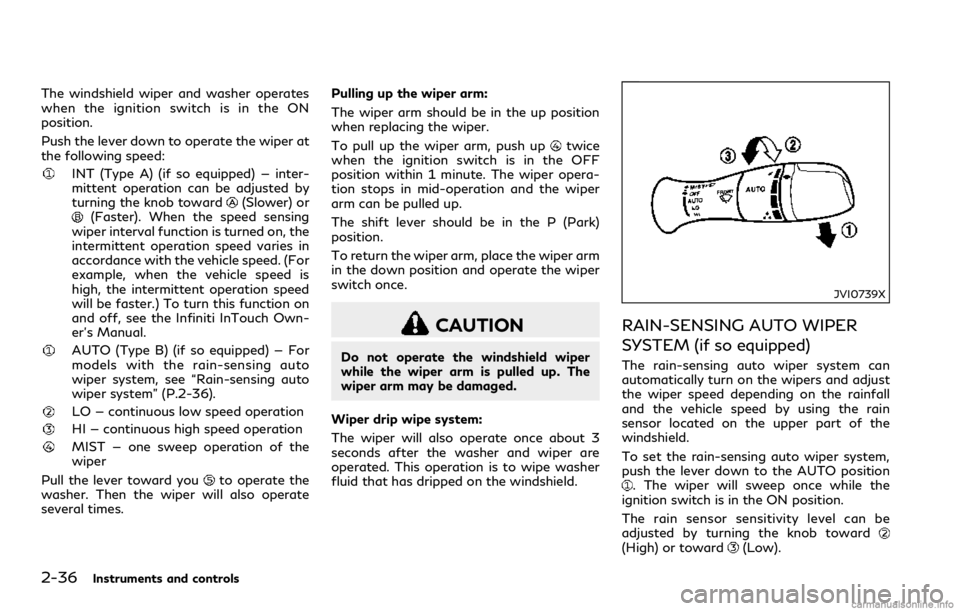
Push the lever down to operate the wiper at
the following speed:
INT (Type A) (if so equipped) — inter-
mittent operation can be adjusted by
turning the knob toward
(Slower) or(Faster). When the speed sensing
wiper interval function is turned on, the
intermittent operation speed varies in
accordance with the vehicle speed. (For
example, when the vehicle speed is
high, the intermittent operation speed
will be faster.) To turn this function on
and off, see the Infiniti InTouch Own-
er’s Manual.
AUTO (Type B) (if so equipped) — For
models with the rain-sensing auto
wiper system, see “Rain-sensing auto
wiper system” (P.2-36).
LO — continuous low speed operation
HI — continuous high speed operation
MIST — one sweep operation of the
wiper
Pull the lever toward you
to operate the
washer. Then the wiper will also operate
several times.Pulling up the wiper arm:
The wiper arm should be in the up position
when replacing the wiper.
To pull up the wiper arm, push up
twice
when the ignition switch is in the OFF
position within 1 minute. The wiper opera-
tion stops in mid-operation and the wiper
arm can be pulled up.
The shift lever should be in the P (Park)
position.
To return the wiper arm, place the wiper arm
in the down position and operate the wiper
switch once.
CAUTION
Do not operate the windshield wiper
while the wiper arm is pulled up. The
wiper arm may be damaged.
Wiper drip wipe system:
The wiper will also operate once about 3
seconds after the washer and wiper are
operated. This operation is to wipe washer
fluid that has dripped on the windshield.
JVI0739X
RAIN-SENSING AUTO WIPER
SYSTEM (if so equipped)
The rain-sensing auto wiper system can
automatically turn on the wipers and adjust
the wiper speed depending on the rainfall
and the vehicle speed by using the rain
sensor located on the upper part of the
windshield.
To set the rain-sensing auto wiper system,
push the lever down to the AUTO position
. The wiper will sweep once while the
ignition switch is in the ON position.
The rain sensor sensitivity level can be
adjusted by turning the knob toward
(High) or toward(Low).
Page 120 of 466

JVI0644X
JVI0937X
Instrument brightness control
The instrument brightness control switch
can be operated when the ignition switch is
in the ON position. When the switch is
operated, the vehicle information display
switches to the brightness adjustment
mode.
Push the + side of the switch
to brighten
the instrument panel lights. The barmoves
to the + side.
Push the - side of the switch
to dim the
instrument panel lights. The barmoves to
the − side. When the brightness level reaches
the minimum, the instrument panel lights will
turn off during the nighttime.
When the brightness level reaches the max-
imum or minimum, a beep will sound.
The vehicle information display returns to
the normal display when the instrument
brightness control switch is not operated
for more than 5 seconds.
JVI1489X
TURN SIGNAL SWITCH
Turn signal
Move the lever up or down to signal the
turning direction. When the turn is com-
pleted, the turn signals cancel automatically.
Lane change signal
.Move the lever up or down until the turn
signal begins to flash, but the lever does
not latch, to signal a lane change. Hold
the lever until the lane change is com-
pleted.
.Move the lever up or down until the turn
signal begins to flash, but the lever does
not latch, and release the lever. The turn
Instruments and controls2-43
Page 123 of 466

2-46Instruments and controls
.Any liquid spilled on the heated seat
should be removed immediately with
a dry cloth.
.When cleaning the seat, never use
gasoline, thinner, or any similar ma-
terials.
.If any malfunctions are found or the
heated seat does not operate, turn
the switch off and have the system
checked. It is recommended you visit
an INFINITI retailer for this service.
JVR0505X
The front seats can be warmed by built-in
heaters. The heating system of driver’s seat
and front passenger seat can be operated
independently.
OPERATION WITH SWITCH
1. Start the engine.
2. Push the switch on the instrument panel.
.Each time the switch is pushed, the
seat heating mode will change in the
following order.
AUTO?High?Mid?Low?OFF
.The indicator lighton the switch will
illuminate when the heater is on.
When the vehicle’s interior is warmed, or
before you leave the vehicle, be sure to turnoff the seat heater.
OPERATION WITH TOUCH
SCREEN
Push the CLIMATE button and touch []
or [] on the lower display. Select an item
from [AUTO], [High], [Mid], [Low] or [OFF].
AUTO MODE SETTING
When in the AUTO mode, the heater will
turn on or off automatically according to the
conditions such as the temperature inside
the vehicle compartment. Depending on the
conditions, the heater will not turn on even if
AUTO is selected. The settings for the AUTO
mode can be changed. For details, see the
Infiniti InTouch Owner’s Manual.
Page 139 of 466

2-62Instruments and controls
PROGRAMMING TROUBLE-
SHOOTING
If the HomeLink®does not quickly learn the
hand-held transmitter information:
.replace the hand-held transmitter bat-
teries with new batteries.
.position the hand-held transmitter with
its battery area facing away from the
HomeLink
®surface.
.press and hold both the HomeLink®and
hand-held transmitter buttons without
interruption.
.position the hand-held transmitter 1-3 in
(26-76 mm) away from the HomeLink
®
surface. Hold the transmitter in that
position for up to 15 seconds. If
HomeLink
®is not programmed within
that time, try holding the transmitter in
another position - keeping the indicator
light in view at all times.
If you have any questions or are having
difficulty programming your HomeLink
®
buttons, refer to the HomeLink®web site
at: www.homelink.com or 1-800-355-
3515.
CLEARING THE PROGRAMMED
INFORMATION
The following procedure clears the pro-
grammed information from both buttons.
Individual buttons cannot be cleared. How-
ever, individual buttons can be repro-
grammed, see “Reprogramming a single
HomeLink
®button” (P.2-62).
To clear all programming
1. Press and hold the two outer HomeLink®
buttons until the indicator light begins to
flash in approximately 10 seconds. Do
not hold for longer than 20 seconds.
2. Release both buttons.
HomeLink
®is now in the programming mode
and can be programmed at any time begin-
ning with “Programming HomeLink
®” - Step
1.
REPROGRAMMING A SINGLE
HomeLink®BUTTON
To reprogram a HomeLink®Universal Trans-
ceiver button, complete the following.
1. Press and hold the desired HomeLink
®
button.Do notrelease the button.
2. The indicator light will begin to flash
after 20 seconds. Without releasing the
HomeLink
®button, proceed with “Pro-
gramming HomeLink®” - Step 1.For questions or comments, contact
HomeLink
®at: www.homelink.com or 1-
800-355-3515.
The HomeLink
®Universal Transceiver but-
ton has now been reprogrammed. The new
device can be activated by pushing the
HomeLink
®button that was just pro-
grammed. This procedure will not affect
any other programmed HomeLink
®buttons.
IF YOUR VEHICLE IS STOLEN
If your vehicle is stolen, you should change
the codes of any non-rolling code device that
has been programmed into HomeLink
®.
Consult the Owner’s Manual of each device
or call the manufacturer or retailer of those
devices for additional information.
When your vehicle is recovered, you will
need to reprogram the HomeLink
®Univer-
sal Transceiver with your new transmitter
information.
FCC Notice:
For USA:
This device complies with Part 15 of the
FCC Rules. Operation is subject to the
following two conditions: (1) This device
may not cause harmful interference, and (2)
this device must accept any interference
received, including interference that may
cause undesired operation.