ECO mode INFINITI Q60 COUPE 2018 Owner's Guide
[x] Cancel search | Manufacturer: INFINITI, Model Year: 2018, Model line: Q60 COUPE, Model: INFINITI Q60 COUPE 2018Pages: 466, PDF Size: 2.48 MB
Page 146 of 466

.You can switch the lock system to the
mode that allows you to open all the
doors when the key is turned once. (See
the Infiniti InTouch Owner’s Manual for
details.)
OPENING AND CLOSING WIN-
DOWS WITH MECHANICAL KEY
The driver’s door key operation also allows
you to open and close the window that is
equipped with the automatic open/close
function. (See “Power windows” (P.2-52).)
To open the window, turn the driver’s door
key cylinder to the rear of the vehicle for
longer than 1 second. The door is unlocked
and the window keeps opening while turning
the key.
This function can also be performed by
pushing and holding the UNLOCK button
on the Intelligent Key. (See “Remote keyless
entry system” (P.3-15).)
To close the window, turn the driver’s door
key cylinder to the front of the vehicle for
longer than 1 second. The door is locked and
the window keeps closing while turning the
key.
SPA2726
LOCKING WITH INSIDE LOCK
KNOB
To lock the door individually, move the inside
lock knob to the lock positionthen close
the door.
To unlock, move the inside lock knob to the
unlock position
.
When locking the door without an Intelli-
gent Key, be sure not to leave the Intelligent
Key inside the vehicle.
JVP0319X
LOCKING WITH POWER DOOR
LOCK SWITCH
Operating the power door lock switch will
lock or unlock all the doors and trunk lid. The
switches are located on the driver’s and
front passenger’s door armrests.
To lock the doors and trunk lid, push the
power door lock switch to the lock position
with the driver’s or front passenger’s door
open, then close the door.
When locking the door this way, be certain
not to leave the Intelligent Key inside the
vehicle.
To unlock the doors including the fuel-filler
door and trunk lid, push the power door lock
Pre-driving checks and adjustments3-5
Page 156 of 466

LOG-IN FUNCTION
After setting up the user information, the
system will automatically recognize the user
upon turning on the vehicle.
There will be a personalized welcome greet-
ing and screen prompt to log-in.
This feature allows 4 drivers to use their
own registration, drive mode, driving posi-
tion, air conditioner, and auto settings and
memorizes these custom settings.
The log-in user can be changed on the
welcome greeting screen or the User List
screen. For more details, see the Infiniti
InTouch Owner’s Manual.
The log-in function is linked to the following
items:
.Meter
.Audio
.Navigation system display (if so
equipped)
.Navigation settings (if so equipped)
.Air conditioner
.Automatic drive positioner (if so
equipped)
.Engine/Transmission
.Steering
.Suspension (if so equipped).Active trace control system
.Driver assistance* (if so equipped)
.Body Control Module (BCM)
*: except for the Forward Emergency Brak-
ing (FEB) with pedestrian detection systemWARNING
The Intelligent Key transmits radio
waves when the buttons are pushed.
The FAA advises that the radio waves
may affect aircraft navigation and com-
munication systems. Do not operate the
Intelligent Key while on an airplane.
Make sure the buttons are not operated
unintentionally when the unit is stored
during a flight.
It is possible to lock/unlock all doors and
fuel-filler door, open the trunk lid, activate
the panic alarm and open the windows by
pushing the buttons on the Intelligent Key
from outside the vehicle.
Before locking the doors, make sure the
Intelligent Key is not left in the vehicle.
The remote keyless entry function can
operate at a distance of approximately 33
ft (10 m) from the vehicle. (The effective
distance depends upon the conditions
around the vehicle.)
As many as 4 Intelligent Keys can be used
with one vehicle. For information concerning
the purchase and use of additional Intelli-
gent Keys, contact an INFINITI retailer.
The buttons on the Intelligent Key will not
operate when:
Pre-driving checks and adjustments3-15
REMOTE KEYLESS ENTRY SYSTEM
Page 160 of 466
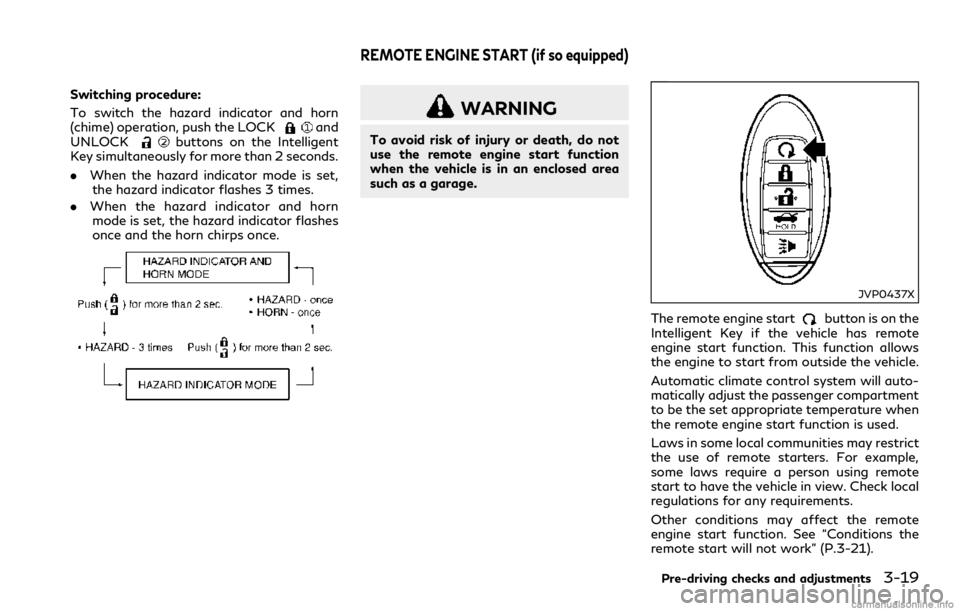
Switching procedure:
To switch the hazard indicator and horn
(chime) operation, push the LOCK
and
UNLOCKbuttons on the Intelligent
Key simultaneously for more than 2 seconds.
.When the hazard indicator mode is set,
the hazard indicator flashes 3 times.
.When the hazard indicator and horn
mode is set, the hazard indicator flashes
once and the horn chirps once.
WARNING
To avoid risk of injury or death, do not
use the remote engine start function
when the vehicle is in an enclosed area
such as a garage.
JVP0437X
The remote engine startbutton is on the
Intelligent Key if the vehicle has remote
engine start function. This function allows
the engine to start from outside the vehicle.
Automatic climate control system will auto-
matically adjust the passenger compartment
to be the set appropriate temperature when
the remote engine start function is used.
Laws in some local communities may restrict
the use of remote starters. For example,
some laws require a person using remote
start to have the vehicle in view. Check local
regulations for any requirements.
Other conditions may affect the remote
engine start function. See “Conditions the
remote start will not work” (P.3-21).
Pre-driving checks and adjustments3-19
REMOTE ENGINE START (if so equipped)
Page 178 of 466
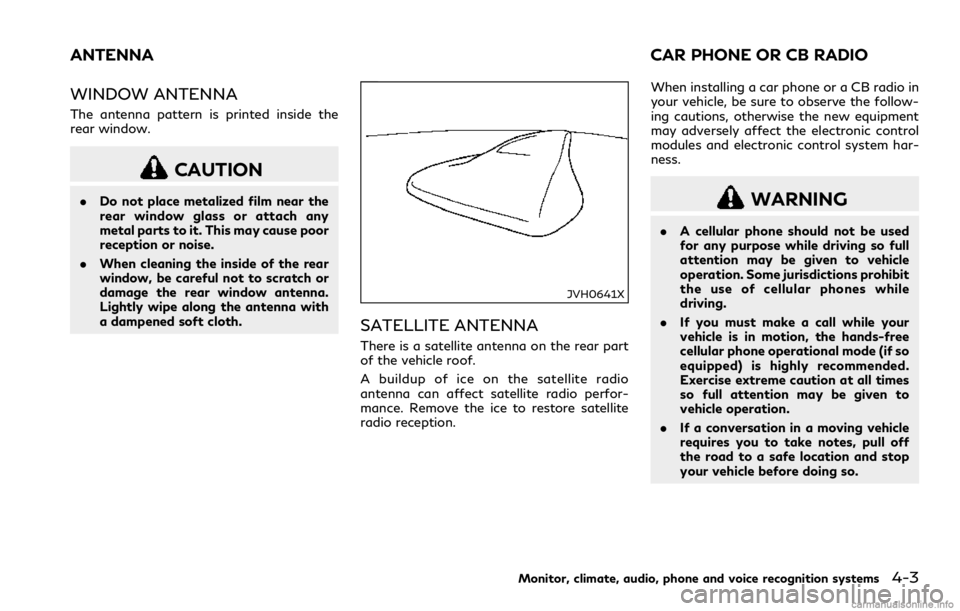
WINDOW ANTENNA
The antenna pattern is printed inside the
rear window.
CAUTION
.Do not place metalized film near the
rear window glass or attach any
metal parts to it. This may cause poor
reception or noise.
.When cleaning the inside of the rear
window, be careful not to scratch or
damage the rear window antenna.
Lightly wipe along the antenna with
a dampened soft cloth.
JVH0641X
SATELLITE ANTENNA
There is a satellite antenna on the rear part
of the vehicle roof.
A buildup of ice on the satellite radio
antenna can affect satellite radio perfor-
mance. Remove the ice to restore satellite
radio reception.When installing a car phone or a CB radio in
your vehicle, be sure to observe the follow-
ing cautions, otherwise the new equipment
may adversely affect the electronic control
modules and electronic control system har-
ness.
WARNING
.A cellular phone should not be used
for any purpose while driving so full
attention may be given to vehicle
operation. Some jurisdictions prohibit
the use of cellular phones while
driving.
.If you must make a call while your
vehicle is in motion, the hands-free
cellular phone operational mode (if so
equipped) is highly recommended.
Exercise extreme caution at all times
so full attention may be given to
vehicle operation.
.If a conversation in a moving vehicle
requires you to take notes, pull off
the road to a safe location and stop
your vehicle before doing so.
Monitor, climate, audio, phone and voice recognition systems4-3
ANTENNA CAR PHONE OR CB RADIO
Page 180 of 466

5 Starting and driving
Precautions when starting and driving........................ 5-4
Exhaust gas (carbon monoxide)............................... 5-4
Three-way catalyst...................................................... 5-5
Tire Pressure Monitoring System (TPMS) ............ 5-5
Avoiding collision and rollover.................................. 5-9
Off-road recovery ........................................................ 5-9
Rapid air pressure loss.............................................. 5-10
Drinking alcohol/drugs and driving....................... 5-10
Intelligent All-Wheel Drive (AWD) driving
safety precautions (AWD models)......................... 5-11
Push-button ignition switch ......................................... 5-11
Operating range for engine start function.......... 5-12
Push-button ignition switch operation................ 5-12
Push-button ignition switch positions ................. 5-13
Emergency engine shut off...................................... 5-13
Intelligent Key battery discharge........................... 5-14
Before starting the engine ............................................ 5-14
Starting the engine.......................................................... 5-15
Remote start (if so equipped) ................................. 5-15
Driving the vehicle ........................................................... 5-16
Automatic Transmission (AT).................................. 5-16
Parking brake.................................................................... 5-21
INFINITI Drive Mode Selector ..................................... 5-22
STANDARD mode...................................................... 5-22
SPORT+ mode (if so equipped) .............................. 5-23SPORT mode............................................................. 5-23
SNOW mode.............................................................. 5-23
ECO mode (if so equipped) ................................... 5-23
PERSONAL mode.................................................... 5-25
Active Lane Control (if so equipped)......................... 5-26
Active Lane Control operation............................. 5-28
Turning Active Lane Control ON/OFF.............. 5-29
How to enable/disable Active Lane Control.... 5-30
Active Lane Control limitations............................ 5-31
System temporarily unavailable ........................... 5-32
System malfunction................................................. 5-32
System maintenance ............................................... 5-33
Lane Departure Warning (LDW) system/Lane
Departure Prevention (LDP) (if so equipped).......... 5-34
LDW system operation........................................... 5-35
How to enable/disable the LDW system.......... 5-36
LDP system operation ............................................ 5-36
Turning the LDP system ON/OFF ..................... 5-37
How to enable/disable the LDP system ........... 5-38
LDW/LDP system limitations .............................. 5-38
System temporarily unavailable ........................... 5-39
System malfunction................................................ 5-40
System maintenance .............................................. 5-40
Blind Spot Warning (BSW) (if so equipped) ............ 5-41
BSW system operation........................................... 5-43
Page 184 of 466
THREE-WAY CATALYST
The three-way catalyst is an emission con-
trol device installed in the exhaust system.
Exhaust gases in the three-way catalyst are
burned at high temperatures to help reduce
pollutants.
WARNING
.The exhaust gas and the exhaust
system are very hot. Keep people,
animals or flammable materials away
from the exhaust system compo-
nents.
.Do not stop or park the vehicle over
flammable materials such as dry
grass, waste paper or rags. They
may ignite and cause a fire.
CAUTION
.Do not use leaded gasoline. Deposits
from leaded gasoline seriously reduce
the three-way catalyst’s ability to
help reduce exhaust pollutants.
.Keep your engine tuned up. Malfunc-
tions in the ignition, fuel injection, or
electrical systems can cause overrichfuel flow into the three-way catalyst,
causing it to overheat. Do not keep
driving if the engine misfires, or if
noticeable loss of performance or
other unusual operating conditions
are detected. Have the vehicle in-
spected promptly. It is recommended
you visit an INFINITI retailer for this
service.
.Avoid driving with an extremely low
fuel level. Running out of fuel could
cause the engine to misfire, damaging
the three-way catalyst.
.Do not race the engine while warming
it up.
.Do not push or tow your vehicle to
start the engine.
TIRE PRESSURE MONITORING
SYSTEM (TPMS)
Each tire, including the spare (if provided),
should be checked monthly when cold and
inflated to the inflation pressure recom-
mended by the vehicle manufacturer on the
vehicle placard or tire inflation pressure
label. (If your vehicle has tires of a different
size than the size indicated on the vehicle
placard or tire inflation pressure label, you
should determine the proper tire inflation
pressure for those tires.)As an added safety feature, your vehicle has
been equipped with a Tire Pressure Mon-
itoring System (TPMS) that illuminates a low
tire pressure telltale when one or more of
your tires is significantly under-inflated.
Accordingly, when the low tire pressure
telltale illuminates, you should stop and
check your tires as soon as possible, and
inflate them to the proper pressure. Driving
on a significantly under-inflated tire causes
the tire to overheat and can lead to tire
failure. Under-inflation also reduces fuel
efficiency and tire tread life, and may affect
the vehicle’s handling and stopping ability.
For models with run-flat tires, if the vehicle
is being driven with one or more flat tires,
the low tire pressure warning light will
illuminate continuously and a chime will
sound for 10 seconds. The flat tire warning
will also appear in the vehicle information
display. The chime will only sound at the first
indication of a flat tire, and the warning light
will illuminate continuously. When the flat
tire warning is activated, it is recommended
you have the system reset and the tire
checked and replaced if necessary by an
INFINITI retailer. Even if the tire is inflated
to the specified COLD tire pressure, the
warning light will continue to illuminate until
the system is reset by an INFINITI retailer.
Your vehicle can be driven for a limited time
on a flat tire. See “Run-flat tires” (P.8-39).
Starting and driving5-5
Page 186 of 466

WARNING
.Radio waves could adversely affect
electric medical equipment. Those
who use a pacemaker should contact
the electric medical equipment man-
ufacturer for the possible influences
before use.
.If the low tire pressure warning light
illuminates while driving, avoid sud-
den steering maneuvers or abrupt
braking, reduce vehicle speed, pull
off the road to a safe location and
stop the vehicle as soon as possible.
Driving with under-inflated tires may
permanently damage the tires and
increase the likelihood of tire failure.
Serious vehicle damage could occur
and may lead to an accident and
could result in serious personal injury.
Check the tire pressure for all four
tires. Adjust the tire pressure to the
recommended COLD tire pressure
shown on the Tire and Loading
Information label to turn the low tire
pressure warning light OFF. If the
light still illuminates while driving
after adjusting the tire pressure, a
tire may be flat or the TPMS may be
malfunctioning. If you have a flat tire,
replace it with a spare tire (if soequipped) or repair it with the emer-
gency tire puncture repair kit (if so
equipped) as soon as possible. If no
tire is flat and all tires are properly
inflated, it is recommended you con-
sult an INFINITI retailer.
.For models with run-flat tires,
although you can continue driving
with a punctured run-flat tire, re-
member that vehicle handling stabi-
lity is reduced, which could lead to an
accident and personal injury. Also,
driving a long distance at high speeds
may damage the tires.
— Do not drive at speeds above 50
MPH (80 km/h) and do not drive
more than approximately 93 miles
(150 km) with a punctured run-
flat tire. The actual distance the
vehicle can be driven on a flat tire
depends on outside temperature,
vehicle load, road conditions and
other factors.
— If you detect any unusual sounds
or vibrations while driving with a
punctured run-flat tire, pull off
the road to a safe location and
stop the vehicle as soon as possi-
ble. The tire may be seriously
damaged and need to be replaced..Since the spare tire is not equipped
with the TPMS, when a spare tire is
mounted or a wheel is replaced, the
TPMS will not function and the low
tire pressure warning light will flash
for approximately 1 minute. The light
will remain on after 1 minute. Have
your tires replaced and/or TPMS
system reset as soon as possible. It
is recommended you visit an INFINITI
retailer for these services.
.Replacing tires with those not origin-
ally specified by INFINITI could affect
the proper operation of the TPMS.
.Do not inject any tire liquid or aerosol
tire sealant into the tires, as this may
cause a malfunction of the tire pres-
sure sensors (for models not equipped
with the emergency tire puncture
repair kit).
.INFINITI recommends using only
Genuine NISSAN Emergency Tire
Sealant provided with your vehicle.
Other tire sealants may damage the
valve stem seal which can cause the
tire to lose air pressure. It is recom-
mended you visit an INFINITI retailer
as soon as possible after using tire
repair sealant (for models equipped
with the emergency tire puncture
repair kit).
Starting and driving5-7
Page 190 of 466

Remember, drinking and driving don’t mix!
And that is true for drugs, too (over-the-
counter, prescription, and illegal drugs).
Don’t drive if your ability to operate your
vehicle is impaired by alcohol, drugs, or some
other physical condition.
INTELLIGENT ALL-WHEEL
DRIVE (AWD) DRIVING SAFETY
PRECAUTIONS (AWD models)
WARNING
.Do not drive beyond the performance
capability of the tires, even with
Intelligent AWD engaged. Accelerat-
ing quickly, sharp steering maneuvers
or sudden braking may cause loss of
control.
.Always use tires of the same type,
size, brand, construction (bias, bias-
belted or radial), and tread pattern
on all four wheels. Install tire chains
on the rear wheels when driving on
slippery roads and drive carefully.
.This vehicle is not designed for off-
road (rough road) use. Do not drive
on sandy or muddy roads that tires
may get stuck in..For AWD equipped vehicles, do not
attempt to raise two wheels off the
ground and shift the transmission to
any D (Drive) or R (Reverse) position
with the engine running. Doing so
may result in drivetrain damage or
unexpected vehicle movement which
could result in serious vehicle damage
or personal injury.
.Do not attempt to test an AWD
equipped vehicle on a 2-wheel dy-
namometer (such as the dynam-
ometers used by some states for
emissions testing), or similar equip-
ment even if the other two wheels are
raised off the ground. Make sure you
inform test facility personnel that
your vehicle is equipped with AWD
before it is placed on a dynamometer.
Using the wrong test equipment may
result in drivetrain damage or unex-
pected vehicle movement which could
result in serious vehicle damage or
personal injury.
.When a wheel is off the ground due
to an unlevel surface, do not spin the
wheel excessively.
WARNING
Do not operate the push-button ignition
switch while driving the vehicle except in
an emergency. (The engine will stop
when the ignition switch is pushed 3
consecutive times or the ignition switch
is pushed and held for more than 2
seconds.) If the engine stops while the
vehicle is being driven, this could lead to
a crash and serious injury.
Before operating the push-button ignition
switch, be sure to move the shift lever to the
P (Park) position.
Starting and driving5-11
PUSH-BUTTON IGNITION SWITCH
Page 194 of 466

1. Apply the parking brake.
2. Move the shift lever to the P (Park) or N
(Neutral) position. (P is recommended.)
The starter is designed not to operate
unless the shift lever is in either of the
above positions.
3. Push the ignition switch to the ON
position. Depress the brake pedal and
push the ignition switch to start the
engine.
To start the engine immediately, push
and release the ignition switch while
depressing the brake pedal with the
ignition switch in any position.
.If the engine is very hard to start in
extremely cold weather or when re-
starting, depress the accelerator ped-
al a little (approximately 1/3 to the
floor) and while holding, crank the
engine. Release the accelerator pedal
when the engine starts.
.If the engine is very hard to start
because it is flooded, depress the
accelerator pedal all the way to the
floor and hold it. Push the ignition
switch to the ON position to start
cranking the engine. After 5 or 6
seconds, stop cranking by pushing
the ignition switch to OFF. After
cranking the engine, release the accel-
erator pedal. Crank the enginewithyour foot off the accelerator pedalby
depressing the brake pedal and push-
ing the push-button ignition switch to
start the engine. If the engine starts,
but fails to run, repeat the above
procedure.
CAUTION
Do not operate the starter for more than
15 seconds at a time. If the engine does
not start, push the ignition switch to
OFF and wait 10 seconds before crank-
ing again, otherwise the starter could be
damaged.
4.Warm-up
Allow the engine to idle for at least 30
seconds after starting. Do not race the
engine while warming it up. Drive at
moderate speed for a short distance
first, especially in cold weather. In cold
weather, keep the engine running for a
minimum of 2 - 3 minutes before shut-
ting it off. Starting and stopping the
engine over a short period of time may
make the vehicle more difficult to start.
When racing the engine up to 4,500 rpm
or more under no load condition, the
engine will enter the fuel cut mode.5. To stop the engine, shift the shift lever to
the P (Park) position and push the
ignition switch to the OFF position.
NOTE:
Care should be taken to avoid situations
that can lead to potential battery discharge
and potential no-start conditions such as:
1.Installation or extended use of electro-
nic accessories that consume battery
power when the engine is not running
(Phone chargers, GPS, DVD players,
etc.)
2.Vehicle is not driven regularly and/or
only driven short distances.
In these cases, the battery may need to be
charged to maintain battery health.
REMOTE START (if so equipped)
Vehicles started with the remote engine
start function require the ignition switch to
be placed in the ON position before the shift
lever can be moved from the P (Park)
position. To place the ignition switch in the
ON position, perform the following steps:
1. Make sure that the Intelligent Key is on
you.
2. Depress the brake pedal.
3. Push the ignition switch once to the ON
position.
Starting and driving5-15
STARTING THE ENGINE
Page 195 of 466

5-16Starting and driving
For additional information about the remote
engine start function, see “Remote engine
start” (P.3-19).AUTOMATIC TRANSMISSION
(AT)
The Automatic Transmission (AT) in your
vehicle is electronically controlled by a
transmission control module to produce
maximum efficiency and smooth operation.
Shown on the following pages are the
recommended operating procedures for this
transmission. Follow these procedures for
maximum vehicle performance and driving
enjoyment.
Starting the vehicle
After starting the engine, fully depress the
foot brake pedal and push the shift lever
button before shifting the shift lever to the R
(Reverse), N (Neutral), D (Drive) or Manual
shift mode position. Be sure the vehicle is
fully stopped before attempting to shift the
shift lever.
This Automatic Transmission (AT) model is
designed so that the foot brake pedal must
be depressed before shifting from P (Park)
to any drive position while the ignition
switch is in the ON position.
The shift lever cannot be moved out of the P
(Park) position and into any of the other
gear positions if the ignition switch is placed
in the LOCK, OFF or ACC position.1. Keep the foot brake pedal depressed and
push the shift lever button to shift into a
driving gear.
2. Release the parking brake and foot
brake, then gradually start the vehicle in
motion.
WARNING
.Do not depress the accelerator pedal
while shifting from P (Park) or N
(Neutral) to R (Reverse), D (Drive) or
manual shift mode. Always depress
the brake pedal until shifting is
completed. Failure to do so could
cause you to lose control and have
an accident.
.Cold engine idle speed is high, so use
caution when shifting into a forward
or reverse gear before the engine has
warmed up.
.Never shift to either P (Park) or R
(Reverse) position while the vehicle is
moving forward and P (Park) or D
(Drive) position while the vehicle is
moving reversing. This could cause an
accident or damage the transmission.
.Do not downshift abruptly on slip-
pery roads. This may cause a loss of
control.
DRIVING THE VEHICLE