instrument panel INFINITI Q60 COUPE 2021 Owner's Guide
[x] Cancel search | Manufacturer: INFINITI, Model Year: 2021, Model line: Q60 COUPE, Model: INFINITI Q60 COUPE 2021Pages: 492, PDF Size: 2.44 MB
Page 164 of 492
3-22Pre-driving checks and adjustments
JVP0452X
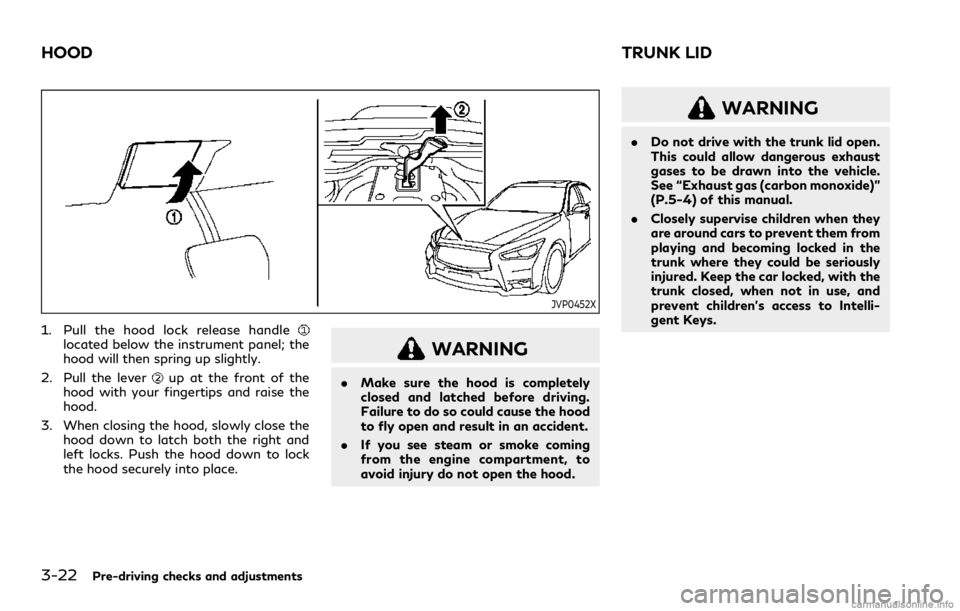
1. Pull the hood lock release handlelocated below the instrument panel; the
hood will then spring up slightly.
2. Pull the lever
up at the front of the
hood with your fingertips and raise the
hood.
3. When closing the hood, slowly close the
hood down to latch both the right and
left locks. Push the hood down to lock
the hood securely into place.
WARNING
.Make sure the hood is completely
closed and latched before driving.
Failure to do so could cause the hood
to fly open and result in an accident.
.If you see steam or smoke coming
from the engine compartment, to
avoid injury do not open the hood.
WARNING
.Do not drive with the trunk lid open.
This could allow dangerous exhaust
gases to be drawn into the vehicle.
See “Exhaust gas (carbon monoxide)”
(P.5-4) of this manual.
.Closely supervise children when they
are around cars to prevent them from
playing and becoming locked in the
trunk where they could be seriously
injured. Keep the car locked, with the
trunk closed, when not in use, and
prevent children’s access to Intelli-
gent Keys.
HOODTRUNK LID
Page 165 of 492

JVP0202X
TRUNK LID RELEASE SWITCH
The trunk lid release switchis located on
the instrument panel.
To open the trunk lid, push the release
switch. To close, push the trunk lid down.
JVP0451X
TRUNK OPEN REQUEST SWITCH
The trunk lid can be opened by pushing the
trunk open request switchwhen the
Intelligent Key is within the operating range
of the trunk lock/unlock function regardless
of the inside lock knob position.
The trunk lid can be opened by pushing the
trunk open request switch
even if the
Intelligent Key is not within the operating
range of the trunk lock/unlock function,
when all doors are unlocked by the power
door lock system, and the automatic unlock
function.
(See “Intelligent Key system” (P.3-6).)
TRUNK BUTTON
The trunk lid can be opened by pushing the
TRUNKbutton on the Intelligent Key for
more than 1 second.
The trunk lid can be opened by pushing the
trunk open request switch
even if the
Intelligent Key is not within the operating
range of the trunk lock/unlock function,
when all doors are unlocked by the power
door lock system, and the automatic unlock
function.
(See “Remote keyless entry system” (P.3-
15).)
Pre-driving checks and adjustments3-23
Page 219 of 492

normally.
The sensors
and, located on the
instrument panel, help maintain a constant
temperature. Do not put anything on or
around the sensors.
SERVICING AIR CONDITIONER
WARNING
The air conditioner contains refrigerant
under high pressure. To avoid personal
injury, any air conditioner service should
be done only by an experienced techni-
cian with the proper equipment.
The air conditioner system in your vehicle is
charged with a refrigerant designed with the
environment in mind.
This refrigerant will not harm the earth’s
ozone layer.However, it may contribute in a
small part to global warming.
Special charging equipment and lubricant
are required when servicing your vehicle’s air
conditioner. Using improper refrigerants or
lubricants will cause severe damage to the
air conditioner system. (See “Air conditioning
system refrigerant and oil recommenda-
tions” (P.10-7).)
An INFINITI retailer will be able to serviceyour environmentally friendly air conditioner
system.
In-cabin microfilter
With Advanced Climate Control system:
The air conditioning system is equipped with
a natural grape seed polyphenol filter which
collects and neutralizes dirt, pollen, dust, etc.
To make sure that the air conditioner heats,
defogs and ventilates efficiently, replace the
filter in accordance with the specified main-
tenance intervals shown in the "9. Main-
tenance and schedules" section. To replace
the filter, contact an INFINITI retailer.
The filter should be replaced if the air flow
decreases significantly or if windows fog up
easily when operating the heater or air
conditioner.
Without Advanced Climate Control system:
The air conditioning system is equipped with
an in-cabin microfilter that collects dirt,
pollen, dust, etc.
To make sure that the air conditioner heats,
defogs and ventilates efficiently, replace the
filter in accordance with the specified main-
tenance schedule shown in the "9. Main-
tenance and schedules" section. To replace
the filter, contact an INFINITI retailer.
The filter should be replaced if the air flow
decreases significantly or if windows fog upeasily when operating the heater or air
conditioner.
Monitor, climate, audio, phone and voice recognition systems4-41
Page 234 of 492

5-12Starting and driving
SSD0872
OPERATING RANGE FOR EN-
GINE START FUNCTION
The Intelligent Key can only be used for
starting the engine when the Intelligent Key
is within the specified operating range
.
When the Intelligent Key battery is almost
discharged or strong radio waves are pre-
sent near the operating location, the Intelli-
gent Key system’s operating range becomes
narrower and may not function properly.
If the Intelligent Key is within the operating
range, it is possible for anyone, even some-
one who does not carry the Intelligent Key,
to push the ignition switch to start the
engine..The trunk area is not included in the
operating range but the Intelligent Key
may function.
.If the Intelligent Key is placed on the
instrument panel, rear parcel shelf, inside
the glove box or door pocket, the
Intelligent Key may not function.
.If the Intelligent Key is placed near the
door or window outside the vehicle, the
Intelligent Key may function.
JVS0241X
PUSH-BUTTON IGNITION
SWITCH OPERATION
When the ignition switch is pushed without
depressing the brake pedal, the ignition
switch position will change as follows:
.Push center once to change to ACC.
.Push center two times to change to ON.
.Push center three times to change to
OFF. (No position illuminates.)
.Push center four times to return to ACC.
.Open or close any door to return to
LOCK during the OFF position.
If the battery of the vehicle is discharged,
the push-button ignition switch cannot be
turned from the LOCK position.
Page 244 of 492

5-22Starting and driving
STANDARD MODE
Allows for optimum driving according to the
driving conditions.
This mode will be selected first each time the
engine is started.
SPORT+ MODE (if so equipped)
In addition to the characteristics of the
SPORT mode, this mode heightens steering
response and changes the setting of VDC
(Vehicle Dynamic Control) for a more sporty
driving experience.
NOTE:
.VDC operation is reduced when the
INFINITI Drive Mode Selector is used
to select the SPORT+ mode. The VDC
system may not operate in the same
circumstances when compared to op-
eration in the standard mode. To help
prevent accidents drive carefully, avoid
careless or dangerous driving techniques
and be especially careful when driving
and cornering on slippery surfaces.
.In the SPORT+ mode, fuel economy may
be reduced.
SPORT MODE
.Adjusts the engine and transmission
points for a higher response.
.The setting of the steering system is
adjusted to provide a quick steering
response and a heavy steering effort.
.The setting of the suspension system is
adjusted to increase the damping force
(if so equipped).
NOTE:
In the SPORT mode, fuel economy may be
reduced.
SNOW MODE
Changes the engine characteristics to aid
driving on slippery roads.
ECO MODE
Assists the driver’s eco-driving. The engine
and transmission points are adjusted for
improved fuel economy, providing such a
driving features as smooth starting or con-
stant cruising.
NOTE:
Selecting the ECO mode will not necessarily
improve fuel economy as many driving
factors influence its effectiveness.
Operation
Select the ECO mode using the INFINITI
Drive Mode Selector. The ECO drive indica-
tor light on the instrument panel illuminates.
When the accelerator pedal is depressed
within the range of economy drive, the ECO
drive indicator light illuminates in green.
When the accelerator pedal is depressed
above the range of economy drive, the ECO
drive indicator light turns off. For ECO pedal
system equipped models, see “ECO pedal
system” (P.5-22).
The ECO drive indicator light will not
illuminate in the following cases:
.When the shift lever is in the R (Reverse)
position.
.When the vehicle speed is below 2 MPH
(3.2 km/h) or over 90 MPH (144 km/h).
.When the cruise control (if so equipped)
or the Intelligent Cruise Control (ICC)
system (if so equipped) is operated.
ECO pedal system (if so equipped)
The ECO pedal system helps assist the driver
to improve fuel economy by increasing the
reaction force of the accelerator pedal.
When the ECO drive indicator light is
blinking or remains off, the ECO pedal
system increases the reaction force of the
accelerator pedal.
Page 326 of 492

5-104Starting and driving
JVS0846X
FEB system warning light (on the
instrument panel)
Indicators and warnings (on the vehicle
information display)
Driver assist system forward indica-
tor
Vehicle ahead detection indicator
FEB system emergency warning
indicator
Lower display
FEB WITH PEDESTRIAN DETEC-
TION SYSTEM OPERATION
The FEB with pedestrian detection system
operates at speeds above approximately 3
MPH (5 km/h). For the pedestrian detection
function, the system operates at speeds
between 6 – 37 MPH (10 – 60 km/h).
If a risk of a forward collision is detected, the
FEB with pedestrian detection system will
provide the first warning to the driver by
flashing the driver assist system forward
indicator (orange)
and the vehicle ahead
detection indicator (orange), and provid-
ing an audible warning. In addition, the FEB
with pedestrian detection system pushes the
accelerator pedal up, and then the system
applies partial braking. If the driver applies
the brakes quickly and forcefully, but the
FEB with pedestrian detection system de-
tects that there is still the possibility of a
forward collision, the system will automati-
cally increase the braking force.
If the risk of a collision becomes imminent
and the driver does not take action, the FEB
with pedestrian detection system issues the
second warning to the driver by flashing the
FEB system emergency warning indicator
(red)
, providing an audible warning, and
then automatically applies harder braking.
If a risk of a forward impact with a
pedestrian is detected, the FEB with pedes-
Page 328 of 492

5-106Starting and driving
JVS0847X
FEB system warning light (on the
instrument panel)
Lower display
MENU button
TURNING THE FEB WITH PE-
DESTRIAN DETECTION SYSTEM
ON/OFF
Perform the following steps to turn the FEB
with pedestrian detection system on or off.
1. Push the MENU button
and touch
[Driver Assistance] on the lower display
.
2. Touch [Emergency Assist].
3. Touch [Emergency Braking] to turn the
system ON/OFF.
When the FEB with pedestrian detection
system is turned off, the FEB system warn-
ing light (orange)
illuminates.
The displayed keys on the lower display may
vary depending on models, specifications
and software version.
NOTE:
.The FEB with pedestrian detection sys-
tem will be automatically turned ON
when the engine is restarted.
.The Predictive Forward Collision Warn-
ing (PFCW) system is integrated into
the FEB with pedestrian detection sys-
tem. There is not a separate selection in
the display for the PFCW system. When
the FEB with pedestrian detection sys-
tem is turned off, the PFCW system is
also turned off.
Page 332 of 492

5-110Starting and driving
JVS0848X
FEB system warning light (on the
instrument panel)
Driver assist system forward indicator
(on the vehicle information display)
SYSTEM TEMPORARILY UNA-
VAILABLE
Condition A
In the following conditions, the FEB system
warning light (orange)and the driver
assist system forward indicator (orange)
blinks and the system will be turned off
automatically.
.The radar sensor picks up interference
from another radar source.
.The camera area of windshield is misted
or frozen.
.Strong light is shining from the front.
.The cabin temperature is over approxi-
mately 104°F (40°C) in direct sunlight.
.The camera area of windshield glass is
continuously covered with dirt, etc.
Action to take:
When the above conditions no longer exist,
the FEB with pedestrian detection system
will resume automatically.
NOTE:
When the inside of the windshield on
camera area is misted or frozen, it will take
a period of time to remove it after air
conditioner turns on. If dirt appears on this
area, it is recommended you visit an
INFINITI retailer.
Page 336 of 492

5-114Starting and driving
JVS0849X
Driver assist system forward indicator
(on the vehicle information display)
Vehicle ahead detection indicator (on
the vehicle information display)
FEB system warning light (on the
instrument panel)
Lower display
Page 338 of 492

5-116Starting and driving
JVS0847X
FEB system warning light (on the
instrument panel)
Lower display
MENU button
TURNING THE PFCW SYSTEM
ON/OFF
Perform the following steps to turn the
PFCW system on or off.
1. Push the MENU button
and touch
[Driver Assistance] on the lower display
.
2. Touch [Emergency Assist].
3. Touch [Emergency Braking] to turn the
system ON/OFF.
When the PFCW system is turned off, the
FEB system warning light (orange)
illumi-
nates.
The displayed keys on the lower display may
vary depending on models, specifications
and software version.
NOTE:
The PFCW system is integrated into the
FEB with pedestrian detection system.
There is not a separate selection in the
display for the PFCW system. When the
FEB with pedestrian detection system is
turned off, the PFCW system is also turned
off.