wheel INFINITI Q60 COUPE 2021 Owner's Guide
[x] Cancel search | Manufacturer: INFINITI, Model Year: 2021, Model line: Q60 COUPE, Model: INFINITI Q60 COUPE 2021Pages: 492, PDF Size: 2.44 MB
Page 125 of 492
![INFINITI Q60 COUPE 2021 Owners Guide system checked. It is recommended
that you visit an INFINITI retailer for
this service.
Push the CLIMATE button and touch
[Steering Heater] on the lower display to
turn on or off the steering wheel he](/img/42/35059/w960_35059-124.png "INFINITI Q60 COUPE 2021 Owners Guide system checked. It is recommended
that you visit an INFINITI retailer for
this service.
Push the CLIMATE button and touch
[Steering Heater] on the lower display to
turn on or off the steering wheel he")
system checked. It is recommended
that you visit an INFINITI retailer for
this service.
Push the CLIMATE button and touch
[Steering Heater] on the lower display to
turn on or off the steering wheel heating
manually. The steering wheel heating will
turn off automatically 30 minutes after it
has been turned on. When the steering
wheel heating is turned on, the indicator
above [Steering Heater] will turn on.
If the surface temperature of the steering
wheel is above the temperature within which
the system is designed to operate, the
system will not heat the steering wheel. This
is not a malfunction.
Automatic steering wheel heating can be
turned on or off from the climate control
settings screen. For details, see “Climate
settings” (P.4-40).
SIC4316
In the storage box
WAC0146X
In the console box
The power outlets are located in the storage
box and in the console box.
CAUTION
.The outlet and plug may be hot
during or immediately after use.
.Do not use with accessories that
exceed a 12 volt, 120W (10A) power
draw. Do not use double adapters or
more than one electrical accessory.
.Use power outlet with the engine
running to avoid discharging the
vehicle battery.
Instruments and controls2-47
POWER OUTLETS
Page 169 of 492

JVP0455X
Loose Fuel Cap warning
The Loose Fuel Cap warning appears in the
vehicle information display when the fuel-
filler cap is not tightened correctly after the
vehicle has been refueled. It may take a few
driving trips for the warning to be displayed.
To turn off the warning, perform the
following:
1. Remove and install the fuel-filler cap as
soon as possible. (See “Fuel-filler cap”
(P.3-25).)
2. Tighten the fuel-filler cap until a single
click is heard.
3. Push the
orswitchon the
steering wheel for longer than 1 secondto turn off the Loose Fuel Cap warning
after tightening the fuel-filler cap.
WARNING
.Do not adjust the steering wheel
while driving. You could lose control
of your vehicle and cause an accident.
.Do not adjust the steering wheel any
closer to you than is necessary for
proper steering operation and com-
fort. The driver’s air bag inflates with
great force. If you are unrestrained,
leaning forward, sitting sideways or
out of position in any way, you are at
greater risk of injury or death in a
crash. You may also receive serious or
fatal injuries from the air bag if you
are up against it when it inflates.
Always sit back against the seatback
and as far away as practical from the
steering wheel. Always use the seat
belts.
Pre-driving checks and adjustments3-27
TILT/TELESCOPIC STEERING
Page 170 of 492

3-28Pre-driving checks and adjustments
SPA2328
MANUAL OPERATION (if so
equipped)
Tilt or telescopic operation
Pull the lock leverdown and adjust the
steering wheel up, down, forward or rear-
ward to the desired position.
Push the lock lever up securely to lock the
steering wheel in place.
JVP0205X
ELECTRIC OPERATION (if so
equipped)
Tilt or telescopic operation
Move the switch to adjust the steering
wheel up or down, forward or rearward to
the desired position.
Entry/Exit function operation:
The memory seat system will make the
steering wheel move up automatically when
the driver’s door is opened with the ignition
switch in the LOCK position. This lets the
driver get into and out of the seat more
easily.For more information, see “Memory seat”
(P.3-33).
Page 175 of 492

switch.
4. The outside mirror surface moves down-
ward.
When one of the following conditions has
occurred, the outside mirror surface will
return to its original position.
.The shift lever is moved to any position
other than R (Reverse).
.The outside mirror control switch is set to
the center position.
.The ignition switch is pushed to the OFF
position.
Automatic anti-glare (if so
equipped)
The outside mirrors are designed so that
they automatically change reflection ac-
cording to the intensity of the headlights of
the vehicle following you.
The anti-glare system will be automatically
turned on when the ignition switch is placed
in the ON position.
SIC3869
VANITY MIRROR
To use the front vanity mirror, pull down the
sun visor and pull up the cover.The memory seat system has the following
features:
.Entry/exit function
.Memory storage
ENTRY/EXIT FUNCTION
This system is designed so that the steering
column will automatically move when the
shift lever is in the P (Park) position. This
allows the driver to get into and out of the
driver’s seat more easily.
The steering wheel will move up when the
driver’s door is opened with the ignition
switch in the LOCK position.
The steering wheel will return to the pre-
vious position when the ignition switch is
placed in the ACC position.
Cancel or activate entry/exit func-
tion
All the following conditions must be met
before cancelling or activating the entry/exit
function.
.The ignition switch is placed in the LOCK
position.
.The entry/exit function is not in opera-
tion.
.The following switches are not operated.
— Seat memory switches
Pre-driving checks and adjustments3-33
MEMORY SEAT (if so equipped)
Page 176 of 492

3-34Pre-driving checks and adjustments
— Power seat switches
— Electric tilting/telescopic steering
wheel switch
The entry/exit function can be activated or
canceled by pushing and holding the SET
switch for more than 10 seconds.
The entry/exit function can also be acti-
vated or canceled if the [Lift Steering Wheel
on Exit] key is turned to ON or OFF in the
[Settings] menu on the lower display. (See
the INFINITI InTouch
TMOwner’s Manual.
The displayed keys on the lower display may
vary depending on models, specifications
and software versions.)
Initialize entry/exit function
If the battery cable is disconnected, or if the
fuse opens, the entry/exit function will not
work though this function was set on before.
In such a case, after connecting the battery
or replacing with a new fuse, open and close
the driver’s door more than two times after
the ignition switch is switched from the ON
position to the LOCK position. The entry/
exit function will be activated.
JVP0462X
MEMORY STORAGE
Two positions for the driver’s seat, steering
column and outside mirrors can be stored in
the memory switch. Follow these procedures
to use the memory system.
1. Adjust the driver’s seat, steering column
and outside mirrors to the desired posi-
tions by manually operating each adjust-
ing switch. For additional information,
see “Seats” (P.1-2), “Tilt/telescopic
steering” (P.3-27) and “Outside mirrors”
(P.3-31).
2. Push the SET switch and, within 5
seconds, push the memory switch (1 or
2) fully for at least 1 second.The indicator light for the pushed mem-
ory switch will stay on for approximately
5 seconds after pushing the switch.
When the memory is stored in the
memory switch (1 or 2), a buzzer will
sound.
If memory is stored in the same memory
switch, the previous memory will be
deleted.
Confirming memory storage
Push the SET switch. If the main memory
has not been stored, the indicator light will
come on for approximately 0.5 seconds.
When the memory has stored in position,
the indicator light will stay on for approxi-
mately 5 seconds.
Selecting the memorized position
1. Move the shift lever to the P (Park)
position.
2. Push the memory switch (1 or 2) fully for
at least 1 second.
The driver’s seat, steering column and
outside mirrors will move to the memor-
ized position with the indicator light
flashing, and then the light will stay on
for approximately 5 seconds.
Page 183 of 492
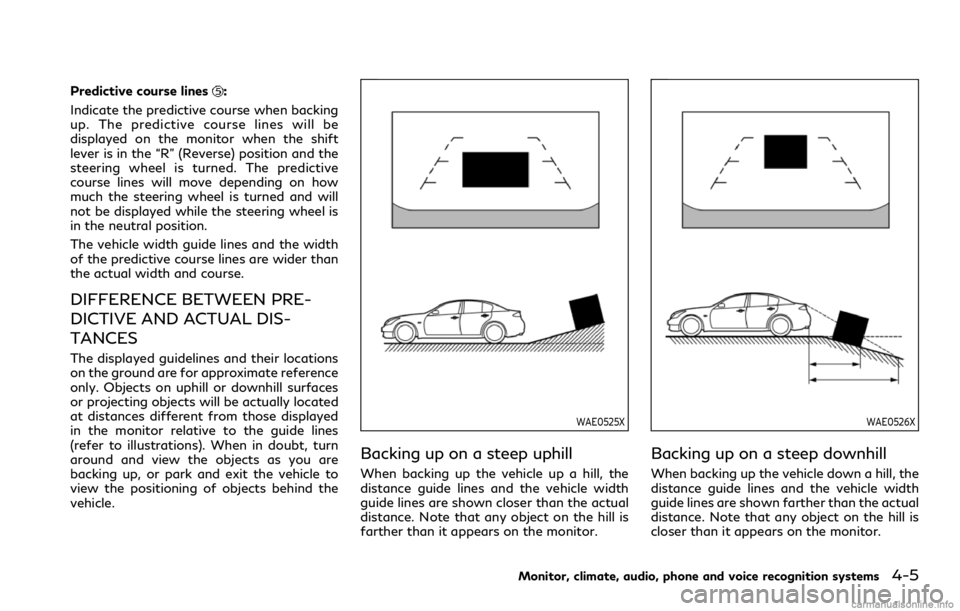
Predictive course lines:
Indicate the predictive course when backing
up. The predictive course lines will be
displayed on the monitor when the shift
lever is in the “R” (Reverse) position and the
steering wheel is turned. The predictive
course lines will move depending on how
much the steering wheel is turned and will
not be displayed while the steering wheel is
in the neutral position.
The vehicle width guide lines and the width
of the predictive course lines are wider than
the actual width and course.
DIFFERENCE BETWEEN PRE-
DICTIVE AND ACTUAL DIS-
TANCES
The displayed guidelines and their locations
on the ground are for approximate reference
only. Objects on uphill or downhill surfaces
or projecting objects will be actually located
at distances different from those displayed
in the monitor relative to the guide lines
(refer to illustrations). When in doubt, turn
around and view the objects as you are
backing up, or park and exit the vehicle to
view the positioning of objects behind the
vehicle.
WAE0525X
Backing up on a steep uphill
When backing up the vehicle up a hill, the
distance guide lines and the vehicle width
guide lines are shown closer than the actual
distance. Note that any object on the hill is
farther than it appears on the monitor.
WAE0526X
Backing up on a steep downhill
When backing up the vehicle down a hill, the
distance guide lines and the vehicle width
guide lines are shown farther than the actual
distance. Note that any object on the hill is
closer than it appears on the monitor.
Monitor, climate, audio, phone and voice recognition systems4-5
Page 184 of 492
4-6Monitor, climate, audio, phone and voice recognition systems
WAE0527X
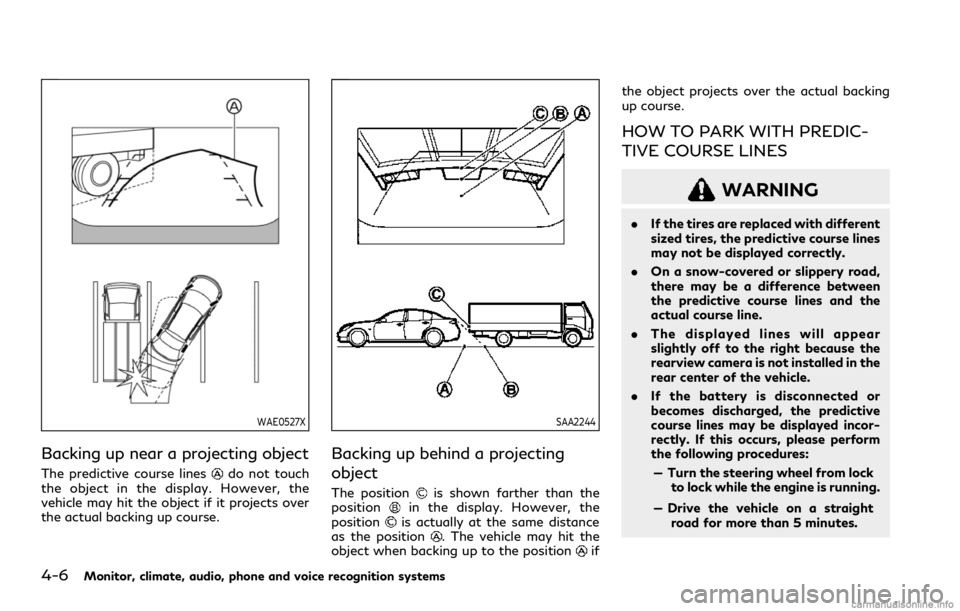
Backing up near a projecting object
The predictive course linesdo not touch
the object in the display. However, the
vehicle may hit the object if it projects over
the actual backing up course.
SAA2244
Backing up behind a projecting
object
The positionis shown farther than the
positionin the display. However, the
positionis actually at the same distance
as the position. The vehicle may hit the
object when backing up to the positionifthe object projects over the actual backing
up course.
HOW TO PARK WITH PREDIC-
TIVE COURSE LINES
WARNING
.If the tires are replaced with different
sized tires, the predictive course lines
may not be displayed correctly.
.On a snow-covered or slippery road,
there may be a difference between
the predictive course lines and the
actual course line.
.The displayed lines will appear
slightly off to the right because the
rearview camera is not installed in the
rear center of the vehicle.
.If the battery is disconnected or
becomes discharged, the predictive
course lines may be displayed incor-
rectly. If this occurs, please perform
the following procedures:
— Turn the steering wheel from lock
to lock while the engine is running.
— Drive the vehicle on a straight
road for more than 5 minutes.
Page 185 of 492
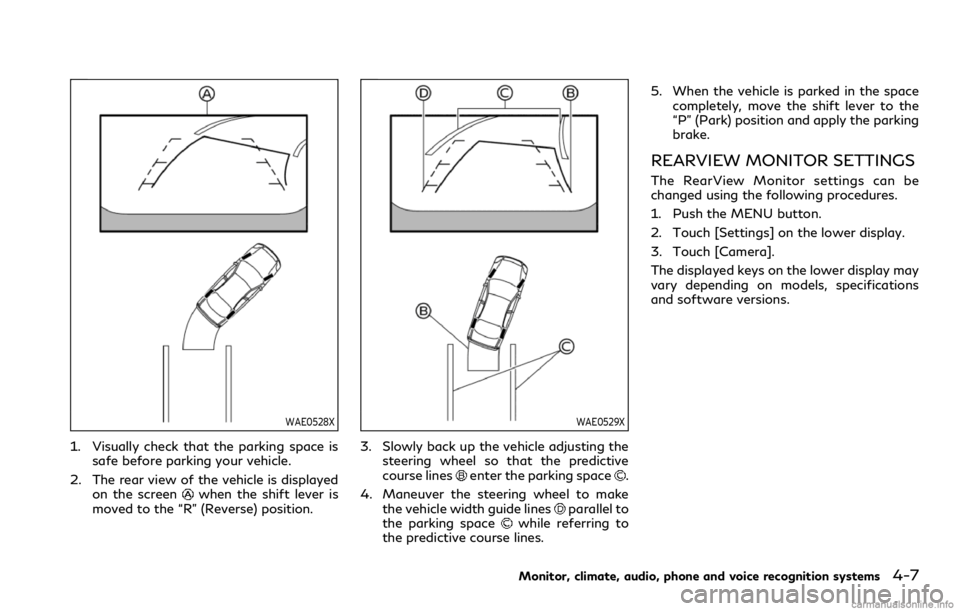
WAE0528X
1. Visually check that the parking space is
safe before parking your vehicle.
2. The rear view of the vehicle is displayed
on the screen
when the shift lever is
moved to the “R” (Reverse) position.
WAE0529X
3. Slowly back up the vehicle adjusting the
steering wheel so that the predictive
course lines
enter the parking space.
4. Maneuver the steering wheel to make
the vehicle width guide lines
parallel to
the parking spacewhile referring to
the predictive course lines.5. When the vehicle is parked in the space
completely, move the shift lever to the
“P” (Park) position and apply the parking
brake.
REARVIEW MONITOR SETTINGS
The RearView Monitor settings can be
changed using the following procedures.
1. Push the MENU button.
2. Touch [Settings] on the lower display.
3. Touch [Camera].
The displayed keys on the lower display may
vary depending on models, specifications
and software versions.
Monitor, climate, audio, phone and voice recognition systems4-7
Page 190 of 492

4-12Monitor, climate, audio, phone and voice recognition systems
CAUTION
Do not scratch the lens when cleaning
dirt or snow from the front of the
camera.
The Around View
®Monitor system is de-
signed as an aid to the driver in situations
such as slot parking or parallel parking.
The monitor displays various views of the
position of the vehicle in a split screen
format. All views are not available at all
times.
Available views:
.Front view
An approximately 150-degree view of
the front of the vehicle.
.Rear view
An approximately 150-degree view of
the rear of the vehicle.
.Bird’s-eye view
The surrounding view of the vehicle from
above.
.Front-side view
The view around and ahead of the front
passenger’s side wheel.
.Front-wide view
An approximately 180-degree view ofthe front of the vehicle.
WAE0196X
To display the multiple views, the Around
View®Monitor system uses cameraslocated in the front grill, on the vehicle’s
outside mirrors and one just above the
vehicle’s license plate.
AROUND VIEW®MONITOR SYS-
TEM OPERATION
With the ignition switch in the “ON” position,
move the shift lever to the “R” (Reverse)
position or push the CAMERA button to
display the Around View
®Monitor on the
upper display.
Page 192 of 492

4-14Monitor, climate, audio, phone and voice recognition systems
Front and rear view:
Guiding lines that indicate the approximate
vehicle width and distances to objects with
reference to the vehicle body line
, are
displayed on the monitor.
Distance guide lines
-:
Indicate distances from the vehicle body.
.Red line
: approx. 1.5 ft (0.5 m)
.Yellow line
: approx. 3 ft (1 m)
.Green line
: approx. 7 ft (2 m)
.Green line
(front view only): approx. 10
ft (3 m)
Vehicle width guide lines
:
Indicate the approximate vehicle width.
Predictive course lines
:
Indicate the predictive course when operat-
ing the vehicle. The predictive course lines
will move depending on how much the
steering wheel is turned. The predictive
course lines in the rear view will not be
displayed while the steering wheel is in the
straight ahead position.
The front view will not be displayed when
the vehicle speed is above 6 MPH (10 km/h).
NOTE:
When the monitor displays the front view
and the steering wheel turns about 90
degrees or less from the straight ahead
position, both the right and left predictivecourse lines
are displayed. When the
steering wheel turns about 90 degrees or
more, a line is displayed only on the
opposite side of the turn.
WAE0231X
Bird’s-eye view:
The bird’s-eye view shows the overhead
view of the vehicle which helps confirm the
vehicle position and the predictive course to
a parking space.
The vehicle icon
shows the position of the
vehicle. Note that the distance between
objects viewed in the bird’s-eye view differs
from the actual distance.
The areas that the cameras cannot cover
are indicated in black.
After the ignition switch is placed in the
"ON" position, the unviewable area
is
highlighted in yellow for a few seconds after
the bird’s-eye view is displayed.