wheel INFINITI Q60 COUPE 2021 Owner's Guide
[x] Cancel search | Manufacturer: INFINITI, Model Year: 2021, Model line: Q60 COUPE, Model: INFINITI Q60 COUPE 2021Pages: 492, PDF Size: 2.44 MB
Page 193 of 492
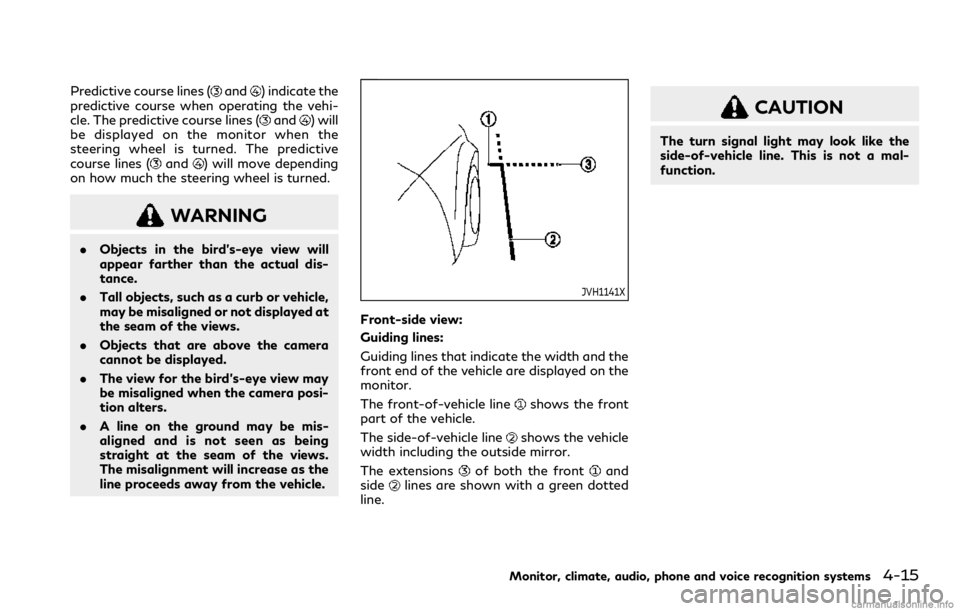
Predictive course lines (and) indicate the
predictive course when operating the vehi-
cle. The predictive course lines (
and) will
be displayed on the monitor when the
steering wheel is turned. The predictive
course lines (
and) will move depending
on how much the steering wheel is turned.
WARNING
.Objects in the bird’s-eye view will
appear farther than the actual dis-
tance.
.Tall objects, such as a curb or vehicle,
may be misaligned or not displayed at
the seam of the views.
.Objects that are above the camera
cannot be displayed.
.The view for the bird’s-eye view may
be misaligned when the camera posi-
tion alters.
.A line on the ground may be mis-
aligned and is not seen as being
straight at the seam of the views.
The misalignment will increase as the
line proceeds away from the vehicle.
JVH1141X
Front-side view:
Guiding lines:
Guiding lines that indicate the width and the
front end of the vehicle are displayed on the
monitor.
The front-of-vehicle line
shows the front
part of the vehicle.
The side-of-vehicle line
shows the vehicle
width including the outside mirror.
The extensions
of both the frontand
sidelines are shown with a green dotted
line.
CAUTION
The turn signal light may look like the
side-of-vehicle line. This is not a mal-
function.
Monitor, climate, audio, phone and voice recognition systems4-15
Page 196 of 492
4-18Monitor, climate, audio, phone and voice recognition systems
up course.
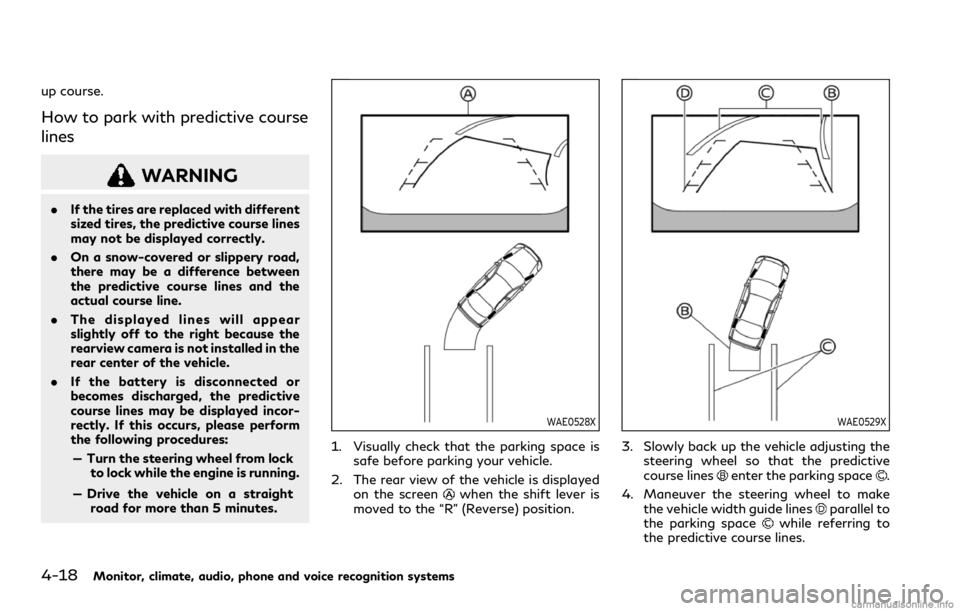
How to park with predictive course
lines
WARNING
.If the tires are replaced with different
sized tires, the predictive course lines
may not be displayed correctly.
.On a snow-covered or slippery road,
there may be a difference between
the predictive course lines and the
actual course line.
.The displayed lines will appear
slightly off to the right because the
rearview camera is not installed in the
rear center of the vehicle.
.If the battery is disconnected or
becomes discharged, the predictive
course lines may be displayed incor-
rectly. If this occurs, please perform
the following procedures:
— Turn the steering wheel from lock
to lock while the engine is running.
— Drive the vehicle on a straight
road for more than 5 minutes.
WAE0528X
1. Visually check that the parking space is
safe before parking your vehicle.
2. The rear view of the vehicle is displayed
on the screen
when the shift lever is
moved to the “R” (Reverse) position.
WAE0529X
3. Slowly back up the vehicle adjusting the
steering wheel so that the predictive
course lines
enter the parking space.
4. Maneuver the steering wheel to make
the vehicle width guide lines
parallel to
the parking spacewhile referring to
the predictive course lines.
Page 216 of 492

4-38Monitor, climate, audio, phone and voice recognition systems
Air flow control:
Push the “
” manual air flow control
button to change the air flow mode.
: Air flows from the center and side
ventilators.
: Air flows from the center and side
ventilators, and foot outlets.
: Air flows mainly from the foot outlets.
: Air flows from the defroster and foot
outlets.
Temperature control:
Push the “
” temperature control increase
button or the “” temperature control
decrease button to set the desired tempera-
ture.
You can individually set temperatures for the
driver’s side and front passenger’s side.
Air intake control:
.Push the “
” air recirculation button to
recirculate interior air inside the vehicle.
The indicator light on the “
” air
recirculation button will illuminate.
.Push the “
” air recirculation button
twice to draw outside air into the
passenger compartment. The indicator
light on the “
” air recirculation button
will turn off.
.To control the air intake automatically,
push and hold the “
” air recirculationbutton. The indicator lights will flash
twice, and then the air intake will switch
to automatic control.
The air intake mode can also be con-
trolled automatically by touching [Auto
Recirc] (if so equipped). The indicator
light on [Auto Recirc] will illuminate. (See
“Operations on touch panel screen” (P.4-
38).)
Turning the system off
Push the ON/OFF button.
Operations on touch panel screen
Heater and air conditioner can be operated
on the touch panel screen. Push the CLI-
MATE button to switch the lower display to
the climate screen.
For details of the touch panel operation on
the lower display, see the separate INFINITI
InTouch
TMOwner’s Manual.
WAE0215X
Example
The following control keys are available.
(Availability of the item depends on the
model and specifications.)
Available items:
.“
”
Touch to change the air flow mode.
.“-
”/“+”
Touch to change the fan speed.
.[DUAL]
Touch to turn the DUAL mode on/off.
(See “DUAL mode setting” (P.4-39).)
.[Steering Heater] (if so equipped)
Touch to turn the steering wheel heater
on/off. (See “Heated steering wheel”
Page 218 of 492

4-40Monitor, climate, audio, phone and voice recognition systems
The Plasmacluster®icon on the climate
screen indicates the status of the Plas-
macluster
®ion emission from the system
and changes with the amount of the air flow.
CLIMATE SETTINGS
Climate settings can be changed on the
climate settings screen on the lower display.
1. Push the MENU button and touch [Set-
tings] on the lower display.
2. Touch [Others].
3. Touch [Climate].
The displayed keys on the lower display may
vary depending on models, specifications
and software versions.
Available settings:
.Left/Right Seat Heater
The driver’s seat and front passenger
seat temperature settings for the auto-
matic seat heating control mode can be
changed separately. (See “Heated seats”
(P.2-45).)
.Steering Wheel Heater
The steering wheel heater can be turned
on/off. (See “Heated steering wheel”
(P.2-46).)
.Auto Steering Wheel Heater
The automatic control mode for the
steering wheel heater can be turned
on/off. When this item is turned on, thesteering wheel heater will turn on auto-
matically if the temperature inside the
vehicle compartment is low at the time
when the ignition switch is turned on.
Regardless of the temperature, the
steering wheel heating will turn off after
30 minutes.
If the steering wheel heater is manually
turned on/off by touching [Steering
Wheel Heater] on the climate settings
screen, the automatic steering wheel
heating control mode will be canceled
and the system will return to the manual
mode.
NOTE:
If the surface temperature of the steer-
ing wheel is above the temperature at
which the system is designed to operate,
the system will not heat the steering
wheel. This is not a malfunction.
5GC0006X
JVH0520X
OPERATING TIPS
When the engine coolant temperature and
outside air temperature are low, the air flow
from the foot outlets may not operate.
However, this is not a malfunction. After
the coolant temperature warms up, the air
flow from the foot outlets will operate
Page 223 of 492

5 Starting and driving
Precautions when starting and driving ...................... 5-4
Exhaust gas (carbon monoxide) .............................. 5-4
Three-way catalyst ..................................................... 5-5
Tire Pressure Monitoring System (TPMS) ........... 5-5
Avoiding collision and rollover ................................. 5-9
Off-road recovery ....................................................... 5-9
Rapid air pressure loss ............................................. 5-10
Drinking alcohol/drugs and driving ..................... 5-10
Intelligent All-Wheel Drive (AWD) driving
safety precautions (AWD models) ....................... 5-11
Push-button ignition switch ........................................ 5-11
Operating range for engine start function ........ 5-12
Push-button ignition switch operation ............... 5-12
Push-button ignition switch positions ................ 5-13
Emergency engine shut off .................................... 5-13
Intelligent Key battery discharge .......................... 5-14
Before starting the engine ........................................... 5-14
Starting the engine ......................................................... 5-15
Remote engine start (if so equipped) .................. 5-15
Driving the vehicle .......................................................... 5-16
Automatic Transmission (AT) ................................ 5-16
Parking brake .................................................................. 5-20
INFINITI Drive Mode Selector .................................... 5-21
STANDARD mode .................................................... 5-22
SPORT+ mode (if so equipped) ............................. 5-22SPORT mode ............................................................ 5-22
SNOW mode ............................................................ 5-22
ECO mode ................................................................. 5-22
PERSONAL mode ................................................... 5-24
Active Lane Control (if so equipped) ........................ 5-25
Active Lane Control operation ............................ 5-27
Turning Active Lane Control ON/OFF ............ 5-28
How to enable/disable Active
Lane Control ............................................................. 5-29
Active Lane Control limitations ......................... 5-30
System temporarily unavailable .......................... 5-31
System malfunction ................................................ 5-32
System maintenance .............................................. 5-32
Lane Departure Warning (LDW)/Lane Departure
Prevention (LDP) (if so equipped) ............................. 5-33
LDW system operation ......................................... 5-35
How to enable/disable the LDW system ........ 5-35
LDP system operation (if so equipped) ............ 5-35
Turning the LDP system ON/OFF (if
so equipped) ............................................................. 5-37
How to enable/disable the LDP system (if
so equipped) ............................................................. 5-37
LDW/LDP system limitations ............................. 5-37
System temporarily unavailable .......................... 5-39
System malfunction ................................................ 5-39
Page 225 of 492

Turning the PFCW system ON/OFF ................ 5-116
PFCW system limitations ..................................... 5-118
System temporarily unavailable ......................... 5-120
System malfunction ................................................ 5-121
System maintenance .............................................. 5-121
Break-in schedule ......................................................... 5-122
Fuel Efficient Driving Tips .......................................... 5-122
Increasing fuel economy ............................................. 5-123
Intelligent All-Wheel Drive (AWD) (if
so equipped) .................................................................. 5-124
Parking/parking on hills .............................................. 5-126
Power steering .............................................................. 5-127
Electric power steering type ................................ 5-127
Direct Adaptive Steering type ............................. 5-127
Brake system .................................................................. 5-129
Braking precautions ................................................ 5-129
Parking brake break-in ......................................... 5-130
Brake assist ................................................................... 5-130
Brake assist .............................................................. 5-130
Anti-lock Braking System (ABS) ........................ 5-130Vehicle Dynamic Control (VDC) system ................ 5-132
Brake force distribution ...................................... 5-132
Active trace control ..................................................... 5-133
Hill Start Assist system .............................................. 5-135
Chassis control .............................................................. 5-135
Sonar system (if so equipped) ................................. 5-136
Sonar system settings ......................................... 5-137
Sonar indicator ...................................................... 5-138
Cold weather driving .................................................. 5-138
Freeing a frozen door lock ................................ 5-138
Antifreeze ............................................................... 5-138
Battery .................................................................... 5-138
Draining of coolant water ................................. 5-138
Tire equipment ...................................................... 5-138
Special winter equipment .................................. 5-139
Driving on snow or ice ........................................ 5-139
Engine block heater (if so equipped) .............. 5-139
Active noise cancellation/Active
sound enhancement ................................................... 5-140
Active noise cancellation ..................................... 5-141
Active sound enhancement ................................ 5-141
Page 228 of 492

5-6Starting and driving
Please note that the TPMS is not a sub-
stitute for proper tire maintenance, and it is
the driver’s responsibility to maintain correct
tire pressure, even if under-inflation has not
reached the level to trigger illumination of
the TPMS low tire pressure telltale.
Your vehicle has also been equipped with a
TPMS malfunction indicator to indicate
when the system is not operating properly.
The TPMS malfunction indicator is com-
bined with the low tire pressure telltale.
When the system detects a malfunction, the
telltale will flash for approximately one
minute and then remain continuously illumi-
nated. This sequence will continue upon
subsequent vehicle start-ups as long as the
malfunction exists. When the malfunction
indicator is illuminated, the system may not
be able to detect or signal low tire pressure
as intended. TPMS malfunctions may occur
for a variety of reasons, including the
installation of replacement or alternate tires
or wheels on the vehicle that prevent the
TPMS from functioning properly. Always
check the TPMS malfunction telltale after
replacing one or more tires or wheels on your
vehicle to ensure that the replacement or
alternate tires and wheels allow the TPMS
to continue to function properly.Additional information
.Since the spare tire (if so equipped) is not
equipped with the TPMS, the TPMS
does not monitor the tire pressure of
the spare tire.
.The TPMS will activate only when the
vehicle is driven at speeds above 16
MPH (25 km/h). Also, this system may
not detect a sudden drop in tire pressure
(for example a flat tire while driving).
.The low tire pressure warning light does
not automatically turn off when the tire
pressure is adjusted. After the tire is
inflated to the recommended pressure,
the vehicle must be driven at speeds
above 16 MPH (25 km/h) to activate the
TPMS and turn off the low tire pressure
warning light. Use a tire pressure gauge
to check the tire pressure.
.The “Tire Pressure Low - Add Air”
warning appears in the vehicle informa-
tion display when the low tire pressure
warning light is illuminated and low tire
pressure is detected. The “Tire Pressure
Low - Add Air” warning turns off when
the low tire pressure warning light turns
off.
The “Tire Pressure Low - Add Air”
warning does not appear if the low tire
pressure warning light illuminates to
indicate a TPMS malfunction..The “Flat Tire - Visit dealer” warning (if
so equipped) appears in the vehicle
information display when the low tire
pressure warning light is illuminated and
one or more flat tires are detected.
.Tire pressure rises and falls depending on
the heat caused by the vehicle’s opera-
tion and the outside temperature. Do not
reduce the tire pressure after driving
because the tire pressure rises after
driving. Low outside temperature can
lower the temperature of the air inside
the tire which can cause a lower tire
inflation pressure. This may cause the
low tire pressure warning light to illumi-
nate. If the warning light illuminates in
low ambient temperature, check the tire
pressure for all four tires.
.You can also check the pressure of all
tires (except the spare tire) in the vehicle
information display. (See “Vehicle infor-
mation display” (P.2-20).)
.After the ignition switch is placed in the
ON position, it may take a period of time
for the tire pressure to be displayed while
the vehicle is driven. Depending on the
radio wave circumstance, tire pressure
may not correctly be displayed.
For additional information, see “Low tire
pressure warning light” (P.2-15) and “Tire
Pressure Monitoring System (TPMS)” (P.6-
3).
Page 229 of 492
WARNING
.Radio waves could adversely affect
electric medical equipment. Those
who use a pacemaker should contact
the electric medical equipment man-
ufacturer for the possible influences
before use.
.If the low tire pressure warning light
illuminates while driving, avoid sud-
den steering maneuvers or abrupt
braking, reduce vehicle speed, pull
off the road to a safe location and
stop the vehicle as soon as possible.
Driving with under-inflated tires may
permanently damage the tires and
increase the likelihood of tire failure.
Serious vehicle damage could occur
and may lead to an accident and
could result in serious personal injury.
Check the tire pressure for all four
tires. Adjust the tire pressure to the
recommended COLD tire pressure
shown on the Tire and Loading
Information label to turn the low tire
pressure warning light OFF. If the
light still illuminates while driving
after adjusting the tire pressure, a
tire may be flat or the TPMS may be
malfunctioning. If you have a flat tire,
replace it with a spare tire (if soequipped) or repair it with the emer-
gency tire puncture repair kit (if so
equipped) as soon as possible. If no
tire is flat and all tires are properly
inflated, it is recommended you con-
sult an INFINITI retailer.
.For models with run-flat tires,
although you can continue driving
with a punctured run-flat tire, re-
member that vehicle handling stabi-
lity is reduced, which could lead to an
accident and personal injury. Also,
driving a long distance at high speeds
may damage the tires.
— Do not drive at speeds above 50
MPH (80 km/h) and do not drive
more than approximately 93 miles
(150 km) with a punctured run-
flat tire. The actual distance the
vehicle can be driven on a flat tire
depends on outside temperature,
vehicle load, road conditions and
other factors.
— If you detect any unusual sounds
or vibrations while driving with a
punctured run-flat tire, pull off
the road to a safe location and
stop the vehicle as soon as possi-
ble. The tire may be seriously
damaged and need to be replaced..Since the spare tire is not equipped
with the TPMS, when a spare tire is
mounted or a wheel is replaced, the
TPMS will not function and the low
tire pressure warning light will flash
for approximately 1 minute. The light
will remain on after 1 minute. Have
your tires replaced and/or TPMS
system reset as soon as possible. It
is recommended you visit an INFINITI
retailer for these services.
.Replacing tires with those not origin-
ally specified by INFINITI could affect
the proper operation of the TPMS.
.Do not inject any tire liquid or aerosol
tire sealant into the tires, as this may
cause a malfunction of the tire pres-
sure sensors (for models not equipped
with the emergency tire puncture
repair kit).
.INFINITI recommends using only
Genuine NISSAN Emergency Tire
Sealant provided with your vehicle.
Other tire sealants may damage the
valve stem seal which can cause the
tire to lose air pressure. It is recom-
mended you visit an INFINITI retailer
as soon as possible after using tire
repair sealant (for models equipped
with the emergency tire puncture
repair kit).
Starting and driving5-7
Page 230 of 492

5-8Starting and driving
CAUTION
.The TPMS may not function properly
when the wheels are equipped with
tire chains or the wheels are buried in
snow.
.Do not place metalized film or any
metal parts (antenna, etc.) on the
windows. This may cause poor recep-
tion of the signals from the tire
pressure sensors, and the TPMS will
not function properly.
Some devices and transmitters may tem-
porarily interfere with the operation of the
TPMS and cause the low tire pressure
warning light to illuminate. Some examples
are:
.Facilities or electric devices using similar
radio frequencies are near the vehicle.
.If a transmitter set to similar frequencies
is being used in or near the vehicle.
.If a computer (or similar equipment) or a
DC/AC converter is being used in or near
the vehicle.
Low tire pressure warning light may illumi-
nate in the following cases.
.If the vehicle is equipped with a wheel
and tire without TPMS..If the TPMS has been replaced and the ID
has not been registered.
.If the wheel is not originally specified by
INFINITI.
FCC Notice:
For USA:
This device complies with Part 15 of the
FCC Rules. Operation is subject to the
following two conditions: (1) This device
may not cause harmful interference, and (2)
this device must accept any interference
received, including interference that may
cause undesired operation.
NOTE:
Changes or modifications not expressly
approved by the party responsible for
compliance could void the user’s authority
to operate the equipment.
For Canada:
This device complies with Industry Canada
licence-exempt RSS standard(s). Operation
is subject to the following two conditions:
1.This device may not cause interference,
and
2.This device must accept any interfer-
ence, include interference that may
cause undesired operation of the device.
TPMS with Tire Inflation Indicator
When adding air to an under-inflated tire,
the TPMS with Tire Inflation Indicator
provides visual and audible signals outside
the vehicle to help you inflate the tires to the
recommended COLD tire pressure.
Vehicle set-up:
1. Park the vehicle in a safe and level place.
2. Apply the parking brake and place the
shift lever in the P (Park) position.
3. Place the ignition switch in the ON
position. Do not start the engine.
Operation:
1. Add air to the tire.
2. After a few seconds, the hazard indica-
tors will start flashing.
3. When the designated pressure is
reached, the horn beeps once and the
hazard indicators stop flashing.
4. Perform the above steps for each tire.
.If the tire is over-inflated more than
approximately 4 psi (30 kPa), the horn
beeps and the hazard indicators flash 3
times. To correct the pressure, push the
core of the valve stem on the tire briefly
to release pressure. When the pressure
reaches the designated pressure, the
horn beeps once.
Page 231 of 492
.If the hazard indicator does not flash
within approximately 15 seconds after
starting to inflate the tire, it indicates
that the Tire Inflation Indicator is not
operating.
.The TPMS will not activate the Tire
Inflation Indicator under the following
conditions:
— If there is interference from an ex-
ternal device or transmitter
— The air pressure from the inflation
device such as those using a power
socket is not sufficient to inflate the
tire
— If an electrical equipment is being used
in or near the vehicle
— There is a malfunction in the TPMS
system
— There is a malfunction in the horn or
hazard indicators
.If the Tire Inflation Indicator does not
operate due to TPMS interference, move
the vehicle about 3 ft (1 m) backward or
forward and try again.
If the Tire Inflation Indicator is not working,
use a tire pressure gauge.AVOIDING COLLISION AND
ROLLOVER
WARNING
Failure to operate this vehicle in a safe
and prudent manner may result in loss of
control or an accident.
Be alert and drive defensively at all times.
Obey all traffic regulations. Avoid excessive
speed, high speed cornering, or sudden
steering maneuvers, because these driving
practices could cause you to lose control of
your vehicle.As with any vehicle, a loss of
control could result in a collision with other
vehicles or objects, or cause the vehicle to
rollover, particularly if the loss of control
causes the vehicle to slide sideways.Be
attentive at all times, and avoid driving when
tired. Never drive when under the influence
of alcohol or drugs (including prescription or
over-the-counter drugs which may cause
drowsiness). Always wear your seat belt as
outlined in the “Seat belts” (P.1-11) of this
manual, and also instruct your passengers to
do so.
Seat belts help reduce the risk of injury in
collisions and rollovers.In a rollover crash,
an unbelted or improperly belted person issignificantly more likely to be injured or
killed than a person properly wearing a seat
belt.
OFF-ROAD RECOVERY
If driving the right side or left side wheels
may unintentionally leave the road surface.
Maintain control of the vehicle by following
the procedure below. Please note that this
procedure is only a general guide. The vehicle
must be driven as appropriate based on the
conditions of the vehicle, road and traffic.
1. Remain calm and do not overreact.
2. Do not apply the brakes.
3. Maintain a firm grip on the steering
wheel with both hands and try to hold
a straight course.
4. When appropriate, slowly release the
accelerator pedal to gradually slow the
vehicle.
5. If there is nothing in the way, steer the
vehicle to follow the road while the
vehicle speed is reduced. Do not attempt
to drive the vehicle back onto the road
surface until vehicle speed is reduced.
6. When it is safe to do so, gradually turn
the steering wheel until both tires return
to the road surface. When all tires are on
the road surface, steer the vehicle to stay
in the appropriate driving lane.
Starting and driving5-9