brake INFINITI Q70 2018 User Guide
[x] Cancel search | Manufacturer: INFINITI, Model Year: 2018, Model line: Q70, Model: INFINITI Q70 2018Pages: 458, PDF Size: 2.21 MB
Page 92 of 458
WARNING
.If the light does not illuminate with
the ignition switch pushed ON, have
the vehicle checked as soon as possi-
ble. It is recommended you visit an
INFINITI retailer for this service.
. If the light illuminates while driving,
avoid sudden steering maneuvers or
abrupt braking, reduce vehicle speed,
pull off the road to a safe location
and stop the vehicle as soon as
possible. Driving with under-inflated
tires may permanently damage the
tires and increase the likelihood of
tire failure. Serious vehicle damage
could occur and may lead to an
accident and could result in serious
personal injury. Check the tire pres-
sure for all four tires. Adjust the tire
pressure to the recommended COLD
tire pressure shown on the Tire and
Loading Information label to turn the
low tire pressure warning light OFF.
If the light still illuminates while
driving after adjusting the tire pres-
sure, a tire may be flat or the TPMS
may be malfunctioning. If you have a
flat tire, replace it with a spare tire as
soon as possible. If no tire is flat and
all tires are properly inflated, have the vehicle checked. It is recom-
mended you visit an INFINITI retailer
for this service.
. Since the spare tire is not equipped
with the TPMS, when a spare tire is
mounted or a wheel is replaced, the
TPMS will not function and the low
tire pressure warning light will flash
for approximately 1 minute. The light
will remain on after the 1 minute.
Have your tires replaced and/or
TPMS system reset as soon as pos-
sible. It is recommended you visit an
INFINITI retailer for these services.
. Replacing tires with those not origin-
ally specified by INFINITI could affect
the proper operation of the TPMS.
CAUTION
.The TPMS is not a substitute for the
regular tire pressure check. Be sure to
check the tire pressure regularly.
. If the vehicle is being driven at speeds
of less than 16 MPH (25 km/h), the
TPMS may not operate correctly.
. Be sure to install the specified size of
tires to the four wheels correctly.
Master warning light
When the ignition switch is in the ON
position, the master warning light illumi-
nates if any of the following are displayed on
the vehicle information display:
.No key warning
. Low fuel warning
. Low washer fluid warning
. Parking brake release warning
. Door/trunk open warning
. Loose fuel cap warning
. Check tire pressure warning
. Intelligent Key system warning
. Headlight warning
. Front radar obstruction warning (if so
equipped)
. Back-up Collision Intervention (BCI) not
available warning (if so equipped)
. Back-up Collision Intervention (BCI) mal-
function warning (if so equipped)
See “Vehicle information display” (P.2-20).
Seat belt warning light and
chime
The light and chime remind you to fasten
seat belts. The light illuminates whenever
the ignition switch is pushed to the ON
position, and will remain illuminated until the
Instruments and controls2-15
Page 93 of 458
2-16Instruments and controls
driver’s seat belt is fastened. At the same
time, the chime will sound for about 6
seconds unless the driver’s seat belt is
securely fastened.
The seat belt warning light for the front
passenger will illuminate if the seat belt is
not fastened when the front passenger’s
seat is occupied.
See “Seat belts” (P.1-10) for precautions on
seat belt usage.
Supplemental air bag warning
light
After pushing the ignition switch to the ON
position, the supplemental air bag warning
light will illuminate. The supplemental air bag
warning light will turn off after about 7
seconds if the supplemental front air bag
and supplemental side air bag, curtain air
bag systems and/or pretensioner seat belt
are operational.
If any of the following conditions occur, the
supplemental front air bag, supplemental
side air bag, supplemental curtain side-
impact air bag and pretensioner seat belt
needs servicing.
. The supplemental air bag warning light
remains on after approximately 7 sec-
onds. .
The supplemental air bag warning light
flashes intermittently.
. The supplemental air bag warning light
does not come on at all.
It is recommended you visit an INFINITI
retailer for these services.
Unless checked and repaired, the Supple-
mental Restraint Systems and/or the pre-
tensioner seat belt may not function
properly.
For additional information, see “Supplemen-
tal restraint system” (P.1-38).WARNING
If the supplemental air bag warning light
is on, it could mean that the front air
bag, side air bag, curtain air bag systems
and/or pretensioner seat belt will not
operate in an accident. To help avoid
injury to yourself or others, have your
vehicle checked. It is recommended you
visit an INFINITI retailer for this service.
Vehicle Dynamic Control
(VDC) warning light
When the ignition switch is in the ON
position, the Vehicle Dynamic Control
(VDC) warning light illuminates and then turns off.
The light will blink when the VDC system or
the traction control system is operating, thus
alerting the driver that the vehicle is nearing
its traction limits. The road surface may be
slippery.
When the VDC warning light illuminates
when the VDC system is turned on, this light
alerts the driver to the fact that the VDC
system’s fail-safe mode is operating, for
example the VDC, active trace control (if so
equipped), Rise-up & Build-up function,
Brake Force Distribution or hill start assist
system may not be functioning properly.
Have the system checked. It is recommended
you visit an INFINITI retailer for this service.
If a malfunction occurs in the system, the
VDC system function will be canceled but
the vehicle is still driveable. For additional
information, see “Vehicle Dynamic Control
(VDC) system” (P.5-123).
INDICATOR LIGHTS
Adaptive Front lighting Sys-
tem (AFS) off indicator light (if so
equipped)
When the ignition switch is pushed to the
ON position, the Adaptive Front lighting
System (AFS) off indicator light will illumi-
nate. The light will turn off in about 1 second
Page 96 of 458

Security indicator light
The light blinks when the ignition switch is in
the ACC, OFF or LOCK position. This
function indicates the security system
equipped on the vehicle is operational.
If the security system is malfunctioning, this
light will remain on while the ignition switch
is in the ON position. For additional informa-
tion, see “Security systems” (P.2-29).
Turn signal/hazard indicator
lights
The light flashes when the turn signal switch
lever or hazard switch is turned on.
Vehicle Dynamic Control
(VDC) off indicator light
When the ignition switch is in the ON
position, the Vehicle Dynamic Control
(VDC) off indicator light illuminates and then
turns off. The VDC off indicator light comes
on when the VDC off switch is pushed to
OFF. This indicates that the vehicle dynamic
control system and traction control system
are not operating.
AUDIBLE REMINDERS
Key reminder chime
A chime will sound if the driver side door is
opened while the ignition switch is pushed to
the ACC position. Make sure the ignition
switch is pushed to the OFF position, and
take the Intelligent Key with you when
leaving the vehicle.
Light reminder chime
A chime will sound when the driver side door
is opened with the light switch in theorposition and the ignition switch in the
ACC, OFF or LOCK position.
Turn the light switch off when you leave the
vehicle.
Parking brake reminder chime
The parking brake reminder chime will sound
if the vehicle is driven at more than 4 MPH (7
km/h) with the parking brake applied. Stop
the vehicle and release the parking brake.
Brake pad wear warning
The disc brake pads have audible wear
warnings. When a brake pad requires repla-
cement, it will make a high pitched scraping
sound when the vehicle is in motion. This
scraping sound will first occur only when the
brake pedal is depressed. After more wear of the brake pad, the sound will always be
heard even if the brake pedal is not
depressed. Have the brakes checked as soon
as possible if the warning sound is heard.
Instruments and controls2-19
Page 99 of 458

2-22Instruments and controls
INDICATORS FOR OPERATION
1. Engine start operation indicator
This indicator appears when the shift lever is
in the P (Park) position.
This indicator means that the engine will
start by pushing the ignition switch with the
brake pedal depressed. You can start the
engine directly in any position of the ignition
switch.
2. Steering lock release malfunction
indicator (if so equipped)
This indicator appears when the steering
wheel cannot be released from the LOCK
position.
If this indicator appears, push the push-
button ignition switch while lightly turning
the steering wheel right and left.
3. NO KEY warning
This warning appears in either of the
following conditions.
No key inside the vehicle:
The warning appears when the door is
closed with the Intelligent Key left outside
the vehicle and the ignition switch in the
ACC or ON position. Make sure that the
Intelligent Key is inside the vehicle.Unregistered Intelligent Key:
The warning appears when the ignition
switch is pushed from the LOCK position
and the Intelligent Key cannot be recognized
by the system. You cannot start the engine
with an unregistered key. Use the registered
Intelligent Key.
See “Intelligent Key system” (P.3-7) for more
details.
4. SHIFT “P” warning
This warning appears when the ignition
switch is pushed to stop the engine with
the shift lever in any position except the P
(Park) position.
If this warning appears, move the shift lever
to the P (Park) position or push the ignition
switch to the ON position.
An inside warning chime will also sound. (See
“Intelligent Key system” (P.3-7).)
5. “PUSH” warning
This warning appears when the shift lever is
moved to the P (Park) position with the
ignition switch in the ACC position after the
SHIFT “P” warning appears.
To push the ignition switch to the OFF
position, perform the following procedure:
.
SHIFT “P” warning ?(Move the shift
lever to “P”) ?PUSH warning ?(Push the ignition switch
?ignition switch
position is turned to ON) ?PUSH
warning ?(Push the ignition switch ?
ignition switch position is turned to OFF)
6. Intelligent Key battery discharge
indicator
This indicator appears when the Intelligent
Key battery is running out of power.
If this indicator appears, replace the battery
with a new one. (See “Intelligent Key battery
replacement” (P.8-25).)
7. Engine start operation for Intel-
ligent Key system indicator
This indicator appears when the Intelligent
Key battery is running out of power and
when the Intelligent Key System and vehicle
are not communicating normally.
If this indicator appears, touch the ignition
switch with the Intelligent Key while depres-
sing the brake pedal. (See “Intelligent Key
battery discharge” (P.5-13).)
8. Parking brake release warning
This warning appears when the vehicle
speed is above 4 MPH (7 km/h) and the
parking brake is applied.
Page 113 of 458
2-36Instruments and controls
SIC3269
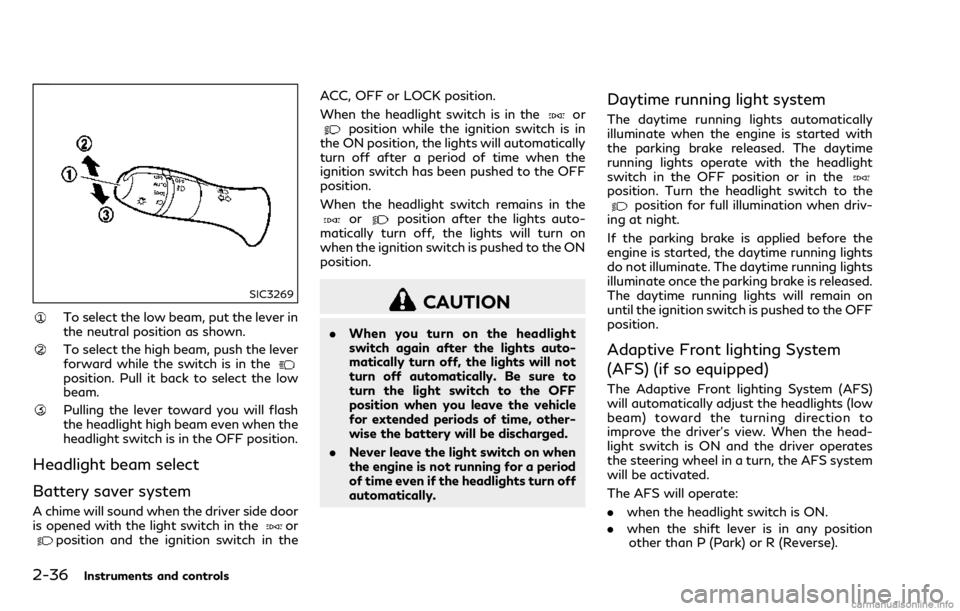
To select the low beam, put the lever in
the neutral position as shown.
To select the high beam, push the lever
forward while the switch is in the
position. Pull it back to select the low
beam.
Pulling the lever toward you will flash
the headlight high beam even when the
headlight switch is in the OFF position.
Headlight beam select
Battery saver system
A chime will sound when the driver side door
is opened with the light switch in theorposition and the ignition switch in theACC, OFF or LOCK position.
When the headlight switch is in the
orposition while the ignition switch is in
the ON position, the lights will automatically
turn off after a period of time when the
ignition switch has been pushed to the OFF
position.
When the headlight switch remains in the
orposition after the lights auto-
matically turn off, the lights will turn on
when the ignition switch is pushed to the ON
position.
CAUTION
. When you turn on the headlight
switch again after the lights auto-
matically turn off, the lights will not
turn off automatically. Be sure to
turn the light switch to the OFF
position when you leave the vehicle
for extended periods of time, other-
wise the battery will be discharged.
. Never leave the light switch on when
the engine is not running for a period
of time even if the headlights turn off
automatically.
Daytime running light system
The daytime running lights automatically
illuminate when the engine is started with
the parking brake released. The daytime
running lights operate with the headlight
switch in the OFF position or in the
position. Turn the headlight switch to theposition for full illumination when driv-
ing at night.
If the parking brake is applied before the
engine is started, the daytime running lights
do not illuminate. The daytime running lights
illuminate once the parking brake is released.
The daytime running lights will remain on
until the ignition switch is pushed to the OFF
position.
Adaptive Front lighting System
(AFS) (if so equipped)
The Adaptive Front lighting System (AFS)
will automatically adjust the headlights (low
beam) toward the turning direction to
improve the driver’s view. When the head-
light switch is ON and the driver operates
the steering wheel in a turn, the AFS system
will be activated.
The AFS will operate:
. when the headlight switch is ON.
. when the shift lever is in any position
other than P (Park) or R (Reverse).
Page 173 of 458

4-2Monitor, climate, audio, phone and voice recognition systems
Refer to the Infiniti InTouch Owner’s Manual
that includes the following information.
.Audio system
. Bluetooth
®Hands-Free Phone system
. Infiniti InTouchTMApps
. Infiniti InTouchTMServices
. Navigation system
. Voice recognition
. Information and settings viewable on
Infiniti InTouch
TM
WARNING
. Do not disassemble or modify this
system. If you do, it may result in
accidents, fire, or electric shock.
. Do not use this system if you notice
any abnormality, such as a frozen
screen or lack of sound. Continued
use of the system may result in
accident, fire or electric shock.
. In case you notice any foreign object
in the system hardware, spill liquid on
it, or notice smoke or smell coming
from it, stop using the system im-
mediately. Ignoring such conditions
may lead to accidents, fire, or electric
shock. It is recommended you visit an
INFINITI retailer for servicing.
. Park the vehicle in a safe location and
apply the parking brake to view the
images on the front center display
screen.
Do not attempt to operate the system in
extreme temperature conditions [below
−4°F (−20°C) and above 158°F (70°C)].
Operating this system under these condi-
tions may result in system malfunctions.
INFINITI INTOUCH OWNER’S MANUALSAFETY NOTE
Page 178 of 458

SAA1898
3. Slowly back up the vehicle adjusting thesteering wheel so that the predictive
course lines
enter the parking space.
4. Maneuver the steering wheel to make the vehicle width guide lines
parallel to
the parking spacewhile referring to
the predictive course lines. 5. When the vehicle is parked in the space
completely, move the shift lever to the P
(Park) position and apply the parking
brake.
JVH1690X
ADJUSTING THE SCREEN
The display settings such as Brightness,
Contrast, Black Level, Tint and Color of the
RearView Monitor can be adjusted.
1. Push the SETTING button while theRearView Monitor screen is displayed.
2. The Display settings menu is displayed. Select an item you wish to adjust.
3. Adjust the selected item using the “+” or “-” key.
Select the “Reset Settings” key to return all
settings to default.
Display settings menu can also be accessed
while the RearView Monitor screen is not
displayed. Push the SETTING button and
Monitor, climate, audio, phone and voice recognition systems4-7
Page 179 of 458

4-8Monitor, climate, audio, phone and voice recognition systems
select “Camera” key, and then select “Dis-
play” key.
NOTE:
Do not adjust any of the display settings of
the RearView Monitor while the vehicle is
moving. Make sure the parking brake is
firmly applied.
PREDICTIVE COURSE LINE SET-
TINGS
To toggle on and off the predictive course
lines:
1. Push the SETTING button while theRearView Monitor screen is not dis-
played.
2. Select the “Camera” key.
3. Select the “Camera” key.
4. Select the “Predictive Course Lines” key to turn the feature on or off. When this
item is turned on, the predictive course
lines will be displayed on the monitor.
REARVIEW MONITOR SYSTEM
LIMITATIONS
WARNING
Listed below are the system limitations
for RearView Monitor. Failure to oper-
ate the vehicle in accordance with these
system limitations could result in serious
injury or death.
.The system cannot completely elim-
inate blind spots and may not show
every object.
. Underneath the bumper and the
corner areas of the bumper cannot
be viewed on the RearView Monitor
because of its monitoring range lim-
itation. The system will not show
small objects below the bumper, and
may not show objects close to the
bumper or on the ground.
. Objects viewed in the RearView
Monitor differ from actual distance
because a wide-angle lens is used.
. Objects in the RearView Monitor will
appear visually opposite compared to
when viewed in the rear view and
outside mirrors. .
Use the displayed lines as a reference.
The lines are highly affected by the
number of occupants, fuel level, ve-
hicle position, road conditions and
road grade.
. Make sure that the trunk lid is
securely closed when backing up.
. Do not put anything on the rearview
camera. The rearview camera is in-
stalled above the license plate.
. When washing the vehicle with high-
pressure water, be sure not to spray
it around the camera. Otherwise,
water may enter the camera unit
causing water condensation on the
lens, a malfunction, fire or an electric
shock.
. Do not strike the camera. It is a
precision instrument. Otherwise, it
may malfunction or cause damage
resulting in a fire or an electric shock.
The following are operating limitations and
do not represent a system malfunction:
. When the temperature is extremely high
or low, the screen may not clearly display
objects.
. When strong light is directly coming on
the camera, objects may not be displayed
clearly.
Page 189 of 458

4-18Monitor, climate, audio, phone and voice recognition systems
SAA1897
1. Visually check that the parking space issafe before parking your vehicle.
2. The rear view of the vehicle is displayed on the screen
when the shift lever is
moved to the R (Reverse) position.
SAA1898
3. Slowly back up the vehicle adjusting the steering wheel so that the predictive
course lines
enter the parking space.
4. Maneuver the steering wheel to make the vehicle width guide lines
parallel to
the parking spacewhile referring to
the predictive course lines. 5. When the vehicle is parked in the space
completely, move the shift lever to the P
(Park) position and apply the parking
brake.
Page 190 of 458

JVH1707X
How to switch the display
The Around View®Monitor can display two
split views as well as a single view of the
front-wide view or rear-wide view. Push the
CAMERA button, change the shift lever
position, or select the “Change View” key
to switch between the available views.
For models with the Back-up Collision
Intervention (BCI) system, “
” key may
be displayed on the Around View®Monitor
screen when the shift lever is in the R
position. For details of the BCI system, see
“Back-up Collision Intervention (BCI)” (P.5-
54).
JVH1690X
HOW TO ADJUST THE SCREEN
VIEW
The display settings such as Brightness,
Contrast, Black Level, Tint and Color of the
Around View
®Monitor can be adjusted.
1. Push the SETTING button with the Around View
®Monitor turned on.
2. The Display settings menu is displayed. Select an item you wish to adjust.
3. Adjust the selected item using the “+” or “-” key.
Select the “Reset Settings” key to return all
settings to default. NOTE:
Do not adjust any of the display settings of
the Around View
®Monitor while the vehicle
is moving. Make sure the parking brake is
firmly applied.
Display settings menu can also be accessed
while the Around View
®Monitor screen is
not displayed. See “Around View®Monitor
settings” (P.4-19).
AROUND VIEW®MONITOR SET-
TINGS
To set up the Around View®Monitor to your
preferred settings, push the SETTING but-
ton while the Around View
®Monitor screen
is not displayed, select the “Camera/Sonar”
key.
Items displayed on the screen may vary
depending on the specification and model.
Monitor, climate, audio, phone and voice recognition systems4-19