brake INFINITI Q70 2018 Workshop Manual
[x] Cancel search | Manufacturer: INFINITI, Model Year: 2018, Model line: Q70, Model: INFINITI Q70 2018Pages: 458, PDF Size: 2.21 MB
Page 279 of 458

5-70Starting and driving
JVS0462X
The system is intended to enhance the
operation of the vehicle when following a
vehicle traveling in the same lane and
direction.
If the radar sensor
detects a slower
moving vehicle ahead, the system will reduce
the vehicle speed so that your vehicle
follows the vehicle in front at the selected
distance.
The system automatically controls the throt-
tle and applies the brakes (up to approxi-
mately 40% of vehicle braking power) if
necessary.
The detection range of the sensor is approxi-
mately 650 ft (200 m) ahead.
Vehicle-to-vehicle distance control
mode operation
The vehicle-to-vehicle distance control
mode is designed to maintain a selected
distance and reduce the speed to match the
slower vehicle ahead; the system will de-
celerate the vehicle as necessary and if the
vehicle ahead comes to a stop, the vehicle
decelerates to a standstill. However, the ICC
system can only apply up to approximately
40% of the vehicle’s total braking power.
This system should only be used when traffic
conditions allow vehicle speeds to remain
fairly constant or when vehicle speeds
change gradually. If a vehicle moves into
the traveling lane ahead or if a vehicle
traveling ahead rapidly decelerates, the
distance between vehicles may become
closer because the ICC system cannot
decelerate the vehicle quickly enough. If this
occurs, the ICC system will sound a warning
chime and blink the system display to notify
the driver to take necessary action.
The system will cancel and a warning chime
will sound if the speed is below approxi-
mately 15 MPH (24 km/h) and a vehicle is
not detected ahead. The system will also
disengage when the vehicle goes above the
maximum set speed.
See “Approach warning” (P.5-78). The following items are controlled in the
vehicle-to-vehicle distance control mode:
.
When there are no vehicles traveling
ahead, the vehicle-to-vehicle distance
control mode maintains the speed set
by the driver. The set speed range is
between approximately 20 and 90 MPH
(32 and 144 km/h).
. When there is a vehicle traveling ahead,
the vehicle-to-vehicle distance control
mode adjusts the speed to maintain the
distance, selected by driver, from the
vehicle ahead. The adjusting speed range
is up to the set speed. If the vehicle
ahead comes to a stop, the vehicle
decelerates to a standstill within the
limitations of the system. The system
will cancel once it judges a standstill with
a warning chime.
. When the vehicle traveling ahead has
moved out from its lane of travel, the
vehicle-to-vehicle distance control mode
accelerates and maintains vehicle speed
up to the set speed.
The ICC system does not control vehicle
speed or warn you when you approach
stationary and slow moving vehicles. You
must pay attention to vehicle operation to
maintain proper distance from vehicles
ahead when approaching toll gates or traffic
congestion.
Page 280 of 458

SSD0254
When driving on the freeway at a set speed
and approaching a slower traveling vehicle
ahead, the ICC system will adjust the speed
to maintain the distance, selected by the
driver, from the vehicle ahead. If the vehicle
ahead changes lanes or exits the freeway,
the ICC system will accelerate and maintain
the speed up to the set speed. Pay attention
to the driving operation to maintain control
of the vehicle as it accelerates to the set
speed.
The vehicle may not maintain the set speed
on winding or hilly roads. If this occurs, you
will have to manually control the vehicle
speed.
Normally when controlling the distance to avehicle ahead, this system automatically
accelerates or decelerates your vehicle ac-
cording to the speed of the vehicle ahead.
Depress the accelerator to properly accel-
erate your vehicle when acceleration is
required for a lane change. Depress the
brake pedal when deceleration is required
to maintain a safe distance to the vehicle
ahead due to its sudden braking or if a
vehicle cuts in. Always stay alert when using
the ICC system.
SSD0977
Vehicle-to-vehicle distance control
mode switches
The system is operated by a MAIN switch
and four control switches, all mounted on
the steering wheel.
1. ACCELERATE/RESUME switch:
Resumes set speed or increases speed
incrementally.
2. COAST/SET switch: Sets desired cruise speed, reduces speed
incrementally.
3. CANCEL switch: Deactivates the system without erasing
the set speed.
Starting and driving5-71
Page 283 of 458

5-74Starting and driving
SSD0982
When the COAST/SET switch is pushed
under the following conditions, the system
cannot be set and the ICC indicators will
blink for approximately 2 seconds:
.When traveling below 20 MPH (32
km/h) and the vehicle ahead is not
detected
. When the shift lever is not in the D (Drive)
or manual shift mode
. When the parking brake is applied
. When the brakes are operated by the
driver
SSD0983
When the COAST/SET switch is pushed
under the following conditions, the system
cannot be set.
A warning chime will sound and the ICC
indicators will blink.
. When the INFINITI Drive Mode Selector
is turned to the SNOW mode (To use the
ICC system, turn the INFINITI Drive
Mode Selector to a mode other than
the SNOW mode, push the MAIN switch
to turn off the ICC and reset the ICC
switch by pressing the MAIN switch
again.)
For details about the INFINITI Drive
Mode Selector, see “INFINITI Drive
Mode Selector” (P.5-20). .
When the VDC system is off (To use the
ICC system, turn on the VDC system.
Push the MAIN switch to turn off the
ICC system and reset the ICC switch by
pushing the MAIN switch again.)
For details about the VDC system, see
“Vehicle Dynamic Control (VDC) system”
(P.5-123).
. When ABS or VDC (including the traction
control system) is operating
. When a wheel is slipping (To use the ICC
system, make sure the wheels are no
longer slipping. Push the MAIN switch to
turn off the ICC system, and reset the
ICC system by pushing the MAIN switch
again.)
Page 284 of 458

SSD0984
System set display with vehicle ahead
System set display without vehicle
ahead
The driver sets the desired vehicle speed
based on the road conditions. The ICC
system maintains the set vehicle speed,
similar to standard cruise control, as long
as no vehicle is detected in the lane ahead.
The ICC system displays the set speed.
Vehicle detected ahead:
When a vehicle is detected in the lane ahead,
the ICC system decelerates the vehicle by
controlling the throttle and applying the
brakes to match the speed of a slower
vehicle ahead. The system then controls the vehicle speed based on the speed of the
vehicle ahead to maintain the driver selected
distance.
NOTE:
.
The stop lights of the vehicle come on
when braking is performed by the ICC
system.
. When the brake operates, a noise may be
heard. This is not a malfunction.
When a vehicle ahead is detected, the
vehicle ahead detection indicator comes on.
The ICC system will also display the set
speed and selected distance. Vehicle ahead not detected:
When a vehicle is no longer detected ahead,
the ICC system gradually accelerates your
vehicle to resume the previously set vehicle
speed. The ICC system then maintains the
set speed.
When a vehicle is no longer detected the
vehicle ahead detection indicator turns off.
If a vehicle ahead appears during accelera-
tion to the set vehicle speed or any time the
ICC system is in operation, the system
controls the distance to that vehicle.
When a vehicle is no longer detected under
approximately 15 MPH (24 km/h), the
system will be canceled.
Starting and driving5-75
Page 285 of 458

5-76Starting and driving
SSD0985
When passing another vehicle,the set speed
indicator will flash when the vehicle speed
exceeds the set speed. The vehicle detect
indicator will turn off when the area ahead
of the vehicle is open. When the pedal is
released, the vehicle will return to the
previously set speed.
Even though your vehicle speed is set in the
ICC system, you can depress the accelerator
pedal when it is necessary to accelerate your
vehicle rapidly.
How to change the set vehicle
speed
To cancel the preset speed, use any of these
methods:
. Push the CANCEL switch. The set vehicle
speed indicator will go out.
. Tap the brake pedal. The set vehicle
speed indicator will go out.
. Turn the MAIN switch off. Both the
MAIN switch indicator and set vehicle
speed indicator will go out.
To reset at a faster cruising speed, use one
of the following methods:
. Depress the accelerator pedal. When the
vehicle attains the desired speed, push
and release the COAST/SET switch.
. Push and hold the ACCELERATE/RE-
SUME switch. The set vehicle speed will
increase by approximately 5 MPH (5
km/h for Canada).
. Push, then quickly release the ACCEL-
ERATE/RESUME switch. Each time you
do this, the set speed will increase by
approximately 1 MPH (1 km/h for Ca-
nada).
To reset at a slower cruising speed, use one
of the following methods:
. Lightly tap the brake pedal. When the
vehicle attains the desired speed, push
the COAST/SET switch and release it. .
Push and hold the COAST/SET switch.
The set vehicle speed will decrease by
approximately 5 MPH (5 km/h for
Canada).
. Push, then quickly release the COAST/
SET switch. Each time you do this, the
set speed will decrease by approximately
1 MPH (1 km/h for Canada).
To resume the preset speed, push and
release the ACCELERATE/RESUME
switch. The vehicle will resume the last set
cruising speed when the vehicle speed is over
20 MPH (32 km/h).
Page 287 of 458
5-78Starting and driving
Approach warning
If your vehicle comes closer to the vehicle
ahead due to rapid deceleration of that
vehicle or if another vehicle cuts in, the
system warns the driver with the chime and
ICC system display. Decelerate by depres-
sing the brake pedal to maintain a safe
vehicle distance if:
.The chime sounds.
. The vehicle ahead detection and set
distance indicator blink.
The warning chime may not sound in some
cases when there is a short distance be-
tween vehicles. Some examples are:
. When the vehicles are traveling at the
same speed and the distance between
vehicles is not changing
. When the vehicle ahead is traveling
faster and the distance between vehicles
is increasing
. When a vehicle cuts in near your vehicle
The warning chime will not sound when:
. Your vehicle approaches other vehicles
that are parked or moving slowly.
. The accelerator pedal is depressed, over-
riding the system.
NOTE:
The approach warning chime may sound
and the system display may blink when the radar sensor detects objects on the side of
the vehicle or on the side of the road. This
may cause the ICC system to decelerate or
accelerate the vehicle. The radar sensor may
detect these objects when the vehicle is
driven on winding roads, narrow roads, hilly
roads or when entering or exiting a curve. In
these cases you will have to manually
control the proper distance ahead of your
vehicle.
Also, the sensor sensitivity can be affected
by vehicle operation (steering maneuver or
driving position in the lane) or traffic or
vehicle condition (for example, if a vehicle is
being driven with some damage).
Automatic cancellation
A chime sounds under the following condi-
tions and the control is automatically can-
celed.
.
When the vehicle ahead is not detected
and your vehicle is traveling below the
speed of 15 MPH (24 km/h)
. When the system judges the vehicle is at
standstill
. When the shift lever is not in the D (Drive)
or manual shift mode
. When the parking brake is applied
. When the INFINITI Drive Mode Selector
is turned to the SNOW mode .
When the VDC system is turned off
. When ABS or VDC (including the traction
control system) operates
. When distance measurement becomes
impaired due to adhesion of dirt or
obstruction to the sensor
. When a wheel slips
. When the radar signal is temporarily
interrupted
Vehicle-to-vehicle distance control
mode limitations
WARNING
Listed below are the system limitations
for the ICC system. Failure to operate
the vehicle in accordance with these
system limitations could result in serious
injury or death.
. The system is primarily intended for
use on straight, dry, open roads with
light traffic. It is not advisable to use
the system in city traffic or con-
gested areas.
. This system will not adapt automati-
cally to road conditions. This system
should be used in evenly flowing
traffic. Do not use the system on
roads with sharp curves, or on icy
Page 288 of 458

roads, in heavy rain or in fog.
. As there is a performance limit to the
distance control function, never rely
solely on the ICC system. This system
does not correct careless, inattentive
or absent-minded driving, or over-
come poor visibility in rain, fog, or
other bad weather. Decelerate the
vehicle speed by depressing the brake
pedal, depending on the distance to
the vehicle ahead and the surround-
ing circumstances in order to main-
tain a safe distance between vehicles.
. If the vehicle ahead comes to a stop,
the vehicle decelerates to a standstill
within the limitations of the system.
The system will cancel once it judges
that the vehicle has come to a
standstill and sound a warning chime.
To prevent the vehicle from moving,
the driver must depress the brake
pedal.
. Always pay attention to the opera-
tion of the vehicle and be ready to
manually control the proper follow-
ing distance. The vehicle-to-vehicle
distance control mode of the ICC
system may not be able to maintain
the selected distance between vehi-
cles (following distance) or selected
vehicle speed under some circum- stances.
. The system may not detect the
vehicle in front of you in certain road
or weather conditions. To avoid ac-
cidents, never use the ICC system
under the following conditions:
— On roads where the traffic is heavy or there are sharp curves
— On slippery road surfaces such as on ice or snow, etc.
— During bad weather (rain, fog, snow, etc.)
— When rain, snow or dirt adhere to the system sensor
— On steep downhill roads (the vehicle may go beyond the set
vehicle speed and frequent brak-
ing may result in overheating the
brakes)
— On repeated uphill and downhill roads
— When traffic conditions make it difficult to keep a proper distance
between vehicles because of fre-
quent acceleration or deceleration
. In some road or traffic conditions, a
vehicle or object can unexpectedly
come into the sensor detection zone and cause automatic braking. You
may need to control the distance
from other vehicles using the accel-
erator pedal. Always stay alert and
avoid using the ICC system when it is
not recommended in this section.
The radar sensor will not detect the follow-
ing objects:
. Stationary and slow moving vehicles
. Pedestrians or objects in the roadway
. Oncoming vehicles in the same lane
. Motorcycles traveling offset in the travel
lane
The sensor generally detects the signals
returned from the vehicle ahead. Therefore,
if the sensor cannot detect the reflection
from the vehicle ahead, the ICC system may
not maintain the selected distance.
The following are some conditions in which
the sensor cannot detect the signals:
. When the snow or road spray from
traveling vehicles reduces the sensor’s
visibility
. When excessively heavy baggage is
loaded in the rear seat or the trunk of
your vehicle
The ICC system is designed to automatically
check the sensor’s operation within the
limitation of the system. When the sensor
Starting and driving5-79
Page 296 of 458

switch again will turn the system completely
off.
When the ignition switch is pushed to the
OFF position, the system is also automati-
cally turned off.
To use the ICC system again, quickly push
and release the MAIN switch (vehicle-to-
vehicle distance control mode) or push and
hold it (conventional cruise control mode)
again to turn it on.
When the Distance Control Assist (DCA)
system is on, the conventional (fixed speed)
cruise control mode cannot be turned on
even though the MAIN switch is pushed and
held.
To turn on the conventional (fixed speed)
cruise control mode, turn off the DCA
system. See “Distance Control Assist
(DCA)” (P.5-88).
CAUTION
To avoid accidentally engaging cruise
control, make sure to turn the MAIN
switch off when not using the ICC
system.
SSD0993
To set cruising speed,accelerate your
vehicle to the desired speed, push the
COAST/SET switch and release it. (The
SET indicator will come on in the display.)
Take your foot off the accelerator pedal.
Your vehicle will maintain the set speed.
. To pass another vehicle, depress the
accelerator pedal. When you release the
pedal, the vehicle will return to the
previously set speed.
. The vehicle may not maintain the set
speed when going up or down steep hills.
If this happens, manually maintain vehi-
cle speed. To cancel the preset speed,
use any of the
following methods:
1. Push the CANCEL switch. The SET indicator will turn off.
2. Tap the brake pedal. The SET indicator will turn off.
3. Turn the MAIN switch off. Both the MAIN switch indicator and SET indicator
will turn off.
To reset at a faster cruising speed, use one
of the following three methods:
1. Depress the accelerator pedal. When the vehicle attains the desired speed, push
and release the COAST/SET switch.
2. Push and hold the ACCELERATE/RE- SUME set switch. When the vehicle
attains the desired speed, release the
switch.
3. Push, then quickly release the ACCEL- ERATE/RESUME switch. Each time you
do this, the set speed will increase by
about 1 MPH (1.6 km/h).
To reset at a slower cruising speed, use one
of the following three methods:
1. Lightly tap the brake pedal. When the vehicle attains the desired speed, push
the COAST/SET switch and release it.
2. Push and hold the COAST/SET switch. Release the switch when the vehicle
Starting and driving5-87
Page 297 of 458
5-88Starting and driving
slows down to the desired speed.
3. Push, then quickly release the COAST/ SET switch. Each time you do this, the
set speed will decrease by about 1 MPH
(1.6 km/h).
To resume the preset speed, push and
release the ACCELERATE/RESUME
switch. The vehicle will resume the last set
cruising speed when the vehicle speed is over
25 MPH (40 km/h).
System temporarily unavailable
A chime sounds under the following condi-
tions and the control is automatically can-
celed.
. When the vehicle slows down more than
8 MPH (13 km/h) below the set speed
. When the shift lever is not in the D (Drive)
or manual shift mode
. When the parking brake is applied.
. When the VDC operates (including the
traction control system)
. When a wheel slipsJVS0715X
Warning light
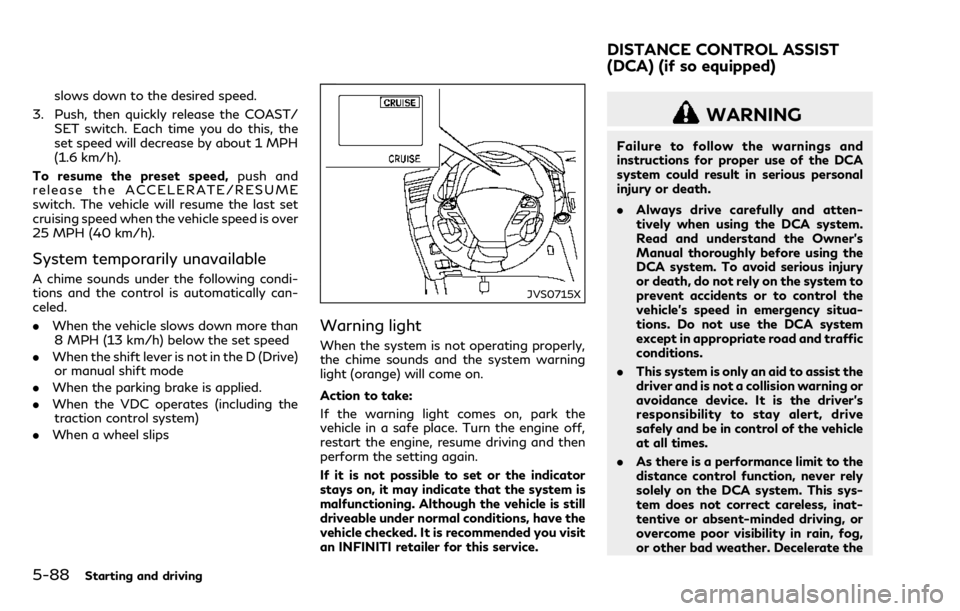
When the system is not operating properly,
the chime sounds and the system warning
light (orange) will come on.
Action to take:
If the warning light comes on, park the
vehicle in a safe place. Turn the engine off,
restart the engine, resume driving and then
perform the setting again.
If it is not possible to set or the indicator
stays on, it may indicate that the system is
malfunctioning. Although the vehicle is still
driveable under normal conditions, have the
vehicle checked. It is recommended you visit
an INFINITI retailer for this service.
WARNING
Failure to follow the warnings and
instructions for proper use of the DCA
system could result in serious personal
injury or death.
.Always drive carefully and atten-
tively when using the DCA system.
Read and understand the Owner’s
Manual thoroughly before using the
DCA system. To avoid serious injury
or death, do not rely on the system to
prevent accidents or to control the
vehicle’s speed in emergency situa-
tions. Do not use the DCA system
except in appropriate road and traffic
conditions.
. This system is only an aid to assist the
driver and is not a collision warning or
avoidance device. It is the driver’s
responsibility to stay alert, drive
safely and be in control of the vehicle
at all times.
. As there is a performance limit to the
distance control function, never rely
solely on the DCA system. This sys-
tem does not correct careless, inat-
tentive or absent-minded driving, or
overcome poor visibility in rain, fog,
or other bad weather. Decelerate the
DISTANCE CONTROL ASSIST
(DCA) (if so equipped)
Page 298 of 458

vehicle speed by depressing the brake
pedal, depending on the distance to
the vehicle ahead and the surround-
ing circumstances in order to main-
tain a safe distance between vehicles.
. Always pay attention to the opera-
tion of the vehicle and be ready to
manually decelerate to maintain the
proper following distance. The DCA
system may not be able to decelerate
the vehicle under some circum-
stances.
. This system only brakes and moves
the accelerator pedal upward to help
assist the driver to maintain a follow-
ing distance from the vehicle ahead.
Acceleration should be operated by
the driver.
. The DCA system does not control
vehicle speed or warn you when you
approach stationary and slow moving
vehicles. You must pay attention to
vehicle operation to maintain proper
distance from vehicles ahead.
. The DCA system automatically de-
celerates your vehicle to help assist
the driver to maintain a following
distance from the vehicle ahead.
Manually brake when deceleration is
required to maintain a safe distance
upon sudden braking by the vehicle ahead or when a vehicle suddenly
appears in front of you. Always stay
alert when using the DCA system.
. If the vehicle ahead comes to a stop,
the vehicle decelerates to a standstill
within the limitations of the system.
The system will cancel with a warning
chime once it judges that the vehicle
has come to a standstill. To prevent
the vehicle from moving, the driver
must depress the brake pedal.
JVS0462X
The DCA system is intended to assist the
driver in keeping a following distance from
the vehicle ahead traveling in the same lane
and direction.
If the radar sensor
detects a slower
moving vehicle ahead, the system will reduce
the vehicle speed to help assist the driver to
maintain a following distance.
The system automatically controls the throt-
tle and applies the brakes (up to approxi-
mately 40% of vehicle braking power) if
necessary.
The detection range of the sensor is approxi-
mately 650 ft (200 m) ahead.
Starting and driving5-89