phone INFINITI Q70 2018 Owners Manual
[x] Cancel search | Manufacturer: INFINITI, Model Year: 2018, Model line: Q70, Model: INFINITI Q70 2018Pages: 458, PDF Size: 2.21 MB
Page 5 of 458
INFINITI CUSTOMER CARE PROGRAM
INFINITI CARES ...
Both INFINITI and your INFINITI retailer are dedicated to serving all your automotive needs. Your satisfaction with your vehicle and your
INFINITI retailer are our primary concerns. Your INFINITI retailer is always available to assist you with all your automobile sales and service
needs.
However, if there is something that your
INFINITI retailer cannot assist you with or
you would like to provide INFINITI directly
with comments or questions, please contact
our (INFINITI’s) Consumer Affairs Depart-
ment using our toll-free number:For U.S. customers1-800-662-6200
For Canadian customers 1-800-361-4792
The Consumer Affairs Department will ask
for the following information:
. Your name, address, and telephone num-
ber
. Vehicle identification number (on dash
panel)
. Date of purchase
. Current odometer reading
. Your INFINITI retailer’s name
. Your comments or questions
OR You can write to INFINITI with the informa-
tion on the left at:
For U.S. customersINFINITI Division
Nissan North America, Inc.
Consumer Affairs Department
P.O. Box 685003
Franklin, TN 37068-5003
or via e-mail at:
[email protected]
For Canadian customers INFINITI Division
Nissan Canada Inc.
5290 Orbitor Drive
Mississauga, Ontario L4W 4Z5
or via e-mail at:
information.centre@nissancanada.
com If you prefer, visit us at:
www.infinitiUSA.com (for U.S. customer) or
www.infiniti.ca (for Canadian customers)
We appreciate your interest in INFINITI and
thank you for buying a quality INFINITI
vehicle.
Page 6 of 458
Illustrated table of contents0
Safety — Seats, seat belts and supplemental restraint
system1
Instruments and controls
Pre-driving checks and adjustments
Monitor, climate, audio, phone and voice recognition
systems
Starting and driving
In case of emergency
Appearance and care
Do-it-yourself
Maintenance and schedules
Technical and consumer information
2
3
4
5
6
7
8
9
10
Table of
Contents
11Index
Page 12 of 458

JVC1096X
1. Rear sunshade (if so equipped) (P.2-55)
2. Rear spot light (if so equipped) (P.2-58)
3. Coat hooks (P.2-50)
4. Rear personal light (if so equipped)(P.2-57)
5. Sun visors (P.3-25) 6. Microphone
— Bluetooth®Hands-Free Phone sys-
tem*
7. Power windows (P.2-51)
8. Moonroof switch (P.2-54) 9. Map light (P.2-57)
— Active noise cancellation system
(P.5-128)
— SOS call switch* (if so equipped)
10. Sunglasses holder (P.2-48)
11. Inside rearview mirror — Operation (P.3-25)
— HomeLink
®(P.2-60)
12. Trunk pass-through/Rear armrest (P.1-4)
13. Rear cup holders (P.2-47)/Seat heater switch (if so equipped) (P.2-41)
14. Rear pocket (if so equipped) (P.2-50) or power outlet (if so equipped) (P.2-46)
15. Console box — Power outlet (P.2-46)
— USB connection port*
— Auxiliary input jack*
16. Front cup holders (P.2-47)
*: Refer to the Infiniti InTouch Owner’s Manual.
Illustrated table of contents0-5
PASSENGER COMPARTMENT
Page 13 of 458
0-6Illustrated table of contents
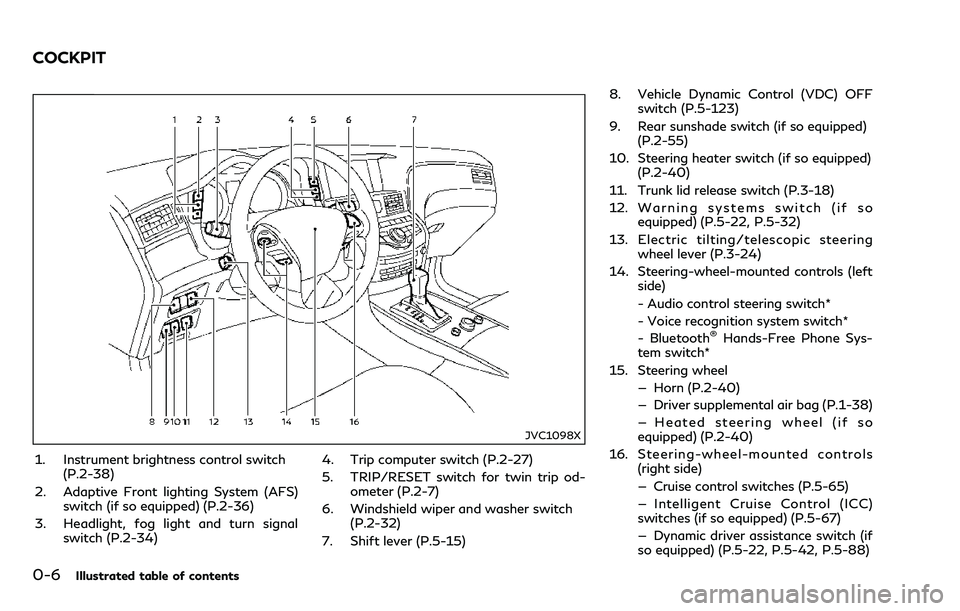
JVC1098X
1. Instrument brightness control switch(P.2-38)
2. Adaptive Front lighting System (AFS) switch (if so equipped) (P.2-36)
3. Headlight, fog light and turn signal switch (P.2-34) 4. Trip computer switch (P.2-27)
5. TRIP/RESET switch for twin trip od-
ometer (P.2-7)
6. Windshield wiper and washer switch (P.2-32)
7. Shift lever (P.5-15) 8. Vehicle Dynamic Control (VDC) OFF
switch (P.5-123)
9. Rear sunshade switch (if so equipped) (P.2-55)
10. Steering heater switch (if so equipped) (P.2-40)
11. Trunk lid release switch (P.3-18)
12. Warning systems switch (if so equipped) (P.5-22, P.5-32)
13. Electric tilting/telescopic steering wheel lever (P.3-24)
14. Steering-wheel-mounted controls (left side)
- Audio control steering switch*
- Voice recognition system switch*
- Bluetooth
®Hands-Free Phone Sys-
tem switch*
15. Steering wheel — Horn (P.2-40)
— Driver supplemental air bag (P.1-38)
— Heated steering wheel (if so
equipped) (P.2-40)
16. Steering-wheel-mounted controls (right side)
— Cruise control switches (P.5-65)
— Intelligent Cruise Control (ICC)
switches (if so equipped) (P.5-67)
— Dynamic driver assistance switch (if
so equipped) (P.5-22, P.5-42, P.5-88)
COCKPIT
Page 80 of 458
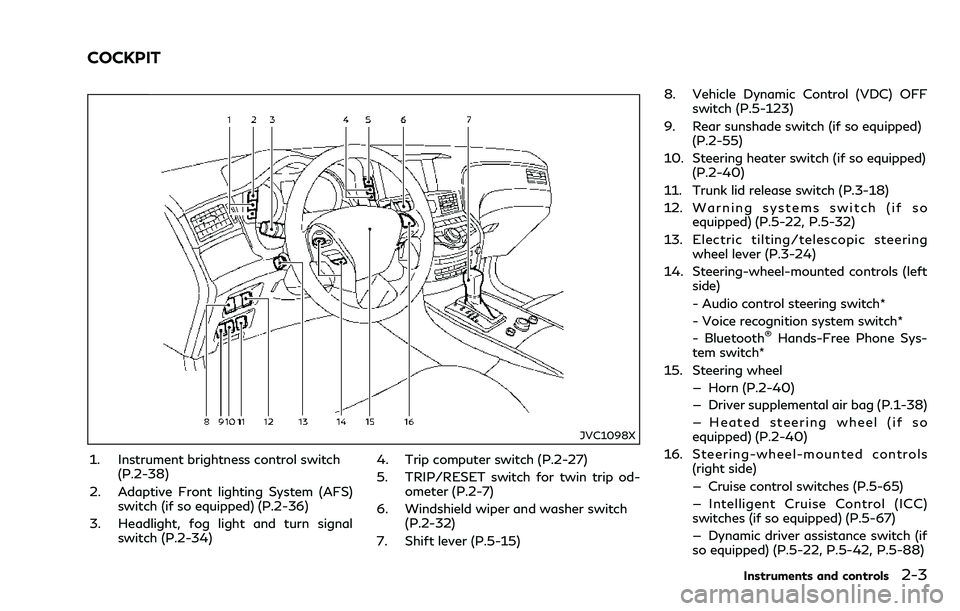
JVC1098X
1. Instrument brightness control switch(P.2-38)
2. Adaptive Front lighting System (AFS) switch (if so equipped) (P.2-36)
3. Headlight, fog light and turn signal switch (P.2-34) 4. Trip computer switch (P.2-27)
5. TRIP/RESET switch for twin trip od-
ometer (P.2-7)
6. Windshield wiper and washer switch (P.2-32)
7. Shift lever (P.5-15) 8. Vehicle Dynamic Control (VDC) OFF
switch (P.5-123)
9. Rear sunshade switch (if so equipped) (P.2-55)
10. Steering heater switch (if so equipped) (P.2-40)
11. Trunk lid release switch (P.3-18)
12. Warning systems switch (if so equipped) (P.5-22, P.5-32)
13. Electric tilting/telescopic steering wheel lever (P.3-24)
14. Steering-wheel-mounted controls (left side)
- Audio control steering switch*
- Voice recognition system switch*
- Bluetooth
®Hands-Free Phone Sys-
tem switch*
15. Steering wheel — Horn (P.2-40)
— Driver supplemental air bag (P.1-38)
— Heated steering wheel (if so
equipped) (P.2-40)
16. Steering-wheel-mounted controls (right side)
— Cruise control switches (P.5-65)
— Intelligent Cruise Control (ICC)
switches (if so equipped) (P.5-67)
— Dynamic driver assistance switch (if
so equipped) (P.5-22, P.5-42, P.5-88)
Instruments and controls2-3
COCKPIT
Page 123 of 458

2-46Instruments and controls
JVI1133X
Front
JVI1696X
Center console
JVI1161X
Behind the center console (if so equipped)
The power outlet is used for powering
electrical accessories such as cellular tele-
phones.
CAUTION
. The outlet and plug may be hot
during or immediately after use.
. Do not use with accessories that
exceed a 12 volt, 120W (10A) power
draw. Do not use double adapters or
more than one electrical accessory.
. Use power outlet with the engine
running to avoid discharging the vehicle battery.
. Avoid using power outlet when the
air conditioner, headlights or rear
window defroster is on.
. This power outlet is not designed for
use with a cigarette lighter unit.
. Push the plug in as far as it will go. If
good contact is not made, the plug
may overheat or the internal tem-
perature fuse may blow.
. Before inserting or disconnecting a
plug, be sure the electrical accessory
being used is turned OFF.
. When not in use, be sure to close the
cap. Do not allow water or any liquid
to contact the outlet.
POWER OUTLET
Page 148 of 458

WARNING
.Radio waves could adversely affect
electric medical equipment. Those
who use a pacemaker should contact
the electric medical equipment man-
ufacturer for the possible influences
before use.
. The Intelligent Key transmits radio
waves when the buttons are pushed.
The FAA advises that the radio
waves may affect aircraft navigation
and communication systems. Do not
operate the Intelligent Key while on
an airplane. Make sure the buttons
are not operated unintentionally
when the unit is stored during a
flight.
The Intelligent Key system can operate all
the doors and the trunk lid using the remote
controller function or pushing the request
switch on the vehicle without taking the key
out from a pocket or purse. The operating
environment and/or conditions may affect
the Intelligent Key system operation.
Be sure to read the following before using
the Intelligent Key system.
CAUTION
. Be sure to carry the Intelligent Key
with you when operating the vehicle.
. Never leave the Intelligent Key in the
vehicle when you leave the vehicle.
The Intelligent Key is always communicating
with the vehicle as it receives radio waves.
The Intelligent Key system transmits weak
radio waves. Environmental conditions may
interfere with the operation of the Intelligent
Key system under the following operating
conditions.
. When operating near a location where
strong radio waves are transmitted, such
as a TV tower, power station and broad-
casting station.
. When in possession of wireless equip-
ment, such as a cellular telephone,
transceiver, and CB radio.
. When the Intelligent Key is in contact
with or covered by metallic materials.
. When any type of radio wave remote
control is used nearby.
. When the Intelligent Key is placed near
an electric appliance such as a personal
computer. .
When the vehicle is parked near a parking
meter.
In such cases, correct the operating condi-
tions before using the Intelligent Key func-
tion or use the mechanical key.
Although the life of the battery varies
depending on the operating conditions, the
battery’s life is approximately 2 years. If the
battery is discharged, replace it with a new
one.
When the Intelligent Key battery is almost
discharged, see “Intelligent Key battery dis-
charge” (P.5-13) to start the engine.
Since the Intelligent Key is continuously
receiving radio waves, if the key is left near
equipment which transmits strong radio
waves, such as signals from a TV and
personal computer, the battery life may
become shorter.
For information regarding replacement of a
battery, see “Intelligent Key battery replace-
ment” (P.8-25).
For models with a steering wheel lock
mechanism: Because the steering wheel is
locked electrically, unlocking the steering
wheel with the ignition switch in the LOCK
position is impossible when the vehicle
battery is completely discharged. Pay special
attention that the vehicle battery is not
completely discharged.
Pre-driving checks and adjustments3-7
INTELLIGENT KEY SYSTEM
Page 172 of 458

4 Monitor, climate, audio, phone and voice re-cognition systems
Infiniti InTouch Owner’s Manual................................... 4-2
Safety note ........................................................................\
.. 4-2
RearView Monitor (if so equipped)............................... 4-3
RearView Monitor system operation ..................... 4-4
How to read displayed lines...................................... 4-4
Difference between predictive and
actual distances ............................................................ 4-4
How to park with predictive course lines.............. 4-6
Adjusting the screen.................................................... 4-7
Predictive course line settings .................................. 4-8
RearView Monitor system limitations.................... 4-8
System maintenance.................................................... 4-9
Around View
®Monitor (if so equipped)................... 4-10
Around View®Monitor system operation........... 4-11
How to adjust the screen view............................... 4-19
Around View
®Monitor settings............................. 4-19
Around View®Monitor system limitations ......... 4-21
System maintenance.................................................. 4-23
Camera aiding sonar function (if so equipped) ....... 4-23
Sonar system operation........................................... 4-24 Turning on and off the sonar function............... 4-25
Sonar system limitations........................................ 4-26
System temporarily unavailable ........................... 4-27
System maintenance ............................................... 4-27
Moving Object Detection (MOD) (if
so equipped)...................................................................... 4-27
MOD system operation......................................... 4-28
Turning on and off the MOD system................ 4-30
MOD system limitations........................................ 4-30
System maintenance ............................................... 4-31
Ventilators.............................................................\
............ 4-32
Heater and air conditioner............................................ 4-32 Automatic climate control .................................... 4-34
Operating tips............................................................ 4-36
Linking Intelligent Key............................................. 4-37
Servicing climate control ........................................ 4-37
Antenna........................................................................\
..... 4-38 Window antenna..................................................... 4-38
Satellite antenna...................................................... 4-38
Car phone or CB radio.................................................. 4-38
Page 173 of 458

4-2Monitor, climate, audio, phone and voice recognition systems
Refer to the Infiniti InTouch Owner’s Manual
that includes the following information.
.Audio system
. Bluetooth
®Hands-Free Phone system
. Infiniti InTouchTMApps
. Infiniti InTouchTMServices
. Navigation system
. Voice recognition
. Information and settings viewable on
Infiniti InTouch
TM
WARNING
. Do not disassemble or modify this
system. If you do, it may result in
accidents, fire, or electric shock.
. Do not use this system if you notice
any abnormality, such as a frozen
screen or lack of sound. Continued
use of the system may result in
accident, fire or electric shock.
. In case you notice any foreign object
in the system hardware, spill liquid on
it, or notice smoke or smell coming
from it, stop using the system im-
mediately. Ignoring such conditions
may lead to accidents, fire, or electric
shock. It is recommended you visit an
INFINITI retailer for servicing.
. Park the vehicle in a safe location and
apply the parking brake to view the
images on the front center display
screen.
Do not attempt to operate the system in
extreme temperature conditions [below
−4°F (−20°C) and above 158°F (70°C)].
Operating this system under these condi-
tions may result in system malfunctions.
INFINITI INTOUCH OWNER’S MANUALSAFETY NOTE
Page 174 of 458

JVH1705X
1. SETTING button
WARNING
Failure to follow the warnings and
instructions for proper use of the Rear-View Monitor system could result in
serious injury or death.
.
The RearView Monitor is a conveni-
ence but it is not a substitute for
proper backing. Always turn and look
out the windows, and check mirrors to be sure that it is safe to move
before operating the vehicle. Always
back up slowly.
. The system is designed as an aid to
the driver in showing large stationary
objects directly behind the vehicle, to
help avoid damaging the vehicle.
. The distance guide line and the
vehicle width line should be used as
a reference only when the vehicle is
on a level paved surface. The distance
viewed on the monitor is for refer-
ence only and may be different than
the actual distance between the
vehicle and displayed objects.
CAUTION
Do not scratch the camera lens when
cleaning dirt or snow from the front of
the camera.
The RearView Monitor system automatically
shows a rear view of the vehicle when the
shift lever is placed in the R (Reverse)
position.
The radio can still be heard while the Rear-
View Monitor is active.
Monitor, climate, audio, phone and voice recognition systems4-3
REARVIEW MONITOR (if so equipped)