tire pressure INFINITI Q70 2019 User Guide
[x] Cancel search | Manufacturer: INFINITI, Model Year: 2019, Model line: Q70, Model: INFINITI Q70 2019Pages: 458, PDF Size: 3.25 MB
Page 213 of 458

5-6Starting and driving
be able to detect or signal low tire pressure
as intended. TPMS malfunctions may occur
for a variety of reasons, including the
installation of replacement or alternate tires
or wheels on the vehicle that prevent the
TPMS from functioning properly. Always
check the TPMS malfunction telltale after
replacing one or more tires or wheels on your
vehicle to ensure that the replacement or
alternate tires and wheels allow the TPMS
to continue to function properly.
Additional information
.Since the spare tire is not equipped with
the TPMS, the TPMS does not monitor
the tire pressure of the spare tire.
. The TPMS will activate only when the
vehicle is driven at speeds above 16
MPH (25 km/h). Also, this system may
not detect a sudden drop in tire pressure
(for example a flat tire while driving).
. The low tire pressure warning light does
not automatically turn off when the tire
pressure is adjusted. After the tire is
inflated to the recommended pressure,
the vehicle must be driven at speeds
above 16 MPH (25 km/h) to activate the
TPMS and turn off the low tire pressure
warning light. Use a tire pressure gauge
to check the tire pressure.
. The CHECK TIRE PRESSURE warning
appears in the vehicle information dis- play when the low tire pressure warning
light is illuminated and low tire pressure
is detected. The CHECK TIRE PRES-
SURE warning turns off when the low
tire pressure warning light turns off.
The CHECK TIRE PRESSURE warning
does not appear if the tire pressure
warning light illuminates to indicate a
TPMS malfunction.
. Tire pressure rises and falls depending on
the heat caused by the vehicle’s opera-
tion and the outside temperature. Do not
reduce the tire pressure after driving
because the tire pressure rises after
driving. Low outside temperature can
lower the temperature of the air inside
the tire which can cause a lower tire
inflation pressure. This may cause the
low tire pressure warning light to illumi-
nate. If the warning light illuminates in
low ambient temperature, check the tire
pressure for all four tires.
. You can also check the pressure of all
tires (except the spare tire) on the center
display. (See the INFINITI InTouch
TM
Owner’s Manual.) The order of the tire
pressure figures displayed on the screen
may not correspond with the actual
order of the tire position.
For additional information, see “Low tire
pressure warning light” (P.2-14) and “Tire
Pressure Monitoring System (TPMS)” (P.6- 3).
WARNING
.
If the low tire pressure warning light
illuminates or LOW PRESSURE in-
formation is displayed on the monitor
screen while driving, avoid sudden
steering maneuvers or abrupt brak-
ing, reduce vehicle speed, pull off the
road to a safe location and stop the
vehicle as soon as possible. Driving
with under-inflated tires may perma-
nently damage the tires and increase
the likelihood of tire failure. Serious
vehicle damage could occur and may
lead to an accident and could result in
serious personal injury. Check the tire
pressure for all four tires. Adjust the
tire pressure to the recommended
COLD tire pressure shown on the
Tire and Loading Information label to
turn the low tire pressure warning
light OFF. If the light still illuminates
while driving after adjusting the tire
pressure, a tire may be flat or the
TPMS may be malfunctioning. If you
have a flat tire, replace it with a spare
tire as soon as possible. If no tire is
flat and all tires are properly inflated,
it is recommended you consult an
INFINITI retailer.
Page 214 of 458

.Since the spare tire is not equipped
with the TPMS, when a spare tire is
mounted or a wheel is replaced, the
TPMS will not function and the low
tire pressure warning light will flash
for approximately 1 minute. The light
will remain on after 1 minute. Have
your tires replaced and/or TPMS
system reset as soon as possible. It
is recommended you visit an INFINITI
retailer for these services.
. Replacing tires with those not origin-
ally specified by INFINITI could affect
the proper operation of the TPMS.
. Do not inject any tire liquid or aerosol
tire sealant into the tires, as this may
cause a malfunction of the tire pres-
sure sensors.
CAUTION
.The TPMS may not function properly
when the wheels are equipped with
tire chains or the wheels are buried in
snow.
. Do not place metalized film or any
metal parts (antenna, etc.) on the
windows. This may cause poor recep-
tion of the signals from the tire pressure sensors, and the TPMS will
not function properly.
Some devices and transmitters may tem-
porarily interfere with the operation of the
TPMS and cause the low tire pressure
warning light to illuminate. Some examples
are:
. Facilities or electric devices using similar
radio frequencies are near the vehicle.
. If a transmitter set to similar frequencies
is being used in or near the vehicle.
. If a computer (or similar equipment) or a
DC/AC converter is being used in or near
the vehicle.
Low tire pressure warning light may illumi-
nate in the following cases.
. If the vehicle is equipped with a wheel
and tire without TPMS.
. If the TPMS has been replaced and the ID
has not been registered.
. If the wheel is not originally specified by
INFINITI.
FCC Notice:
For USA:
This device complies with Part 15 of the
FCC Rules. Operation is subject to the
following two conditions: (1) This device
may not cause harmful interference, and (2)
this device must accept any interference received, including interference that may
cause undesired operation.
NOTE:
Changes or modifications not expressly
approved by the party responsible for
compliance could void the user’s authority
to operate the equipment.
For Canada:
This device complies with Industry Canada
licence-exempt RSS standard(s). Operation
is subject to the following two conditions:
(1) this device may not cause interference,
and (2) this device must accept any inter-
ference, including interference that may
cause undesired operation of the device.
AVOIDING COLLISION AND
ROLLOVER
WARNING
Failure to operate this vehicle in a safe
and prudent manner may result in loss of
control or an accident.
Be alert and drive defensively at all times.
Obey all traffic regulations. Avoid excessive
speed, high speed cornering, or sudden
steering maneuvers, because these driving
practices could cause you to lose control of
Starting and driving5-7
Page 215 of 458

5-8Starting and driving
your vehicle.As with any vehicle, a loss of
control could result in a collision with other
vehicles or objects, or cause the vehicle to
rollover, particularly if the loss of control
causes the vehicle to slide sideways. Be
attentive at all times, and avoid driving when
tired. Never drive when under the influence
of alcohol or drugs (including prescription or
over-the-counter drugs which may cause
drowsiness). Always wear your seat belt as
outlined in the “Seat belts” (P.1-10) and also
instruct your passengers to do so.
Seat belts help reduce the risk of injury in
collisions and rollovers. In a rollover crash,
an unbelted or improperly belted person is
significantly more likely to be injured or
killed than a person properly wearing a seat
belt.
OFF-ROAD RECOVERY
If driving the right side or left side wheels
may unintentionally leave the road surface.
Maintain control of the vehicle by following
the procedure below. Please note that this
procedure is only a general guide. The vehicle
must be driven as appropriate based on the
conditions of the vehicle, road and traffic.
1. Remain calm and do not overreact.
2. Do not apply the brakes.
3. Maintain a firm grip on the steering wheel with both hands and try to hold a straight course.
4. When appropriate, slowly release the accelerator pedal to gradually slow the
vehicle.
5. If there is nothing in the way, steer the vehicle to follow the road while the
vehicle speed is reduced. Do not attempt
to drive the vehicle back onto the road
surface until vehicle speed is reduced.
6. When it is safe to do so, gradually turn the steering wheel until both tires return
to the road surface. When all tires are on
the road surface, steer the vehicle to stay
in the appropriate driving lane.
.If you decide that it is not safe toreturn the vehicle to the road surface
based on vehicle, road or traffic
conditions, gradually slow the vehicle
to a stop in a safe place off the road.
RAPID AIR PRESSURE LOSS
Rapid air pressure loss or a “blow-out” can
occur if the tire is punctured or is damaged
due to hitting a curb or pothole. Rapid air
pressure loss can also be caused by driving
on under-inflated tires.
Rapid air pressure loss can affect the
handling and stability of the vehicle, espe-
cially at highway speeds.
Help prevent rapid air pressure loss by
maintaining the correct air pressure and visually inspect the tires for wear and
damage. See “Wheels and tires” (P.8-30).
If a tire rapidly loses air pressure or “blows-
out” while driving maintain control of the
vehicle by following the procedure below.
Please note that this procedure is only a
general guide. The vehicle must be driven as
appropriate based on the conditions of the
vehicle, road and traffic.
WARNING
The following actions can increase the
chance of losing control of the vehicle if
there is a sudden loss of tire air pressure.
Losing control of the vehicle may cause a
collision and result in personal injury.
.
The vehicle generally moves or pulls
in the direction of the flat tire.
. Do not rapidly apply the brakes.
. Do not rapidly release the accelerator
pedal.
. Do not rapidly turn the steering
wheel.
1. Remain calm and do not overreact.
2. Maintain a firm grip on the steering wheel with both hands and try to hold
a straight course.
Page 235 of 458
![INFINITI Q70 2019 User Guide 5-28Starting and driving
JVS1081X
HOW TO ENABLE/DISABLE THE
LDP SYSTEM
Perform the following steps to enable or
disable the LDP system.
1. Push the SETTING button
.
2. Touch [Driver Assistance].
3. To](/img/42/41105/w960_41105-234.png "INFINITI Q70 2019 User Guide 5-28Starting and driving
JVS1081X
HOW TO ENABLE/DISABLE THE
LDP SYSTEM
Perform the following steps to enable or
disable the LDP system.
1. Push the SETTING button
.
2. Touch [Driver Assistance].
3. To")
5-28Starting and driving
JVS1081X
HOW TO ENABLE/DISABLE THE
LDP SYSTEM
Perform the following steps to enable or
disable the LDP system.
1. Push the SETTING button
.
2. Touch [Driver Assistance].
3. Touch [Lane Assist].
4. Touch [Lane Departure Prevention] to turn the system ON/OFF.
LDW/LDP SYSTEM LIMITATIONS
WARNING
Listed below are the system limitations
for the LDW and LDP systems. Failure to
operate the vehicle in accordance with
these system limitations could result in
serious injury or death.
.The system will not operate at speeds
below 45 MPH (70 km/h) or if it
cannot detect lane markers.
. The LDP system is primarily intended
for use on well-developed freeways
or highways. It may not detect the
lane markers in certain roads, weath-
er or driving conditions.
. Do not use the LDP system under the
following conditions as it may not
function properly:
— During bad weather (rain, fog, snow, etc.).
— When driving on slippery roads, such as on ice or snow, etc.
— When driving on winding or un- even roads.
— When there is a lane closure due to road repairs. — When driving in a makeshift or
temporary lane.
— When driving on roads where the lane width is too narrow.
— When driving without normal tire conditions (for example, tire wear,
low tire pressure, installation of
spare tire, tire chains, non-stan-
dard wheels).
— When the vehicle is equipped with non-original brake parts or sus-
pension parts.
. The camera may not detect lane
markers in the following situations
and the LDW and LDP systems may
not operate properly.
— On roads where there are multi- ple parallel lane markers, lane
markers that are faded or not
painted clearly, yellow painted
lane markers, non-standard lane
markers, or lane markers covered
with water, dirt, snow, etc.
— On roads where the discontinued lane markers are still detectable.
— On roads where there are sharp curves.
— On roads where there are sharply contrasting objects, such as sha-
Page 253 of 458

5-46Starting and driving
and the BSI system may not operate
properly.— On roads where there are multi- ple parallel lane markers; lane
markers that are faded or not
painted clearly; yellow painted
lane markers; non-standard lane
markers; lane markers covered
with water, dirt, snow, etc.
— On roads where discontinued lane markers are still detectable.
— On roads where there are sharp curves.
— On roads where there are sharply contrasting objects, such as sha-
dows, snow, water, wheel ruts,
seams or lines remaining after
road repairs.
— On roads where the traveling lane merges or separates.
— When the vehicle’s traveling di- rection does not align with the
lane markers.
— When traveling close to the ve- hicle in front of you, which ob-
structs the lane camera unit
detection range.
— When rain, snow or dirt adheres to the windshield in front of a lane camera unit.
— When the headlights are not bright due to dirt on the lens or
if aiming is not adjusted properly.
— When strong light enters a lane camera unit. (For example: light
directly shines on the front of the
vehicle at sunrise or sunset.)
— When a sudden change in bright- ness occurs. (For example: when
the vehicle enters or exits a tunnel
or under a bridge.)
. Do not use the BSI system under the
following conditions because the sys-
tem may not function properly.
— During bad weather. (For exam- ple: rain, fog, snow, etc.)
— When driving on slippery roads, such as on ice or snow, etc.
— When driving on winding or un- even roads.
— When there is a lane closure due to road repairs.
— When driving in a makeshift or temporary lane.
— When driving on roads where the lane width is too narrow. — When driving with a tire that is
not within normal tire conditions
(for example, tire wear, low tire
pressure, installation of spare tire,
tire chains, non-standard wheels).
— When the vehicle is equipped with non-original brake parts or sus-
pension parts.
. Excessive noise (for example, audio
system volume, open vehicle window)
will interfere with the chime sound,
and it may not be heard.
BSI DRIVING SITUATIONS
Indicator on
Indicator off
Indicator flashing
Page 270 of 458

— Severe weather
— Road spray
— Ice/frost/dirt build up on thevehicle
. Do not attach stickers (including
transparent material), install acces-
sories or apply additional paint near
the radar sensors. These conditions
may reduce the ability of the radar
sensors to detect other vehicles.
. The sonar sensors detect stationary
objects behind the vehicle. The sonar
sensor may not detect:
— Small or moving objects
— Wedge-shaped objects
— Object close to the bumper (less than approximately 1 ft (30 cm))
— Thin objects such as rope, wire and chain, etc.
. The brake engagement by the BCI
system is not as effective on a slope
as it is on flat ground. When on a
steep slope the system may not
function properly.
. Do not use the BCI system under the
following conditions because the sys-
tem may not function properly. — When driving with a tire that is
not within normal tire conditions
(for example, tire wear, low tire
pressure, installation of spare tire,
tire chains, non-standard wheels).
— When the vehicle is equipped with non-original brake parts or sus-
pension parts.
. Excessive noise (for example, audio
system volume, open vehicle window)
will interfere with the chime sound,
and it may not be heard.
JVS0700X
Vehicle information display
SYSTEM TEMPORARILY UNA-
VAILABLE
Under the following conditions, a chime will
sound and “BCI NOT AVAILABLE” warning
will appear in the vehicle information display
, and the BCI system will be turned off
automatically.
. If the vehicle is parked in direct sunlight
under high temperature conditions (over
approximately 104°F (40°C)).
. When side radar blockage is detected.
Turn off the BCI system and turn it on again
when the above conditions no longer exist.
Starting and driving5-63
Page 324 of 458
4. Drive at economical speeds and dis-tances.
.Observing the speed limit and notexceeding 60 MPH (97 km/h) (where
legally allowed) can improve fuel
efficiency due to reduced aerody-
namic drag.
.Maintaining a safe following distance
behind other vehicles reduces unne-
cessary braking.
.Safely monitoring traffic to anticipatechanges in speed permits reduced
braking and smooth acceleration
changes.
.Select a gear range suitable to roadconditions.
5. Use cruise control.
.Using cruise control during highway driving helps maintain a steady speed.
.Cruise control is particularly effectivein providing fuel savings when driving
on flat terrains.
6. Plan for the shortest route.
.Utilize a map or navigation system to determine the best route to save time.
7. Avoid idling.
.Shutting off your engine when safe for stops exceeding 30-60 seconds
saves fuel and reduces emissions. 8. Buy an automated pass for toll roads.
.Automated passes permit drivers to
use special lanes to maintain cruising
speed through the toll and avoid
stopping and starting.
9. Winter warm up.
.Limit idling time to minimize impact to fuel economy.
.Vehicles typically need no more than30 seconds of idling at start-up to
effectively circulate the engine oil
before driving.
.Your vehicle will reach its ideal oper-ating temperature more quickly while
driving versus idling.
10. Keeping your vehicle cool.
.Park your vehicle in a covered parking area or in the shade whenever possi-
ble.
.When entering a hot vehicle, openingthe windows will help to reduce the
inside temperature faster, resulting in
reduced demand on your A/C system. .
Keep your engine tuned up.
. Follow the recommended scheduled
maintenance.
. Keep the tires inflated to the correct
pressure. Low tire pressure increases tire
wear and lowers fuel economy.
. Keep the wheels in correct alignment.
Improper alignment increases tire wear
and lowers fuel economy.
. Use the recommended viscosity engine
oil. (See “Engine oil and oil filter recom-
mendation” (P.10-9).)
Starting and driving5-117
INCREASING FUEL ECONOMY
Page 325 of 458
5-118Starting and driving
SSD0336
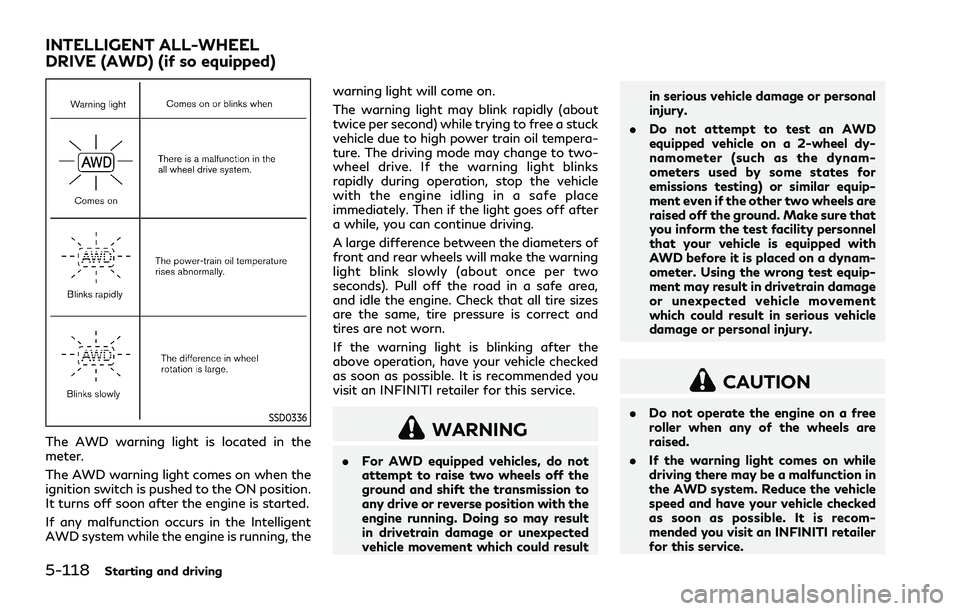
The AWD warning light is located in the
meter.
The AWD warning light comes on when the
ignition switch is pushed to the ON position.
It turns off soon after the engine is started.
If any malfunction occurs in the Intelligent
AWD system while the engine is running, thewarning light will come on.
The warning light may blink rapidly (about
twice per second) while trying to free a stuck
vehicle due to high power train oil tempera-
ture. The driving mode may change to two-
wheel drive. If the warning light blinks
rapidly during operation, stop the vehicle
with the engine idling in a safe place
immediately. Then if the light goes off after
a while, you can continue driving.
A large difference between the diameters of
front and rear wheels will make the warning
light blink slowly (about once per two
seconds). Pull off the road in a safe area,
and idle the engine. Check that all tire sizes
are the same, tire pressure is correct and
tires are not worn.
If the warning light is blinking after the
above operation, have your vehicle checked
as soon as possible. It is recommended you
visit an INFINITI retailer for this service.WARNING
.
For AWD equipped vehicles, do not
attempt to raise two wheels off the
ground and shift the transmission to
any drive or reverse position with the
engine running. Doing so may result
in drivetrain damage or unexpected
vehicle movement which could result in serious vehicle damage or personal
injury.
. Do not attempt to test an AWD
equipped vehicle on a 2-wheel dy-
namometer (such as the dynam-
ometers used by some states for
emissions testing) or similar equip-
ment even if the other two wheels are
raised off the ground. Make sure that
you inform the test facility personnel
that your vehicle is equipped with
AWD before it is placed on a dynam-
ometer. Using the wrong test equip-
ment may result in drivetrain damage
or unexpected vehicle movement
which could result in serious vehicle
damage or personal injury.
CAUTION
.Do not operate the engine on a free
roller when any of the wheels are
raised.
. If the warning light comes on while
driving there may be a malfunction in
the AWD system. Reduce the vehicle
speed and have your vehicle checked
as soon as possible. It is recom-
mended you visit an INFINITI retailer
for this service.
INTELLIGENT ALL-WHEEL
DRIVE (AWD) (if so equipped)
Page 329 of 458

5-122Starting and driving
BRAKE ASSIST
When the force applied to the brake pedal
exceeds a certain level, the Brake Assist is
activated generating greater braking force
than a conventional brake booster even with
light pedal force.
WARNING
The Brake Assist is only an aid to assist
braking operation and is not a collision
warning or avoidance device. It is the
driver’s responsibility to stay alert, drive
safely and be in control of the vehicle at
all times.
ANTI-LOCK BRAKING SYSTEM
(ABS)
WARNING
.The Anti-lock Braking System (ABS)
is a sophisticated device, but it
cannot prevent accidents resulting
from careless or dangerous driving
techniques. It can help maintain ve-
hicle control during braking on slip-
pery surfaces. Remember that
stopping distances on slippery sur- faces will be longer than on normal
surfaces even with ABS. Stopping
distances may also be longer on
rough, gravel or snow covered roads,
or if you are using tire chains. Always
maintain a safe distance from the
vehicle in front of you. Ultimately,
the driver is responsible for safety.
. Tire type and condition may also
affect braking effectiveness.
— When replacing tires, install the specified size of tires on all four
wheels.
— When installing a spare tire, make sure that it is the proper size and
type as specified on the Tire and
Loading Information label. See
“Tire and loading information la-
bel” (P.10-16).
— For detailed information, see “Wheels and tires” (P.8-30).
The Anti-lock Braking System (ABS) controls
the brakes so the wheels do not lock during
hard braking or when braking on slippery
surfaces. The system detects the rotation
speed at each wheel and varies the brake
fluid pressure to prevent each wheel from
locking and sliding. By preventing each
wheel from locking, the system helps the driver maintain steering control and helps to
minimize swerving and spinning on slippery
surfaces.
Using the system
Depress the brake pedal and hold it down.
Depress the brake pedal with firm steady
pressure, but do not pump the brakes. The
ABS will operate to prevent the wheels from
locking up. Steer the vehicle to avoid
obstacles.
WARNING
Do not pump the brake pedal. Doing so
may result in increased stopping dis-
tances.
Self-test feature
The ABS includes electronic sensors, electric
pumps, hydraulic solenoids and a computer.
The computer has a built-in diagnostic
feature that tests the system each time you
start the engine and move the vehicle at a
low speed in forward or reverse. When the
self-test occurs, you may hear a “clunk”
noise and/or feel a pulsation in the brake
pedal. This is normal and does not indicate a
malfunction. If the computer senses a mal-
function, it switches the ABS off and
BRAKE ASSIST
Page 336 of 458

6 In case of emergency
Hazard warning flasher switch ..................................... 6-2
Roadside assistance program ....................................... 6-2
Emergency engine shut off ............................................ 6-3
Flat tire ........................................................................\
........ 6-3Tire Pressure Monitoring System (TPMS) ........... 6-3
Changing a flat tire ..................................................... 6-4 Jump starting .................................................................... 6-9
Push starting ................................................................... 6-11
If your vehicle overheats .............................................. 6-12
Towing your vehicle ...................................................... 6-13
Towing recommended by INFINITI ................... 6-14
Vehicle recovery (freeing a stuck vehicle) ........ 6-15