wheel INFINITI Q70-HYBRID 2018 Service Manual
[x] Cancel search | Manufacturer: INFINITI, Model Year: 2018, Model line: Q70-HYBRID, Model: INFINITI Q70-HYBRID 2018Pages: 458, PDF Size: 2.22 MB
Page 240 of 458

SSD1024
INFINITI Drive Mode Selector
Four driving modes can be selected by using
the INFINITI Drive Mode Selector, STAN-
DARD, SPORT, ECO and SNOW. Select the
STANDARD mode for normal driving.
NOTE:
When the INFINITI Drive Mode Selector
selects a mode, the mode may not switch
quickly. This is not a malfunction.
STANDARD MODE
Recommended for normal driving. Turn the
INFINITI Drive Mode Selector to the
position. “STANDARD” appears on the ve-
hicle information display for 2 seconds.
SPORT MODE
Adjusts the engine and transmission points
to enhance performance. If the vehicle is
equipped with the active trace control
system, the amount of brake control pro-
vided by active trace control is reduced. (See
“Vehicle Dynamic Control (VDC) system”
(P.5-122).) Turn the INFINITI Drive Mode
Selector to the SPORT position. “SPORT”
appears on the vehicle information display
for 2 seconds.
NOTE:
In the SPORT mode, fuel economy may be
reduced.
SNOW MODE
Used on snowy roads or slippery areas.
When the SNOW mode is activated, engine
output is controlled to avoid wheel spin.
Turn the SNOW mode off for normal driving.
Turn the INFINITI Drive Mode Selector to
the SNOW position. “SNOW” appears on
the vehicle information display for 2 sec-
onds.
ECO MODE
Adjusts engine and transmission points to
enhance fuel economy.
NOTE:
Selecting this drive mode will not necessa-
rily improve fuel economy as many driving
factors influence its effectiveness.
Operation
Turn the INFINITI Drive Mode Selector to
the ECO position. “ECO” appears on the
vehicle information display for 2 seconds
and the ECO drive indicator light illuminates
on the instrument panel.
When the accelerator pedal is depressed
within the range of economy drive, the ECO
drive indicator light illuminates in green.
When the accelerator pedal is depressed
above the range of economy drive, the color
of the ECO drive indicator light changes to
orange. For ECO pedal system equipped
models see “ECO pedal system” (P.5-20).
The ECO drive indicator light will not
illuminate in the following cases:
. When the shift lever is in the R (Reverse)
position.
. When the vehicle speed is below 3 MPH
(4.8 km/h) or over 90 MPH (144 km/h).
. When the Intelligent Cruise Control (ICC)
system is operated.
Starting and driving5-19
INFINITI DRIVE MODE SELECTOR
Page 242 of 458
![INFINITI Q70-HYBRID 2018 Service Manual JVS1081X
Setting ECO pedal reaction force:
1. Push the SETTING button
.
2. Touch [Drive Mode Enhancement].
3. Touch [ECO Pedal].
4. To set the reaction force of the ECO pedal system, touch [Standard]](/img/42/41108/w960_41108-241.png "INFINITI Q70-HYBRID 2018 Service Manual JVS1081X
Setting ECO pedal reaction force:
1. Push the SETTING button
.
2. Touch [Drive Mode Enhancement].
3. Touch [ECO Pedal].
4. To set the reaction force of the ECO pedal system, touch [Standard]")
JVS1081X
Setting ECO pedal reaction force:
1. Push the SETTING button
.
2. Touch [Drive Mode Enhancement].
3. Touch [ECO Pedal].
4. To set the reaction force of the ECO pedal system, touch [Standard] or [Soft].
5. To turn off the ECO pedal system, touch [OFF].
When the ECO pedal system is turned off,
the accelerator will operate normally.
WARNING
Failure to follow the warnings and
instructions for proper use of the LDW
and LDP systems could result in serious
personal injury or death.
. The LDW and LDP systems will not
steer the vehicle or prevent loss of
control. It is the driver’s responsibility
to stay alert, drive safely, keep the
vehicle in the traveling lane, and be in
control of the vehicle at all times.
. The LDP system may activate if you
change lanes without first activating
your turn signal or, for example, if a
construction zone directs traffic to
cross an existing lane marker. If this
occurs, you may need to apply cor-
rective steering to complete your lane
change.
. Because the LDP system may not
activate under the road, weather,
and lane marker conditions described
in this section, it may not activate
every time your vehicle begins to
leave its lane and you will need to
apply corrective steering. .
Lane Departure Warning (LDW) system
— warns the driver with a warning light and chime that the vehicle is begin-
ning to leave the driving lane.
. Lane Departure Prevention (LDP) system
— warns the driver with a warning light and chime, and helps assist the driver
to return the vehicle to the center of
the traveling lane by applying the
brakes to the left or right wheels
individually (for a short period of
time).
Starting and driving5-21
LANE DEPARTURE WARNING
(LDW)/LANE DEPARTURE
PREVENTION (LDP) (if so equipped)
Page 246 of 458
![INFINITI Q70-HYBRID 2018 Service Manual JVS1081X
HOW TO ENABLE/DISABLE THE
LDW SYSTEM
Perform the following steps to enable or
disable the LDW system.
1. Push the SETTING button
.
2. Touch [Driver Assistance].
3. Touch [Lane Assist].
4. Tou](/img/42/41108/w960_41108-245.png "INFINITI Q70-HYBRID 2018 Service Manual JVS1081X
HOW TO ENABLE/DISABLE THE
LDW SYSTEM
Perform the following steps to enable or
disable the LDW system.
1. Push the SETTING button
.
2. Touch [Driver Assistance].
3. Touch [Lane Assist].
4. Tou")
JVS1081X
HOW TO ENABLE/DISABLE THE
LDW SYSTEM
Perform the following steps to enable or
disable the LDW system.
1. Push the SETTING button
.
2. Touch [Driver Assistance].
3. Touch [Lane Assist].
4. Touch [Lane Departure Warning] to turn the system ON/OFF.
LDP SYSTEM OPERATION
The LDP system operates above approxi-
mately 45 MPH (70 km/h) and when the
lane markings are clear.
If the vehicle approaches either the left or
right side of the traveling lane, the LDW
indicator light (orange) on the instrument
panel will flash and a warning chime will
sound. Then, the LDP system will automa-
tically apply the brakes for a short period of
time to help assist the driver to return the
vehicle to the center of the traveling lane.
NOTE:
.The LDP system is not designed to work
when you operate the lane change signal
and change traveling lanes in the direc-
tion of the signal. (The LDP system will
become operable again approximately 2
seconds after the lane change signal is
turned off.)
. The LDP braking assist will not operate
or will stop operating and only a warn-
ing chime will sound under the following
conditions.
— When the brake pedal is depressed.
— When the steering wheel is turned as
far as necessary for the vehicle to
change lanes.
— When the accelerator pedal is de-
pressed while brake control assist is provided.
— When the ICC, DCA, BSI, BSW,
PFCW or FEB warnings sound.
— When the hazard warning flashers
are operated.
— When driving on a curve at a high
speed.
. While the LDP system is operating, you
may hear a sound of brake operation.
This is normal and indicates that the
LDP system is operating properly.
Starting and driving5-25
Page 247 of 458

5-26Starting and driving
JVS1106X
LDP ON indicator light (green) (on the
instrument panel)
Dynamic driver assistance switch
Center multi-function control panel
TURNING THE LDP SYSTEM ON/
OFF
To turn on the LDP system, push the
dynamic driver assistance switchon the
steering wheel after starting the hybrid
system. The LDP ON indicator light (green)
on the instrument panel will illuminate.
Push the dynamic driver assistance switch
again to turn off the LDP system. The LDP
ON indicator light (green)will turn off.
The dynamic driver assistance switch
is
used for the LDP, Blind Spot Intervention
(BSI) and Distance Control Assist (DCA)
systems.
When the dynamic driver assistance switch
is pushed, the BSI and DCA systems will
also turn on or off simultaneously. The LDP
system can be individually set to on or off on
the center display and using the center
multi-function control panel
.
If the system is set to off, the system will not
turn on even if the dynamic driver assistance
switch
is pushed to on. To set the system
to on or off on the center display, see “How
to enable/disable the LDP system” (P.5-27).
Page 248 of 458
![INFINITI Q70-HYBRID 2018 Service Manual JVS1081X
HOW TO ENABLE/DISABLE THE
LDP SYSTEM
Perform the following steps to enable or
disable the LDP system.
1. Push the SETTING button
.
2. Touch [Driver Assistance].
3. Touch [Lane Assist].
4. Tou](/img/42/41108/w960_41108-247.png "INFINITI Q70-HYBRID 2018 Service Manual JVS1081X
HOW TO ENABLE/DISABLE THE
LDP SYSTEM
Perform the following steps to enable or
disable the LDP system.
1. Push the SETTING button
.
2. Touch [Driver Assistance].
3. Touch [Lane Assist].
4. Tou")
JVS1081X
HOW TO ENABLE/DISABLE THE
LDP SYSTEM
Perform the following steps to enable or
disable the LDP system.
1. Push the SETTING button
.
2. Touch [Driver Assistance].
3. Touch [Lane Assist].
4. Touch [Lane Departure Prevention] to turn the system ON/OFF.
LDW/LDP SYSTEM LIMITATIONS
WARNING
Listed below are the system limitations
for the LDW and LDP systems. Failure to
operate the vehicle in accordance with
these system limitations could result in
serious injury or death.
.The system will not operate at speeds
below 45 MPH (70 km/h) or if it
cannot detect lane markers.
. The LDP system is primarily intended
for use on well-developed freeways
or highways. It may not detect the
lane markers in certain roads, weath-
er or driving conditions.
. Do not use the LDP system under the
following conditions as it may not
function properly:
— During bad weather (rain, fog, snow, etc.).
— When driving on slippery roads, such as on ice or snow, etc.
— When driving on winding or un- even roads.
— When there is a lane closure due to road repairs. — When driving in a makeshift or
temporary lane.
— When driving on roads where the lane width is too narrow.
— When driving without normal tire conditions (for example, tire wear,
low tire pressure, installation of
spare tire, tire chains, non-stan-
dard wheels).
— When the vehicle is equipped with non-original brake parts or sus-
pension parts.
. The camera may not detect lane
markers in the following situations
and the LDW and LDP systems may
not operate properly.
— On roads where there are multi- ple parallel lane markers, lane
markers that are faded or not
painted clearly, yellow painted
lane markers, non-standard lane
markers, or lane markers covered
with water, dirt, snow, etc.
— On roads where the discontinued lane markers are still detectable.
— On roads where there are sharp curves.
— On roads where there are sharply contrasting objects, such as sha-
Starting and driving5-27
Page 249 of 458

5-28Starting and driving
dows, snow, water, wheel ruts,
seams or lines remaining after
road repairs. (The LDW and LDP
systems could detect these items
as lane markers.)
— On roads where the traveling lane merges or separates.
— When the vehicle’s traveling di- rection does not align with the
lane marker.
— When traveling close to the ve- hicle in front of you, which ob-
structs the lane camera unit
detection range.
— When rain, snow or dirt adheres to the windshield in front of the
lane camera unit.
— When the headlights are not bright due to dirt on the lens or
if the aiming is not adjusted
properly.
— When strong light enters the lane camera unit. (For example, the
light directly shines on the front
of the vehicle at sunrise or sun-
set.)
— When a sudden change in bright- ness occurs. (For example, when
the vehicle enters or exits a tunnel or under a bridge.)
. Excessive noise will interfere with the
warning chime sound, and the chime
may not be heard.
Page 264 of 458

JVS1109X
BSI ON indicator light (green)
Dynamic driver assistance switch
Center multi-function control panel
TURNING THE BSI SYSTEM ON/
OFF
To turn on the BSI system, push the dynamic
driver assistance switchon the steering
wheel after starting the hybrid system. The
BSI ON indicator light (green)
on the
instrumental panel will illuminate.
Push the dynamic driver assistance switch
again to turn off the BSI system. The BSI ON
indicator light (green)will turn off.
The dynamic driver assistance switch
is
used for the BSI, Lane Departure Prevention
(LDP) and Distance Control Assist (DCA)
systems. When the dynamic driver assis-
tance switch
is pushed, the LDP and DCA
systems will also turn on or off simulta-
neously. The BSI system can be individually
set to on or off on the center display.
If the system is set to off, the system will not
turn on even if the dynamic driver assistance
switch
is pushed to on. To set the system
to on or off on the center display, see “How
to enable/disable the BSI system” (P.5-44).
Starting and driving5-43
Page 266 of 458

and the BSI system may not operate
properly.— On roads where there are multi- ple parallel lane markers; lane
markers that are faded or not
painted clearly; yellow painted
lane markers; non-standard lane
markers; lane markers covered
with water, dirt, snow, etc.
— On roads where discontinued lane markers are still detectable.
— On roads where there are sharp curves.
— On roads where there are sharply contrasting objects, such as sha-
dows, snow, water, wheel ruts,
seams or lines remaining after
road repairs.
— On roads where the traveling lane merges or separates.
— When the vehicle’s traveling di- rection does not align with the
lane markers.
— When traveling close to the ve- hicle in front of you, which ob-
structs the lane camera unit
detection range.
— When rain, snow or dirt adheres to the windshield in front of a lane camera unit.
— When the headlights are not bright due to dirt on the lens or
if aiming is not adjusted properly.
— When strong light enters a lane camera unit. (For example: light
directly shines on the front of the
vehicle at sunrise or sunset.)
— When a sudden change in bright- ness occurs. (For example: when
the vehicle enters or exits a tunnel
or under a bridge.)
. Do not use the BSI system under the
following conditions because the sys-
tem may not function properly.
— During bad weather. (For exam- ple: rain, fog, snow, etc.)
— When driving on slippery roads, such as on ice or snow, etc.
— When driving on winding or un- even roads.
— When there is a lane closure due to road repairs.
— When driving in a makeshift or temporary lane.
— When driving on roads where the lane width is too narrow. — When driving with a tire that is
not within normal tire conditions
(for example, tire wear, low tire
pressure, installation of spare tire,
tire chains, non-standard wheels).
— When the vehicle is equipped with non-original brake parts or sus-
pension parts.
. Excessive noise (for example, audio
system volume, open vehicle window)
will interfere with the chime sound,
and it may not be heard.
BSI DRIVING SITUATIONS
Indicator on
Indicator off
Indicator flashing
Starting and driving5-45
Page 283 of 458

5-62Starting and driving
— Severe weather
— Road spray
— Ice/frost/dirt build up on thevehicle
. Do not attach stickers (including
transparent material), install acces-
sories or apply additional paint near
the radar sensors. These conditions
may reduce the ability of the radar
sensors to detect other vehicles.
. The sonar sensors detect stationary
objects behind the vehicle. The sonar
sensor may not detect:
— Small or moving objects
— Wedge-shaped objects
— Object close to the bumper (less than approximately 1 ft (30 cm))
— Thin objects such as rope, wire and chain, etc.
. The brake engagement by the BCI
system is not as effective on a slope
as it is on flat ground. When on a
steep slope the system may not
function properly.
. Do not use the BCI system under the
following conditions because the sys-
tem may not function properly. — When driving with a tire that is
not within normal tire conditions
(for example, tire wear, low tire
pressure, installation of spare tire,
tire chains, non-standard wheels).
— When the vehicle is equipped with non-original brake parts or sus-
pension parts.
. Excessive noise (for example, audio
system volume, open vehicle window)
will interfere with the chime sound,
and it may not be heard.
JVS0700X
Vehicle information display
SYSTEM TEMPORARILY UNA-
VAILABLE
Under the following conditions, a chime will
sound and “BCI NOT AVAILABLE” warning
will appear in the vehicle information display
, and the BCI system will be turned off
automatically.
. If the vehicle is parked in direct sunlight
under high temperature conditions (over
approximately 104°F (40°C)).
. When side radar blockage is detected.
Turn off the BCI system and turn it on again
when the above conditions no longer exist.
Page 291 of 458
5-70Starting and driving
vehicle ahead, this system automatically
accelerates or decelerates your vehicle ac-
cording to the speed of the vehicle ahead.
Depress the accelerator to properly accel-
erate your vehicle when acceleration is
required for a lane change. Depress the
brake pedal when deceleration is required
to maintain a safe distance to the vehicle
ahead due to its sudden braking or if a
vehicle cuts in. Always stay alert when using
the ICC system.
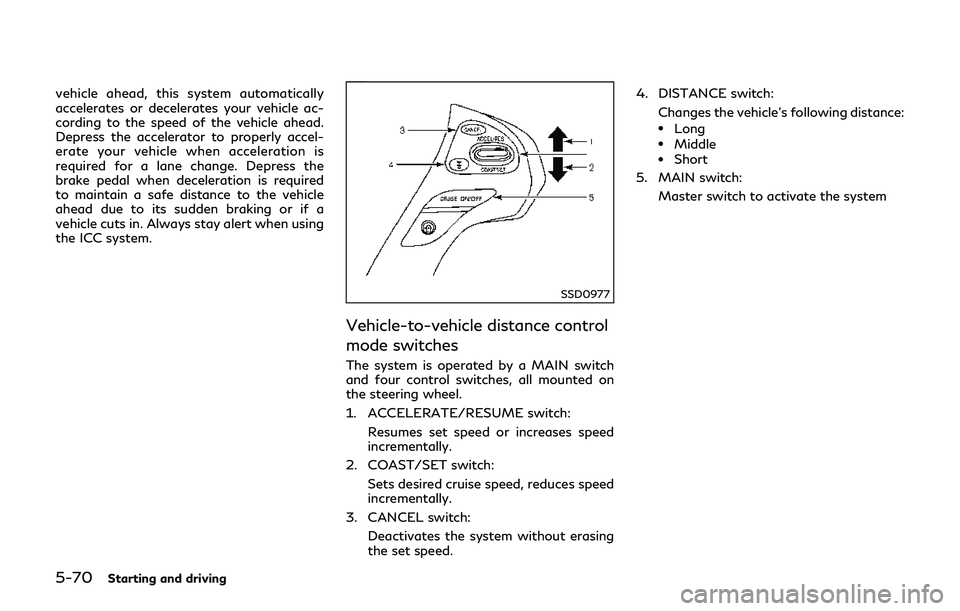
SSD0977
Vehicle-to-vehicle distance control
mode switches
The system is operated by a MAIN switch
and four control switches, all mounted on
the steering wheel.
1. ACCELERATE/RESUME switch:Resumes set speed or increases speed
incrementally.
2. COAST/SET switch: Sets desired cruise speed, reduces speed
incrementally.
3. CANCEL switch: Deactivates the system without erasing
the set speed. 4. DISTANCE switch:
Changes the vehicle’s following distance:
.Long.Middle.Short
5. MAIN switch:
Master switch to activate the system