engine oil INFINITI QX 2013 User Guide
[x] Cancel search | Manufacturer: INFINITI, Model Year: 2013, Model line: QX, Model: INFINITI QX 2013Pages: 578, PDF Size: 3.92 MB
Page 120 of 578
SIC4325
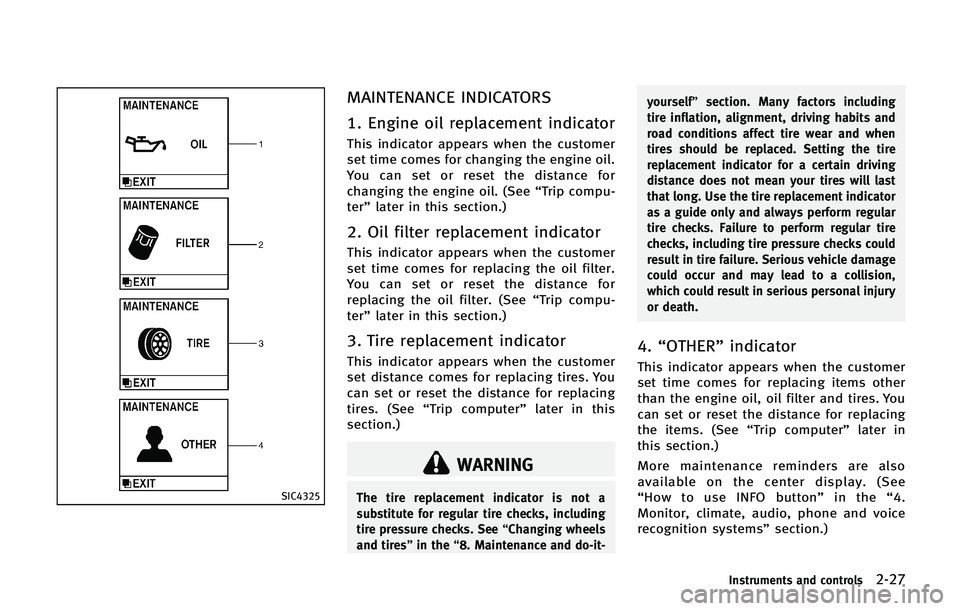
MAINTENANCE INDICATORS
1. Engine oil replacement indicator
This indicator appears when the customer
set time comes for changing the engine oil.
You can set or reset the distance for
changing the engine oil. (See“Trip compu-
ter” later in this section.)
2. Oil filter replacement indicator
This indicator appears when the customer
set time comes for replacing the oil filter.
You can set or reset the distance for
replacing the oil filter. (See “Trip compu-
ter” later in this section.)
3. Tire replacement indicator
This indicator appears when the customer
set distance comes for replacing tires. You
can set or reset the distance for replacing
tires. (See “Trip computer” later in this
section.)
WARNING
The tire replacement indicator is not a
substitute for regular tire checks, including
tire pressure checks. See “Changing wheels
and tires” in the“8. Maintenance and do-it- yourself”
section. Many factors including
tire inflation, alignment, driving habits and
road conditions affect tire wear and when
tires should be replaced. Setting the tire
replacement indicator for a certain driving
distance does not mean your tires will last
that long. Use the tire replacement indicator
as a guide only and always perform regular
tire checks. Failure to perform regular tire
checks, including tire pressure checks could
result in tire failure. Serious vehicle damage
could occur and may lead to a collision,
which could result in serious personal injury
or death.
4. “OTHER” indicator
This indicator appears when the customer
set time comes for replacing items other
than the engine oil, oil filter and tires. You
can set or reset the distance for replacing
the items. (See “Trip computer” later in
this section.)
More maintenance reminders are also
available on the center display. (See
“ How to use INFO button” in the“4.
Monitor, climate, audio, phone and voice
recognition systems” section.)
Instruments and controls2-27
Page 123 of 578

2-30Instruments and controls
The outside temperature sensor is located
in front of the radiator. The sensor may be
affected by road or engine heat, wind
directions and other driving conditions.
The display may differ from the actual
outside temperature or the temperature
displayed on various signs or billboards.
6. Setting
Setting cannot be made while driving. A
message“Setting can only be operated
when stopped” is also displayed on the
dot matrix liquid crystal display.
The
switch*Aandswitch*Bare
used in the setting mode to select and
decide a menu.
SKIP:
Push the
switch*Ato move to the
warning check mode.
Push the
switch*Bto select other
menus.
ALERT:
There are 3 submenus under the alert
menu.
. BACK
Select this submenu to return to the top
page of the setting mode. .
TIMER
Select this submenu to specify when
the “TIMER” indicator activates.
. ICY
Select this submenu to display the low
outside temperature warning.
MAINTENANCE: There are 5 submenus under the main-
tenance menu.
. BACK
Select this submenu to return to the top
page of the setting mode.
. OIL
Select this submenu to set or reset the
distance for changing the engine oil.
. FILTER
Select this submenu to set or reset the
distance for replacing the oil filter.
. TIRE
Select this submenu to set or reset the
distance for replacing tires.
. OTHER
Select this submenu and set or reset
the distance for replacing items other
than the engine oil, oil filter and tires. OPTIONS:
There are 4 submenus under the display
menu.
. BACK
Select this submenu to return to the top
page of the setting mode.
. LANGUAGE
Select this submenu to choose English,
French or Spanish for display.
. UNIT
Select this submenu to choose the unit.
. EFFECTS
Select this submenu to turn on and off
the needle sweep function when start-
ing the engine.
7. Warning check
SKIP:
Push the
switch*Ato move to the
warning check mode.
Push the
switch*Bto select other
menus.
DETAIL:
This item is available only when a warning
is displayed.
Select this menu to see the details of
warnings.
Page 211 of 578

4-10Monitor, climate, audio, phone and voice recognition systems
Starting and driving”section.
* When the ignition switch is in the ACC
position, the “Tire Pressure” key is not
displayed.
SAA2481
SAA2482
Maintenance information
The maintenance intervals can be dis-
played for the engine oil, oil filter, tire
and other reminders.
To set a maintenance interval, select a
preferred item from the list.
You can also set to display a message to
remind you that the maintenance needs to
be performed.
The following example shows how to set
the engine oil maintenance information.
Use the same steps to set the other
maintenance information.
1. Set the interval (mileage) of the main- tenance schedule. To determine the
recommended maintenance interval,
refer to your “INFINITI Service and
Maintenance Guide”.
2. To display the reminder automatically when the desired distance is reached,
select the “Reminder” key.
3. Reset the driving distance to the new maintenance schedule.
4. To return to the previous screen, push the BACK button.
The unit can be converted between “US”
and “Metric”. (See “How to use SETTING
Page 355 of 578

5-14Starting and driving
4. Push the ignition switch while depres-sing the brake pedal within 10 seconds
after the chime sounds. The engine will
start.
After step 3 is performed, when the
ignition switch is pushed without depres-
sing the brake pedal, the ignition switch
position will change to ACC.
NOTE:
. When the ignition switch is pushed to
the ACC or ON position or the engine is
started by the above procedures, the
Intelligent Key battery discharge indi-
cator appears on the dot matrix liquid
crystal display even if the Intelligent
Key is inside the vehicle. This is not a
malfunction. To turn off the Intelligent
Key battery discharge indicator, touch
the ignition switch with the Intelligent
Key again.
. If the Intelligent Key battery discharge
indicator appears, replace the battery
as soon as possible. (See “Battery”in
the “8. Maintenance and do-it-your-
self” section.) .
Make sure the area around the vehicle
is clear.
. Check fluid levels such as engine oil,
coolant, brake fluid and window
washer fluid as frequently as possible,
or at least whenever you refuel.
. Check that all windows and lights are
clean.
. Visually inspect tires for their appear-
ance and condition. Also check tires for
proper inflation.
. Lock all doors.
. Position seat and adjust head re-
straints/headrests.
. Adjust inside and outside mirrors.
. Fasten seat belts and ask all passen-
gers to do likewise.
. Check the operation of warning lights
when the ignition switch is pushed to
the ON position. (See “Warning/indica-
tor lights and audible reminders” in the
“2. Instruments and controls” section.)1. Apply the parking brake.
2. Move the shift lever to the P (Park) or N
(Neutral) position. (P is recommended.)
The starter is designed not to operate
unless the shift lever is in either of the
above positions.
3. Push the ignition switch to the ON position. Depress the brake pedal and
push the ignition switch to start the
engine.
To start the engine immediately, push
and release the ignition switch while
depressing the brake pedal with the
ignition switch in any position.
.If the engine is very hard to start inextremely cold weather or when
restarting, depress the accelerator
pedal a little (approximately 1/3 to
the floor) and while holding, crank
the engine. Release the accelerator
pedal when the engine starts.
.If the engine is very hard to startbecause it is flooded, depress the
accelerator pedal all the way to the
floor and hold it. Push the ignition
switch to the ON position to start
cranking the engine. After 5 or 6
seconds, stop cranking by pushing
the ignition switch to OFF. After
BEFORE STARTING THE ENGINE STARTING THE ENGINE
Page 357 of 578

5-16Starting and driving
ENGINE PROTECTION MODE
The engine has an engine protection mode
to reduce the chance of damage if the
coolant temperature becomes too high (for
example, when climbing steep grades in
high temperature with heavy loads, such
as when towing a trailer).
When the engine temperature reaches a
certain level:
.The engine coolant temperature gauge
will move toward the H position.
. Engine power may be reduced.
. The air conditioning cooling function
may be automatically turned OFF for a
short time (the blower will continue to
operate).
Engine power and, under some conditions,
vehicle speed will decrease. Vehicle speed
can be controlled with the accelerator
pedal, but the vehicle may not accelerate
at the desired speed. The transmission will
downshift or upshift as it reaches pre-
scribed shift points. You can also shift
manually.
As driving conditions change and engine
coolant temperature is reduced, vehicle
speed can be increased using the accel-
erator pedal, and air conditioning cooling function will automatically be turned back
ON.
If:
1. The engine coolant temperature is not
reduced.
2. The air conditioning cooling function does not turn back ON.
3. The engine oil pressure warning light
illuminates or engine coolant
temperature gauge does not return to
the normal range from the H position,
this may indicate a malfunction. Move
the vehicle off the road to a safe area
and allow the engine to cool. If after
checking the oil and coolant, the
remains on or engine coolant tempera-
ture does not return to the normal
range, do not continue to drive and
contact an INFINITI retailer.
The Malfunction Indicator Light (MIL)
may also come ON. You do not need to
have your vehicle towed, unless it remains
on, but have it inspected soon by an
INFINITI retailer. See “Warning/indicator
lights and audible reminders” in the“2.
Instruments and controls” section.
WARNING
Overheating can result in reduced engine
power and vehicle speed. The reduced speed
may be lower than other traffic, which could
increase the chance of a collision. Be
especially careful when driving. If the
vehicle cannot maintain a safe driving
speed, pull to the side of the road in a safe
area. Allow the engine to cool and return to
normal operation. See“If your vehicle over-
heats” in the“6. In case of emergency”
section.
CAUTION
Running the engine with the engine oil
pressure warning light on could cause
serious damage to the engine almost
immediately. Such damage is not covered
by warranty. Turn off the engine as soon as
it is safe to do so.
DRIVING THE VEHICLE
Page 440 of 578

namic drag..Recirculating the cool air in the cabinwhen the A/C is on reduces cooling
load.
4. Drive at economical speeds and dis- tances.
.Observing the speed limit and not
exceeding 60 MPH (97 km/h) (where
legally allowed) can improve fuel
efficiency due to reduced aerody-
namic drag.
.Maintaining a safe following dis-tance behind other vehicles reduces
unnecessary braking.
.Safely monitoring traffic to antici- pate changes in speed permits
reduced braking and smooth accel-
eration changes.
.Select a gear range suitable to road
conditions.
5. Use cruise control.
.Using cruise control during highway driving helps maintain a steady
speed.
.Cruise control is particularly effec-tive in providing fuel savings when
driving on flat terrains. 6. Plan for the shortest route.
.Utilize a map or navigation system to
determine the best route to save
time.
7. Avoid idling.
.Shutting off your engine when safe for stops exceeding 30-60 seconds
saves fuel and reduces emissions.
8. Buy an automated pass for toll roads.
.Automated passes permit drivers to use special lanes to maintain cruis-
ing speed through the toll and avoid
stopping and starting.
9. Winter warm up.
.Limit idling time to minimize impact to fuel economy.
.Vehicles typically need no more than30 seconds of idling at start-up to
effectively circulate the engine oil
before driving.
.Your vehicle will reach its ideal
operating temperature more quickly
while driving versus idling.
10. Keeping your vehicle cool.
.Park your vehicle in a covered
parking area or in the shade when-
ever possible.
.When entering a hot vehicle, open- ing the windows will help to reduce
the inside temperature faster, result-
ing in reduced demand on your A/C
system.
Starting and driving5-99
Page 441 of 578

5-100Starting and driving
.Keep your engine tuned up.
. Follow the recommended scheduled
maintenance.
. Keep the tires inflated to the correct
pressure. Low tire pressure increases
tire wear and lowers fuel economy.
. Keep the wheels in correct alignment.
Improper alignment increases tire wear
and lowers fuel economy.
. Use the recommended viscosity engine
oil. (See “Engine oil and oil filter
recommendation” in the“9. Technical
and consumer information” section.)
WARNING
.Do not attempt to raise two wheels off
the ground and shift the transmission to
any drive or reverse position with the
engine running. Doing so may result in
drivetrain damage or unexpected vehicle
movement which could result in serious
vehicle damage or personal injury.
. Do not attempt to test a 4WD equipped
vehicle on a 2-wheel dynamometer or
similar equipment even if the other two
wheels are raised off the ground. Make
sure you inform test facility personnel
that your vehicle is equipped with 4WD
before it is placed on a dynamometer.
Using the wrong test equipment may
result in drivetrain damage or unex-
pected vehicle movement which could
result in serious vehicle damage or
personal injury.
CAUTION
.Do not drive the vehicle in the 4HI or 4LO
position on dry hard surface roads.
Driving on dry, hard surfaces in 4HI or 4LO may cause unnecessary noise, tire
wear and increased fuel consumption.
If the Four-Wheel Drive (4WD) warning
light turns on when driving on dry hard
surface roads:
—in the 4HI position, shift the 4WD
shift switch to AUTO.
—in the 4LO position, stop the vehicleand shift the transmission lever to
the N (Neutral) position with the
brake pedal depressed and shift the
4WD shift switch to AUTO.
If the 4WD warning light is still on
after the above operation, have your
vehicle checked by an INFINITI retai-
ler as soon as possible.
. The transfer case may be damaged if you
continue driving with the 4WD warning
light blinking.
See “On-pavement and off-road driving
precautions” earlier in this section for
other precautions for offroad driving.
INCREASING FUEL ECONOMY INFINITI ALL-MODE 4WD®(if so equipped)
Page 444 of 578

The 4WD shift switch is used to select the
4WD mode depending on the driving
conditions. There are 3 types of drive
modes available, AUTO, 4HI and 4LO.
The 4WD shift switch electronically con-
trols the transfer case operation. Rotate
the switch to move between each mode,
AUTO, 4H and 4L.
You must depress the 4WD shift switch to
select 4L, and the vehicle MUST be
stationary and the shift lever in the N
(Neutral) position when changing into or
out of 4L.
WARNING
.When parking, apply the parking brake
before stopping the engine and make
sure that the 4WD shift indicator is on
and the ATP warning light turns off.
Otherwise, the vehicle could unexpect-
edly move even if the automatic trans-
mission is in the P (Park) position.
. The 4LO and 4HI indicators must stop
blinking and the 4LO or 4HI indicator
must remain illuminated or turn off
before shifting the transmission into
gear. If the shift lever is shifted from the N (Neutral) position to any other gear
while the 4LO and 4HI indicators are
blinking alternately, the vehicle may
move unexpectedly.
CAUTION
.
Never shift the 4WD shift switch be-
tween 4L and 4H while driving.
. The 4HI position provides greater trac-
tion. Avoid excessive speed, as it will
cause increased fuel consumption and
higher oil temperatures, and could da-
mage drivetrain component. Speeds over
62 MPH (100 km/h) in 4HI is not
recommended.
. The 4LO position provides maximum
traction. Avoid raising vehicle speed
excessively, as the maximum speed is
approximately 31 MPH (50 km/h).
. When driving straight, shift the 4WD
shift switch to the AUTO or 4H position.
Do not move the 4WD shift switch when
making a turn or reversing.
. Do not shift the 4WD shift switch
(between AUTO and 4H) while driving
on steep downhill grades. Use the engine brake and low automatic trans-
mission gears for engine braking.
. Do not operate the 4WD shift switch
(between AUTO and 4H) with the rear
wheels spinning.
. Do not drive on dry hard surface roads in
the 4HI or 4LO position. Driving on dry
hard surfaces in 4HI or 4LO may cause
unnecessary noise and tire wear.
INFINITI recommends driving in the
AUTO position under these conditions.
. The 4WD transfer case may not be
shifted between 4HI and 4LO at low
ambient temperatures and the 4LO and
4HI indicators may blink even when the
4WD shift switch is shifted. After driving
for a while you can change the 4WD shift
switch between 4H and 4L.
When driving on rough roads,
.Drive carefully according to the road
surface conditions.
When the vehicle is stuck,
. Place stones or wooden blocks under
the tires to free the vehicle.
. Set the 4WD shift switch to 4H or 4L.
. If it is difficult to free the vehicle, repeat
forward and backward movement to
Starting and driving5-103
Page 446 of 578
.Never shift the 4WD shift switch be-
tween 4L and 4H while driving.
. Engine idling speed is high while warm-
ing up the engine. Be especially careful
when starting or driving on slippery
surfaces with the 4WD shift switch in
AUTO.
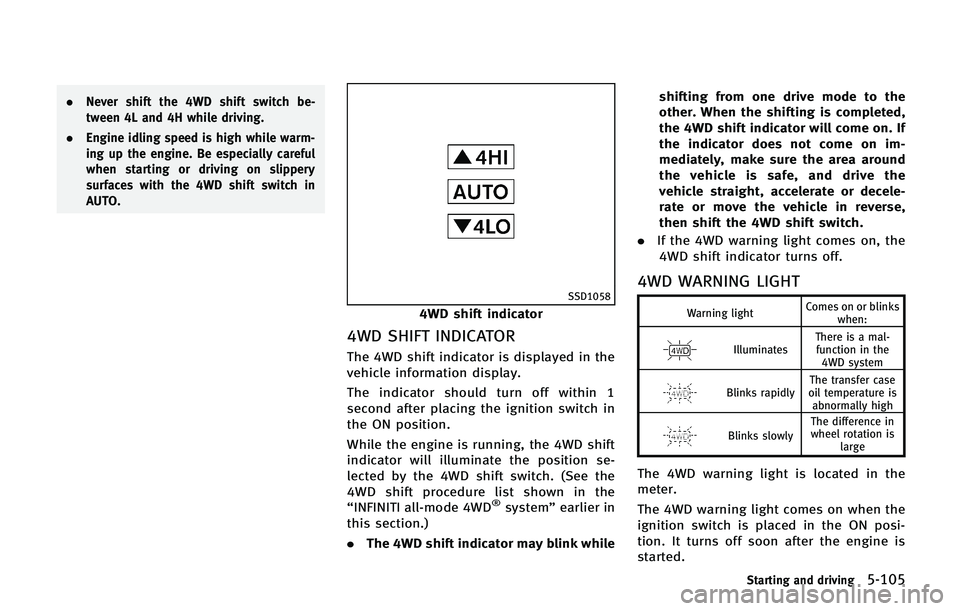
SSD1058
4WD shift indicator
4WD SHIFT INDICATOR
The 4WD shift indicator is displayed in the
vehicle information display.
The indicator should turn off within 1
second after placing the ignition switch in
the ON position.
While the engine is running, the 4WD shift
indicator will illuminate the position se-
lected by the 4WD shift switch. (See the
4WD shift procedure list shown in the
“INFINITI all-mode 4WD
®system” earlier in
this section.)
. The 4WD shift indicator may blink while shifting from one drive mode to the
other. When the shifting is completed,
the 4WD shift indicator will come on. If
the indicator does not come on im-
mediately, make sure the area around
the vehicle is safe, and drive the
vehicle straight, accelerate or decele-
rate or move the vehicle in reverse,
then shift the 4WD shift switch.
. If the 4WD warning light comes on, the
4WD shift indicator turns off.
4WD WARNING LIGHT
Warning light Comes on or blinks
when:
Illuminates There is a mal-
function in the 4WD system
Blinks rapidly The transfer case
oil temperature is abnormally high
Blinks slowly The difference in
wheel rotation is large
The 4WD warning light is located in the
meter.
The 4WD warning light comes on when the
ignition switch is placed in the ON posi-
tion. It turns off soon after the engine is
started.
Starting and driving5-105
Page 490 of 578

8 Maintenance and do-it-yourself
Maintenance requirement .................................... 8-2Scheduled maintenance .................................. 8-2
General maintenance....................................... 8-2
Where to go for service ................................... 8-2
General maintenance ........................................... 8-2 Explanation of maintenance items ................... 8-2
Maintenance precautions ..................................... 8-5
Engine compartment check locations ................... 8-7 VK56VD engine model ..................................... 8-7
Engine cooling system ......................................... 8-8
Checking engine coolant level ......................... 8-9
Changing engine coolant ................................. 8-9
Engine oil .......................................................... 8-10
Checking engine oil level............................... 8-10
Changing engine oil and filter ....................... 8-10
Automatic transmission fluid ............................. 8-12
Power steering fluid........................................... 8-13
Brake fluid......................................................... 8-13 Brake fluid .................................................... 8-14
Window washer fluid ......................................... 8-15
Battery .............................................................. 8-16 Jump starting ................................................ 8-17
Variable voltage control system ......................... 8-17
Drive belts ......................................................... 8-18 Spark plugs ...................................................... 8-18
Replacing spark plugs ................................. 8-19
Air cleaner ........................................................ 8-19
Windshield wiper blades ................................... 8-20 Cleaning ...................................................... 8-20
Replacing..................................................... 8-21
Rear window wiper blades ................................ 8-22
Brakes .............................................................. 8-22 Self-adjusting brakes ................................... 8-22
Brake pad wear warning .............................. 8-22
Brake booster .............................................. 8-22
Fuses ................................................................ 8-23 Engine compartment .................................... 8-23
Passenger compartment............................... 8-24
Intelligent Key battery replacement ................... 8-25
Lights................................................................ 8-28
Headlights ................................................... 8-29
Exterior and interior lights ........................... 8-29
Wheels and tires ............................................... 8-31 Tire pressure ............................................... 8-31
Tire labeling ................................................ 8-35
Types of tires............................................... 8-37
Tire chains ................................................... 8-38
Changing wheels and tires........................... 8-38