wheel INFINITI QX 2013 Owner's Guide
[x] Cancel search | Manufacturer: INFINITI, Model Year: 2013, Model line: QX, Model: INFINITI QX 2013Pages: 578, PDF Size: 3.92 MB
Page 193 of 578

3-28Pre-driving checks and adjustments
3. Push theswitch*Aon the right
side of the combination meter panel for
longer than 1 second to turn off the
LOOSE FUEL CAP warning after tighten-
ing the fuel cap.WARNING
. Do not adjust the steering wheel while
driving. You could lose control of your
vehicle and cause an accident.
. Do not adjust the steering wheel any
closer to you than is necessary for
proper steering operation and comfort.
The driver’s air bag inflates with great
force. If you are unrestrained, leaning
forward, sitting sideways or out of
position in any way, you are at greater
risk of injury or death in a crash. You
may also receive serious or fatal injuries
from the air bag if you are up against it
when it inflates. Always sit back against
the seatback and as far away as practical
from the steering wheel. Always use the
seat belts.
SPA2754
ELECTRIC OPERATION
Tilt or telescopic operation
Move the lever*1to adjust the steering
wheel up or down, forward or rearward to
the desired position.
Entry/Exit function operation:
The automatic drive positioner system will
make the steering wheel move up auto-
matically when the driver’s door is opened
with the ignition switch in the LOCK
position. This lets the driver get into and
out of the seat more easily.
For more information, see “Automatic drive
TILT/TELESCOPIC STEERING
Page 198 of 578

SPA2756
SET/memory switches
The automatic drive positioner system has
three features:
. Entry/exit function
. Memory storage
. Setting memory function
ENTRY/EXIT FUNCTION
This system is designed so that the driver’s
seat and steering column will automati-
cally move when the automatic transmis-
sion shift lever is in the P (Park) position.
This allows the driver to get into and out of
the driver’s seat more easily.
The driver’s seat will slide backward and the steering wheel will move up when the
driver’s door is opened with the ignition
switch in the LOCK position.
The driver’s seat and steering wheel will
return to the previous positions when the
ignition switch is pushed to the ACC
position.
The driver’s seat will not return to the
previous positions if the seat or steering
adjusting switch is operated when the seat
is at the exit position.
Cancel or activate entry/exit func-
tion
The shift lever must be in the P (Park)
position with the ignition switch in the OFF
position.
The entry/exit function can be activated or
canceled by pressing and holding the SET
switch for more than 10 seconds.
The indicator lights on the memory
switches (1 and 2) will blink once when
the function is canceled, and the indicator
lights will blink twice when the function is
activated. Note that the indicator lights
may illuminate after 5 seconds while
holding the SET switch. This indicates
readiness for linking the Intelligent Key to
a stored memory position. Keep the SET switch pressed for more than 10 seconds
to turn on or off the entry/exit function.
The entry/exit function can also be acti-
vated or canceled if the
“Lift Steering
Wheel on Exit” key or“Slide Driver Seat
Back on Exit” key is turned to ON or OFF in
the “Comfort” settings. (See “Vehicle
information and settings” in the“4.
Monitor, climate, audio, phone and voice
recognition systems” section.)
Initialize entry/exit function
If the battery cable is disconnected, or if
the fuse opens, the entry/exit function will
not work though this function was set on
before. In such a case, after connecting the
battery or replacing with a new fuse, open
and close the driver’s door more than two
times after the ignition switch is turned
from the ON position to the LOCK position.
The entry/exit function will be activated.
Pre-driving checks and adjustments3-33
AUTOMATIC DRIVE POSITIONER
Page 199 of 578

3-34Pre-driving checks and adjustments
MEMORY STORAGE
Two positions for the driver’s seat, steering
column and outside mirrors can be stored
in the automatic drive positioner memory.
Follow these procedures to use the mem-
ory system.
1. Move the shift lever to the P (Park) position.
2. Push the ignition switch to the ON position.
3. Adjust the driver’s seat, steering col- umn and outside mirrors to the desired
positions by manually operating each
adjusting switch. For additional infor-
mation, see “Seats”in the“1. Safety —
seats, seat belts and supplemental
restraint system” section and“Tilt/
telescopic steering” earlier in this
section and “Outside mirrors” earlier
in this section.
4. Push the SET switch and, within 5 seconds, push the memory switch (1
or 2) fully for at least 1 second.
The indicator light for the pushed
memory switch will stay on for approxi-
mately 5 seconds after pushing the
switch.
If memory is stored in the same memory switch, the previous memory
will be deleted.
Linking Intelligent Key to a stored
memory position
The Intelligent Key can be linked to a
stored memory position with the following
procedure.
1. Follow the steps for storing a memory
position.
2. While the indicator light for the memory switch being set is illuminated for 5
seconds, push the
button on the
Intelligent Key. If the indicator light
blinks, the Intelligent Key is linked to
that memory setting.
Push the ignition switch to the OFF posi-
tion, and then push the
button on the
Intelligent Key. The driver’s seat, steering
wheel and outside mirrors will move to the
memorized position.
Confirming memory storage
. Push the ignition switch to the ON
position and push the SET switch. If
the main memory has not been stored,
the indicator light will come on for
approximately 0.5 second. When the
memory has stored in position, the indicator light will stay on for approxi-
mately 5 seconds.
. If the battery cable is disconnected, or if
the fuse opens, the memory will be
canceled. In this case, reset the desired
position using the previous procedure.
. If optional Intelligent Keys are added to
your vehicle, the memory storage pro-
cedure to switch 1 or 2 and linking
Intelligent Key procedure to a stored
memory position should be performed
again for each Intelligent Key. For
additional Intelligent Key information,
see “Keys” earlier in this section.
Selecting the memorized position
1. Move the shift lever to the P (Park)
position.
2. Use one of the following methods to move the driver’ s seat, the outside
mirrors and the steering wheel.
.Push the ignition switch to the ON position and push the memory
switch (1 or 2) fully for at least 1
second.
.Within 45 seconds of opening the
driver’ s door, push the memory
switch (1 or 2) fully for at least 1
second.
Page 202 of 578

4 Monitor, climate, audio, phone and voice recogni-tion systems
Safety note .......................................................... 4-3
Center multi-function control panel ...................... 4-3
How to use INFINITI controller.......................... 4-4
How to use touch screen ................................. 4-4
Menu options .................................................. 4-6
How to select menus on the screen................. 4-7
Vehicle information and settings.......................... 4-7 How to use STATUS button .............................. 4-7
How to use brightness control and display
ON/OFF button ................................................ 4-7
How to use INFO button .................................. 4-7
How to use SETTING button ........................... 4-12
Around View
TMMonitor...................................... 4-21
How to switch the display ............................. 4-23
How to see each view.................................... 4-24
Difference between predicted and
actual distances ............................................ 4-28
Camera aiding corner sonar function ............. 4-30
Moving Object Detection (MOD) ..................... 4-32
How to adjust the screen view....................... 4-34
Around View
TMMonitor settings .................... 4-35
Operating tips ............................................... 4-37
Ventilators ......................................................... 4-38
Automatic climate control .................................. 4-39 Automatic climate control .............................. 4-41 Operating tips.............................................. 4-46
Linking Intelligent Key ................................. 4-46
In-cabin microfilter....................................... 4-46
Servicing climate control.............................. 4-47
Audio system .................................................... 4-47 Audio operation precautions ........................ 4-47
FM-AM-SAT radio with Compact Disc
(CD) player................................................... 4-60
DVD (Digital Versatile Disc)
player operation .......................................... 4-64
USB memory operation ................................ 4-67
Bluetooth
®streaming audio ........................ 4-72
iPod®player operation ................................ 4-76
Front auxiliary input jacks............................ 4-78
CD/DVD/USB memory care and cleaning...... 4-80
Steering-wheel-mounted controls
for audio ..................................................... 4-81
Antenna ....................................................... 4-82
Dual head restraint DVD system (if
so equipped)..................................................... 4-83 System components..................................... 4-83
Before operating dual head restraint
DVD system ................................................. 4-91
Playing Digital Versatile Disc (DVD)/USB ...... 4-92
Operating tips.............................................. 4-97
Page 207 of 578

4-6Monitor, climate, audio, phone and voice recognition systems
.Delete:
Deletes the last character that has been
input with one touch. Push and hold
the button to delete all of the char-
acters.
. OK:
Completes character inputs.
Touch screen maintenance
If you clean the display screen, use a dry,
soft cloth. If additional cleaning is neces-
sary, use a small amount of neutral
detergent with a soft cloth. Never spray
the screen with water or detergent. Dam-
pen the cloth first, and then wipe the
screen.
SAA3275
MENU OPTIONS
The start menu can be displayed using the
menu control switch on the steering-wheel-
mounted controls.
1. While the MAP or STATUS screen is displayed, push and hold the menu
control switch until the “Menu Options”
screen appears.
2. Highlight the preferred item by tilting the menu control switch up or down,
and then push the menu control switch
to select it.
SAA2476
Available items
Destination/Route:
These items are for the navigation system.
See the separate Navigation System Own-
er’s Manual for details.
Info:
Displays the information screen. It is the
same screen that appears when you push
the INFO button.
Settings:
Displays the settings screen. It is the same
screen that appears when you push the
SETTING button.
Page 210 of 578

Fuel Economy information
The approximate distance to empty, aver-
age fuel economy and current fuel econo-
my will be displayed for reference.
To reset the average fuel economy (Avg
Fuel Econ), select the“Reset Fuel Eco”key.
If the “Fuel Eco History” key is selected,
the average fuel consumption history will
be displayed in graph form along with the
average for the previous Reset-to-Reset
period.
The unit can be converted between “US”
and “Metric”. (See “How to use SETTING
button” later in this section.)
The fuel economy information may differ
from the information displayed on the
vehicle information display. This is due to
the timing difference in updating the
information and does not indicate a mal-
function.
SAA3146
TIRE PRESSURE information
WARNING
. When a spare tire is mounted or a wheel
is replaced, tire pressure will not be
indicated, the TPMS will not function
and the low tire pressure warning light
will flash for approximately 1 minute.
The light will remain on after 1 minute.
Contact your INFINITI retailer as soon as
possible for tire replacement and/or
system resetting. .
Replacing tires with those not originally
specified by INFINITI could affect the
proper operation of the TPMS.
The tire pressure will be displayed for
reference.
The pressure indication “** kPa”or“**
psi ”on the screen means that the pressure
is being measured. After a few driving
trips, the pressure for each tire will be
displayed.
To change the measurement units, select
the “Select Units” key with the INFINITI
controller and push the ENTER button.
In case of low tire pressure, LOW PRES-
SURE information will be displayed on the
screen. Check the pressure of all tires.
Tire pressure rises and falls depending on
the heat caused by the vehicle’s traveling
condition and the temperature.
After tire rotation is performed, tire pres-
sure will not be displayed in the actual tire
position. Drive the vehicle at over 25 MPH
(40 km/h) for approximately 10 minutes to
reset the display.
For more details about the Tire Pressure
Monitoring System (TPMS), see “Tire Pres-
sure Monitoring System (TPMS)” in the“5.
Monitor, climate, audio, phone and voice recognition systems4-9
Page 218 of 578

Light Sensitivity:
Adjust the sensitivity of the automatic
headlights higher (right) or lower (left).
Light Off Delay:
Choose the duration of the automatic
headlight off timer from 0, 30, 45, 60, 90,
120, 150 and 180 second periods.
Selective Door Unlock:
When this item is turned to ON, only the
driver’s door is unlocked first after the door
unlock operation. When the door handle
request switch on the driver’s or front
passenger’s side door is pushed to be
unlocked, only the corresponding door is
unlocked first. All the doors can be
unlocked if the door unlock operation is
performed again within 60 seconds.
When this item is turned to OFF, all the
doors will be unlocked after the door
unlock operation is performed once.
Intelligent Key Lock/Unlock:
When this item is turned to ON, door lock/
unlock function by pushing the door
handle request switch will be activated.
Lift Steering Wheel on Exit:
When this item is turned to ON, the
steering wheel moves upward for easy exitif the ignition switch is in the LOCK
position and the driver’s door is opened.
After getting into the vehicle and pushing
the ignition switch to the ACC position, the
steering wheel moves to the previous
position.
Slide Driver Seat Back on Exit:
When this item is turned to ON, the driver’s
seat moves backward for easy exit if the
ignition switch is in the OFF position and
the driver’s door is opened. After getting
into the vehicle and pushing the ignition
switch to the ACC position, the driver’s seat
moves to the previous position.
Return All Settings to Default:
Select this item and then select “YES”to
return all settings to the default.
SAA2487
Clock settings
The display as illustrated will appear when
pushing the SETTING button and selecting
the “Others” key, and then selecting the
“Clock” key.
The clock settings display cannot be
operated while driving. Stop the vehicle
in a safe place and apply the parking brake
before setting the clock.
On-screen Clock:
When this item is turned to ON, a clock is
always displayed in the upper right corner
of the screen.
Monitor, climate, audio, phone and voice recognition systems4-17
Page 222 of 578
When you push the CAMERA button or shift
the shift lever into the R (Reverse) position
while the ignition switch is in the ON
position, the Around View Monitor oper-
ates. The monitor displays various views of
the position of the vehicle.
Available views:
.Bird-Eye View
The surrounding view of the vehicle.
. Front-Side View
The view around and ahead of the front
passenger’s side wheel.
. Front View
An approximately 150-degree view of
the front of the vehicle.
. Rear view
An approximately 150-degree view of
the rear of the vehicle.
. Rear-Wide View
An approximately 180-degree view of
the rear of the vehicle.
The system is designed as an aid to the
driver in situations such as slot parking or
parallel parking.
SAA3160
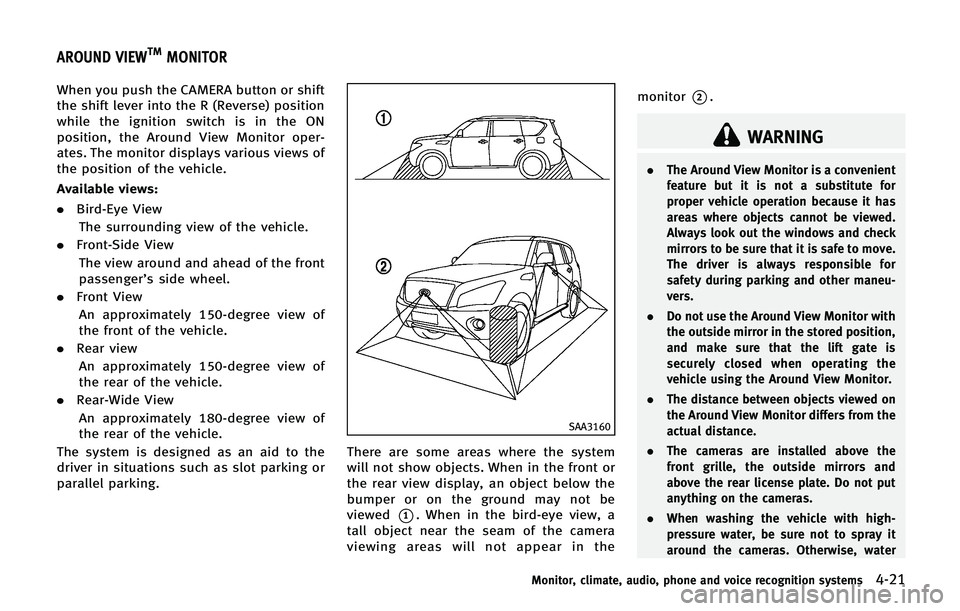
There are some areas where the system
will not show objects. When in the front or
the rear view display, an object below the
bumper or on the ground may not be
viewed
*1. When in the bird-eye view, a
tall object near the seam of the camera
viewing areas will not appear in the monitor
*2.
WARNING
.
The Around View Monitor is a convenient
feature but it is not a substitute for
proper vehicle operation because it has
areas where objects cannot be viewed.
Always look out the windows and check
mirrors to be sure that it is safe to move.
The driver is always responsible for
safety during parking and other maneu-
vers.
. Do not use the Around View Monitor with
the outside mirror in the stored position,
and make sure that the lift gate is
securely closed when operating the
vehicle using the Around View Monitor.
. The distance between objects viewed on
the Around View Monitor differs from the
actual distance.
. The cameras are installed above the
front grille, the outside mirrors and
above the rear license plate. Do not put
anything on the cameras.
. When washing the vehicle with high-
pressure water, be sure not to spray it
around the cameras. Otherwise, water
Monitor, climate, audio, phone and voice recognition systems4-21
AROUND VIEWTMMONITOR
Page 226 of 578
SAA1840
Front view
SAA1896
Rear view
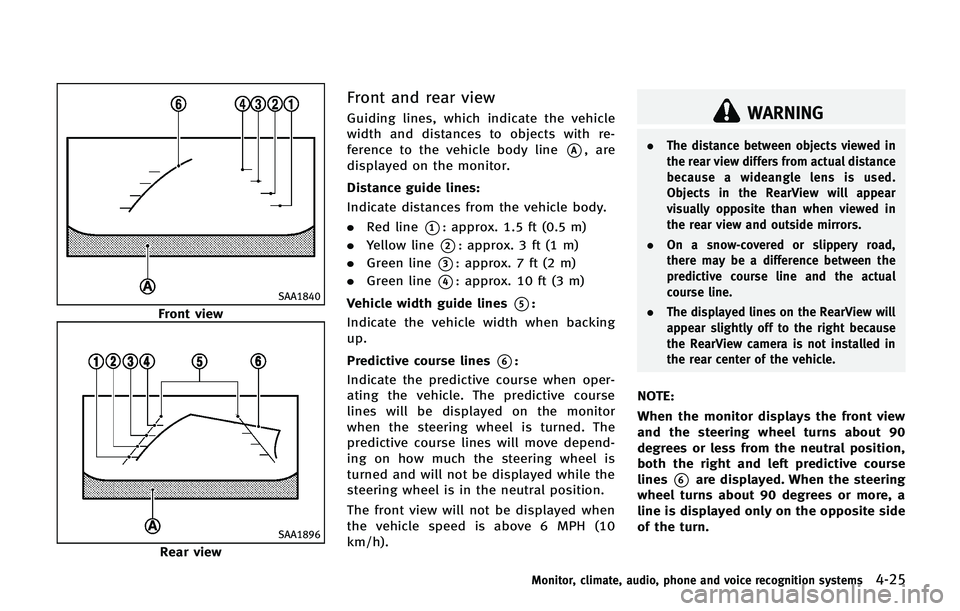
Front and rear view
Guiding lines, which indicate the vehicle
width and distances to objects with re-
ference to the vehicle body line
*A, are
displayed on the monitor.
Distance guide lines:
Indicate distances from the vehicle body.
. Red line
*1: approx. 1.5 ft (0.5 m)
. Yellow line
*2: approx. 3 ft (1 m)
. Green line
*3: approx. 7 ft (2 m)
. Green line
*4: approx. 10 ft (3 m)
Vehicle width guide lines
*5:
Indicate the vehicle width when backing
up.
Predictive course lines
*6:
Indicate the predictive course when oper-
ating the vehicle. The predictive course
lines will be displayed on the monitor
when the steering wheel is turned. The
predictive course lines will move depend-
ing on how much the steering wheel is
turned and will not be displayed while the
steering wheel is in the neutral position.
The front view will not be displayed when
the vehicle speed is above 6 MPH (10
km/h).
WARNING
. The distance between objects viewed in
the rear view differs from actual distance
because a wideangle lens is used.
Objects in the RearView will appear
visually opposite than when viewed in
the rear view and outside mirrors.
. On a snow-covered or slippery road,
there may be a difference between the
predictive course line and the actual
course line.
. The displayed lines on the RearView will
appear slightly off to the right because
the RearView camera is not installed in
the rear center of the vehicle.
NOTE:
When the monitor displays the front view
and the steering wheel turns about 90
degrees or less from the neutral position,
both the right and left predictive course
lines
*6are displayed. When the steering
wheel turns about 90 degrees or more, a
line is displayed only on the opposite side
of the turn.
Monitor, climate, audio, phone and voice recognition systems4-25
Page 227 of 578
4-26Monitor, climate, audio, phone and voice recognition systems
Bird-eye view
WARNING
.Objects in the bird-eye view will appear
further than the actual distance because
the bird-eye view is a pseudo view that
is processed by combining the views
from the cameras on the outside mirrors,
the front and the rear of the vehicle.
. Tall objects, such as a curb or vehicle,
may be misaligned or not displayed at
the seam of the views.
. Objects that are above the camera
cannot be displayed.
. The view for the bird-eye view may be
misaligned when the camera position
alters.
. A line on the ground may be misaligned
and is not seen as being straight at the
seam of the views. The misalignment will
increase as the line proceeds away from
the vehicle.
. Tire angle display does not indicate the
actual tire angle
JVH0265X
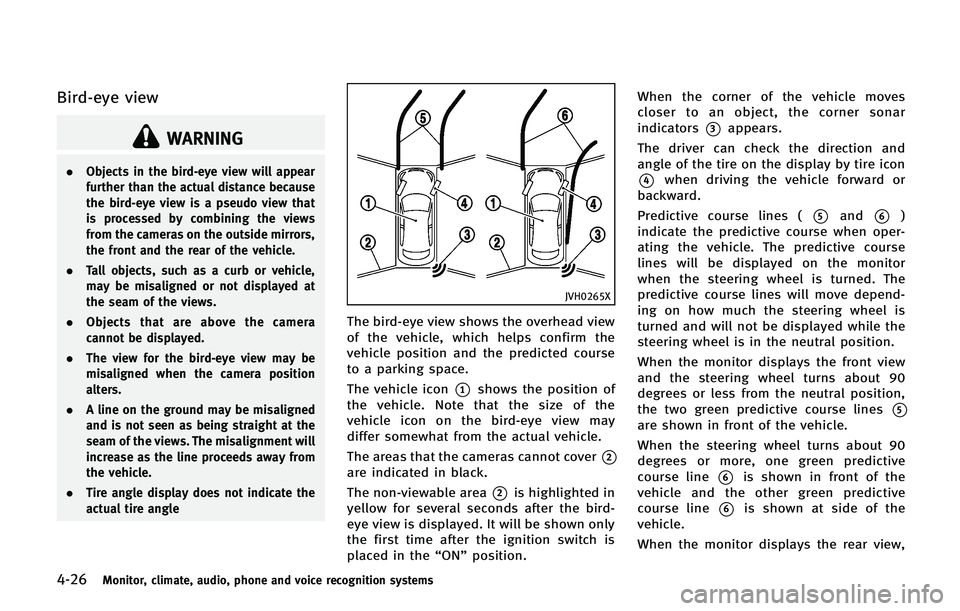
The bird-eye view shows the overhead view
of the vehicle, which helps confirm the
vehicle position and the predicted course
to a parking space.
The vehicle icon
*1shows the position of
the vehicle. Note that the size of the
vehicle icon on the bird-eye view may
differ somewhat from the actual vehicle.
The areas that the cameras cannot cover
*2
are indicated in black.
The non-viewable area
*2is highlighted in
yellow for several seconds after the bird-
eye view is displayed. It will be shown only
the first time after the ignition switch is
placed in the “ON”position. When the corner of the vehicle moves
closer to an object, the corner sonar
indicators
*3appears.
The driver can check the direction and
angle of the tire on the display by tire icon
*4when driving the vehicle forward or
backward.
Predictive course lines (
*5and*6)
indicate the predictive course when oper-
ating the vehicle. The predictive course
lines will be displayed on the monitor
when the steering wheel is turned. The
predictive course lines will move depend-
ing on how much the steering wheel is
turned and will not be displayed while the
steering wheel is in the neutral position.
When the monitor displays the front view
and the steering wheel turns about 90
degrees or less from the neutral position,
the two green predictive course lines
*5
are shown in front of the vehicle.
When the steering wheel turns about 90
degrees or more, one green predictive
course line
*6is shown in front of the
vehicle and the other green predictive
course line
*6is shown at side of the
vehicle.
When the monitor displays the rear view,