wheel INFINITI QX 2013 Owner's Manual
[x] Cancel search | Manufacturer: INFINITI, Model Year: 2013, Model line: QX, Model: INFINITI QX 2013Pages: 578, PDF Size: 3.92 MB
Page 114 of 578

2) Avoid hard acceleration or decelera-tion.
3) Avoid steep uphill grades.
4) If possible, reduce the amount of cargo being hauled or towed.
The malfunction indicator light may
stop blinking and remain on.
Have the vehicle inspected by an
INFINITI retailer. You do not need to
have your vehicle towed to the retailer.
CAUTION
Continued vehicle operation without having
the emission control system checked and
repaired as necessary could lead to poor
driveability, reduced fuel economy, and
possible damage to the emission control
system.
Security indicator light
The light blinks when the ignition switch is
in the ACC, OFF and LOCK position. This
function indicates the security system
equipped on the vehicle is operational.
If the security system is malfunctioning,
this light will remain on while the ignition switch is in the ON position. For additional
information, see
“Security systems” later
in this section.
SNOW mode indicator light
When selecting SNOW mode while the
engine is running, this light will illuminate.
(See “SNOW mode” in the“5. Starting and
driving” section.)
TOW mode indicator light
This light will illuminate when the TOW
MODE is selected while the engine is
running. (See “Tow mode” in the“5.
Starting and driving” section.)
Turn signal/hazard indicator
lights
The light flashes when the turn signal
switch lever or hazard switch is turned on.
Vehicle Dynamic Control (VDC)
off indicator light
The light comes on when the vehicle
dynamic control off switch is pushed to
OFF. This indicates that the vehicle dynamic
control system is not operating.
When the 4L position is selected with the
Four-Wheel Drive (4WD) shift switch, the
VDC system is disabled and the VDC off indicator light illuminates. (4WD models)
For additional information, see
“Vehicle
Dynamic Control (VDC) system” in the“5.
Starting and driving” section of this
manual.
AUDIBLE REMINDERS
Key reminder chime
A chime will sound if the driver side door is
opened while the ignition switch is pushed
to the ACC position. Make sure the ignition
switch is pushed to the OFF position, and
take the Intelligent Key with you when
leaving the vehicle.
Light reminder chime
A chime will sound when the driver side
door is opened with the light switch in the
orposition and the ignition switch
in the ACC, OFF or LOCK position.
Turn the light switch off when you leave the
vehicle.
The chime will also sound for 2 seconds
when the ignition switch is turned to the
OFF position with the fog lights on while
the headlight switch is in the AUTO
position (if so equipped).
Instruments and controls2-21
Page 115 of 578

2-22Instruments and controls
Parking brake reminder chime
The chime will sound if the vehicle is driven
at more than 4 MPH (7 km/h) with the
parking brake applied. Stop the vehicle
and release the parking brake.
Brake pad wear warning
The disc brake pads have audible wear
warnings. When a brake pad requires
replacement, it will make a high pitched
scraping sound when the vehicle is in
motion. This scraping sound will first occur
only when the brake pedal is depressed.
After more wear of the brake pad, the
sound will always be heard even if the
brake pedal is not depressed. Have the
brakes checked as soon as possible if the
warning sound is heard.
SIC4379
The dot matrix liquid crystal display
appears in the vehicle information display
*1located between the speedometer and
odometer, and shows the indicators for the
driving systems, Intelligent Key operation
and various warnings and information.
For detailed information about each sys-
tem, see the following sections:
. Automatic Transmission (AT)
—“ Warning/indicator lights and audi-
ble reminders” earlier in this sec-
tion.
—“ Driving the vehicle” in the“5.
Starting and driving” section..
Four-Wheel Drive (4WD) system
—“ INFINITI all-mode 4WD
®”in the “5.
Starting and driving” section.
. Back-up Collision Intervention (BCI)
system
—“ Blind Spot Warning/Blind Spot
Intervention
TM/Back-up Collision In-
tervention systems” in the“5. Start-
ing and driving” section.
. Cruise control system
—“ Cruise control” in the“5. Starting
and driving” section.
. Intelligent Cruise Control (ICC) system
—“ Intelligent Cruise Control (ICC) sys-
tem” in the “5. Starting and driving”
section.
. Distance Control Assist (DCA) system
—“ Distance Control Assist (DCA) sys-
tem” in the “5. Starting and driving”
section.
. Intelligent Key system
—“ Intelligent Key system” in the“3.
Pre-driving checks and adjust-
ments” section.
—“ Push-button ignition switch” in the
“5. Starting and driving” section.
DOT MATRIX LIQUID CRYSTAL DISPLAY
Page 119 of 578

2-26Instruments and controls
17.“TIMER” indicator
This indicator appears when the set
“TIMER” indicator activates. You can set
the time for up to 6 hours. (See “Trip
computer” later in this section.)
18. Low outside temperature warn-
ing
This warning appears if the outside tem-
perature is below 378F(3 8C). The warning
can be set not to be displayed. (See “Trip
computer” later in this section.)
19. Four-Wheel Drive (4WD) shift
indicator (4WD models)
This indicator shows the Four-Wheel Drive
(4WD) driving mode (AUTO, 4HI or 4LO) that
is selected by the 4WD shift switch. (See
“INFINITI all-mode 4WD
®”in the “5. Start-
ing and driving” section.)
20. Intelligent Cruise Control (ICC)
system MAIN switch indicator (if so
equipped)
The Intelligent Cruise Control (ICC) system
main switch indicator (CRUISE) is displayed
when the ICC main switch is pushed. When
the main switch is pushed again, the
indicator disappears. While the CRUISE indicator is displayed, the ICC system is
operational.
The cruise control set indicator (SET) is
displayed while the vehicle is controlled by
the conventional (fixed speed) cruise con-
trol mode of the ICC system.
For more details, see
“Intelligent Cruise
Control (ICC) system” in the“5. Starting
and driving” section.
21. Distance Control Assist (DCA)
system switch indicator (if so
equipped)
The indicator is displayed when the Dis-
tance Control Assist (DCA) system switch is
pushed on. When the switch is pushed
again, the indicator disappears. While the
indicator is displayed, the DCA system is
operational. (See “Distance Control Assist
(DCA) system” in the“5. Starting and
driving” section.)
22. Back-up Collision Intervention
(BCI) system indicator (if so
equipped)
The BCI ON indicator (SYSTEM ON) appears
when the shift lever is in the R (Reverse)
position with the Back-up Collision Inter-
vention (BCI) system turned on. If the BCI system is turned off using the BCI
switch, the BCI OFF indicator (SYSTEM OFF)
appears.
For more details, see
“Blind Spot Warning/
Blind Spot Intervention
TM/Back-up Colli-
sion Intervention systems” in the“5.
Starting and driving” section.
Page 120 of 578
SIC4325
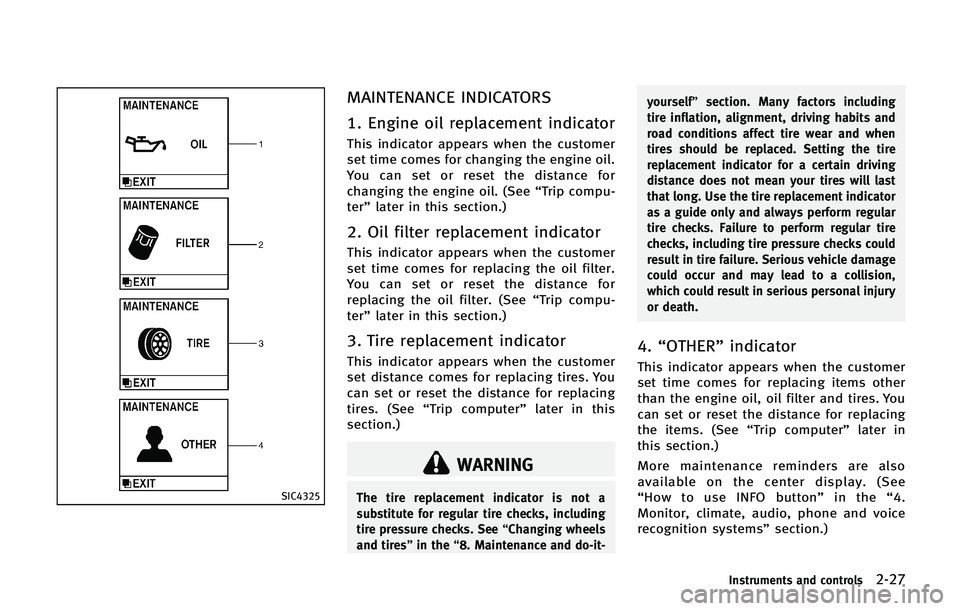
MAINTENANCE INDICATORS
1. Engine oil replacement indicator
This indicator appears when the customer
set time comes for changing the engine oil.
You can set or reset the distance for
changing the engine oil. (See“Trip compu-
ter” later in this section.)
2. Oil filter replacement indicator
This indicator appears when the customer
set time comes for replacing the oil filter.
You can set or reset the distance for
replacing the oil filter. (See “Trip compu-
ter” later in this section.)
3. Tire replacement indicator
This indicator appears when the customer
set distance comes for replacing tires. You
can set or reset the distance for replacing
tires. (See “Trip computer” later in this
section.)
WARNING
The tire replacement indicator is not a
substitute for regular tire checks, including
tire pressure checks. See “Changing wheels
and tires” in the“8. Maintenance and do-it- yourself”
section. Many factors including
tire inflation, alignment, driving habits and
road conditions affect tire wear and when
tires should be replaced. Setting the tire
replacement indicator for a certain driving
distance does not mean your tires will last
that long. Use the tire replacement indicator
as a guide only and always perform regular
tire checks. Failure to perform regular tire
checks, including tire pressure checks could
result in tire failure. Serious vehicle damage
could occur and may lead to a collision,
which could result in serious personal injury
or death.
4. “OTHER” indicator
This indicator appears when the customer
set time comes for replacing items other
than the engine oil, oil filter and tires. You
can set or reset the distance for replacing
the items. (See “Trip computer” later in
this section.)
More maintenance reminders are also
available on the center display. (See
“ How to use INFO button” in the“4.
Monitor, climate, audio, phone and voice
recognition systems” section.)
Instruments and controls2-27
Page 134 of 578

SIC2275
Headlight aiming control (if so
equipped)
Depending on the number of occupants in
the vehicle and the load it is carrying, the
headlight axis may be higher than desired.
If the vehicle is traveling on a hilly road,
the headlights may directly hit the rearview
mirror of the vehicle ahead or the wind-
shield of the oncoming vehicle. The light
axis can be lowered with the operation of
the switch.
The larger the number designated on the
switch, the lower the axis.
When traveling with no heavy load or on aflat road, select position 0.
WARNING
Xenon headlights are extremely bright
compared to conventional headlights. If
the xenon headlights hit the rearview mirror
of the vehicle ahead or the windshield of
oncoming vehicle, the driver of these
vehicles may have difficulty driving because
of the brightness. Use the headlight aiming
control switch to lower the light axis. See
“Xenon headlights”
earlier in this section
for additional information.
Daytime running light system (Ca-
nada only)
The daytime running lights automatically
illuminate when the engine is started with
the parking brake released. The daytime
running lights operate with the headlight
switch in the OFF position or in the
position. Turn the headlight switch to theposition for full illumination when
driving at night.
If the parking brake is applied before the
engine is started, the daytime running
lights do not illuminate. The daytime running lights illuminate once the parking
brake is released. The daytime running
lights will remain on until the ignition
switch is pushed to the OFF position.
WARNING
When the daytime running light system is
active, tail lights on your vehicle are not on.
It is necessary at dusk to turn on your
headlights. Failure to do so could cause an
accident injuring yourself and others.
Adaptive Front lighting System
(AFS) (if so equipped)
The Adaptive Front lighting System (AFS)
will automatically adjust the headlights
(low beam) toward the turning direction to
improve the driver’s view. When the head-
light switch is ON and the driver operates
the steering wheel in a turn, the AFS
system will be activated.
The AFS will operate:
.
Right-side headlight
— When the headlight switch is ON
— When the shift lever is in any
position other than P (Park) or R
Instruments and controls2-41
Page 135 of 578

2-42Instruments and controls
(Reverse)
— When the steering wheel is turned
clockwise
. Left-side headlight
— When the headlight switch is ON
— When the shift lever is in any
position other than P (Park) or R
(Reverse)
— When the vehicle is driven at a
speed above 16 MPH (25km/h).
However, when the vehicle’s speed
decreases below 3 MPH (5 km/h) it
will stop.
— When the steering wheel is turned
counterclockwise
AFS will also adjust the headlight to a
proper axis automatically, depending on
the number of occupants in the vehicle, the
load the vehicle is carrying and the road
conditions.
If the AFS OFF indicator light blinks after
the ignition switch has been pushed to the
ON position, this may indicate that the AFS
is not functioning properly. Have the
system checked by an INFINITI retailer.
When the engine is started, the headlights
will vibrate to check the system condition.
This is not a malfunction.HEADLIGHT WASHER (if so
equipped)
The headlight washer operates when the
headlight is on and the ignition switch is in
the ON position.
Pull the windshield washer switch toward
you. The headlight washer operates with
the windshield washer operation. This
operation activates once each time either
the ignition switch or the headlight switch
is turned off and on.
After the first operation, the headlight
washer operates once at every fifth opera-
tion of the windshield washer.
CAUTION
. Do not operate the washer continuously
for longer than 30 seconds.
. Do not operate the headlight washer if
the window washer fluid reservoir is
empty.
SIC3270
Page 137 of 578

2-44Instruments and controls
SIC3272
FOG LIGHT SWITCH
To turn the fog lights on, turn the headlight
switch to theposition, then turn the
switch to theposition. To turn them
off, turn the switch to the OFF position.
The headlights must be on for the fog
lights to operate.
When the headlight switch is in the AUTO
position, turning the fog light switch to the
position will turn on the headlights,
fog lights and the other lights while the
ignition switch is in the ON position or the
engine is running (if so equipped).
SIC4401
The heated steering wheel system is
designed to operate only when the surface
temperature of the steering wheel is below
688F (208C).
Push the heated steering wheel switch to
warm the steering wheel after the engine
starts. The indicator light
*1on the switch
will illuminate.
If the surface temperature of the steering
wheel is below 688F (208C), the system will
heat the steering wheel and cycle off and
on to maintain a temperature above 688F
(208C). The indicator light will remain on as
long as the system is on. Push the switch again to turn the heated
steering wheel system off manually. The
indicator light will turn off.
NOTE:
If the surface temperature of the steering
wheel is above 688
F (208C) when the
switch is turned on, the system will not
heat the steering wheel. This is not a
malfunction.
HEATED STEERING WHEEL
Page 138 of 578

SIC4444
To sound the horn, push the center pad
area of the steering wheel.
WARNING
Do not disassemble the horn. Doing so
could affect proper operation of the supple-
mental front air bag system. Tampering with
the supplemental front air bag system may
result in serious personal injury.
WARNING
Do not use or allow occupants to use the
seat heater if you or the occupants cannot
monitor elevated seat temperatures or have
an inability to feel pain in body parts that
contact the seat. Use of the seat heater by
such people could result in serious injury.
CAUTION
.The battery could run down if the seat
heater is operated while the engine is
not running.
. Do not use the seat heater for extended
periods or when no one is using the
seat.
. Do not put anything on the seat which
insulates heat, such as a blanket,
cushion, seat cover, etc. Otherwise, the
seat may become overheated.
. Do not place anything hard or heavy on
the seat or pierce it with a pin or similar
object. This may result in damage to the
heater. .
Any liquid spilled on the heated seat
should be removed immediately with a
dry cloth.
. When cleaning the seat, never use
gasoline, thinner, or any similar materi-
als.
. If any malfunctions are found or the
heated seat does not operate, turn the
switch off and have the system checked
by an INFINITI retailer.
Instruments and controls2-45
HORN HEATED SEATS (if so equipped)
Page 142 of 578

SIC4454
For driving or starting the vehicle on snowy
roads or slippery areas, push on the SNOW
mode switch. The SNOW mode indicator
light will illuminate. When the SNOW mode
is activated, engine output is controlled to
avoid wheel spin.
Push off the SNOW mode for normal
driving.
SIC4474
TOW MODE should be used when pulling a
heavy trailer or hauling a heavy load.
Driving the vehicle in TOW MODE with no
trailer/load or light trailer/light load will
not cause any damage. However, fuel
economy may be reduced, and the trans-
mission/engine driving characteristics may
feel unusual.
Push the TOW MODE switch to activate
TOW MODE. The indicator light on the TOW
MODE switch illuminates when TOW MODE
is selected. Push the TOW MODE switch
again to turn TOW MODE OFF.
TOW MODE is automatically canceled when
the ignition switch is placed in the OFFposition.
Instruments and controls2-49
SNOW MODE SWITCH
TOW MODE SWITCH
Page 143 of 578

2-50Instruments and controls
SIC3844
The vehicle should be driven with the
Intelligent Brake Assist (IBA) system on
for most driving conditions.
The Intelligent Brake Assist (IBA) system
will sound a warning chime to alert the
driver when the vehicle is traveling too
close to the vehicle ahead and will apply
the brake control if necessary.
To turn off the system, push the IBA OFF
switch. The
indicator will illuminate.
The IBA system will remain in the last ON
or OFF state it was left in until it is
manually changed by pushing the IBA OFF
switch. See
“Intelligent Brake Assist (IBA) system”
in the “5. Starting and driving” section.
SIC4455
The vehicle should be driven with the
Vehicle Dynamic Control (VDC) system on
for most driving conditions.
If the vehicle is stuck in mud or snow, the
VDC system reduces the engine output to
reduce wheel spin. The engine speed will
be reduced even if the accelerator is
depressed to the floor. If maximum engine
power is needed to free a stuck vehicle,
turn the VDC system off.
To turn off the VDC system, push the VDC
OFF switch. The
indicator will illumi-
nate.
Push the VDC OFF switch again or restart
the engine to turn on the system. (See
INTELLIGENT BRAKE ASSIST (IBA) OFF
SWITCH (if so equipped) VEHICLE DYNAMIC CONTROL (VDC) OFF
SWITCH