light INFINITI QX4 2005 Factory Service Manual
[x] Cancel search | Manufacturer: INFINITI, Model Year: 2005, Model line: QX4, Model: INFINITI QX4 2005Pages: 3419, PDF Size: 80.18 MB
Page 2520 of 3419

FRONT FOG LAMP
LT-73
C
D
E
F
G
H
I
J
L
MA
B
LT
Revision: October 20052005 QX56
Terminals and Reference Values for BCMEKS00B9F
Terminal
No.Wire
colorSignal nameMeasuring condition
Reference value
(Approx.) Ignition
switchOperation or condition
2 SB Combination switch input 5 ONLighting, turn, wiper OFF
Wiper dial position 4
3 G/Y Combination switch input 4 ONLighting, turn, wiper OFF
Wiper dial position 4
4 Y Combination switch input 3 ONLighting, turn, wiper OFF
Wiper dial position 4
5 G/B Combination switch input 2
ONLighting, turn, wiper OFF
Wiper dial position 4
6 V Combination switch input 1
32 R/G Combination switch output 5 ONLighting, turn, wiper OFF
Wiper dial position 4
33 R/Y Combination switch output 4 ONLighting, turn, wiper OFF
Wiper dial position 4
34 L Combination switch output 3 ONLighting, turn, wiper OFF
Wiper dial position 4
SKIA5291E
SKIA5292E
SKIA5291E
SKIA5292E
SKIA5291E
SKIA5292E
SKIA5291E
Page 2521 of 3419

LT-74
FRONT FOG LAMP
Revision: October 20052005 QX56
Terminals and Reference Values for IPDM E/REKS00B9G
How to Proceed With Trouble DiagnosisEKS00B9H
1. Confirm the symptom or customer complaint.
2. Understand operation description and function description. Refer to LT-69, "
System Description" .
3. Perform the Preliminary Check. Refer to LT-75, "
Preliminary Check" .
4. Check symptom and repair or replace the cause of malfunction.
5. Does the front fog lamp operate normally? If YES: GO TO 6. If NO: GO TO 4.
6. Inspection End.
35 O/B Combination switch output 2
ONLighting, turn, wiper OFF
Wiper dial position 4
36 R/W Combination switch output 1
38 W/L Ignition switch (ON) ON — Battery voltage
39 L CAN-H — — —
40 P CAN-L — — —
67 B Ground ON — 0V
70 W/B Battery power supply (fusible link) OFF — Battery voltage Terminal
No.Wire
colorSignal nameMeasuring condition
Reference value
(Approx.) Ignition
switchOperation or condition
SKIA5292E
Te r m i n a l
No.Wire
colorSignal nameMeasuring condition
Reference value
(Approx.) Ignition
switchOperation or condition
38 B Ground ON — 0V
39 L CAN-H — — —
40 P CAN-L — — —
50 W/RFront turn/fog
lamp (LH)ONLighting switch must be in the 2ND position
or AUTO position (LOW beam is ON) and
the front fog lamp switch must be ONOFF 0V
ON Battery voltage
51 W/RFront turn/fog
lamp (RH) ONLighting switch must be in the 2ND position
or AUTO position (LOW beam is ON) and
the front fog lamp switch must be ONOFF 0V
ON Battery voltage
59 B Ground ON — 0V
Page 2523 of 3419

LT-76
FRONT FOG LAMP
Revision: October 20052005 QX56
CONSULT-II FunctionsEKS00B9J
Refer to LT- 1 7 , "CONSULT-II Function (BCM)" in HEADLAMP (FOR USA).
Refer to LT- 2 0 , "
CONSULT-II Function (IPDM E/R)" in HEADLAMP (FOR USA).
Front Fog Lamps Do Not Illuminate (Both Sides)EKS00B9K
1. CHECK COMBINATION SWITCH INPUT SIGNAL
Select "BCM" on CONSULT-II. With "HEAD LAMP" data monitor,
make sure "FR FOG SW" turns ON-OFF linked with operation of
lighting switch.
OK or NG
OK >> GO TO 2.
NG >> Check lighting switch. Refer to LT-100, "
Combination
Switch Inspection" .
2. FOG LAMP ACTIVE TEST
1. Select "IPDM E/R" on CONSULT-II, and select "ACTIVE TEST"
on "SELECT DIAG MODE" screen.
2. Select "EXTERNAL LAMPS" on "SELECT TEST ITEM" screen.
3. Touch "FOG" on "ACTIVE TEST" screen.
4. Make sure fog lamps operate.
OK or NG
OK >> GO TO 3.
NG >> GO TO 4.
3. CHECK IPDM E/R
1. Select "IPDM E/R" on CONSULT-II, and select "DATA MONI-
TOR" on "SELECT DIAG MODE" screen.
2. Make sure "FR FOG REQ" turns ON when lighting switch is in
FOG position.
OK or NG
OK >> Replace IPDM E/R. Refer to PG-28, "Removal and
Installation of IPDM E/R" .
NG >> Replace BCM. Refer to BCS-20, "
Removal and Installa-
tion of BCM" . When lighting switch is in
FOG position: FR FOG SW ON
SKIA5897E
Fog lamps should operate.
WKIA1438E
When lighting switch is in
FOG position: FR FOG REQ ON
SKIA5898E
Page 2532 of 3419
TURN SIGNAL AND HAZARD WARNING LAMPS
LT-85
C
D
E
F
G
H
I
J
L
MA
B
LT
Revision: October 20052005 QX56
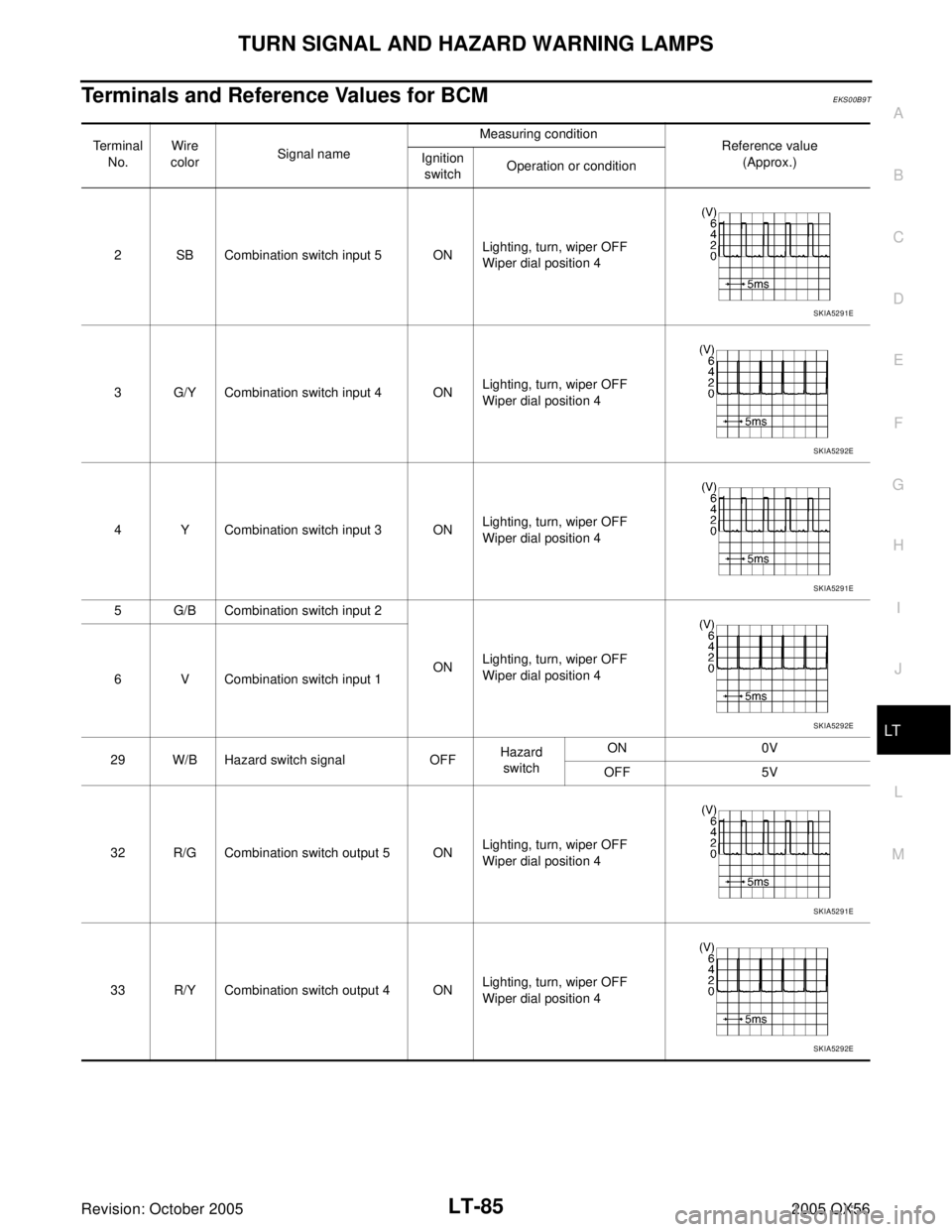
Terminals and Reference Values for BCMEKS00B9T
Terminal
No.Wire
colorSignal nameMeasuring condition
Reference value
(Approx.) Ignition
switchOperation or condition
2 SB Combination switch input 5 ONLighting, turn, wiper OFF
Wiper dial position 4
3 G/Y Combination switch input 4 ONLighting, turn, wiper OFF
Wiper dial position 4
4 Y Combination switch input 3 ONLighting, turn, wiper OFF
Wiper dial position 4
5 G/B Combination switch input 2
ONLighting, turn, wiper OFF
Wiper dial position 4
6 V Combination switch input 1
29 W/B Hazard switch signal OFFHazard
switchON 0V
OFF 5V
32 R/G Combination switch output 5 ONLighting, turn, wiper OFF
Wiper dial position 4
33 R/Y Combination switch output 4 ONLighting, turn, wiper OFF
Wiper dial position 4
SKIA5291E
SKIA5292E
SKIA5291E
SKIA5292E
SKIA5291E
SKIA5292E
Page 2533 of 3419

LT-86
TURN SIGNAL AND HAZARD WARNING LAMPS
Revision: October 20052005 QX56
How to Proceed With Trouble DiagnosisEKS00B9U
1. Confirm the symptom or customer complaint.
2. Understand operation description and function description. Refer to LT-80, "
System Description" .
3. Perform preliminary check. Refer to LT-87, "
Preliminary Check" .
4. Check symptom and repair or replace the cause of malfunction.
5. Do turn signal and hazard warning lamps operate normally? If YES: GO TO 6. If NO: GO TO 4.
6. Inspection End.
34 L Combination switch output 3 ONLighting, turn, wiper OFF
Wiper dial position 4
35 O/B Combination switch output 2
ONLighting, turn, wiper OFF
Wiper dial position 4
36 R/W Combination switch output 1
38 W/L Ignition switch (ON) ON — Battery voltage
39 L CAN-H — — —
40 P CAN-L — — —
60 G/B Turn signal (left) ONCombination
switchTurn left ON
61 G/Y Turn signal (right) ONCombination
switchTurn right ON
67 B Ground ON — 0V
70 W/B Battery power supply OFF — Battery voltage Te r m i n a l
No.Wire
colorSignal nameMeasuring condition
Reference value
(Approx.) Ignition
switchOperation or condition
SKIA5291E
SKIA5292E
SKIA3009J
SKIA3009J
Page 2536 of 3419

TURN SIGNAL AND HAZARD WARNING LAMPS
LT-89
C
D
E
F
G
H
I
J
L
MA
B
LT
Revision: October 20052005 QX56
4. Touch "FLASHER" on "SELECT TEST ITEM" screen.
DATA MONITOR
Operation Procedure
1. Touch "FLASHER" on "SELECT TEST ITEM" screen.
2. Touch "DATA MONITOR" on "SELECT DIAG MODE" screen.
3. Touch either "ALL SIGNALS" or "SELECTION FROM MENU" on the "SELECT MONITOR ITEM" screen.
4. Touch "START".
5. When "SELECTION FROM MENU" is selected, touch items to be monitored. When "ALL SIGNALS" is
selected, all the items will be monitored.
6. Touch "RECORD" while monitoring, then the status of the monitored item can be recorded. To stop
recording, touch "STOP".
Display Item List
ACTIVE TEST
Operation Procedure
1. Touch "FLASHER" on "SELECT TEST ITEM" screen.
2. Touch "ACTIVE TEST" on "SELECT DIAG MODE" screen.
3. Touch item to be tested and check operation of the selected item.
4. During the operation check, touching "BACK" or "OFF" deactivates the operation.
Display Item List
LKIA0183E
ALL SIGNALS Monitors all the signals.
SELECTION FROM MENU Selects and monitors the individual signal.
Monitor item Contents
IGN ON SW "ON/OFF" Displays "IGN position (ON)/OFF, ACC position (OFF)" judged from the ignition switch signal.
HAZARD SW "ON/OFF" Displays "Hazard ON (ON)/Hazard OFF (OFF)" status, determined from hazard switch signal.
TURN SIGNAL R "ON/OFF" Displays "Turn right (ON)/Other (OFF)" status, determined from lighting switch signal.
TURN SIGNAL L "ON/OFF" Displays "Turn left (ON)/Other (OFF)" status, determined from lighting switch signal.
BRAKE SW "ON/OFF" Displays status of stop lamp switch.
Test item Description
FLASHER (RH) Turn signal lamp (right) can be operated by any ON-OFF operations.
FLASHER (LH) Turn signal lamp (left) can be operated by any ON-OFF operations.
Page 2537 of 3419

LT-90
TURN SIGNAL AND HAZARD WARNING LAMPS
Revision: October 20052005 QX56
Turn Signal Lamp Does Not OperateEKS00B9X
1. CHECK COMBINATION SWITCH INPUT SIGNAL
With CONSULT-II
Select "BCM" on CONSULT-II. With "FLASHER" data monitor, make
sure "TURN SIGNAL R" and "TURN SIGNAL L" turns ON-OFF
linked with operation of lighting switch.
Without CONSULT-II
Refer to LT- 1 0 0 , "
Combination Switch Inspection" .
OK or NG
OK >> GO TO 2.
NG >> Check lighting switch. Refer to LT-100, "
Combination Switch Inspection" .
2. ACTIVE TEST
With CONSULT-II
1. Select "FLASHER" during active test. Refer to LT-89, "
ACTIVE
TEST" .
2. Make sure "FLASHER RH" and "FLASHER LH" operate.
Without CONSULT-II
GO TO 3.
OK or NG
OK >> Replace BCM. Refer to BCS-20, "Removal and Installa-
tion of BCM" .
NG >> GO TO 3.
3. CHECK TURN SIGNAL LAMPS CIRCUIT
1. Turn ignition switch OFF.
2. Disconnect BCM connector and front turn/fog lamp LH and RH
connectors.
3. Check continuity between BCM harness connector M20 terminal
60 (G/B) and front turn/fog lamp LH harness connector E101 ter-
minal 2 (G/B).
4. Check continuity between BCM harness connector M20 terminal
61 (G/Y) and front turn/fog lamp RH harness connector E102
terminal 2 (G/Y).
OK or NG
OK >> GO TO 4.
NG >> Repair harness or connector.When lighting switch is in
TURN RH position: TURN SIGNAL R ON
When lighting switch is in
TURN LH position: TURN SIGNAL L ON
SKIA4499E
SKIA6190E
60 (G/B) - 2 (G/B) : Continuity should exist.
61 (G/Y) - 2 (G/Y) : Continuity should exist.
WKIA1890E
Page 2542 of 3419

LIGHTING AND TURN SIGNAL SWITCH
LT-95
C
D
E
F
G
H
I
J
L
MA
B
LT
Revision: October 20052005 QX56
LIGHTING AND TURN SIGNAL SWITCHPFP:25540
Removal and InstallationEKS00BA5
REMOVAL
1. Remove steering column cover.
2. While pressing tabs, pull lighting and turn signal switch toward
driver door and disconnect from the base.
INSTALLATION
Installation is in the reverse order of removal.
LKIA0013E
Page 2546 of 3419

COMBINATION SWITCH
LT-99
C
D
E
F
G
H
I
J
L
MA
B
LT
Revision: October 20052005 QX56
4. Touch "COMB SW" on "SELECT TEST ITEM" screen.
DATA MONITOR
Operation Procedure
1. Touch "COMB SW" on "SELECT TEST ITEM" screen.
2. Touch "DATA MONITOR" on "SELECT DIAG MODE" screen.
3. Touch either "ALL SIGNALS" or "SELECTION FROM MENU" on "SELECT MONITOR ITEM" screen.
4. Touch "START".
5. When "SELECTION FROM MENU" is selected, touch items to be monitored. When "ALL SIGNALS" is
selected, all the signals will be monitored.
6. Touch "RECORD" while monitoring, then the status of the monitored item can be recorded. To stop
recording, touch "STOP".
Display Item List
LKIA0183E
ALL SIGNALS Monitors all the signals.
SELECTION FROM MENU Selects and monitors individual signal.
Monitor item name
"OPERATION OR UNIT"Contents
TURN SIGNAL R "ON/OFF" Displays "Turn Right (ON)/Other (OFF)" status, determined from lighting switch signal.
TURN SIGNAL L "ON/OFF" Displays "Turn Left (ON)/Other (OFF)" status, determined from lighting switch signal.
HI BEAM SW "ON/OFF"Displays status (high beam switch: ON/Others: OFF) of high beam switch judged from lighting
switch signal.
HEAD LAMP SW 1 "ON/OFF" Displays "Headlamp switch 1 (ON)/Other (OFF)" status, determined from lighting switch signal.
HEAD LAMP SW 2 "ON/OFF"Displays status (headlamp switch 2: ON/Others: OFF) of headlamp switch 2 judged from lighting
switch signal.
LIGHT SW 1ST "ON/OFF"Displays status (lighting switch 1st position: ON/Others: OFF) of lighting switch judged from lighting
switch signal.
PASSING SW "ON/OFF"Displays status (flash-to-pass switch: ON/Others: OFF) of flash-to-pass switch judged from lighting
switch signal.
AUTO LIGHT SW "ON/OFF" Displays "Auto light switch (ON)/Other (OFF)" status, determined from lighting switch signal.
FR FOG SW "ON/OFF" Displays "Front fog lamp switch (ON)/Other (OFF)" status, determined from lighting switch signal.
FR WIPER HI "ON/OFF" Displays "Front Wiper HI (ON)/Other (OFF)" status, determined from wiper switch signal.
FR WIPER LOW "ON/OFF" Displays "Front Wiper LOW (ON)/Other (OFF)" status, determined from wiper switch signal.
FR WIPER INT "ON/OFF" Displays "Front Wiper INT (ON)/Other (OFF)" status, determined from wiper switch signal.
FR WASHER SW "ON/OFF" Displays "Front Washer Switch (ON)/Other (OFF)" status, determined from wiper switch signal.
INT VOLUME [1 - 7] Displays intermittent operation knob setting (1 - 7), determined from wiper switch signal.
RR WIPER ON "ON/OFF" Displays "Rear Wiper (ON)/(OFF)" status, determined from wiper switch signal.
RR WIPER INT "ON/OFF" Displays "Rear Wiper INT (ON)/(OFF)" status, determined from wiper switch signal.
RR WASHER SW "ON/OFF" Displays "Rear Washer (ON)/(OFF)" status, determined from wiper switch signal.
Page 2547 of 3419

LT-100
COMBINATION SWITCH
Revision: October 20052005 QX56
Combination Switch InspectionEKS00BAA
1. SYSTEM CHECK
1. Referring to table below, check which system the malfunctioning switch belongs.
>> GO TO 2.
2. SYSTEM CHECK
With CONSULT-II
CAUTION:
If CONSULT-II is used with no connection of CONSULT-II CONVERTER, malfunctions might be
detected in self-diagnosis depending on control unit which carries out CAN communication.
1. Connect CONSULT-II, and select "COMB SW" on "SELECT
TEST ITEM" screen.
2. Select "DATA MONITOR".
3. Select "START", and confirm that other switches in malfunction-
ing system operate normally.
Example: When auto light switch is malfunctioning, confirm that
"FRONT WIPER LOW" and "FRONT WIPER INT" in System 3,
to which the auto light switch belongs, turn ON-OFF normally.
Without CONSULT-II
Operate combination switch, and confirm that other switches in malfunctioning system operate normally.
Example: When auto light switch is malfunctioning, confirm that "FRONT WIPER LOW" and "FRONT WIPER
INT" in System 3, to which the auto light switch belongs, operate normally.
Check results
Other switches in malfunctioning system operate normally.>>Replace lighting switch or wiper switch.
Other switches in malfunctioning system do not operate normally.>>GO TO 3.
System 1 System 2 System 3 System 4 System 5
— FR WASHER FR WIPER LO TURN LH TURN RH
FR WIPER HI — FR WIPER INT PASSING HEAD LAMP1
INT VOLUME 1 RR WASHER — HEAD LAMP2 HI BEAM
RR WIPER INT INT VOLUME 3 AUTO LIGHT — TAIL LAMP
INT VOLUME 2 RR WIPER ON — FR FOG —
SKIA7075E