audio INFINITI QX50 2014 Owner's Guide
[x] Cancel search | Manufacturer: INFINITI, Model Year: 2014, Model line: QX50, Model: INFINITI QX50 2014Pages: 498, PDF Size: 2.47 MB
Page 187 of 498
4-24Monitor, climate, audio, phone and voice recognition systems
—Maximum Resolution: 2048 61536
pixels
— Maximum Size: 2-MB
— Colors: 32768 (15-bit)
— Maximum File Name lengths: 253-
Bytes
— Maximum Folders: 500
— Maximum Images per Folder: 1024
. If an electronic device (such as a digital
camera) is directly connected to the
vehicle using a USB cable, no image
will be displayed on the screen.
. If the file name is too long, some file
names may not be entirely displayed.
. When the total number of characters in
the file name exceeds 100 or if 1 file
name in a directory exceeds 100
characters, all files will show a shor-
tened 8-character version. The image
will still be displayed when selected. The system is designed as an aid to the
driver in situations such as slot parking or
parallel parking.
When the shift lever is shifted into the R
(Reverse) position, the monitor display
shows view to the rear of the vehicle.
WARNING
.
The RearView camera is a convenience
but it is not a substitute to check behind
the vehicle when backing up.
. The driver is always responsible for
safety during parking and other maneu-
vers.
. Objects viewed in the RearView Monitor
differ from actual distance because a
wide-angle lens is used. Objects in the
RearView Monitor will appear visually
opposite like ones viewed in the inside
and outside mirrors.
. Make sure that the lift gate is securely
closed when backing up.
. Underneath the bumper and the corner
areas of the bumper cannot be viewed on
the RearView monitor because of its
monitoring range limitation. .
Do not put anything on the RearView
camera. The RearView camera is in-
stalled above the license plate.
. When washing the vehicle with high-
pressure water, be sure not to spray it
around the camera. Otherwise, water
may enter the camera unit causing water
condensation on the lens, a malfunction,
fire or an electric shock.
. Do not strike the camera. It is a precision
instrument. Otherwise, it may malfunc-
tion or cause damage resulting in a fire
or an electric shock.
CAUTION
Do not scratch the camera lens when
cleaning dirt or snow from the lens.
REARVIEW MONITOR (if so equipped)
Page 188 of 498
SAA1896
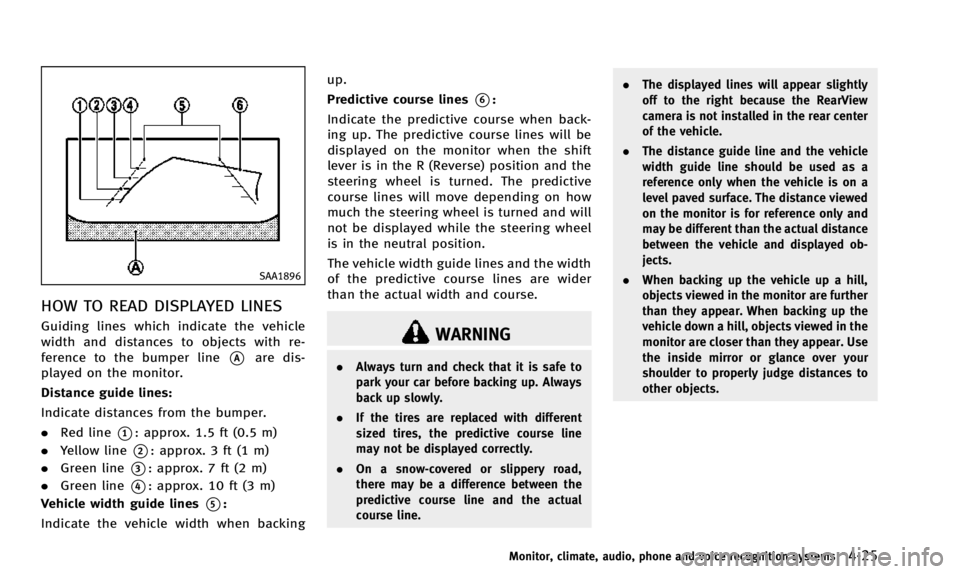
HOW TO READ DISPLAYED LINES
Guiding lines which indicate the vehicle
width and distances to objects with re-
ference to the bumper line
*Aare dis-
played on the monitor.
Distance guide lines:
Indicate distances from the bumper.
. Red line
*1: approx. 1.5 ft (0.5 m)
. Yellow line
*2: approx. 3 ft (1 m)
. Green line
*3: approx. 7 ft (2 m)
. Green line
*4: approx. 10 ft (3 m)
Vehicle width guide lines
*5:
Indicate the vehicle width when backing up.
Predictive course lines
*6:
Indicate the predictive course when back-
ing up. The predictive course lines will be
displayed on the monitor when the shift
lever is in the R (Reverse) position and the
steering wheel is turned. The predictive
course lines will move depending on how
much the steering wheel is turned and will
not be displayed while the steering wheel
is in the neutral position.
The vehicle width guide lines and the width
of the predictive course lines are wider
than the actual width and course.
WARNING
. Always turn and check that it is safe to
park your car before backing up. Always
back up slowly.
. If the tires are replaced with different
sized tires, the predictive course line
may not be displayed correctly.
. On a snow-covered or slippery road,
there may be a difference between the
predictive course line and the actual
course line. .
The displayed lines will appear slightly
off to the right because the RearView
camera is not installed in the rear center
of the vehicle.
. The distance guide line and the vehicle
width guide line should be used as a
reference only when the vehicle is on a
level paved surface. The distance viewed
on the monitor is for reference only and
may be different than the actual distance
between the vehicle and displayed ob-
jects.
. When backing up the vehicle up a hill,
objects viewed in the monitor are further
than they appear. When backing up the
vehicle down a hill, objects viewed in the
monitor are closer than they appear. Use
the inside mirror or glance over your
shoulder to properly judge distances to
other objects.
Monitor, climate, audio, phone and voice recognition systems4-25
Page 189 of 498

4-26Monitor, climate, audio, phone and voice recognition systems
SAA1897
HOW TO PARK WITH PREDICTIVE
COURSE LINES
1. Visually check that the parking space issafe before parking your vehicle.
2. The rearview of the vehicle is displayed on the screen
*Aas illustrated when the shift lever is moved to the R
(Reverse) position.
SAA1898
3. Slowly back up the vehicle adjusting
the steering wheel so that the predic-
tive course lines
*Benter the parking
space
*C.
4. When the back of the vehicle enter the parking space
*C, maneuver the steer-
ing wheel to make the vehicle width
Page 190 of 498

guide lines*Dparallel to the parking
space
*C.
5. When the vehicle is parked in the space completely, move the shift lever to the
P (Park) position and apply the parking
brake.
SAA1978
DIFFERENCE BETWEEN PREDICTIVE
AND ACTUAL DISTANCES
Backing up on a steep uphill
When backing up the vehicle up a hill, the
distance guide lines and the vehicle width
guide lines are shown closer than the actual distance. For example, the display
shows 3 ft (1 m) to the place
*A, but the
actual 3 ft (1 m) distance on the hill is the
place
*B. Note that any object on the hill is
further than it appears on the monitor.
Monitor, climate, audio, phone and voice recognition systems4-27
Page 191 of 498

4-28Monitor, climate, audio, phone and voice recognition systems
SAA1979
Backing up on a steep downhill
When backing up the vehicle down a hill,
the distance guide lines and the vehicle
width guide lines are shown further than
the actual distance. For example, the
display shows 3 ft (1 m) to the place
*A,
but the actual 3 ft (1 m) distance on the hill is the place
*B. Note that any object on
the hill is closer than it appears on the
monitor.
SAA1923
Backing up near a projecting object
The predictive course lines*Ado not
touch the object in the display. However,
the vehicle may hit the object if it projects
over the actual backing up course.
Page 192 of 498

SAA1980
Backing up behind a projecting
object
The position*Cis shown further than the
position
*Bin the display. However, the
position
*Cis actually at the same
distance as the position
*A. The vehicle may hit the object when backing up to the
position
*Aif the object projects over the
actual backing up course.
SAA2606
PREDICTIVE COURSE LINE SETTINGS
To turn ON or OFF the predictive course line
display, push the SETTINGbutton, select
the “Camera” key and push the ENTER
button.
Predictive Course Lines:
When this item is turned on, the predictive
course lines will be displayed on the
monitor when the shift lever is in the R
(Reverse) position.
Monitor, climate, audio, phone and voice recognition systems4-29
Page 193 of 498

4-30Monitor, climate, audio, phone and voice recognition systems
HOW TO ADJUST SCREEN
To adjust the Display ON/OFF, Brightness,
Tint, Color, Contrast and Black Level of the
rearview monitor, push theSETTINGbutton
with the rearview monitor on, select the
“Display” key on the screen and select the
item key and adjust the level using the
INFINITI controller.
Do not adjust the Brightness, Tint, Color,
Contrast and Black Level of the rearview
monitor while the vehicle is moving. Make
sure the parking brake is firmly applied.
OPERATING TIPS
. When the shift lever is shifted to the R
(Reverse) position, the monitor screen
automatically changes to the rearview
monitor mode. However, the radio can
be heard.
. When the view is switched, the display
images on the screen may be displayed
with some delay.
. When the temperature is extremely high
or low, the screen may not clearly
display objects. This is not a malfunc-
tion.
. When strong light is directly coming on
the camera, objects may not be dis-
played clearly. This is not a malfunc- tion.
. Vertical lines may be seen in objects on
the screen. This is due to strong
reflected light from the bumper. This
is not a malfunction.
. The screen may flicker under fluores-
cent light. This is not a malfunction.
. The colors of objects on the RearView
monitor may differ somewhat from the
actual color of objects. This is not a
malfunction.
. Objects on the monitor may not be clear
in a dark environment. This is not a
malfunction.
. If dirt, rain or snow accumulates on the
camera, the RearView monitor may not
display object clearly. Clean the cam-
era.
. Do not use alcohol, benzine or thinner
to clean the camera. This will cause
discoloration. To clean the camera,
wipe with a cloth dampened with
diluted mild cleaning agent and then
wipe with a dry cloth.
. Do not damage the camera as the
monitor screen may be adversely af-
fected.
. Do not use wax on the camera window.
Wipe off any wax with a clean cloth dampened with mild detergent diluted
with water.
Page 194 of 498
When you push theCAMERAbutton or shift
the shift lever into the R (Reverse) position
while the ignition switch is in the ON
position, the Around View Monitor oper-
ates. The monitor displays various views of
the position of the vehicle.
Available views:
. Bird-Eye View
The surrounding view of the vehicle.
. Front-Side View
The view around and ahead of the front
passenger’s side wheel.
. Front View
The view to the front of the vehicle.
. RearView
The view to the rear of the vehicle.
. Rear-Wide View
An approximately 180-degree view of
the rear of the vehicle.
The system is designed as an aid to the
driver in situations such as slot parking or
parallel parking.
SAA2148
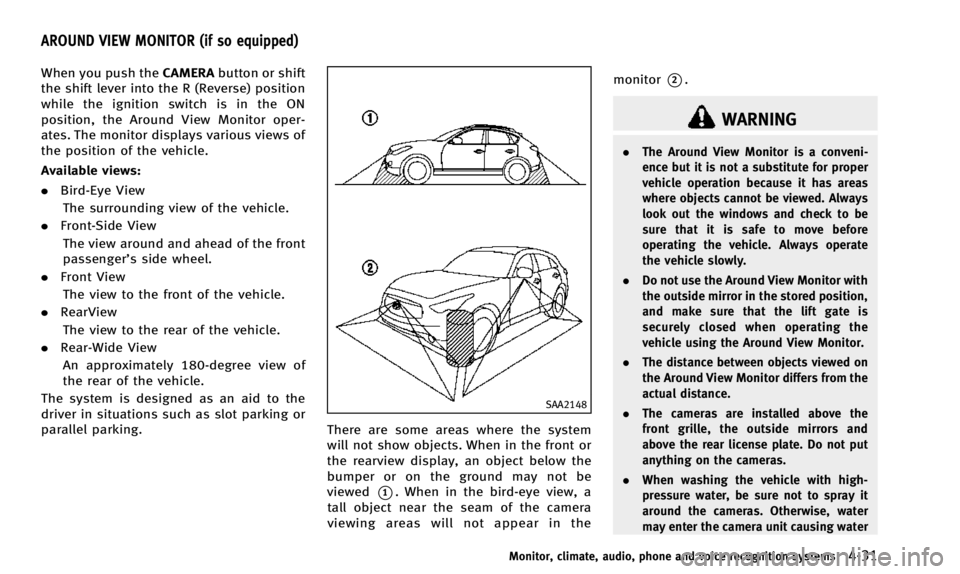
There are some areas where the system
will not show objects. When in the front or
the rearview display, an object below the
bumper or on the ground may not be
viewed
*1. When in the bird-eye view, a
tall object near the seam of the camera
viewing areas will not appear in the monitor
*2.
WARNING
.
The Around View Monitor is a conveni-
ence but it is not a substitute for proper
vehicle operation because it has areas
where objects cannot be viewed. Always
look out the windows and check to be
sure that it is safe to move before
operating the vehicle. Always operate
the vehicle slowly.
. Do not use the Around View Monitor with
the outside mirror in the stored position,
and make sure that the lift gate is
securely closed when operating the
vehicle using the Around View Monitor.
. The distance between objects viewed on
the Around View Monitor differs from the
actual distance.
. The cameras are installed above the
front grille, the outside mirrors and
above the rear license plate. Do not put
anything on the cameras.
. When washing the vehicle with high-
pressure water, be sure not to spray it
around the cameras. Otherwise, water
may enter the camera unit causing water
Monitor, climate, audio, phone and voice recognition systems4-31
AROUND VIEW MONITOR (if so equipped)
Page 195 of 498

4-32Monitor, climate, audio, phone and voice recognition systems
condensation on the lens, a malfunction,
fire or an electric shock.
. Do not strike the cameras. They are
precision instruments. Doing so could
cause a malfunction or cause damage
resulting in a fire or an electric shock.
CAUTION
Do not scratch the lens when cleaning dirt
or snow from the front of the camera.
Page 196 of 498

SAA3311
: Shift the shift lever
: Select the“Wide”,“Side”or“Top ”key on the
screen.
: Push the CAMERA button
*A: Original screen before the Around View Monitor is operated
*B: Rear view/bird’s-eye view screen
*C: Rear view/front-side view screen
*D: Rear-wide view screen
*E: Front view/bird’s-eye view screen
*F: Front view/front-side view screen
HOW TO SWITCH THE DISPLAY
The Around View Monitor display consists
of the left and the right screens. You can
see a combination of different views on the
screens as illustrated above.
Starting with the shift lever opera-
tion
.When the shift lever is shifted into the R
(Reverse) position
*1while another
screen
*Ais displayed, Around View
Monitor operates and the rearview and
bird-eye view
*Bare displayed.
The Around View Monitor screen
switches to the previous screen when
the shift lever is shifted out of the R
(Reverse) position
*2.
Monitor, climate, audio, phone and voice recognition systems4-33