air condition INFINITI QX50 2019 User Guide
[x] Cancel search | Manufacturer: INFINITI, Model Year: 2019, Model line: QX50, Model: INFINITI QX50 2019Pages: 564, PDF Size: 7.25 MB
Page 80 of 564
When pretensioner(s) activate, smoke is re-
leased and a loud noise may be heard. This
smoke is not harmful and does not indicate a
fire. Care should be taken not to inhale it, as it
may cause irritation and choking. Those with
a history of a breathing condition should get
fresh air promptly.
After the pretensioner(s’) activation, load lim-
iters allow the seat belt to release webbing (if
necessary) to reduce forces against the chest.
The supplemental air bag warning light
is used to indicate malfunctions in the preten-
sioner system. For additional information, re-
fer to "Supplemental air bag warning light" in
this section. If the operation of the supple-
mental air bag warning light indicates there is
a malfunction, have the system checked. It is
recommended that you visit an INFINITI re-
tailer for this service.
When selling your vehicle, we request that
you inform the buyer about the pretensioner
system and guide the buyer to the appropri-
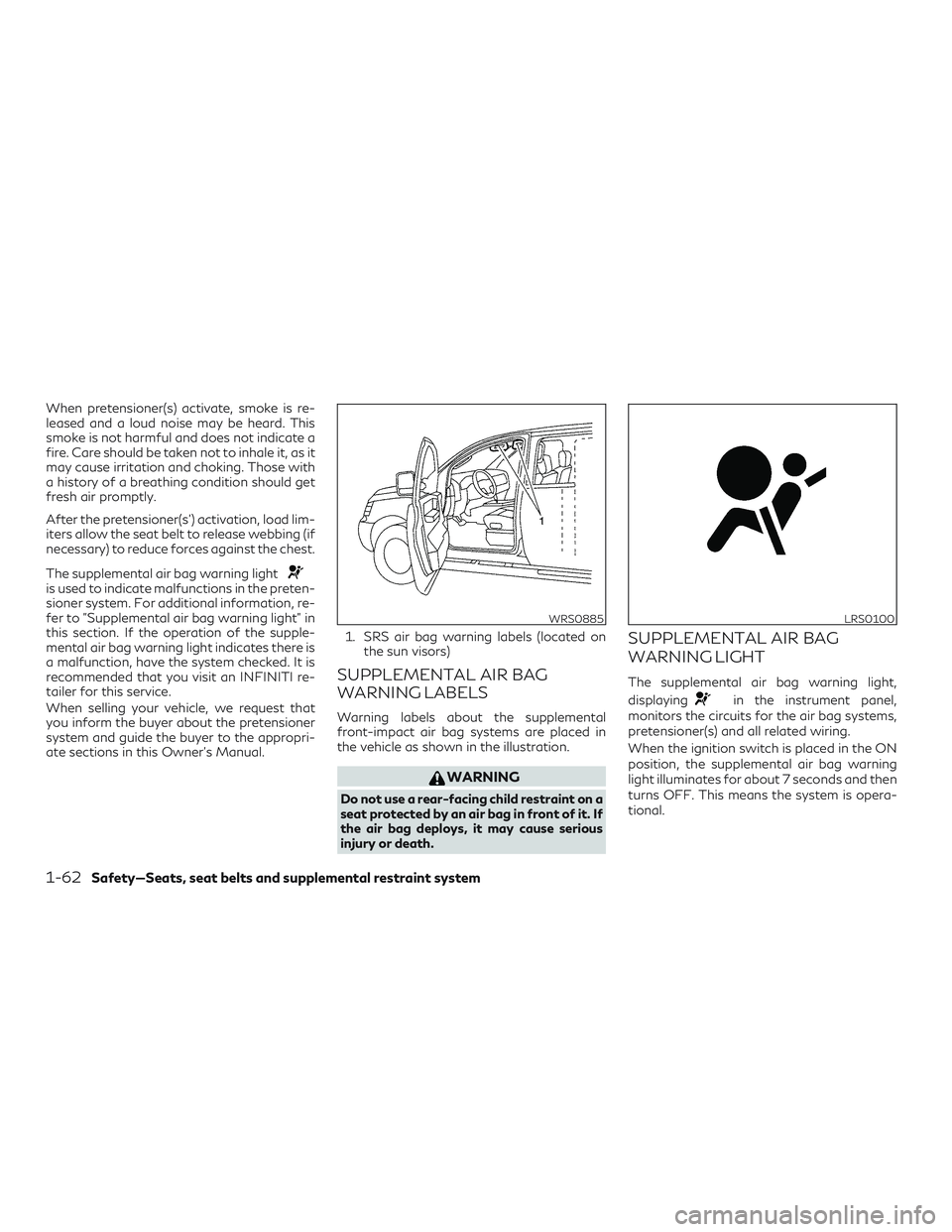
ate sections in this Owner’s Manual.1. SRS air bag warning labels (located on
the sun visors)
SUPPLEMENTAL AIR BAG
WARNING LABELS
Warning labels about the supplemental
front-impact air bag systems are placed in
the vehicle as shown in the illustration.
WARNING
Do not use a rear-facing child restraint on a
seat protected by an air bag in front of it. If
the air bag deploys, it may cause serious
injury or death.
SUPPLEMENTAL AIR BAG
WARNING LIGHT
The supplemental air bag warning light,
displaying
in the instrument panel,
monitors the circuits for the air bag systems,
pretensioner(s) and all related wiring.
When the ignition switch is placed in the ON
position, the supplemental air bag warning
light illuminates for about 7 seconds and then
turns OFF. This means the system is opera-
tional.
WRS0885LRS0100
1-62Safety—Seats, seat belts and supplemental restraint system
Page 81 of 564
If any of the following conditions occur, the
front air bag, side air bag, curtain air bag,
knee air bag and pretensioner systems need
servicing:∙ The supplemental air bag warning light remains on after approximately 7 sec-
onds.
∙ The supplemental air bag warning light flashes intermittently.
∙ The supplemental air bag warning light does not come on at all.
Under these conditions, the front air bag, side
air bag, curtain air bag, knee air bag or pre-
tensioner systems may not operate properly.
They must be checked and repaired. It is rec-
ommended that you visit an INFINITI retailer
for this service.
WARNING
If the supplemental air bag warning light is
on, it could mean that the front air bag, side
air bag, curtain air bag, knee air bag and/or
pretensioner systems will not operate in an
accident. To help avoid injury to yourself or
others, have your vehicle checked as soon
as possible. It is recommended that you
visit an INFINITI retailer for this service.
Repair and replacement procedure
The front air bags, side air bags, curtain air
bags, knee air bags and pretensioner(s) are
designed to inflate on a one-time-only basis.
As a reminder, unless it is damaged, the
supplemental air bag warning light remains
illuminated after inflation has occurred.
These systems should be repaired and/or re-
placed as soon as possible. It is recom-
mended that you visit an INFINITI retailer for
this service.
When maintenance work is required on the
vehicle, the front air bags, side air bags, cur-
tain air bags, knee air bags, pretensioner(s)
and related parts should be pointed out to the
person performing the maintenance. The ig-
nition switch should always be in the LOCK
position when working under the hood or
inside the vehicle.
WARNING
∙ Once a front air bag, side air bag, curtain air bag or knee air bag has inflated, the air
bag module will not function again and
must be replaced. Additionally, the acti-
vated pretensioner(s) must also be re-
placed. The air bag module and preten-
sioner(s) should be replaced. It is
recommended that you visit an INFINITI
retailer for this service. However, the air
bag module and pretensioner(s) cannot
be repaired.
∙ The front air bag, side air bag, curtain air bag, knee air bag systems and the pre-
tensioner system should be inspected if
there is any damage to the front end or
side portion of the vehicle. It is recom-
mended that you visit an INFINITI re-
tailer for this service.
∙ If you need to dispose of a supplemental air bag or pretensioner systems or scrap
the vehicle, it is recommended that you
visit an INFINITI retailer. Incorrect dis-
posal procedures could cause personal
injury.
Safety—Seats, seat belts and supplemental restraint system1-63
Page 86 of 564
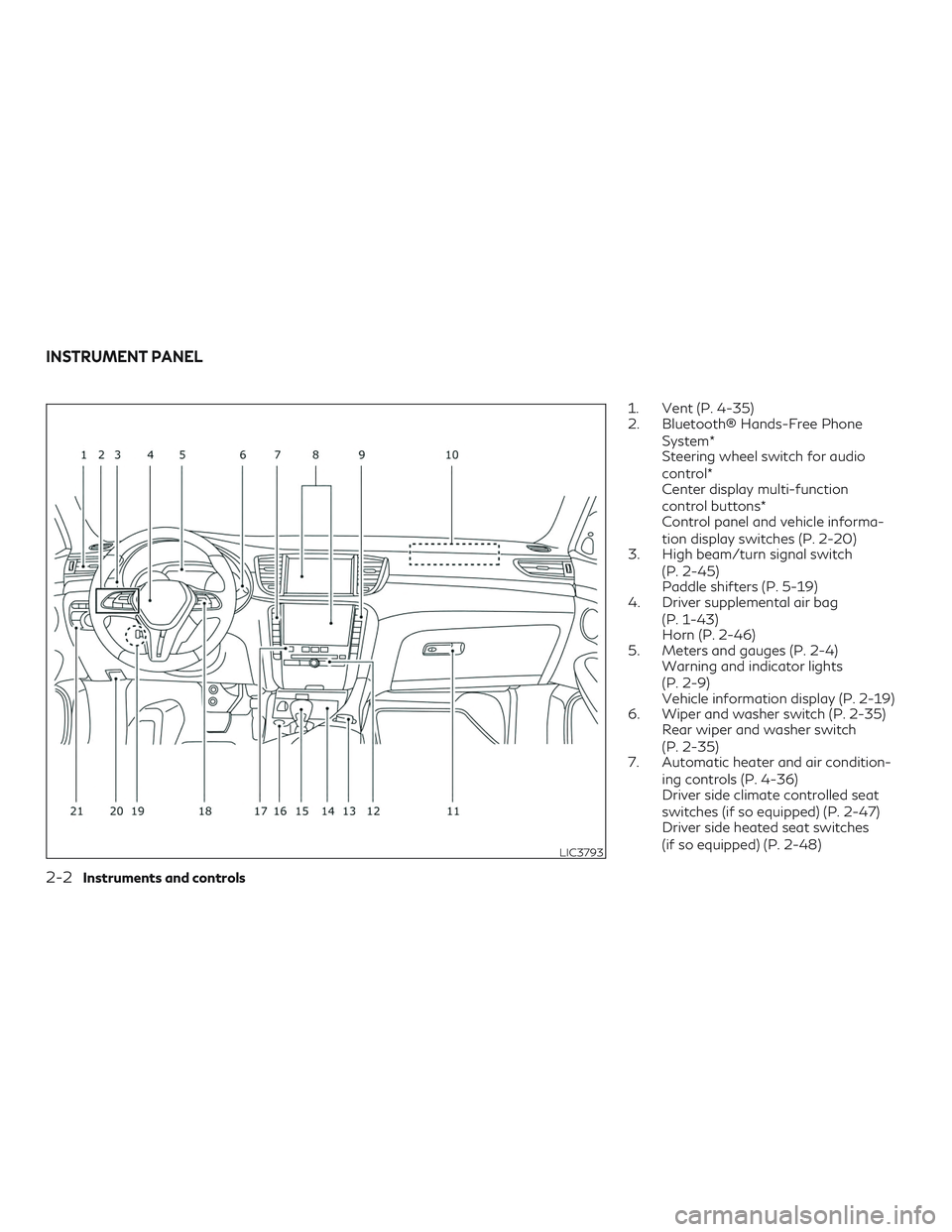
1. Vent (P. 4-35)
2. Bluetooth® Hands-Free PhoneSystem*
Steering wheel switch for audio
control*
Center display multi-function
control buttons*
Control panel and vehicle informa-
tion display switches (P. 2-20)
3. High beam/turn signal switch
(P. 2-45)
Paddle shifters (P. 5-19)
4. Driver supplemental air bag
(P. 1-43)
Horn (P. 2-46)
5. Meters and gauges (P. 2-4) Warning and indicator lights
(P. 2-9)
Vehicle information display (P. 2-19)
6. Wiper and washer switch (P. 2-35) Rear wiper and washer switch
(P. 2-35)
7. Automatic heater and air condition-
ing controls (P. 4-36)
Driver side climate controlled seat
switches (if so equipped) (P. 2-47)
Driver side heated seat switches
(if so equipped) (P. 2-48)
LIC3793
INSTRUMENT PANEL
2-2Instruments and controls
Page 87 of 564
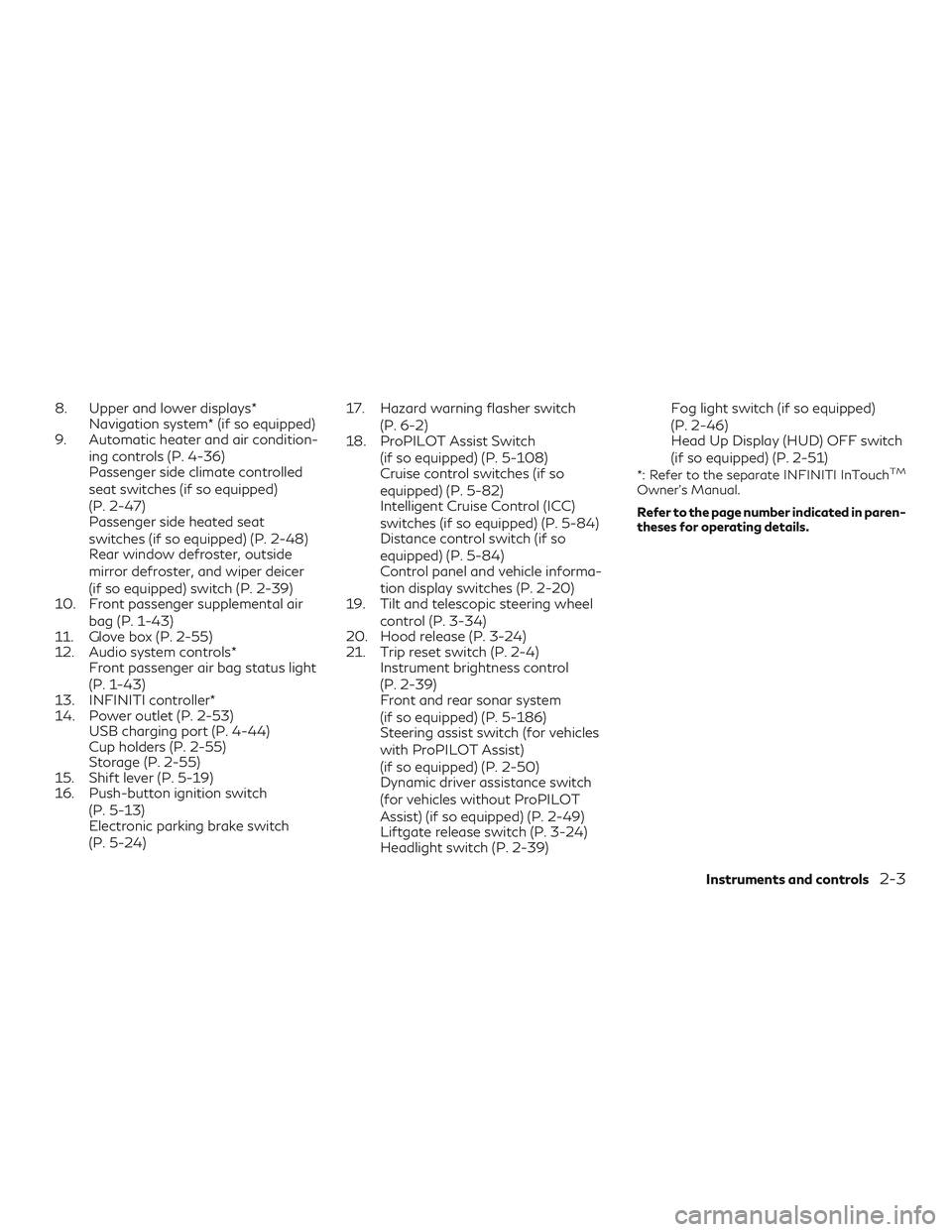
8. Upper and lower displays*Navigation system* (if so equipped)
9. Automatic heater and air condition-
ing controls (P. 4-36)
Passenger side climate controlled
seat switches (if so equipped)
(P. 2-47)
Passenger side heated seat
switches (if so equipped) (P. 2-48)
Rear window defroster, outside
mirror defroster, and wiper deicer
(if so equipped) switch (P. 2-39)
10. Front passenger supplemental air
bag (P. 1-43)
11. Glove box (P. 2-55)
12. Audio system controls* Front passenger air bag status light
(P. 1-43)
13. INFINITI controller*
14. Power outlet (P. 2-53) USB charging port (P. 4-44)
Cup holders (P. 2-55)
Storage (P. 2-55)
15. Shift lever (P. 5-19)
16. Push-button ignition switch
(P. 5-13)
Electronic parking brake switch
(P. 5-24) 17. Hazard warning flasher switch
(P. 6-2)
18. ProPILOT Assist Switch
(if so equipped) (P. 5-108)
Cruise control switches (if so
equipped) (P. 5-82)
Intelligent Cruise Control (ICC)
switches (if so equipped) (P. 5-84)
Distance control switch (if so
equipped) (P. 5-84)
Control panel and vehicle informa-
tion display switches (P. 2-20)
19. Tilt and telescopic steering wheel
control (P. 3-34)
20. Hood release (P. 3-24)
21. Trip reset switch (P. 2-4) Instrument brightness control
(P. 2-39)
Front and rear sonar system
(if so equipped) (P. 5-186)
Steering assist switch (for vehicles
with ProPILOT Assist)
(if so equipped) (P. 2-50)
Dynamic driver assistance switch
(for vehicles without ProPILOT
Assist) (if so equipped) (P. 2-49)
Liftgate release switch (P. 3-24)
Headlight switch (P. 2-39) Fog light switch (if so equipped)
(P. 2-46)
Head Up Display (HUD) OFF switch
(if so equipped) (P. 2-51)
*: Refer to the separate INFINITI InTouchTM
Owner’s Manual.
Refer to the page number indicated in paren-
theses for operating details.
Instruments and controls2-3
Page 99 of 564
Seat belt warning light andchime
The light and chime remind you to fasten your
seat belts. The light illuminates whenever the
ignition switch is placed in the ON or START
position and remains illuminated until the
driver’s seat belt is fastened. At the same
time, the chime sounds for about 6 seconds
unless the driver’s seat belt is securely fas-
tened.
The seat belt warning light may also illumi-
nate if the front passenger’s seat belt is not
fastened when the front passenger’s seat is
occupied. For 7 seconds after the ignition
switch is placed in the ON position, the sys-
tem does not activate the warning light for
the front passenger.
For additional information, refer to “Seat
belts” in the “Safety—Seats, seat belts and
supplemental restraint system” section of this
manual.
Supplemental air bagwarning light
When the ignition switch is placed in the ON
or START position, the supplemental air bag
warning light illuminates for about 7 seconds
and then turns off. This means the system is
operational. If any of the following conditions occur, the
front air bag, side air bag, curtain air bag, and
pretensioner seat belt systems need servic-
ing:
∙ The supplemental air bag warning light remains on after approximately 7 sec-
onds.
∙ The supplemental air bag warning light flashes intermittently.
∙ The supplemental air bag warning light does not come on at all.
It is recommended that you visit an INFINITI
retailer for these services.
Unless checked and repaired, the supplemen-
tal restraint system (air bag system) and/or
the pretensioners may not function properly.
For additional information, refer to “Supple-
mental Restraint System (SRS)” in the
“Safety—Seats, seat belts and supplemental
restraint system” section of this manual.
WARNING
If the supplemental air bag warning light is
on, it could mean that the front air bag, side
air bag, curtain air bag and/or pretensioner
systems will not operate in an accident. To
help avoid injury to yourself or others, have
your vehicle checked as soon as possible. It
is recommended that you visit an INFINITI
retailer for this service.
INDICATOR LIGHTS
For additional information, refer to “Vehicle
information display” in this section.
Automatic brake hold indicator light (if so
equipped)
This light illuminates to show the status of
the automatic brake hold system.
When the automatic brake hold system is on
standby, the indicator will illuminate white.
When the automatic brake hold system is
operating, the indicator will illuminate green.
For additional information, refer to “Auto-
matic brake hold” in the “Starting and driving”
section of this manual.
Instruments and controls2-15
Page 109 of 564
45. Distance Control Assist (DCA)/BlindSpot Intervention (BSI)/Lane Departure
Prevention (LDP) indicator (if so
equipped)
46. Not Available: Seat Belt Not Fastened (if so equipped)
47. Not Available: Poor Road Conditions (if so equipped)
48. Not Available: Visibility is impaired (if so equipped)
49. Press Brake Pedal (if so equipped)
50. Power turned off to save the battery
51. Shift system malfunction. Visit dealer
52. Check position of shift lever
53. Shift to P range
54. Currently not available
No Key Detected
This warning appears when the Intelligent
Key is left outside the vehicle with the ignition
switch in the ON position. Make sure the
Intelligent Key is inside the vehicle.
For additional information, refer to “INFINITI
Intelligent Key System” in the “Pre-driving
checks and adjustments” section of this
manual. Key ID Incorrect
This warning appears when the ignition
switch is placed in the OFF position and the
Intelligent Key is not recognized by the sys-
tem. You cannot start the engine with an
unregistered key.
For additional information, refer to “INFINITI
Intelligent Key System” in the “Pre-driving
checks and adjustments” section of this
manual.
Key Battery Low
This indicator illuminates when the Intelligent
Key battery is running out of power.
If this indicator illuminates, replace the bat-
tery with a new one. For additional informa-
tion, refer to “Battery replacement” in the
“Do-it-yourself” section of this manual.
Key System Error: See Owner’s Manual
After the ignition switch is pushed to the ON
position, this light comes on for a period of
time and then turns off.
The Key System Error message warns of a
malfunction with the Intelligent Key system.
If the light comes on while the engine is
stopped, it may be impossible to start the
engine.If the light comes on while the engine is run-
ning, you can drive the vehicle. However in
these cases, have the system checked. It is
recommended that you visit an INFINITI re-
tailer for this service.
Key Registration Complete
This appears when a new Intelligent Key is
registered to the vehicle.
Push brake and start switch to drive
This indicator appears when the shift lever is
in the P (Park) position.
This indicator also appears when the vehicle
has been started using the Remote Engine
Start (if so equipped) function.
This indicator means that the engine will start
by pushing the ignition switch with the brake
pedal depressed. You can start the engine
from any position of the ignition switch.
Push Ignition to OFF
After the Push Ignition to OFF warning illu-
minates, the warning will illuminate if the ig-
nition switch is placed in the Auto ACC posi-
tion when the shift lever is moved to the P
(Park) position.
Instruments and controls2-25
Page 110 of 564
To turn off the Push warning, place the igni-
tion switch in the ON position and then in the
LOCK position.
Shift to Park
This warning appears when the door is
opened while the shift lever is in positions
other than the P (Park) position.
If this warning illuminates, move the shift
lever to the P position.
Engine start operation for Intelligent Key
system (if I-Key battery level is low)
This indicator appears when the battery of
the Intelligent Key is low and when the Intel-
ligent Key system and the vehicle are not
communicating normally.
If this appears, touch the ignition switch with
the Intelligent Key while depressing the brake
pedal. For additional information, refer to
“INFINITI Intelligent Key battery discharge” in
the “Starting and driving” section of this
manual.
Release Parking Brake
This warning illuminates in the message area
of the vehicle information display when the
parking brake is set and the vehicle is driven.Low Fuel
This warning illuminates when the fuel level in
the fuel tank is getting low. Refuel as soon as
it is convenient, preferably before the fuel
gauge reaches 0 (Empty).
There will be a
small reserve of fuel in the tank when the fuel
gauge needle reaches 0 (Empty).
Loose Fuel Cap
This warning appears when the fuel-filler cap
is not tightened correctly after the vehicle has
been refueled. For additional information, re-
fer to “Fuel-filler cap” in the “Pre-driving
checks and adjustments” section of this
manual.
Transmission Shift Position indicator
This indicator shows the transmission shift
position.
Low Washer Fluid
This warning illuminates when the
windshield-washer fluid is at a low level. Add
windshield-washer fluid as necessary. For
additional information, refer to “Windshield-
washer fluid” in the “Do-it-yourself” section
of this manual. Tire Pressure Low - Add Air
This warning appears when the low tire pres-
sure warning light in the meter illuminates
and low tire pressure is detected. The warn-
ing appears each time the ignition switch is
placed in the ON position as long as the low
tire pressure warning light remains illumi-
nated. If this warning appears, stop the ve-
hicle and adjust the tire pressures of all four
tires to the recommended COLD tire pres-
sure shown on the Tire and Loading Informa-
tion label. For additional information, refer to
“Low tire pressure warning light” in this sec-
tion and “Tire Pressure Monitoring System
(TPMS)” in the “Starting and driving” section
of this manual.
Steering Assist Not Available: Cannot De-
tect Lane (if so equipped)
This message may appear when the Steering
Assist system is engaged.
Under the following conditions, the Steering
Assist system is automatically canceled:
∙ When lane markers in the traveling lane cannot be correctly detected for a period
of time due to such items as a snow rut,
reflection of light on a rainy day or several
unclear lane markers are present
2-26Instruments and controls
Page 114 of 564
tional information, refer to “Extended stor-
age switch” in this section.
CVT Error: See Owner’s Manual
This warning illuminates when there is a
problem with the CVT system. If this warning
comes on, have the system checked. It is rec-
ommended that you visit an INFINITI retailer
for this service.
Headlight System Error: See Owner’s
Manual (if so equipped)
This warning illuminates when there is an
error with the system. For additional infor-
mation, refer to “Headlight switch” in this
section.
Distance Control Assist (DCA)/Blind Spot
Intervention® (BSI)/Lane Departure Pre-
vention (LDP) indicator (if so equipped)
This indicator shows when the
DCA/BSI/LDP system is engaged.
For additional information, refer to "Dynamic
driver assistance switch” in this section and
Distance Control Assist (DCA)” , “Blind Spot
Intervention® (BSI)” and “Lane Departure
Prevention (LDP)” in the “Starting and driving”
section of this manual.Not Available Seat Belt Not Fastened (if so
equipped)
This message may appear when the Intelli-
gent Cruise Control (ICC) (with ProPILOT
Assist) system is engaged.
Under the following condition, the ICC (with
ProPILOT Assist) system is automatically
canceled:
∙ When the driver’s seat belt is not fas- tened
The above system cannot be used when the
driver’s seat belt is not fastened.
Not Available Poor Road Conditions (if so
equipped)
This message may appear when the Intelli-
gent Cruise Control (ICC) (with ProPILOT
Assist) system, the Blind Spot Intervention®
(BSI) system, the Lane Departure Prevention
(LDP) system, the Distance Control Assist
(DCA) system, or the ICC (without ProPILOT
Assist) system is engaged.
Under the following conditions, the ICC (with
ProPILOT Assist) system, the Blind Spot In-
tervention® (BSI) system, the Lane Depar-
ture Prevention (LDP) system, the Distance Control Assist (DCA) system, or the ICC
(without ProPILOT Assist) system is auto-
matically canceled:
∙ When the VDC operates
∙ When a wheel slips
The above system cannot be used in some
situations (VDC operates and wheel slip.)
Not Available Visibility is impaired (if so
equipped)
This message may appear when the Intelli-
gent Cruise Control (ICC) (with ProPILOT
Assist) system is engaged.
Under the following conditions, the ICC (with
ProPILOT Assist) system is automatically
canceled: ∙ The camera area of the windshield is fogged up or covered with dirt, water,
drops, ice, snow, etc.
∙ Strong light, such as sunlight or high beams from oncoming vehicles, enter the
front camera
∙ When the wiper (HI) operates
The system will be available when the above
conditions no longer exist.
2-30Instruments and controls
Page 133 of 564
NOTE:
The heated seats may also be adjusted in the
lower display. For additional information,
refer to “Heater and air conditioner (auto-
matic)” in the “Monitor, climate, audio,
phone and voice recognition” section of this
manual.
WARNING
When this switch is activated the following
systems (if so equipped) are turned off and
will not work.
∙ Distance Control Assist (DCA)
∙ Blind Spot Intervention (BSI)
∙ Lane Departure Prevention (LDP)
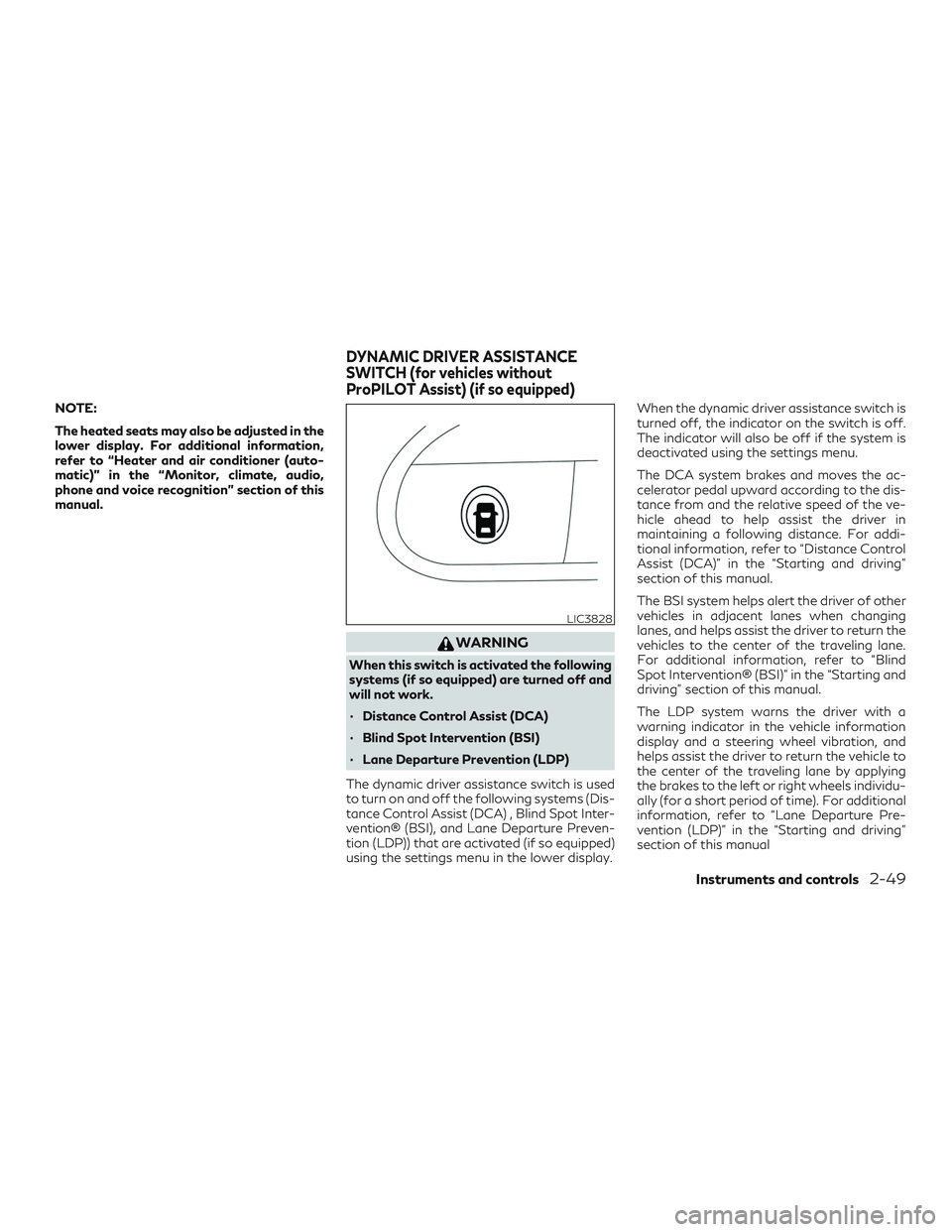
The dynamic driver assistance switch is used
to turn on and off the following systems (Dis-
tance Control Assist (DCA) , Blind Spot Inter-
vention® (BSI), and Lane Departure Preven-
tion (LDP)) that are activated (if so equipped)
using the settings menu in the lower display. When the dynamic driver assistance switch is
turned off, the indicator on the switch is off.
The indicator will also be off if the system is
deactivated using the settings menu.
The DCA system brakes and moves the ac-
celerator pedal upward according to the dis-
tance from and the relative speed of the ve-
hicle ahead to help assist the driver in
maintaining a following distance. For addi-
tional information, refer to “Distance Control
Assist (DCA)” in the “Starting and driving”
section of this manual.
The BSI system helps alert the driver of other
vehicles in adjacent lanes when changing
lanes, and helps assist the driver to return the
vehicles to the center of the traveling lane.
For additional information, refer to “Blind
Spot Intervention® (BSI)” in the “Starting and
driving” section of this manual.
The LDP system warns the driver with a
warning indicator in the vehicle information
display and a steering wheel vibration, and
helps assist the driver to return the vehicle to
the center of the traveling lane by applying
the brakes to the left or right wheels individu-
ally (for a short period of time). For additional
information, refer to “Lane Departure Pre-
vention (LDP)” in the “Starting and driving”
section of this manual
LIC3828
DYNAMIC DRIVER ASSISTANCE
SWITCH (for vehicles without
ProPILOT Assist) (if so equipped)
Instruments and controls2-49
Page 138 of 564
∙ Do not use double adapters or more thanone electrical accessory.
∙ Use power outlets with the engine run- ning to avoid discharging the vehicle
battery.
∙ Avoid using power outlets when the air conditioner, headlights or rear window
defroster is on.
∙ Before inserting or disconnecting a plug, be sure the electrical accessory being
used is turned off.
∙ Push the plug in as far as it will go. If good contact is not made, the plug may over-
heat or the internal temperature fuse
may open.
∙ When not in use, be sure to close the cap. Do not allow water or any other liquid to
contact the outlet.
LIC3359
OFF position
LIC3266
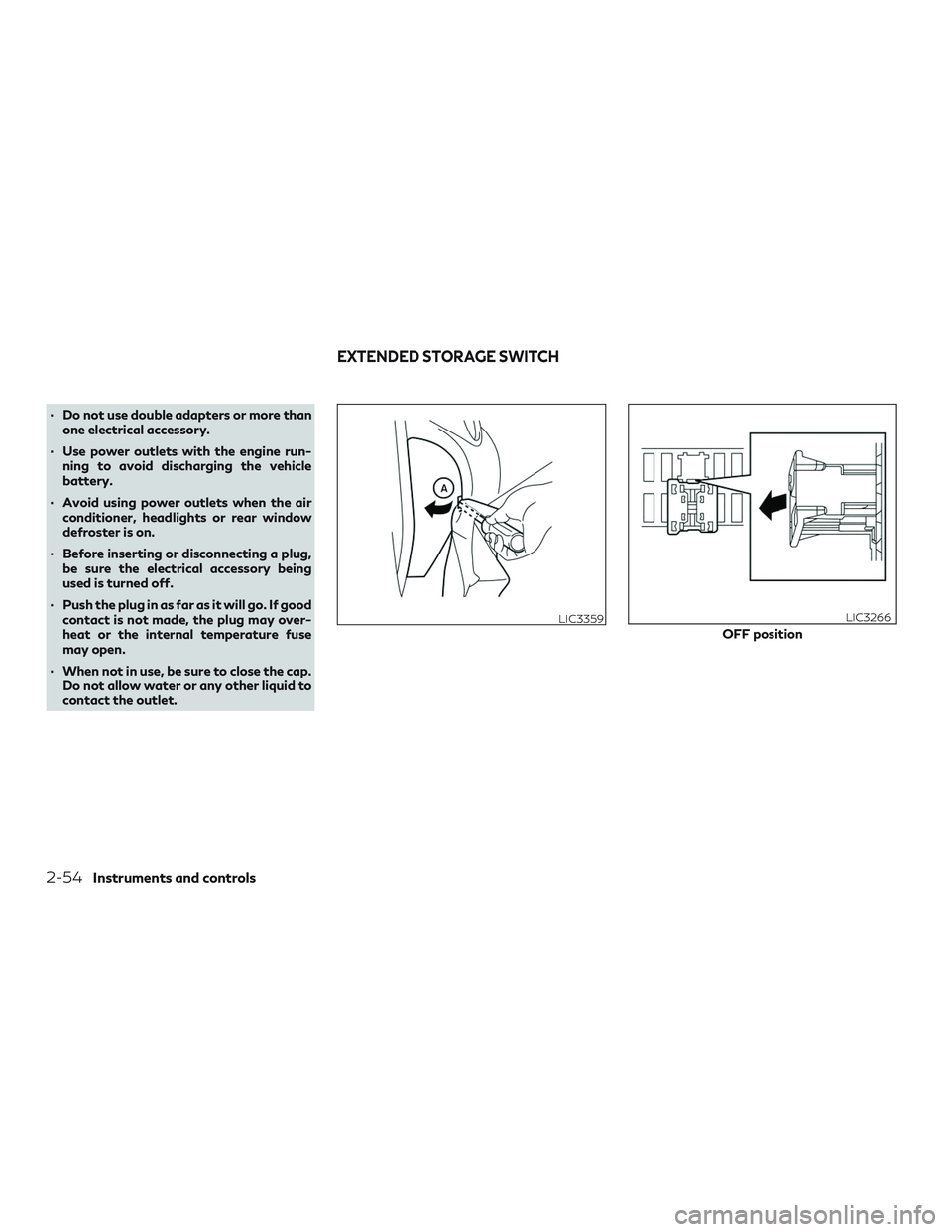
EXTENDED STORAGE SWITCH
2-54Instruments and controls