lock INFINITI QX55 2023 Repair Manual
[x] Cancel search | Manufacturer: INFINITI, Model Year: 2023, Model line: QX55, Model: INFINITI QX55 2023Pages: 526, PDF Size: 5.75 MB
Page 187 of 526

Manual Mode:
If power operation is not available, the lift-
gate may be operated manually. Power op-
eration may not be available if multiple ob-
stacles have been detected in a single power
cycle or if the battery voltage is low.
If the power liftgate opener switch
OAis
pushed during power open or close, the
power operation will be canceled and the
liftgate can be operated manually.
To open the liftgate manually, unlock the
doors, push the liftgate opener switch
OAand
lift the liftgate. To close, lower and push the liftgate down
securely.
MOTION-ACTIVATED LIFTGATE
(if so equipped)
The liftgate can be operated using a quick
kicking motion under the center of the rear
bumper.
To operate, the Intelligent Key must be within
31.5 in (80 cm) of the liftgate.
NOTE:
Lifestyle Receiver is available as an acces-
sory for this vehicle. If a Lifestyle Receiver is
installed, the liftgate electronic control unit
(ECU) needs to be replaced with an ECU pro-
grammed for the Motion-Activated Lift-
gate to function properly.
Proper operation technique
• While at the rear of the vehicle, begin mak-
ing a quick forward kicking motion.
• Raise your foot straight under the center of the rear bumper then immediately return
your foot to the ground in a continuous
motion.
• The kicking motion should be straight, smooth and consistent.
• After your kick motion is complete, step back and allow the liftgate to open/close.
LPD3182LPD3147
Activation zone
Pre-driving checks and adjustments3-25
Page 191 of 526
3. Push and hold the power liftgate closeswitchlocated on the liftgate for
more than 3 seconds or until two beeps
are heard.
The liftgate will open to the selected position
setting. To change the position of the liftgate,
repeat steps 1-3.
OPENING THE FUEL-FILLER
DOOR
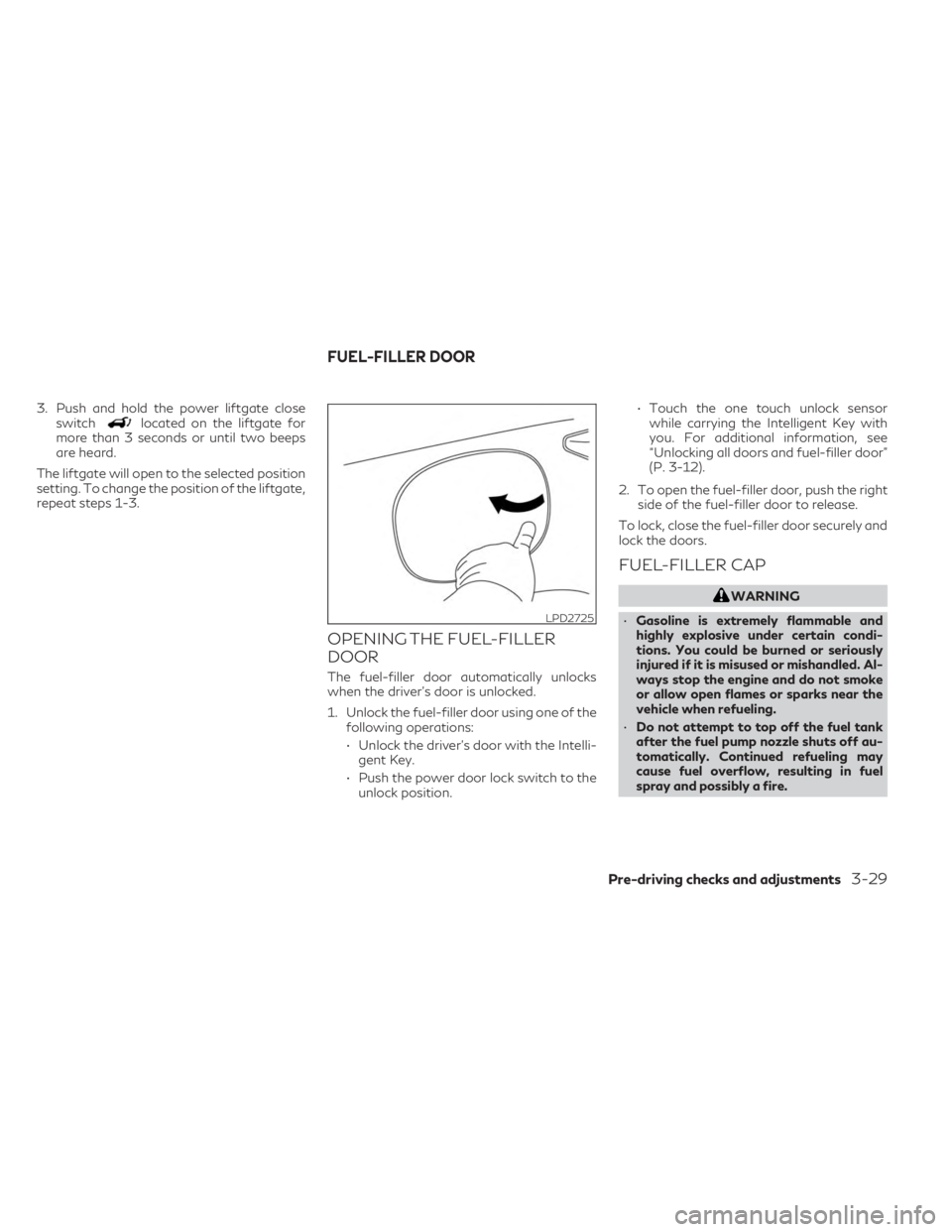
The fuel-filler door automatically unlocks
when the driver's door is unlocked.
1. Unlock the fuel-filler door using one of the following operations:
• Unlock the driver’s door with the Intelli- gent Key.
• Push the power door lock switch to the unlock position. • Touch the one touch unlock sensor
while carrying the Intelligent Key with
you. For additional information, see
“Unlocking all doors and fuel-filler door”
(P. 3-12).
2. To open the fuel-filler door, push the right side of the fuel-filler door to release.
To lock, close the fuel-filler door securely and
lock the doors.
FUEL-FILLER CAP
WARNING
• Gasoline is extremely flammable and
highly explosive under certain condi-
tions. You could be burned or seriously
injured if it is misused or mishandled. Al-
ways stop the engine and do not smoke
or allow open flames or sparks near the
vehicle when refueling.
• Do not attempt to top off the fuel tank
after the fuel pump nozzle shuts off au-
tomatically. Continued refueling may
cause fuel overflow, resulting in fuel
spray and possibly a fire.
LPD2725
FUEL-FILLER DOOR
Pre-driving checks and adjustments3-29
Page 193 of 526

To remove the fuel-filler cap:
1. Turn the fuel-filler cap counterclockwiseto remove.
2. Put the fuel-filler cap on the cap holder
OAwhile refueling.
To install the fuel-filler cap:
1. Insert the fuel-filler cap straight into the fuel-filler tube.
2. Turn the fuel-filler cap clockwise until a single click is heard.
Loose Fuel Cap warning
The Loose Fuel Cap warning will appear in
the vehicle information display when the
fuel-filler cap is not tightened correctly after
the vehicle has been refueled. It may take a
few driving trips for the message to be dis-
played. To turn off the warning, perform the
following:
1. Remove and install the fuel-filler cap assoon as possible. For additional informa-
tion, see “Fuel-filler cap” (P. 3-29).
2. Tighten the fuel-filler cap until it a single click is heard. 3. Press the
button on the steering
wheel for about 1 second to turn off the
Loose Fuel Cap warning message in the
vehicle information display.
LPD2726LPD2985
Pre-driving checks and adjustments3-31
Page 194 of 526

WARNING
• Do not adjust the steering wheel while
driving. You could lose control of your
vehicle and cause an accident.
• Do not adjust the steering wheel any
closer to you than is necessary for proper
steering operation and comfort. The
driver's air bag inflates with great force.
If you are unrestrained, leaning forward,
sitting sideways or out of position in any
way, you are at greater risk of injury or
death in a crash. You may also receive
serious or fatal injuries from the air bag if
you are up against it when it inflates.
Always sit back against the seatback and
as far away as practical from the steer-
ing wheel. Always use the seat belts.
MANUAL OPERATION (if so
equipped)
Tilt and telescopic operation
Push the lock leverO1down:
• Adjust the steering wheel up or down in direction
O2to the desired position.
• Adjust the steering wheel forward or back- ward in direction
O3to the desired position.
Pull the lock lever
O1up firmly to lock the
steering wheel in place.
AUTOMATIC OPERATION (if so
equipped)
Tilt and telescopic operation
To adjust the steering wheel move the switch
O1in the following directions:
• Adjust the steering wheel up or down in direction
O2to the desired tilt position.
• Adjust the steering wheel forward or back- ward in direction
O3to the desired tele-
scopic position.
LPD2728LPD2752
STEERING WHEEL
3-32Pre-driving checks and adjustments
Page 195 of 526

Entry/Exit function (if so equipped)
The memory seat system will make the steer-
ing wheel move up automatically when the
driver's door is opened and the ignition switch
is in the LOCK position. This lets the driver get
into and out of the seat more easily. The
steering wheel moves back into position
when the driver's door is closed and the igni-
tion switch is pushed.
For additional information, see “Memory
seat” (P. 3-37).1. To block glare from the front, swing down
the sun visorO1.
2. To block glare from the side, remove the sun visor from the center mount and
swing the visor to the side
O2.
3. Slide the extension
O3sun visor in or out
as needed.
CAUTION
• Do not store the sun visor before return-
ing the extension to its original position.
• Do not pull the extension sun visor forc-
ibly downward.
WPD0344
SUN VISORS
Pre-driving checks and adjustments3-33
Page 198 of 526

Power folding outside mirrors
CAUTION
• Do not touch the mirrors while they are
moving. Your hand may be pinched, and
the mirror may malfunction.
• Do not drive with the mirrors stored. You
will be unable to see behind the vehicle. Push the switch
O2to open or the switchO1
to close the mirrors.
If one of the mirrors are manually operated or
bumped, the mirror body can become loose
at the pivot point. To correct electronic mirror
operation, cycle the mirrors by pushing the
switch
O1until completely closed, then push
the switch
O2until the mirrors are in the open
position.
Automatic folding outside mirrors
The outside mirrors fold automatically when
the vehicle is locked with the Intelligent Key
or by using the request switch. The outside
mirrors unfold automatically when the igni-
tion switch is placed in the ON position.
Heated mirrors
The electric control type outside mirrors can
be heated to defrost, defog, or de-ice for
improved visibility. Push the rear window de-
froster switch to activate the heating func-
tion. Push the switch again to deactivate, or
the heating function will automatically turn
off after approximately 15 minutes. For ad-
ditional information, see “Rear window de-
froster, outside mirror defroster and wiper
deicer (if so equipped) switch” (P. 2-39).
Reverse tilt-down feature (if so
equipped)
The reverse tilt-down feature will turn both
outside mirror surfaces downward to provide
better rear visibility close to the vehicle when
the mirror control switch is in either the L or R
position.
The mirrors automatically return to their
original position when you shift out of R
(Reverse).
The outside mirror surfaces will return to
their original position when one of the fol-
lowing has occurred:
• The shift lever is moved to any position other than R (Reverse).
• The outside mirror control switch is set to the neutral or center position.
• The ignition switch is placed in the OFF position.
NOTE:
If the outside mirror control switch is in the
center (neutral) position, mirror surface will
NOT turn downward when the shift lever is
moved to R (Reverse).
For additional information regarding this fea-
ture, see “Memory seat” (P. 3-37).
LPD2303
3-36Pre-driving checks and adjustments
Page 201 of 526
To use the memory function, set the climate
and audio systems to the driver's preferred
settings. Lock the doors with the Intelligent
Key. Each Intelligent Key may be set with the
driver's individual preferences. When a new
Intelligent Key is used, “Connection with the
key has been done” will be displayed on the
vehicle information display and the memo-
rized settings are available.
To engage the memorized settings, perform
the following:
1. Carry the Intelligent Key that is linked tothe memorized settings.
2. Unlock the doors by pushing the driver’s door handle request switch or the
button on the Intelligent Key.
3. Place the ignition switch in the ON posi- tion. The settings linked to the Intelligent
Key will start.
For additional information on using the cli-
mate control system, see “Heater and air con-
ditioner (automatic)” (P. 4-33).
For additional information on using the navi-
gation and audio systems, refer to the sepa-
rate INFINITI InTouch™ Owner’s Manual.
SYSTEM OPERATION
The memory seat system will not work or will
stop operating under the following
conditions:
• When the vehicle speed is above 4 mph (7 km/h).
• When any of the memory switches are pushed while the memory seat system is
operating.
• When the switch for the driver’s seat and steering column is pushed while the
memory seat system is operating.
• When the seat has already been moved to the memorized position.
• When no seat position is stored in the memory switch.
• When the shift lever is moved from P (Park) to any other position.
The memory seat system can be adjusted and
canceled. It is recommended you visit an
INFINITI retailer for this service.
Pre-driving checks and adjustments3-39
Page 208 of 526
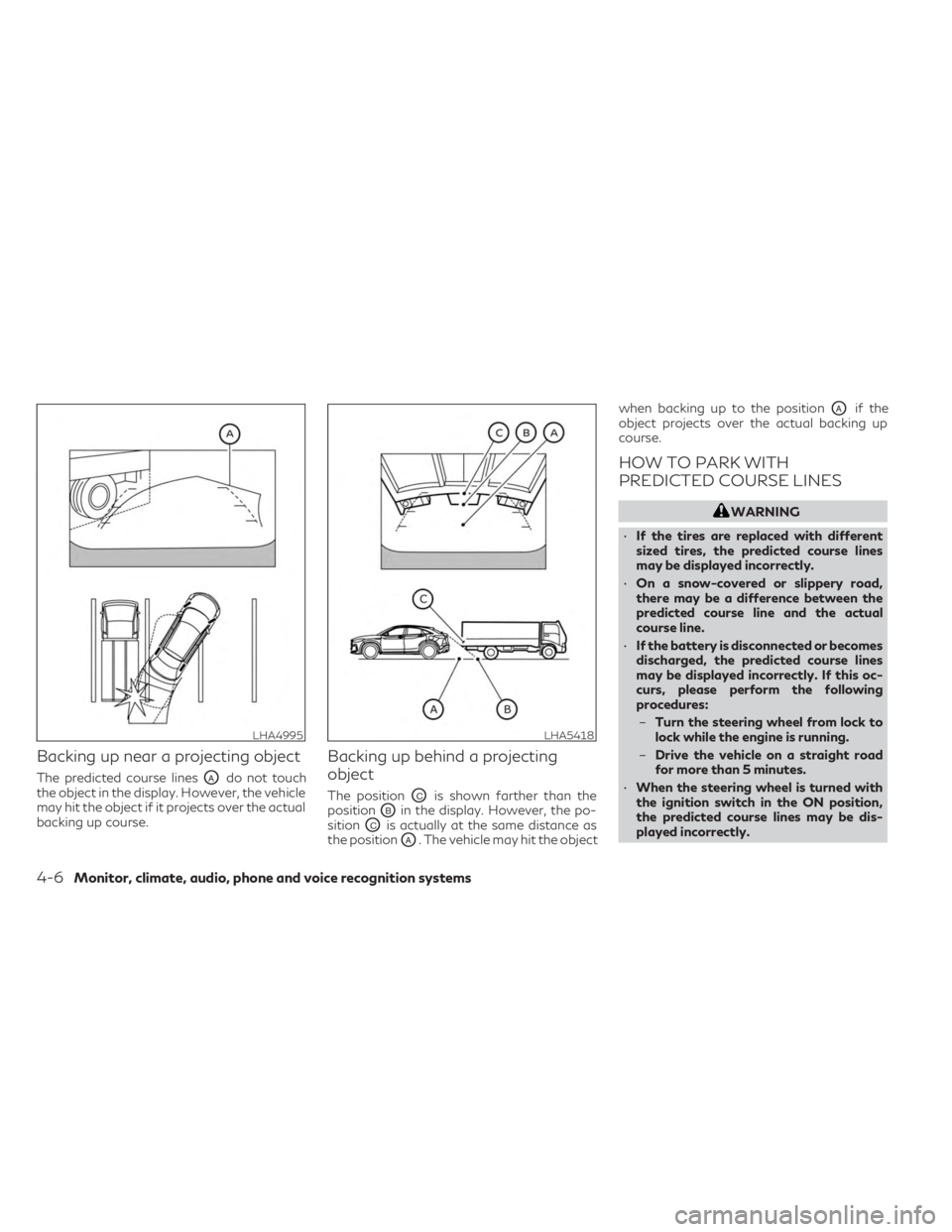
Backing up near a projecting object
The predicted course linesOAdo not touch
the object in the display. However, the vehicle
may hit the object if it projects over the actual
backing up course.
Backing up behind a projecting
object
The positionOCis shown farther than the
position
OBin the display. However, the po-
sition
OCis actually at the same distance as
the position
OA. The vehicle may hit the object when backing up to the position
OAif the
object projects over the actual backing up
course.
HOW TO PARK WITH
PREDICTED COURSE LINES
WARNING
• If the tires are replaced with different
sized tires, the predicted course lines
may be displayed incorrectly.
• On a snow-covered or slippery road,
there may be a difference between the
predicted course line and the actual
course line.
• If the battery is disconnected or becomes
discharged, the predicted course lines
may be displayed incorrectly. If this oc-
curs, please perform the following
procedures:
– Turn the steering wheel from lock to
lock while the engine is running.
– Drive the vehicle on a straight road
for more than 5 minutes.
• When the steering wheel is turned with
the ignition switch in the ON position,
the predicted course lines may be dis-
played incorrectly.
LHA4995LHA5418
4-6Monitor, climate, audio, phone and voice recognition systems
Page 220 of 526

Backing up behind a projecting
object
The positionOCis shown farther than the
position
OBin the display. However, the po-
sition
OCis actually at the same distance as
the position
OA. The vehicle may hit the object when backing up to the position
OAif the
object projects over the actual backing up
course.
HOW TO PARK WITH
PREDICTED COURSE LINES
WARNING
• If the tires are replaced with different
sized tires, the predicted course lines
may be displayed incorrectly.
• On a snow-covered or slippery road,
there may be a difference between the
predicted course line and the actual
course line.
• If the battery is disconnected or becomes
discharged, the predicted course lines
may be displayed incorrectly. If this oc-
curs, please perform the following
procedures:
– Turn the steering wheel from lock to
lock while the engine is running.
– Drive the vehicle on a straight road
for more than 5 minutes.
• When the steering wheel is turned with
the ignition switch in the ON position,
the predicted course lines may be dis-
played incorrectly. 1. Visually check that the parking space is
safe before parking your vehicle.
LHA5418LHA5043
4-18Monitor, climate, audio, phone and voice recognition systems
Page 233 of 526

NOTE:
The blue or green MOD icon will change to
orange if one of the following has occurred:
•When the system is malfunctioning.
• When the component temperature
reaches a high level (icon will blink).
• When the RearView camera has detected
a blockage (icon will blink).
If the icon light continues to illuminate or-
ange, have the MOD system checked. It is
recommended that you visit an INFINITI re-
tailer for this service.
SYSTEM MAINTENANCE
CAUTION
• Do not use alcohol, benzine or thinner to
clean the camera. This will cause
discoloration.
• Do not damage the camera as the moni-
tor screen may be adversely affected. If dirt, rain or snow accumulates on any of the
cameras
O1, the MOD system may not oper-
ate properly. Clean the camera by wiping
with a cloth dampened with a diluted mild
cleaning agent and then wiping with a dry
cloth.
LHA5420
Monitor, climate, audio, phone and voice recognition systems4-31