air INFINITI QX56 2010 Factory Service Manual
[x] Cancel search | Manufacturer: INFINITI, Model Year: 2010, Model line: QX56, Model: INFINITI QX56 2010Pages: 4210, PDF Size: 81.91 MB
Page 3490 of 4210
SN-18
< COMPONENT DIAGNOSIS >
SONAR BUZZER CIRCUIT INSPECTION
NO >> Replace buzzer. Refer to SN-51, "Removal and Installation".
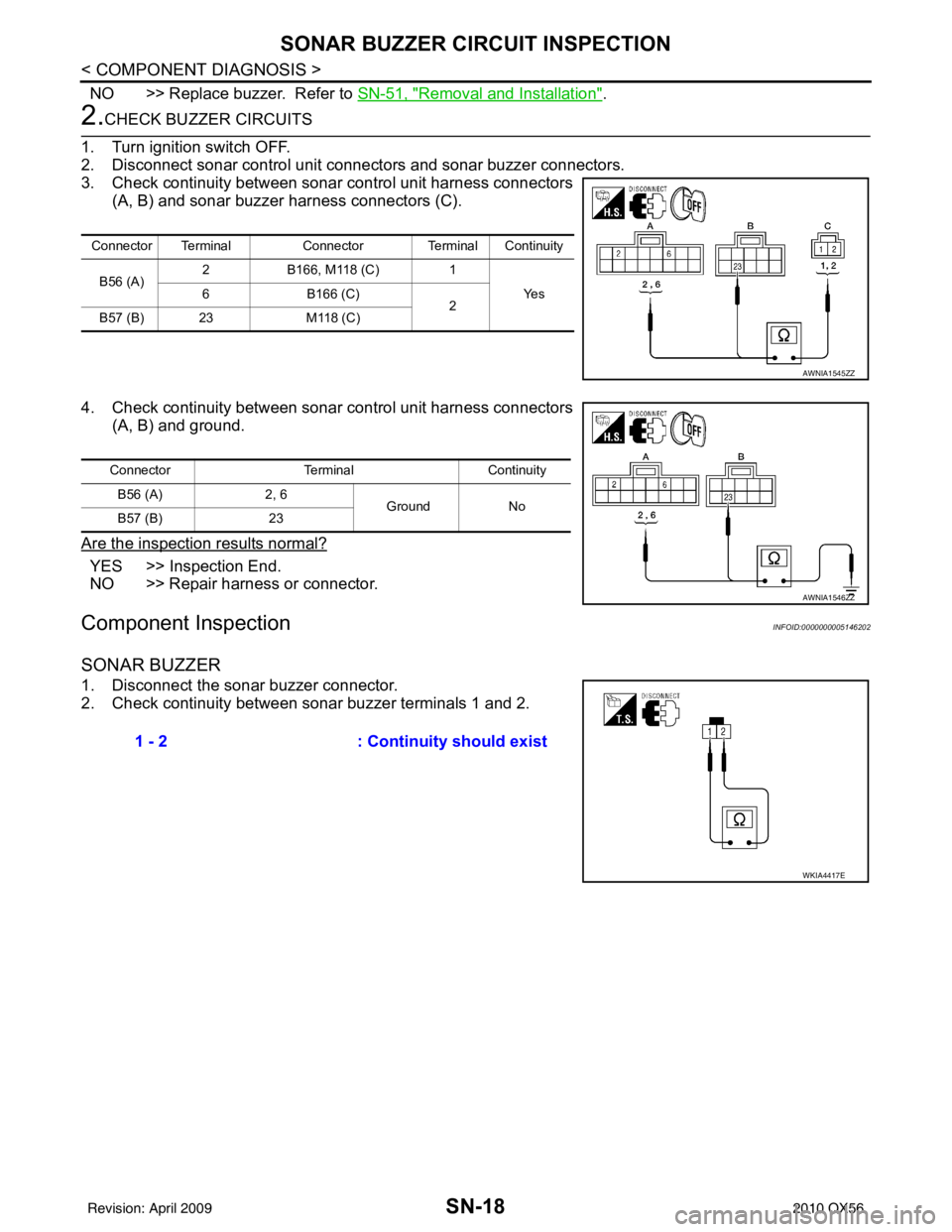
2.CHECK BUZZER CIRCUITS
1. Turn ignition switch OFF.
2. Disconnect sonar control unit connectors and sonar buzzer connectors.
3. Check continuity between sonar control unit harness connectors
(A, B) and sonar buzzer harness connectors (C).
4. Check continuity between sonar control unit harness connectors
(A, B) and ground.
Are the inspection results normal?
YES >> Inspection End.
NO >> Repair harness or connector.
Component InspectionINFOID:0000000005146202
SONAR BUZZER
1. Disconnect the sonar buzzer connector.
2. Check continuity between sonar buzzer terminals 1 and 2.
Connector Terminal Connector Terminal Continuity
B56 (A) 2
B166, M118 (C) 1
Ye s
6 B166 (C)
2
B57 (B) 23 M118 (C)
AWNIA1545ZZ
ConnectorTerminalContinuity
B56 (A) 2, 6
Ground No
B57 (B) 23
AWNIA1546ZZ
1 - 2 : Continuity should exist
WKIA4417E
Revision: April 20092010 QX56
Page 3491 of 4210

SN
SONAR SYSTEM OFF SWITCH CIRCUIT INSPECTIONSN-19
< COMPONENT DIAGNOSIS >
C
DE
F
G H
I
J
K L
M B A
O P
SONAR SYSTEM OFF SWITCH CIRCUIT INSPECTION
DescriptionINFOID:0000000005146203
The sonar system can be disabled by momentarily pressing the sonar system OFF switch. The sonar system
OFF indicator lamp will be illuminated when the sonar s ystem is OFF. Enabling the sonar system will cause
the sonar system OFF indicator to go out. The indica tor will flash if a malfunction exists in the system.
Diagnosis Procedure (With Rear Sonar System)INFOID:0000000005146204
Regarding Wiring Diagram information, refer to SN-23, "Wiring Diagram".
1.CHECK SONAR SYSTEM OFF SWITCH
Refer to SN-20, "
Component Inspection".
Is the inspection result normal?
YES >> GO TO 2.
NO >> Replace sonar system OFF switch. Refer to IP-14, "
Removal and Installation".
2.CHECK SONAR SYSTEM OFF SWITCH CIRCUITS
1. Turn ignition switch OFF.
2. Disconnect sonar control unit connector and sonar system OFF switch connector.
3. Check continuity between sonar control unit harness connector (A) and sonar system OFF switch harness connector (B).
4. Check continuity between sonar system OFF switch harness connector and ground.
Are the inspection results normal?
YES >> Inspection End.
NO >> Repair harness or connector.
Diagnosis Procedure (With Front and Rear Sonar System)INFOID:0000000005146205
Regarding Wiring Diagram information, refer to SN-33, "Wiring Diagram".
1.CHECK SONAR SYSTEM OFF SWITCH
Refer to SN-20, "
Component Inspection".
Is the inspection result normal?
YES >> GO TO 2.
Connector Terminal Connector Terminal Continuity
B24 (A) 4
M116 (B) 5
Ye s
13 1
AWNIA1577ZZ
ConnectorTerminalContinuity
M116 1, 5
Ground No
2, 6 Yes
AWNIA1578ZZ
Revision: April 20092010 QX56
Page 3492 of 4210

SN-20
< COMPONENT DIAGNOSIS >
SONAR SYSTEM OFF SWITCH CIRCUIT INSPECTION
NO >> Replace sonar system OFF switch. Refer to IP-14, "Removal and Installation".
2.CHECK SONAR SYSTEM OFF SWITCH CIRCUITS
1. Turn ignition switch OFF.
2. Disconnect sonar control unit connector and sonar system OFF switch connector.
3. Check continuity between sonar control unit harness connector (A) and sonar system OFF switch harness connector (B).
4. Check continuity between sonar system OFF switch harness connector and ground.
Are the inspection results normal?
YES >> Inspection End.
NO >> Repair harness or connector.
Component InspectionINFOID:0000000005146206
SONAR SYSTEM OFF SWITCH
1. Disconnect the sonar system OFF switch connector.
2. Check continuity between the following switch terminals.
SONAR SYSTEM OFF INDICATOR
1. Disconnect the sonar system OFF switch connector.
2. Apply battery voltage to switch terminal 5.
3. Check the sonar system OFF indicator operation when switch terminal 6 is connected to battery ground.
Connector Terminal Connector Terminal Continuity
B56 (A) 5
M116 (B) 5
Ye s
11 1
ALNIA1087ZZ
ConnectorTerminalContinuity
M116 1, 5
Ground No
2, 6 Yes
ALNIA1088ZZ
Sonar system OFF switch Terminals Continuity
Depressed 1 - 2Ye s
Released No
AWNIA0181ZZ
Terminals Condition Operation
Sonar system
OFF switch 5
Battery voltage
Indicator ON
6G ro u nd
AWNIA0182ZZ
Revision: April 20092010 QX56
Page 3517 of 4210

SN
SONAR SYSTEM SYMPTOMSSN-45
< SYMPTOM DIAGNOSIS >
C
DE
F
G H
I
J
K L
M B A
O P
SYMPTOM DIAGNOSIS
SONAR SYSTEM SYMPTOMS
Symptom TableINFOID:0000000005146213
Symptom Repair order
When the sonar system is OFF, the OFF indicator does not light
and the sonar buzzer does not sound. 1. Check sonar system OFF switch. Refer to
SN-20, "
Compo-
nent Inspection" or SN-19, "Diagnosis Procedure (With
Front and Rear Sonar System)".
2. Check harness and connections for sonar system OFF
switch.
3. Replace sonar control unit. Refer to SN-50, "
Removal and
Installation".
When the sonar system is OFF, the OFF indicator lamp does not
light but the sonar buzzer does sound. 1. Check sonar system OFF switch. Refer to
SN-19, "
Diagno-
sis Procedure (With Rear Sonar System)" or SN-19, "Diag-
nosis Procedure (With Front and Rear Sonar System)".
2. Check harness and connections for sonar system OFF indi- cator lamp.
3. Replace sonar control unit.
When the sonar system is OFF, the sonar buzzer does not sound
but the OFF indicator lamp lights. 1. Check sonar buzzer. Refer to
SN-18, "
Component Inspec-
tion" or SN-17, "Diagnosis Procedure (With Front and Rear
Sonar System)".
2. Check harness and connections between sonar buzzer and sonar control unit.
3. Replace sonar control unit.
When sonar system is ON, the sonar system OFF indicator lamp
lights up and the sonar buzzer sounds intermittently (for about 4
seconds). (Rear sonar system only) 1. Check harnesses between sonar sensors and sonar control
unit for an open condition.
2. Check sonar sensors. Refer to SN-5, "
Preliminary Check".
3. Replace sonar control unit.
The sonar system still operates when the sonar system is OFF. 1. Replace sonar control unit.
When the transmission gear selector lever is in the R position and
the sonar system is ON, the rear sonar system does not operate. 1. Check transmissin range switch. Refer to
TM-45, "
Diagnosis
Procedure".
2. Check back-up lamp relay.
3. Check related harness and connections for back-up lamp re- lay.
4. Replace sonar control unit.
When the transmission gear selector lever is in a forward drive
gear and the sonar system is ON, the front sonar system does not
operate. (With front and rear sonar system only) 1. Check harness and connections between sonar control unit
and combination meter.
2. Replace sonar control unit.
Sonar system OFF indicator lamp lights up and buzzer sounds al-
though there are no obstacles within the detection range. 1. Check sonar sensors.
2. Check harness and connections between sonar sensors
and sonar control unit.
3. Replace sonar control unit.
The sonar sensors do not detect objects in the detectable range. 1. Check sonar sensors.
2. Replace sonar control unit.
Revision: April 20092010 QX56
Page 3518 of 4210

SN-46
< PRECAUTION >
PRECAUTION
PRECAUTION
PRECAUTION
Precaution for Supplemental Restraint System (SRS) "AIR BAG" and "SEAT BELT
PRE-TENSIONER"
INFOID:0000000005403331
The Supplemental Restraint System such as “A IR BAG” and “SEAT BELT PRE-TENSIONER”, used along
with a front seat belt, helps to reduce the risk or severity of injury to the driver and front passenger for certain
types of collision. This system includes seat belt switch inputs and dual stage front air bag modules. The SRS
system uses the seat belt switches to determine the front air bag deployment, and may only deploy one front
air bag, depending on the severity of a collision and w hether the front occupants are belted or unbelted.
Information necessary to service the system safely is included in the SR and SB section of this Service Man-
ual.
WARNING:
• To avoid rendering the SRS inopera tive, which could increase the risk of personal injury or death in
the event of a collision which would result in air bag inflation, all maintenance must be performed by
an authorized NISSAN/INFINITI dealer.
• Improper maintenance, including in correct removal and installation of the SRS, can lead to personal
injury caused by unintent ional activation of the system. For re moval of Spiral Cable and Air Bag
Module, see the SR section.
• Do not use electrical test equipmen t on any circuit related to the SRS unless instructed to in this
Service Manual. SRS wiring harn esses can be identified by yellow and/or orange harnesses or har-
ness connectors.
PRECAUTIONS WHEN USING POWER TOOLS (AIR OR ELECTRIC) AND HAMMERS
WARNING:
• When working near the Airbag Diagnosis Sensor Unit or other Airbag System sensors with the Igni-
tion ON or engine running, DO NOT use air or electri c power tools or strike near the sensor(s) with a
hammer. Heavy vibration could activate the sensor( s) and deploy the air bag(s), possibly causing
serious injury.
• When using air or electric power tools or hammers , always switch the Ignition OFF, disconnect the
battery, and wait at least 3 minu tes before performing any service.
Precaution Necessary for Steering W heel Rotation After Battery Disconnect
INFOID:0000000005403332
NOTE:
• This Procedure is applied only to models with Intelligent Key system and NATS (NISSAN ANTI-THEFT SYS-
TEM).
• Remove and install all control units after disconnecting both battery cables with the ignition knob in the
″LOCK ″ position.
• Always use CONSULT-III to perform self-diagnosis as a part of each function inspection after finishing work.
If DTC is detected, perform trouble diagnosis according to self-diagnostic results.
For models equipped with the Intelligent Key system and NATS, an electrically controlled steering lock mech-
anism is adopted on the key cylinder.
For this reason, if the battery is disconnected or if the battery is discharged, the steering wheel will lock and
steering wheel rotation will become impossible.
If steering wheel rotation is required when battery pow er is interrupted, follow the procedure below before
starting the repair operation.
OPERATION PROCEDURE
1. Connect both battery cables. NOTE:
Supply power using jumper cables if battery is discharged.
2. Use the Intelligent Key or mechanical key to turn the ignition switch to the ″ACC ″ position. At this time, the
steering lock will be released.
3. Disconnect both battery cables. The steering lock will remain released and the steering wheel can be rotated.
4. Perform the necessary repair operation.
Revision: April 20092010 QX56
Page 3519 of 4210

SN
PRECAUTIONSN-47
< PRECAUTION >
C
DE
F
G H
I
J
K L
M B A
O P
5. When the repair work is completed, return the ignition switch to the ″LOCK ″ position before connecting
the battery cables. (At this time, the steering lock mechanism will engage.)
6. Perform a self-diagnosis check of al l control units using CONSULT-III.
Revision: April 20092010 QX56
Page 3524 of 4210

SR-1
RESTRAINTS
C
DE
F
G
I
J
K L
M
SECTION SR
A
B
SR
N
O P
CONTENTS
SRS AIRBAG
PRECAUTION ....... ........................................2
PRECAUTIONS .............................................. .....2
Precaution for Supplemental Restraint System
(SRS) "AIR BAG" and "SEAT BELT PRE-TEN-
SIONER" ............................................................. ......
2
Precaution for SRS "AIR BAG" and "SEAT BELT
PRE-TENSIONER" Service ......................................
2
Precaution Necessary for Steering Wheel Rota-
tion After Battery Disconnect ............................... ......
2
Occupant Classification System Precaution .............3
PREPARATION ............................................4
PREPARATION .............................................. .....4
Special Service Tool ........................................... ......4
ON-VEHICLE REPAIR ..................................5
DRIVER AIR BAG MODULE .......................... .....5
Removal and Installation ...........................................5
SPIRAL CABLE ............................................. .....7
Removal and Installation ...........................................7
FRONT PASSENGER AIR BAG MODULE ......10
Removal and Installation ..................................... ....10
SIDE CURTAIN AIR BAG MODULE ................13
Removal and Installation .........................................13
CRASH ZONE SENSOR ...................................14
Removal and Installation ..................................... ....14
SIDE AIR BAG (SATELLITE) SENSOR ...........15
Removal and Installation .........................................15
FRONT SEAT BELT PRE-TENSIONER ...........16
Removal and Installation .........................................16
DIAGNOSIS SENSOR UNIT .............................17
Removal and Installation .........................................17
OCCUPANT CLASSIFICATION SYSTEM
CONTROL UNIT ................................................
19
Removal and Installation .........................................19
COLLISION DIAGNOSIS ..................................20
For Frontal Collision ................................................20
For Side and Rollover Collision ...............................21
Revision: April 20092010 QX56
Page 3525 of 4210

SR-2
< PRECAUTION >
PRECAUTIONS
PRECAUTION
PRECAUTIONS
Precaution for Supplemental Restraint System (SRS) "AIR BAG" and "SEAT BELT
PRE-TENSIONER"
INFOID:0000000005250379
The Supplemental Restraint System such as “A IR BAG” and “SEAT BELT PRE-TENSIONER”, used along
with a front seat belt, helps to reduce the risk or severity of injury to the driver and front passenger for certain
types of collision. This system includes seat belt switch inputs and dual stage front air bag modules. The SRS
system uses the seat belt switches to determine the front air bag deployment, and may only deploy one front
air bag, depending on the severity of a collision and w hether the front occupants are belted or unbelted.
Information necessary to service the system safely is included in the SR and SB section of this Service Man-
ual.
WARNING:
• To avoid rendering the SRS inopera tive, which could increase the risk of personal injury or death in
the event of a collision which would result in air bag inflation, all maintenance must be performed by
an authorized NISSAN/INFINITI dealer.
• Improper maintenance, including in correct removal and installation of the SRS, can lead to personal
injury caused by unintent ional activation of the system. For re moval of Spiral Cable and Air Bag
Module, see the SR section.
• Do not use electrical test equipmen t on any circuit related to the SRS unless instructed to in this
Service Manual. SRS wiring harn esses can be identified by yellow and/or orange harnesses or har-
ness connectors.
PRECAUTIONS WHEN USING POWER TOOLS (AIR OR ELECTRIC) AND HAMMERS
WARNING:
• When working near the Airbag Diagnosis Sensor Unit or other Airbag System sensors with the Igni-
tion ON or engine running, DO NOT use air or electri c power tools or strike near the sensor(s) with a
hammer. Heavy vibration could activate the sensor( s) and deploy the air bag(s), possibly causing
serious injury.
• When using air or electric power tools or hammers , always switch the Ignition OFF, disconnect the
battery, and wait at least 3 minu tes before performing any service.
Precaution for SRS "AIR BAG" and "S EAT BELT PRE-TENSIONER" Service
INFOID:0000000005147754
• Do not use electrical test equipment to check SRS ci rcuits unless instructed to in this Service Manual.
• Before servicing the SRS, turn ignition switch OFF, disconnect both battery terminals and wait at least 3 min- utes.
For approximately 3 minutes after the terminals are remov ed, it is still possible for the air bags and seat belt
pre-tensioners to deploy. Therefore, do not work on any SRS connectors or wires until at least 3 minutes
have passed.
• The air bag diagnosis sensor unit must always be installed with the arrow mark “ ⇐” pointing toward the front
of the vehicle for proper operation. Also check air bag diagnosis sensor unit for cracks, deformities or rust
before installation and replace as required.
• The spiral cable must be aligned with the neutral position since its rotations are limited. Do not attempt to
turn steering wheel or column after removal of steering gear.
• Handle air bag module carefully. Always place driver and front passenger air bag modules with the pad side facing upward and seat mounted front side air bag module standing with the stud bolt side facing down.
• Conduct self-diagnosis to check entire SRS for proper function after replacing any components.
• After air bag inflates, the front instrument panel assembly should be replaced if damaged.
Precaution Necessary for Steering Wheel Rotation After Battery Disconnect
INFOID:0000000005256816
NOTE:
• This Procedure is applied only to models with Intelligent Key system and NATS (NISSAN ANTI-THEFT SYS-
TEM).
• Remove and install all control units after disconnecting both battery cables with the ignition knob in the ″LOCK ″ position.
Revision: April 20092010 QX56
Page 3526 of 4210

PRECAUTIONSSR-3
< PRECAUTION >
C
DE
F
G
I
J
K L
M A
B
SR
N
O P
• Always use CONSULT-III to perform self-diagnosis as a part of each function inspection after finishing work.
If DTC is detected, perform trouble diagnosis according to self-diagnostic results.
For models equipped with the Intelligent Key system and NATS , an electrically controlled steering lock mech-
anism is adopted on the key cylinder.
For this reason, if the battery is disconnected or if the battery is discharged, the steering wheel will lock and
steering wheel rotation will become impossible.
If steering wheel rotation is required when battery power is interrupted, follow the procedure below before
starting the repair operation.
OPERATION PROCEDURE
1. Connect both battery cables. NOTE:
Supply power using jumper cables if battery is discharged.
2. Use the Intelligent Key or mechanical key to turn the ignition switch to the ″ACC ″ position. At this time, the
steering lock will be released.
3. Disconnect both battery cables. The steering lock will remain released and the steering wheel can be
rotated.
4. Perform the necessary repair operation.
5. When the repair work is completed, return the ignition switch to the ″LOCK ″ position before connecting
the battery cables. (At this time, the steering lock mechanism will engage.)
6. Perform a self-diagnosis check of al l control units using CONSULT-III.
Occupant Classification System PrecautionINFOID:0000000005147755
Replace control unit and passenger front seat cushion as an assembly.
Revision: April 20092010 QX56
Page 3527 of 4210
SR-4
< PREPARATION >
PREPARATION
PREPARATION
PREPARATION
Special Service ToolINFOID:0000000005147756
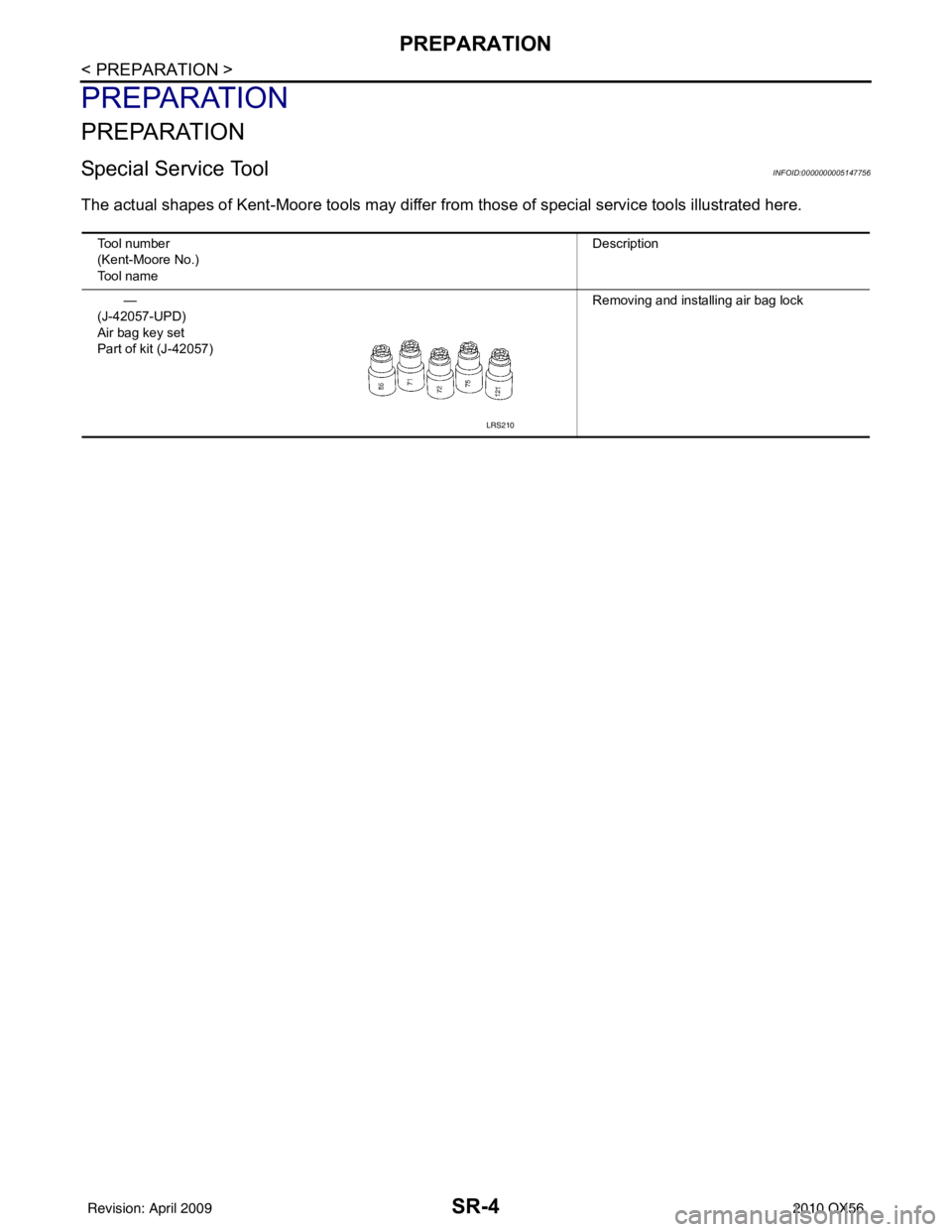
The actual shapes of Kent-Moore tools may differ from those of special service tools illustrated here.
Tool number
(Kent-Moore No.)
Tool name Description
—
(J-42057-UPD)
Air bag key set
Part of kit (J-42057) Removing and installing air bag lock
LRS210
Revision: April 20092010 QX56