cruise control INFINITI QX60 2014 Owner's Manual
[x] Cancel search | Manufacturer: INFINITI, Model Year: 2014, Model line: QX60, Model: INFINITI QX60 2014Pages: 547, PDF Size: 7.39 MB
Page 17 of 547
23. Ignition switch (P. 5-12)
24. Cruise control main/set switches
(if so equipped) and Intelligent cruise
control main/set switches
(if so equipped) (P. 5-51, P.5-53)
25. Dynamic Driver Assistance switch
(if so equipped) (P. 5-72)
26. Tilt steering wheel control (P. 3-27)
27. Bluetooth® Hands-Free Phone System
(P. 4-109, 4-123)
28. Steering wheel switch for audio control
(P.4-94)
29. Hood release (P. 3-20)
30. Vehicle Dynamic Control (VDC) OFF
switch (P. 2-40)
Heated steering wheel switch
(if so equipped) (P.2-39)
Headlight aiming control (P. 2-33)
Warning System switch
(if so equipped) (P. 2-40)
Power inverter switch (if so equipped)
(P. 2-41)
Liftgate release switch (P.3-20)
Power liftgate main switch (P. 3-23)
31. Control panel and Vehicle Information
Display switches (P.4-14, 2-15)*: Refer to the separate Navigation System Own-
er’s Manual (if so equipped) .
See the page number indicated in paren-
theses for operating details.
Illustrated table of contents0-7
Page 95 of 547
23. Ignition switch (P. 5-12)
24. Cruise control main/set switches
(if so equipped) and Intelligent cruise
control main/set switches
(if so equipped) (P. 5-51, P.5-53)
25. Dynamic Driver Assistance switch
(if so equipped) (P. 5-72)
26. Tilt steering wheel control (P. 3-27)
27. Bluetooth® Hands-Free Phone System
(P. 4-109, 4-123)
28. Steering wheel switch for audio control
(P.4-94)
29. Hood release (P. 3-20)
30. Vehicle Dynamic Control (VDC) OFF
switch (P. 2-40)
Heated steering wheel switch
(if so equipped) (P.2-39)
Headlight aiming control (P. 2-33)
Warning System switch
(if so equipped) (P. 2-40)
Power inverter switch (if so equipped)
(P. 2-41)
Liftgate release switch (P.3-20)
Power liftgate main switch (P. 3-23)
31. Control panel and Vehicle Information
Display switches (P.4-14, 2-15)*: Refer to the separate Navigation System Own-
er’s Manual (if so equipped) .
See the page number indicated in paren-
theses for operating details.
Instruments and controls2-3
Page 106 of 547
Make sure the ignition switch is placed in the
LOCK position, and take the Intelligent Key with
you when leaving the vehicle.
Lane departure warning chime (if so
equipped)
When the Lane Departure Warning (LDW) or
Lane Departure Prevention (LDP) system is on,
the chime sounds if the vehicle is traveling close
to either the left or the right of a traveling lane with
detectable lane markers.
See “Lane Departure Warning (LDW)
system/Lane Departure Prevention (LDP) sys-
tem” in the “Starting and driving” section for more
details.
Light reminder chime
With the ignition switch placed in the OFF posi-
tion, a chime sounds when the driver’s door is
opened if the headlights or parking lights are on.
Turn the headlight control switch off before leav-
ing the vehicle.
Intelligent Key door buzzer
The Intelligent Key door buzzer sounds if any one
of the following improper operations is found.
●The ignition switch is not returned to the
LOCK position when locking the doors.
●The Intelligent Key is left inside the vehicle
when locking the doors.
●The Intelligent Key is taken outside the ve-
hicle when operating the vehicle.
●Any doors are not closed securely when
locking the doors.
When the buzzer sounds, be sure to check both
the vehicle and the Intelligent Key System. See
“INFINITI Intelligent Key” in the “Pre-driving
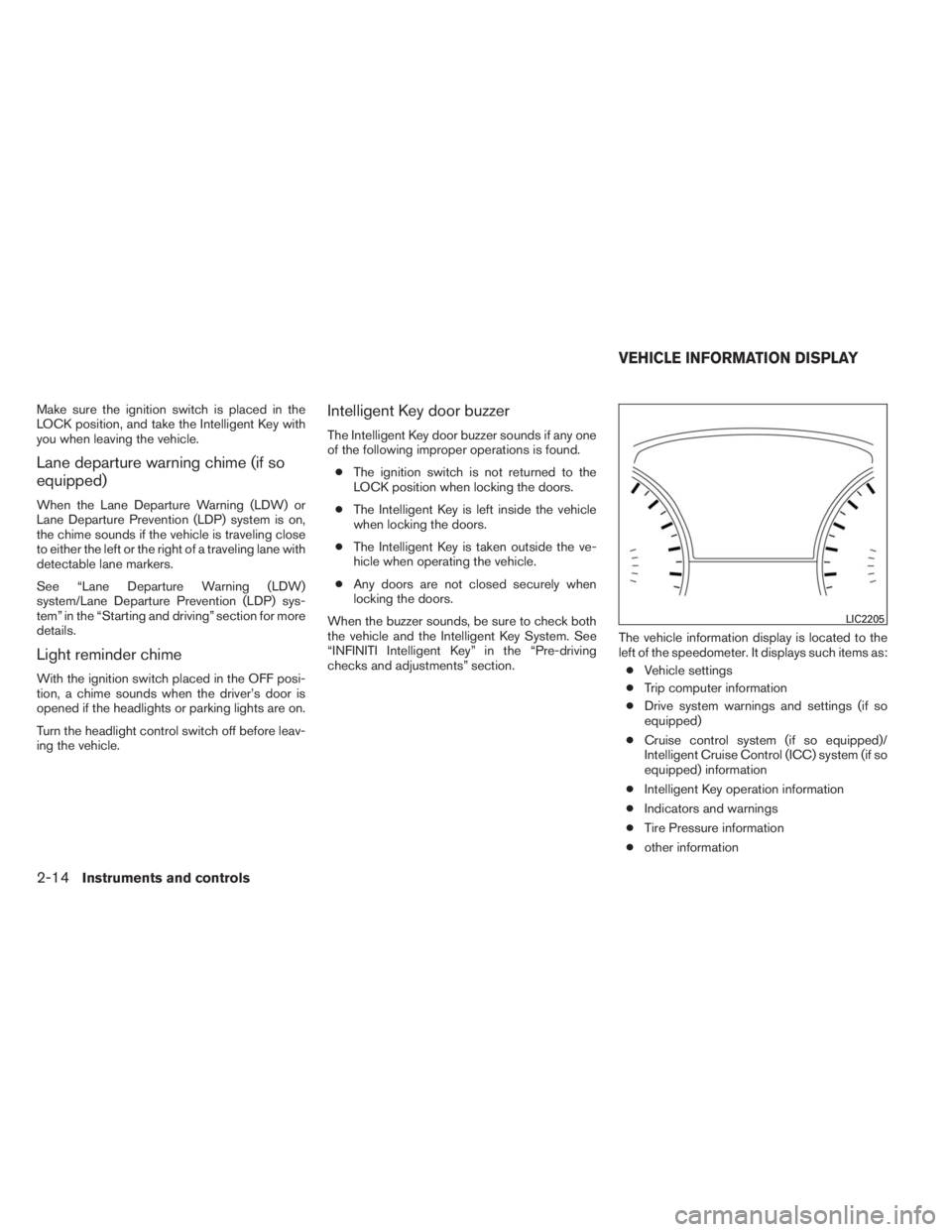
checks and adjustments” section.The vehicle information display is located to the
left of the speedometer. It displays such items as:
●Vehicle settings
●Trip computer information
●Drive system warnings and settings (if so
equipped)
●Cruise control system (if so equipped)/
Intelligent Cruise Control (ICC) system (if so
equipped) information
●Intelligent Key operation information
●Indicators and warnings
●Tire Pressure information
●other information
LIC2205
VEHICLE INFORMATION DISPLAY
2-14Instruments and controls
Page 341 of 547

5 Starting and driving
Precautions when starting and driving................5-4
Exhaust gas (carbon monoxide)..................5-4
Three-way catalyst..............................5-4
Tire Pressure Monitoring System (TPMS)..........5-5
On-pavement and off-road driving
precautions....................................5-8
Avoiding collision and rollover....................5-8
Off-road recovery...............................5-9
Rapid air pressure loss..........................5-9
Drinking alcohol/drugs and driving...............5-10
Driving safety precautions......................5-10
Push-Button Ignition Switch.......................5-12
Operating range...............................5-13
Push-button ignition switch positions............5-14
Emergency engine shut off.....................5-14
INFINITI Intelligent Key battery discharge.........5-15
INFINITI vehicle immobilizer system..............5-15
Before starting the engine.........................5-16
Starting the engine...............................5-16
Remote start (if so equipped)...................5-17
Driving the vehicle................................5-17
Continuously Variable Transmission (CVT)........5-17
Parking brake....................................5-21INFINITI Drive mode selector.......................5-22
Standard mode................................5-22
Sport mode...................................5-22
Snow mode...................................5-22
ECO mode...................................5-23
Lane Departure Warning (LDW) system/ Lane
Departure Prevention (LDP) system
(if so equipped)..................................5-25
Lane departure warning (LDW) system...........5-26
Lane departure prevention (LDP) system . . .......5-28
Lane camera unit maintenance..................5-32
Blind Spot Warning (BSW) System/Blind Spot
Intervention® (BSI) System/Back-up Collision
Intervention (BCI) System (if so equipped)..........5-32
Blind spot warning (BSW) system/blind spot
intervention® (BSI) systems....................5-33
BSW system operation........................5-34
BSI system operation..........................
5-36
BSW/BSI driving situations.....................5-39
The back-up collision intervention (BCI)
system (if so equipped)........................5-44
BCI system operation..........................5-44
Radar maintenance............................5-50
Cruise control (if so equipped).....................5-51
Page 342 of 547
Precautions on cruise control ...................5-51
Cruise control operations.......................5-51
Intelligent cruise control (ICC) system
(Full Speed Range) (if so equipped)................5-53
Selecting the vehicle-to-vehicle distance
control mode..................................5-54
Vehicle-to-vehicle distance control mode.........5-54
Precautions on vehicle-to-vehicle distance
control mode..................................5-55
Vehicle-to-vehicle distance control mode
operation.....................................5-56
Conventional (fixed speed) cruise control
mode........................................5-68
Preview function (for Intelligent Cruise
Control system equipped models)...............5-72
Distance Control Assist (DCA) system
(if so equipped)..................................5-72
Precautions on distance control assist
system.......................................5-72
Distance control assist operation................5-74
Forward Collision Warning (FCW) system
(if so equipped)..................................5-82
Precautions on FCW system....................5-83
FCW system operation.........................5-85Intelligent Brake Assist (IBA) system
(if so equipped) . . ................................5-86
Precautions on IBA system.....................5-86
IBA system operation..........................5-88
Break-in schedule................................5-89
Fuel efficient driving tips...........................5-89
Increasing fuel economy...........................5-90
Intelligent All-Wheel Drive (AWD) (if so equipped) . . . 5-90
Parking/parking on hills............................5-93
Power steering...................................5-94
Brake system....................................5-94
Brake precautions.............................5-94
Anti-lock Braking System (ABS).................5-95
Brake assist (if so equipped)....................5-96
Vehicle Dynamic Control (VDC) system.............5-96
Active trace control (if so equipped).............5-98
Brake force distribution........................5-98
Hill start assist system
............................5-99
Cold weather driving.............................5-100
Freeing a frozen door lock.....................5-100
Anti-freeze...................................5-100
Battery......................................5-100
Draining of coolant water......................5-100
Page 363 of 547

ECO MODE
Adjusts the engine and transmission to enhance
fuel economy.
NOTE:
Selecting this drive mode will not necessar-
ily improve fuel economy as many driving
factors influence its effectiveness.
Operation
Turn the drive mode select switch to the ECO
position. “ECO” appears in the vehicle informa-
tion display for 2 seconds and the ECO drive
indicator light illuminates on the instrument panel.
When the accelerator pedal is depressed within
the range of economy drive, the ECO drive indi-
cator light illuminates in green. When the accel-
erator pedal is depressed above the range of
economy drive, the color of the ECO drive indi-
cator light changes to orange. For ECO pedal
system equipped models see “ECO pedal sys-
tem” in this section.
The ECO drive indicator light will not illuminate in
the following cases:
●When the shift lever is in the R (Reverse)
position.●When the vehicle speed is below 3 MPH
(4.8 km/h) or over 90 MPH (144 km/h).
●When the Intelligent Cruise Control (ICC)
system (if so equipped) is operated.
ECO pedal system
Helps assist the driver to improve fuel economy
by increasing the reaction force of the accelera-
tor pedal. When the ECO drive indicator light is
blinking or turns orange, the ECO pedal system
increases the reaction force of the accelerator
pedal.
ECO drive indicatorIlluminate or blink
when
Illuminate
(green)When the pedal is
depressed within
range of economy
drive
Blinks
(green)When the pedal is
depressed likely
over the range of
economy drive
Illuminate
(orange)When the pedal is
depressed over
the range of
economy drive
When the ECO drive indicator illuminates in
green, the accelerator reaction force is normal.
When the ECO drive indicator light is blinking or
turns orange, the ECO pedal system increases
the reaction force of the accelerator pedal.
The ECO pedal system may not vary accelerator
reaction force under the following conditions:
●When the shift lever is in the N (Neutral) or
R (Reverse) position.
●When Intelligent Cruise Control (ICC) (if so
equipped) is being operated.
If the ECO pedal system malfunctions, it will
cancel automatically. The ECO pedal system will
not vary the reaction force of the accelerator
pedal.
When the drive mode select switch is rotated
from the ECO mode to another mode (STAN-
DARD, SPORT or SNOW) while the ECO pedal
system is operating, the ECO pedal system con-
tinues to operate until the pedal is released.
If the accelerator pedal is depressed quickly, the
ECO pedal system will not increase the reaction
force of the acceleration pedal. The ECO pedal
system is not designed to prevent the vehicle
from accelerating.
Starting and driving5-23
Page 371 of 547

2. Select “Driver Aids”, and press the ENTER
button.
3. To set the LDP system to on or off, use
the
buttons to navigate in the menu
and use the ENTER button to select or
change an item:
●Select “Lane” and press the ENTER but-
ton.
– To turn on the warning, use the ENTER
button to check box for Warning (LDW)”
– To turn on the assistance system, use the
ENTER button to check box for “Assis-
tance (LDP)”
Automatic deactivation
Condition A:
The warning and assist functions of the LDP
system are not designed to work under the fol-
lowing conditions:
●When you operate the lane change signal
and change the traveling lanes in the direc-
tion of the signal. (The LDP system will be
deactivated for approximately 2 seconds af-
ter the lane change signal is turned off.)
●When the vehicle speed lowers to less than
approximately 45 MPH (70 km/h).After the above conditions have finished and the
necessary operating conditions are satisfied, the
warning and assist functions will resume.
Condition B:
The assist function of the LDP system is not
designed to work under the following conditions
(warning is still functional):
●When the brake pedal is depressed.
●When the steering wheel is turned as far as
necessary for the vehicle to change lanes.
●When the accelerator pedal is applied dur-
ing LDP system operation.
●When the Intelligent Cruise Control (ICC)
approach warning occurs.
●When the hazard warning flashers are oper-
ated.
●When driving on a curve at high speed.
After the above conditions have finished and the
necessary operating conditions are satisfied, the
LDP system application of the brakes will resume.
Condition C:
If the following messages appear in the vehicle
information display, a chime will sound and the
LDP system will be turned off automatically.●“Unavailable Road is slippery”:
When the VDC system (except TCS func-
tion) or ABS operates.
●“Unavailable VDC OFF”:
When the VDC system is turned off.
●“Unavailable Snow mode active”:
When the drive mode select switch is turned
to the SNOW mode.
Action to take:
When the above conditions no longer exist, turn
off the LDP system. Push the dynamic driver
assistance switch again to turn the LDP system
back on.
Temporary disabled status at high tem-
perature:
If the vehicle is parked in direct sunlight under
high temperature conditions (over approximately
104°F (40°C)) and then the LDP system is turned
on, the LDP system may be deactivated auto-
matically and the following message will appear
on the vehicle information display.
“Unavailable High Cabin Temp. ”
When the interior temperature is reduced, the
system will resume operating automatically.
Starting and driving5-31
Page 391 of 547
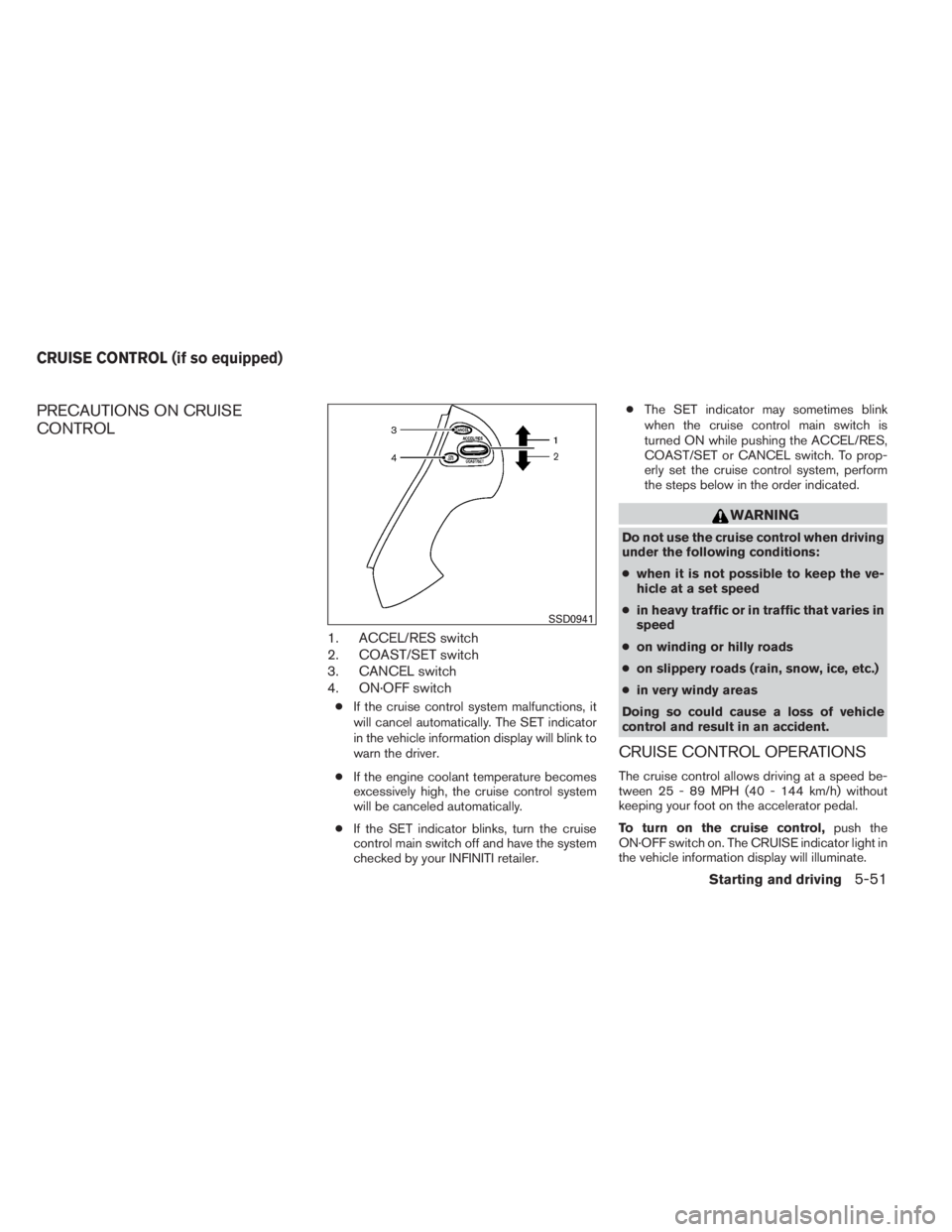
PRECAUTIONS ON CRUISE
CONTROL
1. ACCEL/RES switch
2. COAST/SET switch
3. CANCEL switch
4. ON·OFF switch
●If the cruise control system malfunctions, it
will cancel automatically. The SET indicator
in the vehicle information display will blink to
warn the driver.
●If the engine coolant temperature becomes
excessively high, the cruise control system
will be canceled automatically.
●If the SET indicator blinks, turn the cruise
control main switch off and have the system
checked by your INFINITI retailer.●The SET indicator may sometimes blink
when the cruise control main switch is
turned ON while pushing the ACCEL/RES,
COAST/SET or CANCEL switch. To prop-
erly set the cruise control system, perform
the steps below in the order indicated.
WARNING
Do not use the cruise control when driving
under the following conditions:
●when it is not possible to keep the ve-
hicle at a set speed
●in heavy traffic or in traffic that varies in
speed
●on winding or hilly roads
●on slippery roads (rain, snow, ice, etc.)
●in very windy areas
Doing so could cause a loss of vehicle
control and result in an accident.
CRUISE CONTROL OPERATIONS
The cruise control allows driving at a speed be-
tween 25 - 89 MPH (40 - 144 km/h) without
keeping your foot on the accelerator pedal.
To turn on the cruise control,push the
ON·OFF switch on. The CRUISE indicator light in
the vehicle information display will illuminate.
SSD0941
CRUISE CONTROL (if so equipped)
Starting and driving5-51
Page 392 of 547

To set cruising speed,accelerate the vehicle to
the desired speed, push the COAST/SET switch
and release it. The SET indicator light in the
vehicle information display will illuminate. Take
your foot off the accelerator pedal. Your vehicle
maintains the set speed.
●To pass another vehicle,depress the ac-
celerator pedal. When you release the
pedal, the vehicle returns to the previously
set speed.
●The vehicle may not maintain the set speed
when going up or down steep hills. If this
happens, drive without the cruise control.
To cancel the preset speed,use one of the
following three methods.
●Push the CANCEL button; the SET indicator
light in the vehicle information display goes
out.
●Tap the brake pedal; the SET indicator light
goes out.
●Push the ON·OFF switch off. Both the
CRUISE indicator light and SET indicator
light in the vehicle information display go out.The cruise control is automatically canceled and
the SET light in the vehicle information display
goes out if:
●you depress the brake pedal while pushing
the ACCEL/RES or SET/COAST switch.
The preset speed is deleted from memory.
●the vehicle slows down more than 8 MPH
(13 km/h) below the set speed.
●you move the shift lever to N (Neutral) .
To reset at a faster cruising speed,use one of
the following three methods.
●Depress the accelerator pedal. When the
vehicle attains the desired speed, push and
release the COAST/SET switch.
●Push and hold the ACCEL/RES switch.
When the vehicle attains the speed you de-
sire, release the switch.
●Push and release the ACCEL/RES switch.
Each time you do this, the set speed in-
creases by about 1 MPH (1.6 km/h).To reset at a slower cruising speed,use one
of the following three methods.
●Lightly tap the brake pedal. When the ve-
hicle attains the desired speed, push the
COAST/SET switch and release it.
●Push and hold the COAST/SET switch. Re-
lease the switch when the vehicle slows to
the desired speed.
●Push and release the COAST/SET switch.
Each time you do this, the set speed de-
creases by about 1 MPH (1.6 km/h).
To resume the preset speed,push and re-
lease the ACCEL/RES switch. The vehicle re-
turns to the last set cruising speed when the
vehicle speed is over 25 MPH (40 km/h).
5-52Starting and driving
Page 393 of 547
The Intelligent Cruise Control (ICC) system
maintains a selected distance from the vehicle in
front of you within the speed range of 0 to
90 MPH (0 to 144 km/h) up to the set speed. The
set speed can be selected by the driver between
20 to 90 MPH (32 to 144 km/h).
The vehicle travels at a set speed when the road
ahead is clear.
The ICC system can be set to one of two cruise
control modes.
●Vehicle-to-vehicle distance control mode:
For maintaining a selected distance be-
tween your vehicle and the vehicle in front of
you up to the preset speed.
●Conventional (fixed speed) cruise control
mode:
For cruising at a preset speed.WARNING
●ICC is not a collision avoidance or warn-
ing device. For highway use only and
not intended for congested areas or city
driving. Will not brake automatically to
a stop. Failure to apply the brakes could
result in an accident.
●Always observe posted speed limits
and do not set the speed over them.
●Always drive carefully and attentively
when using either cruise control mode.
Read and understand the Owner’s
Manual thoroughly before using the
cruise control. To avoid serious injury or
death, do not rely on the system to pre-
vent accidents or to control the vehicle’s
speed in emergency situations. Do not
use cruise control except in appropriate
road and traffic conditions.
●In the conventional (fixed speed) cruise
control mode, a warning chime will not
sound to warn you if you are too close
to the vehicle ahead. Pay special atten-
tion to the distance between your ve-
hicle and the vehicle ahead of you or a
collision could occur.
INTELLIGENT CRUISE CONTROL (ICC)
SYSTEM (Full Speed Range) (if so
equipped)
Starting and driving5-53