Chain INFINITI QX60 2015 Owner's Manual
[x] Cancel search | Manufacturer: INFINITI, Model Year: 2015, Model line: QX60, Model: INFINITI QX60 2015Pages: 554, PDF Size: 5.84 MB
Page 12 of 554
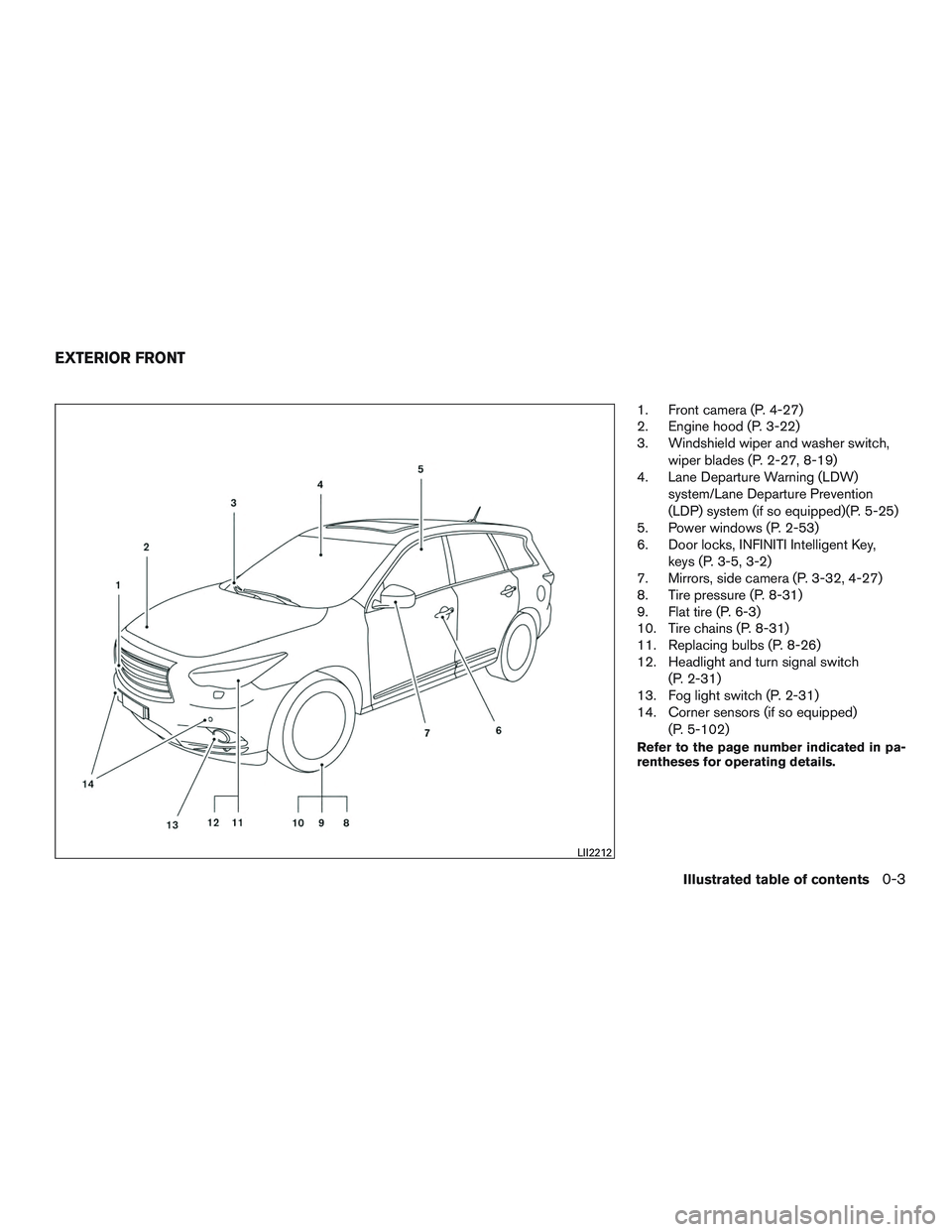
1. Front camera (P. 4-27)
2. Engine hood (P. 3-22)
3. Windshield wiper and washer switch,wiper blades (P. 2-27, 8-19)
4. Lane Departure Warning (LDW)
system/Lane Departure Prevention
(LDP) system (if so equipped)(P. 5-25)
5. Power windows (P. 2-53)
6. Door locks, INFINITI Intelligent Key,
keys (P. 3-5, 3-2)
7. Mirrors, side camera (P. 3-32, 4-27)
8. Tire pressure (P. 8-31)
9. Flat tire (P. 6-3)
10. Tire chains (P. 8-31)
11. Replacing bulbs (P. 8-26)
12. Headlight and turn signal switch
(P. 2-31)
13. Fog light switch (P. 2-31)
14. Corner sensors (if so equipped)
(P. 5-102)
Refer to the page number indicated in pa-
rentheses for operating details.
LII2212
EXTERIOR FRONT
Illustrated table of contents0-3
Page 223 of 554
●The driver is always responsible for
safety during parking and other
maneuvers.
● Always look around and check that it is
safe to move before parking.
● Read and understand the limitations of
the sonar (parking sensor) as contained
in this section.
● The colors of the sonar indicators and
the distance guide lines in the front,
front-wide, rear and rear-wide views in-
dicate different distances to the object.
● Inclement weather or Ultrasonic
sources such as an automatic car wash,
a truck’s compressed-air brakes or a
pneumatic drill may affect the function
of the system; this may include reduced
performance or a false activation.
● This function is designed as an aid to
the driver in detecting large stationary
objects to help avoid damaging the
vehicle.
● The system is not designed to prevent
contact with small or moving objects. ●
The system will not detect small objects
below the bumper, and may not detect
objects close to the bumper or on the
ground.
● The system may not detect the follow-
ing objects:
– Fluffy objects such as snow, cloth, cotton, glass or wool.
– Thin objects such as rope, wire or chain.
– Wedge-shaped objects.
● If your vehicle sustains damage to the
bumper fascia, leaving it misaligned or
bent, the sensing zone may be altered
causing inaccurate measurement of ob-
jects or false alarms.
CAUTION
● Excessive noise (such as audio system
volume or an open vehicle window) will
interfere with the tone and it may not be
heard. ●
Keep the surface of the sonar sensors
(located on the front and rear bumper
fascia) free from accumulations of
snow, ice and dirt. Do not scratch the
surface of the sonar sensors when
cleaning. If the sensors are covered, the
accuracy of the sonar function will be
diminished.
The system gives the tone for front objects when
the shift lever is in the D (Drive) position and both
front and rear objects when the shift lever is in the
R (Reverse) position.
When the camera image is shown on the display,
the system shows the sonar indicator regardless
of the shift selector position.
The system is deactivated at speeds above
10 km/h (6 mph) . It is reactivated at lower
speeds.
When the objects are detected, the indicator
(green) appears and blinks and the tone sounds
intermittently. When the vehicle moves closer to
the object, the color of the indicator turns yellow
and the rate of the blinking and the rate of the
tone increase. When the vehicle is very close to
the object, the indicator stops blinking and turns
red, and the tone sounds continuously.
4-36Monitor, climate, audio, phone and voice recognition systems
Page 346 of 554

●When a spare tire is mounted or a wheel
is replaced, tire pressure will not be
indicated, the TPMS will not function
and the low tire pressure warning light
will flash for approximately 1 minute.
The light will remain on after 1 minute.
Contact your INFINITI retailer as soon
as possible for tire replacement and/or
system resetting.
● Replacing tires with those not originally
specified by INFINITI could affect the
proper operation of the TPMS.
● Do not inject any tire liquid or aerosol
tire sealant into the tires, as this may
cause a malfunction of the tire pressure
sensors.
CAUTION
● The TPMS may not function properly
when the wheels are equipped with tire
chains or the wheels are buried in snow.
● Do not place metalized film or any
metal parts (antenna, etc.) on the win-
dows. This may cause poor reception of
the signals from the tire pressure sen-
sors, and the TPMS will not function
properly. Some devices and transmitters may temporarily
interfere with the operation of the TPMS and
cause the low tire pressure warning light to illu-
minate.
Some examples are:
– Facilities or electric devices using similar radio
frequencies are near the vehicle.
– If a transmitter set to similar frequencies is being used in or near the vehicle.
– If a computer (or similar equipment) or a DC/AC converter is being used in or near the
vehicle.
FCC Notice:
For USA:
This device complies with Part 15 of the
FCC Rules. Operation is subject to the fol-
lowing two conditions: (1) This device may
not cause harmful interference, and (2) this
device must accept any interference re-
ceived, including interference that may
cause undesired operation. NOTE:
Changes or modification not expressly ap-
proved by the party responsible for compli-
ance could void the user’s authority to op-
erate the equipment.
For Canada:
This device complies with Industry Canada
license-exempt RSS standard(s) . Opera-
tion is subject to the following two condi-
tions: (1) this device may not cause inter-
ference, and (2) this device must accept any
interference, including interference that
may cause undesired operation of the de-
vice.
TPMS with Tire Inflation Indicator
When adding air to an under-inflated tire, the
TPMS with Tire Inflation Indicator provides visual
and audible signals outside the vehicle to help
you inflate the tires to the recommended COLD
tire pressure.
Vehicle set-up:
1. Park the vehicle in a safe and level place.
2. Apply the parking brake and place the shift lever into the P (Park) position.
3. Place the ignition switch to the ON position. Do not start the engine.
Starting and driving5-7
Page 351 of 554

●Accelerating quickly, sharp steering
maneuvers or sudden braking may
cause loss of control.
● If at all possible, avoid sharp turning
maneuvers, particularly at high speeds.
Your INFINITI vehicle has a higher cen-
ter of gravity than a passenger car. The
vehicle is not designed for cornering at
the same speeds as passenger cars.
Failure to operate this vehicle correctly
could result in loss of control and/or a
rollover accident.
● Always use tires of the same type, size,
brand, construction (bias, bias-belted,
or radial) , and tread pattern on all four
wheels. Install tire chains on the front
wheels when driving on slippery roads
and drive carefully.
● Be sure to check the brakes immedi-
ately after driving in mud or water. For
additional information, refer to “Brake
system” in this section for “Wet
brakes”.
● Avoid parking your vehicle on steep
hills. If you get out of the vehicle and it
rolls forward, backward or sideways,
you could be injured. ●
Whenever you drive off-road through
sand, mud or water as deep as the
wheel hub, more frequent maintenance
may be required. For additional infor-
mation, refer to “Periodic maintenance”
in the “INFINITI Service and Mainte-
nance Guide.”WARNING
Do not operate the push-button ignition
switch while driving the vehicle except in
an emergency. (The engine will stop when
the ignition switch is pushed three con-
secutive times in quick succession or the
ignition switch is pushed and held for
more than 2 seconds.) If the engine stops
while the vehicle is being driven, this
could lead to a crash and serious injury.
PUSH-BUTTON IGNITION SWITCH
5-12Starting and driving
Page 365 of 554
on, it will automatically apply the brakes for a
short period of time, using the function of the
Vehicle Dynamic Control (VDC) system.
LANE DEPARTURE WARNING
(LDW) SYSTEM
Precautions on LDW system
WARNING
●This system is only a warning device to
inform the driver of a potential unin-
tended lane departure. It will not steer
the vehicle or prevent loss of control. It
is the driver’s responsibility to stay
alert, drive safely, keep the vehicle in
the traveling lane, and be in control of
the vehicle at all times.
● The system will not operate at speeds
below approximately 45 MPH (70 km/h)
or if it cannot detect lane markers. ●
If the LDW system malfunctions, it will
cancel automatically, and “Please see
owner’s manual” will appear in the ve-
hicle information display. If “Please see
owner’s manual” appears in the vehicle
information display, pull off the road to
a safe location and stop the vehicle.
Place the shift lever into the P (Park)
position and the ignition switch to the
off position and restart the engine. If
“Please see owner’s manual” continues
to appear in the vehicle information dis-
play, have the system checked by an
INFINITI retailer.
● Excessive noise will interfere with the
warning chime sound, and the chime
may not be heard.
● Do not use the LDW system under the
following conditions as it may not func-
tion properly:
– During bad weather (rain, fog, snow, etc.) .
– When driving on slippery roads, such as on ice or snow, etc.
– When driving on winding or uneven roads. – When there is a lane closure due to
road repairs.
– When driving in a makeshift or tem- porary lane.
– When driving on roads where the lane width is too narrow.
– When driving without normal tire conditions (for example, tire wear,
low tire pressure, installation of
spare tire, tire chains, nonstandard
wheels) .
– When the vehicle is equipped with nonoriginal brake parts or suspen-
sion parts.
– When you are towing a trailer or other vehicle.
The system may not function properly under the
following conditions: ● On roads where there are multiple parallel
lane markers; lane markers that are faded or
not painted clearly; yellow painted lane
markers; non-standard lane markers; or lane
markers covered with water, dirt, snow, etc.
● On roads where the discontinued lane mark-
ers are still detectable.
● On roads where there are sharp curves.
5-26Starting and driving
Page 368 of 554

– When driving without normal tireconditions (for example, tire wear,
low tire pressure, installation of
spare tire, tire chains, non-standard
wheels) .
– When the vehicle is equipped with nonoriginal brake parts or suspen-
sion parts.
– When you are towing a trailer or other vehicle.
● If the LDP system malfunctions, it will
cancel automatically. The LDP system
warning light (orange) will illuminate in
the display.
● If LDP system warning light (orange)
illuminates in the display, pull off the
road to a safe location and stop the
vehicle. Turn the engine off and restart
the engine. If the LDP system warning
light (orange) continues to illuminate,
have the LDP system checked by an
INFINITI retailer.
● Excessive noise will interfere with the
warning chime sound, and the chime
may not be heard.
The LDP system may or may not operate
properly under the following conditions: ●
On roads where there are multiple par-
allel lane markers; lane markers that
are faded or not painted clearly; yellow
painted lane markers; non-standard
lane markers; or lane markers covered
with water, dirt, snow, etc.
● On roads where discontinued lane
markers are still detectable.
● On roads where there are sharp curves.
● On roads where there are sharply con-
trasting objects, such as shadows,
snow, water, wheel ruts, seams or lines
remaining after road repairs. (The LDP
system could detect these items as lane
markers.)
● On roads where the traveling lane
merges or separates.
● When the vehicle’s traveling direction
does not align with the lane marker.
● When traveling close to the vehicle in
front of you, which obstructs the lane
camera unit detection range.
● When rain, snow or dirt adheres to the
windshield in front of the lane camera
unit. ●
When the headlights are not bright due
to dirt on the lens or if the aiming is not
adjusted properly.
● When strong light enters the lane cam-
era unit. (For example, the light directly
shines on the front of the vehicle at
sunrise or sunset.)
● When a sudden change in brightness
occurs. (For example, when the vehicle
enters or exits a tunnel or under a
bridge.)
While the LDP system is operating, you may hear
a sound of brake operation. This is normal and
indicates that the LDP system is operating prop-
erly.
Starting and driving5-29
Page 378 of 554

– When the headlights are not brightdue to dirt on the lens or if aiming is
not adjusted properly.
– When strong light enters a lane cam- era unit. (For example: light directly
shines on the front of the vehicle at
sunrise or sunset.)
– When a sudden change in brightness occurs. (For example: when the ve-
hicle enters or exits a tunnel or under
a bridge.)
● Do not use the BSI system under the
following conditions because the sys-
tem may not function properly.
– During bad weather (For example: rain, fog, snow, etc.)
– When driving on slippery roads, such as on ice or snow, etc.
– When driving on winding or uneven roads.
– When there is a lane closure due to road repairs.
– When driving in a makeshift lane.
– When driving on roads where the lane width is too narrow. – When driving with a tire that is not
within normal tire conditions (e.g.
tire wear, low tire pressure, installa-
tion of spare tire, tire chains, non-
standard wheels) .
– When the vehicle is equipped with non-original brake parts or suspen-
sion parts.
● Do not use the BSI systems when tow-
ing a trailer.
● Excessive noise (e.g. audio system vol-
ume, open vehicle window) will inter-
fere with the chime sound, and it may
not be heard.
BSW/BSI DRIVING SITUATIONS
Another vehicle approaching from
behind
Illustration 1: The Blind Spot Warning indicator
light illuminates if a vehicle enters the detection
zone from behind in an adjacent lane.
However, if the overtaking vehicle is traveling much
faster than your vehicle, the indicator light may not
illuminate before the detected vehicle is beside
your vehicle. Always use the side and rear mirrors
and turn and look in the direction your vehicle will
move to ensure it is safe to change lanes.
Illustration 1 – Approaching from behind
SSD1026
Starting and driving5-39
Page 385 of 554

WARNING
●Always check surroundings and turn to
check what is behind you before back-
ing up. The radar sensors detect ap-
proaching (moving) vehicles. The radar
sensors cannot detect every object such
as:
– Pedestrians, bicycles, motorcycles, animals or child operated toy
vehicles
– A vehicle that is passing at speeds greater than approximately 24 km/h
(15 MPH)
● The radar sensors may not detect ap-
proaching vehicles in certain situations:
– Illustration a: When a vehicle parked next to you obstructs the beam of the
radar sensor.
– Illustration b: When the vehicle is parked in an angled parking space.
– Illustration c: When the vehicle is parked on inclined ground.
– Illustration d: When an approaching vehicle turns into your vehicle’s park-
ing lot aisle. – Illustration e: When the angle formed
by your vehicle and approaching ve-
hicle is small.
● The following conditions may reduce
the ability of the radar to detect other
vehicles:
– Severe weather
– Road spray
– Ice build up on the vehicle
– Frost build up on the vehicle
– Dirt up on the vehicle
● Do not attach stickers (including trans-
parent material) , install accessories or
apply additional paint near the radar
sensors. These conditions may reduce
the ability of the radar to detect other
vehicles.
● The sonar sensors detect stationary ob-
jects behind the vehicle. The sonar sen-
sor may not detect:
– Small or moving objects
– Wedge-shaped objects
– Object close to the bumper (less than approximately 30 cm (1 ft.)) – Thin objects such as rope, wire and
chain, etc.
● The brake engagement by the BCI sys-
tem is not as effective on a slope as it is
on flat ground. When on a steep slope
the system may not function properly.
● Do not use the BCI system under the
following conditions because the sys-
tem may not function properly.
– When driving with a tire that is not within normal tire conditions (e.g.
tire wear, low tire pressure, installa-
tion of spare tire, tire chains, non-
standard wheels) .
– When the vehicle is equipped with non-original brake parts or suspen-
sion parts.
● Do not use the BCI systems when tow-
ing a trailer.
● Excessive noise (e.g. audio system vol-
ume, open vehicle window) will inter-
fere with the chime sound, and it may
not be heard.
5-46Starting and driving
Page 434 of 554

WARNING
●While driving on a slippery surface, be
careful when braking, accelerating or
downshifting. Abrupt braking or accel-
erating could cause the wheels to skid
and result in an accident.
● If the engine is not running or is turned
off while driving, the power assist for
the brakes will not work. Braking will be
harder.
Wet brakes
When the vehicle is washed or driven through
water, the brakes may get wet. As a result, your
braking distance will be longer and the vehicle
may pull to one side during braking.
To dry the brakes, drive the vehicle at a safe
speed while lightly pressing the brake pedal to
heat up the brakes. Do this until the brakes return
to normal. Avoid driving the vehicle at high
speeds until the brakes function correctly.
Parking brake break-in
Break-in the parking brake shoes whenever the
effect of the parking brake is weakened or when-
ever the parking brake shoes and/or rotors are
replaced, in order to assure the best brake per-
formance. This procedure is described in the INFINITI Ser-
vice Manual and can be performed by an INFINITI
retailer.
ANTI-LOCK BRAKING SYSTEM
(ABS)
WARNING
●
The Anti-lock Braking System (ABS) is a
sophisticated device, but it cannot pre-
vent accidents resulting from careless
or dangerous driving techniques. It can
help maintain vehicle control during
braking on slippery surfaces. Remem-
ber that stopping distances on slippery
surfaces will be longer than on normal
surfaces even with ABS. Stopping dis-
tances may also be longer on rough,
gravel or snow covered roads, or if you
are using tire chains. Always maintain a
safe distance from the vehicle in front of
you. Ultimately, the driver is respon-
sible for safety.
● Tire type and condition may also affect
braking effectiveness.
– When replacing tires, install the specified size of tires on all four
wheels. – When installing a spare tire, make
sure that it is the proper size and type
as specified on the Tire and Loading
Information label. For additional in-
formation, refer to “Tire and loading
information label” in the “Technical
and consumer information” section
of this manual.
– For additional information, refer to “Wheels and tires” in the “Mainte-
nance and do-it-yourself” section of
this manual.
The Anti-lock Braking System (ABS) controls the
brakes so the wheels do not lock during hard
braking or when braking on slippery surfaces.
The system detects the rotation speed at each
wheel and varies the brake fluid pressure to pre-
vent each wheel from locking and sliding. By
preventing each wheel from locking, the system
helps the driver maintain steering control and
helps to minimize swerving and spinning on slip-
pery surfaces.
Using the system
Depress the brake pedal and hold it down. De-
press the brake pedal with firm steady pressure,
but do not pump the brakes. The ABS will oper-
ate to prevent the wheels from locking up. Steer
the vehicle to avoid obstacles.
Starting and driving5-95
Page 439 of 554

●When driving on extremely inclined sur-
faces such as higher banked corners,
the VDC system may not operate prop-
erly and the
indicator may flash or
both the
andindicator
lights may illuminate. Do not drive on
these types of roads.
● When driving on an unstable surface
such as a turntable, ferry, elevator or
ramp, the
indicator may flash or
both the
andindicator
lights may illuminate. This is not a mal-
function. Restart the engine after driv-
ing onto a stable surface.
● If wheels or tires other than the INFINITI
recommended ones are used, the VDC
system may not operate properly and
the
indicator may flash or both
the
andindicator lights may
illuminate.
● The VDC system is not a substitute for
winter tires or tire chains on a snow
covered road.
ACTIVE TRACE CONTROL (if so
equipped)
This system senses driving based on the driver’s
steering and acceleration/braking patterns, and
controls brake pressure at individual wheels to
help smooth vehicle response.
When the VDC OFF switch is used to turn off the
VDC system, the active trace control system is
also turned off.
If the active trace control is not functioning prop-
erly, the IBA OFF indicator light illuminates in the
instrument panel.
BRAKE FORCE DISTRIBUTION
During braking while driving through turns, the
system optimizes the distribution of force to each
of the four wheels depending on the radius of the
turn.
WARNING
● The VDC system is designed to help the
driver maintain controllability but can-
not prevent accidents due to abrupt
steering operation at high speeds or by
careless or dangerous driving tech-
niques. Reduce vehicle speed and be
especially careful when driving and cor-
nering on slippery surfaces and always
drive carefully.
● The active trace control and brake force
distribution systems may not be effec-
tive depending on the driving condition.
Always drive carefully and attentively.
● Do not modify the vehicle’s suspension.
If suspension parts such as shock ab-
sorbers, struts, springs, stabilizer bars,
bushings and wheels are not INFINITI
recommended for your vehicle or are
extremely deteriorated, the VDC system
may not operate properly. This could
adversely affect vehicle handling per-
formance, and the VDC warning light
may illuminate.
5-100Starting and driving