wheel INFINITI QX60 2017 Repair Manual
[x] Cancel search | Manufacturer: INFINITI, Model Year: 2017, Model line: QX60, Model: INFINITI QX60 2017Pages: 629, PDF Size: 6.89 MB
Page 397 of 629
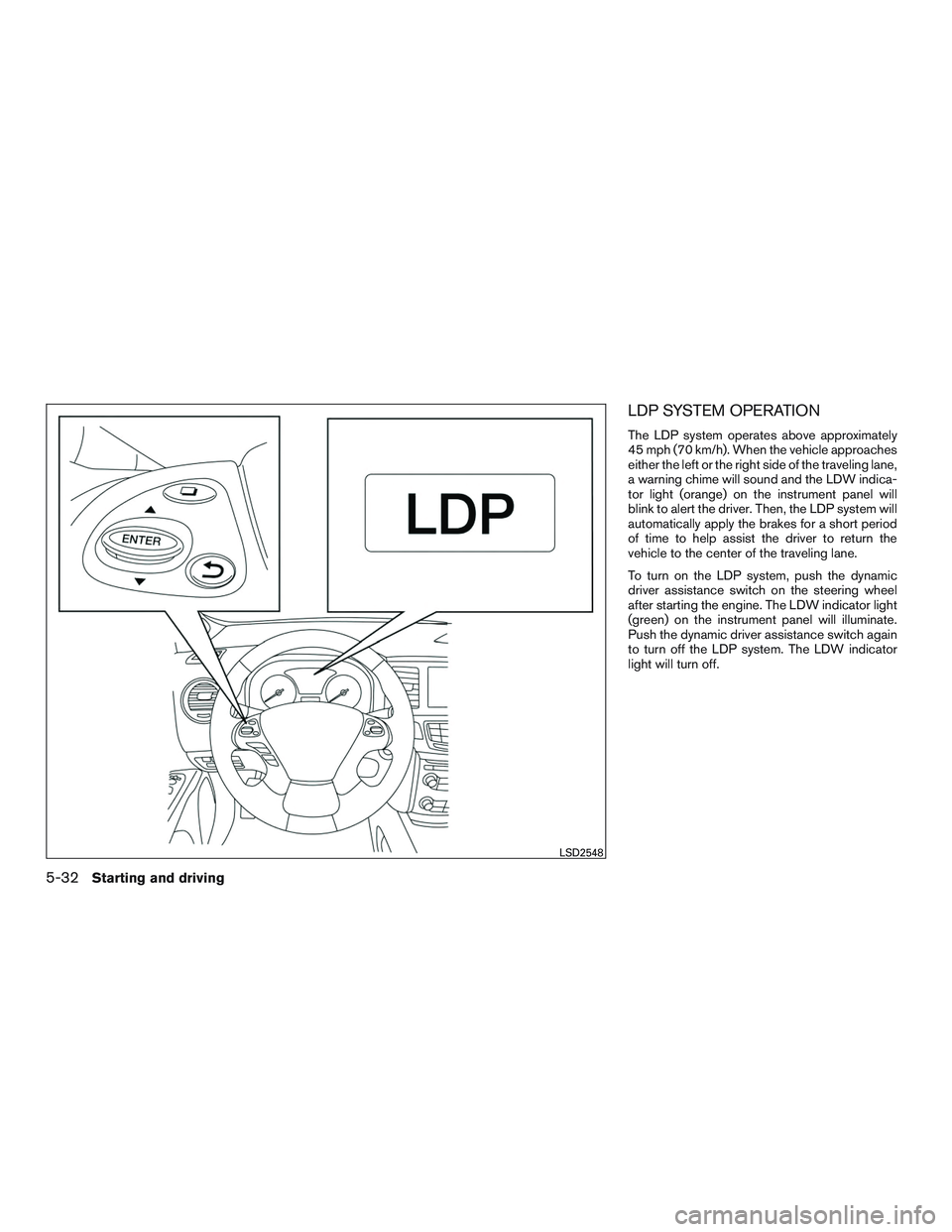
LDP SYSTEM OPERATION
The LDP system operates above approximately
45 mph (70 km/h). When the vehicle approaches
either the left or the right side of the traveling lane,
a warning chime will sound and the LDW indica-
tor light (orange) on the instrument panel will
blink to alert the driver. Then, the LDP system will
automatically apply the brakes for a short period
of time to help assist the driver to return the
vehicle to the center of the traveling lane.
To turn on the LDP system, push the dynamic
driver assistance switch on the steering wheel
after starting the engine. The LDW indicator light
(green) on the instrument panel will illuminate.
Push the dynamic driver assistance switch again
to turn off the LDP system. The LDW indicator
light will turn off.
LSD2548
5-32Starting and driving
Page 398 of 629
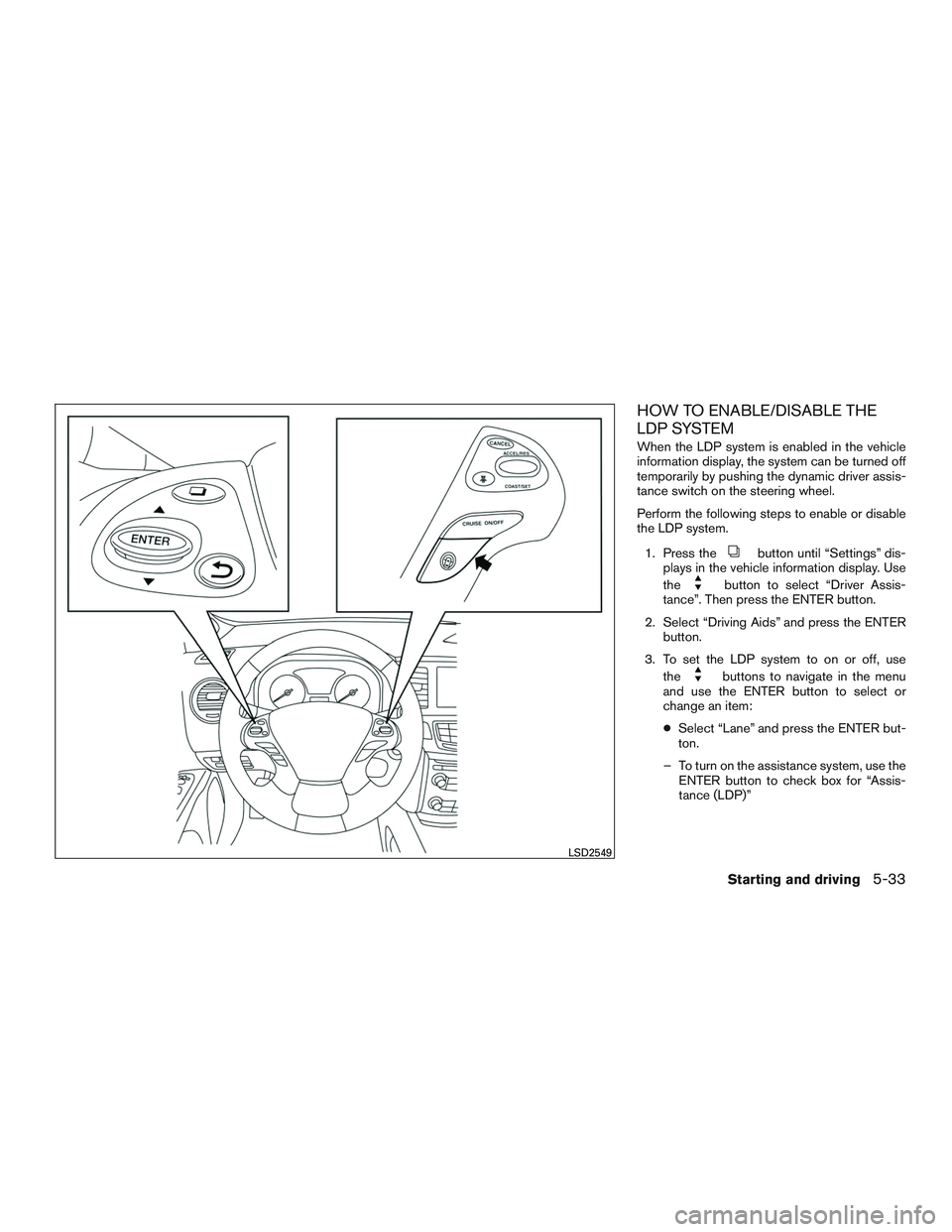
HOW TO ENABLE/DISABLE THE
LDP SYSTEM
When the LDP system is enabled in the vehicle
information display, the system can be turned off
temporarily by pushing the dynamic driver assis-
tance switch on the steering wheel.
Perform the following steps to enable or disable
the LDP system.1. Press the
button until “Settings” dis-
plays in the vehicle information display. Use
the
button to select “Driver Assis-
tance”. Then press the ENTER button.
2. Select “Driving Aids” and press the ENTER button.
3. To set the LDP system to on or off, use the
buttons to navigate in the menu
and use the ENTER button to select or
change an item:
● Select “Lane” and press the ENTER but-
ton.
– To turn on the assistance system, use the ENTER button to check box for “Assis-
tance (LDP)”
LSD2549
Starting and driving5-33
Page 399 of 629

LDP SYSTEM LIMITATIONS
WARNING
Listed below are the system limitations for
the LDP system. Failure to follow the
warnings and instructions for proper use
of the LDP system could result in serious
injury or death.
●The LDP system will not steer the ve-
hicle or prevent loss of control. It is the
driver’s responsibility to stay alert, drive
safely, keep the vehicle in the traveling
lane, and be in control of the vehicle at
all times.
● The LDP system is primarily intended
for use on well-developed freeways or
highways. It may not detect the lane
markers in certain roads, weather or
driving conditions.
● The LDP system may activate if you
change lanes without first activating
your turn signal or, for example, if a
construction zone directs traffic to
cross an existing lane marker. If this
occurs you may need to apply corrective
steering to complete your lane change. ●
Because the LDP may not activate un-
der the road, weather, and lane marker
conditions described in this section, it
may not activate every time your vehicle
begins to leave its lane and you will
need to apply corrective steering.
● When the LDP system is operating,
avoid excessive or sudden steering ma-
neuvers. Otherwise, you could lose con-
trol of the vehicle.
● The LDP system will not operate at
speeds below approximately 45 mph
(70 km/h) or if it cannot detect lane
markers.
● Do not use the LDP system under the
following conditions as it may not func-
tion properly:
– During bad weather (rain, fog, snow, etc.) .
– When driving on slippery roads, such as on ice or snow.
– When driving on winding or uneven roads.
– When there is a lane closure due to road repairs. – When driving in a makeshift or tem-
porary lane.
– When driving on roads where the lane width is too narrow.
– When driving without normal tire conditions (for example, tire wear,
low tire pressure, installation of
spare tire, tire chains, non-standard
wheels) .
– When the vehicle is equipped with nonoriginal brake parts or suspen-
sion parts.
– When you are towing a trailer or other vehicle.
● If the LDP system malfunctions, it will
cancel automatically. The LDP system
warning light (orange) will illuminate in
the display.
● If LDP system warning light (orange)
illuminates in the display, pull off the
road to a safe location and stop the
vehicle. Turn the engine off and restart
the engine. If the LDP system warning
light (orange) continues to illuminate,
have the LDP system checked. It is rec-
ommended that you visit an INFINITI
retailer for this service.
5-34Starting and driving
Page 400 of 629
●Excessive noise will interfere with the
warning chime sound, and the chime
may not be heard.
The LDP system may or may not operate
properly under the following conditions:
● On roads where there are multiple par-
allel lane markers; lane markers that
are faded or not painted clearly; yellow
painted lane markers; non-standard
lane markers; or lane markers covered
with water, dirt, snow, etc.
● On roads where discontinued lane
markers are still detectable.
● On roads where there are sharp curves.
● On roads where there are sharply con-
trasting objects, such as shadows,
snow, water, wheel ruts, seams or lines
remaining after road repairs. (The LDP
system could detect these items as lane
markers.)
● On roads where the traveling lane
merges or separates.
● When the vehicle’s traveling direction
does not align with the lane marker. ●
When traveling close to the vehicle in
front of you, which obstructs the lane
camera unit detection range.
● When rain, snow or dirt adheres to the
windshield in front of the lane camera
unit.
● When the headlights are not bright due
to dirt on the lens or if the aiming is not
adjusted properly.
● When strong light enters the lane cam-
era unit. (For example, the light directly
shines on the front of the vehicle at
sunrise or sunset.)
● When a sudden change in brightness
occurs. (For example, when the vehicle
enters or exits a tunnel or under a
bridge.)
While the LDP system is operating, you may hear
a sound of brake operation. This is normal and
indicates that the LDP system is operating prop-
erly.SYSTEM TEMPORARILY
UNAVAILABLE
Condition A:
The warning and assist functions of the LDP
system are not designed to work under the fol-
lowing conditions: ● When you operate the lane change signal
and change the traveling lanes in the direc-
tion of the signal. (The LDP system will be
deactivated for approximately 2 seconds af-
ter the lane change signal is turned off.)
● When the vehicle speed lowers to less than
approximately 45 mph (70 km/h).
After the above conditions have finished and the
necessary operating conditions are satisfied, the
warning and assist functions will resume.
Condition B:
The assist function of the LDP system is not
designed to work under the following conditions
(warning is still functional): ● When the brake pedal is depressed.
● When the steering wheel is turned as far as
necessary for the vehicle to change lanes.
● When the vehicle is accelerated during LDP
system operation.
Starting and driving5-35
Page 413 of 629

BSI SYSTEM OPERATION
If the radar sensors detect vehicles in the detec-
tion zone, the BSW indicator light located near
the outside mirrors illuminates. If your vehicle is
approaching a lane marker, the system chimes a
sound (three times) and the BSW indicator light
flashes. Then the system applies the brakes on
one side of the vehicle for a moment to help return
the vehicle back to the center of the lane. BSI
operates regardless of turn signal usage.
NOTE:
Warning and brake control will only be ac-
tivated if the BSW indicator light is already
illuminated when your vehicle approaches
a lane marker. If another vehicle comes into
the detection zone after your vehicle has
crossed a lane marker, no warning or brake
control will be activated. For additional in-
formation, refer to “BSI driving situations”
in this section. The BSI system is typically
activated earlier than the Lane Departure
Prevention (LDP) system when your vehicle
is approaching a lane marker.
The BSI system turns on when the dynamic driver
assistance switch on the steering wheel is
pushed when the “Blind Spot Intervention®” is
enabled in the “Driver Assistance” menu on the
vehicle information display. The BSI ON indicatorlight on the instrument panel illuminates when the
BSI system is turned on.
The BSI system provides a chime and turns on or
flashes the BSW indicator light even if the BSW
system is off.
5-48Starting and driving
Page 414 of 629
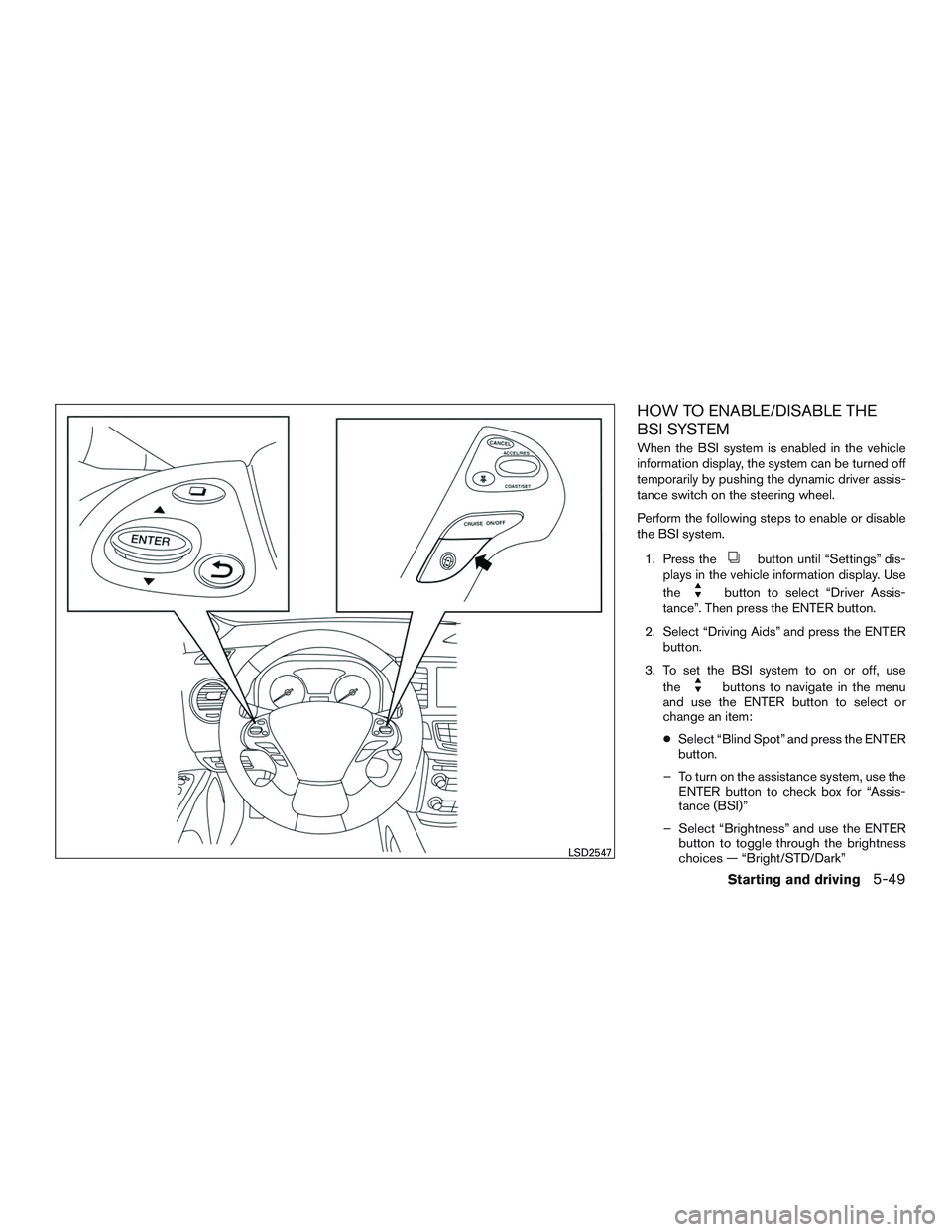
HOW TO ENABLE/DISABLE THE
BSI SYSTEM
When the BSI system is enabled in the vehicle
information display, the system can be turned off
temporarily by pushing the dynamic driver assis-
tance switch on the steering wheel.
Perform the following steps to enable or disable
the BSI system.1. Press the
button until “Settings” dis-
plays in the vehicle information display. Use
the
button to select “Driver Assis-
tance”. Then press the ENTER button.
2. Select “Driving Aids” and press the ENTER button.
3. To set the BSI system to on or off, use the
buttons to navigate in the menu
and use the ENTER button to select or
change an item:
● Select “Blind Spot” and press the ENTER
button.
– To turn on the assistance system, use the ENTER button to check box for “Assis-
tance (BSI)”
– Select “Brightness” and use the ENTER button to toggle through the brightness
choices — “Bright/STD/Dark”
LSD2547
Starting and driving5-49
Page 415 of 629

BSI SYSTEM LIMITATIONS
WARNING
Listed below are the system limitations for
the BSI system. Failure to operate the
vehicle in accordance with these system
limitations could result in serious injury or
death.
●The radar sensors may not be able to
detect and activate BSI when certain
objects are present such as:
– Pedestrians, bicycles, or animals.
– Vehicles such as motorcycles, low height vehicles, or high ground clear-
ance vehicles.
– Oncoming vehicles.
– Vehicles remaining in the detection zone when you accelerate from a
stop. For additional information, re-
fer to “BSI driving situations” in this
section.
– A vehicle merging into an adjacent lane at a speed approximately the
same as your vehicle. For additional
information, refer to “BSI driving
situations” in this section. – A vehicle approaching rapidly from
behind. For additional information,
refer to “BSI driving situations” in
this section.
– A vehicle which your vehicle over- takes rapidly. For additional informa-
tion, refer to “BSI driving situations”
in this section.
– A vehicle that passes through the de- tection zone quickly.
● The radar sensors detection zone is de-
signed based on a standard lane width.
When driving in a wider lane, the radar
sensors may not detect vehicles in an
adjacent lane. When driving in a narrow
lane, the radar sensors may detect ve-
hicles driving two lanes away.
● The radar sensors are designed to ig-
nore most stationary objects, however
objects such as guardrails, walls, foli-
age and parked vehicles may occasion-
ally be detected. This is a normal driving
condition.
● Severe weather or road spray condi-
tions may reduce the ability of the radar
to detect other vehicles. ●
The camera may not detect lane mark-
ers in the following situations and the
BSI system may not operate properly.
– On roads where there are multiple parallel lane markers; lane markers
that are faded or not painted clearly;
yellow painted lane markers; non-
standard lane markers; lane markers
covered with water, dirt, snow, etc.
– On roads where discontinued lane markers are still detectable.
– On roads where there are sharp curves.
– On roads where there are sharply contrasting objects, such as shad-
ows, snow, water, wheel ruts, seams
or lines remaining after road repairs.
– On roads where the traveling lane merges or separates.
– When the vehicle’s traveling direc- tion does not align with the lane
markers.
– When traveling close to the vehicle in front of you, which obstructs the lane
camera unit detection range.
5-50Starting and driving
Page 416 of 629

– When rain, snow or dirt adheres tothe windshield in front of a lane cam-
era unit.
– When the headlights are not bright due to dirt on the lens or if aiming is
not adjusted properly.
– When strong light enters a lane cam- era unit. (For example: light directly
shines on the front of the vehicle at
sunrise or sunset.)
– When a sudden change in brightness occurs. (For example: when the ve-
hicle enters or exits a tunnel or under
a bridge.)
● Do not use the BSI system under the
following conditions because the sys-
tem may not function properly.
– During bad weather (For example: rain, fog, snow, etc.)
– When driving on slippery roads, such as on ice or snow, etc.
– When driving on winding or uneven roads.
– When there is a lane closure due to road repairs.
– When driving in a makeshift lane. – When driving on roads where the
lane width is too narrow.
– When driving with a tire that is not within normal tire conditions (e.g.
tire wear, low tire pressure, installa-
tion of spare tire, tire chains, non-
standard wheels) .
– When the vehicle is equipped with non-original brake parts or suspen-
sion parts.
● Do not use the BSI systems when tow-
ing a trailer.
● Excessive noise (e.g. audio system vol-
ume, open vehicle window) will inter-
fere with the chime sound, and it may
not be heard.
BSI DRIVING SITUATIONS
Another vehicle approaching from
behind
Illustration 1: The Blind Spot Warning indicator
light illuminates if a vehicle enters the detection
zone from behind in an adjacent lane.
However, if the overtaking vehicle is traveling
much faster than your vehicle, the indicator light
may not illuminate before the detected vehicle is
beside your vehicle. Always use the side and rear
mirrors and turn and look in the direction your
vehicle will move to ensure it is safe to change
lanes.
Illustration 1 – Approaching from behind
SSD1026
Starting and driving5-51
Page 429 of 629

– Illustration c: When the vehicle isparked on inclined ground.
– Illustration d: When an approaching vehicle turns into your vehicle’s park-
ing lot aisle.
– Illustration e: When the angle formed by your vehicle and approaching ve-
hicle is small.
● The following conditions may reduce
the ability of the radar to detect other
vehicles:
– Severe weather
– Road spray
– Ice/frost/dirt build up on the vehicle
● Do not attach stickers (including trans-
parent material) , install accessories or
apply additional paint near the radar
sensors. These conditions may reduce
the ability of the radar to detect other
vehicles.
● The sonar sensors detect stationary ob-
jects behind the vehicle. The sonar sen-
sor may not detect:
– Small or moving objects
– Wedge-shaped objects – Object close to the bumper (less than
approximately 1 ft (30 cm))
– Thin objects such as rope, wire and chain, etc.
● The brake engagement by the BCI sys-
tem is not as effective on a slope as it is
on flat ground. When on a steep slope
the system may not function properly.
● Do not use the BCI system under the
following conditions because the sys-
tem may not function properly:
– When driving with a tire that is not within normal tire conditions (e.g.
tire wear, low tire pressure, installa-
tion of spare tire, tire chains, non-
standard wheels) .
– When the vehicle is equipped with non-original brake parts or suspen-
sion parts.
● Do not use the BCI systems when tow-
ing a trailer.
● Excessive noise (e.g. audio system vol-
ume, open vehicle window) will inter-
fere with the chime sound, and it may
not be heard.SYSTEM TEMPORARILY NOT
AVAILABLE
If the following messages appear on the vehicle
information display, a chime will sound and the
BCI system will be turned off automatically.
● “Unavailable High Accelerator Temp.”:
If the vehicle is parked in direct sunlight
under high temperature conditions (over ap-
proximately 104°F (40°C)) and then started,
the BCI system may be deactivated auto-
matically and the “Unavailable High Accel-
erator Temp” message will appear in the
vehicle information display for a period of
time.
When the interior temperature is reduced,
turn off the BCI system and turn it on again.
● “Unavailable Side Radar Obstruction”:
When side radar blockage is detected.
When the blockage is removed, turn off the
BCI system and turn it on again.
5-64Starting and driving
Page 445 of 629
WARNING
●In the conventional (fixed speed) cruise
control mode, a warning chime does not
sound to warn you if you are too close
to the vehicle ahead, as neither the
presence of the vehicle ahead nor the
vehicle-to-vehicle distance is detected.
● Pay special attention to the distance
between your vehicle and the vehicle
ahead of you or a collision could occur.
● Always confirm the setting in the Intel-
ligent Cruise Control system display.
● Do not use the conventional (fixed
speed) cruise control mode when driv-
ing under the following conditions:
– When it is not possible to keep the vehicle at a set speed
– In heavy traffic or in traffic that varies in speed
– On winding or hilly roads
– On slippery roads (rain, snow, ice, etc.)
– In very windy areas
● Doing so could cause a loss of vehicle
control and result in an accident.
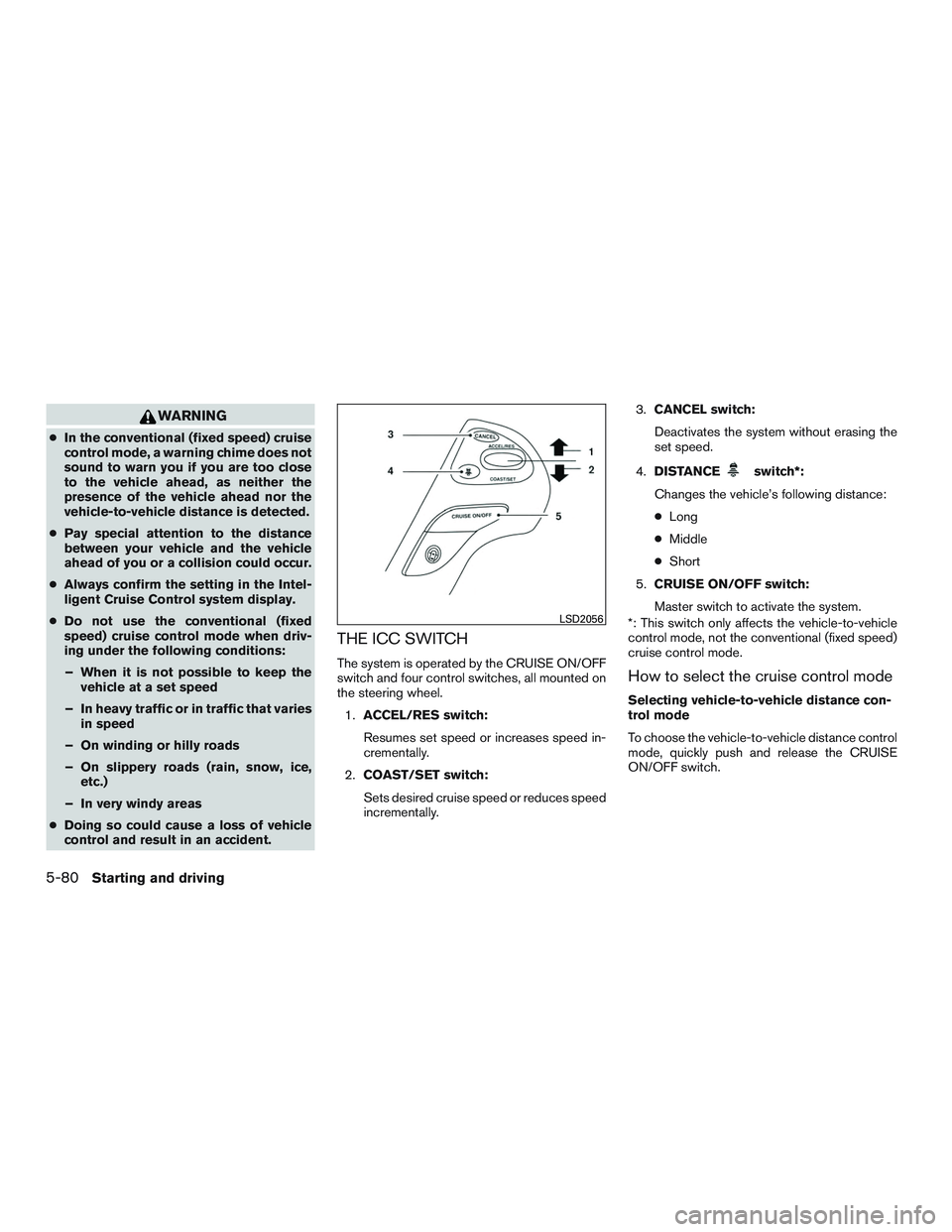
THE ICC SWITCH
The system is operated by the CRUISE ON/OFF
switch and four control switches, all mounted on
the steering wheel.
1. ACCEL/RES switch:
Resumes set speed or increases speed in-
crementally.
2. COAST/SET switch:
Sets desired cruise speed or reduces speed
incrementally. 3.
CANCEL switch:
Deactivates the system without erasing the
set speed.
4. DISTANCE
switch*:
Changes the vehicle’s following distance:
● Long
● Middle
● Short
5. CRUISE ON/OFF switch:
Master switch to activate the system.
*: This switch only affects the vehicle-to-vehicle
control mode, not the conventional (fixed speed)
cruise control mode.
How to select the cruise control mode
Selecting vehicle-to-vehicle distance con-
trol mode
To choose the vehicle-to-vehicle distance control
mode, quickly push and release the CRUISE
ON/OFF switch.
LSD2056
5-80Starting and driving