Control arm INFINITI QX60 2018 Owner's Guide
[x] Cancel search | Manufacturer: INFINITI, Model Year: 2018, Model line: QX60, Model: INFINITI QX60 2018Pages: 532, PDF Size: 6.22 MB
Page 191 of 532
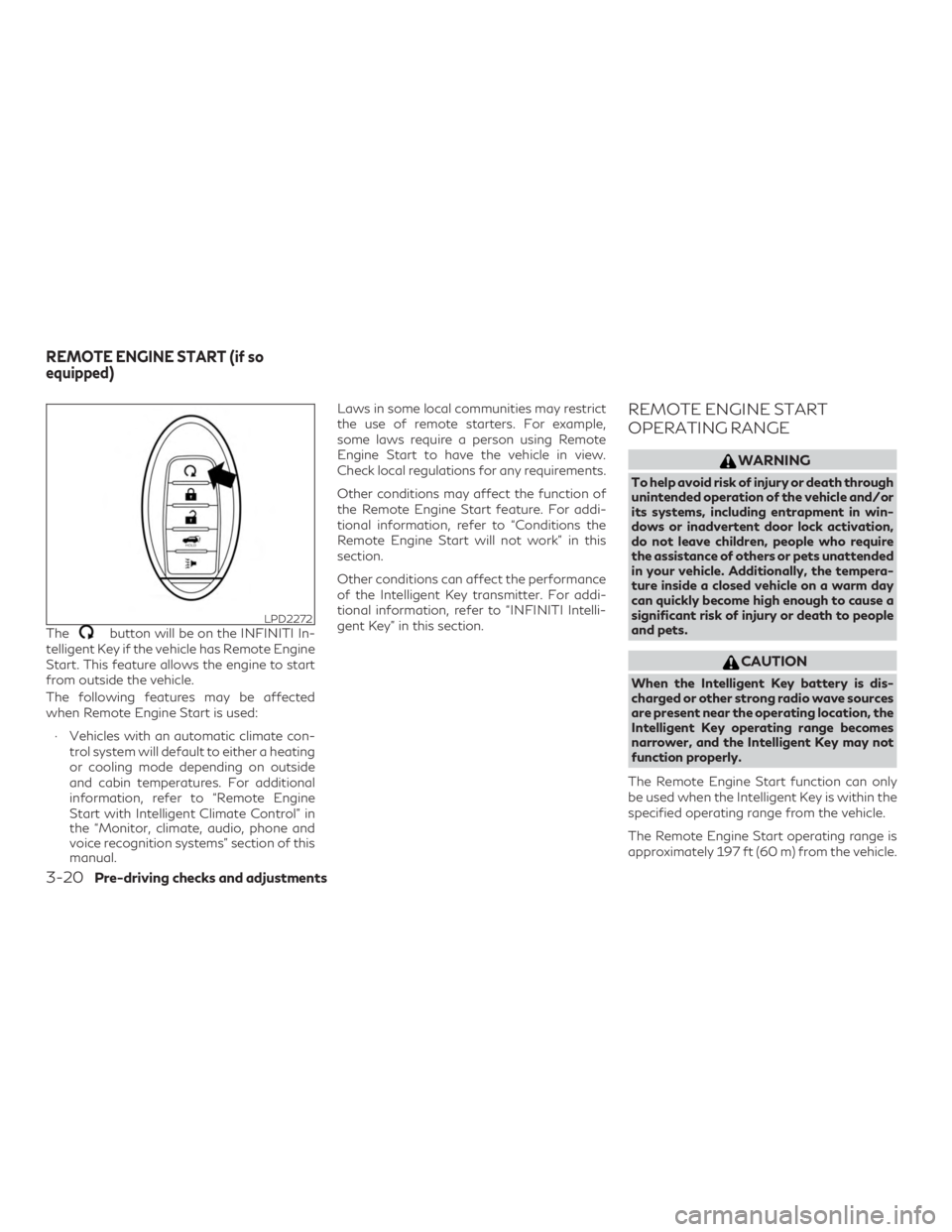
Thebutton will be on the INFINITI In-
telligent Key if the vehicle has Remote Engine
Start. This feature allows the engine to start
from outside the vehicle.
The following features may be affected
when Remote Engine Start is used:
∙ Vehicles with an automatic climate con- trol system will default to either a heating
or cooling mode depending on outside
and cabin temperatures. For additional
information, refer to “Remote Engine
Start with Intelligent Climate Control” in
the “Monitor, climate, audio, phone and
voice recognition systems” section of this
manual. Laws in some local communities may restrict
the use of remote starters. For example,
some laws require a person using Remote
Engine Start to have the vehicle in view.
Check local regulations for any requirements.
Other conditions may affect the function of
the Remote Engine Start feature. For addi-
tional information, refer to “Conditions the
Remote Engine Start will not work” in this
section.
Other conditions can affect the performance
of the Intelligent Key transmitter. For addi-
tional information, refer to “INFINITI Intelli-
gent Key” in this section.
REMOTE ENGINE START
OPERATING RANGE
WARNING
To help avoid risk of injury or death through
unintended operation of the vehicle and/or
its systems, including entrapment in win-
dows or inadvertent door lock activation,
do not leave children, people who require
the assistance of others or pets unattended
in your vehicle. Additionally, the tempera-
ture inside a closed vehicle on a warm day
can quickly become high enough to cause a
significant risk of injury or death to people
and pets.
CAUTION
When the Intelligent Key battery is dis-
charged or other strong radio wave sources
are present near the operating location, the
Intelligent Key operating range becomes
narrower, and the Intelligent Key may not
function properly.
The Remote Engine Start function can only
be used when the Intelligent Key is within the
specified operating range from the vehicle.
The Remote Engine Start operating range is
approximately 197 ft (60 m) from the vehicle.
LPD2272
REMOTE ENGINE START (if so
equipped)
3-20Pre-driving checks and adjustments
Page 192 of 532
REMOTE STARTING THE
VEHICLE
To use the Remote Engine Start feature to
start the engine perform the following:1. Aim the Intelligent Key at the vehicle.
2. Press the
button to lock all
doors.
3. Within 5 seconds press and hold the
button until the turn signal
lights flash and the tail lamps turn on. If
the vehicle is not within view press and
hold the
button for at least 2 sec-
onds.
The following events will occur when the en-
gine starts:
∙ The parking lights will turn on and remain on as long as the engine is running.
∙ The doors will be locked and the climate control system may come on.
∙ The engine will continue to run for 10 minutes. Repeat the steps to extend
the time for an additional 10 minutes. For
additional information, refer to “Extend-
ing engine run time” in this section.
Depress and hold the brake then push the
push-button ignition switch to the ON posi- tion before driving. For additional informa-
tion, refer to “Driving the vehicle” in the
“Starting and driving” section of this manual.
EXTENDING ENGINE RUN TIME
The Remote Engine Start feature can be ex-
tended one time by performing the steps
listed in “Remote starting the vehicle” in this
section. Run time will be calculated as fol-
lows:
∙ The first 10 minute run time will start when the Remote Engine Start function
is performed.
∙ The second 10 minutes will start immedi- ately when the Remote Engine Start
function is performed again. For ex-
ample, if the engine has been running for
5 minutes, and 10 minutes are added, the
engine will run for a total of 15 minutes.
∙ Extending engine run time will bring you to the two Remote Engine Start limit.
A maximum of two Remote Engine Starts, or
a single start with an extension, are allowed
between ignition cycles.
The ignition switch must be cycled to the ON
position and then back to the OFF position
before the Remote Engine Start procedure
can be used again.
CANCELING A REMOTE ENGINE
START
To cancel a Remote Engine Start, perform
one of the following: ∙ Aim the Intelligent Key at the vehicle and press
until the parking lights turn
off.
∙ Turn on the hazard warning flashers.
∙ Cycle the ignition switch ON and then OFF.
∙ The extended engine run time has ex- pired.
∙ The first 10 minute timer has expired.
∙ The engine hood has been opened.
∙ The shift lever is moved out of park.
∙ The alarm sounds due to illegal entry into the vehicle.
∙ The ignition switch is pushed without an Intelligent Key in the vehicle.
∙ The ignition switch is pushed with an In- telligent Key in the vehicle but the brake
pedal is not depressed.
Pre-driving checks and adjustments3-21
Page 193 of 532
CONDITIONS THE REMOTE
ENGINE START WILL NOT WORK
The Remote Engine Start will not operate if
any of the following conditions are present:∙ “Remote Engine Start” is turned off in the “Locking” section of the Vehicle Settings
menu.
∙ The ignition switch is placed in the ON position.
∙ The hood is not securely closed.
∙ The hazard indicator lights are on.
∙ The engine is still running. The engine must be completely stopped. Wait at
least 6 seconds if the engine goes from
running to off. This is not applicable when
extending engine run time.
∙ The
button is not pressed and held
for at least 2 seconds.
∙ The
button is not pressed and held
within 5 seconds of pressing the lock but-
ton.
∙ The brake is pressed.
∙ The doors are not closed and locked.
∙ The liftgate is open. ∙ The I–Key Indicator Light remains solid is
in the vehicle information display.
∙ The alarm sounds due to illegal entry into the vehicle.
∙ Two Remote Engine Starts, or a single Remote Engine Start with an extension,
have already been used.
∙ The vehicle is not in P (Park).
∙ There is a detected registered key already inside of the vehicle.
∙ The Remote Engine Start function has been switched to the OFF position in
Vehicle Settings of the vehicle informa-
tion display. For additional information,
refer to “Vehicle information display” in
the “Instruments and controls” section of
this manual.
The Remote Engine Start may display a
warning or indicator in the vehicle informa-
tion display. For additional information, refer
to “Vehicle information display” in the “Instru-
ments and controls” section of this manual.
3-22Pre-driving checks and adjustments
Page 250 of 532

OPERATING TIPS
The sunload sensor, located on the top driv-
er’s side of the instrument panel, helps the
system maintain a constant temperature. Do
not put anything on or around this sensor.∙ When the climate system is in automatic
operation and the engine coolant tem-
perature and outside air temperature are
low, the air flow outlet may default to
defroster mode for a maximum of 2 min-
utes 30 seconds. This is not a malfunc-
tion. After the engine coolant tempera-
ture warms up, the air flow outlet will
return to foot mode and operation will
continue normally.
∙ When the outside and interior cabin tem- peratures are moderate to high, the in-
take setting may default to turn off air
recirculation to allow fresh air into the
passenger compartment. You may notice
air flow from the foot mode vent outlets
for a maximum of 15 seconds. This is not
a malfunction. After the initial warm air is
expelled, the intake will return to auto-
matic control, air flow outlet will return to
previous settings, and operation will con-
tinue normally. To exit, press any climate
control button.
∙ Keep the moonroof (if so equipped) closed while the air conditioner is in op-
eration. ∙ If you feel that the air flow mode you
have selected and the outlets the air is
coming out do not match, select the
mode.
∙ When you change the air flow mode, you may feel air flow from the feet vents for
just a moment. This is not a malfunction.
LHA2173
Monitor, climate, audio, phone and voice recognition systems4-37
Page 276 of 532
CONTINUOUSLY VARIABLE
TRANSMISSION (CVT)
WARNING
∙ Do not depress the accelerator pedalwhile shifting from P (Park) or N (Neu-
tral) to R (Reverse), D (Drive), or M
(Manual shift mode). Always depress the
brake pedal until shifting is completed.
Failure to do so could cause you to lose
control and have an accident.
∙ Cold engine idle speed is high, so use cau- tion when shifting into a forward or re-
verse gear before the engine has warmed
up.
∙ Do not downshift abruptly on slippery roads. This may cause a loss of control.
∙ Never shift to either the P (Park) or R (Reverse) position while the vehicle is
moving forward and P (Park) or D (Drive)
position while the vehicle is reversing.
This could cause an accident or damage
the transmission.
∙ Except in an emergency, do not shift to the N (Neutral) position while driving.
Coasting with the transmission in the N
(Neutral) position may cause serious
damage to the transmission.
CAUTION
To avoid possible damage to your vehicle,
when stopping the vehicle on an uphill
grade, do not hold the vehicle by depressing
the accelerator pedal. The foot brake
should be used for this purpose.
The CVT in your vehicle is electronically con-
trolled to produce maximum power and
smooth operation.
The recommended operating procedures for
this transmission are shown on the following
pages. Follow these procedures for maxi-
mum vehicle performance and driving enjoy-
ment.
Engine power may be automatically reduced
to protect the CVT if the engine speed in-
creases quickly when driving on slippery
roads or while being tested on some dyna-
mometers.
Starting the vehicle
1. After starting the engine, fully depress the foot brake pedal before moving the
shift lever out of the P (Park) position. This Continuously Variable Transmis-
sion is designed so that the foot brake
pedal must be depressed before shifting
from P (Park) to any driving position
while the ignition switch is in the ON
position.
The shift lever cannot be moved out of
the P (Park) position and into any of the
other positions if the ignition switch is
placed in the LOCK, OFF or ACC posi-
tion while the ready light illuminates.
2. Keep the foot brake pedal depressed and move the shift lever to a driving po-
sition.
3. Release the parking brake and foot brake pedal and then gradually start the
vehicle in motion.
WARNING
∙ Do not depress the accelerator pedalwhile shifting from P (Park) or N (Neu-
tral) to R (Reverse), D (Drive), or M
(Manual shift mode). Always depress the
brake pedal until shifting is completed.
Failure to do so could cause you to lose
control and have an accident.
DRIVING THE VEHICLE
Starting and driving5-19
Page 277 of 532

∙ Cold engine idle speed is high, so use cau-tion when shifting into a forward or re-
verse gear before the engine has warmed
up.
∙ Do not downshift abruptly on slippery roads. This may cause a loss of control.
∙ Never shift to either the P (Park) or R (Reverse) position while the vehicle is
moving forward and P (Park) or D (Drive)
position while the vehicle is reversing.
This could cause an accident or damage
the transmission.
CAUTION
∙ To avoid possible damage to your vehicle,when stopping the vehicle on an uphill
grade, do not hold the vehicle by depress-
ing the accelerator pedal. The foot brake
should be used for this purpose.
∙ Except in an emergency, do not shift to the N (Neutral) position while driving.
Coasting with the transmission in the N
(Neutral) position may cause serious
damage to the transmission.Shifting
Press the button while depressing the
brake pedal
Press the button to shift
Shift without pressing the button
After starting the engine, fully depress the
brake pedal, press the shift lever button and
move the shift lever from the P (Park) position
to any of the desired shift positions.
WARNING
Apply the parking brake if the shift lever is
in any position while the engine is not run-
ning. Failure to do so could cause the vehicle
to move unexpectedly or roll away and re-
sult in serious personal injury or property
damage.
CAUTION
Use the P (Park) or R (Reverse) position
only when the vehicle is completely
stopped.
P (Park)
CAUTION
To prevent transmission damage, use the P
(Park) position only when the vehicle is
completely stopped.
Use the P (Park) shift lever position when the
vehicle is parked or when starting the engine.
Make sure the vehicle is completely stopped.
The brake pedal must be depressed and the
shift lever button pressed to move the shift
lever from N (Neutral) or any drive position
to P (Park). Apply the parking brake. When
parking on a hill, apply the parking brake first,
then move the shift lever to the P (Park)
position.
LSD2358
5-20Starting and driving
Page 279 of 532

∙In the manual shift mode, the transmis-
sion may not shift to the selected gear.
This helps maintain driving performance
and reduces the chance of vehicle dam-
age or loss of control.
∙ When this situation occurs, the Continu-
ously Variable Transmission (CVT) posi-
tion indicator light will blink and the
chime will sound.
∙ In the manual shift mode, the transmis-
sion may shift up automatically to a
higher range than selected if the engine
speed is too high. When the vehicle
speed decreases, the transmission auto-
matically shifts down and shifts to 1st
gear before the vehicle comes to a stop.
∙ CVT operation is limited to automatic drive mode when CVT fluid temperature
is extremely low even if manual shift
mode is selected. This is not a malfunc-
tion. When CVT fluid warms up, manual
mode can be selected.
∙ When the CVT fluid temperature is high, the shift range may upshift in lower rpm
than usual. This is not a malfunction.
Shift lock release
If the battery charge is low or discharged, the
shift lever may not be moved from the P
(Park) position even with the brake pedal de-
pressed and the shift lever button pressed. To
move the shift lever, perform the following
procedure:
1. Push the ignition switch to the OFF or LOCK position.
2. Apply the parking brake.
3. Remove the shift lock release cover us- ing a suitable tool. 4. Push down the shift lock release using a
suitable tool.
5. Press the shift lever button and move the shift lever to the N (Neutral) position
while holding down the shift lock release.
The vehicle may be moved to the desired
location. Replace the removed shift lock
release cover after the operation.
If the shift lever cannot be moved out of the P
(Park) position, have the Continuously Vari-
able Transmission system checked as soon as
possible. It is recommended that you visit an
INFINITI retailer for this service.
WARNING
If the shift lever cannot be moved from the
P (Park) position while the engine is running
and the brake pedal is depressed, the stop
lights may not work. Malfunctioning stop
lights could cause an accident injuring your-
self and others.
Accelerator downshift
— in D (Drive) position —
For passing or hill climbing, depress the ac-
celerator pedal to the floor. This shifts the
transmission down into a lower gear, de-
pending on the vehicle speed.
LSD2360
5-22Starting and driving
Page 280 of 532

High fluid temperature protection
mode
This transmission has a high fluid tempera-
ture protection mode. If the fluid temperature
becomes too high (for example, when climb-
ing steep grades in high temperatures with
heavy loads, such as when towing a trailer),
engine power and, under some conditions,
vehicle speed will be decreased automatically
to reduce the chance of transmission dam-
age. Vehicle speed can be controlled with the
accelerator pedal, but the engine and vehicle
speed may be limited.
Fail-safe
When the fail-safe operation occurs, the
Continuously Variable Transmission will not
be shifted into the selected driving position.
If the vehicle is driven under extreme condi-
tions, such as excessive wheel spinning and
subsequent hard braking, the fail-safe sys-
tem may be activated. The Malfunction Indi-
cator Light (MIL) may come on to indicate
the fail-safe mode is activated. For addi-
tional information, refer to “Malfunction In-
dicator Light (MIL)” in the “Instruments and
controls” section of this manual. This will oc-
cur even if all electrical circuits are function-
ing properly. In this case, place the ignitionswitch in the OFF position and wait for
10 seconds. Then place the ignition switch
back in the ON position. The vehicle should
return to its normal operating condition. If it
does not return to its normal operating con-
dition, have the transmission checked and
repaired, if necessary. It is recommended
that you visit an INFINITI retailer for this
service.
WARNING
When the high fluid temperature protec-
tion mode or fail-safe operation occurs, ve-
hicle speed may be gradually reduced. The
reduced speed may be lower than other
traffic, which could increase the chance of a
collision. Be especially careful when driving.
If necessary, pull to the side of the road at a
safe place and allow the transmission to re-
turn to normal operation, or have it re-
paired if necessary.
WARNING
∙ Be sure the parking brake is fully released
before driving. Failure to do so can cause
brake failure and lead to an accident.
∙ Do not release the parking brake from outside the vehicle.
∙ Do not use the shift lever in place of the parking brake. When parking, be sure the
parking brake is fully engaged.
∙ To help avoid risk of injury or death through unintended operation of the ve-
hicle and/or its systems, do not leave
children, people who require the assis-
tance of others or pets unattended in
your vehicle. Additionally, the tempera-
ture inside a closed vehicle on a warm day
can quickly become high enough to cause
a significant risk of injury or death to
people and pets.
PARKING BRAKE
Starting and driving5-23
Page 333 of 532
Do not attach stickers (including transparent
material), install accessories or apply addi-
tional paint near the radar sensors.
Do not strike or damage the area around the
radar sensors. It is recommended that you
visit an INFINITI retailer if the area around
the radar sensors is damaged due to a colli-
sion.
Radio frequency statement
For USA
This device complies with part 15 of the FCC
Rules. (FCC Number UR8100261)
Operation is subject to the following two
conditions: (1) This device may not cause
harmful interference, and (2) this device must
accept any interference received, including
interference that may cause undesired op-
eration.
NOTE:
The manufacturer is not responsible for any
radio or TV interference caused by unau-
thorized modifications to this equipment.
Such modifications could void the user’s au-
thority to operate the equipment.For Canada
This device complies with Industry Canada
Standard RSS-310.
Operation is subject to the following two
conditions: (1) This device may not cause in-
terference, and (2) this device must accept
any interference, including interference that
may cause undesired operation.
Frequency of operation: 24,05GHz —
24,25GHz
Field Strength: Not greater than 2.5V/m
peak (0.25V/m average) at a distance of 3m
Ce produit est en conformité avec le Stan-
dard Industrie Canada RSS-310.
L’utilisation de ce dispositif est autorisée
seulement aux deux conditions suivantes : (1)
Il ne doit pas produire de brouillage, et (2)
l’utilisateur du dispositif doit être prêt à ac-
cepter tout brouillage radioélectrique reçu,
même si ce brouillage est susceptible de com-
promettre le fonctionnement du dispositif.
Fréquence d’opération : 24,05GHZ -
24,25GHz
Puissance du champ électrique: Pas plus de
2,5V/m pique (0,25V/m moyenne) à une dis-
tance de 3m.
PRECAUTIONS ON CRUISE
CONTROL
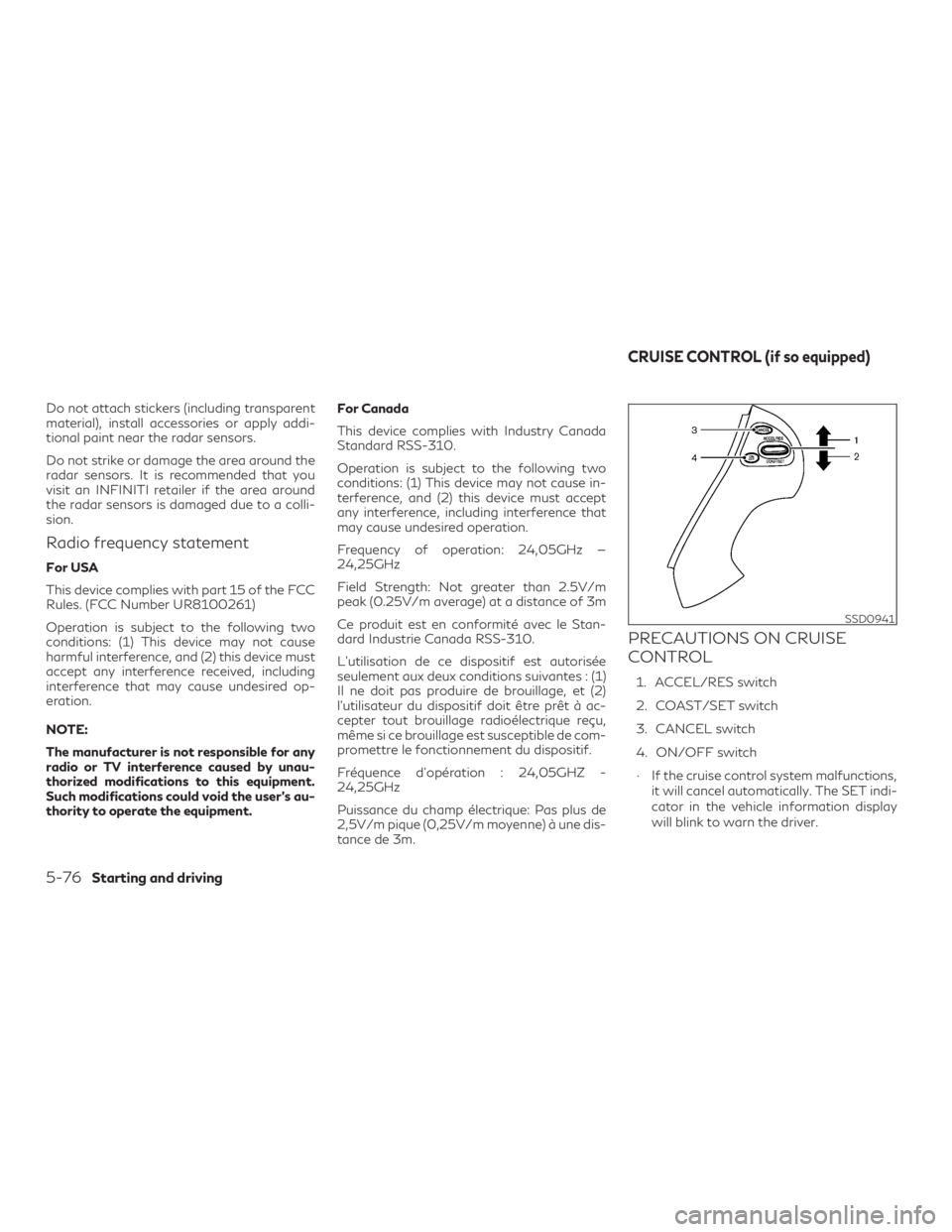
1. ACCEL/RES switch
2. COAST/SET switch
3. CANCEL switch
4. ON/OFF switch
∙ If the cruise control system malfunctions, it will cancel automatically. The SET indi-
cator in the vehicle information display
will blink to warn the driver.
SSD0941
CRUISE CONTROL (if so equipped)
5-76Starting and driving
Page 365 of 532
Condition B:
When the sensor area of the front bumper is
dirty, making it impossible to detect a vehicle
ahead, the DCA system is automatically can-
celed.
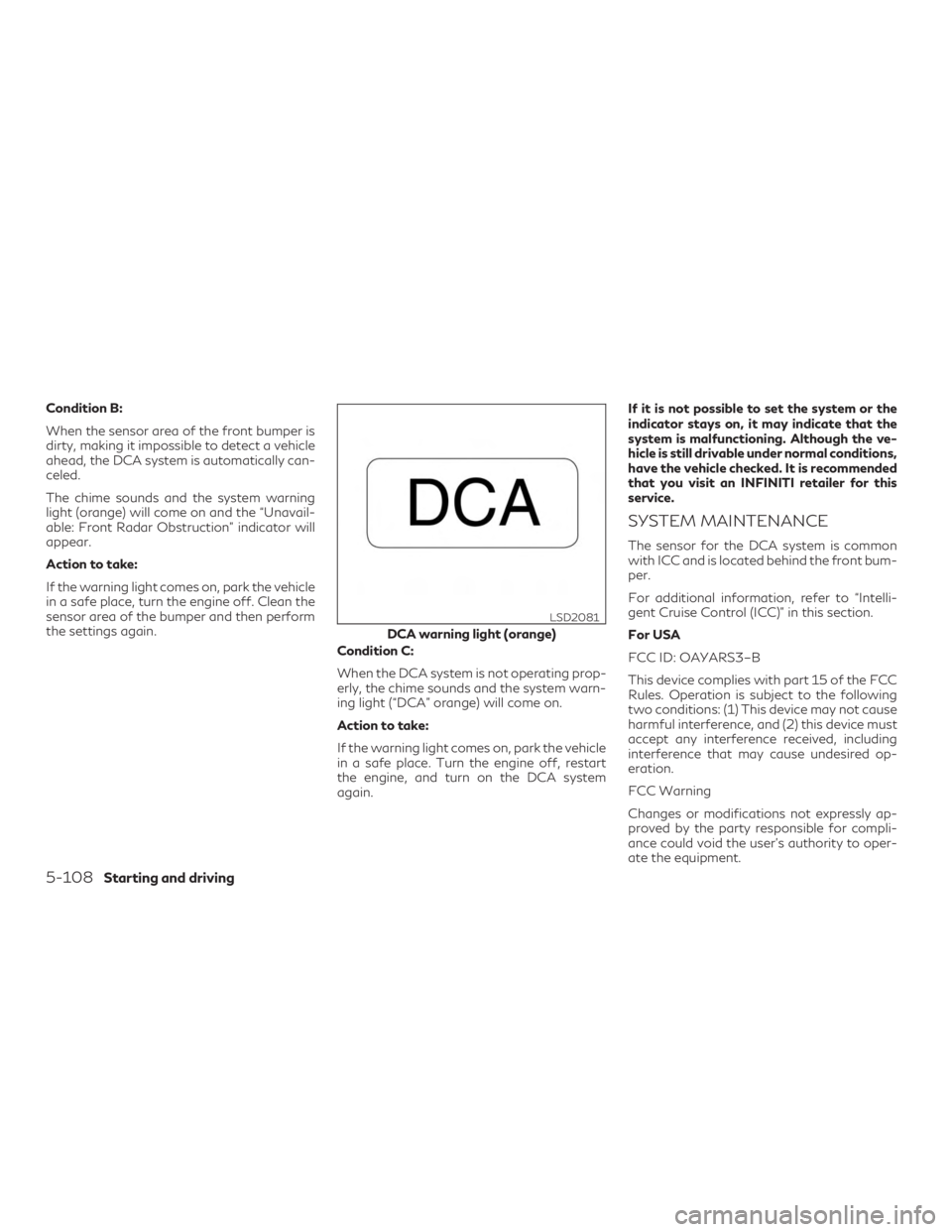
The chime sounds and the system warning
light (orange) will come on and the “Unavail-
able: Front Radar Obstruction” indicator will
appear.
Action to take:
If the warning light comes on, park the vehicle
in a safe place, turn the engine off. Clean the
sensor area of the bumper and then perform
the settings again.Condition C:
When the DCA system is not operating prop-
erly, the chime sounds and the system warn-
ing light (“DCA” orange) will come on.
Action to take:
If the warning light comes on, park the vehicle
in a safe place. Turn the engine off, restart
the engine, and turn on the DCA system
again.If it is not possible to set the system or the
indicator stays on, it may indicate that the
system is malfunctioning. Although the ve-
hicle is still drivable under normal conditions,
have the vehicle checked. It is recommended
that you visit an INFINITI retailer for this
service.
SYSTEM MAINTENANCE
The sensor for the DCA system is common
with ICC and is located behind the front bum-
per.
For additional information, refer to “Intelli-
gent Cruise Control (ICC)” in this section.
For USA
FCC ID: OAYARS3–B
This device complies with part 15 of the FCC
Rules. Operation is subject to the following
two conditions: (1) This device may not cause
harmful interference, and (2) this device must
accept any interference received, including
interference that may cause undesired op-
eration.
FCC Warning
Changes or modifications not expressly ap-
proved by the party responsible for compli-
ance could void the user’s authority to oper-
ate the equipment.
DCA warning light (orange)
LSD2081
5-108Starting and driving