door lock INFINITI QX60 2018 Owner's Manual
[x] Cancel search | Manufacturer: INFINITI, Model Year: 2018, Model line: QX60, Model: INFINITI QX60 2018Pages: 532, PDF Size: 6.22 MB
Page 14 of 532
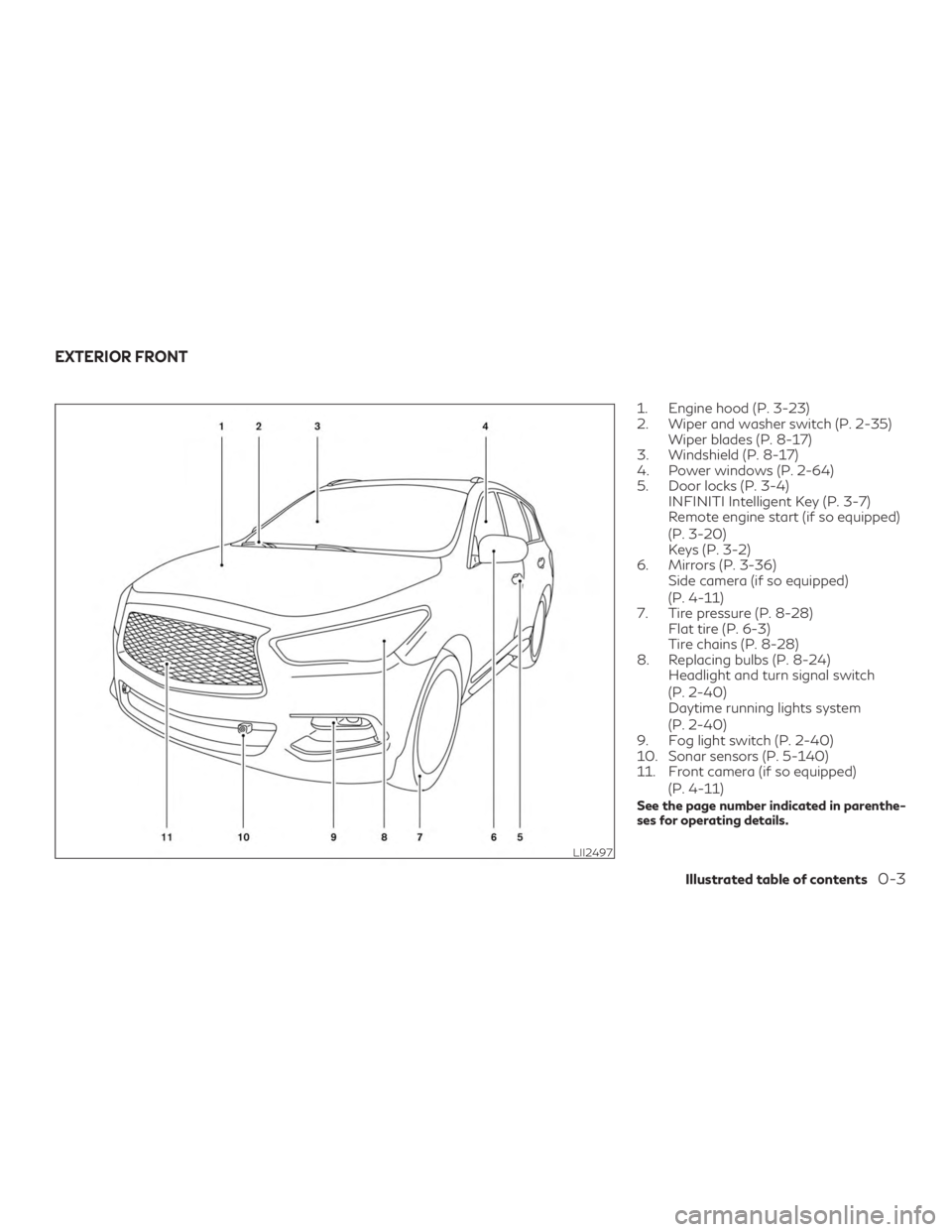
1. Engine hood (P. 3-23)
2. Wiper and washer switch (P. 2-35)Wiper blades (P. 8-17)
3. Windshield (P. 8-17)
4. Power windows (P. 2-64)
5. Door locks (P. 3-4) INFINITI Intelligent Key (P. 3-7)
Remote engine start (if so equipped)
(P. 3-20)
Keys (P. 3-2)
6. Mirrors (P. 3-36) Side camera (if so equipped)
(P. 4-11)
7. Tire pressure (P. 8-28) Flat tire (P. 6-3)
Tire chains (P. 8-28)
8. Replacing bulbs (P. 8-24) Headlight and turn signal switch
(P. 2-40)
Daytime running lights system
(P. 2-40)
9. Fog light switch (P. 2-40)
10. Sonar sensors (P. 5-140)
11. Front camera (if so equipped)
(P. 4-11)
See the page number indicated in parenthe-
ses for operating details.
LII2497
EXTERIOR FRONT
Illustrated table of contents0-3
Page 15 of 532
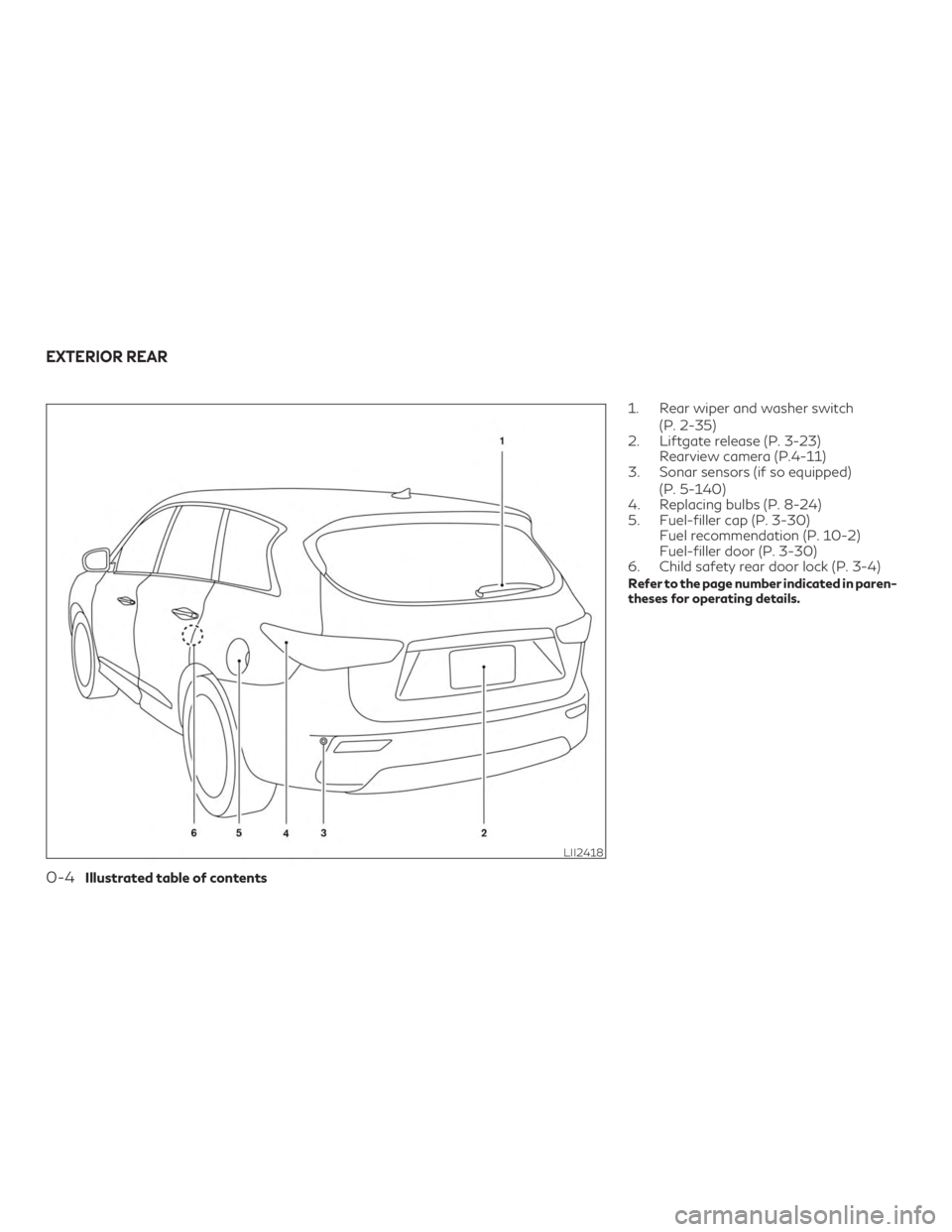
1. Rear wiper and washer switch(P. 2-35)
2. Liftgate release (P. 3-23) Rearview camera (P.4-11)
3. Sonar sensors (if so equipped)
(P. 5-140)
4. Replacing bulbs (P. 8-24)
5. Fuel-filler cap (P. 3-30) Fuel recommendation (P. 10-2)
Fuel-filler door (P. 3-30)
6. Child safety rear door lock (P. 3-4)
Refer to the page number indicated in paren-
theses for operating details.
LII2418
EXTERIOR REAR
0-4Illustrated table of contents
Page 42 of 532
is unfastened, the motor retracts the seat
belt. If the seat belt is not fully retracted, the
motor retracts the seat belt when the door is
opened.
Always wear your seat belt correctly and sit
upright and well back.
If the motor cannot retract the seat belt when
the seat belt is fastened or unfastened, it may
indicate the pre-crash seat belt system has a
malfunction. It is recommended that you visit
an INFINITI retailer to check and repair the
system.
When the seat belt is retracted repeatedly in
a short period of time, the motor may not be
able to retract the seat belt. After 8 minutes,
the motor reactivates and retracts the seat
belt. If the seat belt still cannot be retracted
by the motor, the pre-crash seat belt system
has a malfunction. It is recommended that
you visit an INFINITI retailer to check and
repair the system.THREE-POINT TYPE SEAT BELT
WITH RETRACTOR
WARNING
∙ Every person who drives or rides in thisvehicle should use a seat belt at all times.
Children should be in the rear seats and in
an appropriate restraint.
∙ Do not ride in a moving vehicle when the seatback is reclined. This can be danger-
ous. The shoulder belt will not be against
your body. In an accident, you could be
thrown into it and receive neck or other
serious injuries. You could also slide under
the lap belt and receive serious internal
injuries.
∙ For the most effective protection when the vehicle is in motion, the seat should be
upright. Always sit well back and upright
in the seat with both feet on the floor and
adjust the seat belt properly. ∙ Do not allow children to play with the
seat belts. Most seating positions are
equipped with Automatic Locking Re-
tractor (ALR) mode seat belts. If the seat
belt becomes wrapped around a child’s
neck with the ALR mode activated, the
child can be seriously injured or killed if
the seat belt retracts and becomes tight.
This can occur even if the vehicle is
parked. Unbuckle the seat belt to release
the child. If the seat belt cannot be un-
buckled or is already unbuckled, release
the child by cutting the seat belt with a
suitable tool (such as a knife or scissors)
to release the seat belt.
Safety—Seats, seat belts and supplemental restraint system1-21
Page 99 of 532
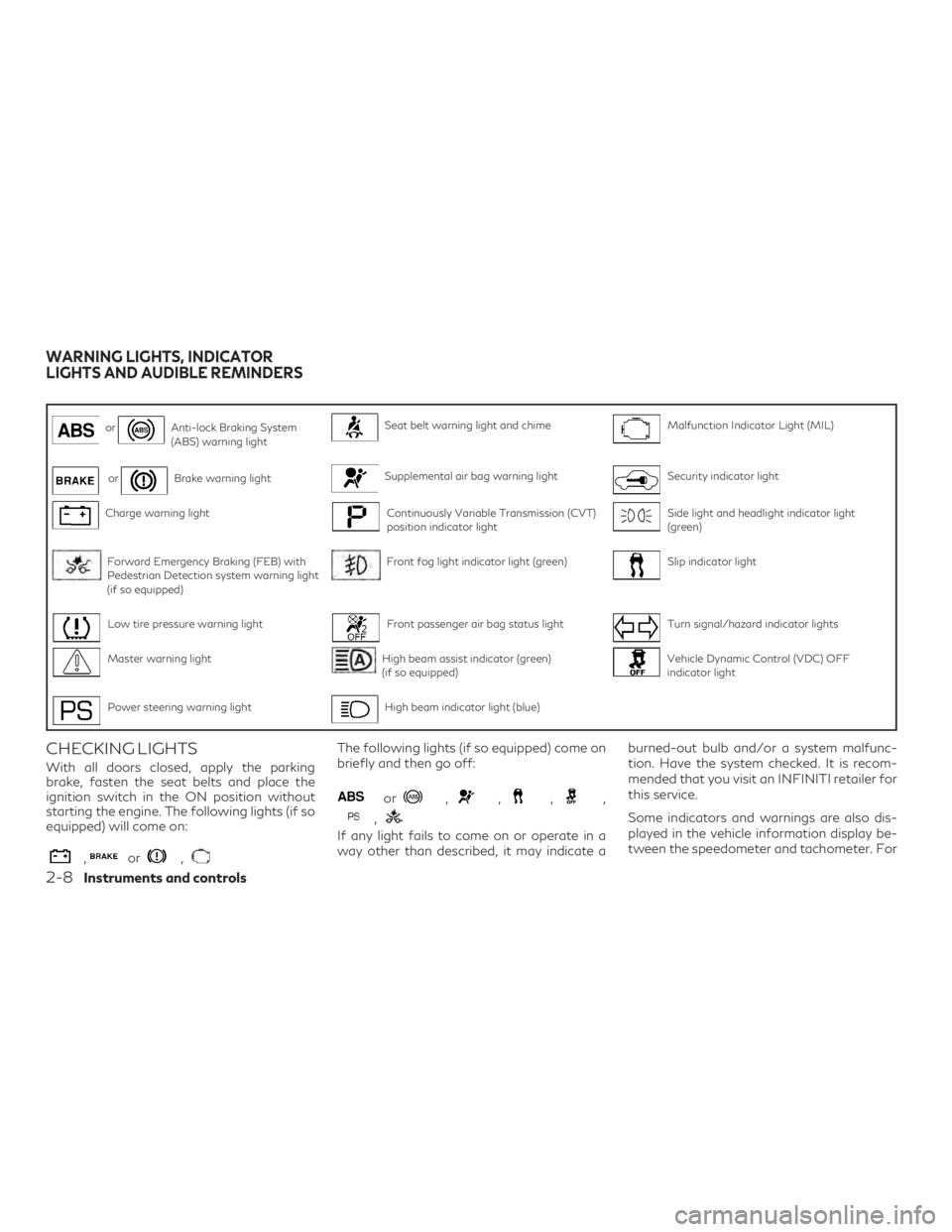
orAnti-lock Braking System
(ABS) warning lightSeat belt warning light and chimeMalfunction Indicator Light (MIL)
orBrake warning lightSupplemental air bag warning lightSecurity indicator light
Charge warning lightContinuously Variable Transmission (CVT)
position indicator lightSide light and headlight indicator light
(green)
Forward Emergency Braking (FEB) with
Pedestrian Detection system warning light
(if so equipped)Front fog light indicator light (green)Slip indicator light
Low tire pressure warning lightFront passenger air bag status lightTurn signal/hazard indicator lights
Master warning lightHigh beam assist indicator (green)
(if so equipped)Vehicle Dynamic Control (VDC) OFF
indicator light
Power steering warning lightHigh beam indicator light (blue)
CHECKING LIGHTS
With all doors closed, apply the parking
brake, fasten the seat belts and place the
ignition switch in the ON position without
starting the engine. The following lights (if so
equipped) will come on:
,or,
The following lights (if so equipped) come on
briefly and then go off:
or,,,,
,
If any light fails to come on or operate in a
way other than described, it may indicate aburned-out bulb and/or a system malfunc-
tion. Have the system checked. It is recom-
mended that you visit an INFINITI retailer for
this service.
Some indicators and warnings are also dis-
played in the vehicle information display be-
tween the speedometer and tachometer. For
WARNING LIGHTS, INDICATOR
LIGHTS AND AUDIBLE REMINDERS
2-8Instruments and controls
Page 101 of 532
for this service. Avoid high-speed driving and
abrupt braking. For additional information,
refer to “Anti-lock Braking System (ABS)
warning light” in this section.
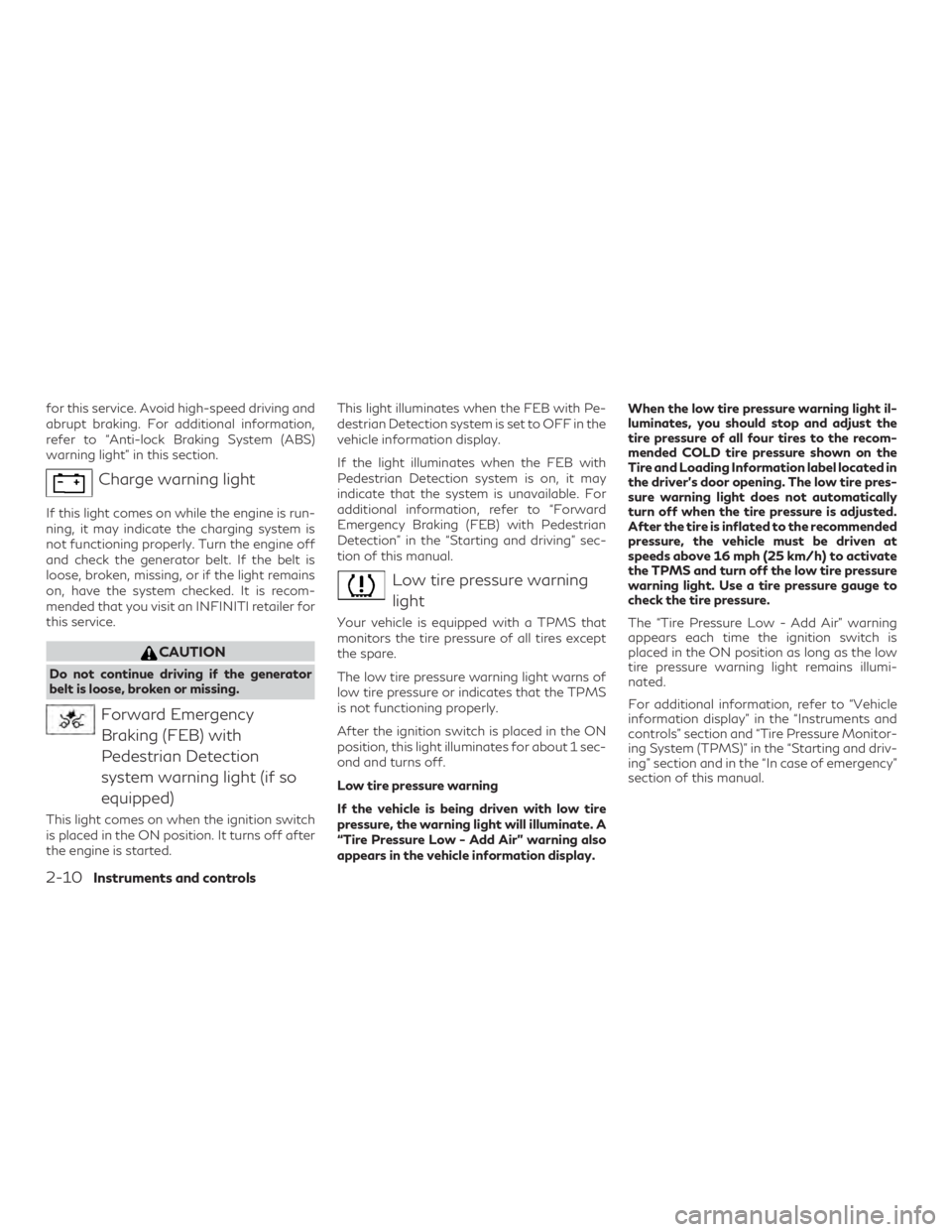
Charge warning light
If this light comes on while the engine is run-
ning, it may indicate the charging system is
not functioning properly. Turn the engine off
and check the generator belt. If the belt is
loose, broken, missing, or if the light remains
on, have the system checked. It is recom-
mended that you visit an INFINITI retailer for
this service.
CAUTION
Do not continue driving if the generator
belt is loose, broken or missing.
Forward EmergencyBraking (FEB) with
Pedestrian Detection
system warning light (if so
equipped)
This light comes on when the ignition switch
is placed in the ON position. It turns off after
the engine is started. This light illuminates when the FEB with Pe-
destrian Detection system is set to OFF in the
vehicle information display.
If the light illuminates when the FEB with
Pedestrian Detection system is on, it may
indicate that the system is unavailable. For
additional information, refer to “Forward
Emergency Braking (FEB) with Pedestrian
Detection” in the “Starting and driving” sec-
tion of this manual.
Low tire pressure warning
light
Your vehicle is equipped with a TPMS that
monitors the tire pressure of all tires except
the spare.
The low tire pressure warning light warns of
low tire pressure or indicates that the TPMS
is not functioning properly.
After the ignition switch is placed in the ON
position, this light illuminates for about 1 sec-
ond and turns off.
Low tire pressure warning
If the vehicle is being driven with low tire
pressure, the warning light will illuminate. A
“Tire Pressure Low - Add Air” warning also
appears in the vehicle information display. When the low tire pressure warning light il-
luminates, you should stop and adjust the
tire pressure of all four tires to the recom-
mended COLD tire pressure shown on the
Tire and Loading Information label located in
the driver’s door opening. The low tire pres-
sure warning light does not automatically
turn off when the tire pressure is adjusted.
After the tire is inflated to the recommended
pressure, the vehicle must be driven at
speeds above 16 mph (25 km/h) to activate
the TPMS and turn off the low tire pressure
warning light. Use a tire pressure gauge to
check the tire pressure.
The “Tire Pressure Low - Add Air” warning
appears each time the ignition switch is
placed in the ON position as long as the low
tire pressure warning light remains illumi-
nated.
For additional information, refer to “Vehicle
information display” in the “Instruments and
controls” section and “Tire Pressure Monitor-
ing System (TPMS)” in the “Starting and driv-
ing” section and in the “In case of emergency”
section of this manual.
2-10Instruments and controls
Page 106 of 532
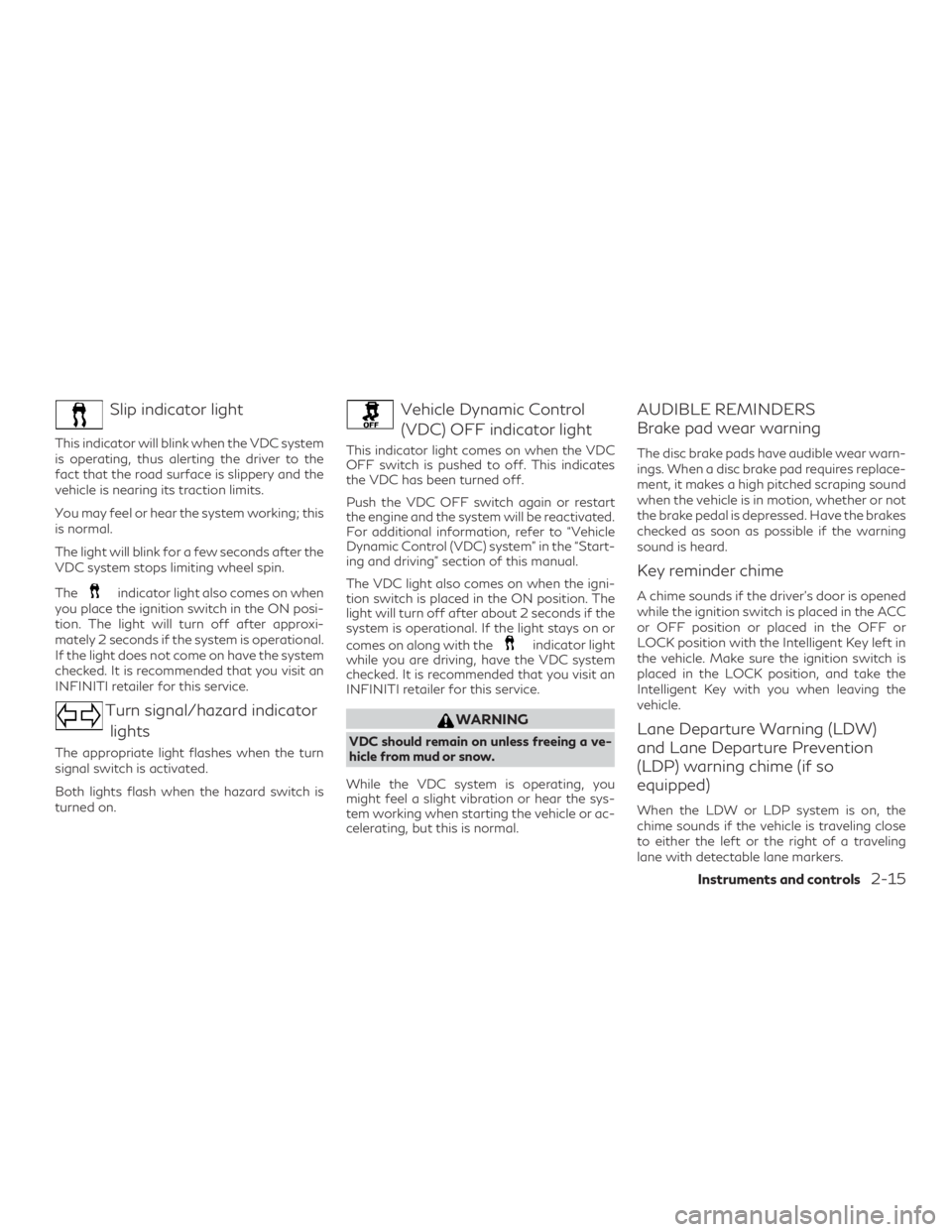
Slip indicator light
This indicator will blink when the VDC system
is operating, thus alerting the driver to the
fact that the road surface is slippery and the
vehicle is nearing its traction limits.
You may feel or hear the system working; this
is normal.
The light will blink for a few seconds after the
VDC system stops limiting wheel spin.
The
indicator light also comes on when
you place the ignition switch in the ON posi-
tion. The light will turn off after approxi-
mately 2 seconds if the system is operational.
If the light does not come on have the system
checked. It is recommended that you visit an
INFINITI retailer for this service.
Turn signal/hazard indicator
lights
The appropriate light flashes when the turn
signal switch is activated.
Both lights flash when the hazard switch is
turned on.
Vehicle Dynamic Control(VDC) OFF indicator light
This indicator light comes on when the VDC
OFF switch is pushed to off. This indicates
the VDC has been turned off.
Push the VDC OFF switch again or restart
the engine and the system will be reactivated.
For additional information, refer to “Vehicle
Dynamic Control (VDC) system” in the “Start-
ing and driving” section of this manual.
The VDC light also comes on when the igni-
tion switch is placed in the ON position. The
light will turn off after about 2 seconds if the
system is operational. If the light stays on or
comes on along with the
indicator light
while you are driving, have the VDC system
checked. It is recommended that you visit an
INFINITI retailer for this service.
WARNING
VDC should remain on unless freeing a ve-
hicle from mud or snow.
While the VDC system is operating, you
might feel a slight vibration or hear the sys-
tem working when starting the vehicle or ac-
celerating, but this is normal.
AUDIBLE REMINDERS
Brake pad wear warning
The disc brake pads have audible wear warn-
ings. When a disc brake pad requires replace-
ment, it makes a high pitched scraping sound
when the vehicle is in motion, whether or not
the brake pedal is depressed. Have the brakes
checked as soon as possible if the warning
sound is heard.
Key reminder chime
A chime sounds if the driver’s door is opened
while the ignition switch is placed in the ACC
or OFF position or placed in the OFF or
LOCK position with the Intelligent Key left in
the vehicle. Make sure the ignition switch is
placed in the LOCK position, and take the
Intelligent Key with you when leaving the
vehicle.
Lane Departure Warning (LDW)
and Lane Departure Prevention
(LDP) warning chime (if so
equipped)
When the LDW or LDP system is on, the
chime sounds if the vehicle is traveling close
to either the left or the right of a traveling
lane with detectable lane markers.
Instruments and controls2-15
Page 107 of 532
For additional information, refer to “Lane
Departure Warning (LDW) system” or “Lane
Departure Prevention (LDP) system” in the
“Starting and driving” section of this manual.
Light reminder chime
With the ignition switch placed in the OFF
position, a chime sounds when the driver’s
door is opened if the headlights or parking
lights are on.
Turn the headlight control switch off before
leaving the vehicle.
Intelligent Key door buzzer
The Intelligent Key door buzzer sounds if any one
of the following improper operations is found.
∙ The ignition switch is not returned to theLOCK position when locking the doors.
∙ The Intelligent Key is left inside the ve- hicle when locking the doors.
∙ The Intelligent Key is taken outside the vehicle when operating the vehicle.
∙ Any doors are not closed securely when locking the doors.
When the buzzer sounds, be sure to check both
the vehicle and the Intelligent Key System. For
additional information, refer to “INFINITI Intel-
ligent Key” in the “Pre-driving checks and ad-
justments” section of this manual.
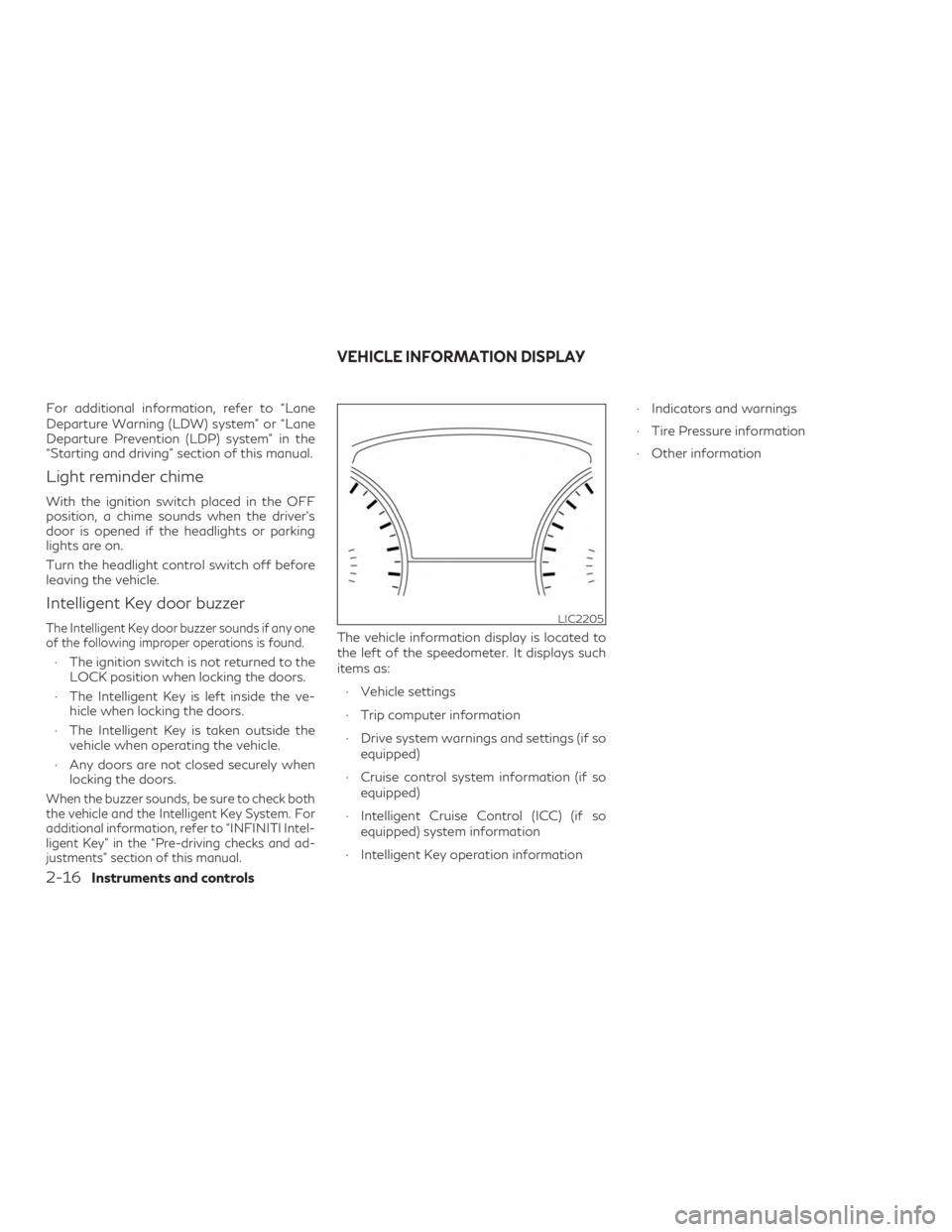
The vehicle information display is located to
the left of the speedometer. It displays such
items as:
∙ Vehicle settings
∙ Trip computer information
∙ Drive system warnings and settings (if so equipped)
∙ Cruise control system information (if so equipped)
∙ Intelligent Cruise Control (ICC) (if so equipped) system information
∙ Intelligent Key operation information ∙ Indicators and warnings
∙ Tire Pressure information
∙ Other information
LIC2205
VEHICLE INFORMATION DISPLAY
2-16Instruments and controls
Page 110 of 532
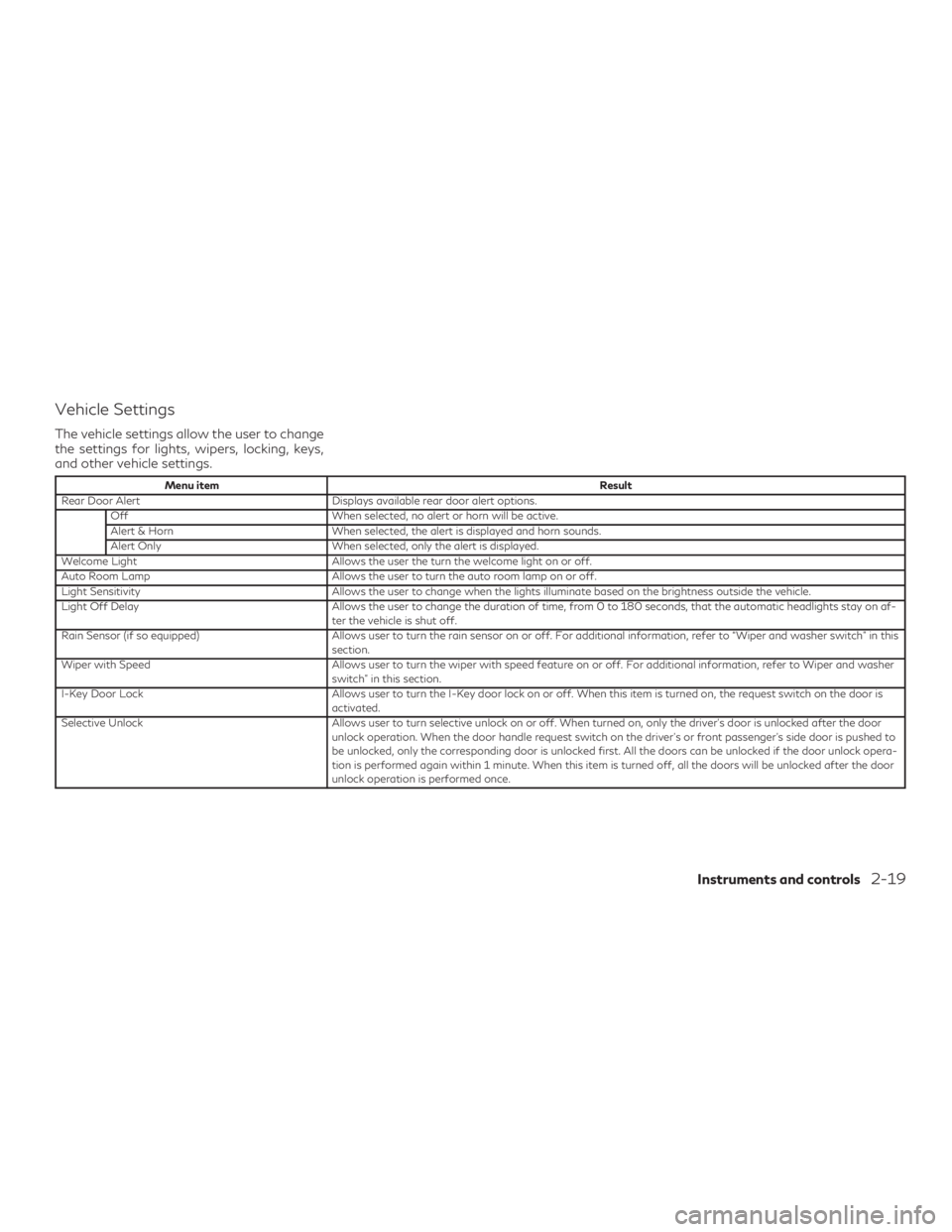
Vehicle Settings
The vehicle settings allow the user to change
the settings for lights, wipers, locking, keys,
and other vehicle settings.
Menu itemResult
Rear Door Alert Displays available rear door alert options. Off When selected, no alert or horn will be active.
Alert & Horn When selected, the alert is displayed and horn sounds.
Alert Only When selected, only the alert is displayed.
Welcome Light Allows the user the turn the welcome light on or off.
Auto Room Lamp Allows the user to turn the auto room lamp on or off.
Light Sensitivity Allows the user to change when the lights illuminate based on the brightness outside the vehicle.
Light Off Delay Allows the user to change the duration of time, from 0 to 180 seconds, that the automatic headlights stay on af- ter the vehicle is shut off.
Rain Sensor (if so equipped) Allows user to turn the rain sensor on or off. For additional information, refer to “Wiper and washer switch” in this section.
Wiper with Speed Allows user to turn the wiper with speed feature on or off. For additional information, refer to Wiper and washer switch” in this section.
I-Key Door Lock Allows user to turn the I-Key door lock on or off. When this item is turned on, the request switch on the door is activated.
Selective Unlock Allows user to turn selective unlock on or off. When turned on, only the driver’s door is unlocked after the door unlock operation. When the door handle request switch on the driver’s or front passenger’s side door is pushed to
be unlocked, only the corresponding door is unlocked first. All the doors can be unlocked if the door unlock opera-
tion is performed again within 1 minute. When this item is turned off, all the doors will be unlocked after the door
unlock operation is performed once.
Instruments and controls2-19
Page 111 of 532
Menu itemResult
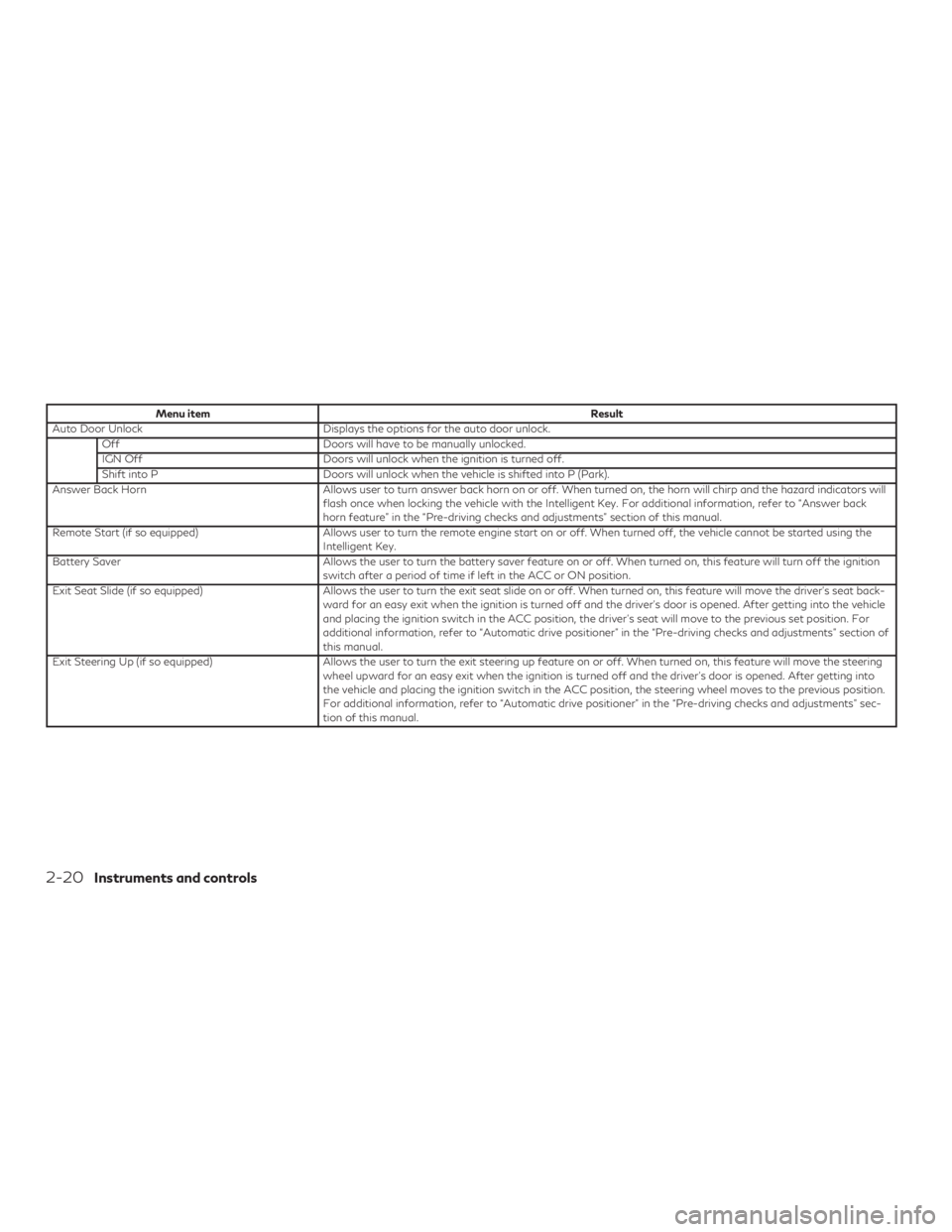
Auto Door Unlock Displays the options for the auto door unlock. Off Doors will have to be manually unlocked.
IGN Off Doors will unlock when the ignition is turned off.
Shift into P Doors will unlock when the vehicle is shifted into P (Park).
Answer Back Horn Allows user to turn answer back horn on or off. When turned on, the horn will chirp and the hazard indicators will flash once when locking the vehicle with the Intelligent Key. For additional information, refer to “Answer back
horn feature” in the “Pre-driving checks and adjustments” section of this manual.
Remote Start (if so equipped) Allows user to turn the remote engine start on or off. When turned off, the vehicle cannot be started using the Intelligent Key.
Battery Saver Allows the user to turn the battery saver feature on or off. When turned on, this feature will turn off the ignition switch after a period of time if left in the ACC or ON position.
Exit Seat Slide (if so equipped) Allows the user to turn the exit seat slide on or off. When turned on, this feature will move the driver’s seat back- ward for an easy exit when the ignition is turned off and the driver’s door is opened. After getting into the vehicle
and placing the ignition switch in the ACC position, the driver’s seat will move to the previous set position. For
additional information, refer to “Automatic drive positioner” in the “Pre-driving checks and adjustments” section of
this manual.
Exit Steering Up (if so equipped) Allows the user to turn the exit steering up feature on or off. When turned on, this feature will move the steering wheel upward for an easy exit when the ignition is turned off and the driver’s door is opened. After getting into
the vehicle and placing the ignition switch in the ACC position, the steering wheel moves to the previous position.
For additional information, refer to “Automatic drive positioner” in the “Pre-driving checks and adjustments” sec-
tion of this manual.
2-20Instruments and controls
Page 122 of 532
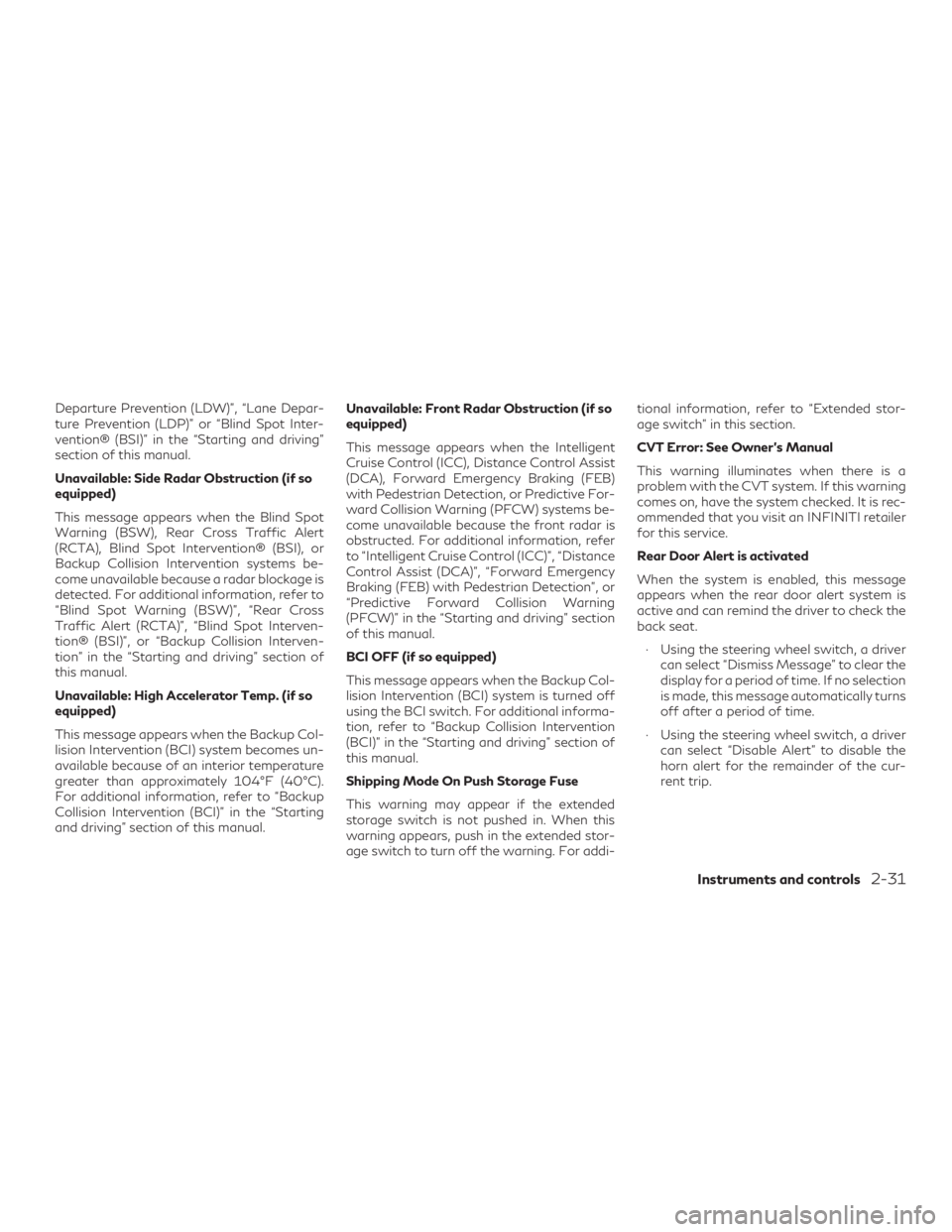
Departure Prevention (LDW)”, “Lane Depar-
ture Prevention (LDP)” or “Blind Spot Inter-
vention® (BSI)” in the “Starting and driving”
section of this manual.
Unavailable: Side Radar Obstruction (if so
equipped)
This message appears when the Blind Spot
Warning (BSW), Rear Cross Traffic Alert
(RCTA), Blind Spot Intervention® (BSI), or
Backup Collision Intervention systems be-
come unavailable because a radar blockage is
detected. For additional information, refer to
“Blind Spot Warning (BSW)”, “Rear Cross
Traffic Alert (RCTA)”, “Blind Spot Interven-
tion® (BSI)”, or “Backup Collision Interven-
tion” in the “Starting and driving” section of
this manual.
Unavailable: High Accelerator Temp. (if so
equipped)
This message appears when the Backup Col-
lision Intervention (BCI) system becomes un-
available because of an interior temperature
greater than approximately 104°F (40°C).
For additional information, refer to “Backup
Collision Intervention (BCI)” in the “Starting
and driving” section of this manual.Unavailable: Front Radar Obstruction (if so
equipped)
This message appears when the Intelligent
Cruise Control (ICC), Distance Control Assist
(DCA), Forward Emergency Braking (FEB)
with Pedestrian Detection, or Predictive For-
ward Collision Warning (PFCW) systems be-
come unavailable because the front radar is
obstructed. For additional information, refer
to “Intelligent Cruise Control (ICC)”, “Distance
Control Assist (DCA)”, “Forward Emergency
Braking (FEB) with Pedestrian Detection”, or
“Predictive Forward Collision Warning
(PFCW)” in the “Starting and driving” section
of this manual.
BCI OFF (if so equipped)
This message appears when the Backup Col-
lision Intervention (BCI) system is turned off
using the BCI switch. For additional informa-
tion, refer to “Backup Collision Intervention
(BCI)” in the “Starting and driving” section of
this manual.
Shipping Mode On Push Storage Fuse
This warning may appear if the extended
storage switch is not pushed in. When this
warning appears, push in the extended stor-
age switch to turn off the warning. For addi-tional information, refer to “Extended stor-
age switch” in this section.
CVT Error: See Owner’s Manual
This warning illuminates when there is a
problem with the CVT system. If this warning
comes on, have the system checked. It is rec-
ommended that you visit an INFINITI retailer
for this service.
Rear Door Alert is activated
When the system is enabled, this message
appears when the rear door alert system is
active and can remind the driver to check the
back seat.
∙ Using the steering wheel switch, a driver can select “Dismiss Message” to clear the
display for a period of time. If no selection
is made, this message automatically turns
off after a period of time.
∙ Using the steering wheel switch, a driver can select “Disable Alert” to disable the
horn alert for the remainder of the cur-
rent trip.
Instruments and controls2-31