fog light INFINITI QX60 2018 Owner's Manual
[x] Cancel search | Manufacturer: INFINITI, Model Year: 2018, Model line: QX60, Model: INFINITI QX60 2018Pages: 490, PDF Size: 6.34 MB
Page 340 of 490
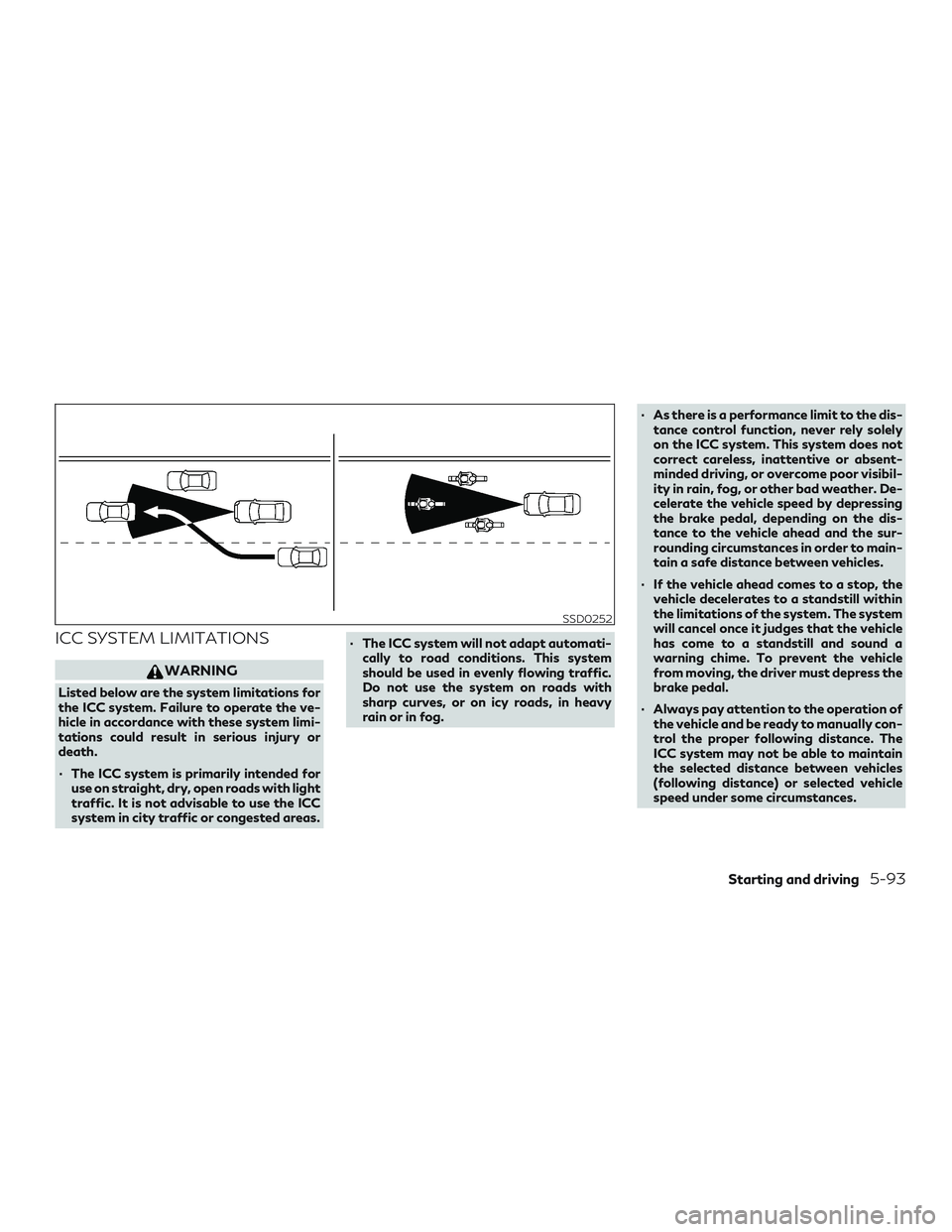
ICC SYSTEM LIMITATIONS
WARNING
Listed below are the system limitations for
the ICC system. Failure to operate the ve-
hicle in accordance with these system limi-
tations could result in serious injury or
death.
∙ The ICC system is primarily intended foruse on straight, dry, open roads with light
traffic. It is not advisable to use the ICC
system in city traffic or congested areas. ∙ The ICC system will not adapt automati-
cally to road conditions. This system
should be used in evenly flowing traffic.
Do not use the system on roads with
sharp curves, or on icy roads, in heavy
rain or in fog. ∙ As there is a performance limit to the dis-
tance control function, never rely solely
on the ICC system. This system does not
correct careless, inattentive or absent-
minded driving, or overcome poor visibil-
ity in rain, fog, or other bad weather. De-
celerate the vehicle speed by depressing
the brake pedal, depending on the dis-
tance to the vehicle ahead and the sur-
rounding circumstances in order to main-
tain a safe distance between vehicles.
∙ If the vehicle ahead comes to a stop, the vehicle decelerates to a standstill within
the limitations of the system. The system
will cancel once it judges that the vehicle
has come to a standstill and sound a
warning chime. To prevent the vehicle
from moving, the driver must depress the
brake pedal.
∙ Always pay attention to the operation of the vehicle and be ready to manually con-
trol the proper following distance. The
ICC system may not be able to maintain
the selected distance between vehicles
(following distance) or selected vehicle
speed under some circumstances.
SSD0252
Starting and driving5-93
Page 351 of 490
Setting DCA system to ON/OFF:
The DCA can be turned on/off in the vehicle
information display using the buttons on the
steering wheel.1. Press the
button until “Settings”
displays in the vehicle information dis-
play. Use the
button to select
“Driver Assistance.” Then press the EN-
TER button.
2. Select “Driving Aids,” and press the EN- TER button.
3. Select “Forward,” and press the ENTER button.
4. To turn on the “Assistance (DCA)” check the box using the ENTER button.
If the LDP, BSI and DCA systems are set to
off in the vehicle information display and the
dynamic driver assistance switch is pushed,
the LDW ON indicator light, BSI ON indicator
light, and the DCA system switch indicator
light will blink for approximately 2 seconds.
For additional information on LDP and BSI,
refer to “Lane Departure Prevention (LDP)”
and “Blind Spot Intervention® (BSI)” in this
section.
DCA SYSTEM LIMITATIONS
WARNING
∙ This system is only an aid to assist the driver and is not a collision warning or
avoidance device. It is the driver’s re-
sponsibility to stay alert, drive safely and
be in control of the vehicle at all times.
∙ This system will not adapt automatically to road conditions.
∙ As there is a performance limit to the dis- tance control function, never rely solely
on the DCA system. This system does not
correct careless, inattentive or absent-
minded driving, or overcome poor visibil-
ity in rain, fog, or other bad weather. De-
celerate the vehicle speed by depressing
the brake pedal, depending on the dis-
tance to the vehicle ahead and the sur-
rounding circumstances in order to main-
tain a safe distance between vehicles.
∙ The system may not detect the vehicle in front of you in certain road or weather
conditions. To avoid accidents, never use
the DCA system under the following
conditions:
– On roads with sharp curves – On slippery road surfaces such as on
ice or snow, etc.
– During bad weather (rain, fog, snow, etc.)
– When rain, snow or dirt adhere to the sensor area of the front bumper
– On steep downhill roads (frequent braking may result in overheating the
brakes)
– On repeated uphill and downhill roads
∙ Do not use the DCA system if you are towing a trailer. The system may not de-
tect a vehicle ahead.
∙ In some road or traffic conditions, a ve- hicle or object can unexpectedly come
into the sensor detection zone and cause
automatic braking. You may need to con-
trol the distance from other vehicles us-
ing the accelerator pedal. Always stay
alert and avoid using the DCA system
where not recommended in this warning
section.
5-104Starting and driving
Page 363 of 490
∙The PFCW system (if so equipped) is in-
tegrated into the FEB with Pedestrian
Detection system. There is not a sepa-
rate selection in the vehicle information
display for the PFCW system. When the
FEB with Pedestrian Detection is turned
off, the PFCW system is also turned off.
FEB WITH PEDESTRIAN
DETECTION SYSTEM
LIMITATIONS
WARNING
Listed below are the system limitations for
the FEB with Pedestrian Detection system.
Failure to operate the vehicle in accordance
with these system limitations could result
in serious injury or death.
∙ The FEB with Pedestrian Detection sys-
tem cannot detect all vehicles or pedes-
trians under all conditions.
∙ The radar sensor FEB with Pedestrian Detection system does not detect the
following objects:
– Small pedestrians (including small children), animals and cyclists. – Pedestrians in wheelchairs or using
mobile transport such as scooters,
child-operated toys, or skateboards.
– Pedestrians who are seated or other- wise not in a full upright standing or
walking position.
– Oncoming vehicles
– Crossing vehicles
– Obstacles on the roadside
∙ The FEB with Pedestrian Detection sys- tem has some performance limitations.
– If a stationary vehicle is in the vehicle’s path, the FEB with Pedestrian Detec-
tion system will not function when the
vehicle is driven at speeds over ap-
proximately 80 km/h (50 mph).
– For pedestrian detection, the FEB with Pedestrian Detection system will
not function when the vehicle is driven
at speeds over approximately
60 km/h (37 mph) or below approxi-
mately 10 km/h (6 mph).
∙ The FEB with Pedestrian Detection sys- tem will not function for pedestrians in
darkness or in tunnels, even if there is
street lighting in the area. ∙ For pedestrians, the FEB with Pedestrian
Detection system will not issue the first
warning and will not push the accelerator
pedal up.
∙ The FEB with Pedestrian Detection sys- tem may not function if the vehicle ahead
is narrow (for example, a motorcycle).
∙ The FEB with Pedestrian Detection sys- tem may not function if speed difference
between the two vehicles is too small.
∙ The radar sensor FEB with Pedestrian Detection system may not function prop-
erly or detect a vehicle ahead in the fol-
lowing conditions:
– Poor visibility (conditions such as rain, snow, fog, dust storms, sandstorms,
and road spray from other vehicles)
– Driving on a steep downhill slope or roads with sharp curves.
– Driving on a bumpy road surface, such as an uneven dirt road.
– If dirt, ice, snow or other material is covering the radar sensor area.
– Interference by other radar sources.
5-116Starting and driving
Page 364 of 490

– The camera area of windshield isfogged up, or covered with dirt, water
drops, ice, snow, etc.
– Strong light (for example, sunlight or high beams from oncoming vehicles)
enters the front camera. Strong light
causes the area around the pedestrian
to be cast in a shadow, making it diffi-
cult to see.
– A sudden change in brightness occurs. (For example, when the vehicle enters
or exits a tunnel or a shaded area or
lightning flashes.)
– The poor contrast of a person to the background, such as having clothing
color or pattern which is similar to the
background.
– The pedestrian’s profile is partially obscured or unidentifiable due to the
pedestrian transporting luggage,
wearing bulky or very loose-fitting
clothing or accessories.
∙ The system performance may degrade in the following conditions:
– The vehicle is driven on a slippery road.
– The vehicle is driven on a slope. – Excessively heavy baggage is loaded
in the rear seat or the trunk room of
your vehicle.
∙ The system is designed to automatically check the sensors’ (radar and camera)
functionality, within certain limitations.
The system may not detect blockage of
sensor areas covered by ice, snow or
stickers, for example. In these cases, the
system may not be able to warn the
driver properly. Be sure that you check,
clean and clear sensor areas regularly.
∙ In some road and traffic conditions, the FEB with Pedestrian Detection system
may unexpectedly apply partial braking.
When acceleration is necessary, depress
the accelerator pedal to override the
system.
∙ Excessive noise will interfere with the warning chime sound, and the chime may
not be heard.
Starting and driving5-117
Page 420 of 490
Machine compounding or aggressive polish-
ing on a base coat/clear coat paint finish may
dull the finish or leave swirl marks.
REMOVING SPOTS
Remove tar and oil spots, industrial dust, in-
sects, and tree sap as quickly as possible from
the surface of the paint to avoid lasting dam-
age or staining. Special cleaning products are
available at an INFINITI retailer or any auto-
motive accessory store. It is recommended
that you visit an INFINITI retailer for these
products.
UNDERBODY
In areas where road salt is used in winter, it is
necessary to clean the underbody regularly in
order to prevent dirt and salt from building up
and causing the acceleration of corrosion on
the underbody and suspension. Before the
winter period and again in the spring, the
underseal must be checked and, if necessary,
re-treated.
GLASS
Use glass cleaner to remove smoke and dust
film from the glass surfaces. It is normal for
glass to become coated with a film after the
vehicle is parked in the hot sun. Glass cleaner
and a soft cloth will easily remove this film.
CAUTION
When cleaning the inside of the windows,
do not use sharp-edged tools, abrasive
cleaners or chlorine-based disinfectant
cleaners. They could damage the electrical
conductors, radio antenna elements or rear
window defogger elements.
ALUMINUM ALLOY WHEELS
Wash the wheels regularly with a sponge
dampened in a mild soap solution, especially
during winter months in areas where road
salt is used. If not removed, road salt can
discolor the wheels.
CAUTION
Follow the directions below to avoid stain-
ing or discoloring the wheels:
∙ Do not use a cleaner that uses strong acidor alkali contents to clean the wheels.
∙ Do not apply wheel cleaners to the wheels when they are hot. The wheel
temperature should be the same as ambi-
ent temperature.
∙ Rinse the wheel to completely remove the cleaner within 15 minutes after the
cleaner is applied.
CHROME PARTS
Clean all chrome parts regularly with a non-
abrasive chrome polish to maintain the finish.
TIRE DRESSINGS
INFINITI does not recommend the use of tire
dressings. Tire manufacturers apply a coating
to the tires to help reduce discoloration of the
rubber. If a tire dressing is applied to the tires,
it may react with the coating and form a
compound. This compound may come off the
tire while driving and stain the vehicle paint.
If you choose to use a tire dressing, take the
following precautions:
∙ Use a water-based tire dressing. The coating on the tire dissolves more easily
than with an oil-based tire dressing.
∙ Apply a light coat of tire dressing to help prevent it from entering the tire
tread/grooves (where it would be diffi-
cult to remove).
∙ Wipe off excess tire dressing using a dry towel. Make sure the tire dressing is com-
pletely removed from the tire tread/
grooves.
∙ Allow the tire dressing to dry as recom- mended by tire dressing manufacturer.
Appearance and care7-3
Page 426 of 490
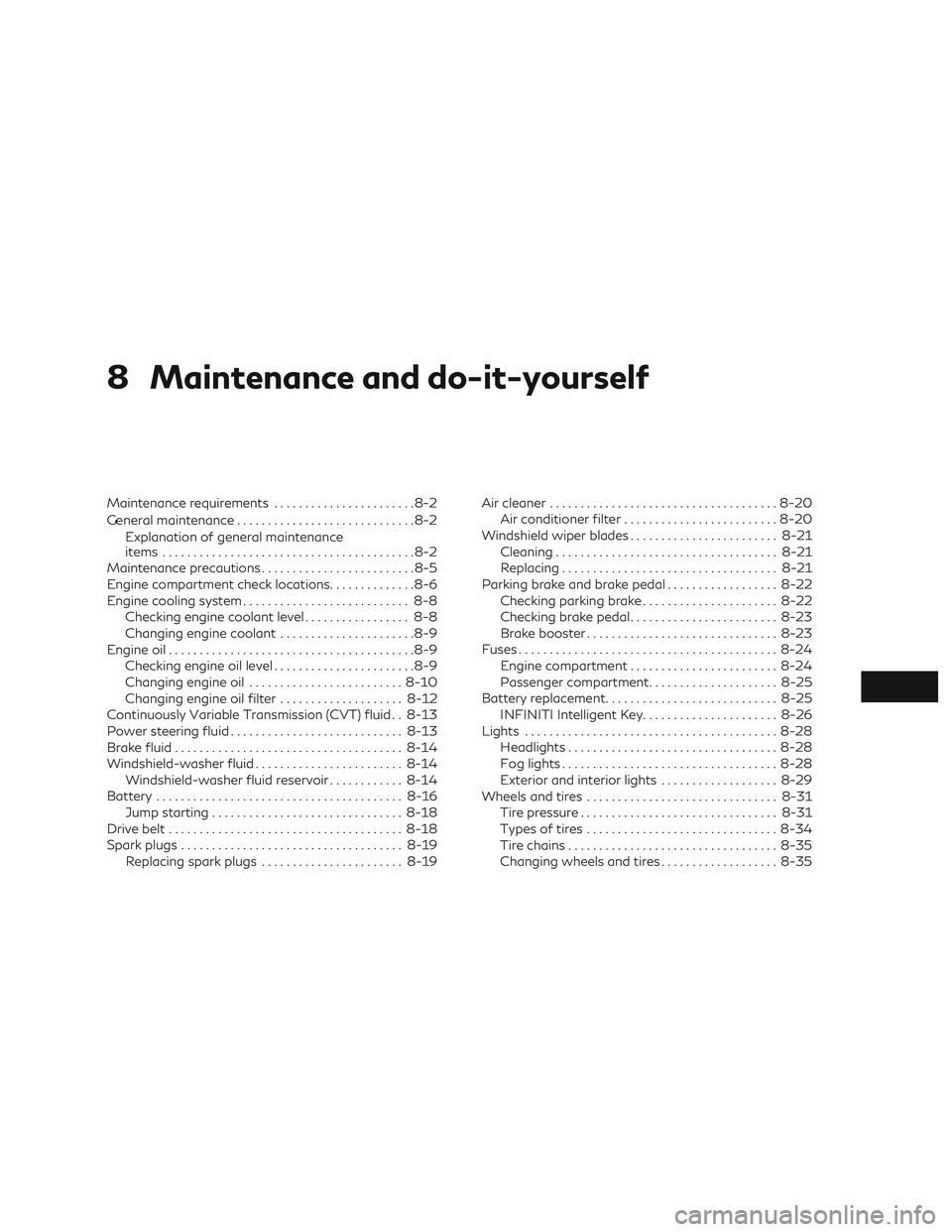
8 Maintenance and do-it-yourself
Maintenance requirements.......................8-2
General maintenance .............................8-2
Explanation of general maintenance
items .........................................8-2
Maintenance precautions .........................8-5
Engine compartment check locations ..............8-6
Engine cooling system ........................... 8-8
Checking engine coolant level ................. 8-8
Changing engine coolant ......................8-9
Engine oil ........................................8-9
Checking engine oil level .......................8-9
Changing engine oil ......................... 8-10
Changing engine oil filter ....................8-12
Continuously Variable Transmission (CVT) fluid . . 8-13
Power steering fluid ............................ 8-13
Brake fluid ..................................... 8-14
Windshield-washer fluid ........................ 8-14
Windshield-washer fluid reservoir ............8-14
Battery ........................................ 8-16
Jump starting ............................... 8-18
Drive belt ...................................... 8-18
Spark plugs .................................... 8-19
Replacing spark plugs ....................... 8-19Air cleaner
..................................... 8-20
Air conditioner filter ......................... 8-20
Windshield wiper blades ........................ 8-21
Cleaning .................................... 8-21
Replacing ................................... 8-21
Parking brake and brake pedal ..................8-22
Checking parking brake ......................8-22
Checking brake pedal ........................ 8-23
Brake booster ............................... 8-23
Fuses .......................................... 8-24
Engine compartment ........................ 8-24
Passenger compartment .....................8-25
Battery replacement ............................ 8-25
INFINITI Intelligent Key ......................8-26
Lights ......................................... 8-28
Headlights .................................. 8-28
Fog
lights ................................... 8-28
Exterior and interior lights ...................8-29
Wheels and tires ............................... 8-31
Tire pressure ................................ 8-31
Types of tires ............................... 8-34
Tire chains .................................. 8-35
Changing wheels and tires ...................8-35
Page 429 of 490
vehicle is held securely on a fairly steep hill
when only the parking brake is applied.
Seat beltsCheck that all parts of the seat belt
system (for example, buckles, anchors, ad-
justers and retractors) operate properly and
smoothly, and are installed securely. Check
the belt webbing for cuts, fraying, wear or
damage.
Steering wheel Check for changes in the
steering condition, such as excessive play,
hard steering or strange noises.
Warning lights and chimes Make sure that all
warning lights and chimes are operating
properly.
Windshield defogger Check that the air
comes out of the defogger outlets properly
and in good quantity when operating the
heater or air conditioner.
Windshield wiper and washer* Check that
the wipers and washer operate properly and
that the wipers do not streak.
Under the hood and vehicle
The maintenance items listed here should be
checked periodically (for example, each time
you check the engine oil or refuel). Battery* (except for maintenance free bat-
teries)
Check the fluid level in each cell. The
fluid should be at the bottom of the filler
opening. Vehicles operated in high tempera-
tures or under severe conditions require fre-
quent checks of the battery fluid level.
NOTE:
Care should be taken to avoid situations
that can lead to potential battery discharge
and potential no-start conditions such as:
1. Installation or extended use of elec-
tronic accessories that consume battery
power when the engine is not running
(Phone chargers, GPS, DVD players,
etc.).
2. Vehicle is not driven regularly and/or
only driven short distances.
In these cases, the battery may need to be
charged to maintain battery health.
Brake (and clutch) fluid level(s)* For Manual
Transmission (M/T) model; make sure that
the brake and clutch fluid levels are between
the MAX and MIN lines on the reservoirs.
Except for Manual Transmission (M/T)
model; make sure that the brake fluid level is
between the MAX and MIN lines on the res-
ervoir. Engine coolant level*
Check the coolant level
when the engine is cold. Make sure that the
coolant level is between the MAX and MIN
lines on the reservoir.
Engine drive belt(s)* Make sure the drive
belt(s) is not frayed, worn, cracked or oily.
Engine oil level* Check the level after parking
the vehicle (on level ground) and turning off
the engine.
Fluid leaks Check under the vehicle for fuel,
oil, water or other fluid leaks after the vehicle
has been parked for a while. Water dripping
from the air conditioner after use is normal. If
you should notice any leaks or if fuel fumes
are evident, check for the cause and have it
corrected immediately.
Power steering fluid level* and lines Check
the level when the fluid is cold with the engine
off. Check the lines for proper attachment,
leaks, cracks, etc.
Windshield-washer fluid* Check that there is
adequate fluid in the reservoir.
8-4Maintenance and do-it-yourself
Page 453 of 490
HEADLIGHTS
For additional information on headlight bulb
replacement, refer to the instructions out-
lined in this section.
Replacing the xenon headlight bulb
If replacement is required, it is recommended
that you visit an INFINITI retailer for this
service.
WARNING
cHIGH VOLTAGE
When xenon headlights are on, they pro-
duce a high voltage. To prevent an electric
shock, never attempt to modify or disas-
semble. Always have your xenon headlights
replaced by a certified service technician.
For additional information, refer to “Head-
light and turn signal switch” in the “Instru-
ments and controls” section of this manual.
FOG LIGHTS
For additional information on fog light bulb
replacement, refer to the instructions out-
lined in this section.
Replacing the LED fog light bulb
If LED fog light bulb replacement is required,
it is recommended that you visit an INFINITI
retailer for this service.
LIGHTS
8-28Maintenance and do-it-yourself
Page 454 of 490
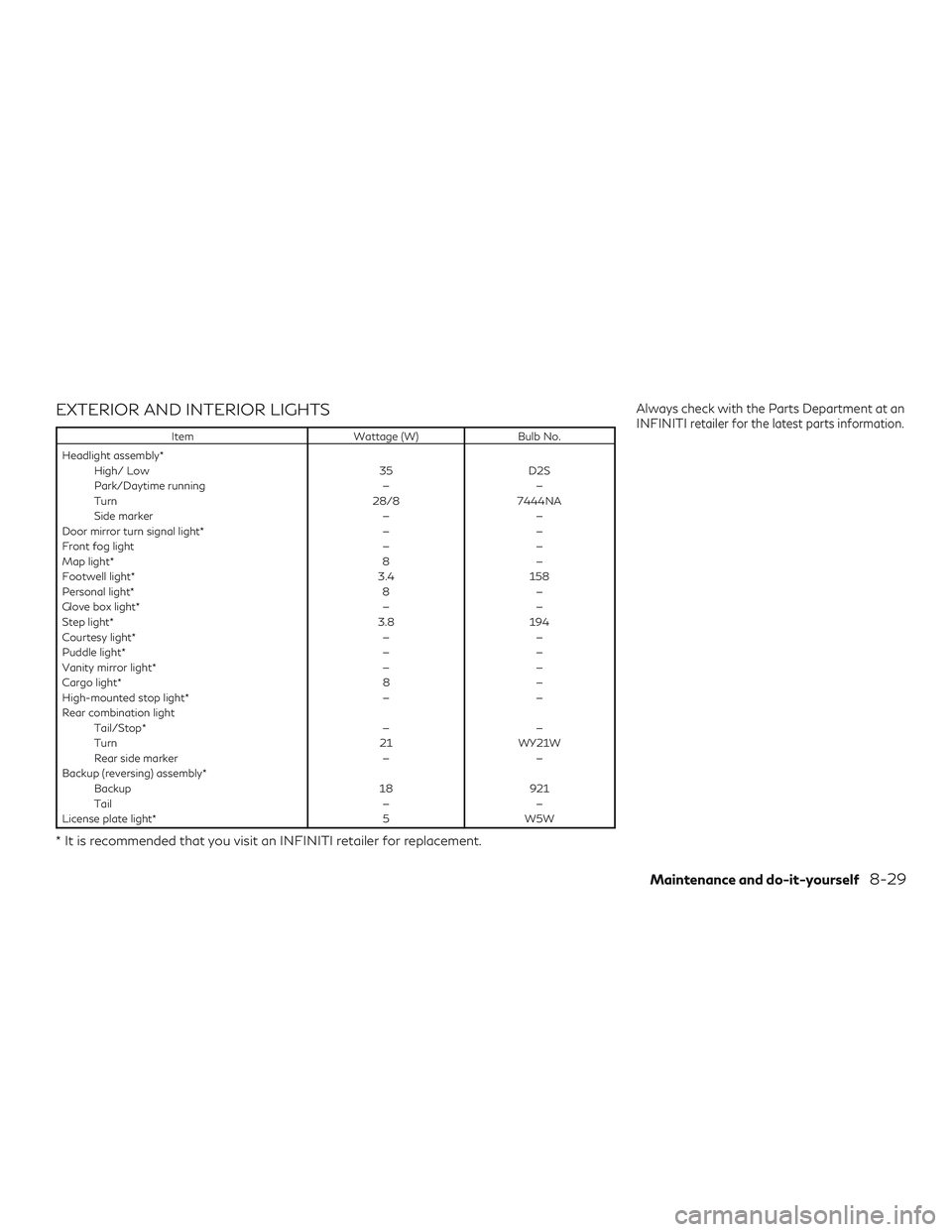
EXTERIOR AND INTERIOR LIGHTS
ItemWattage (W)Bulb No.
Headlight assembly* High/ Low 35D2S
Park/Daytime running ——
Turn 28/87444NA
Side marker ——
Door mirror turn signal light* ——
Front fog light ——
Map light* 8—
Footwell light* 3.4158
Personal light* 8—
Glove box light* ——
Step light* 3.8194
Courtesy light* ——
Puddle light* ——
Vanity mirror light* ——
Cargo light* 8—
High-mounted stop light* ——
Rear combination light Tail/Stop* ——
Turn 21WY21W
Rear side marker ——
Backup (reversing) assembly* Backup 18921
Tail ——
License plate light* 5W5W
* It is recommended that you visit an INFINITI retailer for replacement.
Always check with the Parts Department at an
INFINITIretailer for the latest parts information.
Maintenance and do-it-yourself8-29
Page 455 of 490
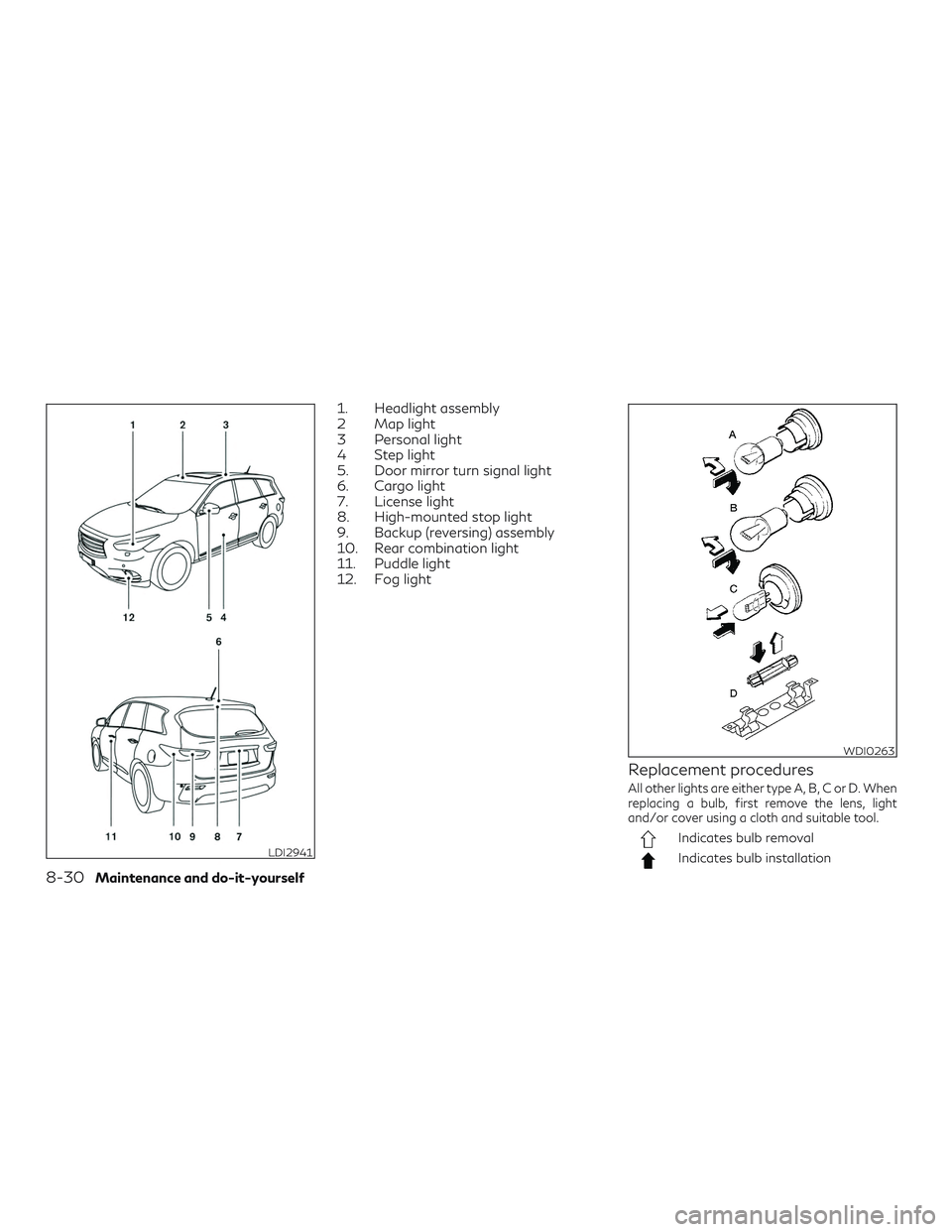
1. Headlight assembly
2 Map light
3 Personal light
4 Step light
5. Door mirror turn signal light
6. Cargo light
7. License light
8. High-mounted stop light
9. Backup (reversing) assembly
10. Rear combination light
11. Puddle light
12. Fog light
Replacement procedures
All other lights are either type A, B, C or D. When
replacing a bulb, first remove the lens, light
and/or cover using a cloth and suitable tool.
Indicates bulb removal
Indicates bulb installationLDI2941
WDI0263
8-30Maintenance and do-it-yourself