air condition INFINITI QX60 2023 Owner's Manual
[x] Cancel search | Manufacturer: INFINITI, Model Year: 2023, Model line: QX60, Model: INFINITI QX60 2023Pages: 636, PDF Size: 7.28 MB
Page 156 of 636
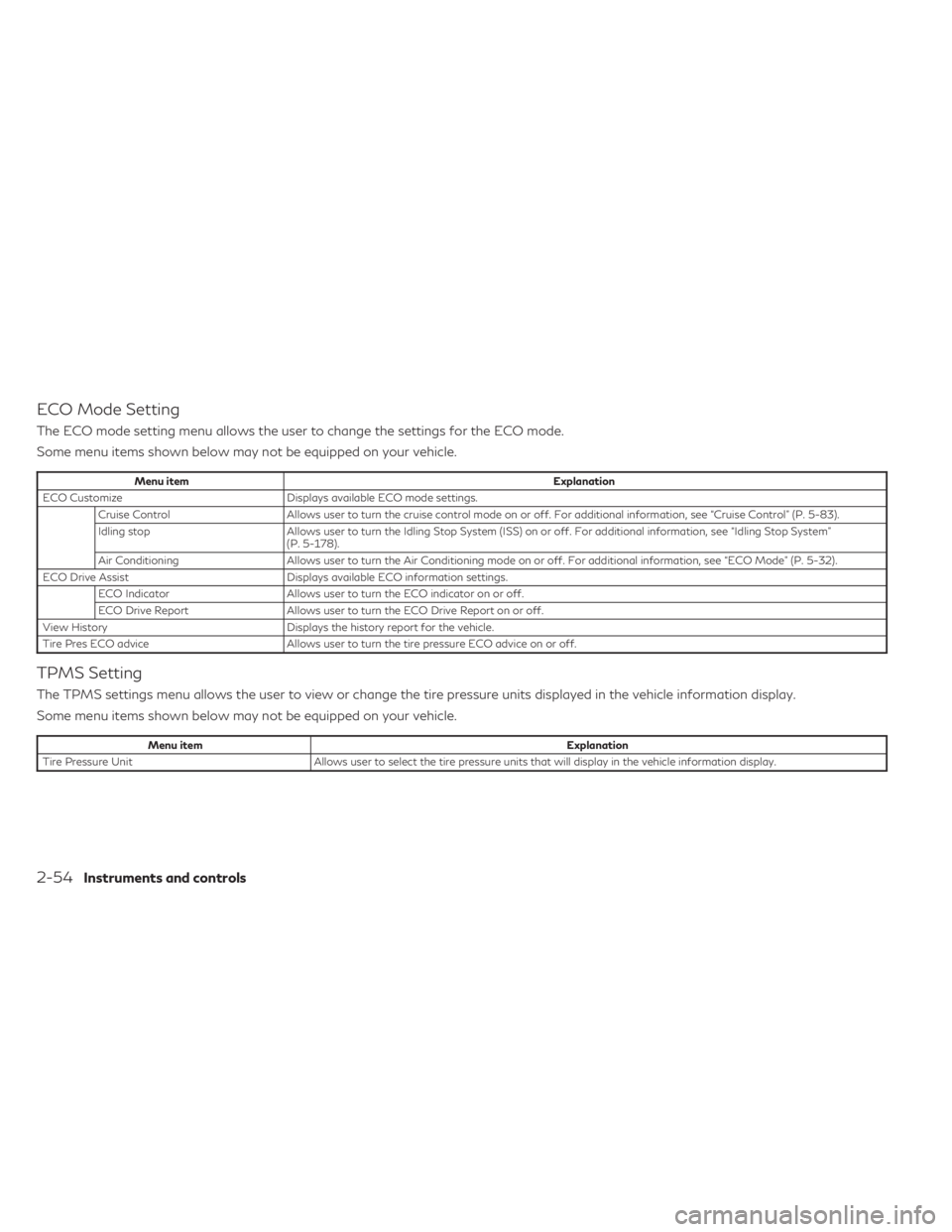
ECO Mode Setting
The ECO mode setting menu allows the user to change the settings for the ECO mode.
Some menu items shown below may not be equipped on your vehicle.
Menu itemExplanation
ECO Customize Displays available ECO mode settings.
Cruise Control Allows user to turn the cruise control mode on or off. For additional information, see “Cruise Control” (P. 5-83).
Idling stop Allows user to turn the Idling Stop System (ISS) on or off. For additional information, see “Idling Stop System”
(P. 5-178).
Air Conditioning Allows user to turn the Air Conditioning mode on or off. For additional information, see “ECO Mode” (P. 5-32).
ECO Drive Assist Displays available ECO information settings.
ECO Indicator Allows user to turn the ECO indicator on or off.
ECO Drive Report Allows user to turn the ECO Drive Report on or off.
View History Displays the history report for the vehicle.
Tire Pres ECO advice Allows user to turn the tire pressure ECO advice on or off.
TPMS Setting
The TPMS settings menu allows the user to view or change the tire pressure units displayed in the vehicle information display.
Some menu items shown below may not be equipped on your vehicle.
Menu item Explanation
Tire Pressure Unit Allows user to select the tire pressure units that will display in the vehicle information display.
2-54Instruments and controls
Page 159 of 636
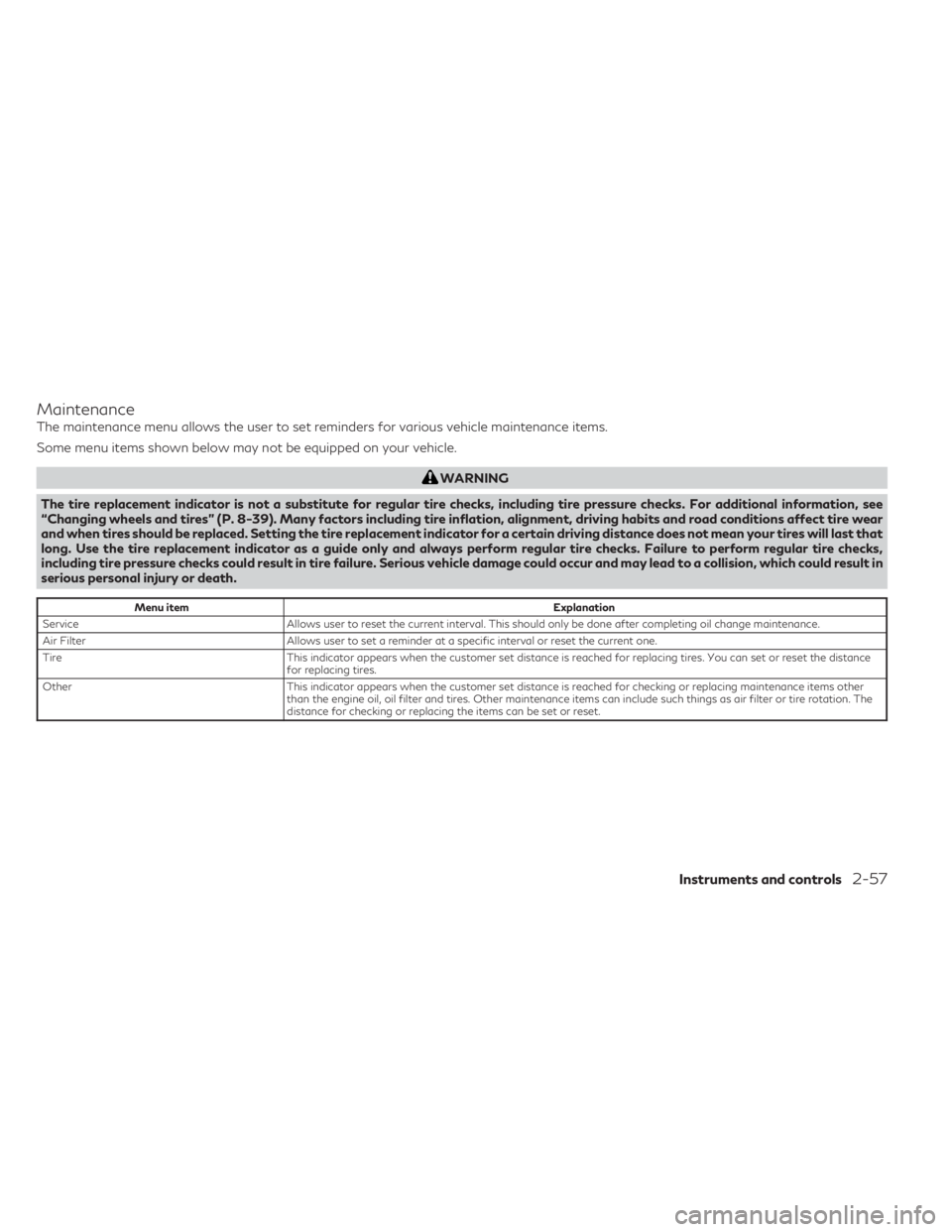
Maintenance
The maintenance menu allows the user to set reminders for various vehicle maintenance items.
Some menu items shown below may not be equipped on your vehicle.
WARNING
The tire replacement indicator is not a substitute for regular tire checks, including tire pressure checks. For additional information, see
“Changing wheels and tires” (P. 8-39). Many factors including tire inflation, alignment, driving habits and road conditions affect tire wear
and when tires should be replaced. Setting the tire replacement indicator for a certain driving distance does not mean your tires will last that
long. Use the tire replacement indicator as a guide only and always perform regular tire checks. Failure to perform regular tire checks,
including tire pressure checks could result in tire failure. Serious vehicle damage could occur and may lead to a collision, which could result in
serious personal injury or death.
Menu item Explanation
Service Allows user to reset the current interval. This should only be done after completing oil change maintenance.
Air Filter Allows user to set a reminder at a specific interval or reset the current one.
Tire This indicator appears when the customer set distance is reached for replacing tires. You can set or reset the distance
for replacing tires.
Other This indicator appears when the customer set distance is reached for checking or replacing maintenance items other
than the engine oil, oil filter and tires. Other maintenance items can include such things as air filter or tire rotation. The
distance for checking or replacing the items can be set or reset.
Instruments and controls2-57
Page 186 of 636
Move the lever up or down until the turn
signal begins to flash, but the lever does not
latch, and release the lever. The turn signal
will automatically flash three times.
Choose the appropriate method to signal a
lane change based on road and traffic
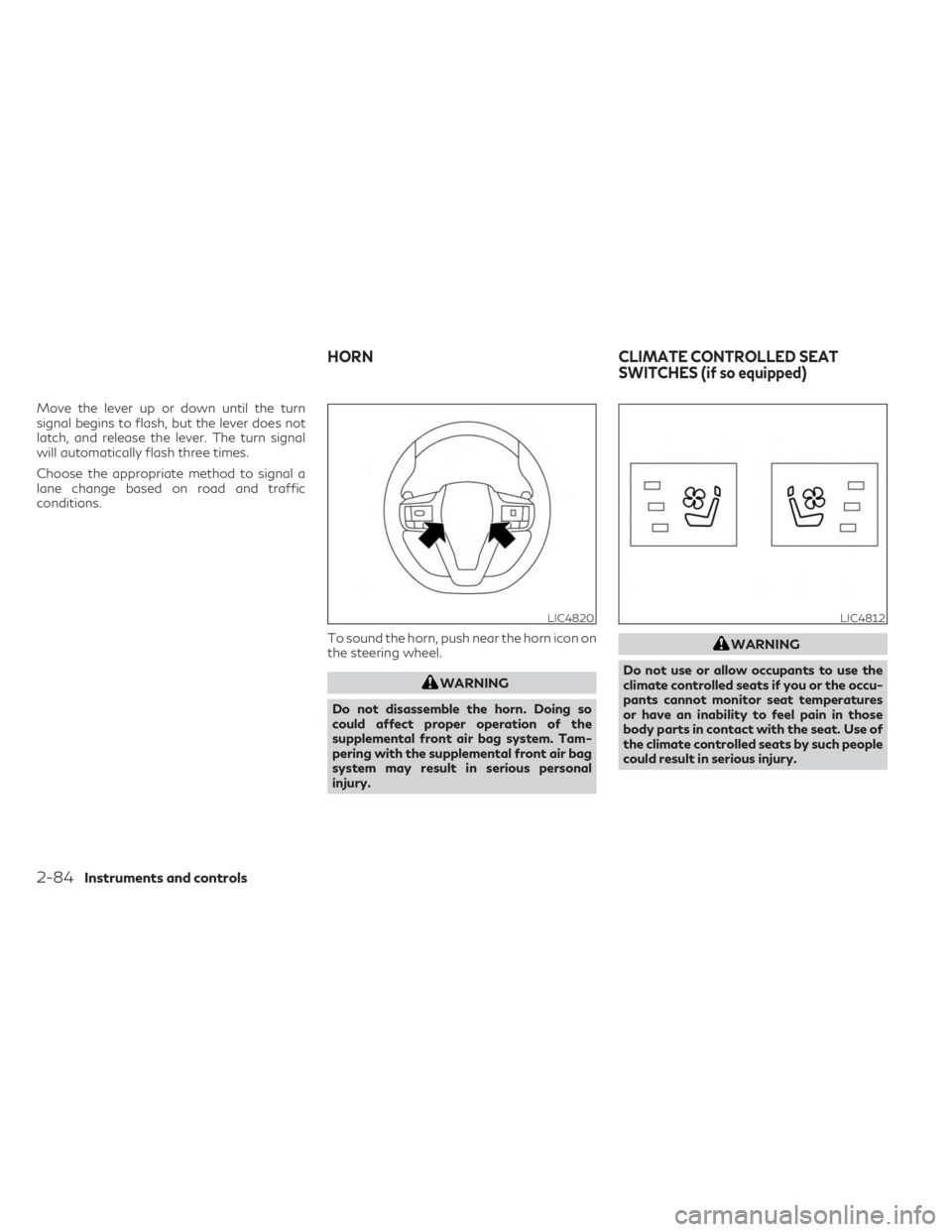
conditions.To sound the horn, push near the horn icon on
the steering wheel.
WARNING
Do not disassemble the horn. Doing so
could affect proper operation of the
supplemental front air bag system. Tam-
pering with the supplemental front air bag
system may result in serious personal
injury.
WARNING
Do not use or allow occupants to use the
climate controlled seats if you or the occu-
pants cannot monitor seat temperatures
or have an inability to feel pain in those
body parts in contact with the seat. Use of
the climate controlled seats by such people
could result in serious injury.
LIC4820LIC4812
HORN CLIMATE CONTROLLED SEAT
SWITCHES (if so equipped)
2-84Instruments and controls
Page 187 of 636
CAUTION
• The battery could run down if the climate
control seat is operated while the engine
is not running.
• Do not use the climate control seat for
extended periods or when no one is using
the seat.
• Do not put anything on the seat which
insulates heat, such as a blanket, cush-
ion, seat cover, etc. Otherwise, the seat
may become overheated.
• Do not place anything hard or heavy on
the seat or pierce it with a pin or similar
objects. This may result in damage to the
climate controlled seat.
• Any liquid spilled on the seat should be
removed immediately with a dry cloth
• When cleaning the seat, never use gaso-
line, benzine, thinner, or any similar
materials.
• If any malfunctions are found or the cli-
mate controlled seat does not operate,
turn the switch off and have the system
checked. It is recommended that you
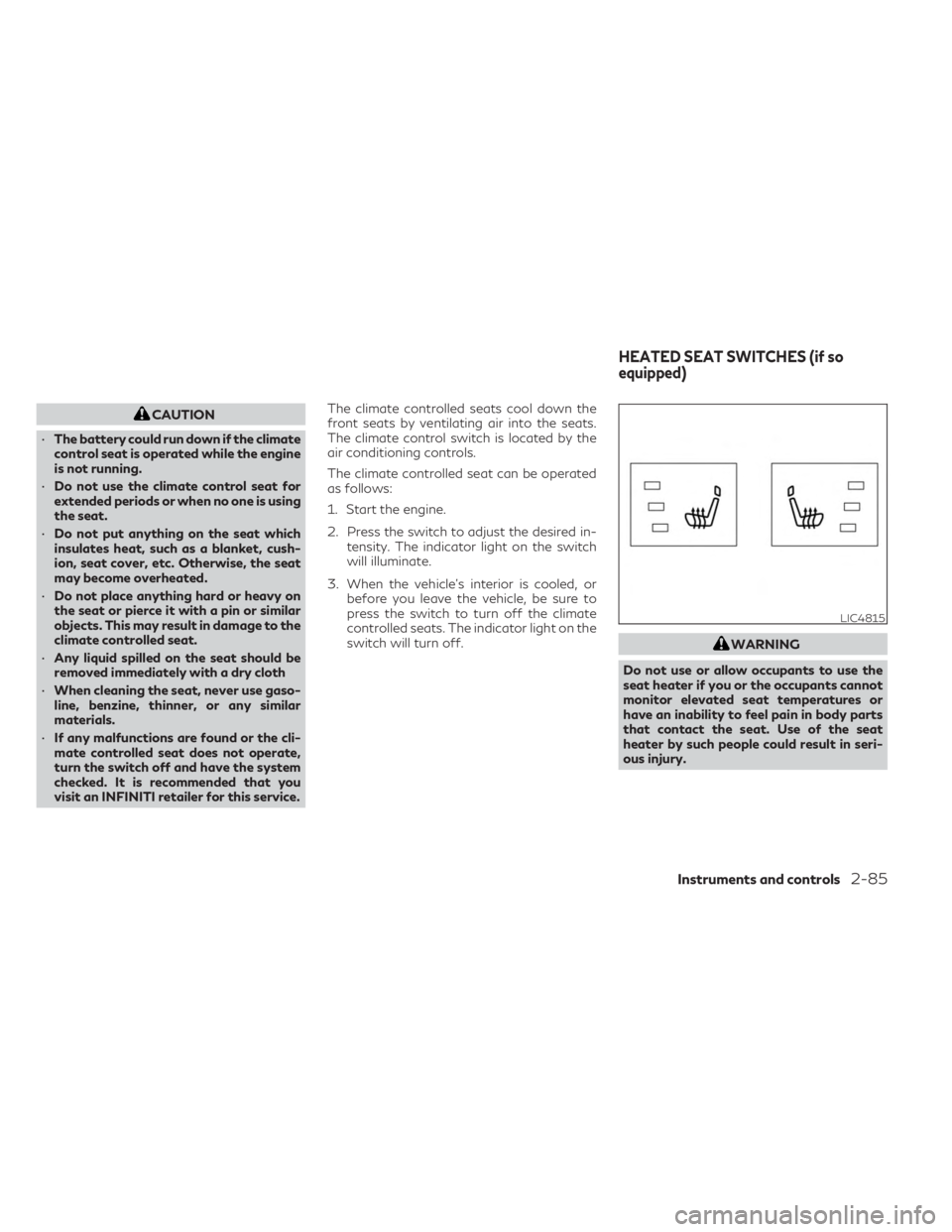
visit an INFINITI retailer for this service. The climate controlled seats cool down the
front seats by ventilating air into the seats.
The climate control switch is located by the
air conditioning controls.
The climate controlled seat can be operated
as follows:
1. Start the engine.
2. Press the switch to adjust the desired in-
tensity. The indicator light on the switch
will illuminate.
3. When the vehicle's interior is cooled, or before you leave the vehicle, be sure to
press the switch to turn off the climate
controlled seats. The indicator light on the
switch will turn off.
WARNING
Do not use or allow occupants to use the
seat heater if you or the occupants cannot
monitor elevated seat temperatures or
have an inability to feel pain in body parts
that contact the seat. Use of the seat
heater by such people could result in seri-
ous injury.
LIC4815
HEATED SEAT SWITCHES (if so
equipped)
Instruments and controls2-85
Page 196 of 636

12V OUTLETS
The power outlets are for powering electrical
accessories such as cellular telephones. They
are rated at 12 volt, 120W (10A) maximum.
The console power outlets are powered only
when the ignition switch is in the ACC or ON
position.
The power outlet in the cargo area is pow-
ered directly by the vehicle’s battery.
CAUTION
• The outlet and plug may be hot during or
immediately after use.
• Only certain power outlets are designed
for use with a cigarette lighter unit. Do
not use any other power outlet for an
accessory lighter. It is recommended
that you visit an INFINITI retailer for ad-
ditional information.
• Do not use with accessories that exceed
a 12 volt, 120W (10A) power draw.
• Do not use double adapters or more than
one electrical accessory. •
Use power outlets with the engine run-
ning to avoid discharging the vehicle
battery.
• Avoid using power outlets when the air
conditioner, headlights or rear window
defroster is on.
• Before inserting or disconnecting a plug,
be sure the electrical accessory being
used is turned OFF.
• Push the plug in as far as it will go. If good
contact is not made, the plug may over-
heat or the internal temperature fuse
may open.
LIC4823
Center Console
LIC4811
2nd Row (if so equipped)
LIC4705
Cargo Area
POWER OUTLETS
2-94Instruments and controls
Page 197 of 636

•When not in use, be sure to close the cap.
Do not allow water or any other liquid to
contact the outlet.
120V OUTLET (if so equipped)
CAUTION
• The outlet and plug may be hot during or
immediately after use.
• Use power outlets with the engine run-
ning to avoid discharging the vehicle
battery.
• Do not use accessories that exceed a
120V, 150W power draw. Do not use
double adaptors or more than one elec-
trical accessory. •
Avoid using power outlets when the air
conditioner, headlights or rear window
defroster is on.
• Before inserting or disconnecting a plug,
be sure the electrical accessory being
used is turned OFF.
• Push the plug in as far as it will go. If good
contact is not made, the plug may over-
heat or the internal temperature fuse
may open.
• When not in use, be sure to close the cap.
Do not allow water or any other liquid to
contact the outlet.
LIC4822
2nd Row
Instruments and controls2-95
Page 212 of 636

Automatic operation
To fully open a window equipped with auto-
matic operation, push the window switch
down to the second detent and release it; it
need not be held. The window automatically
opens all the way. To stop the window, lift
the switch up while the window is opening.
Auto-reverse function
The auto-reverse function can be activated
when a window is closed by automatic
operation.Depending on the environment or driving
conditions, the auto-reverse function may
be activated if an impact or load similar to
something being caught in the window
occurs.
WARNING
There are some small distances immedi-
ately before the closed position which can-
not be detected. Make sure that all passen-
gers have their hands, etc., inside the
vehicle before closing the window.
If the vehicle's battery is disconnected, re-
placed, or jump started, the power window
auto-reverse function may not operate prop-
erly. If this occurs, please contact the retailer
to re-initialize the power window auto-
reverse system.
If the control unit detects something caught
in a window equipped with automatic opera-
tion, as it is closing, the window will be imme-
diately lowered.
When power window switch does
not operate
If the power window automatic function
(closing only) does not operate properly, per-
form the following procedure to initialize the
power window system:
1. Place the ignition switch in the ON position.
2. Open the window more than halfway by operating the power window switch.
3. Pull the power window switch and hold it to close the window, and then hold the
switch more than 3 seconds after the win-
dow is closed.
4. Release the power window switch. Oper- ate the window by the automatic function
to confirm the initialization is complete.
The power window automatically opens
or closes depending on if the automatic
down or up function is selected.
5. Perform steps 2 through 4 above for other windows.
If the power window function does not oper-
ate properly after performing the above pro-
cedure have the system checked and re-
paired. It is recommended that you visit an
INFINITI retailer for this service.
LIC4730
2-110Instruments and controls
Page 232 of 636
Lockout protection
When the power door lock switch is moved to
the lock position and any door is open, all
doors will lock. With the Intelligent Key left in
the vehicle and any door open, all doors will
unlock automatically and chime will sound
after the door is closed.
These functions help prevent the Intelligent
Key from being accidentally locked inside the
vehicle.
AUTOMATIC DOOR LOCKS
• All doors lock automatically when the ve-hicle speed reaches 15 mph (24 km/h).
• All doors unlock automatically when the transmission is placed in the P (Park) posi-
tion or when the ignition switch is placed in
the OFF position, depending on the option
selected in the “Vehicle Settings” menu.
NOTE:The Auto Door Unlock function can be
changed using “Vehicle Settings” of the ve-
hicle information display. For additional in-
formation, see “Vehicle information display
7 inch (18 cm) Type A” (P. 2-22) or “Vehicle
information display 12.3 inch (21 cm) Type
B” (P. 2-44).
CHILD SAFETY REAR DOOR
LOCK
Child safety locks help prevent the rear doors
from being opened accidentally, especially
when small children are in the vehicle.
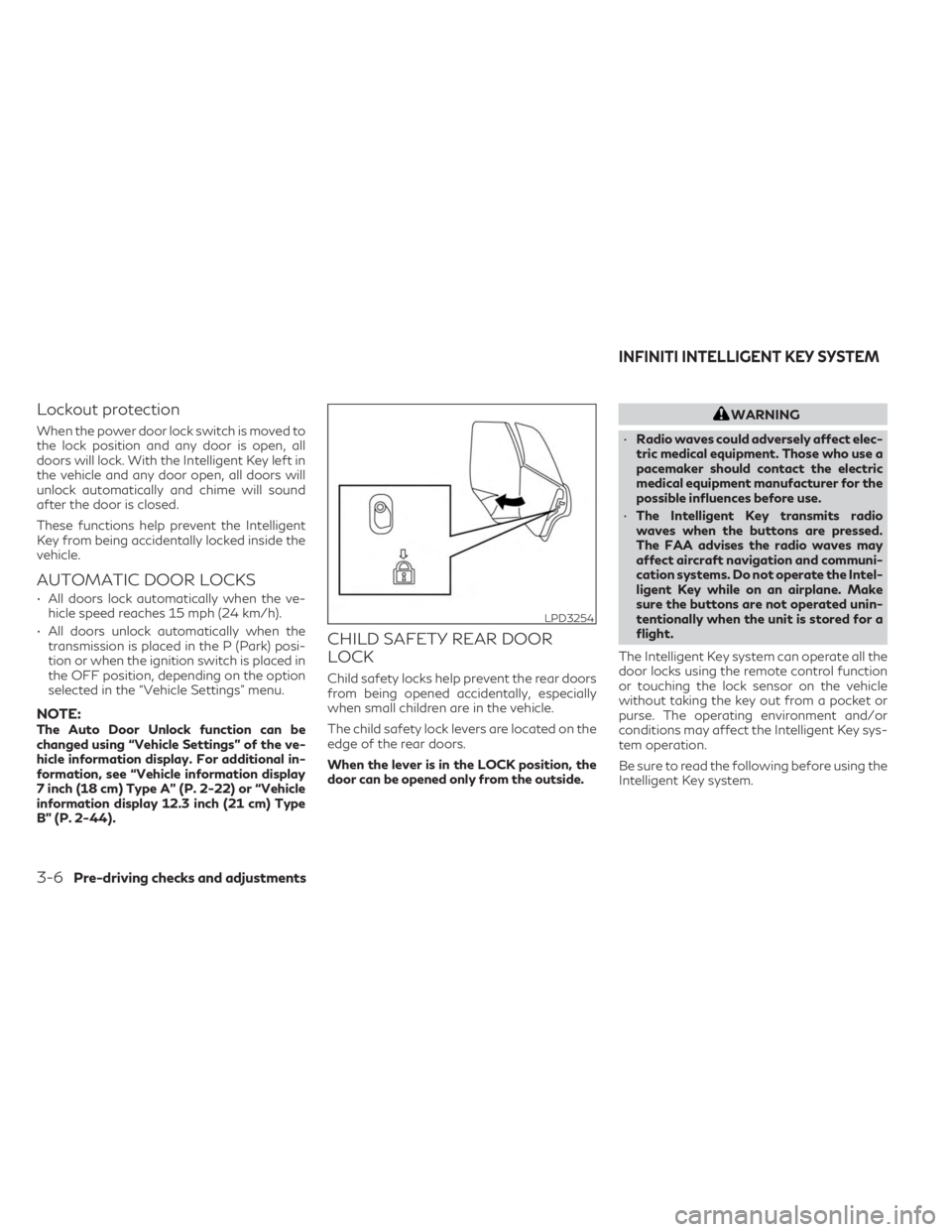
The child safety lock levers are located on the
edge of the rear doors.
When the lever is in the LOCK position, the
door can be opened only from the outside.
WARNING
• Radio waves could adversely affect elec-
tric medical equipment. Those who use a
pacemaker should contact the electric
medical equipment manufacturer for the
possible influences before use.
• The Intelligent Key transmits radio
waves when the buttons are pressed.
The FAA advises the radio waves may
affect aircraft navigation and communi-
cation systems. Do not operate the Intel-
ligent Key while on an airplane. Make
sure the buttons are not operated unin-
tentionally when the unit is stored for a
flight.
The Intelligent Key system can operate all the
door locks using the remote control function
or touching the lock sensor on the vehicle
without taking the key out from a pocket or
purse. The operating environment and/or
conditions may affect the Intelligent Key sys-
tem operation.
Be sure to read the following before using the
Intelligent Key system.
LPD3254
INFINITI INTELLIGENT KEY SYSTEM
3-6Pre-driving checks and adjustments
Page 270 of 636
Confirming memory storage
• Push the SET switch.
• If a memory position has been stored in theswitch (1 or 2) then the indicator light for
the respective switch will stay on for ap-
proximately 5 seconds.
ENTRY/EXIT FUNCTION
This system is designed so that the driver's
seat and automatic operation steering wheel
will automatically move. This allows the
driver to get into and out of the driver’s seat
more easily.
The driver’s seat will slide backward and the
steering wheel will move up:
• When the driver’s door is opened with theignition switch placed in the OFF position.
• When the ignition switch is changed from ACC to OFF with the driver’s door open.
The driver’s seat and steering wheel will re-
turn to the previous position:
• When the ignition switch is changed from ACC or ON while the shift position is in the
P (Park) position. The entry/exit function can be adjusted or
canceled through “Vehicle Settings” in the ve-
hicle information display by performing the
following:
• Switch the Exit Seat Slide from “On” to
“Off”.
• Switch the Exit Steering Up from “On” to “Off”.SETTING MEMORY FUNCTION
The position of the following settings can be
linked to the Intelligent Key and the memo-
rized settings can be available for each Intel-
ligent Key.
To use the memory function, set the climate,
navigation and audio systems to the driver's
preferred settings. Lock the doors with the
Intelligent Key. Each Intelligent Key may be
set with the driver's individual preferences.
When a new Intelligent Key is used, “Connec-
tion with the key has been done” will be dis-
played on the vehicle information display and
the memorized settings are available.
To engage the memorized settings, perform
the following:
1. Carry the Intelligent Key that is linked to the memorized settings. 2. Unlock the doors by wrapping hand
around the capacitive door handle or the
button on the Intelligent Key.
3. Place the ignition switch in the ON posi- tion. The settings linked to the Intelligent
Key will start. .
For additional information, see “INFINITI In-
Touch™ Owner’s Manual” (P. 4-2) and
“Heater and air conditioner (automatic)”
(P. 4-29).
SYSTEM OPERATION
The memory seat system will not work or will
stop operating under the following
conditions:
• When the vehicle speed is above 4 mph (7 km/h).
• When any of the memory switches are pushed while the memory seat is operating.
• When the switch for the driver’s seat, steering wheel or passenger’s seat (if so
equipped) is pushed while the memory seat
is operating.
• When the seat has already been moved to the memorized position.
• When no seat position is stored in the memory switch.
• When the shift position is moved from P (Park) to any other position.
3-44Pre-driving checks and adjustments
Page 271 of 636
4 Monitor, climate, audio, phone and voice
recognition systems
INFINITI InTouch™ Owner’s Manual..............4-2
RearView Monitor (if so equipped) ................4-3
RearView Monitor system operation ...........4-4
How to read the displayed lines ................4-4
Difference between predicted and actual
distances .....................................4-5
How to park with predicted course lines .......4-6
Adjusting the screen ......................... 4-8
How to turn on and off predicted course
lines ......................................... 4-8
RearView Monitor system limitations ......... 4-8
System maintenance ..........................4-9
Around View® Monitor (if so equipped) .........4-10
Around View® Monitor system operation .....4-11
Difference between predicted and actual
distances ................................... 4-16
How to park with predicted course lines ......4-17
How to switch the display ...................4-19
Adjusting the screen ........................ 4-19
Around View® Monitor system
limitations .................................. 4-20System maintenance
........................ 4-22
Moving Object Detection (MOD)
(if so equipped) ................................ 4-23
MOD system operation .....................4-24
Turning MOD on and off ....................4-26
MOD system limitations .....................4-26
System maintenance ........................ 4-27
Vents .......................................... 4-28
Heater and air conditioner (automatic) ..........4-29
Automatic operation ........................ 4-30
Manual operation ........................... 4-31
Operating tips .............................. 4-32
Automatic Climate Control System
(if so equipped) ............................. 4-33
Rear automatic air conditioning system ......4-34
Servicing air conditioner ........................ 4-36
Antenna ....................................... 4-36
Car phone or CB radio ......................... 4-37
iPod®/iPhone® ................................ 4-37