battery INFINITI QX60 2023 Owner's Manual
[x] Cancel search | Manufacturer: INFINITI, Model Year: 2023, Model line: QX60, Model: INFINITI QX60 2023Pages: 636, PDF Size: 7.28 MB
Page 233 of 636

CAUTION
• Be sure to carry the Intelligent Key with
you when operating the vehicle.
• Never leave the Intelligent Key in the ve-
hicle when you leave the vehicle.
The Intelligent Key is always communicating
with the vehicle as it receives radio waves.
The Intelligent Key system transmits weak
radio waves. Environmental conditions may
interfere with the operation of the Intelligent
Key system under the following operating
conditions:
• When operating near a location where strong radio waves are transmitted, such as
a TV tower, power station and broadcast-
ing station.
• When in possession of wireless equipment, such as a cellular telephone, transceiver or
a CB radio.
• When the Intelligent Key is in contact with or covered by metallic materials.
• When any type of radio wave remote con- trol is used nearby.
• When the Intelligent Key is placed near an electric appliance such as a personal
computer.
• When the vehicle is parked near a parking meter. In such cases, correct the operating condi-
tions before using the Intelligent Key function
or use the mechanical key.
Although the life of the battery varies de-
pending on the operating conditions, the bat-
tery’s life is approximately two years. If the
battery is discharged, replace it with a new
one.
When the Intelligent Key battery is low, an
indicator illuminates in the vehicle informa-
tion display. For additional information, see
“Vehicle information display 7 inch (18 cm)
Type A” (P. 2-22) or “Vehicle information dis-
play 12.3 inch (21 cm) Type B” (P. 2-44).
Since the Intelligent Key is continuously re-
ceiving radio waves, if the key is left near
equipment which transmits strong radio
waves, such as signals from a TV and per-
sonal computer, the battery life may become
shorter.
For additional information, see “Battery re-
placement” (P. 8-24).
As many as four Intelligent Keys can be reg-
istered and used with one vehicle. For infor-
mation about the purchase and use of addi-
tional Intelligent Keys, it is recommended that
you visit an INFINITI retailer.CAUTION
Listed below are conditions or occurrences
which will damage the Intelligent Key:
• Do not allow the Intelligent Key, which
contains electrical components, to come
into contact with water or salt water.
This could affect the system function.
• Do not drop the Intelligent Key.
• Do not strike the Intelligent Key sharply
against another object.
• Do not change or modify the Intelligent
Key.
• Wetting may damage the Intelligent
Key. If the Intelligent Key gets wet, im-
mediately wipe until it is completely dry.
• Do not place the Intelligent Key for an
extended period in an area where tem-
peratures exceed 140°F (60°C).
• Do not attach the Intelligent Key with a
key holder that contains a magnet.
• Do not place the Intelligent Key near
equipment that produces a magnetic
field, such as a TV, audio equipment and
personal computers.
Pre-driving checks and adjustments3-7
Page 234 of 636

If an Intelligent Key is lost or stolen, INFINITI
recommends erasing the ID code of that In-
telligent Key from the vehicle. This may pre-
vent the unauthorized use of the Intelligent
Key to operate the vehicle. For information
regarding the erasing procedure, it is recom-
mended that you visit an INFINITI retailer.
OPERATING RANGE
The Intelligent Key functions can only be used
when the Intelligent Key is within the speci-
fied operating range from the lock sensors
O1.When the Intelligent Key battery is dis-
charged or strong radio waves are present
near the operating location, the Intelligent
Key operating range becomes narrower, and
the Intelligent Key may not function properly.
The operating range is within 31.5 in (80 cm)
from each lock sensor
O1.
If the Intelligent Key is too close to the door
glass, handle or rear bumper, the lock sensors
may not function.
When the Intelligent Key is within the operat-
ing range, it is possible for anyone, even
someone who does not carry the Intelligent
Key, to touch the lock sensor and the capaci-
tive sensor to lock or unlock the doors.
LPD3220
3-8Pre-driving checks and adjustments
Page 240 of 636

HOW TO USE THE REMOTE
KEYLESS ENTRY FUNCTION
The remote keyless entry function can oper-
ate all door locks using the remote keyless
function of the Intelligent Key. The remote
keyless function can operate at a distance of
33 ft (10 m) away from the vehicle. The op-
erating distance depends upon the conditions
around the vehicle.
The remote keyless entry function will not
function under the following conditions:
• When the Intelligent Key is not within theoperational range.
• When the doors or the rear liftgate are open or not closed securely.
• When the Intelligent Key battery is discharged.
CAUTION
When locking the doors using the Intelli-
gent Key, be sure not to leave the key in the
vehicle.
Type A (if so equipped)
1.(lock) button
2.
(unlock) button
3.
(liftgate) button
4.
(panic) button
Type B (if so equipped)
1.(remote engine start) button
2.
(lock) button
3.
(unlock) button
4.
(liftgate) button
5.
(panic) button
Locking doors
1. Place the ignition switch in the LOCK position.
2. Close all doors.
LPD3701LPD3702
3-14Pre-driving checks and adjustments
Page 243 of 636

SymptomPossible CauseRemedy
When shifting the shift position to the P
(Park) position The “Push Ignition to OFF” warning ap-
pears in the display. The ignition switch is in the ACC or ON
position.Place the ignition switch in the OFF
position.
When opening the driver's door to get
out of the vehicle The “Door Open” warning appears on the
display. The ignition switch is in the ACC or ON
position.Place the ignition switch in the OFF
position.
When closing the door after getting out
of the vehicle The “No Key Detected” warning appears
on the display, the outside chime sounds
three times and the inside warning chime
sounds for approximately 3 seconds. The ignition switch is in the ACC or ON
position.
Place the ignition switch in the OFF
position.
The “Rear Door Alert” (if so equipped)
warning message appears on the display,
the horn sounds three times twice, or a
“Check Back Seat For All Articles” (if so
equipped) warning appears on the dis-
play. The Rear Door Alert is activated. Check the back seat for all articles, press
the ENTER button to clear the “Rear
Door Alert” warning message.
When closing the door with the inside
lock knob turned to LOCK The outside chime sounds for approxi-
mately 3 seconds and all the doors un-
lock. The Intelligent Key is inside the vehicle. Carry the Intelligent Key with you.
When touching the door handle lock
sensor or the
button on the Intel-
ligent Key to lock the door The outside chime sounds for approxi-
mately 2 seconds.
The Intelligent Key is inside the vehicle. Carry the Intelligent Key with you.
When pushing the ignition switch to
start the engine The key low battery indicator appears on
the display. The battery charge is low.
Replace the battery with a new one. For
additional information, see “Battery re-
placement” (P. 8-24).
When pushing the ignition switch The “I-Key System Error: See Owner’s Manual” warning message in the vehicle
information display appears. It warns of a malfunction with the Intelli-
gent Key system.
It is recommended that you visit an
INFINITI retailer.
Pre-driving checks and adjustments3-17
Page 245 of 636

CAUTION
When the Intelligent Key battery is dis-
charged or other strong radio wave
sources are present near the operating lo-
cation, the Intelligent Key operating range
becomes narrower, and the Intelligent Key
may not function properly.
The Remote Engine Start function can only
be used when the Intelligent Key is within the
specified operating range from the vehicle.
The Remote Engine Start operating range is
approximately 197 ft (60 m) from the vehicle.
REMOTE STARTING THE
VEHICLE
To use the Remote Engine Start feature per-
form the following:
1. Aim the Intelligent Key at the vehicle.
2. Press the
button to lock all doors.
3. Within 5 seconds press and hold the
button until the turn signal lights flash and
the tail lamps turn on. If the vehicle is not
within view press and hold the
but-
ton for at least 2 seconds. The following events will occur when the en-
gine starts:
• The parking lights will turn on and remain
on as long as the engine is running.
• The doors will be locked and the climate control system may come on.
• The engine will continue to run for 10 min- utes. Repeat the steps to extend the time
for an additional 10 minutes. For additional
information, see “Extending engine run
time” (P. 3-19).
Press and hold the brake pedal while switch-
ing the ignition to the ON position before
driving. For additional information, see “Driv-
ing the vehicle” (P. 5-18).
EXTENDING ENGINE RUN TIME
The Remote Engine Start feature can be ex-
tended one time by performing the steps
listed in “Remote starting the vehicle”
(P. 3-19). Run time will be calculated as
follows:
• The first 10 minute run time will start when the Remote Engine Start function is
performed. • The second 10 minutes will start immedi-
ately when the Remote Engine Start func-
tion is performed again. For example, if the
engine has been running for 5 minutes, and
10 minutes are added, the engine will run
for a total of 15 minutes.
• Extending engine run time will bring you to the two Remote Engine Start limit.
A maximum of two Remote Engine Starts, or
a single start with an extension, are allowed
between ignition cycles.
The vehicle must be driven at speeds of 4
mph (7 km/h) before the remote engine start
procedure can be used again.
CANCELING A REMOTE ENGINE
START
To cancel a Remote Engine Start, perform
one of the following:
• Aim the Intelligent Key at the vehicle and press
until the parking lights turn off.
• Turn on the hazard warning flashers.
• Cycle the ignition switch on and then off.
• The extended engine run time has expired.
• The first 10 minute timer has expired.
• Opening the engine hood.
• Shifting the vehicle out of P (Park).
Pre-driving checks and adjustments3-19
Page 248 of 636
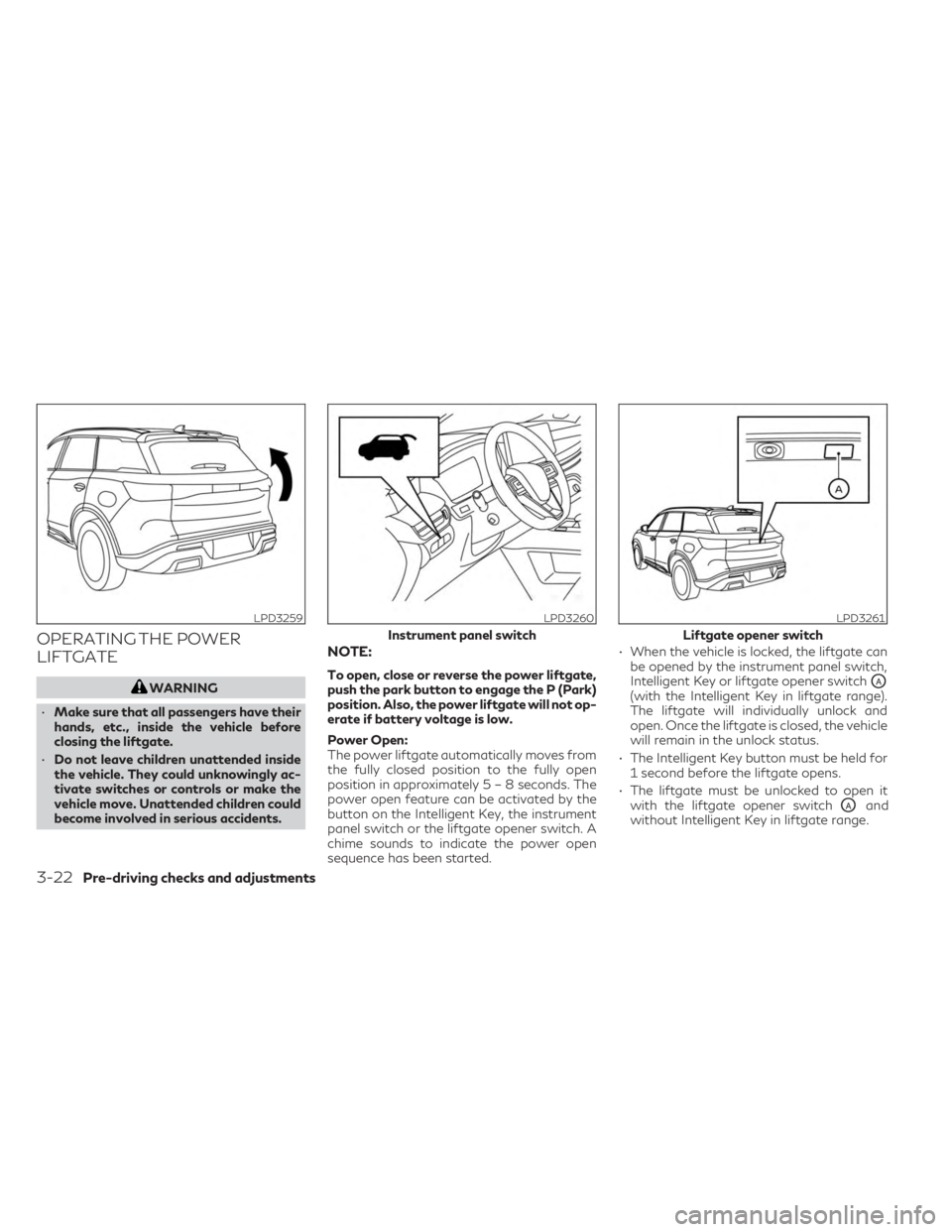
OPERATING THE POWER
LIFTGATE
WARNING
• Make sure that all passengers have their
hands, etc., inside the vehicle before
closing the liftgate.
• Do not leave children unattended inside
the vehicle. They could unknowingly ac-
tivate switches or controls or make the
vehicle move. Unattended children could
become involved in serious accidents.
NOTE:
To open, close or reverse the power liftgate,
push the park button to engage the P (Park)
position. Also, the power liftgate will not op-
erate if battery voltage is low.
Power Open:
The power liftgate automatically moves from
the fully closed position to the fully open
position in approximately5–8seconds. The
power open feature can be activated by the
button on the Intelligent Key, the instrument
panel switch or the liftgate opener switch. A
chime sounds to indicate the power open
sequence has been started. • When the vehicle is locked, the liftgate can
be opened by the instrument panel switch,
Intelligent Key or liftgate opener switchOA(with the Intelligent Key in liftgate range).
The liftgate will individually unlock and
open. Once the liftgate is closed, the vehicle
will remain in the unlock status.
• The Intelligent Key button must be held for 1 second before the liftgate opens.
• The liftgate must be unlocked to open it with the liftgate opener switch
OAand
without Intelligent Key in liftgate range.
LPD3259LPD3260
Instrument panel switch
LPD3261
Liftgate opener switch
3-22Pre-driving checks and adjustments
Page 252 of 636

CAUTION
• If the power liftgate does not stay open
or if the liftgate unexpectedly closes at
any time while a continuous warning
chime sounds, do not operate the lift-
gate. There may be a pressure loss in one
or both of the liftgate struts. It is recom-
mended that you have the liftgate in-
spected. It is recommended that you visit
an INFINITI retailer for this service.
• Do not activate the power liftgate if one
or both of the liftgate struts are re-
moved. Damage to the liftgate or power
liftgate mechanisms may occur.
Power liftgate release
If the liftgate cannot be opened with the
instrument panel switch, liftgate opener
switch or key fob due to a discharged battery,
follow these steps:
1. Move the lever
OAas illustrated with a
suitable tool to open the liftgate.
It is recommended that you visit an INFINITI
retailer as soon as possible for repair.
LIFTGATE POSITION SETTING
The liftgate can be set to open to a specific
height (garage mode) by performing the fol-
lowing:
1. Open the liftgate using the liftgate opener switch or the Intelligent Key.
2. Pull the liftgate down and move to the desired height position (the liftgate will
have some resistance when being manu-
ally adjusted).
LPD3266LPD3267
3-26Pre-driving checks and adjustments
Page 257 of 636
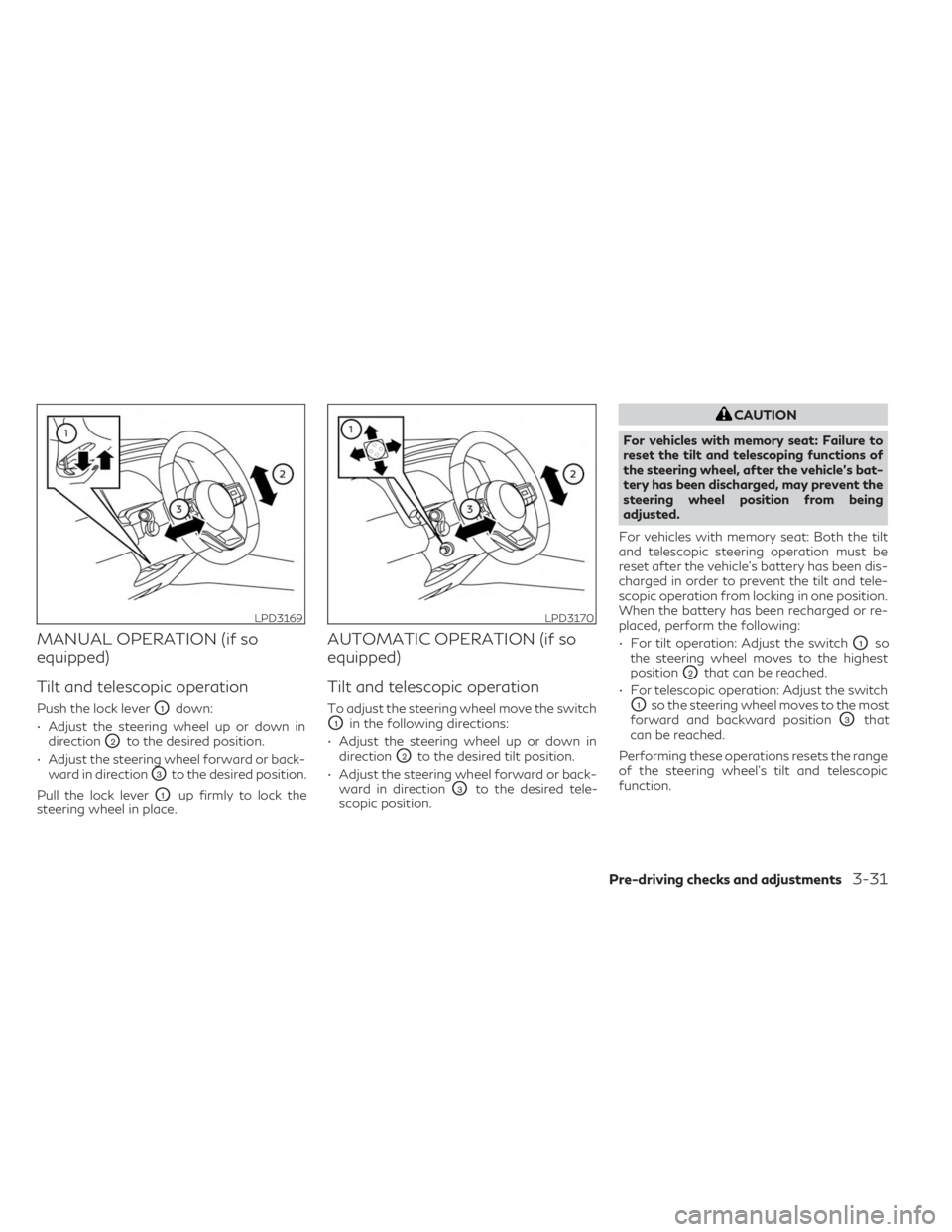
MANUAL OPERATION (if so
equipped)
Tilt and telescopic operation
Push the lock leverO1down:
• Adjust the steering wheel up or down in direction
O2to the desired position.
• Adjust the steering wheel forward or back- ward in direction
O3to the desired position.
Pull the lock lever
O1up firmly to lock the
steering wheel in place.
AUTOMATIC OPERATION (if so
equipped)
Tilt and telescopic operation
To adjust the steering wheel move the switch
O1in the following directions:
• Adjust the steering wheel up or down in direction
O2to the desired tilt position.
• Adjust the steering wheel forward or back- ward in direction
O3to the desired tele-
scopic position.
CAUTION
For vehicles with memory seat: Failure to
reset the tilt and telescoping functions of
the steering wheel, after the vehicle’s bat-
tery has been discharged, may prevent the
steering wheel position from being
adjusted.
For vehicles with memory seat: Both the tilt
and telescopic steering operation must be
reset after the vehicle’s battery has been dis-
charged in order to prevent the tilt and tele-
scopic operation from locking in one position.
When the battery has been recharged or re-
placed, perform the following:
• For tilt operation: Adjust the switch
O1so
the steering wheel moves to the highest
position
O2that can be reached.
• For telescopic operation: Adjust the switch
O1so the steering wheel moves to the most
forward and backward position
O3that
can be reached.
Performing these operations resets the range
of the steering wheel’s tilt and telescopic
function.
LPD3169LPD3170
Pre-driving checks and adjustments3-31
Page 265 of 636

DIMMING MIRROR
The mirror is designed so that it automatically
changes reflection according to the intensity
of the headlights of the following vehicle. You
can enable or disable the automatic anti-
glare mode.
• Push the left button
O2to enable the auto-
matic anti-glare mode.
• Push the right button
O3to disable the
automatic anti-glare mode. LANGUAGE
The language of textual indication can be
selected on the Smart Rear View Mirror dis-
play screen. Select the language by using the
O2orO3button. You can select English,
French and Spanish. The language setting
will be retained even if the engine is restarted. Smart Rear View Mirror system precautions:
NOTE:
• Long-term use of this system while the en-
gine is stopped may cause the battery to
be discharged.
• Do not attach an antenna of wireless de- vice near the Smart Rear View Mirror.
Electric wave from wireless device may
cause disturbed image in Smart Rear View
Mirror.
• Do not push buttons excessively or oper- ate the lever roughly as it may cause the
Smart Rear View Mirror itself to drop.
• Never turn the body of the Smart Rear View Mirror by 90° or more. It may dam-
age the Smart Rear View Mirror.
• Do not apply strong shocks to the body of Smart Rear View Mirror. It may cause a
system failure.
• Do not apply heavy load to the camera and camera-cover on the rear of the vehicle. It
may cause the camera to be removed or
may cause a system failure.
• If it is difficult to see the Smart Rear View Mirror display screen because of a strong
external light, switch the mode to the con-
ventional rearview mirror mode for better
use.
LPD3208LPD3211
Pre-driving checks and adjustments3-39
Page 276 of 636
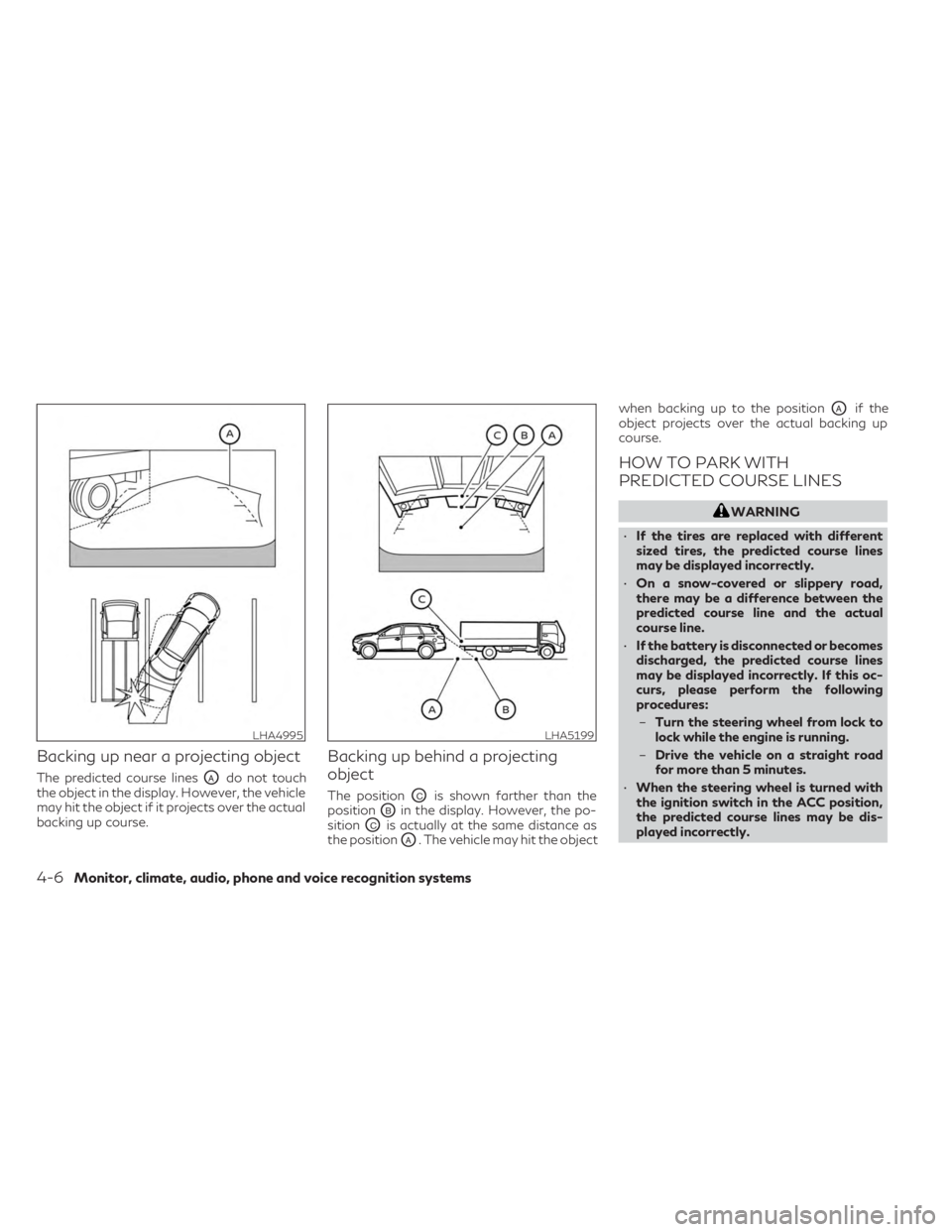
Backing up near a projecting object
The predicted course linesOAdo not touch
the object in the display. However, the vehicle
may hit the object if it projects over the actual
backing up course.
Backing up behind a projecting
object
The positionOCis shown farther than the
position
OBin the display. However, the po-
sition
OCis actually at the same distance as
the position
OA. The vehicle may hit the object when backing up to the position
OAif the
object projects over the actual backing up
course.
HOW TO PARK WITH
PREDICTED COURSE LINES
WARNING
• If the tires are replaced with different
sized tires, the predicted course lines
may be displayed incorrectly.
• On a snow-covered or slippery road,
there may be a difference between the
predicted course line and the actual
course line.
• If the battery is disconnected or becomes
discharged, the predicted course lines
may be displayed incorrectly. If this oc-
curs, please perform the following
procedures:
– Turn the steering wheel from lock to
lock while the engine is running.
– Drive the vehicle on a straight road
for more than 5 minutes.
• When the steering wheel is turned with
the ignition switch in the ACC position,
the predicted course lines may be dis-
played incorrectly.
LHA4995LHA5199
4-6Monitor, climate, audio, phone and voice recognition systems