radio INFINITI QX60 2023 Owner's Manual
[x] Cancel search | Manufacturer: INFINITI, Model Year: 2023, Model line: QX60, Model: INFINITI QX60 2023Pages: 636, PDF Size: 7.28 MB
Page 379 of 636

SYSTEM MAINTENANCE
The two radar sensorsO1for the BSI system
are located near the rear bumper. Always
keep the area near the radar sensors clean.
The radar sensors may be blocked by tempo-
rary ambient conditions such as splashing
water, mist or fog.
The blocked condition may also be caused by
objects such as ice, frost or dirt obstructing
the radar sensors.
Check for and remove objects obstructing
the radar sensors. Do not attach stickers (including transparent
material), install accessories or apply addi-
tional paint near the radar sensors.
Do not strike or damage the area around the
radar sensors.
It is recommended you visit a certified
INFINITI retailer if the area around the radar
sensors is damaged due to a collision.
The lane camera unit
O2for BSI system is
located above the inside mirror. To keep the
proper operation of BSI and prevent a system
malfunction, be sure to observe the
following:
• Always keep the windshield clean.
• Do not attach a sticker (including transpar- ent material) or install an accessory near
the camera unit.
• Do not place reflective materials, such as white paper or a mirror, on the instrument
panel. The reflection of sunlight may ad-
versely affect the camera unit’s capability
of detecting the lane markers.
• Do not strike or damage the areas around the camera unit. Do not touch the camera
lens or remove the screw located on the
camera unit. It is recommended that you
contact a certified INFINITI retailer if the
camera unit is damaged due to an accident.
Radio frequency statement
For USA
FCC ID: LTQRN5TR
CAUTION TO USERS
Changes or modifications not expressly ap-
proved by the party responsible for compli-
ance could void the user’s authority to oper-
ate the equipment.
This device complies with Part 15 of the FCC
Rules and with the RSS of the Industry
Canada. Operation is subject to the follow-
ing two conditions:
1. This device may not cause harmful inter-
ference, and
2. this device must accept any interference
received, including interference that may
cause undesired operation.
For Canada
IC: 3659A-RN5TR
This device contains licence-exempt
transmitter(s)/receiver(s) that comply with
Innovation, Science and Economic Develop-
ment Canada’s licence-exempt RSS(s). Op-
eration is subject to the following two
conditions:
(1) This device may not cause interference.
LSD4414
Starting and driving5-71
Page 380 of 636
(2) This device must accept any interference,
including interference that may cause unde-
sired operation of the device.
L’émetteur/récepteur exempt de licence
contenu dans le présent appareil est con-
forme aux CNR d’Innovation, Sciences et
Développement économique Canada appli-
cables aux appareils radio exempts de li-
cence. L’exploitation est autorisée aux deux
conditions suivantes:
(1) L’appareil ne doit pas produire de
brouillage;
(2) L’appareil doit accepter tout brouillage
radioélectrique subi, même si le brouillage
est susceptible d’en compromettre le
fonctionnement.WARNING
Failure to follow the warnings and instruc-
tions for proper use of the RCTA system
could result in serious injury or death.
• The RCTA system is not a replacement
for proper driving procedures and is not
designed to prevent contact with ve-
hicles or objects. When backing out of a
parking space, always use the side and
rear mirrors and turn and look in the di-
rection your vehicle will move. Never rely
solely on the RCTA system.
• Do not use the RCTA system when tow-
ing a trailer. The system may not func-
tion properly. The RCTA system will assist you when back-
ing out from a parking space. When the ve-
hicle is in reverse, the system is designed to
detect other vehicles approaching from the
right or left of the vehicle. If the system de-
tects cross traffic, it will alert you.
REAR CROSS TRAFFIC ALERT
(RCTA)
5-72Starting and driving
Page 390 of 636

SYSTEM MAINTENANCE
The two radar sensorsO1for the BSW sys-
tem are located near the rear bumper. Always
keep the area near the radar sensors clean.
The radar sensors may be blocked by tempo-
rary ambient conditions such as splashing
water, mist or fog.
The blocked condition may also be caused by
objects such as ice, frost or dirt obstructing
the radar sensors.
Check for and remove objects obstructing
the area around the radar sensors. Do not attach stickers (including transparent
material), install accessories or apply addi-
tional paint near the radar sensors.
Do not strike or damage the area around the
radar sensors. It is recommended that you
visit an INFINITI retailer if the area around
the radar sensors is damaged due to a
collision.
Radio frequency statement
For USA
FCC ID: LTQRN5TR
CAUTION TO USERS
Changes or modifications not expressly ap-
proved by the party responsible for compli-
ance could void the user’s authority to oper-
ate the equipment.
This device complies with Part 15 of the FCC
Rules and with the RSS of the Industry
Canada. Operation is subject to the follow-
ing two conditions:
1.
This device may not cause harmful inter-
ference, and
2. this device must accept any interference
received, including interference that may
cause undesired operation. For Canada
IC: 3659A-RN5TR
This device contains licence-exempt
transmitter(s)/receiver(s) that comply with
Innovation, Science and Economic Develop-
ment Canada’s licence-exempt RSS(s). Op-
eration is subject to the following two
conditions:
(1) This device may not cause interference.
(2) This device must accept any interference,
including interference that may cause unde-
sired operation of the device.
L’émetteur/récepteur exempt de licence
contenu dans le présent appareil est con-
forme aux CNR d’Innovation, Sciences et
Développement économique Canada appli-
cables aux appareils radio exempts de li-
cence. L’exploitation est autorisée aux deux
conditions suivantes:
(1) L’appareil ne doit pas produire de
brouillage;
(2) L’appareil doit accepter tout brouillage
radioélectrique subi, même si le brouillage
est susceptible d’en compromettre le
fonctionnement.
LSD4407
5-82Starting and driving
Page 424 of 636

Steering Assist malfunction
When the system malfunctions, it turns off
automatically. The Steering Assist status
warning illuminates (orange). A chime may
sound depending on the situation.
Action to take:
Stop the vehicle in a safe location, push the
park button to engage the P (Park) position,
turn the engine off, restart the engine, re-
sume driving, and set the Intelligent Cruise
Control system again. If the warning (orange)
continues to illuminate, the Steering Assist is
malfunctioning. Although the vehicle is still
drivable under normal conditions, have the
system checked. It is recommended that you
visit an INFINITI retailer for this service.
Steering Assist maintenance
The camera sensor is located above the in-
side mirror.
To keep the proper operation of the system
and prevent a system malfunction, be sure to
observe the following:
• Always keep the windshield clean.
• Do not attach a sticker (including transpar-ent material) or install an accessory near
the camera unit. • Do not place reflective materials, such as
white paper or a mirror, on the instrument
panel. The reflection of sunlight may ad-
versely affect the camera unit’s capability
of detecting the lane markers.
• Do not strike or damage the areas around the camera unit. Do not touch the camera
lens or remove the screw located on the
camera unit.
If the camera unit is damaged due to an
accident, it is recommended that you visit an
INFINITI retailer.
Radio frequency statement
For USA
FCC ID OAYARS4B
This device complies with Part 15 of the FCC
Rules. Operation is subject to the following
two conditions:
1. This device may not cause harmful inter- ference, and
2. This device must accept any interference received, including interference that may
cause undesired operation. FCC Warning
Changes or modifications not expressly ap-
proved by the party responsible for compli-
ance could void the user’s authority to oper-
ate the equipment.
For Canada
Model: ARS4–B
IC: 4135A-ARS4B
FCC ID: OAYARS4B
This device complies with Part 15 of the FCC
Rules and with Industry Canada licence-
exempt RSS standard(s). Operation is subject
to the following two conditions:
1. This device may not cause interference,
and
2. This device must accept any interference received, including interference that may
cause undesired operation of the device.
5-116Starting and driving
Page 425 of 636

Le présent appareil est conforme aux CNR
d'Industrie Canada applicables aux appareils
radio exempts de licence. L'exploitation est
autorisée aux deux conditions suivantes:
1. L'appareil ne doit pas produire de brouil-lage, et
2. L'utilisateur de l'appareil doit accepter tout brouillage radioélectrique subi, même
si le brouillage est susceptible d'en com-
promettre le fonctionnement.
Radio frequency radiation exposure informa-
tion:
This equipment complies with FCC and IC
radiation exposure limits set forth for an un-
controlled environment.
This equipment should be installed and oper-
ated with minimum distance of 30 cm be-
tween the radiator and your body.
This transmitter must not be co-located or
operating in conjunction with any other an-
tenna or transmitter.
Cet équipement est conforme aux limites
d'exposition aux rayonnements IC établies
pour un environnement non contrôlé. Cet équipement doit être installé et utilisé
avec un minimum de 30 cm de distance entre
la source de rayonnement et votre corps.
FCC Notice
Changes or modifications not expressly ap-
proved by the party responsible for compli-
ance could void the user’s authority to oper-
ate the equipment.
CONVENTIONAL (fixed speed)
CRUISE CONTROL MODE
NOTE:
ProPILOT Assist provides no approach
warnings, automatic braking, or steering as-
sist in the conventional (fixed speed) cruise
control mode.
This mode allows driving at a speed between
25 to 90 mph (40 to 144 km/h) without
keeping your foot on the accelerator pedal.
WARNING
• In the conventional (fixed speed) cruise
control mode, a warning chime does not
sound to warn you if you are too close to
the vehicle ahead, as neither the pres-
ence of the vehicle ahead nor the vehicle-
to-vehicle distance is detected.
• Pay special attention to the distance be-
tween your vehicle and the vehicle ahead
of you or a collision could occur.
• Always confirm the setting in the ICC
system display.
• Do not use the conventional (fixed
speed) cruise control mode when driving
under the following conditions:
– When it is not possible to keep the
vehicle at a set speed
– In heavy traffic or in traffic that var-
ies in speed
– On winding or hilly roads
–
On slippery roads (rain, snow, ice, etc.)
– In very windy areas
• Doing so could cause a loss of vehicle
control and result in an accident.
Starting and driving5-117
Page 447 of 636
SYSTEM MAINTENANCE
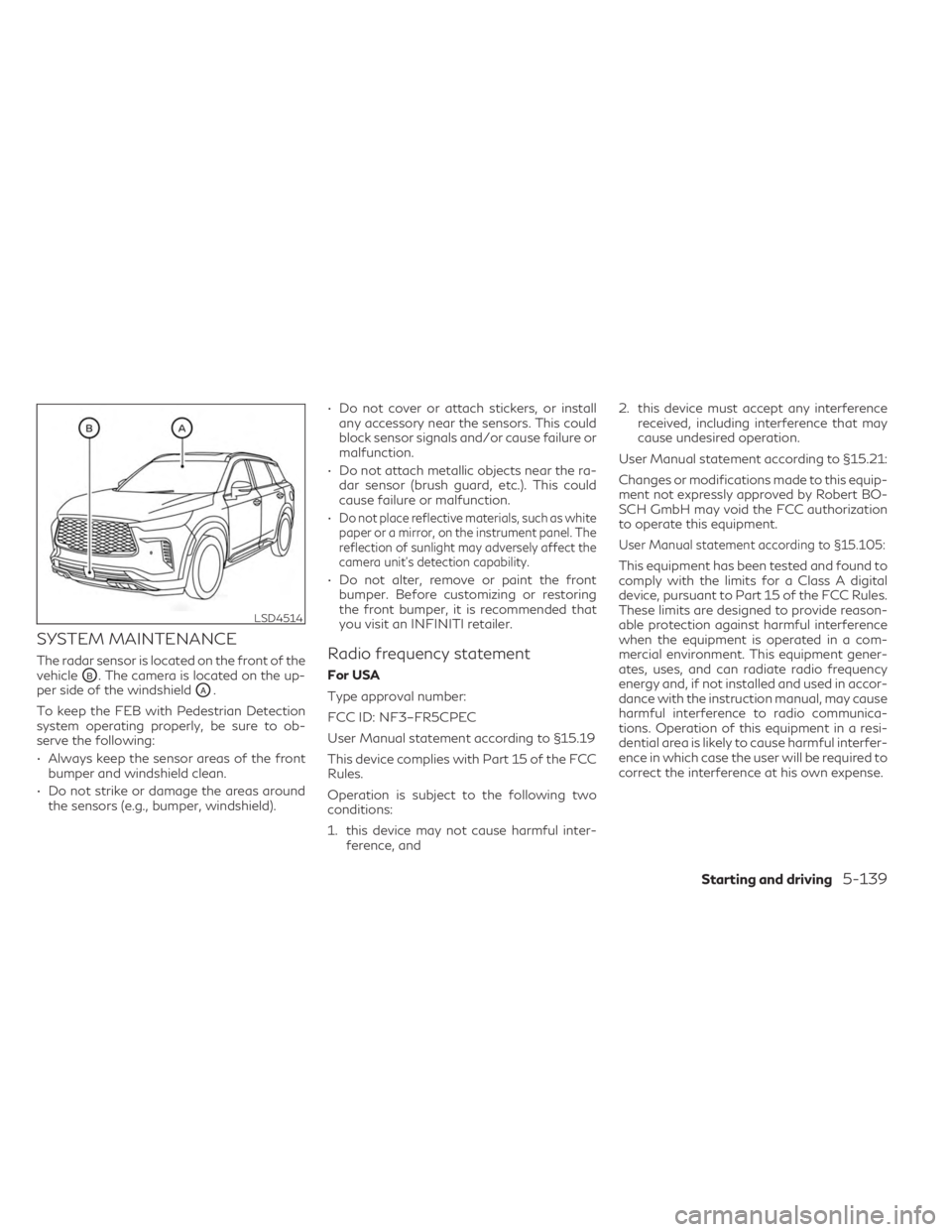
The radar sensor is located on the front of the
vehicle
OB. The camera is located on the up-
per side of the windshield
OA.
To keep the FEB with Pedestrian Detection
system operating properly, be sure to ob-
serve the following:
• Always keep the sensor areas of the front bumper and windshield clean.
• Do not strike or damage the areas around the sensors (e.g., bumper, windshield). • Do not cover or attach stickers, or install
any accessory near the sensors. This could
block sensor signals and/or cause failure or
malfunction.
• Do not attach metallic objects near the ra- dar sensor (brush guard, etc.). This could
cause failure or malfunction.
•
Do not place reflective materials, such as white
paper or a mirror, on the instrument panel. The
reflection of sunlight may adversely affect the
camera unit's detection capability.
• Do not alter, remove or paint the front bumper. Before customizing or restoring
the front bumper, it is recommended that
you visit an INFINITI retailer.
Radio frequency statement
For USA
Type approval number:
FCC ID: NF3–FR5CPEC
User Manual statement according to §15.19
This device complies with Part 15 of the FCC
Rules.
Operation is subject to the following two
conditions:
1. this device may not cause harmful inter- ference, and 2. this device must accept any interference
received, including interference that may
cause undesired operation.
User Manual statement according to §15.21:
Changes or modifications made to this equip-
ment not expressly approved by Robert BO-
SCH GmbH may void the FCC authorization
to operate this equipment.
User Manual statement according to §15.105:
This equipment has been tested and found to
comply with the limits for a Class A digital
device, pursuant to Part 15 of the FCC Rules.
These limits are designed to provide reason-
able protection against harmful interference
when the equipment is operated in a com-
mercial environment. This equipment gener-
ates, uses, and can radiate radio frequency
energy and, if not installed and used in accor-
dance with the instruction manual, may cause
harmful interference to radio communica-
tions. Operation of this equipment in a resi-
dential area is likely to cause harmful interfer-
ence in which case the user will be required to
correct the interference at his own expense.
LSD4514
Starting and driving5-139
Page 448 of 636
RF Exposure Information according 2.1091/
2.1093/OET bulletin 65:
Radiofrequency radiation exposure information:
This equipment complies with FCC radiation
exposure limits set forth for an uncontrolled
environment. This equipment should be in-
stalled and operated with minimum distance
of 20 cm between the radiator and your
body.
The transmitter must not be co-located or
operating in conjunction with any other an-
tenna or transmitter.
For Canada
Type approval number:
IC: 3387A-FR5CPEC
Legal warning for RF equipment:
This device complies with Industry Canada
licence-exempt RSS standard(s). Operation is
subject to the following two conditions: (1)
this device may not cause interference, and
(2) this device must accept any interference,
including interference that may cause unde-
sired operation of the device.
WARNING
Failure to follow the warnings and instruc-
tions for proper use of the PFCW system
could result in serious injury or death.
• The PFCW system can help warn the
driver before a collision occurs but will
not avoid a collision. It is the driver’s re-
sponsibility to stay alert, drive safely and
be in control of the vehicle at all times.
The PFCW system can help alert the driver
when there is a sudden braking of a second
vehicle traveling in front of the vehicle ahead
in the same lane.
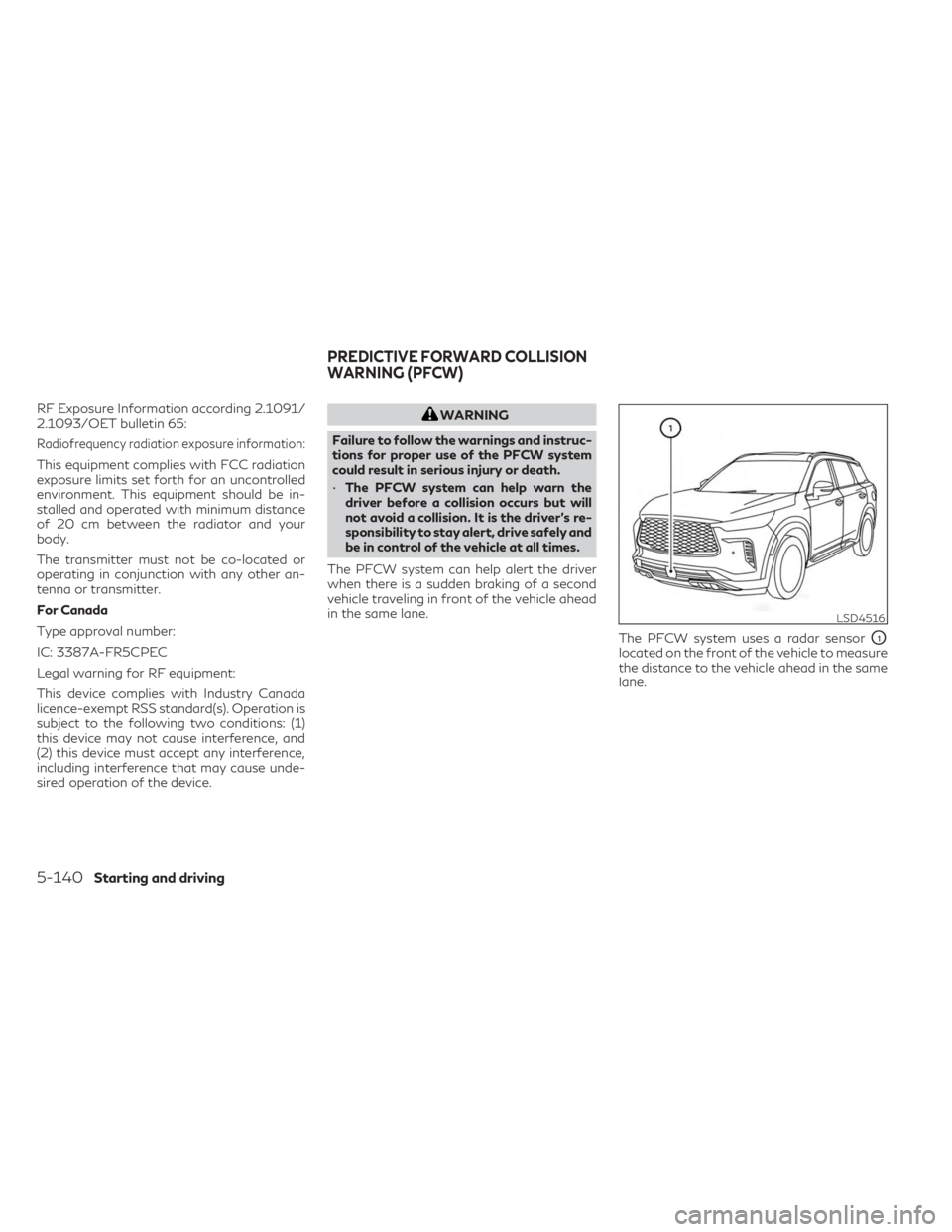
The PFCW system uses a radar sensor
O1
located on the front of the vehicle to measure
the distance to the vehicle ahead in the same
lane.
LSD4516
PREDICTIVE FORWARD COLLISION
WARNING (PFCW)
5-140Starting and driving
Page 463 of 636
SYSTEM MAINTENANCE
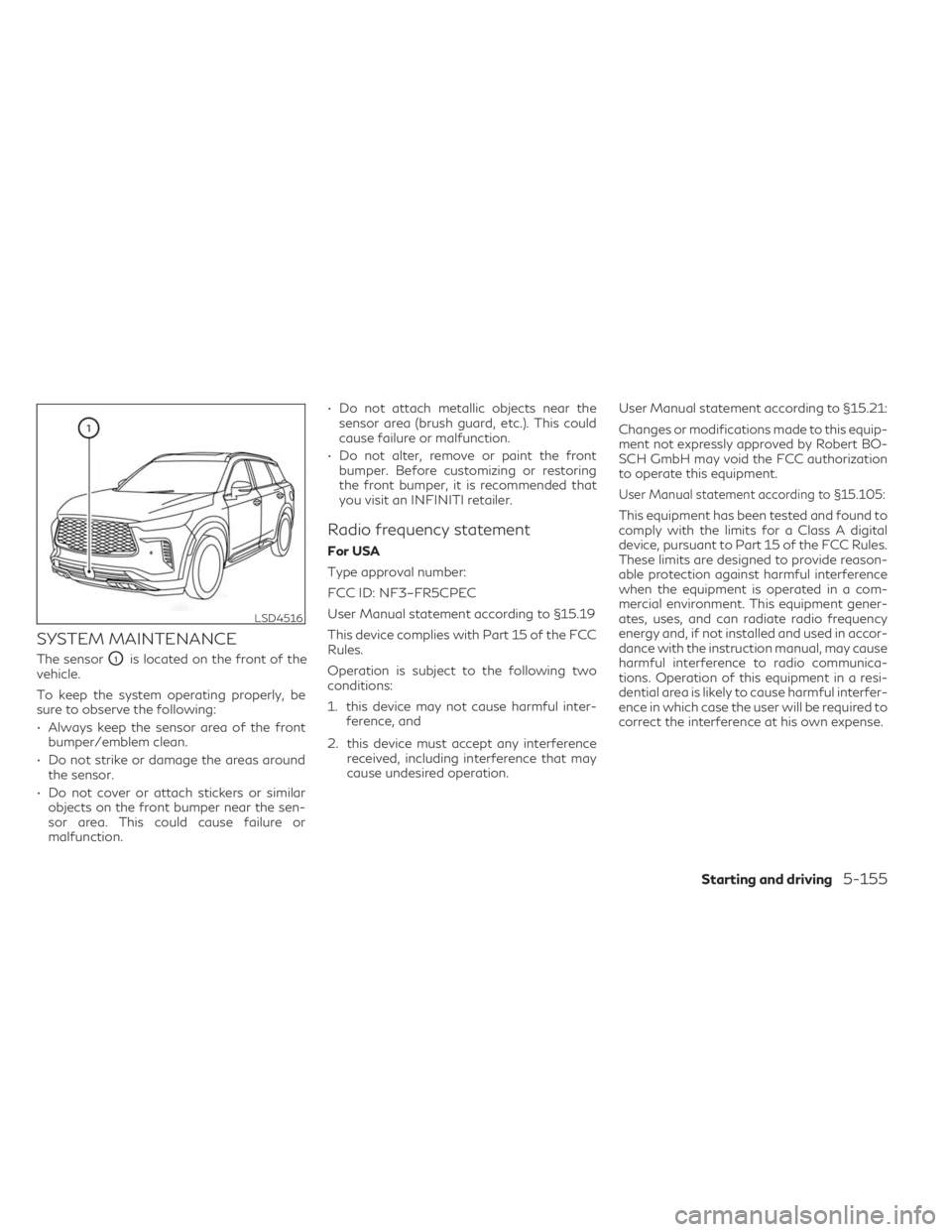
The sensorO1is located on the front of the
vehicle.
To keep the system operating properly, be
sure to observe the following:
• Always keep the sensor area of the front bumper/emblem clean.
• Do not strike or damage the areas around the sensor.
• Do not cover or attach stickers or similar objects on the front bumper near the sen-
sor area. This could cause failure or
malfunction. • Do not attach metallic objects near the
sensor area (brush guard, etc.). This could
cause failure or malfunction.
• Do not alter, remove or paint the front bumper. Before customizing or restoring
the front bumper, it is recommended that
you visit an INFINITI retailer.
Radio frequency statement
For USA
Type approval number:
FCC ID: NF3–FR5CPEC
User Manual statement according to §15.19
This device complies with Part 15 of the FCC
Rules.
Operation is subject to the following two
conditions:
1. this device may not cause harmful inter- ference, and
2. this device must accept any interference received, including interference that may
cause undesired operation. User Manual statement according to §15.21:
Changes or modifications made to this equip-
ment not expressly approved by Robert BO-
SCH GmbH may void the FCC authorization
to operate this equipment.
User Manual statement according to §15.105:
This equipment has been tested and found to
comply with the limits for a Class A digital
device, pursuant to Part 15 of the FCC Rules.
These limits are designed to provide reason-
able protection against harmful interference
when the equipment is operated in a com-
mercial environment. This equipment gener-
ates, uses, and can radiate radio frequency
energy and, if not installed and used in accor-
dance with the instruction manual, may cause
harmful interference to radio communica-
tions. Operation of this equipment in a resi-
dential area is likely to cause harmful interfer-
ence in which case the user will be required to
correct the interference at his own expense.
LSD4516
Starting and driving5-155
Page 464 of 636

RF Exposure Information according 2.1091/
2.1093/OET bulletin 65:
Radiofrequency radiation exposure information:
This equipment complies with FCC radiation
exposure limits set forth for an uncontrolled
environment. This equipment should be in-
stalled and operated with minimum distance
of 20 cm between the radiator and your
body.
The transmitter must not be co-located or
operating in conjunction with any other an-
tenna or transmitter.
For Canada
Type approval number:
IC: 3387A-FR5CPEC
Legal warning for RF equipment:
This device complies with Industry Canada
licence-exempt RSS standard(s). Operation is
subject to the following two conditions: (1)
this device may not cause interference, and
(2) this device must accept any interference,
including interference that may cause unde-
sired operation of the device.
WARNING
Failure to follow the warnings and instruc-
tions for proper use of the DAA system
could result in serious injury or death.
• The DAA system is only a warning to in-
form the driver of a potential lack of
driver attention or drowsiness. It will not
steer the vehicle or prevent loss of
control.
• The DAA system does not detect and
provide an alert of the driver’s lack of
attention or fatigue in every situation.
• It is the driver’s responsibility to:
– stay alert,
– drive safely,
– keep the vehicle in the traveling lane,
– be in control of the vehicle at all times,
– avoid driving when tired,
– avoid distractions (texting, etc.). The DAA system helps alert the driver if the
system detects a lack of attention or driving
fatigue.
The system monitors driving style and steer-
ing behavior over a period of time, and it
detects changes from the normal pattern. If
the system detects that driver attention is
decreasing over a period of time, the system
uses audible and visual warnings to suggest
that the driver take a break.
DRIVER ATTENTION ALERT (DAA)
(if so equipped)
5-156Starting and driving
Page 497 of 636

To shut off the engine in an emergency situ-
ation while driving, perform the following
procedure:
– Rapidly push the push-button ignitionswitch three consecutive times in less than
1.5 seconds, or
– Push and hold the push-button ignition switch for more than 2 seconds.TIRE PRESSURE MONITORING
SYSTEM (TPMS)
This vehicle is equipped with Tire Pressure
Monitoring System (TPMS). It monitors tire
pressure of all tires except the spare. When
the low tire pressure warning light is lit, and
the “Tire Pressure Low - Add Air” warning
appears in the vehicle information display,
one or more of your tires is significantly
under-inflated. If equipped, the system also
displays pressure of all tires (except the spare
tire) on the display screen by sending a signal
from a sensor that is installed in each wheel. If
the vehicle is being driven with low tire pres-
sure, the TPMS will activate and warn you of
it by the low tire pressure warning light. This
system will activate only when the vehicle is
driven at speeds above 16 mph (25 km/h).
For additional information, see “Warning
lights, indicator lights and audible reminders”
(P. 2-12) and “Tire Pressure Monitoring Sys-
tem (TPMS)” (P. 5-5).
WARNING
• Radio waves could adversely affect elec-
tric medical equipment. Those who use a
pacemaker should contact the electric
medical equipment manufacturer for the
possible influences before use. •
If the low tire pressure warning light illu-
minates while driving, avoid sudden
steering maneuvers or abrupt braking,
reduce vehicle speed, pull off the road to
a safe location and stop the vehicle as
soon as possible. Driving with under-
inflated tires may permanently damage
the tires and increase the likelihood of
tire failure. Serious vehicle damage could
occur and may lead to an accident and
could result in serious personal injury.
Check the tire pressure for all four tires.
Adjust the tire pressure to the recom-
mended COLD tire pressure shown on
the Tire and Loading Information label to
turn the low tire pressure warning light
OFF. If the light still illuminates while
driving after adjusting the tire pressure,
a tire may be flat or the TPMS may be
malfunctioning. If you have a flat tire,
replace it with a spare tire as soon as
possible, If no tire is flat and all tires are
properly inflated, have the vehicle
checked. It is recommended that you
visit an INFINITI retailer for this service.
EMERGENCY ENGINE SHUT OFF FLAT TIRE
In case of emergency6-3