horn INFINITI QX60 2023 Owners Manual
[x] Cancel search | Manufacturer: INFINITI, Model Year: 2023, Model line: QX60, Model: INFINITI QX60 2023Pages: 636, PDF Size: 7.28 MB
Page 22 of 636
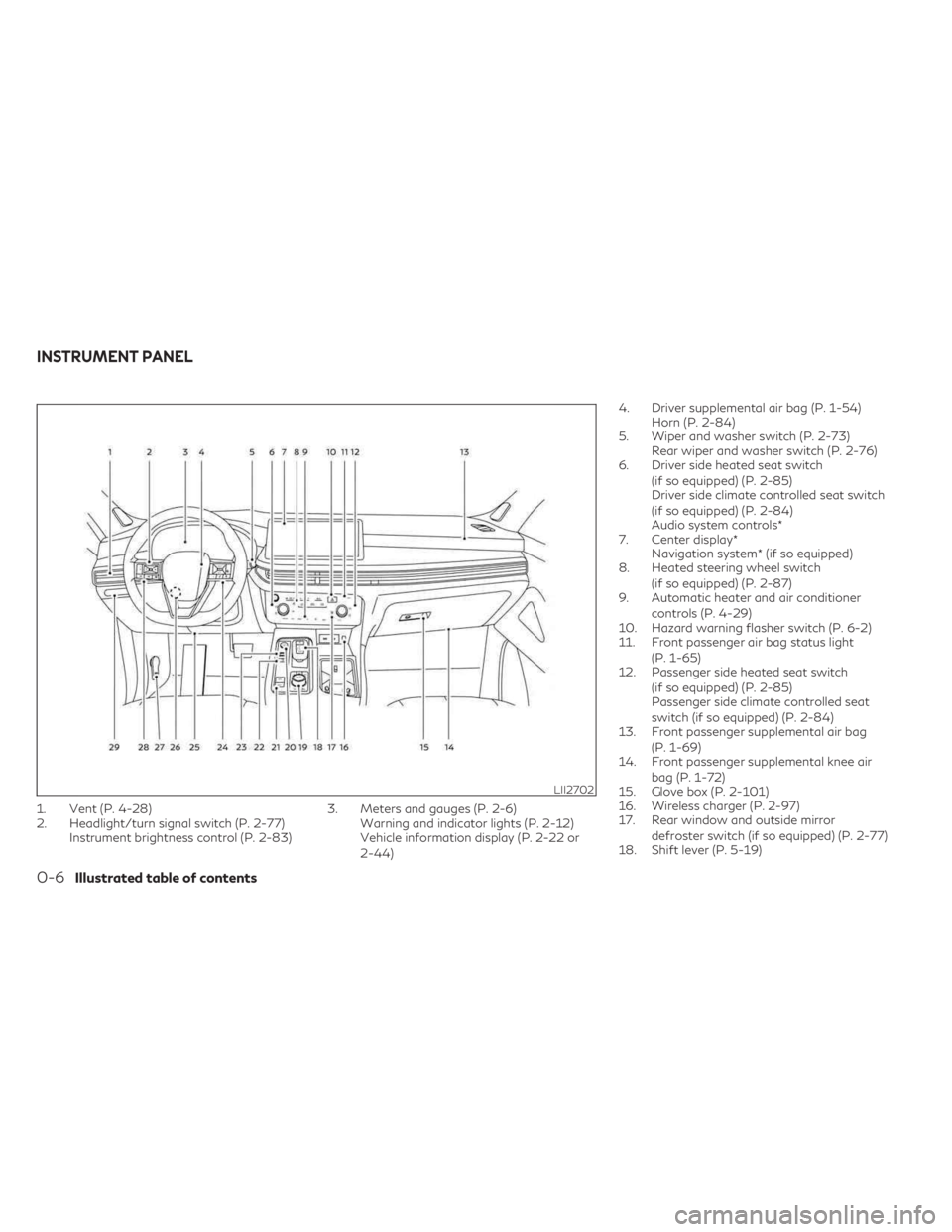
1. Vent (P. 4-28)
2. Headlight/turn signal switch (P. 2-77)Instrument brightness control (P. 2-83) 3. Meters and gauges (P. 2-6)
Warning and indicator lights (P. 2-12)
Vehicle information display (P. 2-22 or
2-44) 4. Driver supplemental air bag (P. 1-54)
Horn (P. 2-84)
5. Wiper and washer switch (P. 2-73) Rear wiper and washer switch (P. 2-76)
6. Driver side heated seat switch
(if so equipped) (P. 2-85)
Driver side climate controlled seat switch
(if so equipped) (P. 2-84)
Audio system controls*
7. Center display* Navigation system* (if so equipped)
8. Heated steering wheel switch
(if so equipped) (P. 2-87)
9. Automatic heater and air conditioner
controls (P. 4-29)
10. Hazard warning flasher switch (P. 6-2)
11. Front passenger air bag status light
(P. 1-65)
12. Passenger side heated seat switch
(if so equipped) (P. 2-85)
Passenger side climate controlled seat
switch (if so equipped) (P. 2-84)
13. Front passenger supplemental air bag
(P. 1-69)
14. Front passenger supplemental knee air
bag (P. 1-72)
15. Glove box (P. 2-101)
16. Wireless charger (P. 2-97)
17. Rear window and outside mirror
defroster switch (if so equipped) (P. 2-77)
18. Shift lever (P. 5-19)
LII2702
INSTRUMENT PANEL
0-6Illustrated table of contents
Page 103 of 636

2 Instruments and controls
Instrument panel.................................2-4
Meters and gauges ..............................2-6
Speedometer and odometer ...................2-6
Tachometer ..................................2-8
Engine coolant temperature gauge ............2-9
Fuel gauge ................................. 2-10
Distance To Empty (DTE) ...................2-10
Warning lights, indicator lights and audible
reminders ....................................... 2-12
Checking lights .............................. 2-14
Warning/Indicator lights (red) ...............2-14
Warning/Indicator lights (yellow) ............2-16
Warning/Indicator lights (other) ..............2-21
Audible reminders ........................... 2-22
Vehicle information display 7 inch (18 cm) Type
A (if so equipped) .............................. 2-22
How to use the vehicle information
display ...................................... 2-23
Startup display .............................. 2-23
Trip computer .............................. 2-24
Oil control system (if so equipped) ...........2-27
Settings .................................... 2-27
Vehicle information display warnings and
indicators ................................... 2-37
Vehicle information display 12.3 inch (31 cm)
Type B (if so equipped) ......................... 2-44How to use the vehicle information
display
...................................... 2-44
Startup display .............................. 2-45
Trip computer .............................. 2-46
Changing the meter screen view .............2-49
Oil control system (if so equipped) ...........2-49
Settings .................................... 2-50
Vehicle information display warnings and
indicators ................................... 2-60
Security systems ................................ 2-71
Vehicle security system .......................2-71
INFINITI Vehicle Immobilizer System .........2-72
Wiper and washer switch ......................2-73
Switch operation ............................ 2-73
Rain-sensing auto wiper system .............2-75
Rear switch operation ....................... 2-76
Rear
window and outside mirror
(if so equipped) defroster switch .................2-77
Headlight and turn signal switch .................2-77
Headlight control switch .....................2-77
LED Daytime Running Lights (DRL)
system ..................................... 2-82
Instrument brightness control ................2-83
Turn signal switch ........................... 2-83
Horn .......................................... 2-84
Page 106 of 636
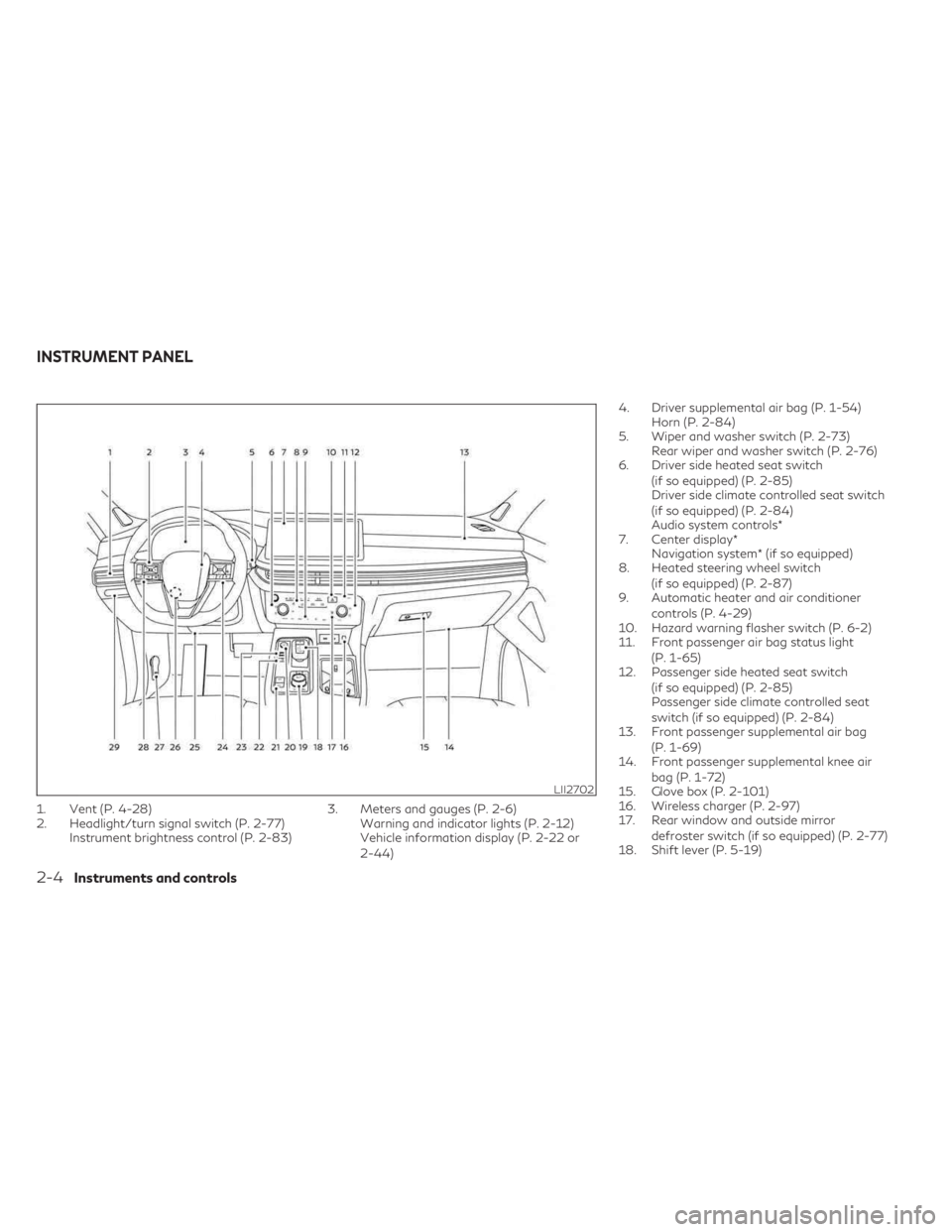
1. Vent (P. 4-28)
2. Headlight/turn signal switch (P. 2-77)Instrument brightness control (P. 2-83) 3. Meters and gauges (P. 2-6)
Warning and indicator lights (P. 2-12)
Vehicle information display (P. 2-22 or
2-44) 4. Driver supplemental air bag (P. 1-54)
Horn (P. 2-84)
5. Wiper and washer switch (P. 2-73) Rear wiper and washer switch (P. 2-76)
6. Driver side heated seat switch
(if so equipped) (P. 2-85)
Driver side climate controlled seat switch
(if so equipped) (P. 2-84)
Audio system controls*
7. Center display* Navigation system* (if so equipped)
8. Heated steering wheel switch
(if so equipped) (P. 2-87)
9. Automatic heater and air conditioner
controls (P. 4-29)
10. Hazard warning flasher switch (P. 6-2)
11. Front passenger air bag status light
(P. 1-65)
12. Passenger side heated seat switch
(if so equipped) (P. 2-85)
Passenger side climate controlled seat
switch (if so equipped) (P. 2-84)
13. Front passenger supplemental air bag
(P. 1-69)
14. Front passenger supplemental knee air
bag (P. 1-72)
15. Glove box (P. 2-101)
16. Wireless charger (P. 2-97)
17. Rear window and outside mirror
defroster switch (if so equipped) (P. 2-77)
18. Shift lever (P. 5-19)
LII2702
INSTRUMENT PANEL
2-4Instruments and controls
Page 133 of 636

Vehicle Settings
The vehicle settings menu allows the user to change the settings for lights, wipers, locking, keys, and other vehicle settings.
Some menu items shown below may not be equipped on your vehicle.
Menu itemExplanation
Lighting Displays the available lighting options.
Welcome Headlight Allows user to turn the welcome headlight on or off.
Auto Room Lamp Allows user to turn the auto room lamp on or off.
Accent Lighting Allows user to adjust the accent lighting.
Brightness Allows user to adjust the brightness of the accent lighting.
Front Seat Area Allows user to turn the front seat area lighting on or off.
Rear Seat Area Allows user to turn the rear seat area lighting on or off.
Light Sensitivity Allows user to change when the light illuminate based on the brightness outside the vehicle.
Light Off Delay Allows user to change the duration of time that the automatic headlights stay on after the vehicle is shut off.
Locking Displays the available locking options.
Ext. Door Switch Allows user to turn the exit door switch on or off.
Selective Unlock Allows user to turn the selective unlock feature on or off. When this item is turned on (default), only the driver’s door is
unlocked after the driver’s door unlock operation. All the doors can be unlocked if the capacitive touch pad is pressed
within 60 seconds of the door handle capacitive unlock feature. When this feature is turned off, all the doors unlock
when the driver’s door unlock operation is performed once.
Auto Door Unlock Allows the user to set the auto door unlock to Shift to P, Power OFF and OFF.
Horn beeps on lock Allows the user to turn the horn beeps on lock feature on or off.
Wipers Displays the available wiper options.
Speed Dependent Allows user to turn the speed dependent wipers on or off.
Rain Sensor Allows user to turn the rain sensor wipers on or off.
Reverse Link Allows user to turn the reverse link feature on or off.
Personal Drive Mode Displays the available INFINITI Drive Mode Selector options.
Instruments and controls2-31
Page 134 of 636

Menu itemExplanation
Acceleration Allows user to adjust the acceleration mode to SPORT, STANDARD or ECO.
Steering Allows user to adjust the steering mode to SPORT or STANDARD.
Trace Control Allows user to turn the Active Trace Control feature on or off.
Reset Allows user to reset the INFINITI Drive Mode Selector settings.
Driving Position Displays the available driving position options.
Exit Seat Slide When the exit seat slide is on the driver’s seat will move backward for easy exit when the ignition switch is placed in the
OFF position and the driver’s door is opened. After getting into the vehicle and placing the ignition switch in the ON
position, the driver’s seat will move to the previous set position.
For additional information, see “Memory seat” (P. 3-43).
Exit Steering Up When the exit steering up feature is turned on, the steering wheel moves upward for easy exit when the ignition switch
is in the OFF position and the driver’s door is opened. After getting into the vehicle and placing the ignition switch in
the ON position, the steering wheel moves to the previous position.
For additional information, see “Memory seat” (P. 3-43).
Rear Door Alert Displays the available Rear Door Alert options.
Horn & Alert When selected, the alert is displayed; and the horn sounds.
Alert Only When selected, only the alert is displayed.
OFF When selected, no alert or horn will be active.
2-32Instruments and controls
Page 140 of 636

retailer for this service. For additional infor-
mation, see “Chassis Control” (P. 5-170).
Check Back Seat For All Articles
When the system is enabled, this message
appears when the vehicle comes to a com-
plete stop, the vehicle is transitioned from the
D (Drive) position to P (Park) position, and the
driver exits the vehicle. This message alerts
the driver, after a period of time, to check for
items in the rear seat after the audible alert
has been provided.
NOTE:
This system is disabled until a driver enables
it using the vehicle information display. For
additional information, see “How to use the
vehicle information display” (P. 2-44).
For additional information, see “Rear Door
Alert” (P. 2-92).
Rear Door Alert is activated
When the system is enabled, this message
appears when the Rear Door Alert system is
active and can remind the driver to check the
back seat.
• Using the steering wheel switch, a drivercan select “Dismiss Message” to clear the
display for a period of time. If no selection is
made, this message automatically turns off
after a period of time. • Using the steering wheel switch, a driver
can select “Disable Alert” to disable the
horn alert for the remainder of the current
trip.
WARNING
Selecting “Dismiss Message” during a stop
within a trip temporarily dismisses the
message for that stop without turning the
system off. Alerts can be provided for
other stops during the trip. Selecting “Dis-
able Alert” turns off the Rear Door Alert
system for the remainder of a trip and no
audible alert will be provided.
NOTE:
This system is disabled until a driver enables
it using the vehicle information display. For
additional information, see “How to use the
vehicle information display” (P. 2-44).
For additional information, see “Rear Door
Alert” (P. 2-92).
Door/Liftgate Open
This warning appears when a door or the
liftgate has been opened.
Headlight System Error: See Owner’s
Manual
This warning appears when there is an error
with the system. For additional information,
see “Headlight and turn signal switch”
(P. 2-77).
INFINITI Drive Mode Selector indicator
When a driving mode is selected using the
INFINITI Drive Mode Selector, the selected
mode indicator is displayed.
• PERSONAL
• SPORT
• STANDARD (2WD models)
• AUTO (AWD models)
• ECO
• SNOW
For additional information, see “INFINITI
Drive Mode Selector” (P. 5-29).
Low Fuel
This warning appears when the fuel level in
the fuel tank is getting low. Refuel as soon as
it is convenient, preferably before the fuel
gauge reaches 0 (Empty). There will be a
small reserve of fuel in the tank when the fuel
gauge needle reaches 0 (Empty).
2-38Instruments and controls
Page 158 of 636

Menu itemExplanation
Ext. Door Switch Allows user to turn the exit door switch on or off.
Selective Unlock Allows user to turn the selective unlock feature on or off. When this item is turned on (default), only the driver’s door is unlocked after the driver’s door unlock operation. All the doors can be unlocked if the capacitive touch pad is pressed
within 60 seconds of the door handle capacitive unlock feature. When this feature is turned off, all the doors unlock
when the driver’s door unlock operation is performed once.
Auto Door Unlock Allows the user to set the auto door unlock to Shift to P, IGN OFF and OFF.
Horn beeps on lock Allows the user to turn the horn beeps on lock feature on or off.
Wipers Displays the available wiper options. Speed Dependent Allows user to turn the speed dependent wipers on or off.
Rain Sensor Allows user to turn the rain sensor wipers on or off.
Reverse Link Allows user to turn the reverse link feature on or off.
Personal Drive Mode Displays the available INFINITI Drive Mode Selector options. Acceleration Allows user to adjust the acceleration mode to SPORT, STANDARD or ECO.
Steering Allows user to adjust the steering mode to SPORT or STANDARD.
Trace Control Allows user to turn the Active Trace Control feature on or off.
Reset Allows user to reset the INFINITI Drive Mode Selector settings.
Driving Position Displays the available driving position options. Exit Seat Slide When the exit seat slide is on the driver’s seat will move backward for easy exit when the ignition switch is placed in the OFF position and the driver’s door is opened. After getting into the vehicle and placing the ignition switch in the ON
position, the driver’s seat will move to the previous set position.
For additional information, see “Memory seat” (P. 3-43).
Exit Steering Up When the exit steering up feature is turned on, the steering wheel moves upward for easy exit when the ignition switch is in the OFF position and the driver’s door is opened. After getting into the vehicle and placing the ignition switch in
the ON position, the steering wheel moves to the previous position.
For additional information, see “Memory seat” (P. 3-43).
Rear Door Alert Displays the available Rear Door Alert options.
Horn & Alert When selected, the alert is displayed; and the horn sounds.
Alert Only When selected, only the alert is displayed.
OFF When selected, no alert or horn will be active.
2-56Instruments and controls
Page 163 of 636

Caution Steep slope
This indicator appears, and a chime sounds
when the automatic brake hold function is
activated while the vehicle is on a steep hill.
Apply the foot brake to stop the vehicle mov-
ing. For additional information, see “Auto-
matic brake hold” (P. 5-27).
Chassis Control System Error See
Owner’s Manual
This warning appears if the chassis control
module detects a malfunction in the chassis
control system. Have the system checked.
It is recommended that you visit an INFINITI
retailer for this service. For additional infor-
mation, see “Chassis Control” (P. 5-170).
Check Back Seat For All Articles
When the system is enabled, this message ap-
pears when the vehicle comes to a complete
stop, the vehicle is transitioned from the D (Drive)
position to P (Park) position, and the driver exits
the vehicle. This message alerts the driver, after a
period of time, to check for items in the rear seat
after the audible alert has been provided.
NOTE:
This system is disabled until a driver enables
it using the vehicle information display. For
additional information, see “How to use the
vehicle information display” (P. 2-44).For additional information, see “Rear Door
Alert” (P. 2-92).
Rear Door Alert is activated
When the system is enabled, this message
appears when the Rear Door Alert system is
active and can remind the driver to check the
back seat.
• Using the steering wheel switch, a driver
can select “Dismiss Message” to clear the
display for a period of time. If no selection is
made, this message automatically turns off
after a period of time.
• Using the steering wheel switch, a driver can select “Disable Alert” to disable the
horn alert for the remainder of the current
trip.
WARNING
Selecting “Dismiss Message” during a stop
within a trip temporarily dismisses the
message for that stop without turning the
system off. Alerts can be provided for
other stops during the trip. Selecting “Dis-
able Alert” turns off the Rear Door Alert
system for the remainder of a trip and no
audible alert will be provided.
NOTE:
This system is disabled until a driver enables
it using the vehicle information display. For
additional information, see “How to use the
vehicle information display” (P. 2-44).
For additional information, see “Rear Door
Alert” (P. 2-92).
Door/Liftgate Open
This warning appears when a door or the
liftgate has been opened.
Electric shift control system
indicator
This indicator appears when a malfunction
occurs in the electric shift control system.
When the master warning indicator appears,
the chime sounds and the following message
is displayed in the vehicle information display:
“When parked apply parking brake”.
When the ignition is placed in the OFF posi-
tion, the chime sounds continuously. Ensure
the parking brake is applied
Have the system checked. It is recommended
that you visit an INFINITI retailer for this
service.
Instruments and controls2-61
Page 174 of 636

The system helps deter vehicle theft but can-
not prevent it nor can it prevent the theft of
interior or exterior vehicle components in all
situations. Always secure your vehicle even if
parking for a brief period. Never leave your
Intelligent Key in the vehicle, and always lock
the vehicle when unattended. Be aware of
your surroundings, and park in secure, well-lit
areas whenever possible.
Many devices offering additional protection,
such as component locks, identification
markers, and tracking systems, are available
at auto supply stores and specialty shops. An
INFINITI retailer may also offer such equip-
ment. Check with your insurance company to
see if you may be eligible for discounts for
various theft protection features.
How to arm the vehicle security
system
1. Close all windows and the moonroof.(The
system can be armed even if the windows
and moonroof are open.)
2. Remove the Intelligent Key from the vehicle.
3. Close all doors, hood and liftgate. Lock all doors. The doors can be locked with the
Intelligent Key, door handle request
switch, or power door lock switch. 4. Wait 30 seconds for the system to com-
plete the pre-armed phase. If during the
pre-armed phase one of the following oc-
curs, the system will not arm:
• Any door is unlocked with the Intelligent Key or door request switch.
• Ignition switch is placed in ON position.
• Even when the driver and/or passengers
are in the vehicle, the system will activate
with all the doors, hood and liftgate locked
with the ignition switch placed in the
LOCK position. When placing the ignition
switch in the ON position, the system will
be released.
Vehicle security system activation
The vehicle security system will give the fol-
lowing alarm:
• The turn signals blink and the horn sounds intermittently.
• The alarm automatically turns off after a period of time. However, the alarm reacti-
vates if the vehicle is tampered with again.
The alarm can be shut off by pressing the
button on the Intelligent Key. The alarm is activated by:
• Opening the door or liftgate without using
the Intelligent Key (even if the door is un-
locked by releasing the door inside lock
switch).
How to stop an activated alarm
The alarm stops only by unlocking the driver’s
door or the liftgate by pressing the
button on the Intelligent Key or pushing the
request switch on the driver's or passenger's
door with the Intelligent Key in range of the
door handle.
INFINITI VEHICLE IMMOBILIZER
SYSTEM
The INFINITI Vehicle Immobilizer System will
not allow the engine to start without the use
of a registered INFINITI Vehicle Immobilizer
System key.
If the engine fails to start using a registered
INFINITI Vehicle Immobilizer System key (for
example, when interference is caused by an-
other INFINITI Vehicle Immobilizer System
key, an automated toll road device or auto-
matic payment device on the key ring), restart
the engine using the following procedures:
1. Leave the ignition switch in the ON posi- tion for approximately 5 seconds.
2-72Instruments and controls
Page 186 of 636
Move the lever up or down until the turn
signal begins to flash, but the lever does not
latch, and release the lever. The turn signal
will automatically flash three times.
Choose the appropriate method to signal a
lane change based on road and traffic
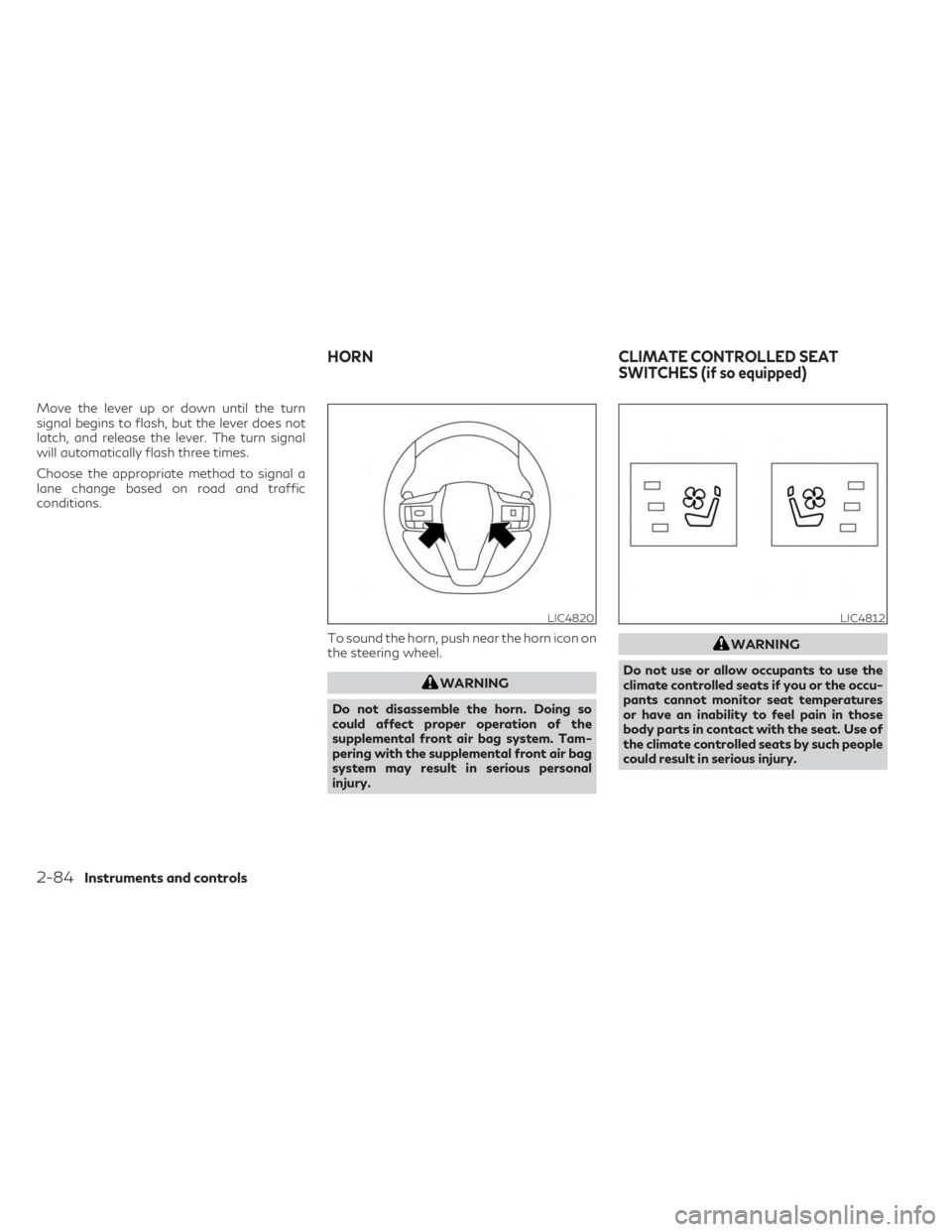
conditions.To sound the horn, push near the horn icon on
the steering wheel.
WARNING
Do not disassemble the horn. Doing so
could affect proper operation of the
supplemental front air bag system. Tam-
pering with the supplemental front air bag
system may result in serious personal
injury.
WARNING
Do not use or allow occupants to use the
climate controlled seats if you or the occu-
pants cannot monitor seat temperatures
or have an inability to feel pain in those
body parts in contact with the seat. Use of
the climate controlled seats by such people
could result in serious injury.
LIC4820LIC4812
HORN CLIMATE CONTROLLED SEAT
SWITCHES (if so equipped)
2-84Instruments and controls