transmission INFINITI QX60 2023 Owners Manual
[x] Cancel search | Manufacturer: INFINITI, Model Year: 2023, Model line: QX60, Model: INFINITI QX60 2023Pages: 636, PDF Size: 7.28 MB
Page 37 of 636

Manual operation to return the 3rd row seats
to a seating position (if so equipped):
1. Use the pull straps
OCto raise each seat-
back. Pull back until the seatback latches
into position. Make sure to properly raise
each seatback to an upright and secured
position.
2. Do not use the pull strap to return the head restraint/headrest to the upright
position. Pull back on the head restraint/
headrest until it latches in the upright
position.
Power operation to return the 3rd row seats
to a seating position (if so equipped):
1. Push and hold the corresponding switch
ODlocated on the left side in the cargo
area.
A beep sounds once and the seatback will be
returned automatically.
A beep sounds twice when the seatback is
fully returned to the seating position. If the control unit detects any obstacle or
malfunctions while in the power operation, a
beep sounds for 4 seconds and the seatback
will return to the folded position automati-
cally. Check if there are any obstacles caught
that prevent seats from returning to the
folded position. It is recommended that you
visit an INFINITI retailer if the beep still
sounds.
CAUTION
When operating the 3rd row power seat-
back return, make sure that the vehicle is
stopped and the transmission is in the P
(Park) position.
WARNING
• When the seat is returned to the normal
seating position, the head restraints/
headrests must be returned to the up-
right position to properly protect vehicle
occupants.
• Never allow anyone to ride in the cargo
area or on the 3rd row seats when they
are in the fold-down position. In a colli-
sion, people riding in these areas are
more likely to be seriously injured or
killed.
LRS3420
Safety-Seats, seat belts and supplemental restraint system1-11
Page 128 of 636
Auto Refuel will be reset automatically each
time when refueling.
For additional information, see “ECO Mode”
(P. 5-32).
6. Tire Pressures
The tire pressure mode shows the pressure of
all four tires while the vehicle is driven.
With the “Tire Pres ECO advice” function ON,
when the tire pressure is getting low, “Check
Tire Pressures for Best Fuel Economy” or
“Add air for Best Fuel Economy” appears. For
additional information, see “ECO Mode Set-
ting” (P. 2-29) or “Tire Pres ECO advice”
(P. 2-29).
When the “Tire Pressure Low — Add Air”
warning appears, the display can be switched
to the tire pressure mode by pushing the
scroll dial to reveal additional details on the
displayed warning.
7. Intelligent All-Wheel Drive (AWD)
torque distribution display (if so
equipped)
When the Intelligent AWD torque distribution
display is selected, you can view the distribu-
tion ratio of the transmission torque to the
front and rear wheels during driving.
8. Compass (if so equipped)
This display indicates the direction the vehicle
is heading.
9. Navigation (if so equipped)
When the route guidance is set in the naviga-
tion system, this item shows the navigation
route information.
10. Audio
The audio mode shows the status of audio
information.
11. Driver Assistance
The Driver Assistance mode shows the oper-
ating condition for the following systems (if
so equipped):
• Forward–– Forward Emergency Braking with Pe- destrian Detection system
–– Predictive Forward Collision Warning (PFCW)
• Lane: –– Lane Departure Warning (LDW)
–– Lane Departure Prevention (LDP)
• Blind Spot: –– Blind Spot Warning (BSW) –– Blind Spot Intervention® (BSI) (if so
equipped)
For additional information, see “Blind Spot
Intervention® (BSI)” (P. 5-61), “Blind Spot
Warning (BSW)” (P. 5-49), “Lane Departure
Warning (LDW)” (P. 5-36), “Forward Emer-
gency Braking (FEB) with Pedestrian Detec-
tion” (P. 5-128), “Predictive Forward Collision
Warning (PFCW)” (P. 5-140) or “Lane Depar-
ture Prevention (LDP)” (P. 5-43).
12. ProPILOT Assist (if so
equipped)
The ProPILOT Assist mode shows operating
conditions for the following systems:
• Intelligent Cruise Control (ICC)
• Steering Assist
The display will also be shown when the Pro-
PILOT Assist is turned on. For additional in-
formation, see “ProPILOT Assist” (P. 5-84).
13. Traffic Sign Recognition (if so
equipped)
The Traffic Sign Recognition (TSR) system
provides the driver with information about
the most recently detected speed limit.
For additional information, see “Traffic Sign
Recognition (TSR) (P. 5-34).
2-26Instruments and controls
Page 143 of 636
Timer Alert — Have a break?
This indicator appears when the set time is
reached. The time can be set up to six hours.
For additional information, see “Driver Assis-
tance” (P. 2-28).
Tire Pressure Low - Add Air
This warning appears when the low tire pres-
sure warning light in the meter illuminates
and low tire pressure is detected. The
warning appears each time the ignition
switch is placed in the ON position as long as
the low tire pressure warning light remains
illuminated. If this warning appears, stop the
vehicle and adjust the tire pressures of all four
tires to the recommended COLD tire pres-
sure shown on the Tire and Loading Informa-
tion label. For additional information, see
“Low tire pressure warning light” (P. 2-18)
and “Tire Pressure Monitoring System
(TPMS)” (P. 5-5).
TPMS Error: See Owner’s Manual
This warning appears when there is an error
with your TPMS. If this warning appears,
have the system checked. It is recommended
that you visit an INFINITI retailer for this
service.
Transmission Shift Position
indicator
This indicator shows the transmission shift
position.
When parked apply parking
brake
This message appears when a malfunction
occurs in the electric shift control system be-
low 6 mph (10 km/h).
Have the system checked. It is recommended
that you visit an INFINITI retailer for this
service.
AWD Error: See Owner’s Manual
This warning appears when the Intelligent
All-Wheel Drive (AWD) system is not func-
tioning properly while the engine is running.
Reduce vehicle speed and have your vehicle
checked by an INFINITI retailer as soon as
possible. For additional information, see “In-
telligent All-Wheel Drive (AWD)” (P. 5-161).
AWD High Temp. Stop Vehicle
This warning appears when the oil tempera-
ture of the powertrain parts will increase due
to the difference in rotation between the
front and rear wheels is large (wheel slip),
such as when driving the vehicle on rough
roads, through sand or mud, or freeing a
stuck vehicle. If this warning is displayed, stopthe vehicle with the engine idling, as soon as it
is safe to do so. In these cases, the AWD
changes to 2WD to protect the powertrain
parts. Then if the warning turns off, you can
continue AWD driving.
Tire Size Incorrect: See Owner’s Manual
This warning may appear if there is a large
difference between the diameters of the
front and rear wheels. Pull off the road in a
safe area, with the engine idling. Check that
all the tire sizes, brand, construction and
tread patterns are the same, that the tire
pressure is correct and that the tires are not
excessively worn. If you have any problems,
please change tires or adjust to the correct
tire pressure. Do not select the SNOW mode
with the INFINITI Drive Mode Selector and
do not drive fast. For additional information,
see “Intelligent All-Wheel Drive (AWD)”
(P. 5-161).
Forward Emergency Braking
(FEB) with Pedestrian
Detection emergency warning
indicator
This indicator appears along, with an audible
warning, when the system detects the possi-
bility of a forward collision.
Instruments and controls2-41
Page 150 of 636
6. Intelligent All-Wheel Drive
(AWD) torque distribution display
(if so equipped)
When the Intelligent AWD torque distribution
display is selected, you can view the distribu-
tion ratio of the transmission torque to the
front and rear wheels during driving.
7. Compass (if so equipped)
This display indicates the direction the vehicle
is heading.
8. Navigation (if so equipped)
When the route guidance is set in the naviga-
tion system, this item shows the navigation
route information.
9. Audio
The audio mode shows the status of audio
information.
10. Driver Assistance
The Driver Assistance mode shows the oper-
ating condition for the following systems:
• Forward–– Forward Emergency Braking (FEB) with Pedestrian Detection system –– Predictive Forward Collision Warning
(PFCW)
• Lane: –– Lane Departure Warning (LDW)
–– Lane Departure Prevention (LDP)
• Blind Spot: –– Blind Spot Warning (BSW)
–– Blind Spot Intervention® (BSI) (if so equipped)
For additional information, see “Blind Spot
Intervention® (BSI)” (P. 5-61), “Blind Spot
Warning (BSW)” (P. 5-49), “Lane Departure
Warning (LDW)” (P. 5-36), “Forward Emer-
gency Braking (FEB) with Pedestrian Detec-
tion” (P. 5-128), “Predictive Forward Collision
Warning (PFCW)” (P. 5-140) or “Lane Depar-
ture Prevention (LDP)” (P. 5-43).
11. ProPILOT Assist (if so
equipped)
The ProPILOT Assist mode shows operating
conditions for the following systems:
• Intelligent Cruise Control (ICC)
• Steering Assist
The display will also be shown when the Pro-
PILOT Assist is turned on. For additional in-
formation, see “ProPILOT Assist” (P. 5-84).
12. Traffic Sign Recognition (if so
equipped)
The Traffic Sign Recognition (TSR) system
provides the driver with information about
the most recently detected speed limit.
For additional information, see “Traffic Sign
Recognition (TSR) (P. 5-34).
13. Idling Stop System
The Idling Stop System provides the driver
with information about the amount of fuel
saved while using the system.
For additional information, see “Idling Stop
System” (P. 5-178).
2-48Instruments and controls
Page 169 of 636
Tire Pressure Low - Add Air
This warning appears when the low tire pres-
sure warning light in the meter illuminates
and low tire pressure is detected. The
warning appears each time the ignition
switch is placed in the ON position as long as
the low tire pressure warning light remains
illuminated. If this warning appears, stop the
vehicle and adjust the tire pressures of all four
tires to the recommended COLD tire pres-
sure shown on the Tire and Loading Informa-
tion label. For additional information, see
“Low tire pressure warning light” (P. 2-18)
and “Tire Pressure Monitoring System
(TPMS)” (P. 5-5).
TPMS Error: See Owner’s Manual
This warning appears when there is an error
with your TPMS. If this warning appears,
have the system checked. It is recommended
that you visit an INFINITI retailer for this
service.
Transmission Shift Position
indicator
This indicator shows the transmission shift
position.
Turn signal/hazard indicators
(green)
The appropriate indicator flashes when the
turn signal switch is activated.
Both indicators flash when the hazard switch
is turned on.
When parked apply parking
brake
This message appears when a malfunction
occurs in the electric shift control system be-
low 6 mph (10 km/h).
Have the system checked. It is recommended
that you visit an INFINITI retailer for this
service.
AWD Error: See Owner’s Manual
This warning appears when the Intelligent
All-Wheel Drive (AWD) system is not func-
tioning properly while the engine is running.
Reduce vehicle speed and have your vehicle
checked by an INFINITI retailer as soon as
possible. For additional information, see “In-
telligent All-Wheel Drive (AWD)” (P. 5-161).
AWD High Temp. Stop Vehicle
This warning appears when the oil tempera-
ture of the powertrain parts will increase due
to the difference in rotation between the
front and rear wheels is large (wheel slip),such as when driving the vehicle on rough
roads, through sand or mud, or freeing a
stuck vehicle. If this warning is displayed, stop
the vehicle with the engine idling, as soon as it
is safe to do so. In these cases, the AWD
changes to 2WD to protect the powertrain
parts. Then if the warning turns off, you can
continue AWD driving.
Tire Size Incorrect: See Owner’s Manual
This warning may appear if there is a large
difference between the diameters of the
front and rear wheels. Pull off the road in a
safe area, with the engine idling. Check that
all the tire sizes, brand, construction and
tread patterns are the same, that the tire
pressure is correct and that the tires are not
excessively worn. If you have any problems,
please change tires or adjust to the correct
tire pressure. Do not select the SNOW mode
with the INFINITI Drive Mode Selector and
do not drive fast. For additional information,
see “Intelligent All-Wheel Drive (AWD)”
(P. 5-161).
Forward Emergency Braking
(FEB) with Pedestrian
Detection system indicator
This warning appears when the ignition
switch is placed in the ON position.
Instruments and controls2-67
Page 222 of 636

USING THE GARAGE DOOR
TWO-WAY COMMUNICATION
HomeLink® has the function of communicat-
ing with garage door opener systems. If your
garage door openers are compatible with
HomeLink®, the HomeLink® can:
• receive and display “closing” or “opening”status from your garage door opener.
• recall and display the garage door being “closed” or “opened”.
HomeLink® can receive the status from a
garage door opener at a range up to 820 ft
(250 m), but it varies depending on the envi-
ronment. You may need to reduce vehicle
speed to successfully receive the garage door
opener communication.
Using two-way communication
Press and hold the HomeLink® buttons (1
and 2) simultaneously for 2 seconds to recall
and display the last recorded garage door
status communicated to HomeLink®.
HomeLink® will display the last recorded sta-
tus for 3 seconds. If two-way communication programming is
successful, HomeLink® will display the status
of your garage door opener with the status
indicator
OA, which changes depending on
the status. The garage door opener status
indicator shows the garage door opener sta-
tus as follows:
Flashing in orange — Closing
Flashing in orange — Opening
Illuminating in green — Closed
Illuminating in green — Opened
The status indicator stops to flash after an
open/close signal is received or no signal is
received within 30 seconds from the garage
door opener.
PROGRAMMING HOMELINK®
FOR CANADIAN CUSTOMERS
AND GATE OPENERS
Canadian radio-frequency laws require
transmitter signals to “time-out” (or quit) af-
ter several seconds of transmission – which
may not be long enough for HomeLink® to
pick up the signal during training. Similar to
this Canadian law, some U.S. gate operators
are designed to “time-out” in the same
manner.
LIC4948
2-120Instruments and controls
Page 232 of 636
Lockout protection
When the power door lock switch is moved to
the lock position and any door is open, all
doors will lock. With the Intelligent Key left in
the vehicle and any door open, all doors will
unlock automatically and chime will sound
after the door is closed.
These functions help prevent the Intelligent
Key from being accidentally locked inside the
vehicle.
AUTOMATIC DOOR LOCKS
• All doors lock automatically when the ve-hicle speed reaches 15 mph (24 km/h).
• All doors unlock automatically when the transmission is placed in the P (Park) posi-
tion or when the ignition switch is placed in
the OFF position, depending on the option
selected in the “Vehicle Settings” menu.
NOTE:The Auto Door Unlock function can be
changed using “Vehicle Settings” of the ve-
hicle information display. For additional in-
formation, see “Vehicle information display
7 inch (18 cm) Type A” (P. 2-22) or “Vehicle
information display 12.3 inch (21 cm) Type
B” (P. 2-44).
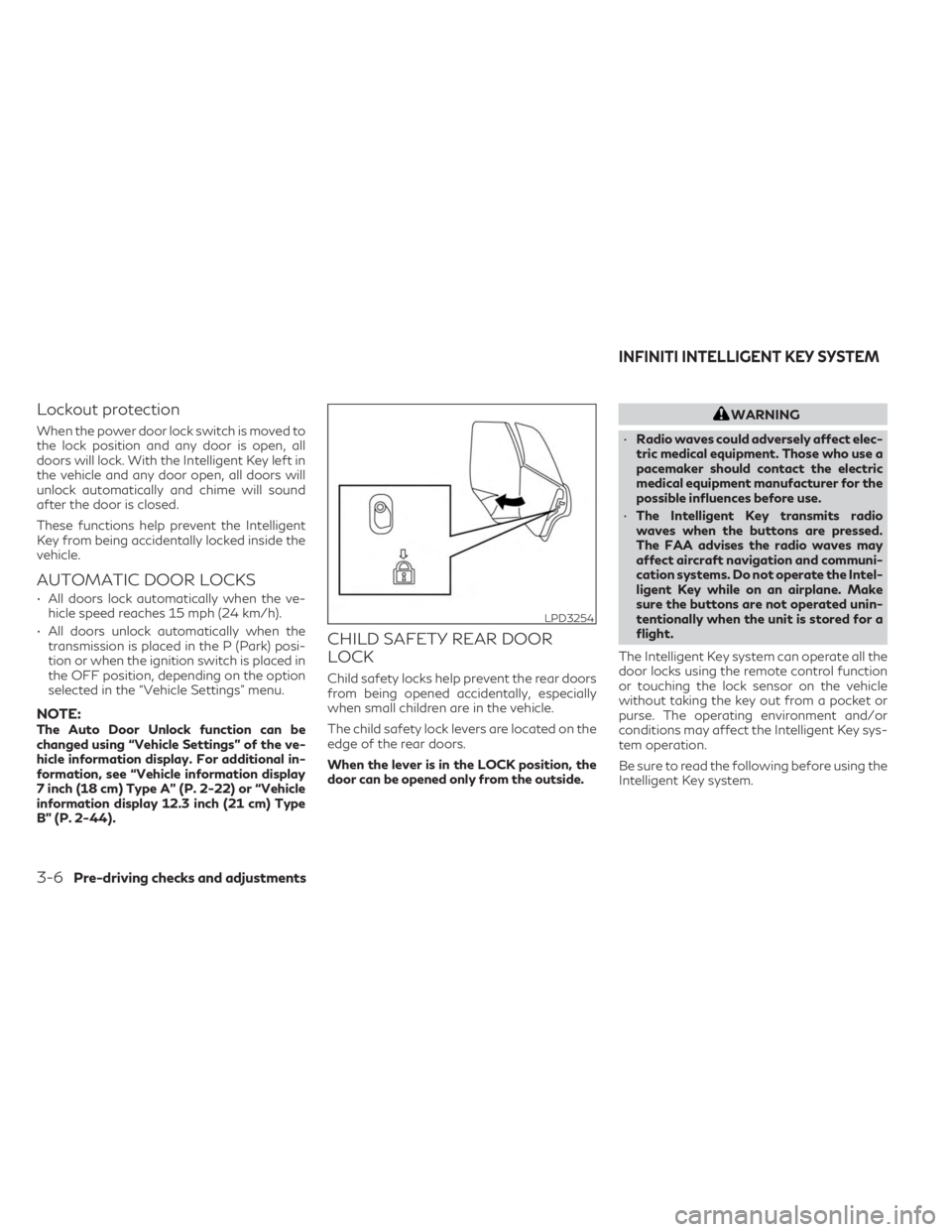
CHILD SAFETY REAR DOOR
LOCK
Child safety locks help prevent the rear doors
from being opened accidentally, especially
when small children are in the vehicle.
The child safety lock levers are located on the
edge of the rear doors.
When the lever is in the LOCK position, the
door can be opened only from the outside.
WARNING
• Radio waves could adversely affect elec-
tric medical equipment. Those who use a
pacemaker should contact the electric
medical equipment manufacturer for the
possible influences before use.
• The Intelligent Key transmits radio
waves when the buttons are pressed.
The FAA advises the radio waves may
affect aircraft navigation and communi-
cation systems. Do not operate the Intel-
ligent Key while on an airplane. Make
sure the buttons are not operated unin-
tentionally when the unit is stored for a
flight.
The Intelligent Key system can operate all the
door locks using the remote control function
or touching the lock sensor on the vehicle
without taking the key out from a pocket or
purse. The operating environment and/or
conditions may affect the Intelligent Key sys-
tem operation.
Be sure to read the following before using the
Intelligent Key system.
LPD3254
INFINITI INTELLIGENT KEY SYSTEM
3-6Pre-driving checks and adjustments
Page 308 of 636

5 Starting and driving
Precautions when starting and driving............5-4
Exhaust gas (carbon monoxide) ................5-4
Three-way catalyst ...........................5-4
Tire Pressure Monitoring System (TPMS) ......5-5
On-pavement and off-road driving
precautions ...................................5-8
Avoiding collision and rollover .................5-8
Off-road recovery ............................5-9
Rapid air pressure loss ........................5-9
Drinking alcohol/drugs and driving ...........5-10
Driving safety precautions ...................5-10
Intelligent All-Wheel Drive (AWD) driving
safety precautions (if so equipped) ............5-12
Push-button ignition switch ....................5-13
Operating range for engine start function ....5-13
Push-button ignition switch operation .......5-13
Push-button ignition switch positions ........5-14
Emergency engine shut off ..................5-14
INFINITI Intelligent Key battery
discharge .................................... 5-15
INFINITI Vehicle Immobilizer System ..........5-15
Before starting the engine ......................5-16
Starting the engine ............................. 5-16
Remote Engine Start (if so equipped) .........5-17
Driving the vehicle ............................. 5-18
Automatic Transmission (A/T) ...............5-18Parking brake
.................................. 5-25
Electronic parking brake (switch type) ........5-25
Automatic brake hold .......................... 5-27
How to activate/deactivate the
automatic brake hold function ...............5-28
How to use the automatic brake hold
function .................................... 5-28
INFINITI Drive Mode Selector ..................5-29
STANDARD (2WD models)/AUTO
(AWD models) .............................. 5-30
SPORT mode ............................... 5-30
SNOW mode ............................... 5-30
PERSONAL mode .......................... 5-30
ECO mode ................................. 5-32
Traffic Sign Recognition (TSR) (if so equipped) . . 5-34 System operation ........................... 5-34
Turning the Traffic Sign Recognition
(TSR) system on and off .....................5-35
System temporarily unavailable ..............5-36
System
malfunction ......................... 5-36
System maintenance ........................ 5-36
Lane Departure Warning (LDW) ................5-36
LDW system operation ......................5-37
How to enable/disable the LDW system .....5-39
LDW system limitations .....................5-40
System temporarily unavailable ..............5-41
Page 319 of 636
•Drive carefully when off the road and
avoid dangerous areas. Every person
who drives or rides in this vehicle should
be seated with their seat belt fastened.
This will keep you and your passengers in
position when driving over rough terrain.
• Do not drive across steep slopes. Instead
drive either straight up or straight down
the slopes. Off-road vehicles can tip over
sideways much more easily than they can
forward or backward.
• Many hills are too steep for any vehicle.
If you drive up them, you may stall. If you
drive down them, you may not be able to
control your speed. If you drive across
them, you may roll over.
• Do not shift gears while driving on
downhill grades as this could cause loss
of control of the vehicle.
• Stay alert when driving to the top of a
hill. At the top there could be a drop-off
or other hazard that could cause an
accident.
• If your engine stalls or you cannot make
it to the top of a steep hill, never attempt
to turn around. Your vehicle could tip or
roll over. Always back straight down in R
(Reverse) gear and apply brakes to con-
trol your speed. •
Heavy braking going down a hill could
cause your brakes to overheat and fade,
resulting in loss of control and an acci-
dent. Apply brakes lightly and use a low
gear to control your speed.
• Unsecured cargo can be thrown around
when driving over rough terrain. Prop-
erly secure all cargo so it will not be
thrown forward and cause injury to you
or your passengers.
• Secure heavy loads in the cargo area as
far forward and as low as possible. Do
not equip the vehicle with tires larger
than specified in this manual. This could
cause your vehicle to roll over.
• Do not grip the inside or spokes of the
steering wheel when driving off-road.
The steering wheel could move suddenly
and injure your hands. Instead drive with
your fingers and thumbs on the outside
of the rim.
• Before operating the vehicle, ensure that
the driver and all passengers have their
seat belts fastened.
• Always drive with the floor mats in place
as the floor may become hot. •
Lower your speed when encountering
strong crosswinds. With a higher center
of gravity, your INFINITI is more af-
fected by strong side winds. Slower
speeds ensure better vehicle control.
• Do not drive beyond the performance ca-
pability of the tires, even with AWD
engaged.
• For AWD equipped vehicles, do not at-
tempt to raise two wheels off the ground
and shift the transmission to any drive or
reverse position with the engine running.
Doing so may result in drivetrain damage
or unexpected vehicle movement which
could result in serious vehicle damage or
personal injury.
• Do not attempt to test an AWD
equipped vehicle on a 2-wheel dyna-
mometer (such as the dynamometers
used by some states for emissions test-
ing), or similar equipment even if the
other two wheels are raised off the
ground. Make sure you inform test facil-
ity personnel that your vehicle is
equipped with AWD before it is placed
on a dynamometer. Using the wrong test
equipment may result in drivetrain dam-
age or unexpected vehicle movement
which could result in serious vehicle dam-
age or personal injury.
Starting and driving5-11
Page 320 of 636
•When a wheel is off the ground due to an
unlevel surface, do not spin the wheel
excessively.
• Accelerating quickly, sharp steering ma-
neuvers or sudden braking may cause
loss of control.
• If at all possible, avoid sharp turning ma-
neuvers, particularly at high speeds.
Your INFINITI vehicle has a higher center
of gravity than a passenger car. The ve-
hicle is not designed for cornering at the
same speeds as passenger cars. Failure
to operate this vehicle correctly could re-
sult in loss of control and/or a rollover
accident.
• Always use tires of the same type, size,
brand, construction (bias, bias-belted, or
radial), and tread pattern on all four
wheels. Install tire chains on the front
wheels when driving on slippery roads
and drive carefully.
• Be sure to check the brakes immediately
after driving in mud or water. For addi-
tional information, see “Brake precau-
tions” (P. 5-165).
• Avoid parking your vehicle on steep hills.
If you get out of the vehicle and it rolls
forward, backward or sideways, you
could be injured. •
Whenever you drive off-road through
sand, mud or water as deep as the wheel
hub, more frequent maintenance may be
required. For additional information, see
“Maintenance under severe operating
conditions” (P. 9-7).
INTELLIGENT ALL-WHEEL
DRIVE (AWD) DRIVING SAFETY
PRECAUTIONS (if so equipped)
WARNING
• Replacing tires with those not originally
specified by INFINITI could affect the
proper operation of the TPMS.
• Always use tires of the same type, size,
brand, construction (bias, bias-belted or
radial), and tread pattern on all four
wheels. Install tire chains on the front
wheels when driving on slippery roads
and drive carefully.
• This vehicle is not designed for off-road
(rough road) use. Do not drive on sandy
or muddy roads that tires may get stuck
in. •
For AWD equipped vehicles, do not at-
tempt to raise two wheels off the ground
and shift the transmission to any D
(Drive) or R (Reverse) position with the
engine running. Doing so may result in
drivetrain damage or unexpected vehicle
movement which could result in serious
vehicle damage or personal injury.
• Do not attempt to test an AWD
equipped vehicle on a 2-wheel dyna-
mometer (such as the dynamometers
used by some states for emissions test-
ing), or similar equipment even if the
other two wheels are raised off the
ground. Make sure you inform test facil-
ity personnel that your vehicle is
equipped with AWD before it is placed
on a dynamometer. Using the wrong test
equipment may result in drivetrain dam-
age or unexpected vehicle movement
which could result in serious vehicle dam-
age or personal injury.
• When a wheel is off the ground due to an
unlevel surface, do not spin the wheel
excessively.
5-12Starting and driving