turn signal INFINITI QX60 2023 Owners Manual
[x] Cancel search | Manufacturer: INFINITI, Model Year: 2023, Model line: QX60, Model: INFINITI QX60 2023Pages: 636, PDF Size: 7.28 MB
Page 19 of 636

1. Engine hood (P. 3-21)
2. Wiper and washer switch (P. 2-73)Wiper blades (P. 8-18) 3. Windshield (P. 8-18)
4. Power windows (P. 2-108) 5. Door locks/Front and rear door
capacitive lock/unlock sensors (P. 3-4)
INFINITI Intelligent Key (P. 3-6)
Remote Engine Start (if so equipped)
(P. 3-18)
Keys (P. 3-2)
6. Mirrors (P. 3-33) Side camera (if so equipped) (P. 4-10)
7. Tire pressure (P. 8-28) Flat tire (P. 6-3)
Tire chains (P. 8-38)
8. Replacing bulbs (P. 8-26) Headlight and turn signal switch (P. 2-77)
LED Daytime Running Lights (DRL)
system (P. 2-82)
9. Sonar sensors (if so equipped) (P. 5-172)
10. Front camera (if so equipped) (P. 4-10)
See the page number indicated in parenthe-
ses for operating details.
LII2709
EXTERIOR FRONT
Illustrated table of contents0-3
Page 22 of 636
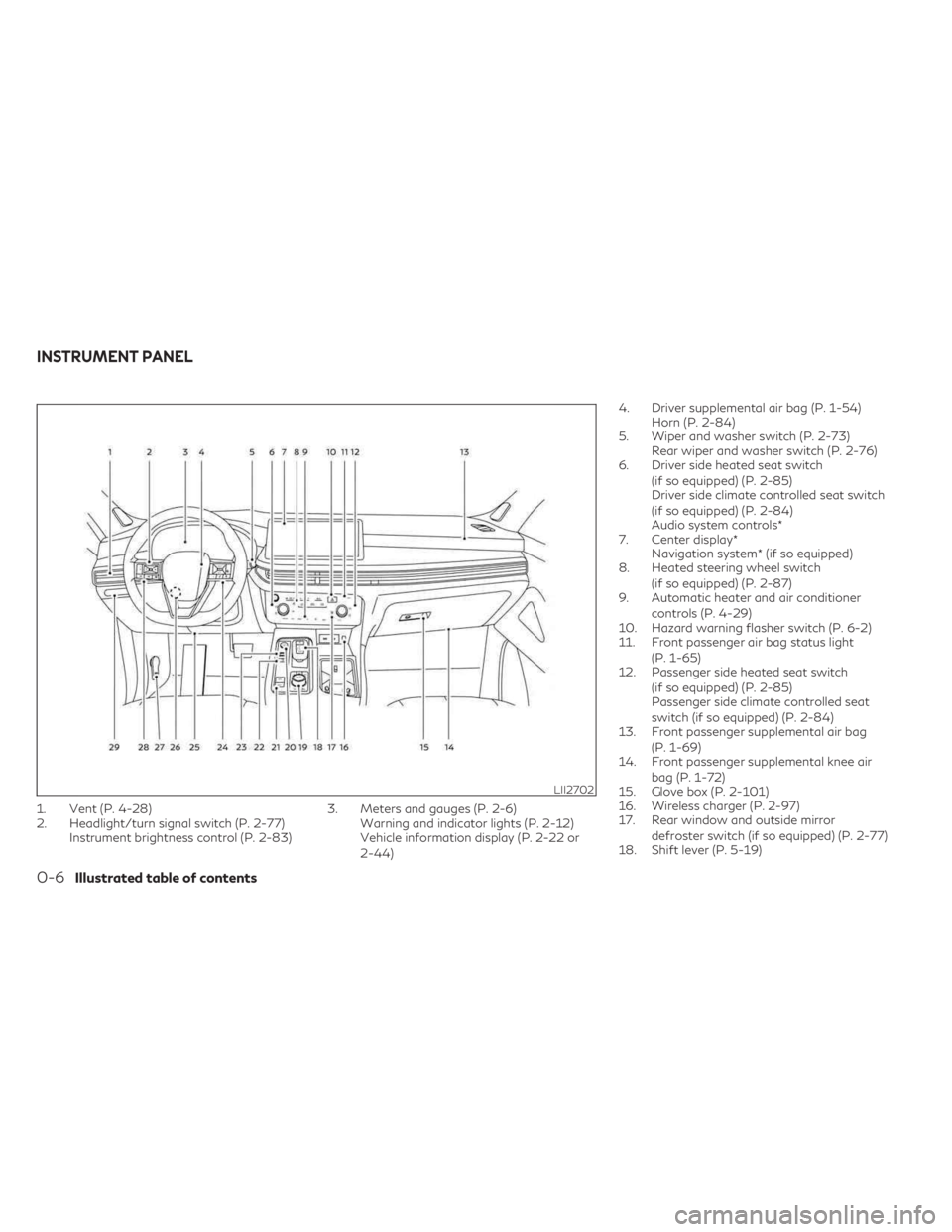
1. Vent (P. 4-28)
2. Headlight/turn signal switch (P. 2-77)Instrument brightness control (P. 2-83) 3. Meters and gauges (P. 2-6)
Warning and indicator lights (P. 2-12)
Vehicle information display (P. 2-22 or
2-44) 4. Driver supplemental air bag (P. 1-54)
Horn (P. 2-84)
5. Wiper and washer switch (P. 2-73) Rear wiper and washer switch (P. 2-76)
6. Driver side heated seat switch
(if so equipped) (P. 2-85)
Driver side climate controlled seat switch
(if so equipped) (P. 2-84)
Audio system controls*
7. Center display* Navigation system* (if so equipped)
8. Heated steering wheel switch
(if so equipped) (P. 2-87)
9. Automatic heater and air conditioner
controls (P. 4-29)
10. Hazard warning flasher switch (P. 6-2)
11. Front passenger air bag status light
(P. 1-65)
12. Passenger side heated seat switch
(if so equipped) (P. 2-85)
Passenger side climate controlled seat
switch (if so equipped) (P. 2-84)
13. Front passenger supplemental air bag
(P. 1-69)
14. Front passenger supplemental knee air
bag (P. 1-72)
15. Glove box (P. 2-101)
16. Wireless charger (P. 2-97)
17. Rear window and outside mirror
defroster switch (if so equipped) (P. 2-77)
18. Shift lever (P. 5-19)
LII2702
INSTRUMENT PANEL
0-6Illustrated table of contents
Page 26 of 636

Warning/Indicator light
(yellow) Name Page
Front passenger
air bag status light 2-18
Low tire pressure
warning light (if so equipped) 2-18
Malfunction Indi-
cator Light (MIL) (if so equipped) 2-19
Master warning
light (if soequipped) 2-20
Rear Automatic
Braking (RAB)
warning light (if so equipped) 2-20
Warning/
Indicator light
(yellow) Name Page
Slip indicator light 2-20
Vehicle Dynamic
Control (VDC)
OFF indicator light 2-20
Warning/
Indicator light
(other) Name Page
Automatic brake
hold indicator light
(white/green) (if so equipped) 2-21
High Beam Assist
indicator light(green) (if so equipped) 2-21
Warning/
Indicator light
(other) Name Page
High beam indica-
tor light (blue)
(if so equipped) 2-21
Low beam indica-
tor light (green)(if so equipped) 2-21
Side light and
headlight indicator light (green) (if so equipped) 2-21
Turn signal/hazard
indicator lights(green) (if so equipped) 2-21
0-10Illustrated table of contents
Page 103 of 636

2 Instruments and controls
Instrument panel.................................2-4
Meters and gauges ..............................2-6
Speedometer and odometer ...................2-6
Tachometer ..................................2-8
Engine coolant temperature gauge ............2-9
Fuel gauge ................................. 2-10
Distance To Empty (DTE) ...................2-10
Warning lights, indicator lights and audible
reminders ....................................... 2-12
Checking lights .............................. 2-14
Warning/Indicator lights (red) ...............2-14
Warning/Indicator lights (yellow) ............2-16
Warning/Indicator lights (other) ..............2-21
Audible reminders ........................... 2-22
Vehicle information display 7 inch (18 cm) Type
A (if so equipped) .............................. 2-22
How to use the vehicle information
display ...................................... 2-23
Startup display .............................. 2-23
Trip computer .............................. 2-24
Oil control system (if so equipped) ...........2-27
Settings .................................... 2-27
Vehicle information display warnings and
indicators ................................... 2-37
Vehicle information display 12.3 inch (31 cm)
Type B (if so equipped) ......................... 2-44How to use the vehicle information
display
...................................... 2-44
Startup display .............................. 2-45
Trip computer .............................. 2-46
Changing the meter screen view .............2-49
Oil control system (if so equipped) ...........2-49
Settings .................................... 2-50
Vehicle information display warnings and
indicators ................................... 2-60
Security systems ................................ 2-71
Vehicle security system .......................2-71
INFINITI Vehicle Immobilizer System .........2-72
Wiper and washer switch ......................2-73
Switch operation ............................ 2-73
Rain-sensing auto wiper system .............2-75
Rear switch operation ....................... 2-76
Rear
window and outside mirror
(if so equipped) defroster switch .................2-77
Headlight and turn signal switch .................2-77
Headlight control switch .....................2-77
LED Daytime Running Lights (DRL)
system ..................................... 2-82
Instrument brightness control ................2-83
Turn signal switch ........................... 2-83
Horn .......................................... 2-84
Page 106 of 636
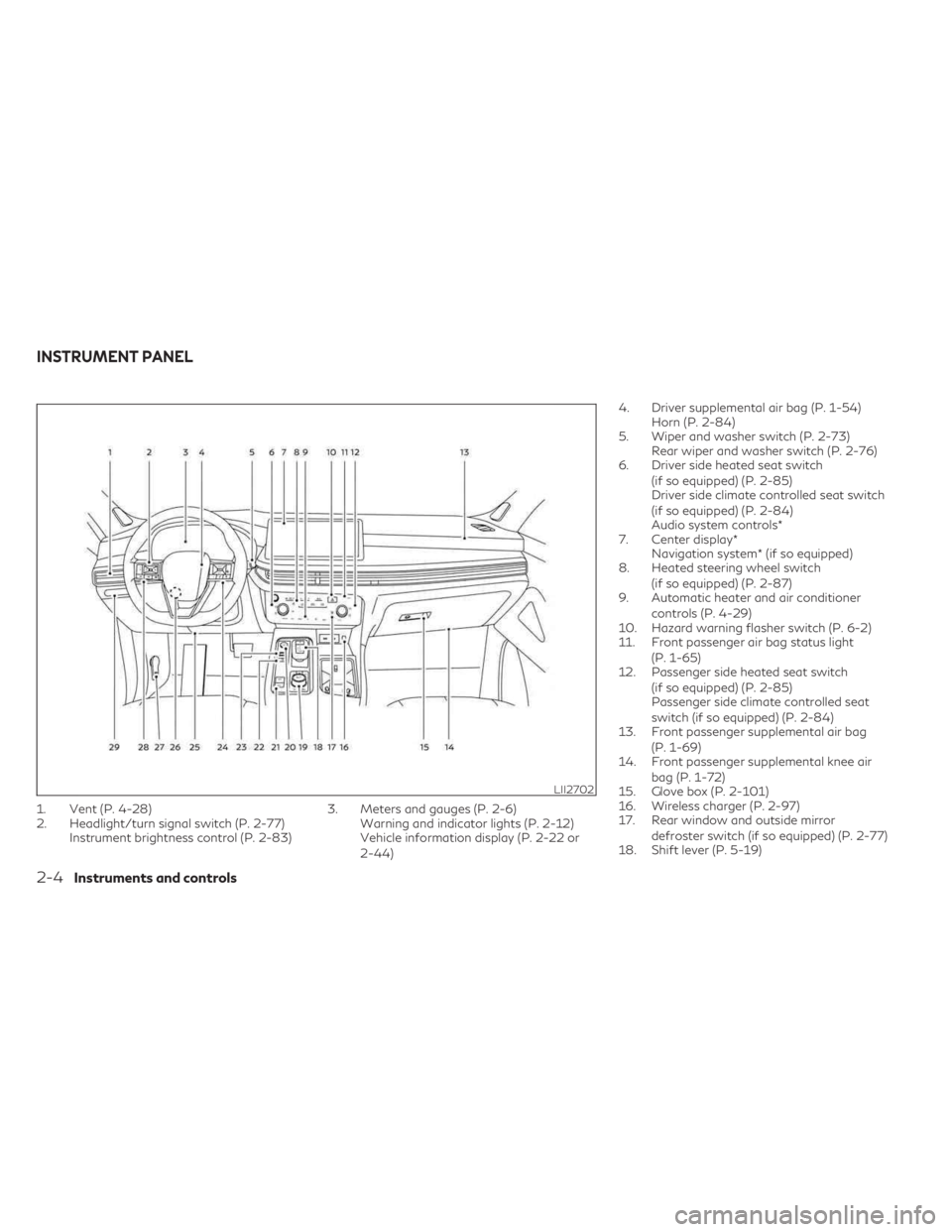
1. Vent (P. 4-28)
2. Headlight/turn signal switch (P. 2-77)Instrument brightness control (P. 2-83) 3. Meters and gauges (P. 2-6)
Warning and indicator lights (P. 2-12)
Vehicle information display (P. 2-22 or
2-44) 4. Driver supplemental air bag (P. 1-54)
Horn (P. 2-84)
5. Wiper and washer switch (P. 2-73) Rear wiper and washer switch (P. 2-76)
6. Driver side heated seat switch
(if so equipped) (P. 2-85)
Driver side climate controlled seat switch
(if so equipped) (P. 2-84)
Audio system controls*
7. Center display* Navigation system* (if so equipped)
8. Heated steering wheel switch
(if so equipped) (P. 2-87)
9. Automatic heater and air conditioner
controls (P. 4-29)
10. Hazard warning flasher switch (P. 6-2)
11. Front passenger air bag status light
(P. 1-65)
12. Passenger side heated seat switch
(if so equipped) (P. 2-85)
Passenger side climate controlled seat
switch (if so equipped) (P. 2-84)
13. Front passenger supplemental air bag
(P. 1-69)
14. Front passenger supplemental knee air
bag (P. 1-72)
15. Glove box (P. 2-101)
16. Wireless charger (P. 2-97)
17. Rear window and outside mirror
defroster switch (if so equipped) (P. 2-77)
18. Shift lever (P. 5-19)
LII2702
INSTRUMENT PANEL
2-4Instruments and controls
Page 114 of 636

Warning/Indicator light (red)Warning/Indicator light (yellow) Warning/Indicator light (other)
orBrake warning lightorAnti-lock Braking System (ABS)
warning lightAutomatic brake hold indicator light
(white/green) (if so equipped)
Charge warning lightElectric power steering warning lightHigh Beam Assist indicator light (green)
(if so equipped)
Electric shift control system warning light
(if so equipped)Electronic parking brake warning light
(if so equipped)High beam indicator light (blue)
(if so equipped)
orElectronic parking brake
indicator lightForward Emergency Braking (FEB) with
Pedestrian Detection system warning lightLow beam indicator light (green)
(if so equipped)
Engine oil pressure warning light
(if so equipped)Front passenger air bag status lightSide light and headlight indicator light
(green) (if so equipped)
Master warning light (if so equipped)Low tire pressure warning light
(if so equipped)Turn signal/hazard indicator lights (green)
(if so equipped)
Seat belt warning light (if so equipped)Malfunction Indicator Light (MIL)
(if so equipped)
WARNING LIGHTS, INDICATOR
LIGHTS AND AUDIBLE REMINDERS
2-12Instruments and controls
Page 123 of 636

Enable the VDC system in the vehicle infor-
mation display again or restart the engine and
the system will be reactivated. For additional
information, see “Vehicle Dynamic Control
(VDC) system” (P. 5-168).
The VDC light also comes on when the igni-
tion switch is placed in the ON position. The
light will turn off after about 2 seconds if the
system is operational. If the light stays on or
comes on along with the
indicator light
while you are driving, have the VDC system
checked. It is recommended that you visit an
INFINITI retailer for this service.
WARNING
VDC should remain on unless freeing a ve-
hicle from mud or snow.
While the VDC system is operating, you
might feel a slight vibration or hear the sys-
tem working when starting the vehicle or ac-
celerating, but this is normal.
WARNING/INDICATOR LIGHTS
(other)
For additional information on warnings and
indicators, see “Vehicle information display–7
inch (18 cm) Type A” (P. 2-22) or “Vehicle
information display—12.3 inch (31 cm) Type
B” (P. 2-44).
Automatic brake hold
indicator light (white/green)
(if so equipped)
The automatic brake hold indicator light
(white) illuminates when the automatic brake
hold system is on standby.
The automatic brake hold indicator light
(green) illuminates when the automatic brake
hold system is operating.
For additional information, see “Automatic
brake hold” (P. 5-27).
High Beam Assist indicator
light (green) (if so equipped)
This indicator light illuminates when the
headlights come on while the headlight
switch is in the AUTO position with the high
beams selected. This indicates that the high
beam assist is operational.
For additional information, see “Headlight
and turn signal switch” (P. 2-77).
High beam indicator light
(blue) (if so equipped)
This blue light comes on when the headlight
high beams are on and goes out when the
low beams are selected. The high beam indicator light also comes on
when the passing signal is activated.
Low beam indicator light
(green) (if so equipped)
This light comes on when the switch is turned
to theposition. The headlights will come
on; and the front side, tail, number plate, and
instrument lights remain on.
Side light and headlight
indicator light (green) (if so
equipped)
The side light and headlight indicator light
illuminates when the side light or headlight
position is selected. For additional informa-
tion, see “Headlight and turn signal switch”
(P. 2-77).
Turn signal/hazard indicator
lights (green) (if so equipped)
The appropriate light flashes when the turn
signal switch is activated.
Both lights flash when the hazard switch is
turned on.
Instruments and controls2-21
Page 140 of 636

retailer for this service. For additional infor-
mation, see “Chassis Control” (P. 5-170).
Check Back Seat For All Articles
When the system is enabled, this message
appears when the vehicle comes to a com-
plete stop, the vehicle is transitioned from the
D (Drive) position to P (Park) position, and the
driver exits the vehicle. This message alerts
the driver, after a period of time, to check for
items in the rear seat after the audible alert
has been provided.
NOTE:
This system is disabled until a driver enables
it using the vehicle information display. For
additional information, see “How to use the
vehicle information display” (P. 2-44).
For additional information, see “Rear Door
Alert” (P. 2-92).
Rear Door Alert is activated
When the system is enabled, this message
appears when the Rear Door Alert system is
active and can remind the driver to check the
back seat.
• Using the steering wheel switch, a drivercan select “Dismiss Message” to clear the
display for a period of time. If no selection is
made, this message automatically turns off
after a period of time. • Using the steering wheel switch, a driver
can select “Disable Alert” to disable the
horn alert for the remainder of the current
trip.
WARNING
Selecting “Dismiss Message” during a stop
within a trip temporarily dismisses the
message for that stop without turning the
system off. Alerts can be provided for
other stops during the trip. Selecting “Dis-
able Alert” turns off the Rear Door Alert
system for the remainder of a trip and no
audible alert will be provided.
NOTE:
This system is disabled until a driver enables
it using the vehicle information display. For
additional information, see “How to use the
vehicle information display” (P. 2-44).
For additional information, see “Rear Door
Alert” (P. 2-92).
Door/Liftgate Open
This warning appears when a door or the
liftgate has been opened.
Headlight System Error: See Owner’s
Manual
This warning appears when there is an error
with the system. For additional information,
see “Headlight and turn signal switch”
(P. 2-77).
INFINITI Drive Mode Selector indicator
When a driving mode is selected using the
INFINITI Drive Mode Selector, the selected
mode indicator is displayed.
• PERSONAL
• SPORT
• STANDARD (2WD models)
• AUTO (AWD models)
• ECO
• SNOW
For additional information, see “INFINITI
Drive Mode Selector” (P. 5-29).
Low Fuel
This warning appears when the fuel level in
the fuel tank is getting low. Refuel as soon as
it is convenient, preferably before the fuel
gauge reaches 0 (Empty). There will be a
small reserve of fuel in the tank when the fuel
gauge needle reaches 0 (Empty).
2-38Instruments and controls
Page 142 of 636

Press brake to operate switch
This indicator appears if the automatic brake
hold switch is pushed without depressing the
brake pedal while the automatic brake hold
function is activated. Depress the brake pedal
and push the switch to deactivate the auto-
matic brake hold function.
For additional information, see “Automatic
brake hold” (P. 5-27).
Push brake and start switch
to drive
This indicator appears when the shift position
is in the P (Park) position.
This indicator also appears when the vehicle
has been started using the Remote Engine
Start (if so equipped) function.
This indicator means that the engine will start
by pushing the ignition switch with the brake
pedal depressed. You can start the engine
from any position of the ignition switch.
Rear seat belt reminder
This rear seat belt reminder appears after
placing the ignition switch in the ON position.If any of the rear passenger seat belts are not
fastened, the seat belt icon illuminates in red
to show which seat belt is not fastened.
When a rear passenger’s seat belt has been
securely fastened, the color of the corre-
sponding seat belt icon will change. The
warning will automatically turn off after ap-
proximately 65 seconds.
After the initial reminder is turned off (by 65
second timer or dismissing the warning in
vehicle information display) and the vehicle
speed is less than 10 mph (15 km/h), if any
rear seat belt is unfastened, the rear seat belt
reminder will display. The warning will auto-
matically turn off after approximately 95
seconds.
After the initial reminder is turned off (by 65
second timer or dismissing the warning in
vehicle information display) and the vehicle
speed is greater than 10 mph (15 km/h), if
any rear seat belt is unfastened, the rear seat
belt reminder will display and a warning
chime will sound every two seconds until the
corresponding seat belt is fastened. The
chime will automatically turn off after ap-
proximately 95 seconds. The rear seat belt
reminder will be displayed until it is dismissed
in the vehicle information display.
Reminder: Turn OFF
headlights
This warning appears when the headlights
are left in the ON position when exiting the
vehicle. Place the headlight switch in the OFF
or AUTO position. For additional informa-
tion, see “Headlight and turn signal switch”
(P. 2-77).
Shipping Mode On Push Storage Fuse
This warning may appear if the extended
storage switch is not pushed in. When this
warning appears, push in the extended stor-
age switch to turn off the warning. For addi-
tional information, see “Extended storage
switch” (P. 2-99).
Steep Slope Apply foot brake
This indicator appears, and chime sounds if
the “Caution Steep slope” has appeared over
about 3 minutes. Then the parking brake will
automatically be applied and the brake force
of the automatic brake hold will be released,
and the vehicle may move or roll away unex-
pectedly. Apply the foot brake to stop the
vehicle moving.
For additional information, see “Automatic
brake hold” (P. 5-27).
2-40Instruments and controls
Page 164 of 636

Headlight System Error: See Owner’s
Manual
This warning appears when there is an error
with the system. For additional information,
see “Headlight and turn signal switch” (P. 2-77).
High Beam Assist indicator
(green)
This indicator appears when the headlights
come on while the headlight switch is in the
AUTO position with the high beams selected
and the engine running. This indicates that
the high beam assist is operational.
For additional information, see “Headlight
and turn signal switch” (P. 2-77).
High beam indicator (blue)
This blue indicator appears when the head-
light high beams are on and goes out when
the low beams are selected.
The high beam indicator also appears when
the passing signal is activated.
INFINITI Drive Mode Selector indicator
When a driving mode is selected using the
INFINITI Drive Mode Selector, the selected
mode indicator is displayed.
• PERSONAL
• SPORT• STANDARD (2WD models)
• AUTO (AWD models)
• ECO
• SNOW
For additional information, see “INFINITI
Drive Mode Selector” (P. 5-29).
Low beam indicator
This indicator appears when the switch is
turned to theposition. The headlights
will come on; and the front side, tail, number
plate, and instrument lights remain on.
Low Fuel
This warning appears when the fuel level in
the fuel tank is getting low. Refuel as soon as
it is convenient, preferably before the fuel
gauge reaches 0 (Empty). There will be a
small reserve of fuel in the tank when the fuel
gauge needle reaches 0 (Empty).
Low Oil Pressure: See
Owner’s Manual
This warning appears in the message area of
the vehicle information display if low oil pres-
sure is detected. This gauge is not designed
to indicate low oil level. The low oil pressure
warning is not designed to indicate a low oil level.
Use the dipstick to check the oil level.
For additional information, see “Engine oil”
(P. 8-6).
Low Outside Temperature
This warning appears if the outside tempera-
ture is below 37°F (3°C). The temperature
can be changed to display in Celsius or Fahr-
enheit. For additional information, see “Driver
Assistance” (P. 2-51).
Low Washer Fluid
This warning appears when the windshield-
washer fluid is at a low level. Add windshield-
washer fluid as necessary. For additional infor-
mation, see “Windshield-washer fluid” (P. 8-11).
Low tire pressure indicator
Your vehicle is equipped with a Tire Pressure
Monitoring System (TPMS) that monitors the
tire pressure of all tires except the spare.
The low tire pressure indicator warns of low
tire pressure or indicates that the TPMS is
not functioning properly.
After the ignition switch is placed in the ON
position, this indicator appears for about 1
second and turns off.
2-62Instruments and controls