light INFINITI QX80 2018 Owners Manual
[x] Cancel search | Manufacturer: INFINITI, Model Year: 2018, Model line: QX80, Model: INFINITI QX80 2018Pages: 522, PDF Size: 2.41 MB
Page 276 of 522

JVS1130X
Warning systems switch
Warning systems ON indicator light
Center multi-function control panel
TURNING THE LDW SYSTEM ON/
OFF
The warning systems switchis used to
turn on and off the LDW system when it is
activated on the center display using the
center multi-function control panel
. See
“How to enable/disable the LDW system”
(P.5-26). When the warning systems switch
is turned off, the warning systems ON
indicator lighton the switch is off.
The warning systems switch
will turn on
and off the LDW and Blind Spot Warning
(BSW) systems at the same time.
Starting and driving5-25
Page 277 of 522
![INFINITI QX80 2018 Owners Manual 5-26Starting and driving
JVS1043X
HOW TO ENABLE/DISABLE THE
LDW SYSTEM
Perform the following steps to enable or
disable the LDW system.
1. Push the SETTING button
.
2. Touch [Driver Assistance].
3. To](/img/42/41145/w960_41145-276.png "INFINITI QX80 2018 Owners Manual 5-26Starting and driving
JVS1043X
HOW TO ENABLE/DISABLE THE
LDW SYSTEM
Perform the following steps to enable or
disable the LDW system.
1. Push the SETTING button
.
2. Touch [Driver Assistance].
3. To")
5-26Starting and driving
JVS1043X
HOW TO ENABLE/DISABLE THE
LDW SYSTEM
Perform the following steps to enable or
disable the LDW system.
1. Push the SETTING button
.
2. Touch [Driver Assistance].
3. Touch [Lane Assist].
4. Touch [Lane Departure Warning] to turn the system ON/OFF.
LDP SYSTEM OPERATION
The LDP system operates above approxi-
mately 45 MPH (70 km/h) and the lane
markings are clear.
If the vehicle approaches either the left or
right side of the traveling lane, the LDW
indicator light (orange) on the instrument
panel will flash and a warning chime will
sound. Then, the LDP system will automa-
tically apply the brakes for a short period of
time to help assist the driver to return the
vehicle to the center of the traveling lane.
NOTE:
.The LDP system is not designed to work
when you operate the lane change signal
and change traveling lanes in the direc-
tion of the signal. (The LDP system will
become operable again approximately 2
seconds after the lane change signal is
turned off.)
. The LDP braking assist will not operate
or will stop operating and only a warn-
ing chime will sound under the following
conditions.
— When the brake pedal is depressed.
— When the steering wheel is turned as
far as necessary for the vehicle to
change lanes.
— When the accelerator pedal is de-
pressed while brake control assist is provided.
— When the Intelligent Cruise Control
(ICC), Distance Control Assist (DCA),
Blind Spot Intervention (BSI), Blind
Spot Warning (BSW), Predictive For-
ward Collision Warning (PFCW) or
Forward Emergency Braking (FEB)
warnings sound.
— When the hazard warning flashers
are operated.
— When driving on a curve at a high
speed.
. While the LDP system is operating, you
may hear a sound of brake operation.
This is normal and indicates that the
LDP system is operating properly.
Page 278 of 522

JVS1095X
LDP ON indicator light (green) (on the
instrument panel)
Dynamic driver assistance switch
Center multi-function control panel
TURNING THE LDP SYSTEM ON/
OFF
To turn on the LDP system, push the
dynamic driver assistance switchon the
steering wheel after starting the engine. The
LDP ON indicator light (green)
on the
instrument panel will illuminate. Push the
dynamic driver assistance switch
again to
turn off the LDP system. The LDP ON
indicator light (green)
will turn off.
The dynamic driver assistance switch
is
used for the LDP, BSI and DCA systems.
When the dynamic driver assistance switch
is pushed, the BSI and DCA systems will
also turn on or off simultaneously. The LDP
system can be individually set to on or off on
the center display using the center multi-
function control panel
.
If the system is set to off, the system will not
turn on even if the dynamic driver assistance
switch
is pushed to on. To set the system
to on or off on the center display, see “How
to enable/disable the LDP system” (P.5-28).
Starting and driving5-27
Page 280 of 522

— On roads where there are sharplycontrasting objects, such as sha-
dows, snow, water, wheel ruts,
seams or lines remaining after
road repairs. (The LDW and LDP
systems could detect these items
as lane markers.)
— On roads where the traveling lane merges or separates.
— When the vehicle’s traveling di- rection does not align with the
lane marker.
— When traveling close to the ve- hicle in front of you, which ob-
structs the lane camera unit
detection range.
— When rain, snow or dirt adheres to the windshield in front of the
lane camera unit.
— When the headlights are not bright due to dirt on the lens or
if the aiming is not adjusted
properly.
— When strong light enters the lane camera unit. (For example, the
light directly shines on the front
of the vehicle at sunrise or sun-
set.) — When a sudden change in bright-
ness occurs. (For example, when
the vehicle enters or exits a tunnel
or under a bridge.)
. Excessive noise will interfere with the
warning chime sound, and the chime
may not be heard.
Starting and driving5-29
Page 281 of 522

5-30Starting and driving
JVS0658X
LDP ON indicator light (green) (on the
instrument panel)
Warning systems ON indicator light
Dynamic driver assistance switch
SYSTEM TEMPORARILY UNA-
VAILABLE
Condition A:
Under the following conditions, a beep will
sound and the LDP system will be canceled
automatically. The LDP ON indicator light
(green)
will blink, and the LDP system
cannot be activated:
. When the VDC system (except TCS
function) or ABS operates.
. When the VDC system is turned off.
. When the SNOW mode switch is turned
on.
. When the 4WD shift switch is in the 4H
or 4L position (for 4WD models).
Action to take:
When the above conditions no longer exist,
turn off the LDP system. Push the dynamic
driver assistance switch
again to turn the
LDP system back on.
Condition B:
LDW system: If the vehicle is parked in direct
sunlight under high temperature conditions
(over approximately 104°F (40°C)) and then
the LDW system is turned on, the LDW
system may be deactivated automatically,
and the warning systems ON indicator light
on the switch will blink.
Page 282 of 522

LDP system:If the vehicle is parked in direct
sunlight under high temperature conditions
(over approximately 104°F (40°C)) and then
the LDP system is turned on, the LDP
system will be turned off automatically, a
beep will sound and the LDP ON indicator
light (green)
will blink.
The LDW and LDP systems are not available
until the conditions no longer exist.
Action to take:
When the above conditions no longer exist,
the LDW system will resume automatically.
For the LDP system, push the dynamic driver
assistance switch
again to turn the LDP
system back on.
SYSTEM MALFUNCTION
LDW system: When the LDW system mal-
functions, it will cancel automatically, and
the LDW indicator light (orange) will illumi-
nate.
LDP system: When the LDP system mal-
functions, it will be turned off automatically,
a beep will sound, and the LDW indicator
light (orange) will illuminate.
Action to take:
Stop the vehicle in a safe location, place the
vehicle in the P (Park) position, turn the
engine off and restart the engine. If the LDW
indicator light (orange) continues to illumi- nate, have the system checked. It is recom-
mended you visit an INFINITI retailer for this
service.
SSD0453
SYSTEM MAINTENANCE
The lane camera unitfor the LDW/LDP
systems is located above the inside mirror.
To keep the proper operation of the LDW/
LDP systems and prevent a system mal-
function, be sure to observe the following:
. Always keep the windshield clean.
. Do not attach a sticker (including trans-
parent material) or install an accessory
near the camera unit.
. Do not place reflective materials, such as
white paper or a mirror, on the instru-
ment panel. The reflection of sunlight
may adversely affect the camera unit’s
capability of detecting the lane markers.
Starting and driving5-31
Page 285 of 522

5-34Starting and driving
JVS1096X
Side indicator light
BSW system warning light
Warning systems switch
Center multi-function control panel
BSW SYSTEM OPERATION
The BSW system operates above approxi-
mately 20 MPH (32 km/h).
If the radar sensors detect a vehicle in the
detection zone, the side indicator light
illuminates.
If the turn signal is then activated, the
system chimes (twice) and the side indicator
light flashes. The side indicator light con-
tinues to flash until the detected vehicle
leaves the detection zone.
NOTE:
.The side indicator light illuminates for a
few seconds when the ignition switch is
placed in the ON position.
. The brightness of the side indicator light
is adjusted automatically depending on
the brightness of the ambient light.
. If a vehicle comes into the detection zone
after the driver activates the turn
signal, then only the side indicator light
flashes and no chime sounds. For addi-
tional information, refer to “BSW sys-
tem limitations” (P.5-36).
Page 286 of 522

JVS1130X
Warning systems switch
Warning systems ON indicator light
Center multi-function control panel
TURNING THE BSW SYSTEM ON/
OFF
The warning systems switchis used to
turn on and off the BSW system when it is
activated on the center display using the
center multi-function control panel
. See
“How to enable/disable the BSW system”
(P.5-36). When the warning systems switch
is turned off, the warning systems ON
indicator lighton the switch is off.
The warning systems switch
will turn on
and off the Lane Departure Warning (LDW)
and BSW systems at the same time.
Starting and driving5-35
Page 288 of 522
— A vehicle which your vehicle over-takes rapidly.
— A vehicle that passes through the detection zone quickly.
. The radar sensor’s detection zone is
designed based on a standard lane
width. When driving in a wider lane,
the radar sensors may not detect
vehicles in an adjacent lane. When
driving in a narrow lane, the radar
sensors may detect vehicles driving
two lanes away.
. The radar sensors are designed to
ignore most stationary objects, how-
ever objects such as guardrails, walls,
foliage and parked vehicles may oc-
casionally be detected. This is a
normal operation condition.
. The following conditions may reduce
the ability of the radar to detect
other vehicles:
— Severe weather
— Road spray
— Ice/frost/snow build-up on the vehicle
— Dirt build-up on the vehicle
. Do not attach stickers (including
transparent material), install acces-
sories or apply additional paint near the radar sensors. These conditions
may reduce the ability of the radar to
detect other vehicles.
. Excessive noise (for example, audio
system volume, open vehicle window)
will interfere with the chime sound,
and it may not be heard.
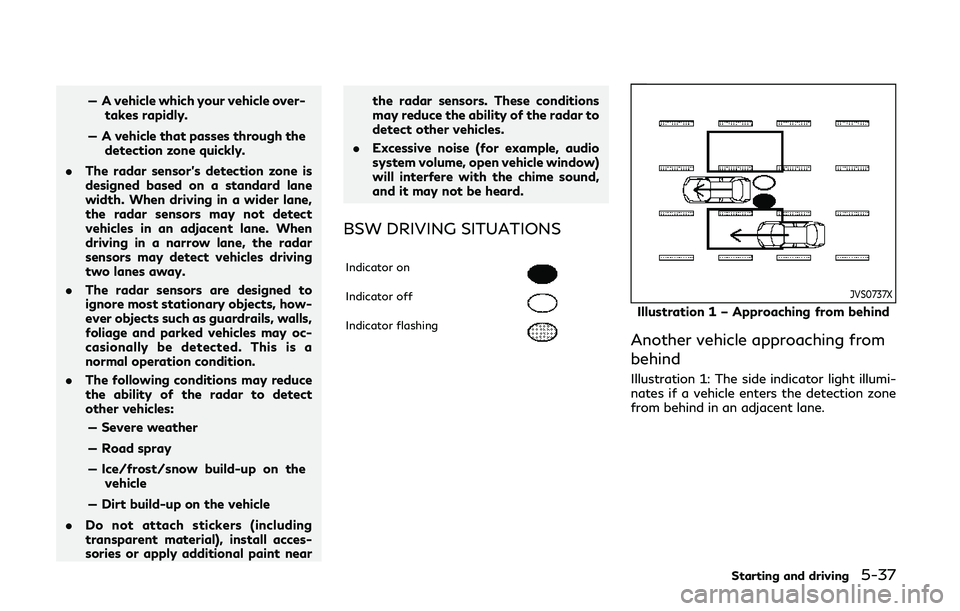
BSW DRIVING SITUATIONS
Indicator on
Indicator off
Indicator flashing
JVS0737X
Illustration 1 – Approaching from behind
Another vehicle approaching from
behind
Illustration 1: The side indicator light illumi-
nates if a vehicle enters the detection zone
from behind in an adjacent lane.
Starting and driving5-37
Page 289 of 522

5-38Starting and driving
JVS0738X
Illustration 2 – Approaching from behind
Illustration 2: If the driver activates the turn
signal, then the system chimes (twice) and
the side indicator light flashes.
NOTE:
. The radar sensors may not detect vehi-
cles which are approaching rapidly from
behind.
. If the driver activates the turn signal
before a vehicle enters the detection
zone, the side indicator light will flash
but no chime will sound when the other
vehicle is detected.
JVS0739X
Illustration 3 – Overtaking another vehicle
Overtaking another vehicle
Illustration 3: The side indicator light illumi-
nates if you overtake a vehicle and that
vehicle stays in the detection zone for
approximately 3 seconds.
The radar sensors may not detect slower
moving vehicles if they are passed quickly.
JVS0740X
Illustration 4 – Overtaking another vehicle
Illustration 4: If the driver activates the turn
signal while another vehicle is in the detec-
tion zone, then the system chimes (twice)
and the side indicator light flashes.
NOTE:
. When overtaking several vehicles in a
row, the vehicles after the first vehicle
may not be detected if they are travel-
ing close together.
. The radar sensors may not detect slower
moving vehicles if they are passed
quickly.
. If the driver activates the turn signal
before a vehicle enters the detection
zone, the side indicator light will flash