light INFINITI QX80 2018 Owners Manual
[x] Cancel search | Manufacturer: INFINITI, Model Year: 2018, Model line: QX80, Model: INFINITI QX80 2018Pages: 522, PDF Size: 2.41 MB
Page 190 of 522

Other conditions can affect the performance
of the Intelligent Key transmitter. See “In-
telligent Key system” (P.3-7) for additional
information.
REMOTE ENGINE START OPER-
ATING RANGE
The remote engine start function can only be
used when the Intelligent Key is within the
specified operating range from the vehicle.
When the Intelligent Key battery is dis-
charged or other strong radio wave sources
are present near the operating location, the
Intelligent Key operating range becomes
narrower, and the Intelligent Key may not
function properly.
The remote engine start operating range is
approximately 197 ft (60 m) from the
vehicle.
REMOTE STARTING THE ENGINE
To use the remote start function to start the
engine, perform the following:
1. Aim the Intelligent Key at the vehicle.
2. Push the “LOCK”
button to lock all
doors.
3. Within 5 seconds push and hold the remote engine start
button until
the turn signal lights flash and the tail
lights illuminate. If the vehicle is not within view, push and hold the remote
engine start
button for at least 2
seconds.
The following events will occur when the
engine starts:
. The front parking lights will turn on and
remain on as long as the engine is
running.
. The doors will be locked and the air
conditioner system may turn on.
. The engine will continue to run for about
10 minutes. Repeat the steps to extend
the time for an additional 10 minutes.
See “Extending engine run time” (P.3-
19).
Depress and hold the brake pedal, then place
the ignition switch in the ON position before
driving. For further instructions, see “Driving
the vehicle” (P.5-17).
EXTENDING ENGINE RUN TIME
The remote engine start function can be
extended one time by performing the steps
listed in “Remote starting the engine” (P.3-
19). Run time will be calculated as follows:
. The first 10 minute run time will start
when the remote engine start function is
performed.
. The second 10 minutes will start imme-
diately when the remote engine start
function is performed. For example, if the engine has been running for 5
minutes, and 10 minutes are added, the
engine will run for a total of 15 minutes.
. Extending engine run time will count
towards the two remote start limit.
A maximum of two remote starts, or a single
start with an extension, are allowed be-
tween ignition cycles.
The ignition switch must be cycled to the ON
position and then back to the OFF position
before the remote engine start procedure
can be used again.
CANCELING A REMOTE START
To cancel a remote start, perform one of the
following:
. Aim the Intelligent Key at the vehicle and
push and hold the remote engine start
button until the front parking lights
turn off.
. Turn on the hazard indicator flashers.
. Cycle the ignition switch ON and then
OFF.
. The extended engine run time has ex-
pired.
. The first 10 minute timer has expired.
. The engine hood has been opened.
. The shift lever is moved out of the P
(Park) position.
Pre-driving checks and adjustments3-19
Page 191 of 522

3-20Pre-driving checks and adjustments
.The theft alarm sounds due to illegal
entry into the vehicle.
. The ignition switch is pushed without an
Intelligent Key in the vehicle.
. The ignition switch is pushed with an
Intelligent Key in the vehicle but the
brake pedal is not depressed.
CONDITIONS THE REMOTE EN-
GINE START WILL NOT WORK
The remote engine start will not operate if
any of the following conditions are present:
. The ignition switch is placed in the ON
position.
. The hood is not securely closed.
. The hazard indicator flashers are on.
. The engine is still running. The engine
must be completely stopped. Wait at
least 6 seconds if the engine goes from
running to off. This is not applicable
when extending engine run time.
. The remote engine start
button is
not pushed and held for at least 2
seconds.
. The remote engine start
button is
not pushed and held within 5 seconds of
pushing the “LOCK”
button.
. The brake pedal is depressed.
. The doors are not closed and locked. .
The liftgate is open.
. The Intelligent Key system warning light
remains on in the meter.
. An Intelligent Key is left inside the
vehicle.
. The theft alarm sounds due to illegal
entry into the vehicle.
. Two remote engine starts, or a single
remote start with an extension, have
already been used.
. The shift lever is not in the P (Park)
position.
The remote engine start may display a
warning or indicator in the vehicle informa-
tion display. For an explanation of the
warning or indicator, see “Operational in-
dicators” (P.2-24).
Page 192 of 522

JVP0567X
1. Pull the hood lock release handlelocated below the instrument panel; the
hood will then spring up slightly.
2. Pull the lever
sideways at the front of
the hood with your fingertips and raise
the hood.
3. When closing the hood, slowly close the hood down and make sure it locks into
place.
WARNING
.Make sure the hood is completely
closed and latched before driving. Failure to do so could cause the hood
to fly open and result in an accident.
. If you see steam or smoke coming
from the engine compartment, to
avoid injury do not open the hood.
WARNING
.Always be sure the liftgate has been
closed securely to prevent it from
opening while driving.
. Do not drive with the liftgate open.
This could allow dangerous exhaust
gases to be drawn into the vehicle.
See “Exhaust gas (carbon monoxide)”
(P.5-4).
. Do not leave children unattended
inside the vehicle. They could un-
knowingly activate switches or con-
trols. Unattended children could
become involved in serious accidents.
. Always be sure that hands and feet
are clear of the door frame to avoid
injury while closing the liftgate.
Pre-driving checks and adjustments3-21
HOOD LIFTGATE
Page 198 of 522

.Push the power door lock switch to the
UNLOCK position.
To lock, close the fuel-filler door securely
and lock all doors by operating the door
handle request switch, the LOCK button on
the Intelligent Key, the mechanical key or the
power door lock switch.
FUEL-FILLER CAP
WARNING
. Gasoline is extremely flammable and
highly explosive under certain condi-
tions. You could be burned or ser-
iously injured if it is misused or
mishandled. Always stop engine and
do not smoke or allow open flames or
sparks near the vehicle when refuel-
ing.
. Do not attempt to top off the fuel
tank after the fuel pump nozzle shuts
off automatically. Continued refuel-
ing may cause fuel overflow, resulting
in fuel spray and possibly a fire.
. Use only an original equipment type
fuel-filler cap as a replacement. It has
a built-in safety valve needed for
proper operation of the fuel system
and emission control system. An in-
correct cap can result in a serious malfunction and possible injury. It
could also cause the malfunction
indicator light to come on.
. Never pour fuel into the throttle body
to attempt to start your vehicle.
. Do not fill a portable fuel container in
the vehicle or trailer. Static electricity
can cause an explosion of flammable
liquid, vapor or gas in any vehicle or
trailer. To reduce the risk of serious
injury or death when filling portable
fuel containers:
— Always place the container on the ground when filling.
— Do not use electronic devices when filling.
— Keep the pump nozzle in contact with the container while you are
filling it.
— Use only approved portable fuel containers for flammable liquid.
CAUTION
. If fuel is spilled on the vehicle body,
flush it away with water to avoid
paint damage. .
Insert the cap straight into the fuel-
filler tube, then tighten until the fuel-
filler cap clicks. Failure to tighten the
fuel-filler cap properly may cause the
malfunction indicator light (MIL)
to illuminate. If thelight illumi-
nates because the fuel-filler cap is
loose or missing, tighten or install the
cap and continue to drive the vehicle.
The
light should turn off after a
few driving trips. If thelight does
not turn off after a few driving trips,
have the vehicle inspected. It is
recommended you visit an INFINITI
retailer for this service.
. The LOOSE FUEL CAP warning will
appear if the fuel-filler cap is not
properly tightened. It may take a few
driving trips for the message to be
displayed. Failure to tighten the fuel-
filler cap properly after the LOOSE
FUEL CAP warning appears may
cause the
Malfunction Indicator
Light (MIL) to illuminate.
Turn the cap counterclockwise to remove.
To tighten, turn the cap clockwise until a
single click is heard.
Pre-driving checks and adjustments3-27
Page 201 of 522
3-30Pre-driving checks and adjustments
CAUTION
.Do not store the main sun visor
before storing the extension sun
visor.
. Do not pull the extension sun visor
forcedly downward.
1. To block out glare from the front, swing down the main sun visor
.
2. To block glare from the side, remove the main sun visor from the center mount
and swing it to the side
.
3. Draw out the extension sun visor
from
the main sun visor to block from further
glare.
SPA2447
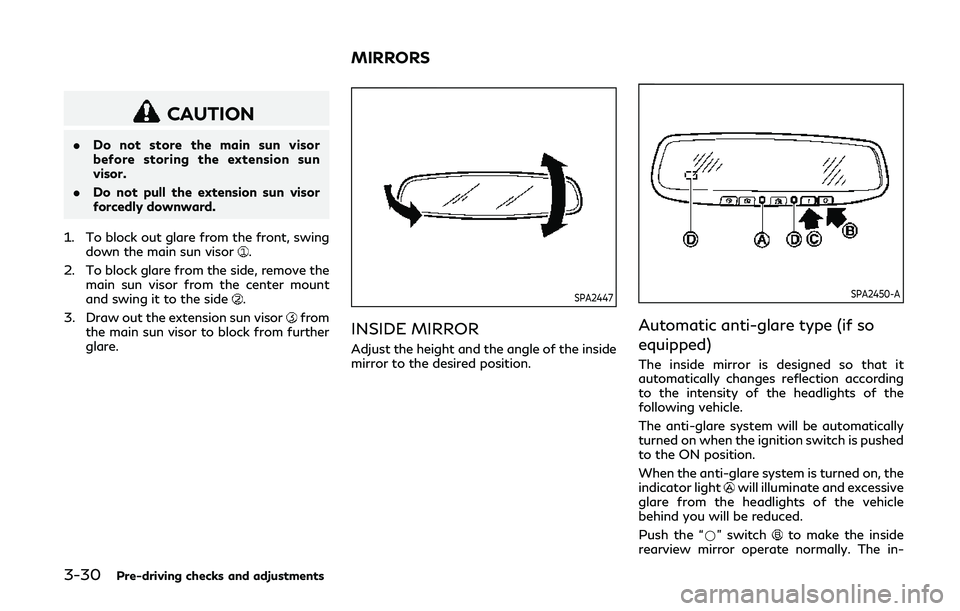
INSIDE MIRROR
Adjust the height and the angle of the inside
mirror to the desired position.
SPA2450-A
Automatic anti-glare type (if so
equipped)
The inside mirror is designed so that it
automatically changes reflection according
to the intensity of the headlights of the
following vehicle.
The anti-glare system will be automatically
turned on when the ignition switch is pushed
to the ON position.
When the anti-glare system is turned on, the
indicator light
will illuminate and excessive
glare from the headlights of the vehicle
behind you will be reduced.
Push the “*” switch
to make the inside
rearview mirror operate normally. The in-
MIRRORS
Page 202 of 522

dicator light will turn off. Push the “I” switchto turn the system on.
Do not allow any object to cover the sensors
or apply glass cleaner on them. Doing so
will reduce the sensitivity of the sensor,
resulting in improper operation.
For the HomeLink
®Universal Transceiver
operation, see “HomeLink®Universal Trans-
ceiver (Type A)” (P.2-68).
Smart Rearview Mirror (if so
equipped)
WARNING
. Failure to follow the warnings and
instructions for proper use of the
Smart Rearview Mirror could result
in serious injury or death.
— The Smart Rearview Mirror is a convenience feature but it is not a
substitute for proper vehicle op-
eration. The system has areas
where objects cannot be viewed.
Check the blind spot of the Smart
Rearview Mirror before vehicle
operation. The driver is always
responsible for safe driving.
— Do not disassemble or modify the Smart Rearview Mirror, the cam- era unit or wirings. If you do, it
may result in accidents or fire. In
case you notice smoke or smell
coming from the Smart Rearview
Mirror, stop using the system
immediately. It is recommended
that you see an INFINITI retailer
for servicing.
— Do not operate the Smart Rear- view Mirror while driving. Doing
so can be a distraction and it could
lose control of your vehicle and
cause an accident or serious in-
jury.
— Do not gaze into the Smart Rear- view Mirror display during driv-
ing. It may cause a distraction and
it could lose control of your vehi-
cle and cause an accident or
serious injury.
— Do not put a cigarette or flames to the Smart Rearview Mirror, the
camera unit or wirings. It may
cause a fire.
. Be sure to adjust the Smart Rearview
Mirror before driving. Switch the
system to the conventional rearview
mirror mode and be properly seated
on the driver’s seat. Then adjust the
mirror so as to see the rear window properly. Driving without adjusting
the mirror may cause difficulty in
watching the display at Smart Rear-
view Mirror mode (camera view
mode) due to the reflection from the
surface of the mirror.
. If the Smart Rearview Mirror mal-
functions, immediately switch the
system to the conventional rearview
mirror mode.
. When strong light (for example, sun-
light or high beams from following
vehicles) enters the camera, a light
beam or a glaring light may appear on
the monitor screen of the Smart
Rearview Mirror. In that case, switch
the system to the conventional rear-
view mirror mode appropriately.
. If dirt, rain or snow accumulates on
the exterior glass surface covering
the camera, the Smart Rearview
Mirror may not display objects
clearly. Use of the rear window
wiper/washer may improve visibility,
but if not, switch the Smart Rearview
Mirror to the conventional rearview
mirror mode until a time the glass
covering the camera can be cleaned.
Pre-driving checks and adjustments3-31
Page 206 of 522

JVP0514X
DIMMING MIRROR
The mirror is designed so that it automati-
cally changes reflection according to the
intensity of the headlights of the following
vehicle. You can enable or disable the
automatic anti-glare mode.
.Push the left button
to enable the
automatic anti-glare mode.
. Push the right button
to disable the
automatic anti-glare mode.
JVP0512X
LANGUAGE
The language of the textual indication can be
selected on the Smart Rearview Mirror
display screen.
Select the language by using the
orbutton. You can select either English or
French. The language setting will be retained
even if the engine is restarted.
Smart Rearview Mirror system precautions:
NOTE:
. Long-term use of this system in stop-
ping engine may cause battery to be
discharged.
. Do not attach an antenna of wireless
device near the Smart Rearview Mirror. Electric wave from wireless device may
cause disturbed image in Smart Rear-
view Mirror.
. Do not push buttons excessively or
operating the lever roughly may cause
a system failure or the Smart Rearview
Mirror itself to drop.
. Never turn the body of Smart Rearview
Mirror by 90° or more. It may damage
the Smart Rearview Mirror.
. Do not apply strong shocks to the body
of Smart Rearview Mirror. It may cause
a system failure.
. Do not apply heavy load to the camera
and camera-cover on the rear of the
vehicle. It may cause the camera to be
removed or may cause a system failure.
. If it is difficult to see the Smart Rearview
Mirror display screen because of a
strong external light, switch the mode
to the conventional rearview mirror
mode for better use.
. Close the sunshade (if so equipped)
when the Smart Rearview Mirror dis-
play screen is unclear due to strong
external light.
Pre-driving checks and adjustments3-35
Page 207 of 522

3-36Pre-driving checks and adjustments
JVP0559X
Flicker image (example)
. When LED headlights are viewed on the
Smart Rearview Mirror display, the
images may flicker. This is normal.
. Due to diffused reflection from external
environment, images on the screen may
flicker. This is not a malfunction.
. A quick movement of a thing may not be
able to display on the camera view
screen. This is not a malfunction.
. Turn on the headlights at twilight or in a
tunnel, etc.
. The Smart Rearview Mirror mode (cam-
era view mode) display is different from
the conventional rearview mirror. Ob-
jects in the display may differ from actual distance. Do not solely rely on
the Smart Rearview Mirror. Always rely
on your own operation to avoid acci-
dents.
. If the brightness of the camera view
display is adjusted to excessive bright
level, it may cause an eyestrain in the
driving. Adjust the brightness properly.
. Use the rear window wiper when it rains.
If the camera view image is still unclear
when the rear window wiper is in
operation, check the deterioration of
the rear window wiper blade.
. When using the rear window wiper,
images on the screen may flicker. This
is not a malfunction.
. Defog the rear window with defroster
when rear window is fogged. Use the
conventional rearview mirror mode until
the rear window is fully defogged.
. The display of the Smart Rearview
Mirror may become hot. This is not a
malfunction.
. The color of an object in the distance or
in the dark may be difficult to be
recognized. This is not a malfunction.
System maintenance (Smart Rearview
Mirror):
. Always keep the mirror and camera area
of the rear window clean. .
Clean the mirror and the camera lens
with a dry soft cloth.
. When cleaning the camera area of the
rear window, use a soft cloth dampened
with water and a neutral detergent. Then
dry it with a dry soft cloth.
. If the image on the Smart Rearview
Mirror display screen is still unclear even
after cleaning the camera area of the
rear window, an oil film may be adhering
to the rear window glass. Clean the rear
window glass with an oil film remover.
. Never use alcohol, benzine, thinner, or
any similar material to clean the mirror or
camera lens. It will cause a discoloration,
deterioration or a system malfunction.
. Do not attach a sticker (including trans-
parent material) on the camera area of
the rear window.
OUTSIDE MIRRORS
WARNING
. Objects viewed in the outside mirror
on the passenger side are closer than
they appear. Be careful when moving
to the right. Using only this mirror
could cause an accident. Use the
inside mirror or glance over your
shoulder to properly judge distances
Page 209 of 522

3-38Pre-driving checks and adjustments
were folded or unfolded by hand, be
sure to adjust them again electrically
before driving.
The outside rearview mirror remote control
operates when the ignition switch is in the
ACC or ON position.
To fold the outside rearview mirrors, push
the outside rearview mirror folding switch to
the “CLOSE” position
. To unfold, push to
the “OPEN” position.
If mirrors are manually operated or bumped,
the mirror body can become loose at the
pivot point. To correct electronic mirror
operation, cycle the mirrors by pushing
“CLOSE” until completely closed, then push
“OPEN” until the mirrors are in the open
position.
Reverse tilt-down feature
When backing up the vehicle, the right and
left outside mirrors will turn downward
automatically to provide better rear visibility.
1. Push the ignition switch to the ON position.
2. Move the shift lever to the R (Reverse) position.
3. Choose the right or left outside mirror by operating the outside mirror control
switch. 4. The outside mirror surfaces move down-
ward.
When one of the following conditions has
occurred, the outside mirror surfaces will
return to their original positions.
. The shift lever is moved to any position
other than R (Reverse).
. The outside mirror control switch is set to
the center position.
. The ignition switch is placed in to the
OFF position.
Automatic anti-glare
The outside rearview mirrors are designed so
that its automatically change reflection
according to the intensity of the headlights
of the vehicle following you.
The anti-glare system will be automatically
turned on when you place the ignition switch
in the ON position.SIC4448
VANITY MIRROR
To use the front vanity mirror, pull down the
sun visor and pull up the cover.
Page 210 of 522

JVP0250X
SET/memory switches
The automatic drive positioner system has
three features:
. Entry/exit function
. Memory storage
. Setting memory function
ENTRY/EXIT FUNCTION
This system is designed so that the driver’s
seat and steering column will automatically
move when the automatic transmission shift
lever is in the P (Park) position. This allows
the driver to get into and out of the driver’s
seat more easily.
The driver’s seat will slide backward and the
steering wheel will move up when the driver’s door is opened with the ignition
switch in the LOCK position.
The driver’s seat and steering wheel will
return to the previous positions when the
ignition switch is pushed to the ACC posi-
tion.
The driver’s seat will not return to the
previous positions if the seat or steering
adjusting switch is operated when the seat is
at the exit position.
Cancel or activate entry/exit func-
tion
The shift lever must be in the P (Park)
position with the ignition switch in the OFF
position.
The entry/exit function can be activated or
canceled by pressing and holding the SET
switch for more than 10 seconds.
The entry/exit function can also be acti-
vated or canceled if the “Lift Steering Wheel
on Exit” key or “Slide Driver’s Seat Back on
Exit” key is turned to ON or OFF in the
Vehicle settings on the center display. (See
Infiniti InTouch Owner’s Manual.)
Initialize entry/exit function
If the battery cable is disconnected, or if the
fuse opens, the entry/exit function will not
work though this function was set on before.
In such a case, after connecting the batteryor replacing with a new fuse, open and close
the driver’s door more than two times after
the ignition switch is turned from the ON
position to the LOCK position. The entry/
exit function will be activated.
MEMORY STORAGE
Two positions for the driver’s seat, steering
column and outside mirrors can be stored in
the automatic drive positioner memory.
Follow these procedures to use the memory
system.
1. Move the shift lever to the P (Park)
position.
2. Adjust the driver’s seat, steering column and outside mirrors to the desired posi-
tions by manually operating each adjust-
ing switch. For additional information,
see “Seats” (P.1-3) and “Tilt/telescopic
steering” (P.3-29) and “Outside mirrors”
(P.3-36).
3. Push the SET switch and, within 5 seconds, push the memory switch (1 or
2) fully for at least 1 second.
The indicator light for the pushed mem-
ory switch will stay on for approximately
5 seconds after pushing the switch.
When the memory is stored in the
memory switch (1 or 2), a buzzer will
sound.
If memory is stored in the same memory
Pre-driving checks and adjustments3-39
AUTOMATIC DRIVE POSITIONER