apple carplay INFINITI QX80 2022 User Guide
[x] Cancel search | Manufacturer: INFINITI, Model Year: 2022, Model line: QX80, Model: INFINITI QX80 2022Pages: 192, PDF Size: 0.74 MB
Page 35 of 192
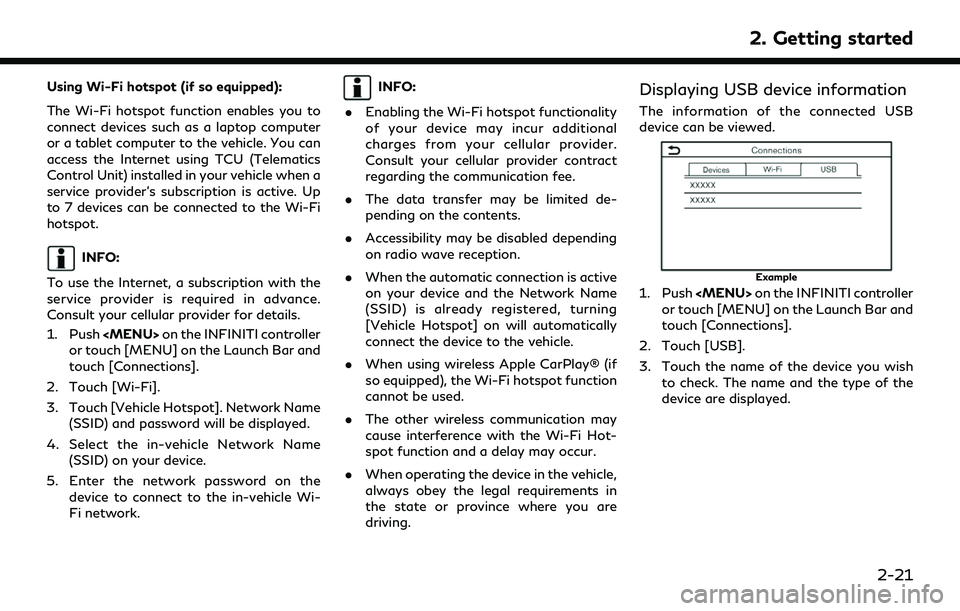
Using Wi-Fi hotspot (if so equipped):
The Wi-Fi hotspot function enables you to
connect devices such as a laptop computer
or a tablet computer to the vehicle. You can
access the Internet using TCU (Telematics
Control Unit) installed in your vehicle when a
service provider’s subscription is active. Up
to 7 devices can be connected to the Wi-Fi
hotspot.
INFO:
To use the Internet, a subscription with the
service provider is required in advance.
Consult your cellular provider for details.
1. Push
Page 53 of 192
![INFINITI QX80 2022 User Guide USB memory device, iPod® or
Bluetooth® audio menu
Touch [USB Menu], [iPod Menu] and
[Menu] (Bluetooth® audio menu) on each
audio screen to display the corresponding
audio menu screen.
Available set](/img/42/41149/w960_41149-52.png "INFINITI QX80 2022 User Guide USB memory device, iPod® or
Bluetooth® audio menu
Touch [USB Menu], [iPod Menu] and
[Menu] (Bluetooth® audio menu) on each
audio screen to display the corresponding
audio menu screen.
Available set")
USB memory device, iPod® or
Bluetooth® audio menu
Touch [USB Menu], [iPod Menu] and
[Menu] (Bluetooth® audio menu) on each
audio screen to display the corresponding
audio menu screen.
Available setting items may vary depending
on models, specifications, software versions
and the connected audio device.
Depending on the connected device, [Menu]
(Bluetooth® audio menu) may not be dis-
played.
Menu Action
[Now Play-
ing]Touch to display the current
playing audio screen.
[Current
List] A list of tracks in the currently
selected category is displayed.
[Folder List] Touch to display the folder list. Touch an item on the list to
select the folder.
The subfolder or track list will
be displayed. Select a sub-
folder or track from the list.
[Album Art-
work] Touch to turn on/off the al-
bum artwork display on the
audio screens. Menu Action
[Playlists] Touch to display the list ac-
cording to the selected item.
[Artists]
[Albums]
[Songs]
[Genres]
[Compo-
sers]
[Audio-
books]
[Podcasts]
[Connec-
tions] Touch to display the Connec-
tions screen.
“Connections settings”
(page 2-17)
SMARTPHONE AUDIO
You can also listen to music from your
compatible smartphone using Apple Car-
Play® or Android Auto.
“Apple CarPlay®” (page 5-17)“Android AutoTM” (page 5-21)
Connecting smartphone
Connect the iPhone® or Android phone to
the USB connection port.
“USB (Universal Serial Bus) connection ports” (page 2-8)
Depending on the models, specifications and
software versions, iPhone® devices can also
be connected wirelessly for Apple CarPlay®
(if so equipped).
“Connecting wirelessly” (page 5-18)
Smartphone audio operation
1. Connect the iPhone® or Android phone and activate Apple CarPlay® or Android
Auto.
2. Push
Page 58 of 192
4. Hands-Free Phone
BLUETOOTH® HANDS-FREE
PHONE SYSTEM
WARNING
.Use a phone after stopping your
vehicle in a safe location. If you have
to use a phone while driving, exercise
extreme caution at all times so full
attention may be given to vehicle
operation.
. If you find yourself unable to devote
full attention to vehicle operation
while talking on the phone, pull off
the road to a safe location and stop
your vehicle before doing so.
CAUTION
To avoid draining the vehicle battery, use
a phone only after starting the engine.
Your vehicle is equipped with Bluetooth®
Hands-Free Phone System. If you are an
owner of a compatible Bluetooth® enabled
cellular phone, you can set up the wireless
connection between your cellular phone and
the in-vehicle phone module. With Blue- tooth® wireless technology, you can make
or receive a telephone call with your cellular
phone in your pocket.
Once a cellular phone is connected to the in-
vehicle phone module, the procedures for
connecting the phone does not need to be
performed again. Your phone will automati-
cally re-connect to the in-vehicle phone
module when the ignition switch is placed
in the ACC or ON position with the selected
cellular phone turned on and carried in the
vehicle.
You can register up to 6 different Blue-
tooth® devices in the in-vehicle phone
module. However, you can talk on only one
cellular phone at a time.
The Voice Recognition System supports
phone and text message commands, so
dialing a phone number using your voice is
possible.“7. Voice recognition”
Before using the Bluetooth® Hands-Free
Phone System, refer to the following notes. . Wireless LAN (Wi-Fi) and the Blue-
tooth® functions share the same fre-
quency band (2.4 GHz). Using the
Bluetooth® and the wireless LAN func-
tions at the same time may slow down or disconnect the communication and cause
undesired noise. It is recommended that
you turn off the wireless LAN (Wi-Fi)
when using the Bluetooth® functions.
. Set up the wireless connection between
a compatible cellular phone and the in-
vehicle phone module before using the
Bluetooth® Hands-Free Phone System.
. Some Bluetooth® enabled cellular
phones may not be recognized by the
in-vehicle phone module. If the system
seems to be malfunctioning or not con-
necting to the phone, contact an
INFINITI retailer or visit the website
below for a recommended phone list
and troubleshooting help.
www.infinitiusa.com/bluetooth/
. When Apple CarPlay® or Android Auto
is active, Apple CarPlay® or Android
Auto will take the place of your Blue-
tooth® Hands-Free Phone functionality.
. You will not be able to use a hands-free
phone under the following conditions:
— Your vehicle is outside of the tele- phone service area.
— Your vehicle is in an area where it is difficult to receive radio waves; such
4-2
Page 68 of 192
![INFINITI QX80 2022 User Guide 4. Hands-Free Phone
[Text Message][Text Message] Turns the text messaging function on/off.
[Text Message Ringtone] Turns the incoming message sound on/off.
[Signature] Turns the signature setting for](/img/42/41149/w960_41149-67.png "INFINITI QX80 2022 User Guide 4. Hands-Free Phone
[Text Message][Text Message] Turns the text messaging function on/off.
[Text Message Ringtone] Turns the incoming message sound on/off.
[Signature] Turns the signature setting for")
4. Hands-Free Phone
[Text Message][Text Message] Turns the text messaging function on/off.
[Text Message Ringtone] Turns the incoming message sound on/off.
[Signature] Turns the signature setting for the outgoing text message on/off.
[Auto Reply] Turns on/off the automatic text message reply function.
[Auto Reply Text Message] Selects the text message to be used for the automatic reply function.
[Edit Custom Text] Creates or edits a customized text message reply.
[Notifications] [Driver Only] When this item is turned on, incoming call notification is displayed only
in the vehicle information display.
[Ringtone] Turns the vehicle ringtone on/off.
[Automatic Hold] When this item is turned on, an incoming phone call will be put on hold
automatically.
INFO:
. If [Allow 2 Phones Simultaneously] is turned on, available phone names are displayed on the Phone settings screen. You can select the
phone you wish to apply the settings to. You can also display the Connections screen by touching [
].“Connections settings” (page 2-17)
. The Phone settings will become inoperable while Apple CarPlay® or Android Auto is active.
4-12
Page 71 of 192
5 Information
Information menu ............................................................. 5-2Updating system software ....................................... 5-4
INFINITI InTouch
TMServices ........................................ 5-6
Subscription to INFINITI InTouchTMServices .... 5-6
Important information regarding access to
INFINITI InTouch
TMServices ................................... 5-6
INFINITI InTouchTMServices features .................. 5-7
INFINITI InTouchTMServices menus ................... 5-10
INFINITI InTouchTMServices settings ................ 5-13
SiriusXM® Travel Link (if so equipped) .................... 5-14 Viewing SiriusXM® Travel Link ............................ 5-14
Using SiriusXM® Travel Link ................................. 5-15
Apple CarPlay® ............................................................... 5-17 Compatibility .............................................................. 5-17
Connecting iPhone® ................................................. 5-17 Apple CarPlay® operation .................................... 5-19
Apple CarPlay® settings ...................................... 5-20
Apple CarPlay® system limitations ................... 5-21
Android Auto
TM.............................................................. 5-21
Compatibility ............................................................ 5-21
Initial Android Auto settings ................................ 5-22
Android Auto operation ........................................ 5-22
Android Auto settings ........................................... 5-24
Android Auto system limitations ........................ 5-25
Siri® Eyes Free ............................................................... 5-25 General information ............................................... 5-25
Requirements ............................................................ 5-25
Siri® Eyes Free activation .................................... 5-25
Operating Siri® Eyes Free .................................... 5-26
Page 73 of 192
![INFINITI QX80 2022 User Guide Menu itemAction
[TomTom Weather] [Current Conditions] Current, hourly or 5-day weather information is displayed. Weather information for
nearby location, near the destination and your preferred city s](/img/42/41149/w960_41149-72.png "INFINITI QX80 2022 User Guide Menu itemAction
[TomTom Weather] [Current Conditions] Current, hourly or 5-day weather information is displayed. Weather information for
nearby location, near the destination and your preferred city s")
Menu itemAction
[TomTom Weather] [Current Conditions] Current, hourly or 5-day weather information is displayed. Weather information for
nearby location, near the destination and your preferred city set as a Favorite City
can be confirmed. Current, hourly or 5-day weather information can be changed by
touching [Current], [Hourly] or [5–Day]. Nearby location, near the destination and
your preferred city can be changed by touching [Nearby], [Near Dest.] or [Favorite
City]. Favorite city can be changed by touching [Change City].
[Hourly Weather
Forecast]
[5-Day Weather Fore-
cast]
[Communication Set-
tings]
Turns the TomTom weather data transmission on/off.
[System Information] [Version Information] Displays the information of the Software Version, etc.
[Software Update] The system software can be updated.
“Updating system software” (page 5-4)
[Map Update] The map data can be updated.
“How to update map data” (page 6-45)
[SXM Information] Displays the SiriusXM® information. The signal quality, subscription status and SiriusXM® radio ID, etc. are displayed.
[License Information] Displays the Open Source Software (OSS) licenses information.
[GPS Position] Displays GPS information, such as number of satellites, latitude/longitude, and approximate altitude, etc.
[Vehicle Data Transmission] When [OK] is touched, data transmission to INFINITI is enabled. Touching [Decline] disables the INFINITI InTouch
TMServices, Premium Traffic, etc.
[Smartphone Connection] [Apple CarPlay] Displays the Apple CarPlay® screen.
“Apple CarPlay®” (page 5-17)
[Android Auto] Displays the Android Auto screen.
“Android AutoTM” (page 5-21)
5. Information
5-3
Page 87 of 192
Apple CarPlay®
WARNING
.Stop your vehicle in a safe location
and apply the parking brake before
connecting your iPhone® to the ve-
hicle or operating your connected
iPhone® for setup.
. If you are unable to devote full
attention to vehicle operation while
using Apple CarPlay®, pull off the
road to a safe location and stop your
vehicle.
You can use Apple CarPlay® by connecting a
compatible iPhone® to your vehicle via a
USB cable or wirelessly (if so equipped).
With Apple CarPlay®, your in-vehicle sys-
tem can be used as a display and a controller
for some of the iPhone® functions. Apple
CarPlay® features Siri® which enables op-
erations via voice controls. Visit Apple.com
for information about the functions that are
available and details about Apple’s privacy
policy.
Certain vehicle information (e.g. location and
speed) may be shared with your device while Apple CarPlay® is in use. Carrier charges
may apply to use Apple CarPlay®.
COMPATIBILITY
Refer to the Apple website for compatible
devices.
INFO:
. For best results, always update your
device to the latest software version.
. Apple CarPlay® will take the place of
your Bluetooth® audio and Bluetooth®
Hands-Free Phone functionality.
. Phone menu and access to the con-
nected phone through Voice Recognition
System will be disabled while Apple
CarPlay® is connected. To access your
phone, use the Siri® function or select
the phone icon in the Apple CarPlay® top
menu screen.
. Models with navigation system:
When setting a route on the navigation
system, if you set a destination with
Apple CarPlay®, the route setting of the
navigation system will be cancelled.
CONNECTING iPhone®
This system supports wireless Apple Car-
Play® (if so equipped). To connect Apple
CarPlay® wirelessly, the Bluetooth® and
Wi-Fi network (if so equipped) must be
available with the in-vehicle system before
operation.
“Setting devices” (page 2-17)
“Wi-Fi setting” (page 2-19)
INFO:
Depending on the device and firmware
version of the iPhone®, wireless Apple Car-
Play® (if so equipped) cannot be used.
Always update your device to the latest
software version.
Connecting with the USB cable
INFO:
To connect your iPhone® with the in-vehicle
system, it is recommended to use the Apple
Lightning
TMcable (Mfi certified) that was
provided with your iPhone®.
1. Connect the iPhone® to the USB con- nection port.
“USB (Universal Serial Bus) connec-
tion ports” (page 2-8)
5. Information
5-17
Page 88 of 192
![INFINITI QX80 2022 User Guide 5. Information
2. Depending on the setting, a StartupInformation screen will appear. Touch
[Yes] to use Apple CarPlay®.
3. Apple CarPlay® starts and the Apple CarPlay® screen will appear.
4. If a n](/img/42/41149/w960_41149-87.png "INFINITI QX80 2022 User Guide 5. Information
2. Depending on the setting, a StartupInformation screen will appear. Touch
[Yes] to use Apple CarPlay®.
3. Apple CarPlay® starts and the Apple CarPlay® screen will appear.
4. If a n")
5. Information
2. Depending on the setting, a StartupInformation screen will appear. Touch
[Yes] to use Apple CarPlay®.
3. Apple CarPlay® starts and the Apple CarPlay® screen will appear.
4. If a notification appears on the iPhone®, select whether or not to use the wireless
connection. Once you enable wireless
Apple CarPlay® (if so equipped) on the
notification, Apple CarPlay® will auto-
matically start wirelessly from next time.
Connecting wirelessly (if so
equipped)
1. Connect the iPhone® to the in-vehiclesystem via Bluetooth®.
“Setting devices” (page 2-17)
INFO:
If no Bluetooth® device is connected and
Apple CarPlay® or Android Auto is not
active, pushing and holding <
>on the
steering wheel can display the
Connections screen.
2. A notification will appear on the iPhone®. Select to use the wireless
connection.
INFO:
If you select not to use the wireless
connection, the iPhone® will be con-
nected as a Bluetooth® device.
3. Depending on the setting, a Startup Information screen will appear. Touch
[Yes] to use Apple CarPlay®.
4. Wireless Apple CarPlay® will start and the Apple CarPlay® screen will appear.
INFO:
If the Wi-Fi connection is off on the Wi-Fi
settings screen, a notification will appear.
Touch [Yes] to use wireless Apple CarPlay®.
“Wi-Fi setting” (page 2-19)
Operating tips
. If you do not wish to display the Startup
Information screen each time you acti-
vate Apple CarPlay®, turn on [Don’t Ask
Anymore] on the Startup Information
screen. The Startup Information screen
will not be displayed from the next Apple
CarPlay® activation. The Startup Infor-
mation screen can be set to appear again
in the Apple CarPlay® setting menu.
“Apple CarPlay® settings”
(page 5-20) .
The system update or the map update (if
so equipped) will be stopped while using
wireless Apple CarPlay® (if so equipped).
. The connection with the other Blue-
tooth® device may be disconnected
when wireless Apple CarPlay® (if so
equipped) is activated.
. Once the wireless connection (if so
equipped) has been established, Apple
CarPlay® will be automatically con-
nected wirelessly next time.
. Wireless Apple CarPlay® (if so equipped)
uses the Wi-Fi network (if so equipped).
After connecting the in-vehicle system to
the Wi-Fi network, the Bluetooth® con-
nection with wireless Apple CarPlay®
connected device will be disconnected.
. If you connect the iPhone® that is using
wireless Apple CarPlay® (if so equipped)
via USB cable, the in-vehicle system
provides power to the iPhone®.
. If wireless Apple CarPlay® (if so
equipped) does not start automatically,
touch [
] on the device settings screen.“Setting devices” (page 2-17)
. If you are using Apple CarPlay® or
Android Auto, you cannot start Apple
5-18
Page 89 of 192
CarPlay® with the other iPhone®. To use
Apple CarPlay® with the other iPhone®,
disconnect the current device, or deacti-
vate Apple CarPlay® or Android Auto on
the Connections settings.
“Connections settings” (page 2-17)
Apple CarPlay® OPERATION
After starting Apple CarPlay®, the iPhone®
functions displayed on the screen can be
operated using the in-vehicle system.
INFO:
. After exiting the Apple CarPlay® screen,
return to the Apple CarPlay® screen by
taking one of the following actions.
— Touch [
] on the Launch Bar.
— Touch [Smartphone Connection] on the information screen, and then touch
[Apple CarPlay].
. When your iPhone® is locked, Apple
CarPlay® can still be activated by oper-
ating the iPhone® and allowing Apple
CarPlay® activation.
Siri® operation
With Siri®, some of the functions in your
iPhone® can be voice controlled.
Make sure that Siri® on your iPhone® is
turned on.
Activation:
Push and hold <
>on the steering wheel to
start a Siri® session.
INFO:
. Push <
>on the steering wheel to end
Siri® operation.
. Keep the interior of the vehicle as quiet
as possible. Close the windows to elim-
inate the surrounding noises (traffic
noises, vibration sounds, etc.), which
may prevent the system from recogniz-
ing the voice commands correctly.
. For functions that can be used with
Siri®, please refer to the Apple website.
Phone operation
If you wish to use the phone with Apple
CarPlay®, follow the procedure below: 1. Touch [Phone] on the Apple CarPlay®
top menu.
2. Operate the screen displayed to make a call, etc.
5. Information
5-19
Page 90 of 192
![INFINITI QX80 2022 User Guide 5. Information
Apple CarPlay® SETTINGS
1. Push<MENU> on the INFINITI controller or touch [MENU] on the Launch Bar.
2. Touch [Connections] on the Launch Bar and then touch [Devices].
3. Touch [
] by t](/img/42/41149/w960_41149-89.png "INFINITI QX80 2022 User Guide 5. Information
Apple CarPlay® SETTINGS
1. Push<MENU> on the INFINITI controller or touch [MENU] on the Launch Bar.
2. Touch [Connections] on the Launch Bar and then touch [Devices].
3. Touch [
] by t")
5. Information
Apple CarPlay® SETTINGS
1. Push