Gear JAGUAR XF 2010 1.G User Guide
[x] Cancel search | Manufacturer: JAGUAR, Model Year: 2010, Model line: XF, Model: JAGUAR XF 2010 1.GPages: 225, PDF Size: 8 MB
Page 79 of 225
R
(FM8) SEMCON JLR OWNER GUIDE VER 1.00 EURO
LANGUAGE: english-en; MARQUE: jaguar; MODEL: XF
Intelligent stop/start
79
Intelligent stop/startECO STOP/START
The Stop/Start system is designed to improve
fuel efficiency and is automatically activated
when the ignition is turned on. If the vehicle is
stopped (e.g. at traffic lights or in traffic), the
engine will turn off ( unless it is required to
support other vehicle systems). When the
brake is released and a drive gear is selected,
the engine will restart automatically.
To activate an automatic engine stop:
• Stop the vehicle from a speed greater than
4 km/h (2.5 mph) and apply sufficient
brake pressure to ensure the vehicle is
stationary.
• Alternatively, whilst stationary, select P
(Park) or N (Neutral).
To activate an automatic engine restart release
the brake pedal with D (Drive) or S (Sport)
selected. The engine will also restart if one of the
following occurs:
•
The accelerator pedal is pressed.
• A shift paddle is used to select a gear.
• R (Reverse) is selected.
• Climate control system demand increases.
• The vehicle’s speed exceeds approximately
1 km/h (0.5 mph).
• Battery charge becomes low.
• Brake vacuum has be en reduced (e.g.
using the brake pedal repeatedly with the
engine off).
• Stop/Start is deactivated.
The following conditions will prevent an
automatic engine stop:
• A shift paddle has been used to select a
gear.
• The external temperature is less than
approximately 0 °C (32 °F).
• The external temperature is more than
approximately 40 °C (104 °F).
• The engine has not reached operating
temperature.
• The driver's door is opened.
• The driver’s seat belt is not fastened.
• The climate control system demand
requires the engine to be running (for
example, in Defrost mode).
• The battery charge is low.
• The bonnet is opened.
• Stop/Start is deactivated.
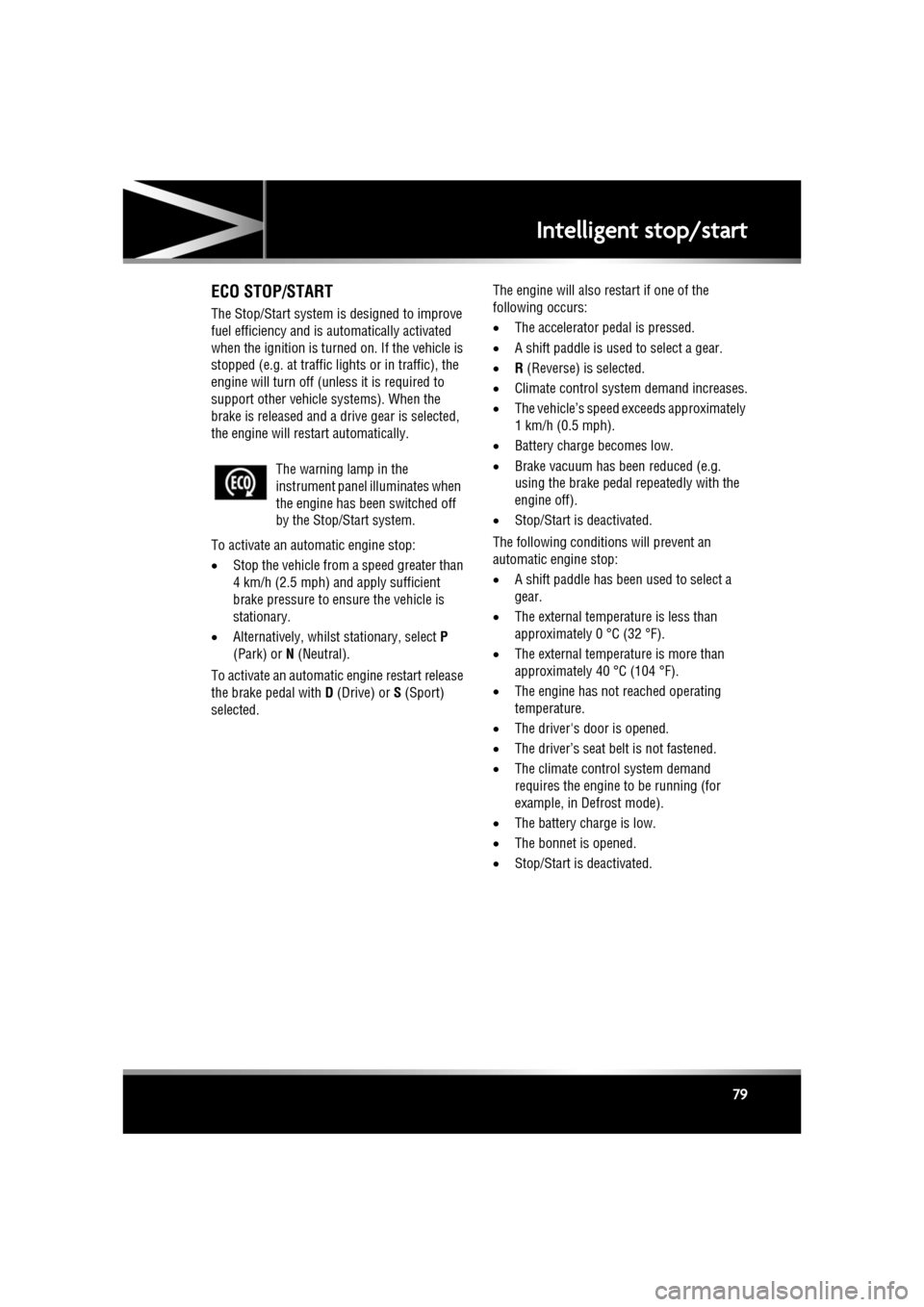
The warning lamp in the
instrument panel
illuminates when
the engine has been switched off
by the Stop/Start system.
Page 81 of 225
R
(FM8) SEMCON JLR OWNER GUIDE VER 1.00 EURO
LANGUAGE: english-en; MARQUE: jaguar; MODEL: XF
Gearbox
81
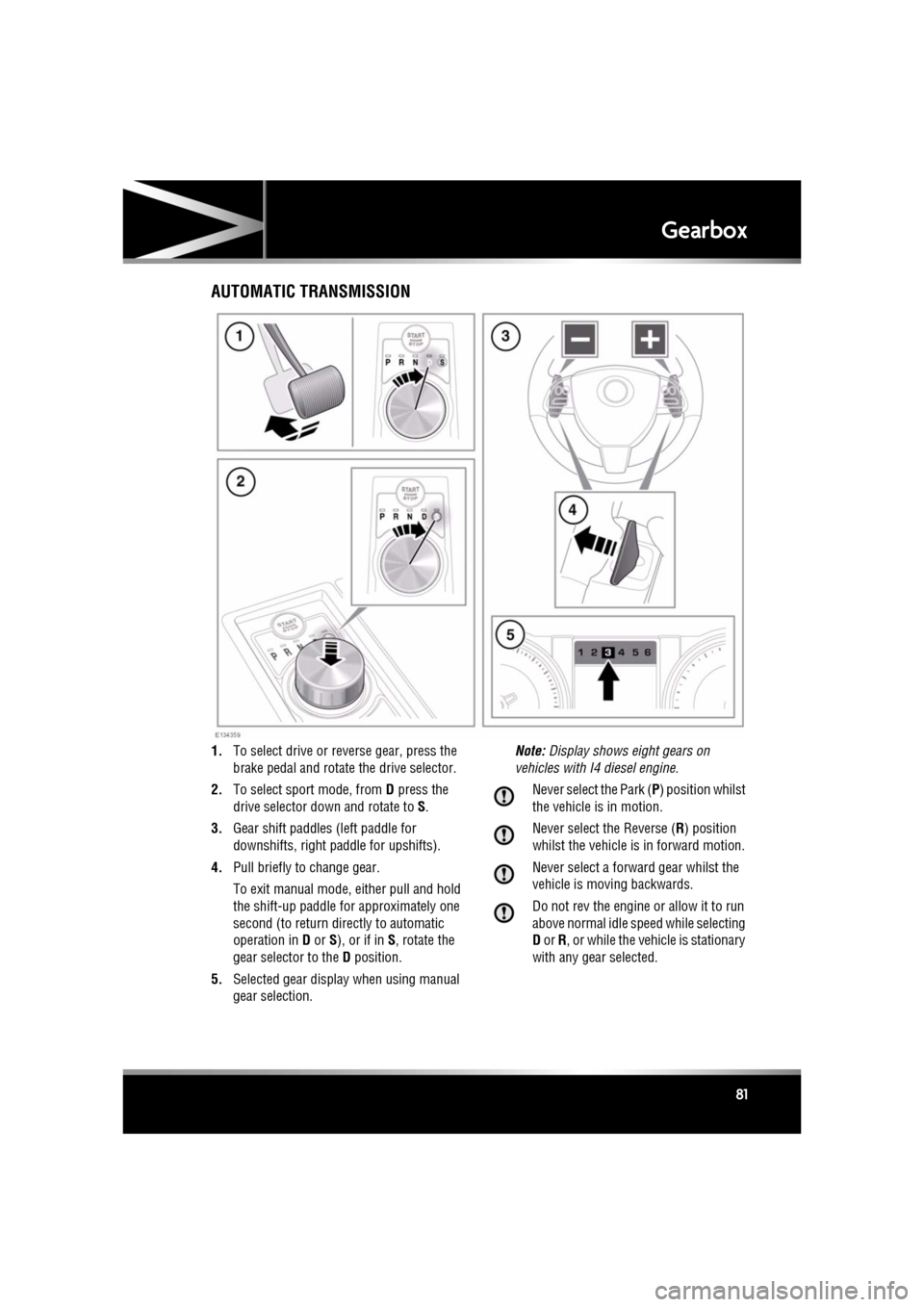
GearboxAUTOMATIC TRANSMISSION
1. To select drive or re verse gear, press the
brake pedal and rotate the drive selector.
2. To select sport mode, from D press the
drive selector dow n and rotate to S.
3. Gear shift paddles (left paddle for
downshifts, right pa ddle for upshifts).
4. Pull briefly to change gear.
To exit manual mode, either pull and hold
the shift-up paddle for approximately one
second (to return directly to automatic
operation in D or S), or if in S, rotate the
gear selector to the D position.
5. Selected gear display when using manual
gear selection. Note:
Display shows eight gears on
vehicles with I4 diesel engine.
Never select the Park ( P) position whilst
the vehicle is in motion.
Never select the Reverse ( R) position
whilst the vehicle is in forward motion.
Never select a forward gear whilst the
vehicle is moving backwards.
Do not rev the engine or allow it to run
above normal idle speed while selecting
D or R, or while the vehicle is stationary
with any gear selected.
Page 82 of 225

L
(FM8) SEMCON JLR OWNER GUIDE VER 1.00 EURO
LANGUAGE: english-en; MARQUE: jaguar; MODEL: XF
Gearbox
82
Do not allow the vehicle to remain
stationary with a drive gear selected and
the engine running . Always select P or
N if the engine is to idle for a prolonged
period.
ROTARY GEAR SELECTOR
The JaguarDrive selector elevates out of the
centre console when the engine is started, in
readiness for gear selection
P should be selected before switching off the
engine. However, it is possible to switch the
engine off with R, D or S selected - the selector
will automatica lly select P, while retracting into
the centre console.
Note: If the engine is switched off with N
selected, the system will wait for 10 minutes
before selecting P. This procedure is to allow
the vehicle to be conveyed through a car wash
only and should not be used for vehicle
recovery purposes.
In the event of a vehicle breakdown, the
transmission will automatically select P. This
prevents the vehicle from being towed on all
four wheels. Therefore, vehicle recovery
should only be undertaken by suitably qualified
personnel.
IF THE SELECTOR FAILS TO ELEVATE
If the JaguarDrive selector is obstructed
remove the obstruction and then start the
engine. The selector s hould elevate as normal.
If the selector still fails to elevate, even if there
is no obstruction, a faul t in the system is
indicated. The selector ca n still be used in the
lowered position, but be aware that it will not
automatically select P when the engine is
switched off. P should be selected manually.
The fault should be re ctified by a Dealer/
Authorised Repairer at the earliest opportunity.
MANUAL GEAR SELECTION
When the gear selector is in the D position,
manual mode may be directly accessed by the
single action of operating the steering wheel
mounted shift paddles.
If continued use of manua l mode is required,
the gear selector may be subsequently moved
to the S position to enter permanent manual
mode.
If the gear selector remains in the D position,
temporary manual mode will be held whilst the
driver is accelerating, decelerating, cornering
or continuing to request shifts via the paddles.
LIMP-HOME MODE
Note: The driver should be aware that the
vehicle’s performance will be reduced and
must take this into account when driving. Also
the use of the Jaguar Sequential Shift paddles
will be disabled. In this event, seek qualified
assistance as soon as possible.
In the event of an electrical or mechanical
failure, transmission ope ration will be limited.
P , R , N , D and S may still be used to enable the
vehicle to be driven to a safe area.
Some faults will cause the selector to be locked
in position until the ignition is switched off. If
the selected range flashes, it signifies that the
driver request cannot be engaged. Re-select N
and repeat the attempt.
If the transmission is st ill unable to select the
requested gear, contact your Dealer/
Authorised Repairer.
Page 83 of 225
R
(FM8) SEMCON JLR OWNER GUIDE VER 1.00 EURO
LANGUAGE: english-en; MARQUE: jaguar; MODEL: XF
Stability control
83
Stability controlWINTER MODE
Winter mode optimises stability of the vehicle
to suit slippery conditions, when grip is
reduced. This helps the vehicle to perform in a
more gentle and controlled manner, to avoid
skidding, allowing more confident progress
under adverse conditions.
Note: Winter mode cannot be active at the
same time as Dynamic m ode. Winter mode will
remain selected indefinitely, even after the
ignition is switched off. Winter mode must be
deselected if no longer required.
DYNAMIC MODE
Note: When the transmission is set to
permanent manual mode and Dynamic mode is
selected, transmission upshifts are fully
controlled by the driver . The transmission will
not change up automatically, even when the rev
limit is reached (the ge ar position indicator in
the message centre will gl ow amber, to indicate
that the next gear should be selected).
Note: Dynamic mode cannot be active at the
same time as Winter mode. Dynamic mode will
remain selected for approximately six hours
after the ignition is switched off, after which
point it will need to be reselected if required.
TRACDSC
Vehicle safety may be reduced by
inappropriate use of of Trac DSC. Trac
DSC should only be used in suitable
conditions.
Trac DSC is an alternative setting of DSC, with
reduced system interventions. With Trac DSC
engaged, traction may be increased, although
stability may be reduced compared to normal
DSC. Trac DSC is intended for use only on dry
tarmac, by suitably experienced drivers. Trac
DSC should not be selected for other surfaces
or by drivers with insuff icient skill and training
to operate the vehicle safely with Trac DSC
function engaged.
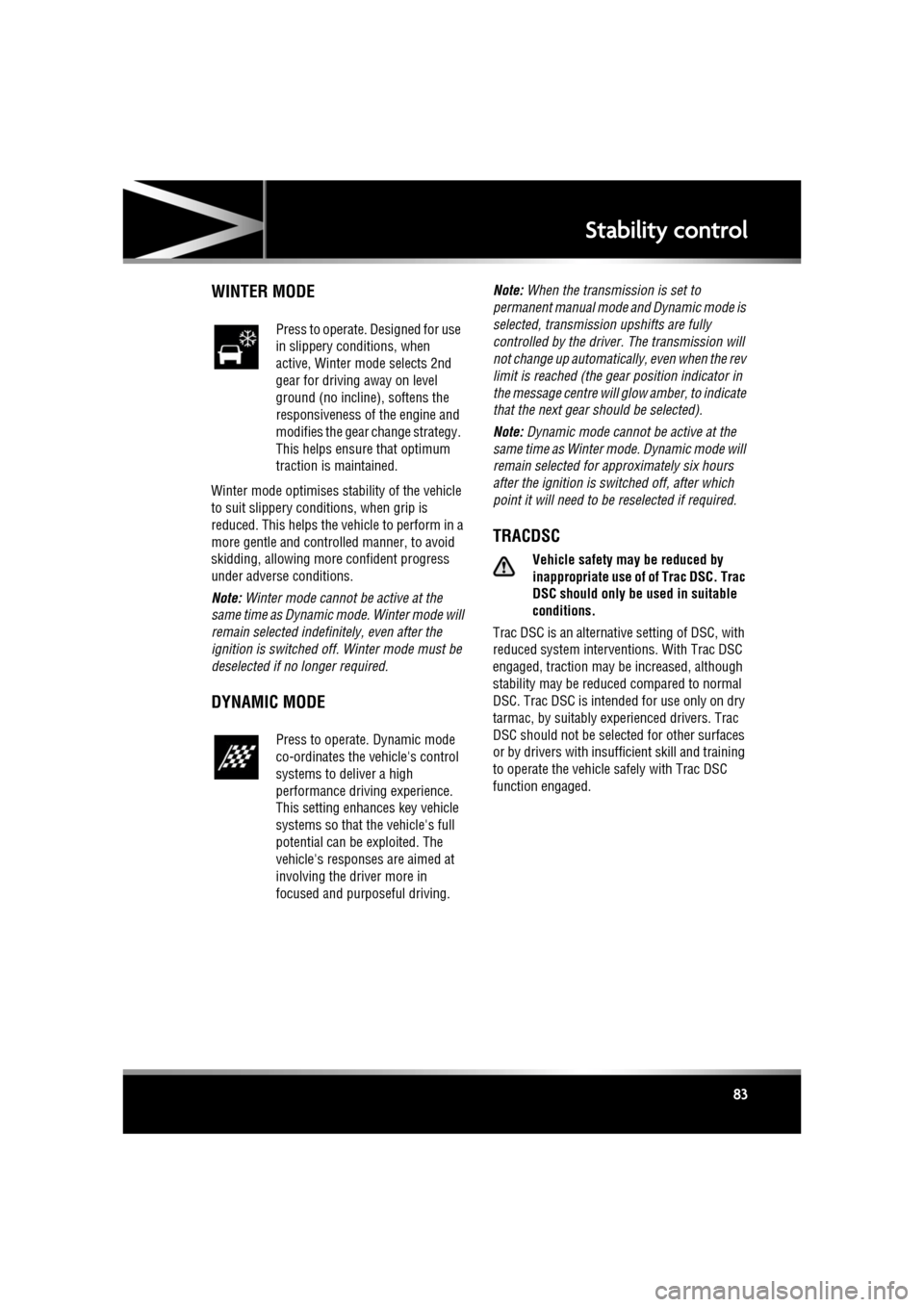
Press to operate. Designed for use
in slippery conditions, when
active, Winter mode selects 2nd
gear for driving away on level
ground (no incline), softens the
responsiveness of the engine and
modifies the gear change strategy.
This helps ensure that optimum
traction is maintained.
Press to operate. Dynamic mode
co-ordinates the vehicle's control
systems to deliver a high
performance driving experience.
This setting enhances key vehicle
systems so that the vehicle's full
potential can be exploited. The
vehicle's responses are aimed at
involving the driver more in
focused and purposeful driving.
Page 88 of 225
L
(FM8) SEMCON JLR OWNER GUIDE VER 1.00 EURO
LANGUAGE: english-en; MARQUE: jaguar; MODEL: XF
Brakes
88
ELECTRIC PARKING BRAKE (EPB)
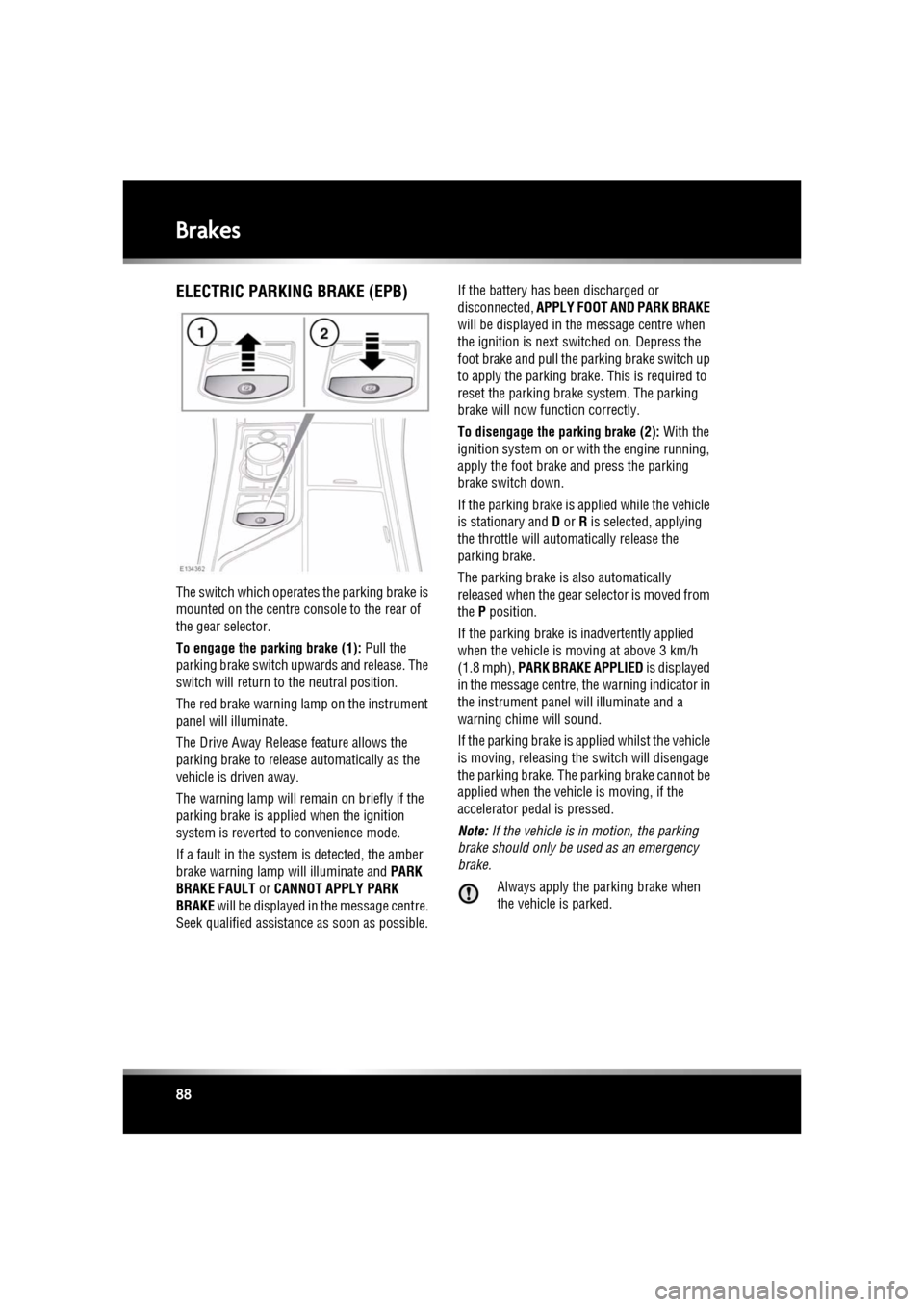
The switch which operate s the parking brake is
mounted on the centre c onsole to the rear of
the gear selector.
To engage the parking brake (1): Pull the
parking brake switch upwards and release. The
switch will return to the neutral position.
The red brake warning lamp on the instrument
panel will illuminate.
The Drive Away Release feature allows the
parking brake to release automatically as the
vehicle is driven away.
The warning lamp will remain on briefly if the
parking brake is applied when the ignition
system is reverted to convenience mode.
If a fault in the system is detected, the amber
brake warning lamp will illuminate and PARK
BRAKE FAULT or CANNOT APPLY PARK
BRAKE will be displayed in the message centre.
Seek qualified assistan ce as soon as possible. If the battery has been discharged or
disconnected,
APPLY FOOT AND PARK BRAKE
will be displayed in the message centre when
the ignition is next switched on. Depress the
foot brake and pull the parking brake switch up
to apply the parking brake. This is required to
reset the parking brake system. The parking
brake will now f unction correctly.
To disengage the parking brake (2): With the
ignition system on or with the engine running,
apply the foot brake and press the parking
brake switch down.
If the parking brake is a pplied while the vehicle
is stationary and D or R is selected, applying
the throttle will auto matically release the
parking brake.
The parking brake is also automatically
released when the gear selector is moved from
the P position.
If the parking brake is inadvertently applied
when the vehicle is moving at above 3 km/h
(1.8 mph), PARK BRAKE APPLIED is displayed
in the message centre, the warning indicator in
the instrument panel will illuminate and a
warning chime will sound.
If the parking brake is a pplied whilst the vehicle
is moving, releasing th e switch will disengage
the parking brake. The parking brake cannot be
applied when the vehicle is moving, if the
accelerator pedal is pressed.
Note: If the vehicle is in motion, the parking
brake should only be used as an emergency
brake.
Always apply the parking brake when
the vehicle is parked.
Page 92 of 225
L
(FM8) SEMCON JLR OWNER GUIDE VER 1.00 EURO
LANGUAGE: english-en; MARQUE: jaguar; MODEL: XF
Parking aids
92
Parking aidsPARKING AID OPERATION
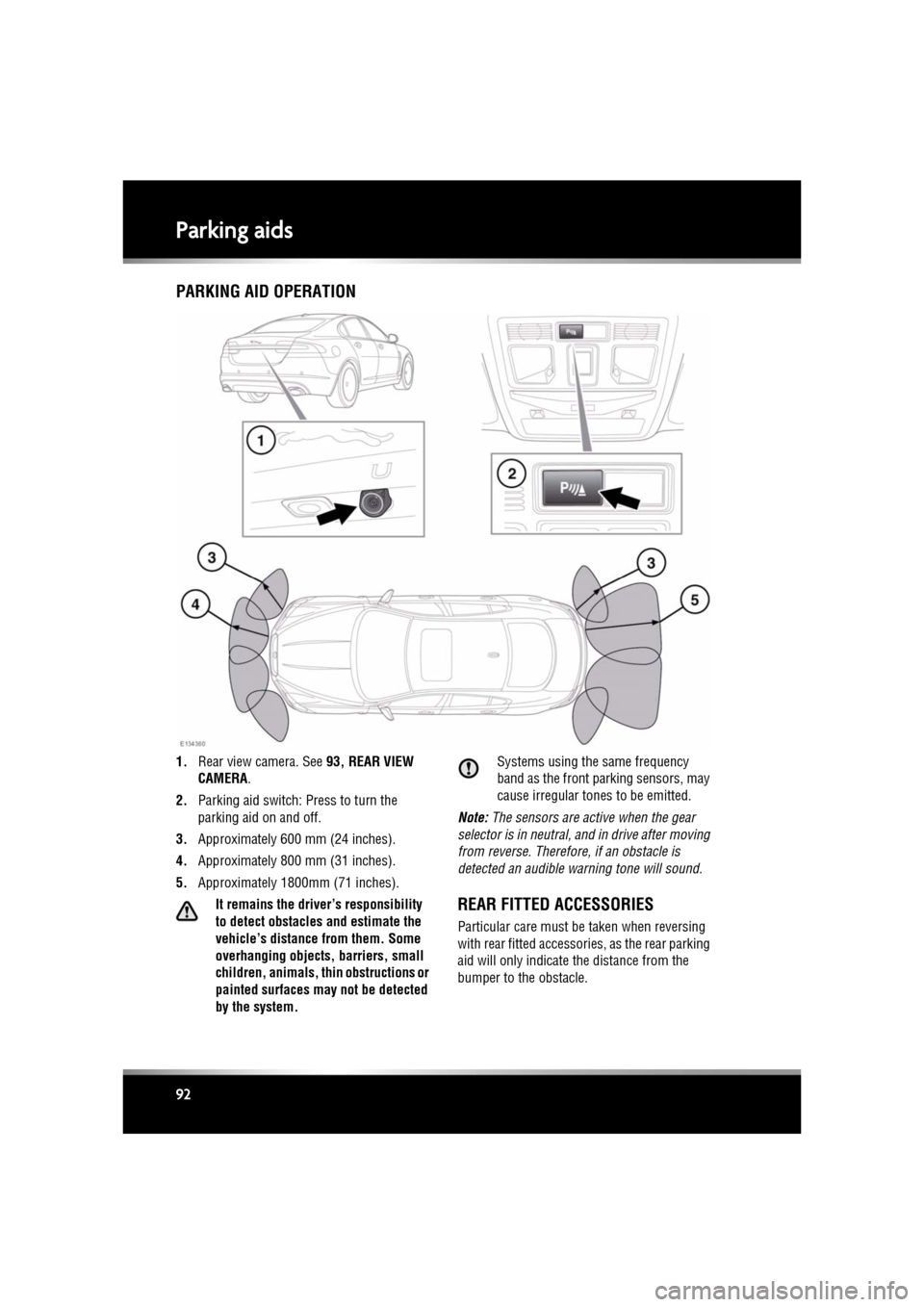
1. Rear view camera. See 93, REAR VIEW
CAMERA .
2. Parking aid switch: Press to turn the
parking aid on and off.
3. Approximately 600 mm (24 inches).
4. Approximately 800 mm (31 inches).
5. Approximately 1800mm (71 inches).
It remains the driver’s responsibility
to detect obstacles and estimate the
vehicle’s distance from them. Some
overhanging objects, barriers, small
children, animals, thin obstructions or
painted surfaces may not be detected
by the system. Systems using the same frequency
band as the front parking sensors, may
cause irregular tones to be emitted.
Note: The sensors are active when the gear
selector is in neutral, and in drive after moving
from reverse. Therefore , if an obstacle is
detected an audible warning tone will sound.
REAR FITTED ACCESSORIES
Particular care must be taken when reversing
with rear fitted accessories, as the rear parking
aid will only indicate the distance from the
bumper to the obstacle.
Page 93 of 225
R
(FM8) SEMCON JLR OWNER GUIDE VER 1.00 EURO
LANGUAGE: english-en; MARQUE: jaguar; MODEL: XF
Parking aids
93
CLEANING THE SENSORS
For reliable operation, th e sensors in the front
and rear bumpers should be kept free from ice,
frost and grime.
Do not clean the sensors with abrasive
or sharp objects or materials.
When using a high pressure spray, only
spray the sensors briefly, from a
distance greater than 200 mm
(8 inches).
PARKING AID SYSTEM FAULT
If the system has a fault when engaging reverse
gear or turning on the ignition, then a single, 3
second tone will be heard and a pop-up
warning will appear on the touch screen. If
both front and rear park ing aids are fitted, the
warning indicator in the parking aid switch will
flash for 3 seconds and then switch off.
If a fault is detected, the system is
automatically disabled.
Note: The parking aid may emit spurious tones
if it detects a frequenc y tone using the same
band as the sensors (e.g. air brakes).
REAR VIEW CAMERA
It remains the driver's responsibility
to detect obstacles and estimate the
vehicle's distance from them when
reversing.
When Reverse ( R) is selected, the system uses
a camera to provide a wide-angle colour rear
view image on the touch screen.
The camera display has priority over the
parking aid display. To view the parking aid
display instead, or to cancel camera display at
any time, touch the display.
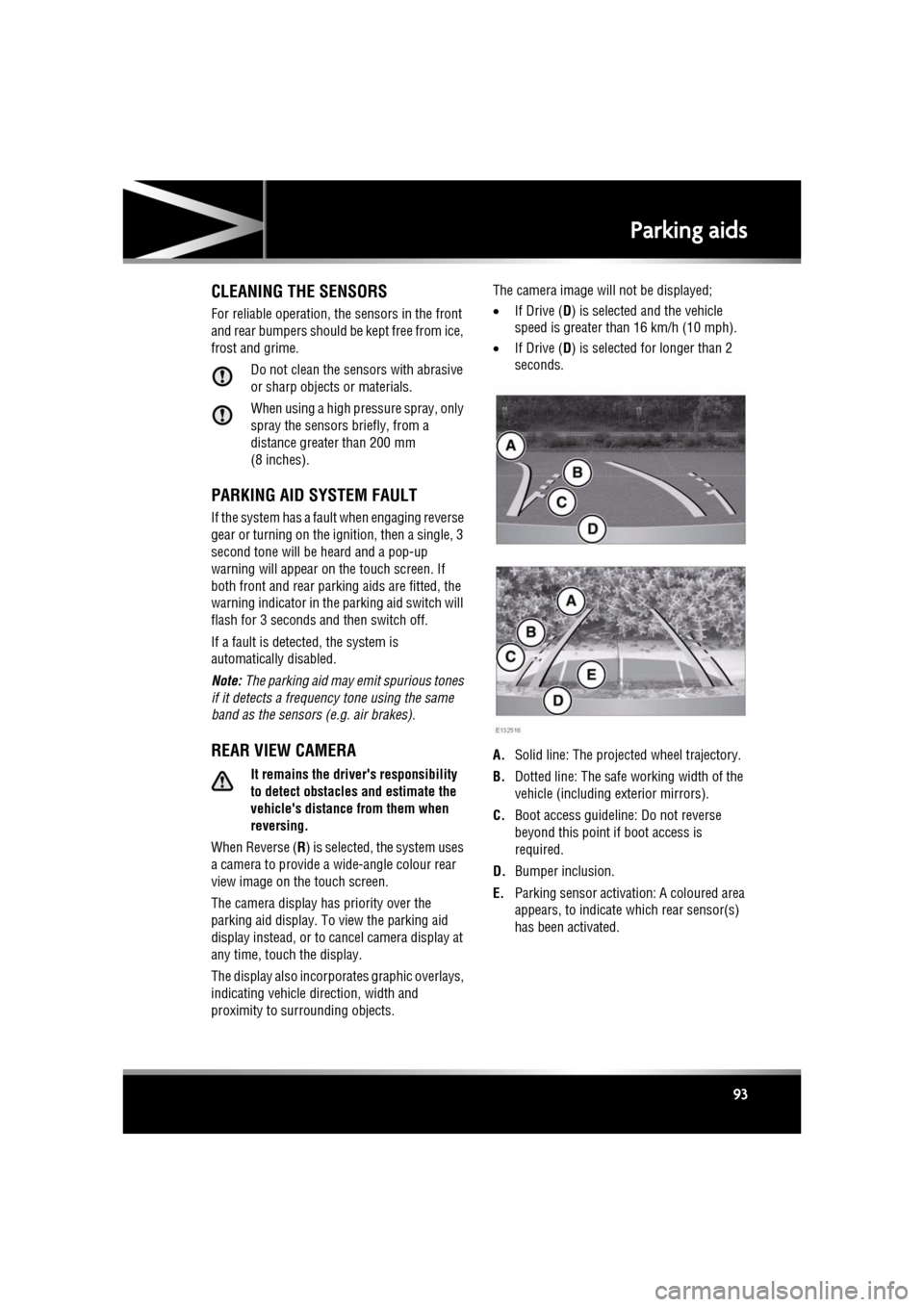
The display also incorporates graphic overlays,
indicating vehicle di rection, width and
proximity to surrounding objects. The camera image will not be displayed;
•
If Drive ( D) is selected and the vehicle
speed is greater than 16 km/h (10 mph).
• If Drive ( D) is selected for longer than 2
seconds.
A. Solid line: The projec ted wheel trajectory.
B. Dotted line: The safe working width of the
vehicle (including exterior mirrors).
C. Boot access guideline: Do not reverse
beyond this point if boot access is
required.
D. Bumper inclusion.
E. Parking sensor activati on: A coloured area
appears, to indicate which rear sensor(s)
has been activated.
Page 94 of 225
L
(FM8) SEMCON JLR OWNER GUIDE VER 1.00 EURO
LANGUAGE: english-en; MARQUE: jaguar; MODEL: XF
Cruise control
94
Cruise controlUSING CRUISE CONTROL
The cruise (speed) contro l system can be used
by the driver to maintain a selected vehicle
speed above 30 km/h (18 mph).
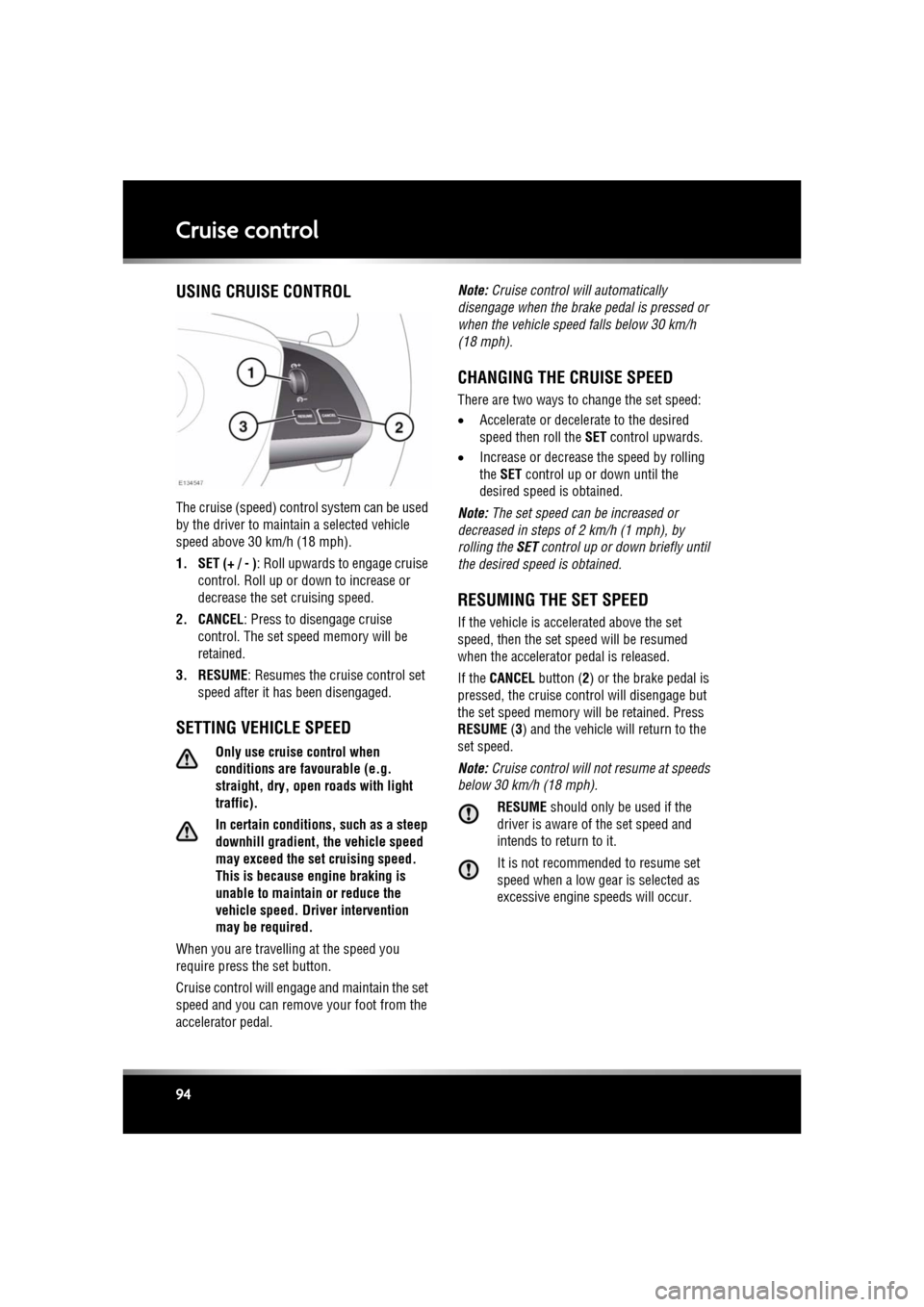
1. SET (+ / - ) : Roll upwards to engage cruise
control. Roll up or down to increase or
decrease the set cruising speed.
2. CANCEL : Press to disengage cruise
control. The set sp eed memory will be
retained.
3. RESUME : Resumes the cruise control set
speed after it has been disengaged.
SETTING VEHICLE SPEED
Only use cruise control when
conditions are favourable (e.g.
straight, dry, open roads with light
traffic).
In certain conditions, such as a steep
downhill gradient, the vehicle speed
may exceed the set cruising speed.
This is because eng ine braking is
unable to maintain or reduce the
vehicle speed. Driver intervention
may be required.
When you are travelling at the speed you
require press the set button.
Cruise control will enga ge and maintain the set
speed and you can remove your foot from the
accelerator pedal. Note:
Cruise control w ill automatically
disengage when the brake pedal is pressed or
when the vehicle speed falls below 30 km/h
(18 mph).
CHANGING THE CRUISE SPEED
There are two ways to change the set speed:
• Accelerate or decele rate to the desired
speed then roll the SET control upwards.
• Increase or decrease the speed by rolling
the SET control up or down until the
desired speed is obtained.
Note: The set speed can be increased or
decreased in steps of 2 km/h (1 mph), by
rolling the SET control up or down briefly until
the desired spee d is obtained.
RESUMING THE SET SPEED
If the vehicle is accelerated above the set
speed, then the set speed will be resumed
when the accelerator pedal is released.
If the CANCEL button ( 2) or the brake pedal is
pressed, the cruise cont rol will disengage but
the set speed memory will be retained. Press
RESUME (3) and the vehicle will return to the
set speed.
Note: Cruise control will not resume at speeds
below 30 km/h (18 mph).
RESUME should only be used if the
driver is aware of the set speed and
intends to return to it.
It is not recomme nded to resume set
speed when a low gear is selected as
excessive engine speeds will occur.
Page 95 of 225

R
(FM8) SEMCON JLR OWNER GUIDE VER 1.00 EURO
LANGUAGE: english-en; MARQUE: jaguar; MODEL: XF
Cruise control
95
AUTOMATIC SWITCH OFF
Cruise control will swit ch off but the set speed
will remain in the memory when:
• The CANCEL button ( 2) is pressed.
• The brake pedal is pressed.
• Speed falls below 30 km/h (18 mph).
• Neutral, Park or Reverse gear is selected.
• Dynamic Stability C ontrol is operating.
• The difference between the actual and set
speed is too great.
• When the vehicle reaches a maximum
speed of 192 km/h (120 mph).
• The accelerator pedal is used to accelerate
beyond the set speed for too long a period.
Cruise control will switch off and clear the
memory when:
• The ignition system is switched off.
• A fault occurs. The cr uise control system
will switch off and cannot be used until the
fault is cleared.
Page 98 of 225

L
(FM8) SEMCON JLR OWNER GUIDE VER 1.00 EURO
LANGUAGE: english-en; MARQUE: jaguar; MODEL: XF
Adaptive cruise control
98
CHANGING THE FOLLOW MODE SET
GAP
Four gap settings are available and the selected
gap setting will be displayed on the message
centre when the gap adjustment control is
operated.
Each gap level is indi cated by an additional
chevron in front of the vehicle icon in the
message centre (one chevron (gap level 1)
being the shortest, four chevrons (gap level 4)
being the longest).
Note: When the ignition is switched off, the
gap setting will revert to the default setting
(gap level 3) when switched on again.
Note: It is the driver’s res ponsibility to select a
gap appropriate to the driving conditions.
OVERRIDING THE SPEED AND
FOLLOW MODE
Whenever the driver is overriding the
ACC by depressing the accelerator
pedal, the ACC will not automatically
apply the brakes to maintain
separation from any vehicle ahead.
The set speed and gap can be overridden by
pressing the accelerator pedal when cruising at
constant speed or in follow mode. If the vehicle
is in follow mode, the warning lamp will go out
when the ACC is overridden by the driver using
the accelerator and CRUISE OVERRIDE will be
displayed on the message centre. When the
accelerator is released the ACC function will
operate again and vehicle speed will decrease
to the set speed, or a lower speed if follow
mode is active.
AUTOMATIC LOW SPEED
SWITCH-OFF
If the speed of the vehicle decreases below 30
km/h (18 mph), the ACC system will be
automatically switched off and the warning
lamp will go out.
If the brakes were bei ng applied by the ACC
system, they will be slowly released.
This will be accompanied by an audible
warning, and DRIVER INTERVENE will be
displayed on the message centre. The driver
must take control.
ACC AUTO OFF
ACC will disengage, but not clear the memory
when:
• The CANCEL button is pressed
• The brake pedal is pressed
• Neutral ( N), Park (P ) or Reverse ( R) gear is
selected
• Dynamic Stability Control activates.
ACC will disengage, and clear the memory
when:
• The ignition system is switched off
• Maximum vehicle speed is reached
• A fault occurs in the ACC system.