light JAGUAR XF 2010 1.G Owner's Manual
[x] Cancel search | Manufacturer: JAGUAR, Model Year: 2010, Model line: XF, Model: JAGUAR XF 2010 1.GPages: 225, PDF Size: 8 MB
Page 87 of 225
R
(FM8) SEMCON JLR OWNER GUIDE VER 1.00 EURO
LANGUAGE: english-en; MARQUE: jaguar; MODEL: XF
Brakes
87
BrakesIMPORTANT INFORMATION
Do not rest your foot on the brake
pedal whilst the vehicle is in motion.
Never allow the vehicle to coast
(freewheel) with the engine turned off.
The engine must be running to provide
full braking assistance. The brakes
will still function wi th the engine off,
but far more pressure will be required
to operate them.
If the red brake warning lamp
illuminates, safely bring the vehicle to
a stop, as quickly as possible and
seek qualified assistance.
Never place non-approved floor
matting or any other obstructions
under the brake pedal. This restricts
pedal travel and braking efficiency.
Driving through heavy rain or water can have
an adverse effect on braking efficiency. Under
such circumstances, it is recommended that
you lightly apply the brak es intermittently to
dry the brakes.
BRAKE WARNING LAMPS
Note: This warning lamp will also illuminate if
there is a fault with the parking brake. See 88,
ELECTRIC PARKIN G BRAKE (EPB).
ELECTRONIC BRAKE FORCE
DISTRIBUTION (EBD)
EBD balances the distribution of braking forces
between the wheels on the front and rear axles,
to maintain maximum braking under all vehicle
loading conditions.
For example; Under light loads, EBD applies
less braking effort to the rear wheels, to
maintain stability. Conv ersely, it allows full
braking effort to the rear wheels when the
vehicle is heavily laden.
A fault with the EBD system is indicated by the
red brake warning lamp and the message EBD
FAULT . The braking system will still operate,
but without EBD assist ance. Seek qualified
assistance to have the fault rectified.
EMERGENCY BRAKE ASSIST (EBA)
The EBA system measures the rate at which the
brake pressure increases. If the system detects
an emergency braki ng situation, EBA
automatically initiates fu ll braking effect. This
can reduce stopping distances in critical
situations.
A fault with the EBA system is indicated by the
brake warning lamp illuminating and
Emergency Brake Assist Not Available
displaying in the message centre. The braking
system will still func tion, but without EBA
assistance. Seek qualified assistance to have
the fault rectified.
EMERGENCY STOP SIGNAL (ESS)
ESS (Emergency Stop Signal) automatically
activates the hazard warning lights during
emergency braking to warn other road users
and reduce the risk of a collision.
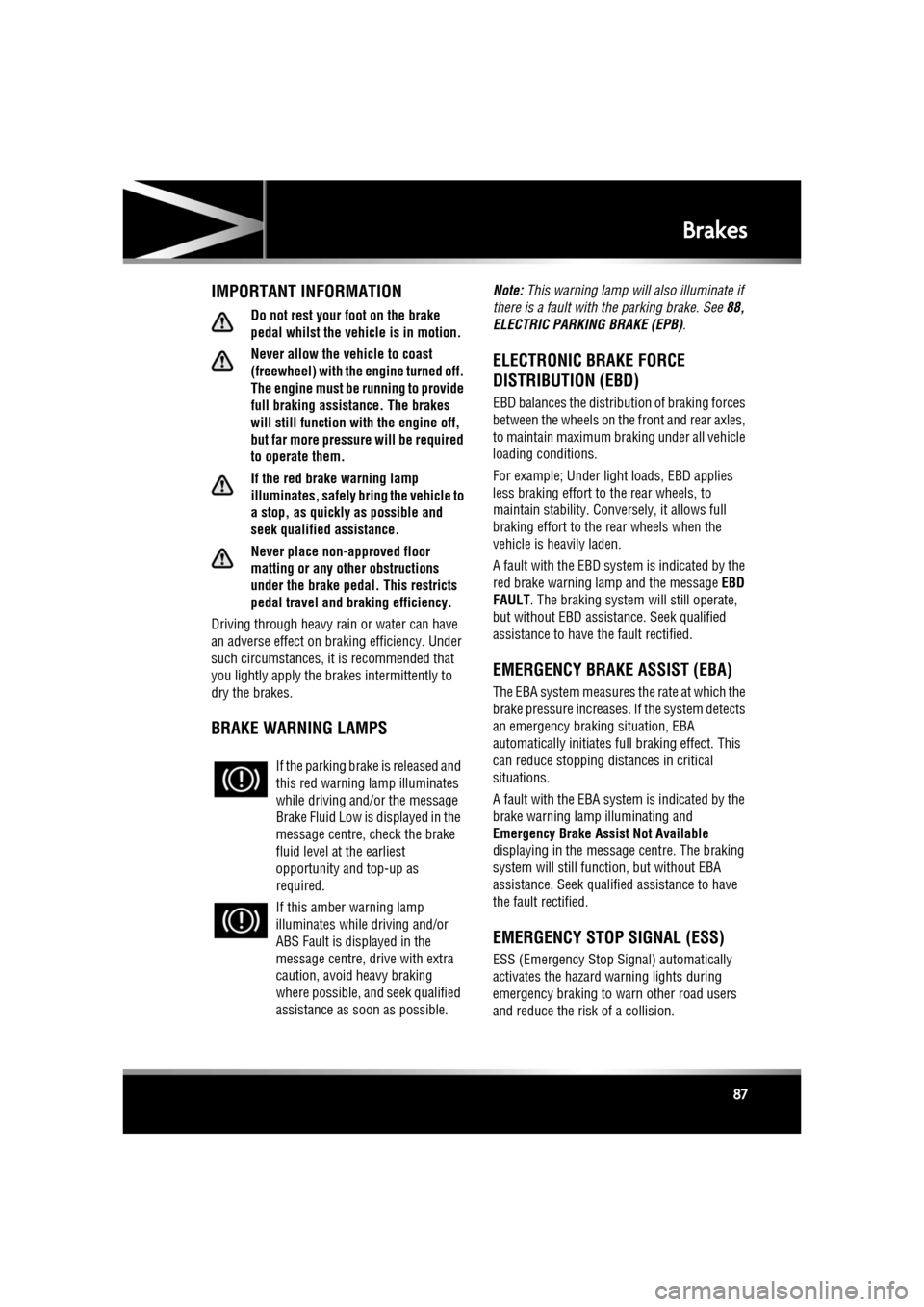
If the parking brake
is released and
this red warning lamp illuminates
while driving and/or the message
Brake Fluid Low is displayed in the
message centre, check the brake
fluid level at the earliest
opportunity and top-up as
required.
If this amber warning lamp
illuminates while driving and/or
ABS Fault is displayed in the
message centre, drive with extra
caution, avoid heavy braking
where possible, and seek qualified
assistance as soon as possible.
Page 89 of 225
R
(FM8) SEMCON JLR OWNER GUIDE VER 1.00 EURO
LANGUAGE: english-en; MARQUE: jaguar; MODEL: XF
Tyre pressure monitoring system
89
Tyre pressure monitoring systemTYRE PRESSURE MONITORING
SYSTEM (TPMS)
The TPM system provides a low
pressure warning and does not
re-inflate your tyres. Tyre pressures
should be checked regularly using an
accurate pressure gauge when cold.
The TPM system can NOT register
damage to a tyre. Regularly check the
condition of your tyres, especially if
the vehicle is driven off-road.
When inflating tyre s, care should be
taken to avoid bending or damaging the
TPM system valves. Always ensure
correct alignment of the inflation head
to the valve stem.
Note: Non-approved accessories may interfere
with the system. If this occurs, TYRE
PRESSURE MONITORI NG SYSTEM FAULT is
displayed in the message centre.
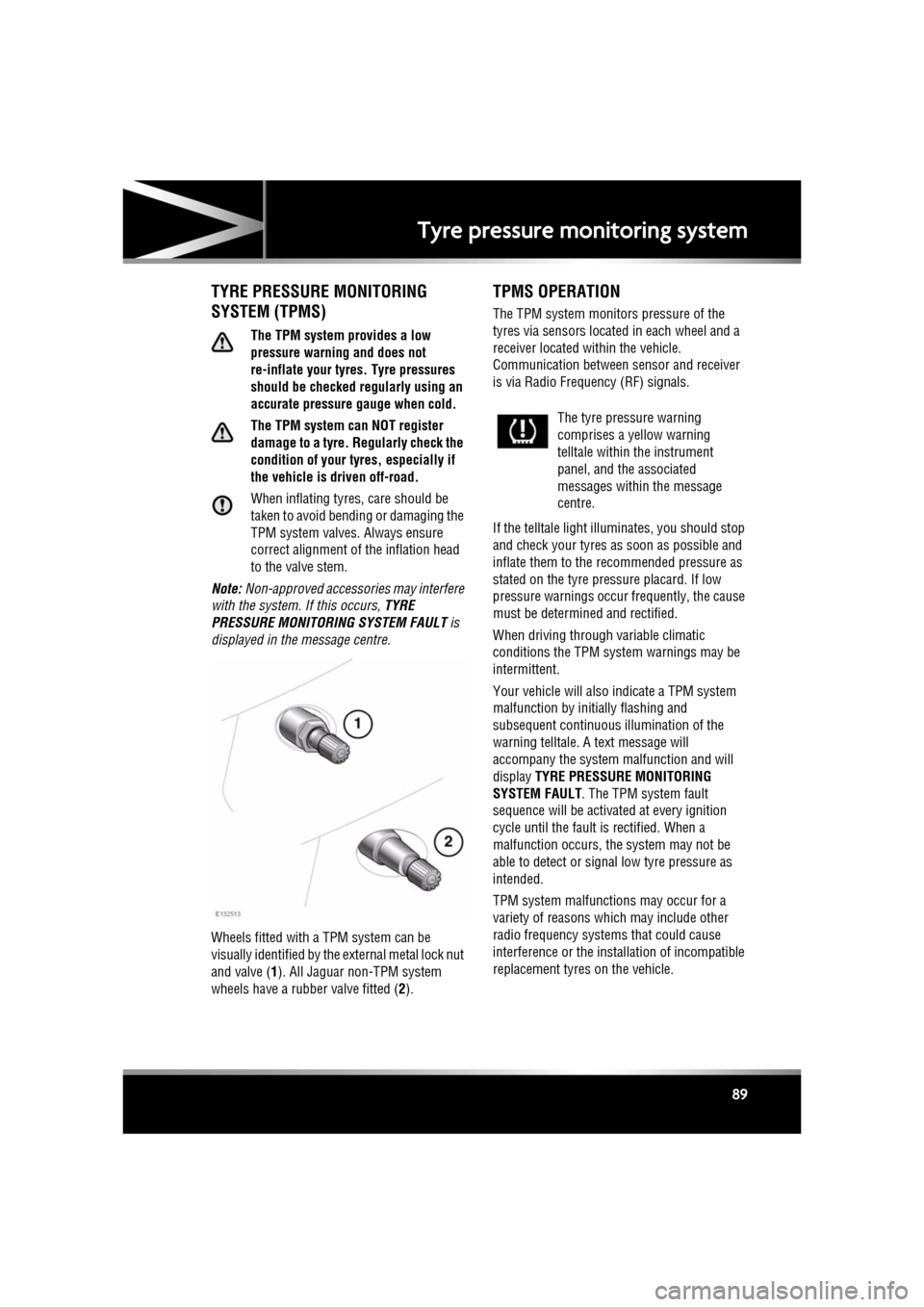
Wheels fitted with a TPM system can be
visually identified by the external metal lock nut
and valve ( 1). All Jaguar n on-TPM system
wheels have a rubber valve fitted (2).
TPMS OPERATION
The TPM system monitors pressure of the
tyres via sensors located in each wheel and a
receiver located within the vehicle.
Communication between sensor and receiver
is via Radio Freque ncy (RF) signals.
If the telltale light illu minates, you should stop
and check your tyres as soon as possible and
inflate them to the recommended pressure as
stated on the tyre pressure placard. If low
pressure warnings occur frequently, the cause
must be determined and rectified.
When driving through variable climatic
conditions the TPM syst em warnings may be
intermittent.
Your vehicle will also indicate a TPM system
malfunction by initially flashing and
subsequent continuous illumination of the
warning telltale. A text message will
accompany the system malfunction and will
display TYRE PRESSURE MONITORING
SYSTEM FAULT . The TPM system fault
sequence will be activated at every ignition
cycle until the fault is rectified. When a
malfunction occurs, the system may not be
able to detect or signal low tyre pressure as
intended.
TPM system malfuncti ons may occur for a
variety of reasons which may include other
radio frequency systems that could cause
interference or the installation of incompatible
replacement tyres on the vehicle.
The tyre pressure warning
comprises a yellow warning
telltale within the instrument
panel, and the associated
messages within the message
centre.
Page 94 of 225
L
(FM8) SEMCON JLR OWNER GUIDE VER 1.00 EURO
LANGUAGE: english-en; MARQUE: jaguar; MODEL: XF
Cruise control
94
Cruise controlUSING CRUISE CONTROL
The cruise (speed) contro l system can be used
by the driver to maintain a selected vehicle
speed above 30 km/h (18 mph).
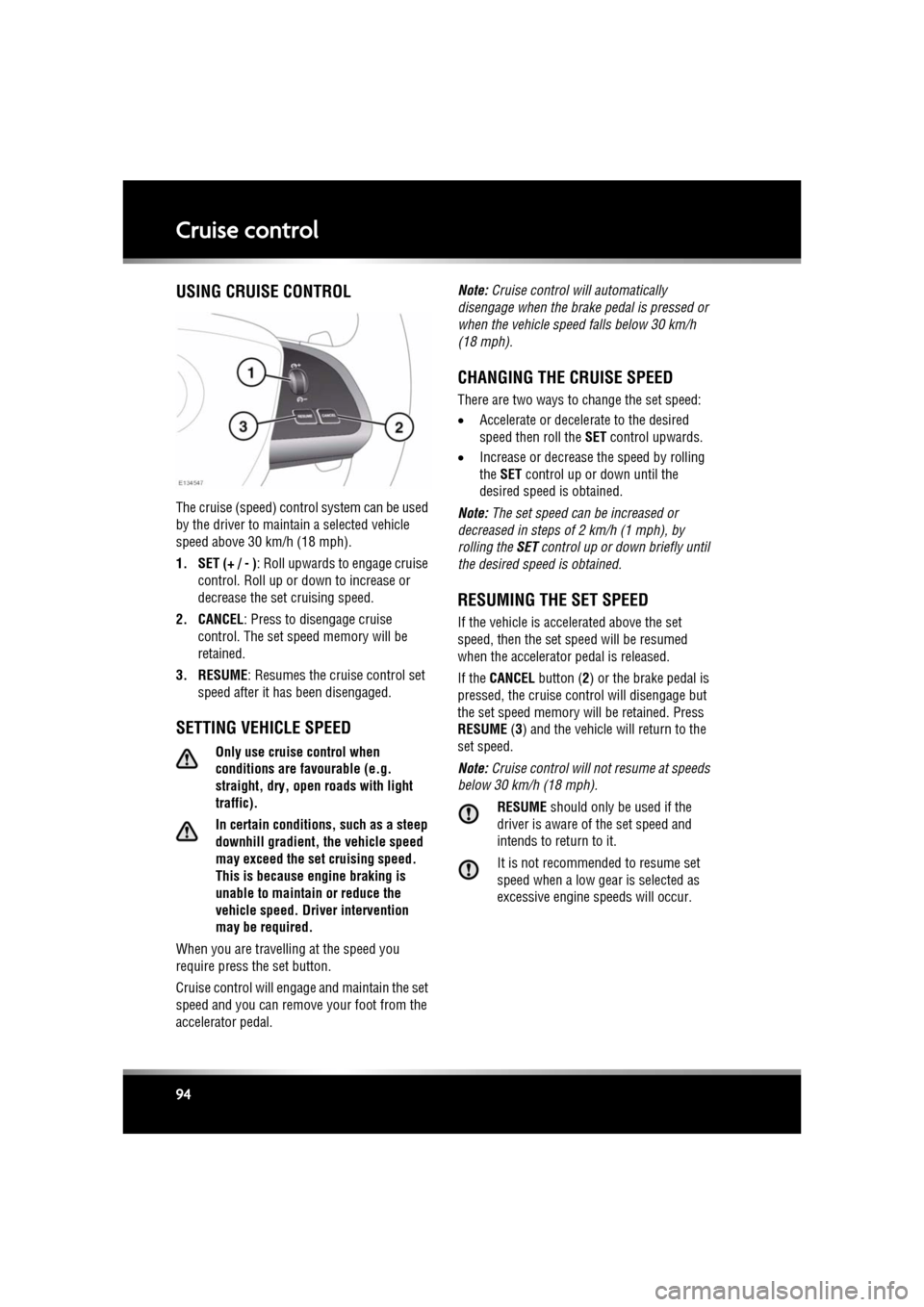
1. SET (+ / - ) : Roll upwards to engage cruise
control. Roll up or down to increase or
decrease the set cruising speed.
2. CANCEL : Press to disengage cruise
control. The set sp eed memory will be
retained.
3. RESUME : Resumes the cruise control set
speed after it has been disengaged.
SETTING VEHICLE SPEED
Only use cruise control when
conditions are favourable (e.g.
straight, dry, open roads with light
traffic).
In certain conditions, such as a steep
downhill gradient, the vehicle speed
may exceed the set cruising speed.
This is because eng ine braking is
unable to maintain or reduce the
vehicle speed. Driver intervention
may be required.
When you are travelling at the speed you
require press the set button.
Cruise control will enga ge and maintain the set
speed and you can remove your foot from the
accelerator pedal. Note:
Cruise control w ill automatically
disengage when the brake pedal is pressed or
when the vehicle speed falls below 30 km/h
(18 mph).
CHANGING THE CRUISE SPEED
There are two ways to change the set speed:
• Accelerate or decele rate to the desired
speed then roll the SET control upwards.
• Increase or decrease the speed by rolling
the SET control up or down until the
desired speed is obtained.
Note: The set speed can be increased or
decreased in steps of 2 km/h (1 mph), by
rolling the SET control up or down briefly until
the desired spee d is obtained.
RESUMING THE SET SPEED
If the vehicle is accelerated above the set
speed, then the set speed will be resumed
when the accelerator pedal is released.
If the CANCEL button ( 2) or the brake pedal is
pressed, the cruise cont rol will disengage but
the set speed memory will be retained. Press
RESUME (3) and the vehicle will return to the
set speed.
Note: Cruise control will not resume at speeds
below 30 km/h (18 mph).
RESUME should only be used if the
driver is aware of the set speed and
intends to return to it.
It is not recomme nded to resume set
speed when a low gear is selected as
excessive engine speeds will occur.
Page 101 of 225
R
(FM8) SEMCON JLR OWNER GUIDE VER 1.00 EURO
LANGUAGE: english-en; MARQUE: jaguar; MODEL: XF
Adaptive cruise control
101
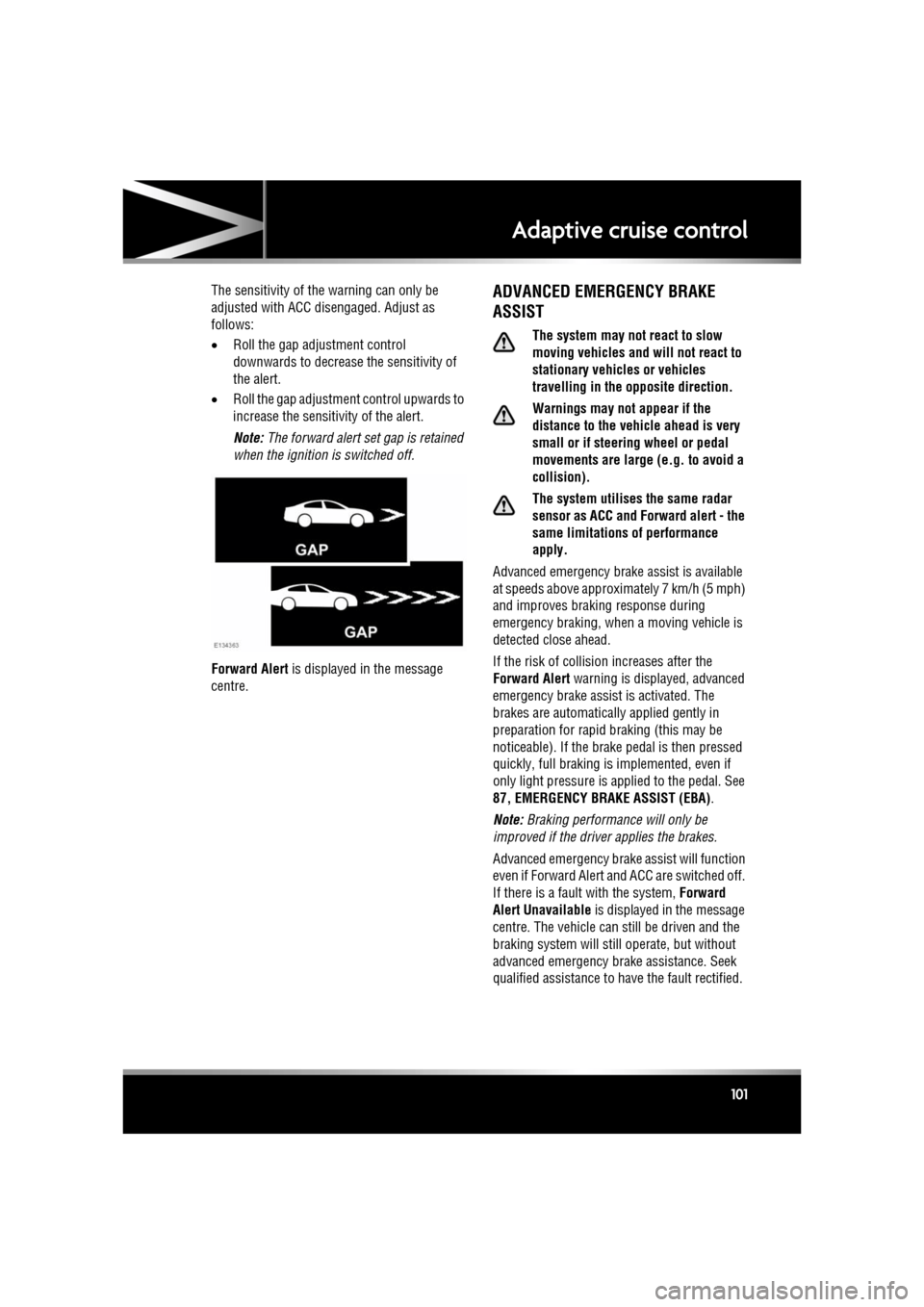
The sensitivity of th e warning can only be
adjusted with ACC disengaged. Adjust as
follows:
• Roll the gap adjustment control
downwards to decrease the sensitivity of
the alert.
• Roll the gap adjustment control upwards to
increase the sensitivity of the alert.
Note: The forward alert set gap is retained
when the ignition is switched off.
Forward Alert is displayed in the message
centre.ADVANCED EMERGENCY BRAKE
ASSIST
The system may not react to slow
moving vehicles and will not react to
stationary vehicles or vehicles
travelling in the opposite direction.
Warnings may not appear if the
distance to the vehicle ahead is very
small or if steering wheel or pedal
movements are large (e.g. to avoid a
collision).
The system utilises the same radar
sensor as ACC and Forward alert - the
same limitations of performance
apply.
Advanced emergency brake assist is available
at speeds above approximately 7 km/h (5 mph)
and improves brakin g response during
emergency braking, when a moving vehicle is
detected close ahead.
If the risk of collision increases after the
Forward Alert warning is displayed, advanced
emergency brake assist is activated. The
brakes are automatically applied gently in
preparation for rapid braking (this may be
noticeable). If the brake pedal is then pressed
quickly, full braking is implemented, even if
only light pressure is ap plied to the pedal. See
87, EMERGENCY BRAKE ASSIST (EBA) .
Note: Braking performance will only be
improved if the driver applies the brakes.
Advanced emergency brake assist will function
even if Forward Alert and ACC are switched off.
If there is a fault with the system, Forward
Alert Unavailable is displayed in the message
centre. The vehicle can st ill be driven and the
braking system will still operate, but without
advanced emergency brake assistance. Seek
qualified assistance to have the fault rectified.
Page 126 of 225
L
(FM8) SEMCON JLR OWNER GUIDE VER 1.00 EURO
LANGUAGE: english-en; MARQUE: jaguar; MODEL: XF
Voice control
126
Voice controlUSING VOICE CONTROL
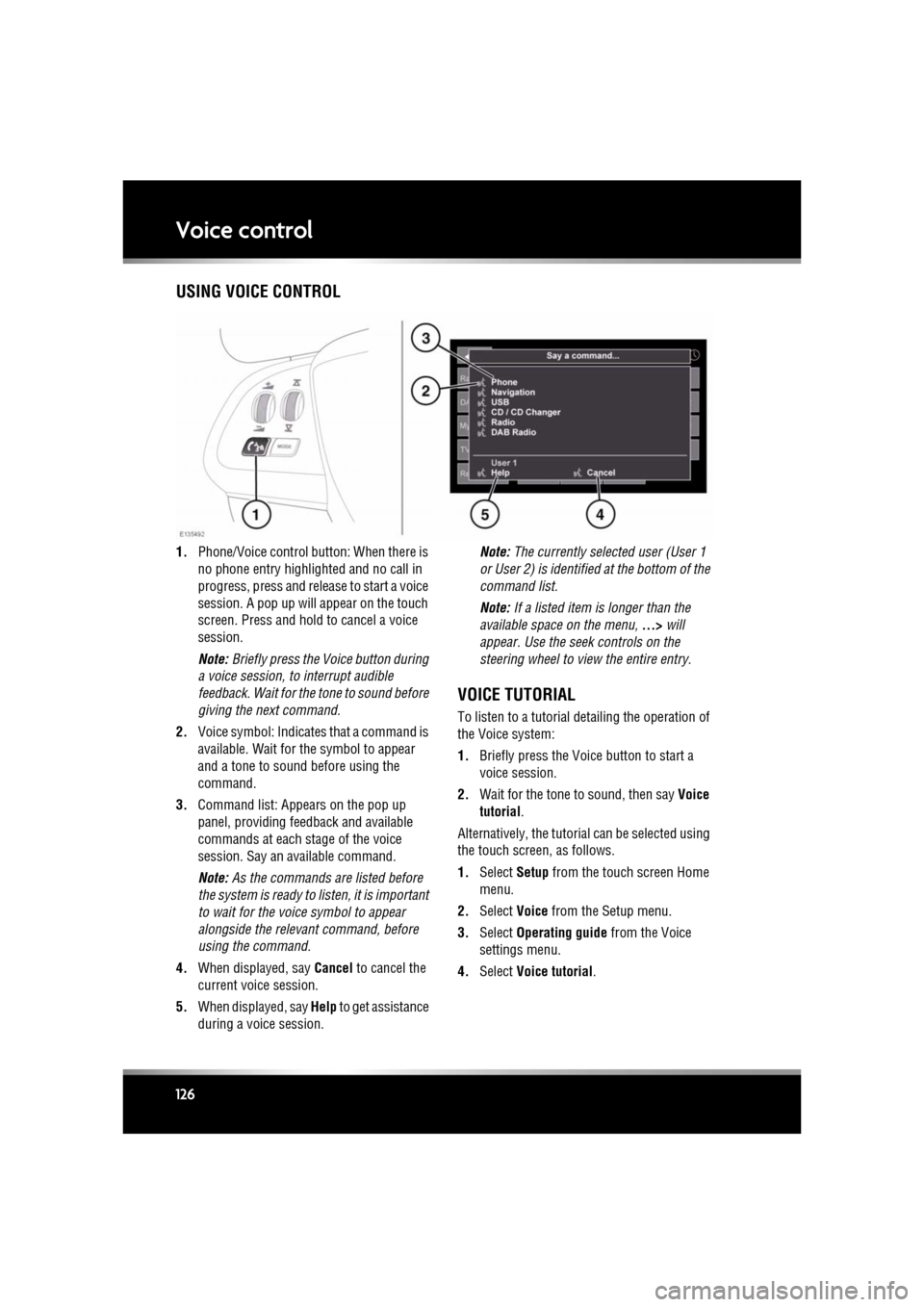
1. Phone/Voice cont rol button: When there is
no phone entry highlighted and no call in
progress, press and release to start a voice
session. A pop up will appear on the touch
screen. Press and hold to cancel a voice
session.
Note: Briefly press the Voice button during
a voice session, to interrupt audible
feedback. Wait for the tone to sound before
giving the next command.
2. Voice symbol: Indicates that a command is
available. Wait for the symbol to appear
and a tone to sound before using the
command.
3. Command list: Appears on the pop up
panel, providing fee dback and available
commands at each stage of the voice
session. Say an available command.
Note: As the commands are listed before
the system is ready to listen, it is important
to wait for the voice symbol to appear
alongside the relevant command, before
using the command.
4. When displayed, say Cancel to cancel the
current voice session.
5. When displayed, say Help to get assistance
during a voice session. Note:
The currently selected user (User 1
or User 2) is identified at the bottom of the
command list.
Note: If a listed item is longer than the
available space on the menu, ...> will
appear. Use the seek controls on the
steering wheel to view the entire entry.
VOICE TUTORIAL
To listen to a tutorial detailing the operation of
the Voice system:
1. Briefly press the Voice button to start a
voice session.
2. Wait for the tone to sound, then say Voice
tutorial .
Alternatively, the tutorial can be selected using
the touch screen, as follows.
1. Select Setup from the touch screen Home
menu.
2. Select Voice from the Setup menu.
3. Select Operating guide from the Voice
settings menu.
4. Select Voice tutorial.
Page 129 of 225
R
(FM8) SEMCON JLR OWNER GUIDE VER 1.00 EURO
LANGUAGE: english-en; MARQUE: jaguar; MODEL: XF
Telephone
129
BLUETOOTH® INFORMATION
The Jaguar Bluetoot h® system supports
Bluetooth® Hands-Fre e Profile (HFP),
Advanced Audio Distribution Profile (A2DP)
and Audio Video Remote Control Profile
(AVRCP).
Note: HFP and A2DP/AVRCP profiles can be
connected independently, so a phone can be
connected via one, while a media device can be
connected via the other, at the same time.
Before making use of the vehicle’s Bluetooth
phone system, your Bl uetooth phone must be
paired and connected to the vehicle system.
This is done using one of two methods; via
your phone to the vehicl e or from the touch
screen to your phone. If one of these methods
is not successful, try the other option.
Each time the ignition is switched on the
system will attempt to connect with the last
connected phone.
As mobile phones have a wide range of audio
and echo characteristics, it may take a few
seconds for the vehicle system to adapt and
deliver optimum audio performance. To
achieve this, it may be necessary to reduce the
in-vehicle volume a nd ventilation fan speed
slightly.
TELEPHONE SAFETY
Switch off your telephone in areas
with a high explos ion risk. This
includes filling stat ions, fuel storage
areas or chemical factories, as well
as places where the air contains fuel
vapour, chemicals or metal dust. Always stow your mobile phone
securely.
The functioning of cardiac
pacemakers or hearing aids may be
impaired when the phone is in use.
Check with a doctor or manufacturer
whether any such devices you or your
passengers are using, are sufficiently
protected against high-frequency
energy.
The Health Industry Manufacturers'
Association recommends that a minimum
separation of 15 centimetres (six inches) is
maintained between a wireless phone antenna
and a pacemaker, to avoid potential
interference with the pacemaker. These
recommendations are consistent with the
independent research by, and
recommendations of, Wi reless Technology
Research.
Bluetooth® is the name for
short-range radio frequency (RF)
technology that allows electronic
devices to communicate
wirelessly with each other.
Page 136 of 225

L
(FM8) SEMCON JLR OWNER GUIDE VER 1.00 EURO
LANGUAGE: english-en; MARQUE: jaguar; MODEL: XF
Navigation system
136
4. Route voice guidance: Allows the voice
guidance messages to be turned off for the
current journey. The soft key is highlighted
while voice guidance is enabled.
5. Detour: Allows a detour from the current route.
6. Return to map : Advances to the main map
screen.
7. Nav set-up : Settings for the navigation
system.
8. Map POI off : Turns the POI (Point Of
Interest) icons on the map on/off.
9. TMC (Traffic Message Channel): Not used
for entering a destination but, when
enabled, will provide data about road
conditions and any even ts that may affect
the journey.
10. More...: Displays the other Nav menu screen.
11. Stored locations : Manages the stored
locations.
12. Stop guidance: Cancels current route guidance.
13. Destination entry : Provides a choice of
options for entering a destination.
Page 139 of 225

R
(FM8) SEMCON JLR OWNER GUIDE VER 1.00 EURO
LANGUAGE: english-en; MARQUE: jaguar; MODEL: XF
Navigation system
139
START GUIDANCE
After selecting a destination, the system will
calculate the route.
There is now a choice to select 3 Routes,
Change route or to Start navigation guidance.
Touch 3 Routes to display a choice of three
different route options on the map.
The roads on the map are drawn in three
different colours to highlight each route.
EcoRoute helps you find the most fuel efficient
route available. A display of three leaves
indicates the most fuel efficient route.
Select route 1, 2 or 3 by touching the
respective box displaye d on the right side of
the map.
Touch Change Route followed by Route prefs.
to change the route setti ngs. If a destination is
already set, touch Waypoint to add a waypoint
in the journey if required.
When you have made your selection, if any,
touch Go.
Note: As you approach a j unction, in addition
to the voice guidance, an inset on the map will
display an enlarged view of the junction.
EASY ROUTE
In Route options , Easy Route can be turned On
or Off .
When On is selected, Easy Route changes the
calculation parameters of Route 3 in order to
reduce:
• Junctions.
• Turns.
• Turns that cross traffic.
• The priority of minor roads.
• Complex junction s and manoeuvres.
LEARN ROUTE
In Route options , Learn Route can be turned
On or Off.
When On is selected, if you make the same
deviation from the proposed route three times,
then the system will memorize the deviation
and offer that as the normal route from then on.
Select Reset all routes to delete any learnt
routes and return to the default settings.
VOICE GUIDANCE
To turn voice guidance on or off but maintain
route guidance, proceed as follows:
1. Touch Nav menu on the navigation screen.
2. Touch the Route voice guidance soft key.
The soft key will be highlighted when voice
guidance is enabled.
CANCEL ROUTE GUIDANCE
To cancel route guidance, proceed as follows:
1. Touch Nav menu on the navigation screen.
2. Touch the Cancel guidance soft key.
QUICK POI SELECTION
Touch the Map screen to display the POI
button. Touch the POI (Point of interest)
button. The screen shows six suggested
categories, five of which can be selected as
quick points of interest.
Note: The POI icons will not be shown if the
map zoom level is greate r than 1 km (½ mile).
Select a Quick POI category, or select More to
see further POIs. Touch OK to confirm a
selection.
The map screen with the POI icon(s) is
displayed. Select the five POIs you wish to see
when the Quick POIs are displayed.
Page 149 of 225
R
(FM8) SEMCON JLR OWNER GUIDE VER 1.00 EURO
LANGUAGE: english-en; MARQUE: jaguar; MODEL: XF
Tyre repair kit
149
USING THE TYRE REPAIR KIT
Avoid skin contact with the sealant
which contains natural rubber latex.
If the tyre inflation pressure does not
reach 1.8 bar (26 psi, 180 kPa) within
seven minutes, the tyre may have
suffered excessive damage. A
temporary repair will not be possible,
and the vehicle should not be driven
until the tyre has been replaced.
Before attempting a tyre repair, ensure
that the vehicle is parked safely, as far
away from passing traffic as possible.
Ensure that the parking brake is applied
and P (Park) is selected.
Do not attempt to remove foreign
objects such as nails, screws, etc. from
the tyre.
Always run the engine when using the
compressor, unless the vehicle is in an
enclosed or poorly ventilated space, as
this may cause asphyxiation.
To prevent overheatin g, do not operate
the compressor continuously for longer
than ten minutes.
Note: All vehicle drivers and occupants should
be made aware that a temporary repair has
been made to a tyre fitt ed to the vehicle. They
should also be made aware of the special
driving conditions im posed when using a
repaired tyre.
REPAIR PROCEDURE
Check the tyre sidewall prior to
inflation. If there are any cracks,
bumps or similar damage, do not
attempt to inflate the tyre. Do not
stand directly besi de the tyre while
the compressor is pumping. Watch the
tyre sidewall. If any cracks, bumps or
similar damage appear, turn off the
compressor and let the air out by
means of the pressure relief valve. Do
not continue to use the tyre.
1. Open the tyre repair kit and peel off the
maximum speed label. Attach the label to
the facia in the driver's field of vision. Take
care not to obstruct an y of the instruments
or warning lights.
2. Uncoil the compressor power cable and
the inflation hose.
3. Unscrew the orange cap from the sealant
bottle receiver and the sealant bottle cap.
4. Screw the sealant bottle into the receiver
(clockwise) until tight.
•Screwing the bottle onto the receiver
will pierce the bottle's seal. Once the
receiver has been fitted, a ratchet
prevents it from being removed.
5. Remove the valve cap from the damaged
tyre.
6. Remove the protective cap from the
inflation hose and connect the inflation
hose to the tyre valve. Ensure that the hose
is screwed on firmly.
7. Ensure that the compressor switch is in the
off ( 0) position.
8. Insert the power cable connector into the
auxiliary power socket.
9. Unless the vehicle is in an enclosed area,
start the engine.
Page 152 of 225
L
(FM8) SEMCON JLR OWNER GUIDE VER 1.00 EURO
LANGUAGE: english-en; MARQUE: jaguar; MODEL: XF
Fuel and refuelling
152
Fuel and refuellingSAFETY PRECAUTIONS
Avoid exposing the f uel gasses to any
potential sources of ignition as the
resulting fire and explosion may
cause serious injuries and/or death.
Switch off the engine when refuelling,
as it is both a source of extreme
temperatures, and electrical sparks.
Switch off any personal electronic
devices such as mobile phones, or
music players.
PETROL ENGINED VEHICLES
Do not use leaded fuels, lead
substitutes or fuel additives.
Fuel system cleaning agents should not
be used, unless a pproved by Jaguar.
OCTANE RATING
The minimum octane rating for fuel used is 95
RON (Research Octane Number). The vehicle
will run on lower ratings, but it may cause
pronounced engine knock or pinking. If the
pinking is severe it ca n cause damage to the
engine, fuel and emis sion control systems.
Note: Occasional, light, engine knock
experienced while accele rating or climbing hills
is acceptable.
Super Green Plus 98 RON unleaded fuel (where
available) may be used as an alternative to the
standard 95 RON unleaded fuel.
Some countries have only 91 RON fuel
available. Vehicles sold in these countries are
specially calibrated to use this fuel.
ETHANOL
This vehicle is not suitable for use with
fuels containing more than 10%
ethanol.
Do not use E85 fuels (85% ethanol
content). Equipment necessary for the
use of fuels containing more than 10%
ethanol is not fitted to this vehicle. If
E85 fuels are used, serious engine and
fuel system damage will occur.
Fuels containing up to 10% ethanol (grain
alcohol) may be used. Ensure that the fuel has
octane ratings no lower than those
recommended for unleaded fuel. Most drivers
will not notice any opera ting difference with
fuel containing ethanol. If a difference is
detected, the use of co nventional unleaded fuel
should be resumed.
METHANOL
Wherever possible avoid using fuel
containing methanol.
Some fuels contain methanol (Methyl or wood
alcohol). If you use fuels containing methanol
the fuels must also contain co-solvents and
corrosion inhibitors fo r methanol. Also, do not
use fuels which contain more than 10%
methanol even if they contain co-solvents and
corrosion inhibitors. Fu el system damage or
vehicle performance pr oblems resulting from
the use of such fuels is not the responsibility of
Jaguar, and may not be covered under the
warranty.