light JAGUAR XF 2010 1.G User Guide
[x] Cancel search | Manufacturer: JAGUAR, Model Year: 2010, Model line: XF, Model: JAGUAR XF 2010 1.GPages: 225, PDF Size: 8 MB
Page 39 of 225
R
(FM8) SEMCON JLR OWNER GUIDE VER 1.00 EURO
LANGUAGE: english-en; MARQUE: jaguar; MODEL: XF
Interior lights
39
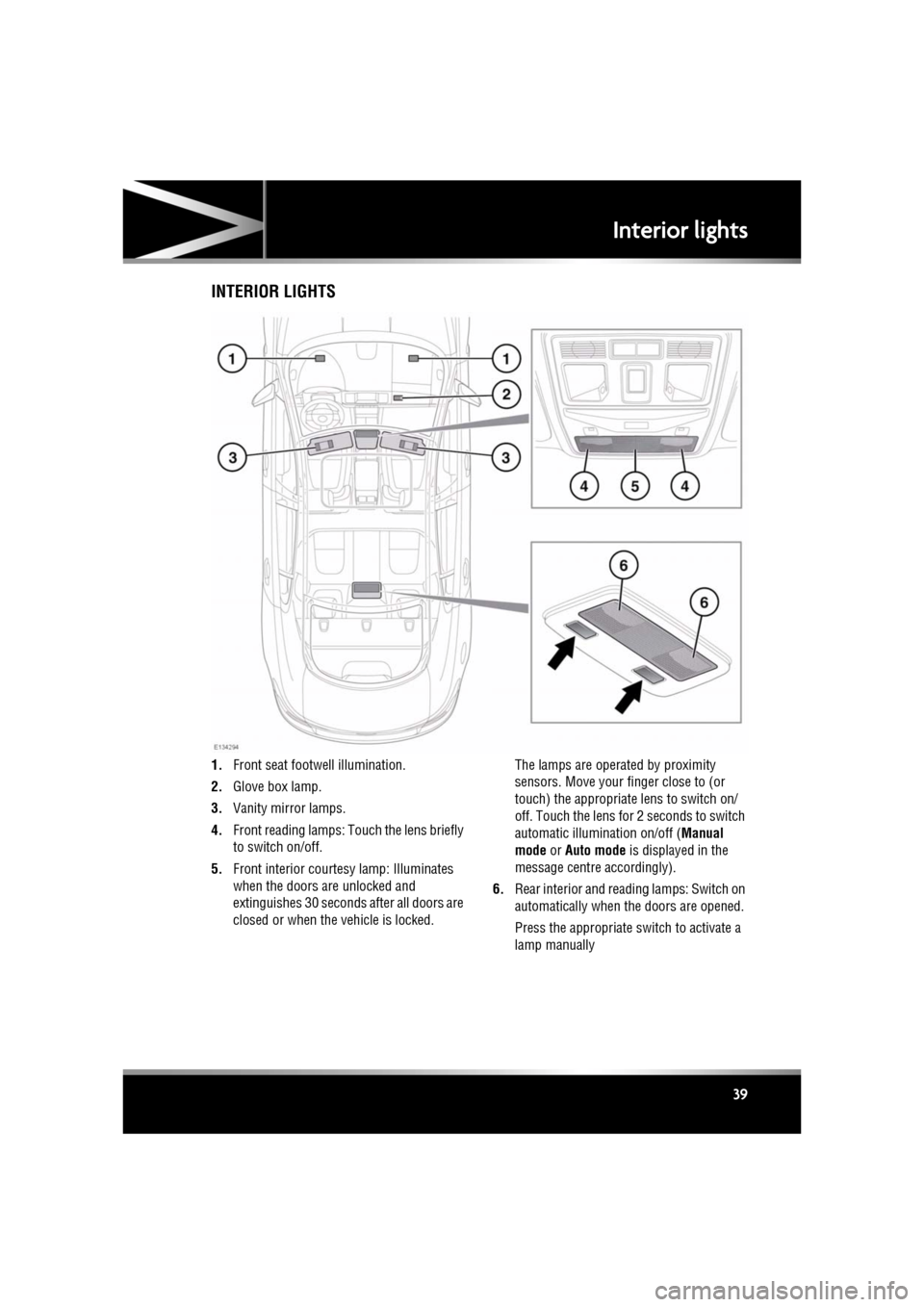
Interior lightsINTERIOR LIGHTS
1. Front seat footwe ll illumination.
2. Glove box lamp.
3. Vanity mirror lamps.
4. Front reading lamps: Touch the lens briefly
to switch on/off.
5. Front interior courte sy lamp: Illuminates
when the doors are unlocked and
extinguishes 30 seconds after all doors are
closed or when the vehicle is locked. The lamps are operated by proximity
sensors. Move your finger close to (or
touch) the appropriate lens to switch on/
off. Touch the lens for 2 seconds to switch
automatic illumination on/off (
Manual
mode or Auto mode is displayed in the
message centre accordingly).
6. Rear interior and read ing lamps: Switch on
automatically when the doors are opened.
Press the appropriate switch to activate a
lamp manually
Page 48 of 225
L
(FM8) SEMCON JLR OWNER GUIDE VER 1.00 EURO
LANGUAGE: english-en; MARQUE: jaguar; MODEL: XF
Garage door opener
48
Garage door openerGARAGE DOOR TRANSCEIVER
Do not use the transceiver with any
garage door opener that lacks the
safety stop and reverse feature as
required by safety standards.
When programming the transceiver to
a garage door opener or entry gate,
ensure the area is clear. This will
prevent potential harm or damage as
the gate or garage door will activate
during the programme.
This device may suffer from
interference if operate d in the vicinity of
a mobile or fixed station transmitter.
This interference is li kely to affect the
hand-held transmitter as well as the
in-car transceiver.
The door transceiver is located in the rear-view
mirror. It can be programmed to transmit the
radio frequencies of up to three different
transmitters, which can be used to operate
garage doors, entry gates, home lighting,
security systems or other radio frequency
operated devices.
Although this section mainly describes the
procedures for a garage door opener, it equally
applies to the previously mentioned
applications.
In some countries, this feature is also known
as the HomeLink® Universal Transceiver.
For further information, see 50,
INFORMATION AND ASSISTANCE .
BEFORE PROGRAMMING
When programming a device that may
require you to press and re-press the
hand-held transmitter (cycle), unplug
the device during the cycling process to
prevent possible motor failure.
For best results, fit a new battery to the
hand-held transmitter of the garage door
opener (or other device ) before programming.
If your garage door opener receiver (located in
the garage) is equippe d with an antenna,
ensure that the antenna is hanging straight
down.
PROGRAMMING
Ensuring that the engine is switched off:
1. Ensure that the ignition system is on.
2. Hold the end of the original garage door
opener hand-held transmitter 50 to
150 mm (2 to 6 inches) away from the
transceiver in the rear-view mirror, keeping
the indicator lamp in view.
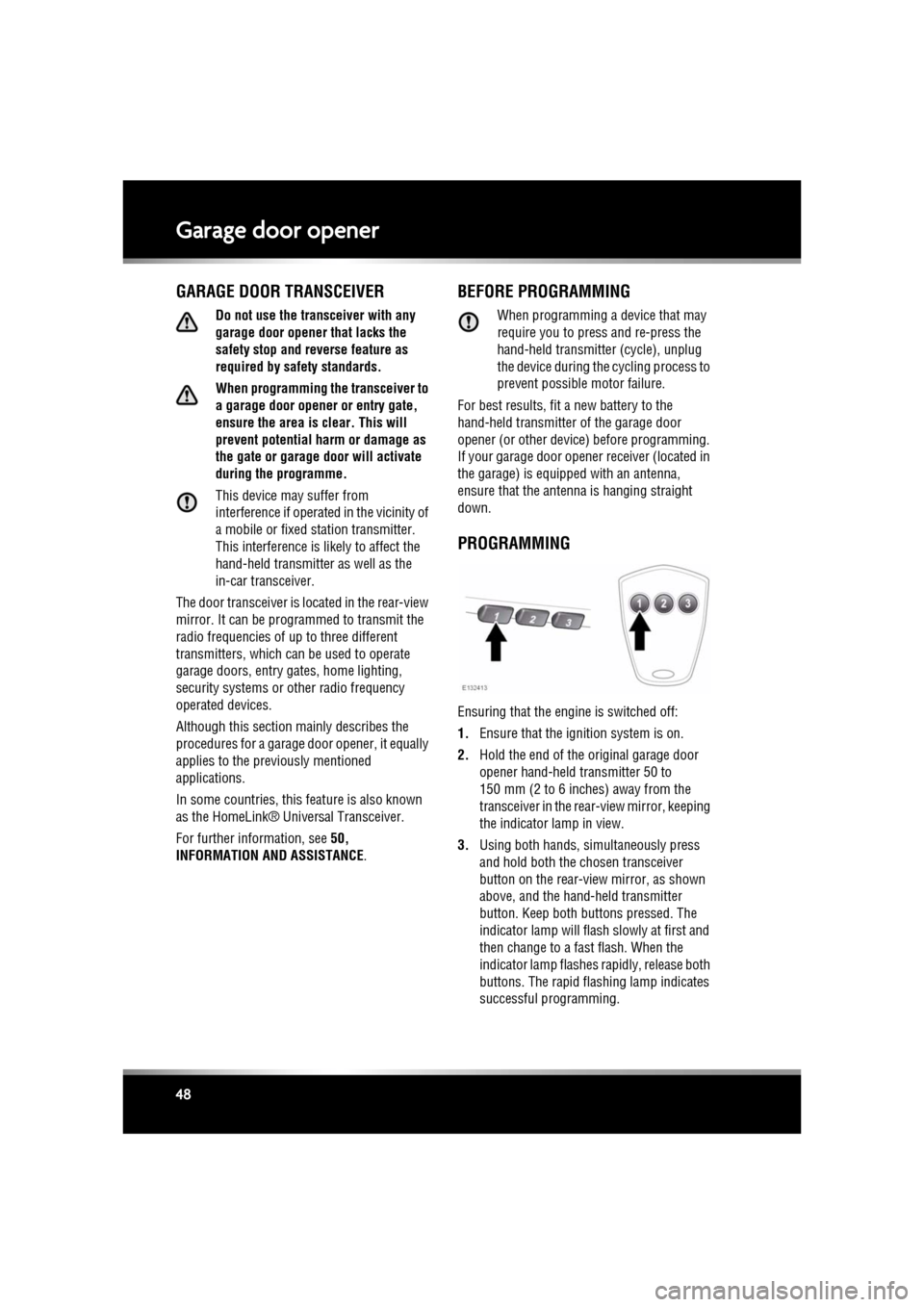
3. Using both hands, simultaneously press
and hold both the chosen transceiver
button on the rear-view mirror, as shown
above, and the hand- held transmitter
button. Keep both but tons pressed. The
indicator lamp will flas h slowly at first and
then change to a fast flash. When the
indicator lamp flashes rapidly, release both
buttons. The rapid flashing lamp indicates
successful programming.
Page 53 of 225
R
(FM8) SEMCON JLR OWNER GUIDE VER 1.00 EURO
LANGUAGE: english-en; MARQUE: jaguar; MODEL: XF
Warning lamps
53
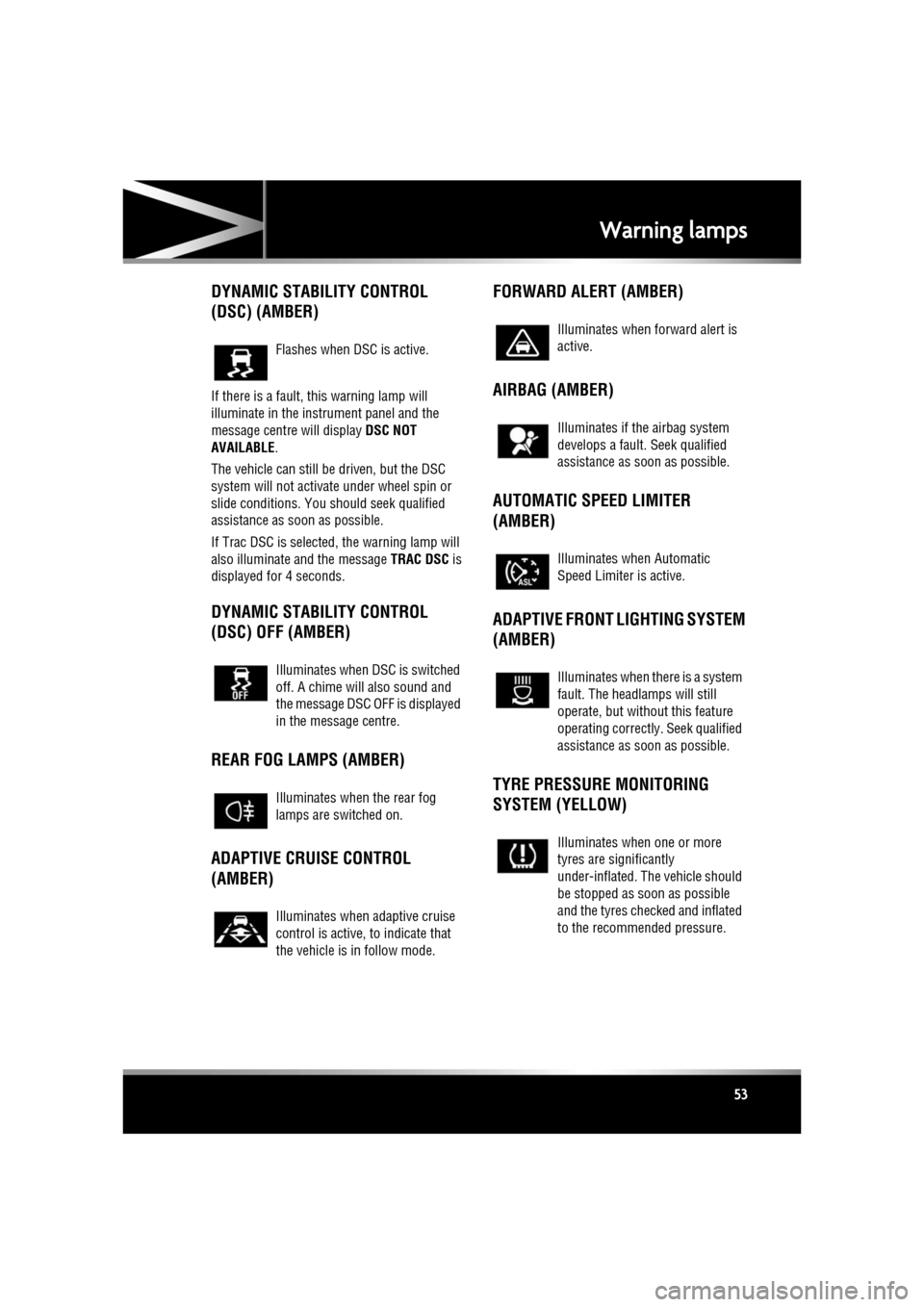
DYNAMIC STABILITY CONTROL
(DSC) (AMBER)
If there is a fault, this warning lamp will
illuminate in the instrument panel and the
message centre will display DSC NOT
AVAILABLE .
The vehicle can still be driven, but the DSC
system will not activate under wheel spin or
slide conditions. You s hould seek qualified
assistance as soon as possible.
If Trac DSC is selected, the warning lamp will
also illuminate and the message TRAC DSC is
displayed for 4 seconds.
DYNAMIC STABILITY CONTROL
(DSC) OFF (AMBER)
REAR FOG LAMPS (AMBER)
ADAPTIVE CRUISE CONTROL
(AMBER) FORWARD ALERT (AMBER)
AIRBAG (AMBER)
AUTOMATIC SPEED LIMITER
(AMBER)
ADAPTIVE FRONT LIGHTING SYSTEM
(AMBER)
TYRE PRESSURE MONITORING
SYSTEM (YELLOW)
Flashes when DSC is active.
Illuminates when DSC is switched
off. A chime will also sound and
the message DSC OFF is displayed
in the message centre.
Illuminates when the rear fog
lamps are switched on.
Illuminates when adaptive cruise
control is active, to indicate that
the vehicle is in follow mode.
Illuminates when forward alert is
active.
Illuminates if the airbag system
develops a fault.
Seek qualified
assistance as soon as possible.
Illuminates when Automatic
Speed Limiter is active.
Illuminates when there is a system
fault. The headlamps will still
operate, but without this feature
operating correctly . Seek qualified
assistance as soon as possible.
Illuminates when one or more
tyres are significantly
under-inflated. The vehicle should
be stopped as soon as possible
and the tyres checked and inflated
to the recommended pressure.
Page 54 of 225
L
(FM8) SEMCON JLR OWNER GUIDE VER 1.00 EURO
LANGUAGE: english-en; MARQUE: jaguar; MODEL: XF
Warning lamps
54
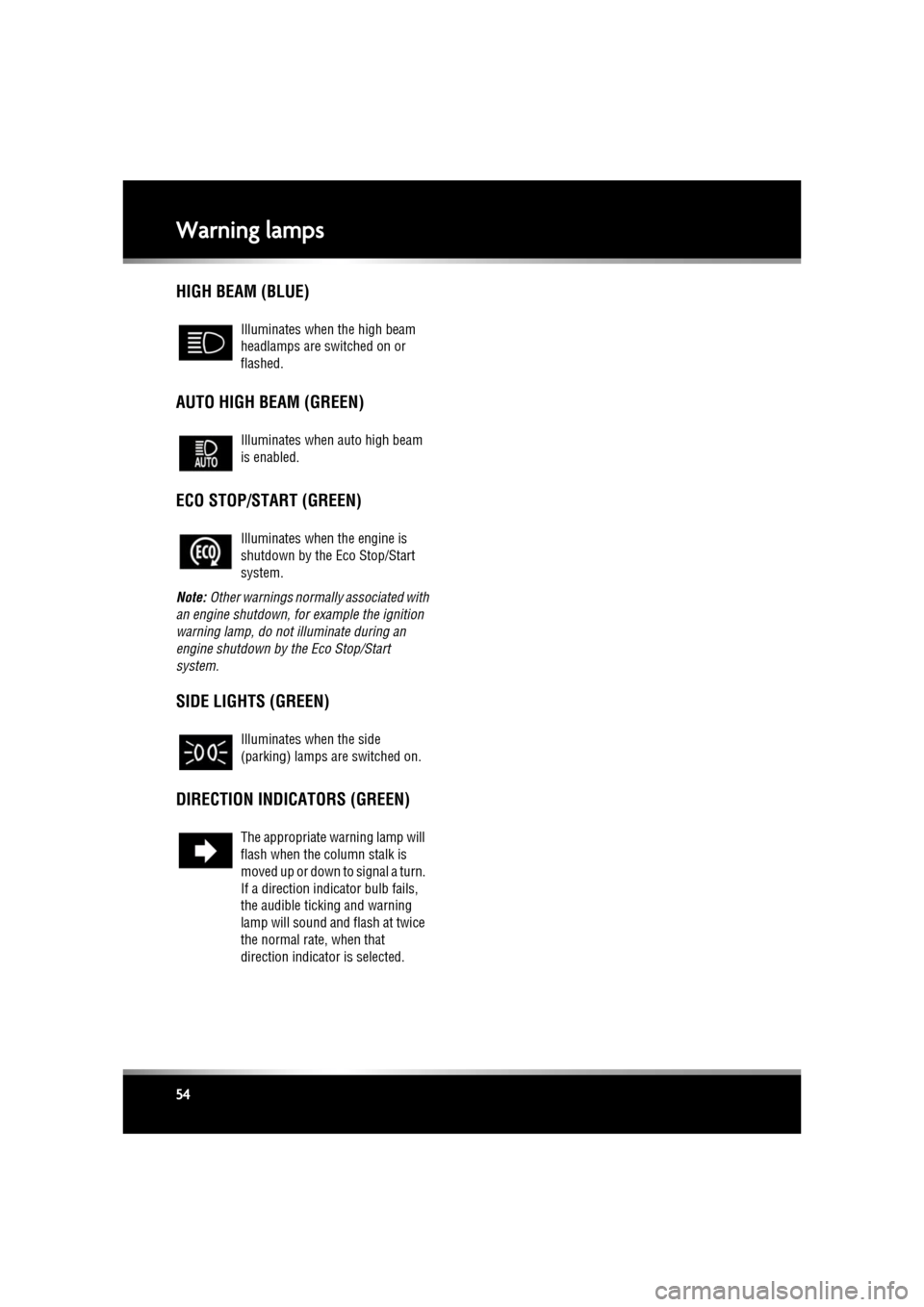
HIGH BEAM (BLUE)
AUTO HIGH BEAM (GREEN)
ECO STOP/START (GREEN)
Note: Other warnings normall y associated with
an engine shutdown, for example the ignition
warning lamp, do not illuminate during an
engine shutdown by the Eco Stop/Start
system.
SIDE LIGHTS (GREEN)
DIRECTION INDICATORS (GREEN)
Illuminates when the high beam
headlamps are switched on or
flashed.
Illuminates when auto high beam
is enabled.
Illuminates when the engine is
shutdown by the Eco Stop/Start
system.
Illuminates when the side
(parking) lamps are switched on.
The appropriate warning lamp will
flash when the column stalk is
moved up or down to signal a turn.
If a direction indi cator bulb fails,
the audible ticking and warning
lamp will sound and flash at twice
the normal rate, when that
direction indicator is selected.
Page 55 of 225

R
(FM8) SEMCON JLR OWNER GUIDE VER 1.00 EURO
LANGUAGE: english-en; MARQUE: jaguar; MODEL: XF
Warning lamps
55
AUDIBLE WARNINGS AND INDICATORS
Hazard or Condition Chime or tone/remedy
External lamps remain on when
the driver’s door is opened. A chime will sound until the lamps are switched off
or driver’s
door is closed (unless th e lighting control is in AUTO position).
Hazard warning indicators on. A ticking will sound until the hazard indicators are switched off.
Direction indicators on. A ticking will s ound until the indicators are switched off.
Memory 1 (or 2) settings sa ved. A short tone as the me mory selection is saved.
Seat belt reminder. A chime will sound if a seat belt is unbuckled whilst the vehicle
is moving. The warning will cease if the occupied seat’s belt is
re-buckled, the ignition is turned off or more than 3 minutes has
elapsed.
Electric parking brake (EPB). If the EPB is a pplied while the vehicle is moving a continuous
chime will sound; release the EPB. If there is a fault with the
system which would prevent the a pplication of the EPB, a brief
sequence of chimes is initiated.
Adaptive Cruise Control (ACC)
driver intervene. Multiple chime. Apply the brakes.
ACC low speed automatic
switch off. A chime will sound to indicate that the ACC system is no longer
operating.
Speed is over 15 km/h (9 mph)
above the set limit speed. A short warning chime. Reduce speed.
G e a r s e l e c t o r i s n o t i n P a r k w i t h
ignition off. A chime will sound. Select Park.
Entry delay warning (European
markets only). Intermittent slow, low pitc
hed chime. Disarm vehicle.
The Jaguar Smart Key cannot
be detected. A chime will sound. The Smart
Key should be docked in the
starter control unit. See 76, IF THE ENGINE FAILS TO START .
The Jaguar Smart Key is to be
removed from the starter
control unit. A chime will sound for 60 seconds
if the Smart Key is in the
starter control unit and the driv er’s door is opened. The remote
handset should be undocked from the starter control unit. See
76, IF THE ENGINE FAILS TO START .
DSC OFF A chime will sound.
Page 59 of 225
R
(FM8) SEMCON JLR OWNER GUIDE VER 1.00 EURO
LANGUAGE: english-en; MARQUE: jaguar; MODEL: XF
Touch screen
59
TURNING OFF THE TOUCH SCREEN
Vehicles without Eco Stop/Start:
1. Press the screen on/off button once to
activate the screensaver (see 58, TOUCH
SCREEN HOME MENU ). If the screensaver
has not been set, a single press will turn off
the touch screen.
2. Press the screen on/off button twice to turn
off the touch screen.
3. To turn on the touch screen, press the
screen on/off button.
Vehicles with Eco Stop/Start:
1. From the Home menu , touch the screen off
soft key to activate the screensaver. If the
screensaver has not been set, touching the
screen off soft key w ill turn off the touch
screen.
2. From the screensaver, touch the screen off
soft key to turn off the touch screen.
3. To turn on the touch screen, touch
anywhere on the screen.
TOUCH SCREEN USE
Always run the engine during prolonged
use of the touch screen.
The buttons on the centre console, below the
touch screen display, are referred to as hard
buttons and should be pressed firmly. The
touch screen buttons are referred to as soft
keys and only require light pressure to
function. Do not use excessive pressure.
TOUCH SCREEN DISPLAY ICONS
Touch screen display icons are as follows (they
may not all be displayed at the same time):
TOUCH SCREEN CARE
Do not use abrasive cleaners on the
touch screen. For approved cleaning
products, contact your Dealer/
Authorised Repairer.
TOUCH SCREEN SETUP
• Select Set-up from the Home menu.
The setup screen cont ains five settings
categories:
• Screen
• System
• Voice
• Trip computer
• Security/vehicle
Audio/Video: Touc h to select the
Audio/Video menu.
Climate: Touch to select the
Climate control menu.
Navigation: Touch to select the
Navigation menu.
Back soft key: Touch to return to
the previous screen displayed.
Shows the current status of the
relevant heated/ventilated seat.
Shows the current status of the
steering wheel heater.
Page 60 of 225

L
(FM8) SEMCON JLR OWNER GUIDE VER 1.00 EURO
LANGUAGE: english-en; MARQUE: jaguar; MODEL: XF
Touch screen
60
SCREEN SETTINGS
Screensaver: Select to change the
screensaver. Touch an option to select.
Screen animations : Select to turn animated
transitions between screens on or off.
Note: While screen animations are on, system
response time will be slower than normal.
Time out home : Sub menu selection screens
can be set to revert to the Home menu after a
pre-determined length of time.
Theme : Changes appearance of the touch
screen soft keys.
SYSTEM SETTINGS
Button feedback : Select to turn the soft key
confirmation tone on or off.
Clock adjust : Select 12 or 24 hour clock. Set
current time. Select Date to change the date, or
to alter the date format. Select Set, to store
new settings.
Note: The clock can also be adjusted from the
touch screen time display.
Home menu shortcuts : Select up to three items
from the displayed list to appear as shortcuts
on the Home menu . Select Clear to deselect
highlighted items.
Language: Select the requir ed language. Select
Male or Female voice. Touch Change to select
alternatives for Voice and text displays. Follow
the on-screen instructions to confirm.
Note: Some languages are not yet available for
both System display text and Voice control. In
this event, it will be necessary to select a
separate language for Voice control.
Volume presets : Adjust volume for the
available sy stems (announcements, phone,
voice etc.).
VOICE SETTINGS
• Command list : View the categories and the
acceptable voice commands.
Select an Information button to view
alternative func tion commands.
• Voicetags : View the categories. Select a
category to manage the voicetags for the
chosen system. See 127, VOICETAGS.
• Operating guide: View brief Voice system
instructions. Select Voice tutorial for more
detailed instructions (cancel via the
displayed pop-up or by pressing and
holding the voice button).
• Preferences : Select to alter the following
settings:
• Voice profile: The voice system can be
trained to have a gr eater recognition of
a particular voice or accent.The default
setting is Standard. To build a voice
profile for either User 1 or User 2, it is
necessary to complete a training
program first.
To complete the training for the first
time, select either User 1 or User 2 and
follow the on-screen and audible
instructions.
• Voice feedback : Select On or Off.
• Feedback volume : Adjust using the +/-
buttons. It is not po ssible to reduce the
volume to zero.
• Voice training: Select to access the voice
system training pr ogram, designed to
enable the system to better recognise the
vocal characteristics of a user.
Select User 1 or User 2 and follow the on
screen and audible instructions. See 127,
VOICE TRAINING.
Page 77 of 225
R
(FM8) SEMCON JLR OWNER GUIDE VER 1.00 EURO
LANGUAGE: english-en; MARQUE: jaguar; MODEL: XF
Starting the engine
77
PETROL ENGINES
If the engine persistently fails to start, press the
START/STOP button (without applying the
brake pedal) to return the ignition to
convenience mode. Slowly depress the
accelerator pedal fully, ho ld it in this position
and press the START/STOP button with the
brake pedal applied, the engine will start to
crank. Release the accelerator pedal when the
engine starts.
If the engine still fails to start, consult your
Dealer/Authorised Repairer.
DIESEL ENGINES
If the engine persistently fails to start, press
and hold the START/STOP button (with the
brake pedal applied). Keep the START/STOP
button and the brake pedal pressed until the
engine starts, then release.
If the engine still fails to start, consult your
Dealer/Authorised Repairer.
SWITCHING OFF THE ENGINE WHILE
MOVING
It is not advisable to switch off the
engine whilst the vehicle is moving.
However, should such a situation
arise, then the following procedure
applies.
• Press and hold the engine START/STOP
button for 2 seconds, or;
• Press the engine START/STOP button
twice within 2 seconds.
In either case, the warning Engine stop button
pressed will be displayed in the message
centre.
ROLLING RE-START
If the engine is switched off whilst the vehicle
is moving, a rolling re-sta rt can be initiated by
selecting neut ral and pressing the engine
START/STOP button.
ECO STOP/START
The Stop/Start system is designed to improve
fuel efficiency and is automatically activated
when the ignition is turned on. If the vehicle is
stopped (e.g. at traffic lights or in traffic), the
engine will turn off (unl ess it is required to
support other vehicle systems). When the
brake is released and a drive gear is selected,
the engine will restart automatically.
To activate an automatic engine stop:
• Stop the vehicle from a speed greater than
4 km/h (2.5 mph) and apply sufficient
brake pressure to ensure the vehicle is
stationary.
• Alternatively, whilst stationary, select P
(Park) or N (Neutral).
To activate an automatic engine restart release
the brake pedal with D (Drive) or S (Sport)
selected.
The warning lamp in the
instrument panel illuminates when
the engine has been switched off
by the Stop/Start system.
Page 79 of 225

R
(FM8) SEMCON JLR OWNER GUIDE VER 1.00 EURO
LANGUAGE: english-en; MARQUE: jaguar; MODEL: XF
Intelligent stop/start
79
Intelligent stop/startECO STOP/START
The Stop/Start system is designed to improve
fuel efficiency and is automatically activated
when the ignition is turned on. If the vehicle is
stopped (e.g. at traffic lights or in traffic), the
engine will turn off ( unless it is required to
support other vehicle systems). When the
brake is released and a drive gear is selected,
the engine will restart automatically.
To activate an automatic engine stop:
• Stop the vehicle from a speed greater than
4 km/h (2.5 mph) and apply sufficient
brake pressure to ensure the vehicle is
stationary.
• Alternatively, whilst stationary, select P
(Park) or N (Neutral).
To activate an automatic engine restart release
the brake pedal with D (Drive) or S (Sport)
selected. The engine will also restart if one of the
following occurs:
•
The accelerator pedal is pressed.
• A shift paddle is used to select a gear.
• R (Reverse) is selected.
• Climate control system demand increases.
• The vehicle’s speed exceeds approximately
1 km/h (0.5 mph).
• Battery charge becomes low.
• Brake vacuum has be en reduced (e.g.
using the brake pedal repeatedly with the
engine off).
• Stop/Start is deactivated.
The following conditions will prevent an
automatic engine stop:
• A shift paddle has been used to select a
gear.
• The external temperature is less than
approximately 0 °C (32 °F).
• The external temperature is more than
approximately 40 °C (104 °F).
• The engine has not reached operating
temperature.
• The driver's door is opened.
• The driver’s seat belt is not fastened.
• The climate control system demand
requires the engine to be running (for
example, in Defrost mode).
• The battery charge is low.
• The bonnet is opened.
• Stop/Start is deactivated.
The warning lamp in the
instrument panel
illuminates when
the engine has been switched off
by the Stop/Start system.
Page 86 of 225

L
(FM8) SEMCON JLR OWNER GUIDE VER 1.00 EURO
LANGUAGE: english-en; MARQUE: jaguar; MODEL: XF
Stability control
86
JAGUARDRIVE CONTROL SCENARIOS
The table below gives examples of the drive
control settings suggested for different driving
scenarios.
Scenario Suggested driver selection
Tyre fitment JaguarDrive ControlDynamic
Stability Control (DSC) Transmission
Wet grass Standard Winter mode Default (On) Drive (D)
Very wet tarmac
Slippery boat launch
ramp
Hill descents while
towing on slippery
surfaces Sport (S) +
Manual
Ice/light snow Standard or All
Season tyres Drive (D)
Snow ploughed
hard-topped roads
(including black ice) All Season tyres
Packed snow roads Winter tyres
Deep fresh snow Snow chains Sport (S)
Normal driving
conditions (e.g. dry
tarmac, town driving,
motorway cruising etc. Standard No driver
selection
required.
Special modes
off Drive (D)
Overtaking on a dry
road Drive (D) or
Sport (S)
Pulling out onto a busy
road in dry conditions
Favourite country lane
(public road) Standard Dynamic mode
Sport (S) or
Sport (S) +
Manual
Private track/race day Standard Trac DSC
(where
conditions
permit)