wheel JAGUAR XF 2010 1.G Owner's Manual
[x] Cancel search | Manufacturer: JAGUAR, Model Year: 2010, Model line: XF, Model: JAGUAR XF 2010 1.GPages: 225, PDF Size: 8 MB
Page 96 of 225
L
(FM8) SEMCON JLR OWNER GUIDE VER 1.00 EURO
LANGUAGE: english-en; MARQUE: jaguar; MODEL: XF
Adaptive cruise control
96
Adaptive cruise controlADAPTIVE CRUISE CONTROL
OVERVIEW
The Adaptive Cruise Control (ACC) system is
designed to aid the driver to maintain a gap
from the vehicle ahead or a set road speed if
there is no slower vehicle ahead. ACC is
available at vehicle sp eeds of 32 to 180 km/h
(20 to 112 mph).
ACC is not a collision warning or
avoidance system. Additionally, ACC
will not react to:
• Stationary or slow moving vehicles below
10 km/h (6 mph).
• Pedestrians or objec ts in the roadway.
• Oncoming vehicles in the same lane.
The ACC system uses a radar sensor, which
projects a beam directly forward of the vehicle
to detect objects ahead.
The radar sensor is mounted in the centre of
the lower bumper, to provide a clear view
forward for the radar beam.
• Only use ACC when conditions are
favourable (i.e. main roads with free
flowing traffic).
• Do not use in poor visibility, specifically
fog, heavy rain, spray or snow.
• Do not use on icy or slippery roads.
• It is the drivers respons ibility to stay alert,
drive safely and be in control of the vehicle
at all times.
• Keep the area in front of the radar sensor
free from dirt, meta l badges or objects,
including vehicle front protectors, which
may prevent the sensor from operating.
• Do not use ACC when entering or leaving a
motorway.
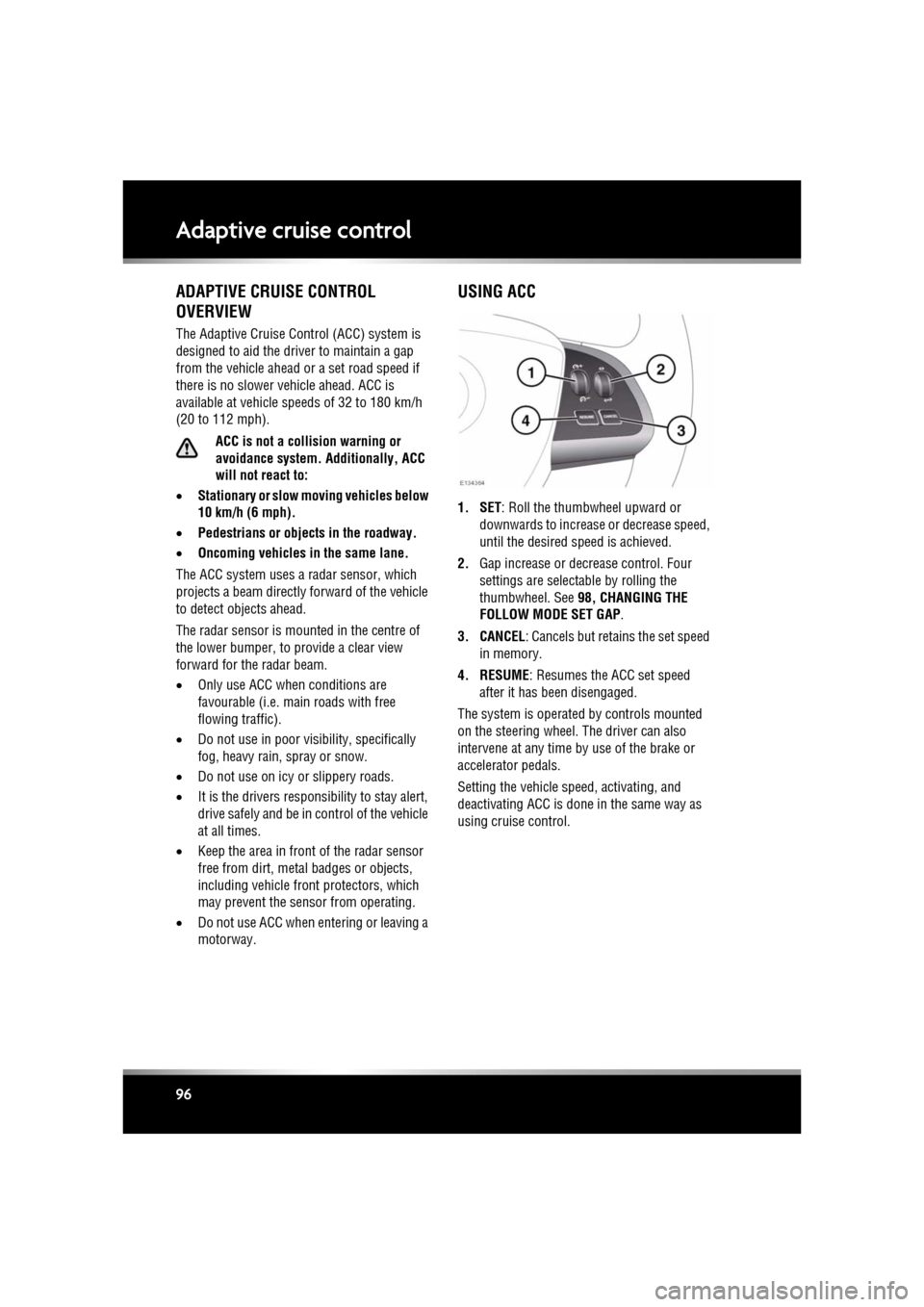
USING ACC
1. SET: Roll the thumbwheel upward or
downwards to increase or decrease speed,
until the desired speed is achieved.
2. Gap increase or decrease control. Four
settings are selectable by rolling the
thumbwheel. See 98, CHANGING THE
FOLLOW MODE SET GAP .
3. CANCEL: Cancels but retains the set speed in memory.
4. RESUME : Resumes the ACC set speed
after it has been disengaged.
The system is operated by controls mounted
on the steering wheel. The driver can also
intervene at any time by use of the brake or
accelerator pedals.
Setting the vehicle speed, activating, and
deactivating ACC is done in the same way as
using cruise control.
Page 101 of 225
R
(FM8) SEMCON JLR OWNER GUIDE VER 1.00 EURO
LANGUAGE: english-en; MARQUE: jaguar; MODEL: XF
Adaptive cruise control
101
The sensitivity of th e warning can only be
adjusted with ACC disengaged. Adjust as
follows:
• Roll the gap adjustment control
downwards to decrease the sensitivity of
the alert.
• Roll the gap adjustment control upwards to
increase the sensitivity of the alert.
Note: The forward alert set gap is retained
when the ignition is switched off.
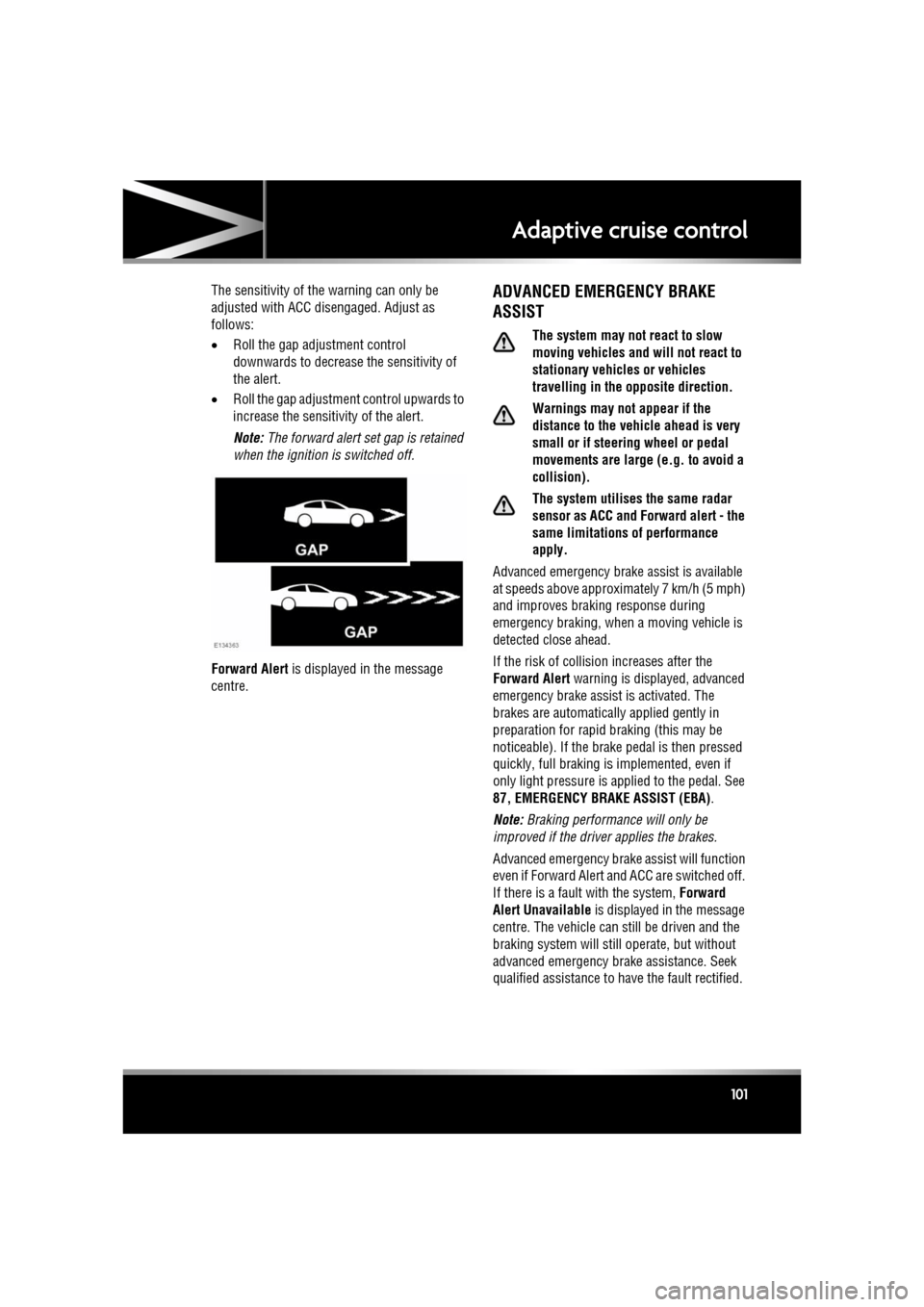
Forward Alert is displayed in the message
centre.ADVANCED EMERGENCY BRAKE
ASSIST
The system may not react to slow
moving vehicles and will not react to
stationary vehicles or vehicles
travelling in the opposite direction.
Warnings may not appear if the
distance to the vehicle ahead is very
small or if steering wheel or pedal
movements are large (e.g. to avoid a
collision).
The system utilises the same radar
sensor as ACC and Forward alert - the
same limitations of performance
apply.
Advanced emergency brake assist is available
at speeds above approximately 7 km/h (5 mph)
and improves brakin g response during
emergency braking, when a moving vehicle is
detected close ahead.
If the risk of collision increases after the
Forward Alert warning is displayed, advanced
emergency brake assist is activated. The
brakes are automatically applied gently in
preparation for rapid braking (this may be
noticeable). If the brake pedal is then pressed
quickly, full braking is implemented, even if
only light pressure is ap plied to the pedal. See
87, EMERGENCY BRAKE ASSIST (EBA) .
Note: Braking performance will only be
improved if the driver applies the brakes.
Advanced emergency brake assist will function
even if Forward Alert and ACC are switched off.
If there is a fault with the system, Forward
Alert Unavailable is displayed in the message
centre. The vehicle can st ill be driven and the
braking system will still operate, but without
advanced emergency brake assistance. Seek
qualified assistance to have the fault rectified.
Page 102 of 225
L
(FM8) SEMCON JLR OWNER GUIDE VER 1.00 EURO
LANGUAGE: english-en; MARQUE: jaguar; MODEL: XF
Adaptive cruise control
102
INTELLIGENT EMERGENCY BRAKING
The system may not react to slow
moving vehicles.
The system will not react to stationary
vehicles, or vehicles that are not
travelling in the same direction as
your vehicle.
Warnings and automatic braking may
not occur if the dist ance to the vehicle
ahead is very small, or if the steering
wheel and pedal movements are large
(to avoid a collis ion for example).
IEB (Intelligent Em ergency Braking)
uses the same radar sensor as
Adaptive Cruise Control and Forward
Alert. The same performance
limitations apply, see 96, ADAPTIVE
CRUISE CONTROL OVERVIEW.
IEB is available at all speeds to automatically
apply the brakes if an unavoidable collision
with a moving vehicle in front is detected.
If there is an imminent risk of collision, an
audible warning is given. If the collision then
becomes unavoidable, the IEB system applies
the brakes at up to maximum pressure. After
IEB has activated, IEB System Was Activated
is displayed in the message centre and the
system is inhibited from further operation until
reset by a Dealer/Authorised Repairer.
IEB will function even if Forward Alert and ACC
are switched off. If the radar sensor is blocked,
by snow or heavy rain for example, or there is
a fault with the system, IEB Not Available is
displayed in the message centre. The vehicle
can still be driven and the braking system will
still operate, but without IEB. If the cause of
this message being disp layed is thought to be
other than a blocked rada r sensor, consult your
Dealer/Authorised Repairer.
Page 110 of 225

L
(FM8) SEMCON JLR OWNER GUIDE VER 1.00 EURO
LANGUAGE: english-en; MARQUE: jaguar; MODEL: XF
Radio
110
8. Frequency input : Select to enter a known
frequency of a station on the current
waveband, using the numeric keypad that
appears. Select OK or wait for 2 seconds to
tune to the entered frequency.
9. Station presets: Ea ch waveband has 6
preset positions.
• Touch and release to tune to the
station stored on that preset.
• Touch and hold to store the current
station on that preset (the radio will
mute while the station is stored then
beep).
• Use the seek buttons on the steering
wheel to change to th e next or previous
preset station.
RADIO DATA SYSTEM (RDS)
Your radio is equipped with RDS which enables
the audio unit to receive additional information
with normal FM radio signals.
Note: Not all FM radio stat ions broadcast RDS
information.
Select Settings (6) to view or alter RDS
settings.
• Traffic/News : Provides local travel or news
information.
• Regionalisation (REG) : Select to prevent
the radio tuning into an alternative local
station that has a stronger signal.
• Alternative Frequency (AF) : Select to
allow the radio to automatically re-tune to
a stronger alternative frequency for the
current station. This is useful on a journey
where the vehicle travels through different
transmitter areas.
Page 112 of 225

L
(FM8) SEMCON JLR OWNER GUIDE VER 1.00 EURO
LANGUAGE: english-en; MARQUE: jaguar; MODEL: XF
DAB radio
112
7. Channel list : Touch to view a list of
available Ensembles an d channels. The list
can be sorted by Ensemble, Channel ,
Subchannel or by Category .
• If an Ensemble is selected from the
list, all available channels from that
ensemble will be displayed.
• Sorting by Subchannel is only
available when the current channel is
broadcasting subchannels.
• If Category is selected, touch the
chosen category to view
corresponding channels, before
making your selection from the list.
Once the desired sele ction has been made,
select the Back soft key to return to the
main DAB menu.
8. Subchannel : If subchannels are broadcast
by the current channel, this soft key will be
active. Select to al low subchannels then
select the required subchannel with the
seek down / up keys.
9. Auto-tune: Select to scan for all available DAB Ensembles/channels. This needs to be
done before using the DAB radio for the
first time.
Auto-tune is also useful when travelling
long distances, so re gional Ensembles can
be tuned.
During Auto-tune, a pop-up shows tuning
progress.
The Auto-tune process will not affect
current presets, but some presets may not
operate if the channel they relate to is no
longer available ( No reception displays). 10.
Station presets: Each DAB band has 6
preset positions.
•Touch and release to tune the radio to
the station stored on that preset.
• Touch and hold to store the current
station on that preset (the radio will
mute while the station is stored).
• Use the seek buttons on the steering
wheel to select the next or previous
preset station.
Note: If you attempt to select a preset
channel that is now una vailable or invalid,
No reception is displayed.
DIGITAL RADIO RECEPTION
DAB radio can significa ntly increase the
number of radio channels /stations available.
The DAB signals are transmitted to most major
cities, towns and motorway networks.
Digital radio is transm itted from regional
transmitters. Some local channels are not
available outside th e range of their
transmitters. If you want to listen to local
channels as you move around the country, use
the auto-tune function (AUTO) to build new
channel lists.
Note: If any auxiliary electrical equipment is
connected to the vehicle, then this may reduce
the DAB radio sound quality.
ENSEMBLES
Unlike AM/FM radio, DAB transmits several
channels/stations on a single frequency. A
group of channels is k nown as an ensemble.
Some channels within the ensemble may have
subchannels offering seve ral listening options.
If reception is lost when the vehicle is in
motion, the vehicle may be out of range of the
ensemble. To build a new list of ensembles,
select Auto-tune .
Page 123 of 225

R
(FM8) SEMCON JLR OWNER GUIDE VER 1.00 EURO
LANGUAGE: english-en; MARQUE: jaguar; MODEL: XF
Television
123
7. TV channel presets:
•Long touch to store the current
channel as a preset. The channel name
will then be displayed on the soft key.
• Short touch to se lect the channel
stored on that preset.
Note: Stored presets contain information
identifying the country where the preset
was stored. When a stored preset is
selected, the TV format of that country will
be adopted. As analogue TV formats differ
in different countries , this may create a
situation where the analogue channel list is
empty.
For information on the use of the audio/video
controls, on the audio unit and steering wheel,
see 104, AUDIO/VIDEO CONTROLS .
ANALOGUE/DIGITAL TELEVISION
The TV offers both analogue and digital TV
reception. You can switch between the two
modes using the touc h screen controls.
• From the TV/My video menu, select TV/My
video again or touch the + button
alongside.
• Select the desired option from DTV 1or
DTV 2 - Digital or ATV - Analogue . There
is no difference in the reception mode
between DTV 1 and DTV 2. The preset list
is the only thing that changes.
Page 124 of 225
L
(FM8) SEMCON JLR OWNER GUIDE VER 1.00 EURO
LANGUAGE: english-en; MARQUE: jaguar; MODEL: XF
Video media player
124
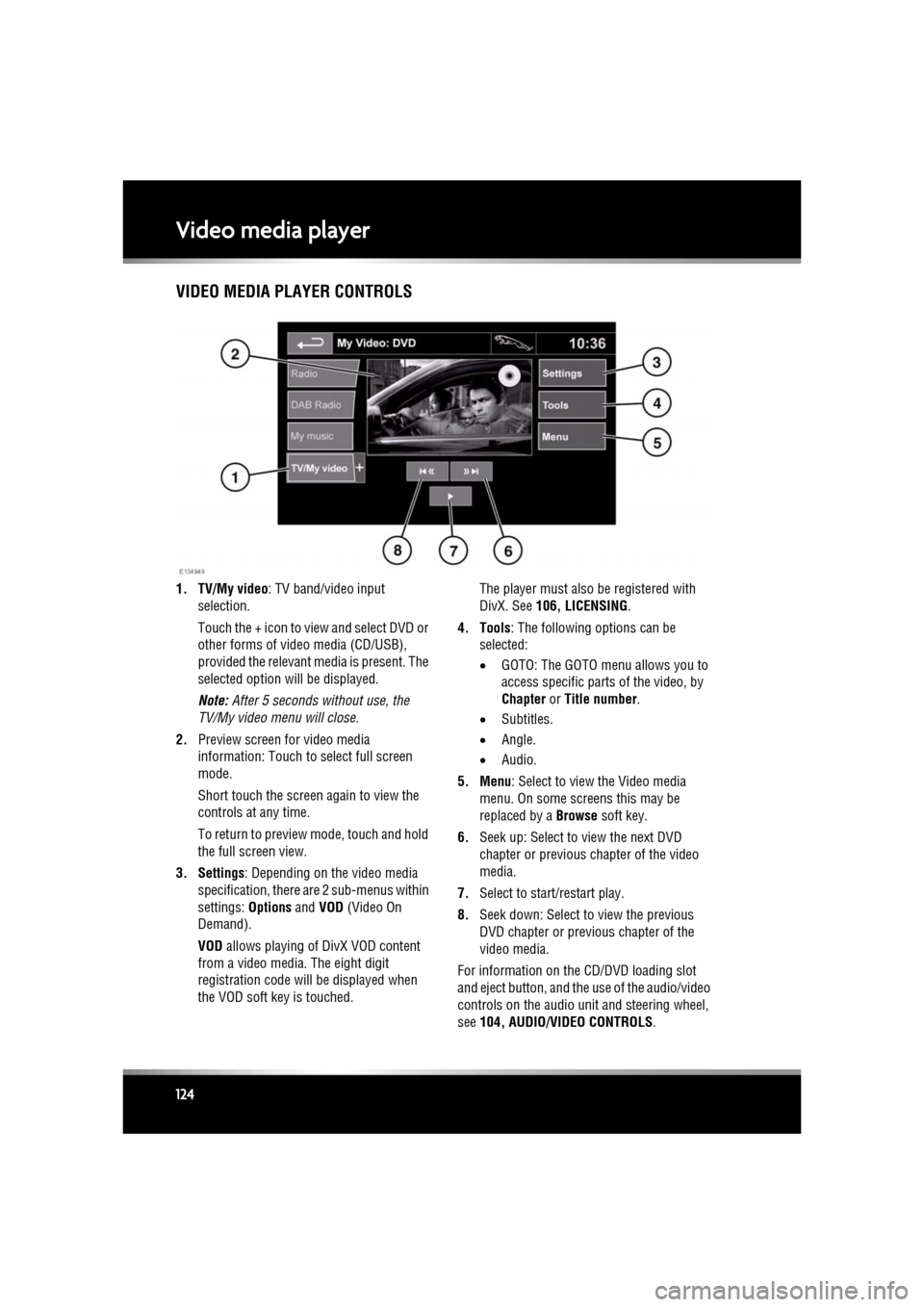
Video media playerVIDEO MEDIA PLAYER CONTROLS
1. TV/My video : TV band/video input
selection.
Touch the + icon to view and select DVD or
other forms of video media (CD/USB),
provided the relevant media is present. The
selected option will be displayed.
Note: After 5 seconds without use, the
TV/My video menu will close.
2. Preview screen for video media
information: Touch to select full screen
mode.
Short touch the screen again to view the
controls at any time.
To return to preview mode, touch and hold
the full screen view.
3. Settings : Depending on the video media
specification, there are 2 sub-menus within
settings: Options and VOD (Video On
Demand).
VOD allows playing of DivX VOD content
from a video media. The eight digit
registration code will be displayed when
the VOD soft key is touched. The player must also be registered with
DivX. See
106, LICENSING .
4. Tools : The following options can be
selected:
• GOTO: The GOTO menu allows you to
access specific part s of the video, by
Chapter or Title number .
• Subtitles.
• Angle.
• Audio.
5. Menu : Select to view the Video media
menu. On some screens this may be
replaced by a Browse soft key.
6. Seek up: Select to view the next DVD
chapter or previous chapter of the video
media.
7. Select to start/restart play.
8. Seek down: Select to view the previous
DVD chapter or previous chapter of the
video media.
For information on the CD/DVD loading slot
and eject button, and the use of the audio/video
controls on the audio unit and steering wheel,
see 104, AUDIO/VIDEO CONTROLS .
Page 126 of 225
L
(FM8) SEMCON JLR OWNER GUIDE VER 1.00 EURO
LANGUAGE: english-en; MARQUE: jaguar; MODEL: XF
Voice control
126
Voice controlUSING VOICE CONTROL
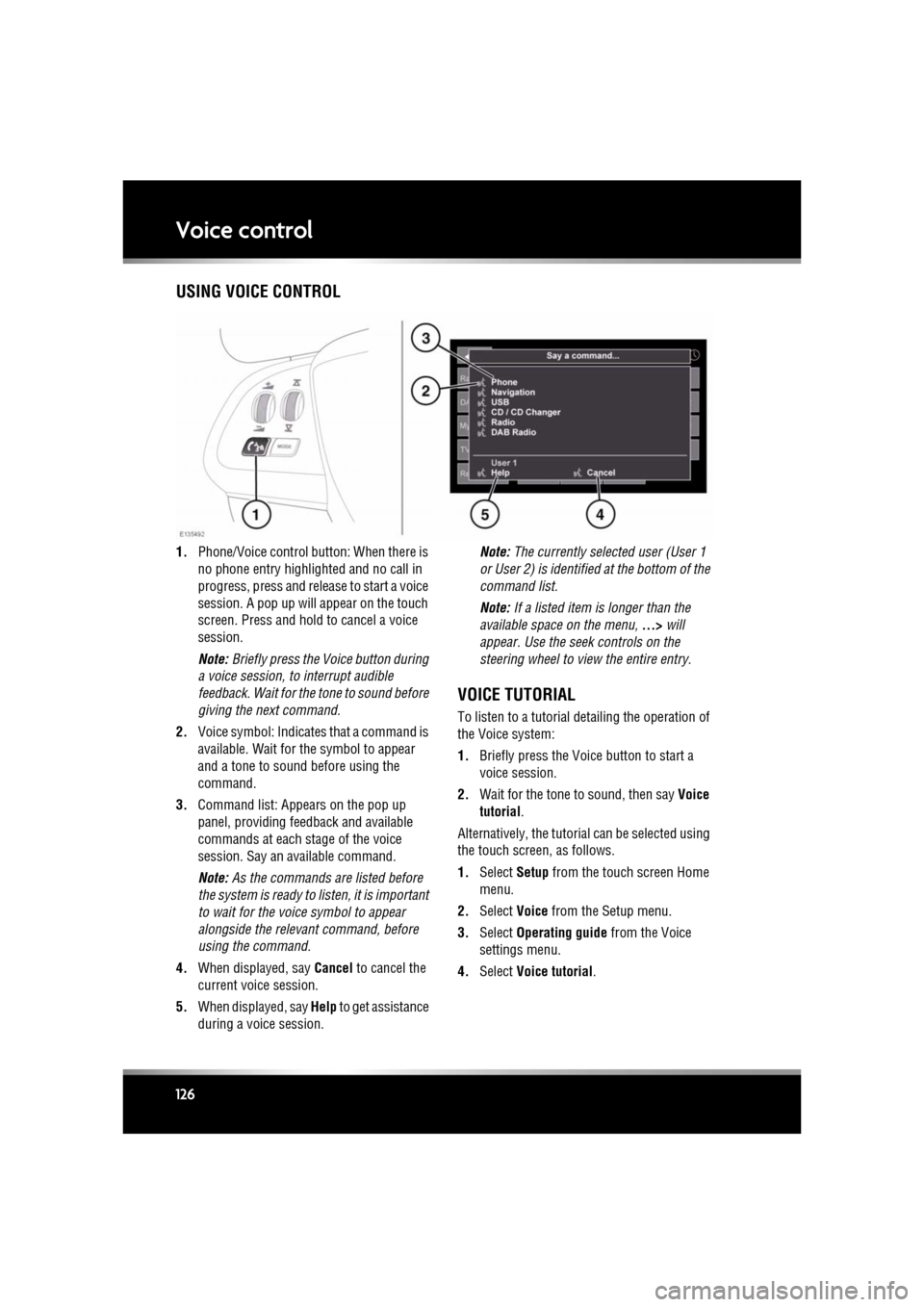
1. Phone/Voice cont rol button: When there is
no phone entry highlighted and no call in
progress, press and release to start a voice
session. A pop up will appear on the touch
screen. Press and hold to cancel a voice
session.
Note: Briefly press the Voice button during
a voice session, to interrupt audible
feedback. Wait for the tone to sound before
giving the next command.
2. Voice symbol: Indicates that a command is
available. Wait for the symbol to appear
and a tone to sound before using the
command.
3. Command list: Appears on the pop up
panel, providing fee dback and available
commands at each stage of the voice
session. Say an available command.
Note: As the commands are listed before
the system is ready to listen, it is important
to wait for the voice symbol to appear
alongside the relevant command, before
using the command.
4. When displayed, say Cancel to cancel the
current voice session.
5. When displayed, say Help to get assistance
during a voice session. Note:
The currently selected user (User 1
or User 2) is identified at the bottom of the
command list.
Note: If a listed item is longer than the
available space on the menu, ...> will
appear. Use the seek controls on the
steering wheel to view the entire entry.
VOICE TUTORIAL
To listen to a tutorial detailing the operation of
the Voice system:
1. Briefly press the Voice button to start a
voice session.
2. Wait for the tone to sound, then say Voice
tutorial .
Alternatively, the tutorial can be selected using
the touch screen, as follows.
1. Select Setup from the touch screen Home
menu.
2. Select Voice from the Setup menu.
3. Select Operating guide from the Voice
settings menu.
4. Select Voice tutorial.
Page 132 of 225
L
(FM8) SEMCON JLR OWNER GUIDE VER 1.00 EURO
LANGUAGE: english-en; MARQUE: jaguar; MODEL: XF
Telephone
132
STEERING WHEEL CONTROLS
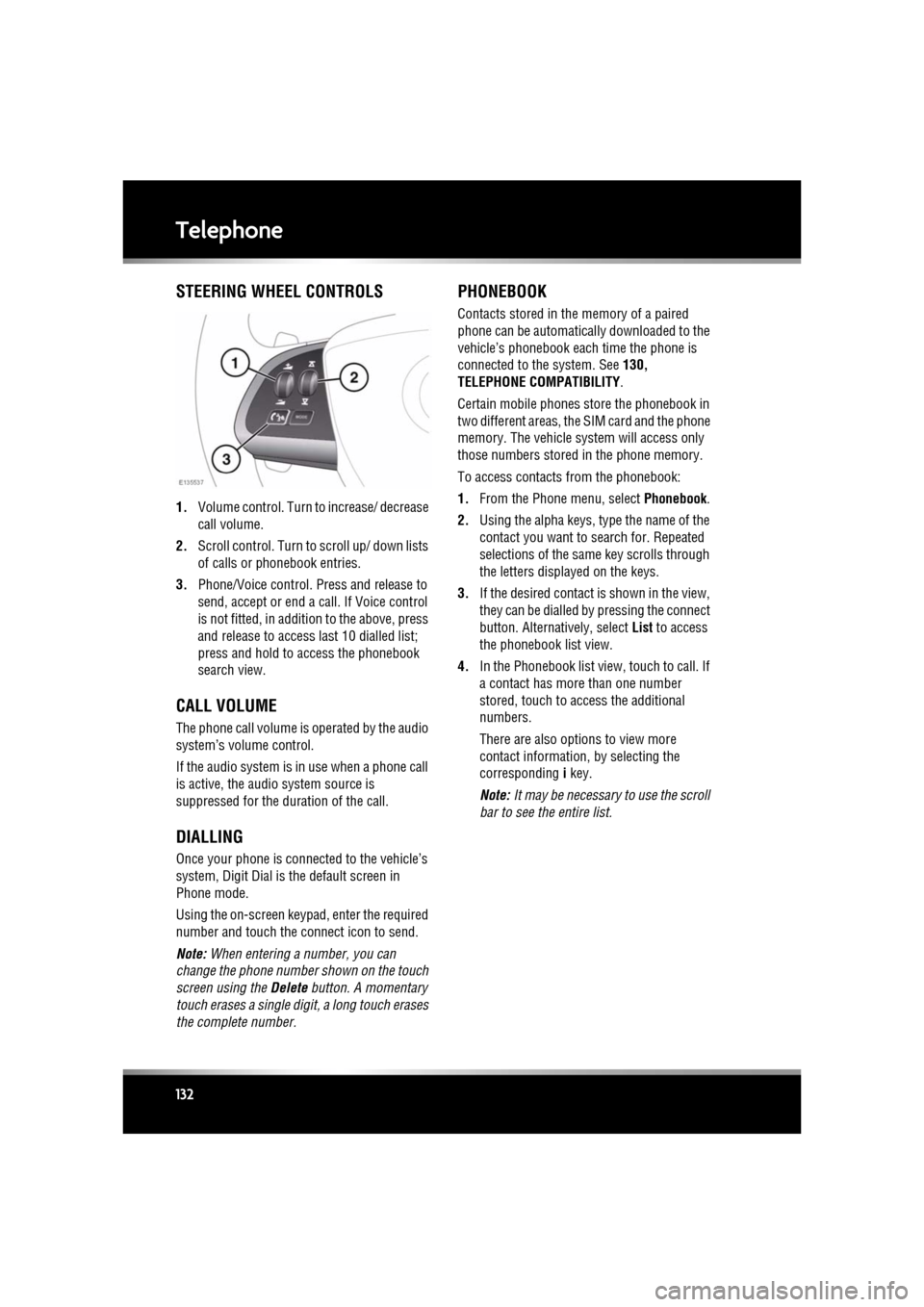
1. Volume control. Turn to increase/ decrease
call volume.
2. Scroll control. Turn to scroll up/ down lists
of calls or phonebook entries.
3. Phone/Voice control. Press and release to
send, accept or end a call. If Voice control
is not fitted, in addition to the above, press
and release to access last 10 dialled list;
press and hold to ac cess the phonebook
search view.
CALL VOLUME
The phone call volume is operated by the audio
system’s volume control.
If the audio system is in use when a phone call
is active, the audio system source is
suppressed for the dur ation of the call.
DIALLING
Once your phone is conne cted to the vehicle’s
system, Digit Dial is the default screen in
Phone mode.
Using the on-screen keypad, enter the required
number and touch the connect icon to send.
Note: When entering a number, you can
change the phone number shown on the touch
screen using the Delete button. A momentary
touch erases a single digi t, a long touch erases
the complete number.
PHONEBOOK
Contacts stored in the memory of a paired
phone can be automatically downloaded to the
vehicle’s phonebook each time the phone is
connected to the system. See 130,
TELEPHONE COMPATIBILITY .
Certain mobile phones store the phonebook in
two different areas, the SIM card and the phone
memory. The vehicle system will access only
those numbers stored in the phone memory.
To access contacts from the phonebook:
1. From the Phone menu, select Phonebook.
2. Using the alpha keys, type the name of the
contact you want to search for. Repeated
selections of the sa me key scrolls through
the letters displayed on the keys.
3. If the desired contact is shown in the view,
they can be dialled by pressing the connect
button. Alternatively, select List to access
the phonebook list view.
4. In the Phonebook list view , touch to call. If
a contact has more than one number
stored, touch to access the additional
numbers.
There are also options to view more
contact information, by selecting the
corresponding i key.
Note: It may be necessary to use the scroll
bar to see the entire list.
Page 158 of 225
L
(FM8) SEMCON JLR OWNER GUIDE VER 1.00 EURO
LANGUAGE: english-en; MARQUE: jaguar; MODEL: XF
Maintenance
158
MaintenanceDISABILITY MODIFICATIONS
Occupants with disabilities which may require
modification of the vehicle, must contact a
Dealer/Authorised Repairer before any
modifications are made.
PARTS AND ACCESSORIES
Do not fit non-approved parts and
accessories or carry out non-approved
alterations or conversions.
Your vehicle is not designed for use
with a roof rack. Do not fit a roof rack to
the vehicle, as damage may result.
AIRBAG SYSTEM
The components that make up the
airbag system are sensitive to
electrical or phys ical interference,
either of which could easily damage
the system and cause inadvertent
operation or a malfunction of the
airbag module.
To prevent malfunction of the airbag system
always consult your Dealer/Authorised
Repairer before fitting any of the following:
• Electronic equipment such as a mobile
phone, two-way radio or in-car
entertainment system.
• Accessories attached to the front of the
vehicle.
• Any modification to the front of the vehicle.
• Any modification involving the removal or
repair of any wiring or component in the
vicinity of any of the airbag system
components, including the steering wheel,
steering column, instrument or facia
panels.
• Any modification to th e fascia panels or
steering wheel.
ANTI-THEFT SYSTEM
No modifications or additions should
be made to the anti- theft system. Such
changes could cause the system to
malfunction.
OWNER MAINTENANCE
Any significant or sudden drop in fluid
levels, or uneven ty re wear, should be
reported to a qualified technician
without delay.
In addition to the routine services and
inspections, a number of simple checks must
be carried out more fr equently. These checks
can be carried out by th e owner and advice is
given on the pages that follow.
DAILY CHECKS
• Operation of lamps, horn, direction
indicators, wipers, washers and warning
indicators.
• Operation of seat belts and brakes.
• Look for fluid deposits underneath the
vehicle that might indicate a leak.
Condensation drips from the air
conditioning are normal.
WEEKLY CHECKS
•Engine oil level.
• Engine coolant level.
• Brake fluid level.
• Power steering fluid level.
• Screen washer fluid level.
• Tyre pressures and condition.
• Operate air conditioning.
Note: The engine oil leve l should be checked
more frequently if the vehicle is driven for
prolonged periods at high speeds.